

Separate browser permission failures from CORS, HTTPS, and application errors
Chrome treats requests to loopback and private-network destinations differently from requests to public HTTPS origins. Since Chrome 142, applicable HTTP requests have used a permission-based Local Network Access model, and Chrome 147 expanded that enforcement to applicable WebSocket connections. In this guide, we build a controlled diagnostic matrix that compares direct local access with a public HTTPS URL backed by a Localtonet HTTP tunnel. The goal is to identify the failing layer without bypassing browser, network, or organizational security controls.
📋 What's in this guide
Chrome Local Network Access rollout and request coverage
Chrome Local Network Access, usually shortened to LNA, prevents a public website from silently using a visitor's browser to reach services on the visitor's computer or local network. Typical protected destinations include localhost, 127.0.0.1, ::1, private IP addresses, link-local addresses, and names that resolve to those address spaces.
The current permission-based rollout has two important milestones. Chrome 142 introduced enforcement for applicable HTTP requests in October 2025. This includes covered fetch() and XMLHttpRequest operations, subresource requests, and subframe navigations. Chrome 147 expanded enforcement to applicable WebSocket connections in April 2026. These milestones and dates were rechecked on August 20, 2026.
| Chrome milestone | Stable rollout | Relevant behavior |
|---|---|---|
| Before Chrome 142 | Before October 2025 | LNA behavior could appear in development, staged, or policy-controlled configurations, but the Chrome 142 permission rollout was not yet the stable baseline. |
| Chrome 142 | October 2025 | Permission-based LNA enforcement covered applicable fetch, XHR, subresource, and subframe requests from public origins to protected local destinations. |
| Chrome 145 | 2026 | Newer Chrome versions distinguish the local-network permission from the loopback-network permission. The older combined permission name may still appear as an alias or in older material. |
| Chrome 147 | April 2026 | LNA enforcement expanded to applicable WebSocket and WebTransport connections involving protected local destinations. |
Chrome behavior can differ by milestone, release channel, profile, operating system, enterprise policy, and Chromium-based browser vendor. Record the complete browser version and whether it is managed. Treat the dates above as rollout landmarks, then test the exact browser environment involved in the reported failure.
What the permission model protects
A common affected pattern is a page at a public origin, such as https://app.example, attempting to call a service on http://localhost, a loopback IP, or a private address such as 192.168.x.x. Chrome classifies the destination using the resolved network address, not merely the text of the hostname. Giving a loopback address a public-looking DNS name does not by itself turn it into a public destination.
The permission decision belongs to the initiating origin. Allowing one public site does not grant every site access to local services. A denial is also persistent for that origin. Chrome does not necessarily show the same prompt again on every request, so repeatedly refreshing a page after choosing Block may continue to produce failures until the permission is restored through the site's settings.
In newer Chrome versions, loopback and local-network access are represented separately. The loopback-network permission applies when a public origin reaches a service on the user's own machine, such as localhost, 127.0.0.1, or ::1. The local-network permission applies when the destination is another protected device or service on the local network. The prompt wording and Site settings label can vary by release, so test the destination class you actually use.
Top-level navigation is not an equivalent LNA test
Opening a local URL directly in the address bar is useful for confirming that Chrome can navigate to the service, but a main-frame navigation is not equivalent to a scripted Local Network Access request. Current LNA enforcement applies to covered fetches, XHR operations, subresources, subframes, WebSockets, and WebTransport. Direct top-level navigation can be outside that enforcement path.
This distinction changes how the diagnostic matrix must be interpreted. A successful address-bar navigation establishes basic browser reachability and may reveal application errors, but it does not prove that JavaScript running at a public origin has permission to contact the destination. It also does not prove that CORS, preflight, WebSocket, or iframe requirements are satisfied.
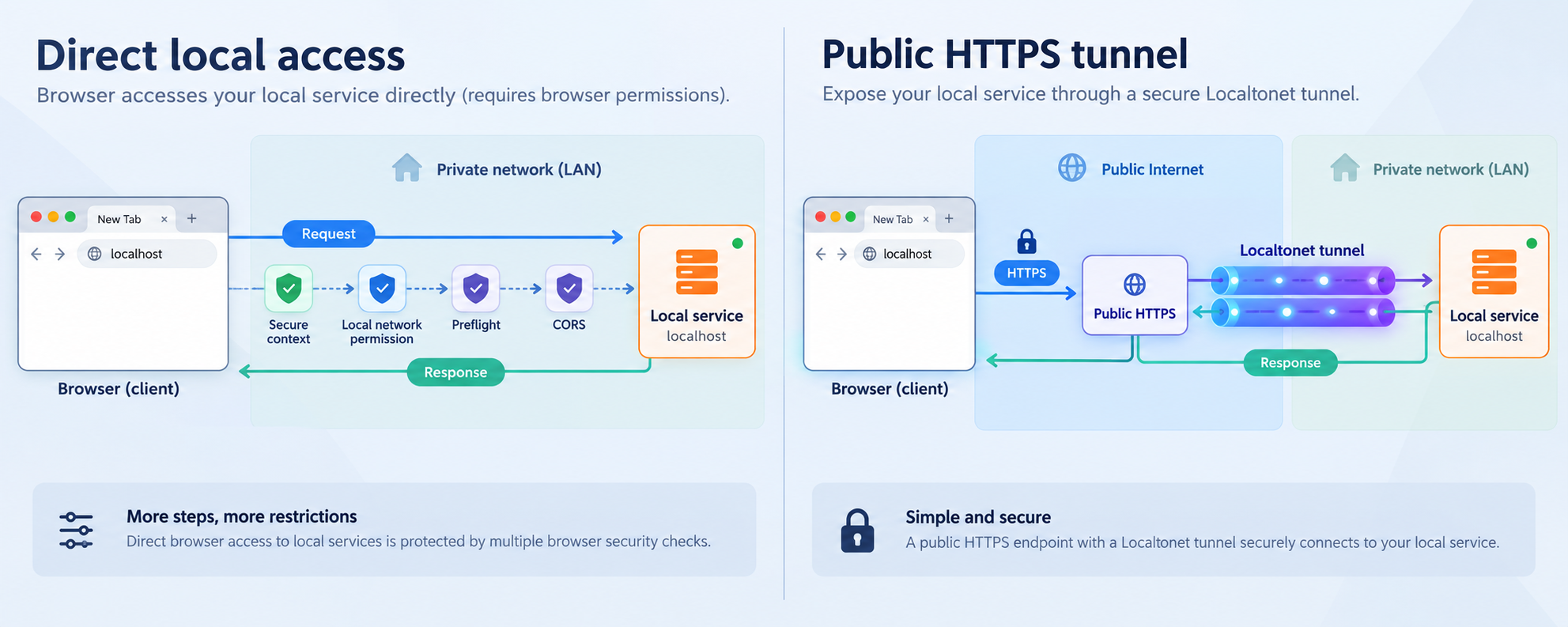
Understand permissions, secure contexts, CORS, and mixed content
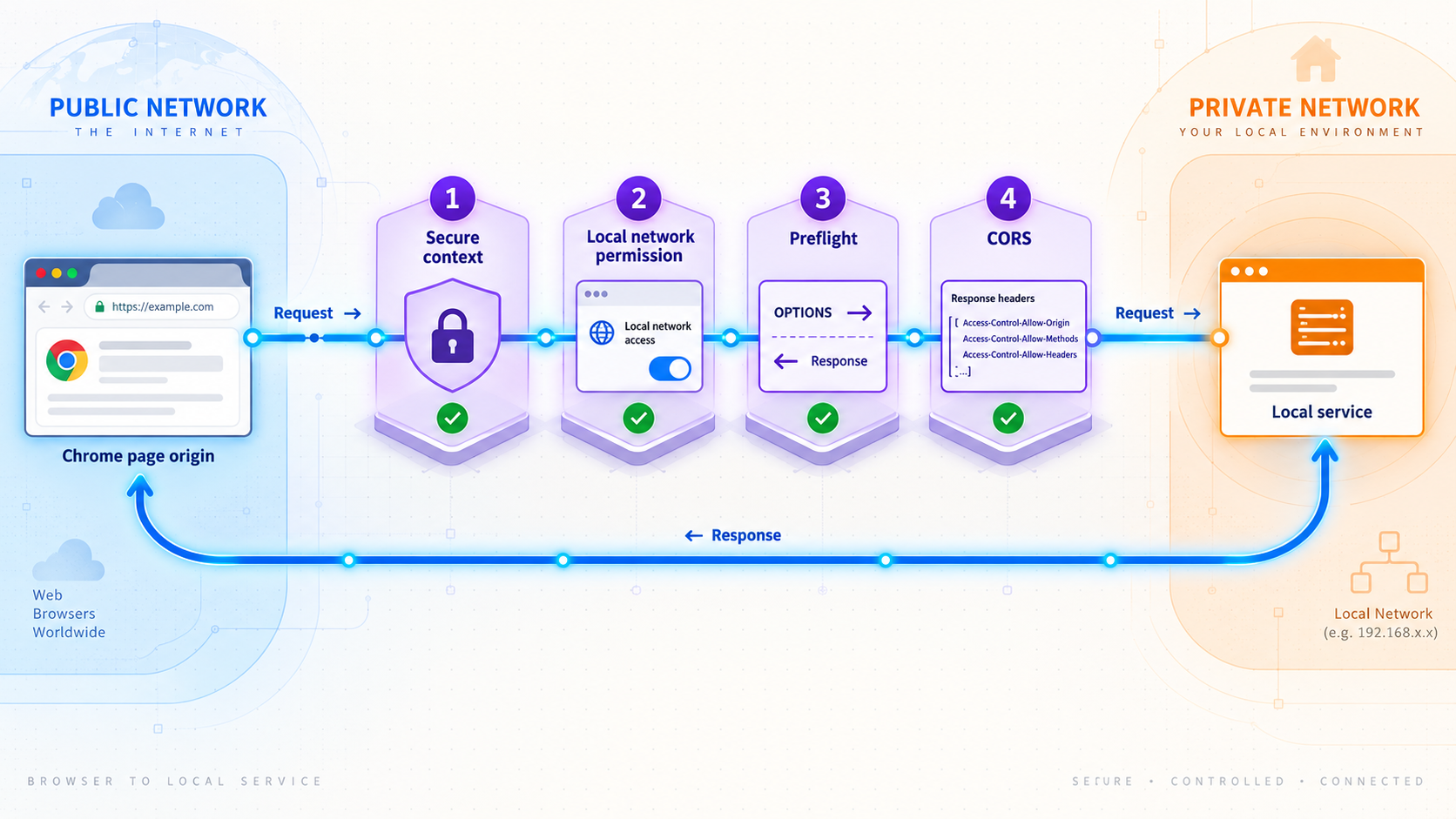
Several browser protections can produce a failed button, a rejected promise, or a generic network error. A useful test separates them. Otherwise, an LNA denial may be mislabeled as CORS, a CORS rejection may be blamed on the tunnel, or ordinary mixed-content blocking may be confused with the permission-based local-access flow.
Origin boundaries
A web origin is generally defined by its scheme, host, and port. Two URLs are cross-origin if one of those components differs. A page loaded from a public HTTPS site and an API reached through a different public HTTPS hostname remain separate origins. Moving an API behind a public HTTPS tunnel does not automatically make it same-origin with the calling page.
The same rule applies during local development. A frontend and API can run on the same computer yet be cross-origin because they use different ports, schemes, or hostnames. Record complete URLs in your test notes rather than classifying them only as local or remote.
Secure contexts and the LNA prompt
The permission-based Local Network Access flow requires a secure initiating context. In the typical public-site scenario, the calling page must be served over HTTPS for Chrome to present a usable local-network permission flow. A public page delivered over plain HTTP should not be expected to receive the same prompt or recovery path.
This secure-context requirement applies to the initiating page. It does not mean that every local service already has to expose a publicly trusted HTTPS certificate. Chrome's current LNA model can recognize an eligible local destination and apply its permission flow, but the exact behavior depends on the destination, request type, browser version, and whether the request qualifies for that flow.
Permission is separate from application authorization
Granting local-network permission allows the browser to attempt an eligible connection. It does not log the user into the application, grant an application role, or override server authorization. The local service must continue to authenticate and authorize callers according to its own security model.
The reverse is also true. Valid application credentials do not grant browser-level local-network permission. A request can fail before the application receives those credentials if Chrome blocks the connection.
CORS and preflight requests
CORS controls whether script at one origin may access a response from another origin. For a cross-origin request, Chrome may send an OPTIONS preflight before the intended request. Whether that preflight is required depends on the method, headers, content type, and credential behavior.
LNA and CORS can both apply to the same operation. Chrome may require permission to reach the protected destination, while the destination must also return an appropriate CORS policy. If the browser never dispatches the intended request because permission was denied, changing CORS headers alone will not fix the failure.
A Localtonet tunnel does not remove CORS. When JavaScript calls the public tunnel URL from another origin, the application still needs a policy appropriate for the initiating origin, methods, headers, and credential mode. The tunnel changes the browser-facing destination and route, not the web application's cross-origin responsibilities.
Mixed content under the permission-based model
Ordinary mixed-content rules still matter when an HTTPS page attempts to load an insecure HTTP resource. However, current Chrome LNA behavior should not be described as a universal sequence in which mixed-content blocking always happens before an LNA check. For requests that Chrome recognizes as eligible local or loopback access, the permission-based flow can affect whether the request is allowed even though the local destination uses HTTP.
This does not make all HTTP requests from HTTPS pages acceptable. A non-local insecure destination, a destination Chrome does not classify as eligible, or a request outside the applicable LNA behavior can still encounter ordinary mixed-content blocking. Use the complete Console message and the actual destination classification rather than assuming that every HTTPS-to-HTTP failure has the same cause.
A Localtonet HTTP tunnel gives the browser a public HTTPS URL backed by the configured local HTTP service. That removes the direct public-origin-to-local-address pattern from the browser-facing request. It does not guarantee success because CORS, authentication, cookies, routing, Content Security Policy, and application behavior may still reject the operation.
Iframe delegation
When the code making the local request runs inside an iframe, permission handling can involve both the embedded origin and the top-level embedding page. The embedding page may need to delegate the applicable capability through Permissions Policy. A relevant iframe can use an allow attribute such as:
<iframe src="https://embedded.example" allow="local-network"></iframe>
For a loopback target in a newer Chrome version, the applicable permission can be loopback-network instead. The grant can be associated with the embedding context, and enterprise policy can alter default inheritance. If a request works in a top-level tab but fails inside an iframe, inspect the frame's origin, the embedding origin, the iframe delegation, and any response-level Permissions Policy.
Managed-browser policy
An organization can allow or block Local Network Access for selected origins through managed-browser policy. Policies such as LocalNetworkAccessAllowedForUrls and LocalNetworkAccessBlockedForUrls can change whether an origin receives access or is denied. Newer policy sets can also provide more granular controls for local destinations, permission inheritance, or address-space classification.
A managed result can therefore differ from the same Chrome milestone on an unmanaged computer. Users may receive no prompt, may have access pre-granted, or may be unable to override a block. Check chrome://policy and Chrome's management status when a result cannot be explained by ordinary site permissions.
| Boundary | Typical evidence | What a public HTTPS tunnel changes |
|---|---|---|
| Local Network Access | Permission prompt, persistent site denial, or a local-network diagnostic in Chrome | The browser addresses a public HTTPS endpoint instead of the protected local target directly |
| Mixed content | An insecure destination is blocked from an HTTPS page outside an applicable allowed flow | The browser-facing Localtonet endpoint uses HTTPS |
| CORS | Console policy error, failed preflight, or missing response headers | The destination origin changes, but cross-origin enforcement remains |
| Application routing | HTTP 404, 405, rejected host, redirect loop, or unexpected response | The public host and scheme visible to the application or framework may differ |
| Connectivity | Connection refusal, timeout, DNS failure, or no application log entry | The browser uses our public relay path while the client must still reach the local service |
| Authentication | HTTP 401 or 403, login redirect, missing cookie, or rejected credential | The new origin can affect cookie scope, redirects, and credential behavior |
Prepare a controlled Chrome test environment
Start with an endpoint whose behavior you understand. A read-only health route returning a short response is better than a complex application page because it removes unrelated variables. The service must listen on a local IP address and port reachable from the device running the Localtonet client.
Prepare the following before running the matrix:
- The exact local service URL, including scheme, hostname or IP address, port, and path.
- A safe endpoint that does not create, update, or delete data.
- Access to application request logs or equivalent diagnostics.
- Chrome DevTools with the Console and Network panels available.
- The complete Chrome version, release channel, profile, and management state.
- A public HTTPS calling page if the real workflow uses JavaScript from a public origin.
- A Localtonet account and a device-specific authentication token.
- A Localtonet client running on the device that can reach the service.
- An available relay server or region selected from the current dashboard.
A public tunnel makes the configured service reachable through its assigned public address while the selected client is connected and the tunnel is running. Begin with a dedicated development instance and a read-only route. Do not expose an unauthenticated administration panel, production database interface, internal control plane, or a service that assumes every caller is trusted.
Hold the request variables constant
Keep the method, body, custom headers, credentials mode, application route, and initiating page the same when you switch between the direct URL and tunnel URL. Change only the destination first. If you change the browser profile, authentication mechanism, endpoint, and request headers together, the result cannot isolate the local-network boundary.
Begin with the simplest request that represents useful behavior. Custom headers and non-simple methods can trigger preflight, which adds another checkpoint. Add those details one at a time after the basic comparison works.
Establish the direct local baseline
Test the application before introducing the tunnel. This confirms that the service is running and gives you a known status code, body, and log entry to compare with the public route.
Verify the service independently
Use the application's health check, a trusted local HTTP client, or a direct browser navigation on the service host. Record the response. If the application does not answer on its own machine, a tunnel will not repair it.
Confirm the listening interface as well as the port. A service bound only to one interface may answer through localhost but not through a LAN address. The Localtonet client must be able to connect to the exact local target configured in the tunnel.
Use top-level navigation only as a reachability check
Open the local URL directly in Chrome. This can establish that the service is running, that Chrome can navigate to it, and that the route does not immediately return an application error. It does not validate the permission path used by fetch, XHR, a subresource, an embedded subframe, WebSocket, or WebTransport.
Main-frame navigation can be outside the current LNA enforcement applied to scripted and embedded request types. The matrix includes navigation as a connectivity control, not as proof that a public page has permission to contact the local destination.
Reproduce the actual scripted request
Load the page that normally initiates the request and reproduce the operation. If the initiating page is a public HTTPS origin and the destination is loopback or a private-network address, this is the comparison that exercises the relevant browser boundary.
A minimal fetch test can look like the following. Replace the placeholder with your safe local endpoint:
const targetUrl = "LOCAL_SERVICE_URL";

fetch(targetUrl, {
  method: "GET"
})
  .then(async response => {
    console.log("Status:", response.status);
    console.log("Body:", await response.text());
  })
  .catch(error => {
    console.error("Request failed:", error);
  });
Watch for a prompt asking whether the site may connect to devices on the local network or to applications on the device. Allow or deny it deliberately and record the choice. Because the decision persists for the initiating origin, changing it midway through a test without recording the change can make later results misleading.
Capture the direct-path evidence
Record whether Chrome displayed a permission prompt, whether the intended request appeared in the Network panel, whether an OPTIONS request occurred, and whether the application logged either request. Copy the complete Console message. If you are testing WebSocket behavior, also record the WebSocket handshake and any connection error.
Install and verify the Localtonet client
Our maintained download page provides clients for Windows 64-bit, 32-bit, ARM, and ARM64; Linux 64-bit, ARM, ARM64, and MUSL builds; macOS 64-bit and ARM64; Docker; and Android. Installable DEB and RPM packages are available for supported x64 and ARM64 Linux environments. Termux is available for ARM64 Android devices, and experimental packages are listed for supported OpenWrt versions and architectures.
Choose the installation path that matches the device that can reach the local service. Do not install the client on a different workstation unless that workstation can connect to the target IP address and port.
Reproducible Debian or Ubuntu x64 installation
The maintained DEB package path requires systemd 247 or newer and OpenSSL 3. Supported examples include Debian 12 and Ubuntu 22.04 or newer. Download the current localtonet-linux-x64.deb package from the Localtonet Getting Started page, then open a terminal in the directory containing it.
Install the downloaded package
Install the current x64 DEB package using the local file in your download directory.
sudo apt install ./localtonet-linux-x64.debSet and validate the device AuthToken
Edit /etc/localtonet/auth-token as root and replace the placeholder with the device-specific token on a single line. Restrict the file and validate the configuration. Never publish the token in screenshots, source control, browser code, or support logs.
sudo chmod 600 /etc/localtonet/auth-token
sudo localtonet --headless --authtoken-file /etc/localtonet/auth-token --check-configEnable and start the Localtonet service
Start the standard tunneling service after the configuration check succeeds, then inspect its journal output.
sudo systemctl enable --now localtonet.service
sudo journalctl -u localtonet.service
This procedure is for the standard Localtonet tunneling client, not VPN Manager. Do not switch to the VPN service for an HTTP tunnel test.
Verify connectivity before creating the tunnel
Check that the service remains active and that its journal does not show an authentication or startup failure. Then confirm in the Localtonet dashboard that the device associated with the token is connected. This establishes that the client has authenticated and established its outbound connection before you create or start the tunnel.
Keep client connectivity separate from local application reachability. A connected Localtonet client may still be unable to reach the target because the application is stopped, bound to a different interface, listening on another port, or blocked between devices. From the client device, verify the exact target URL independently.
The token identifies the client device and must be treated as a credential. Do not place it in JavaScript, an HTML test page, a public repository, or a shared diagnostic capture. The browser needs only the assigned public service URL after the tunnel is running.
Create the public HTTPS comparison path
The Localtonet client establishes an outbound connection to one of our relay servers. An HTTP/s tunnel points to a local IP address and port on, or reachable from, that client device. The browser receives a public HTTPS address, while the local application can continue listening on its existing local HTTP target.
This workflow does not require inbound router port forwarding, firewall changes, VPN setup, or a public IP address. The tunnel is available only while the selected client is connected and the tunnel is running.
Run and verify the Localtonet client
Start the client on the device that can reach the local service. Confirm that the corresponding device is connected before configuring the tunnel.
Select the device AuthToken
Select the device-specific authentication token for the connected client that will run this tunnel.
Select an available relay server
Choose a current server or region from the dashboard. Available values can vary, so use the current product selection rather than copying a server code from an older tutorial.
Create the HTTP/s tunnel
Enter the verified local IP address and port for the service. Select Random Sub Domain, Custom Sub Domain, or Custom Domain as the Process Type according to the options available for your account and test. All three expose the configured content through a public HTTPS address.
Start the tunnel
Creating the configuration does not start it. Press the Start button and confirm that the tunnel is running. Copy the assigned public HTTPS URL without exposing the device token or other credentials.
Verify the public route and close it after testing
Open the assigned HTTPS URL with the same application path and confirm that the expected response reaches the browser and appears in the application logs. Stop the tunnel when the test is finished, and delete it if the configuration is no longer required.
See the maintained Localtonet HTTP/s tunnel workflow for the current product page. The dashboard remains authoritative for available process types, relay choices, and account-specific options.
The application continues listening on its local address and port. Chrome sends the comparison request to the public HTTPS origin, our relay carries it through the client's outbound connection, and the client forwards it to the configured local target. CORS, authentication, routing, authorization, and application validation remain in effect.
Run a matrix that isolates the failing layer
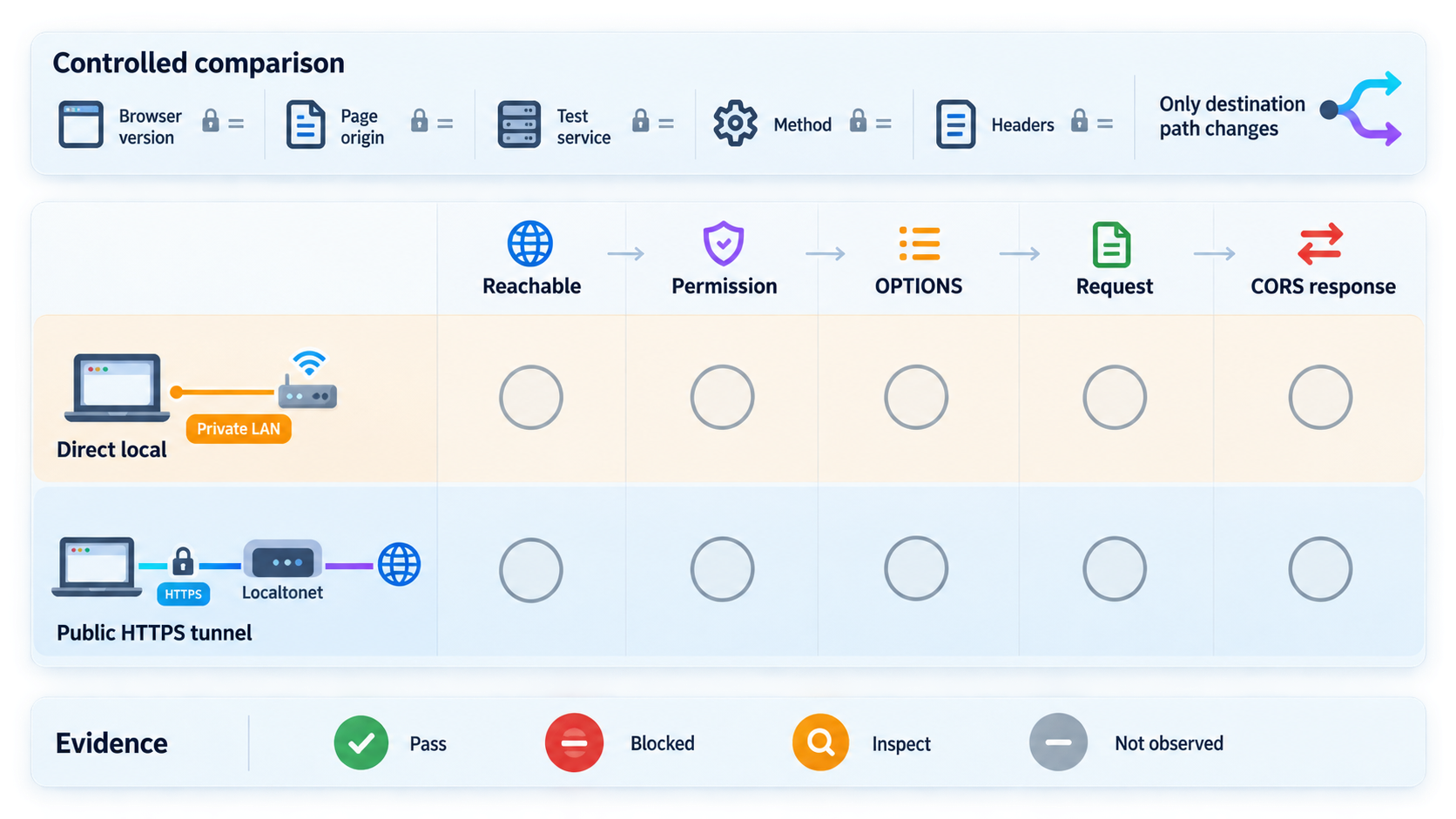
Use a fresh Network recording for each case. Label the initiating origin, target URL, request type, permission state, result, and whether the application logged the request. Do not combine navigation and scripted results into one pass or fail value.
| Test | Browser-facing destination | What it establishes |
|---|---|---|
| Direct top-level navigation | Loopback or private address | Basic navigation and application reachability only. It does not validate scripted LNA permission. |
| Direct fetch or XHR | Loopback or private address | Whether the actual initiating origin encounters LNA permission, secure-context, mixed-content, preflight, or CORS enforcement. |
| Direct subresource or subframe | Loopback or private address | Whether embedded loading is allowed, including relevant iframe delegation and Permissions Policy. |
| Direct WebSocket or WebTransport | Loopback or private address | Whether Chrome 147 or newer applies LNA permission to the connection type used by the application. |
| Tunnel navigation | Localtonet public HTTPS URL | Whether the client, running tunnel, relay path, and local application are connected. |
| Tunnel scripted request | Localtonet public HTTPS URL | Whether the frontend can call the public origin under the application's CORS, authentication, and routing rules. |
| Tunnel request with real headers and method | Localtonet public HTTPS URL | Whether preflight handling and application policy support the production-like request. |
| Repeat in the target managed environment | Both paths | Whether browser version, profile, enterprise policy, or permission state changes the result. |
Interpret common result patterns
If direct navigation fails, verify the application first. The process may not be running, the route may be wrong, or the service may be bound to another interface. Do not interpret this as an LNA result because top-level navigation is only the reachability control.
If direct navigation works but direct fetch or XHR fails, inspect the initiating page's scheme, the origin's local or loopback permission, mixed-content diagnostics, preflight traffic, and CORS response headers. The navigation result does not authorize script at another origin to make or read the request.
If the direct scripted request fails before the application receives anything, and Chrome reports a local-network denial, restore the permission or test with a clean profile. If Chrome sends an OPTIONS request but never sends the intended method, focus on preflight and CORS instead.
If the direct request fails but the tunnel request succeeds, the changed browser-facing destination is relevant. The result is consistent with a direct local-address restriction, insecure-destination issue, or origin-dependent behavior, but it does not prove LNA by itself. Confirm the cause from the Console, Network panel, permission state, and server logs.
If tunnel navigation succeeds but the tunnel scripted request fails, the public path probably reaches the application. Focus on CORS, preflight, credentials, cookies, authorization, trusted-host configuration, and redirects.
Use Chrome DevTools to identify the failing layer
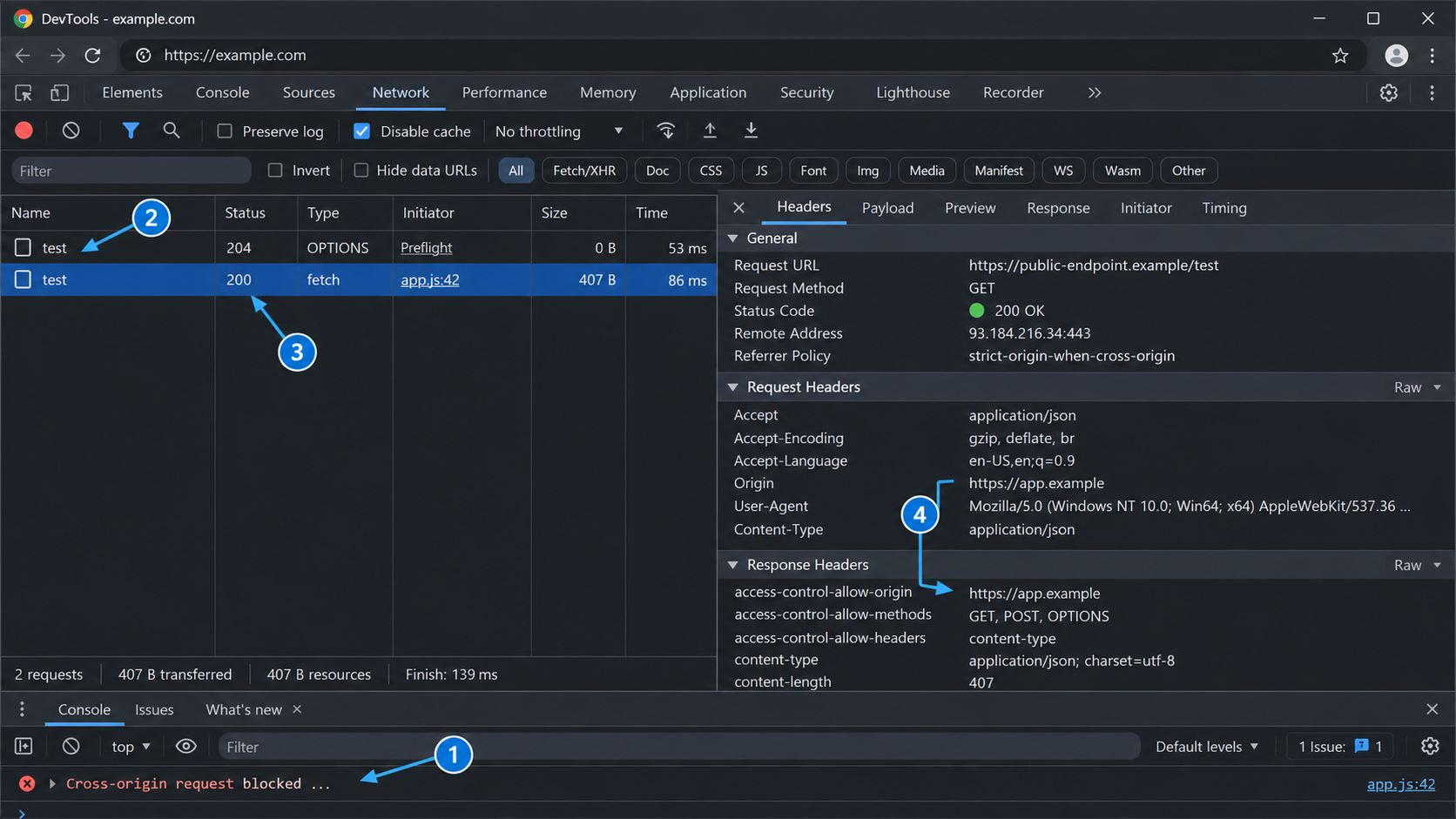
Open DevTools before reproducing the request. Preserve the Network log if redirects or navigation would otherwise clear evidence. Filter by the endpoint path and inspect the intended request, any preceding OPTIONS request, and any WebSocket handshake used by the application.
Start with the Console
Copy the complete browser message. Chrome can report a local-network permission problem, mixed-content block, CORS rejection, Content Security Policy violation, DNS failure, or connection failure. Do not classify every message containing the word “blocked” as CORS.
A user-visible LNA denial may appear as a failed feature in the page, a rejected fetch promise, or a WebSocket connection that never opens. The precise console wording can vary between releases. The important evidence is whether Chrome identifies local or loopback access, whether the origin's permission is blocked, and whether the application saw the request.
Inspect request existence and sequence
Determine whether the intended request appears in the Network panel. If it appears, record the URL, method, status, initiator, request headers, and response headers. If an OPTIONS request appears first, inspect it separately.
If no request appears and the application has no log entry, Chrome may have denied permission before ordinary request dispatch, the request may have been stopped by another browser policy, or the application code may never have initiated it. Add temporary logging immediately before the browser API call and verify the site's permission state.
Distinguish an LNA denial from a CORS failure
- If Chrome reports local-network or loopback permission denial and the intended request never reaches the application, investigate LNA permission and policy first.
- If the application receives an
OPTIONSrequest but the intended request is absent, inspect preflight status and the access-control response headers. - If the intended request reaches the application and returns a response but JavaScript cannot read it, inspect CORS and credential rules.
- If neither path reaches the application and the tunnel also fails, inspect service reachability, client connectivity, tunnel state, and target configuration.
Correlate browser, client, and server evidence
For the Localtonet path, verify three distinct states:
- The selected Localtonet client is connected.
- The HTTP/s tunnel has been started and is running.
- The local application receives the forwarded request.
A saved tunnel configuration can exist without being active. This lifecycle distinction matters when a previously working URL stops responding after the client device disconnects or restarts.
Expose the test service with least privilege
A public HTTPS tunnel is useful for compatibility testing, remote browsers, mobile devices, and approved integrations, but it changes who can potentially reach the service. Treat the assigned address as public even when it is shared only with a small testing group.
If an organization intentionally blocks direct local-network access, involve the responsible administrator. Use a public HTTPS tunnel only when that architecture and exposure have been approved. A tunnel should not be used to bypass authorization, browser policy, network policy, or security review.
Review how the application handles cookies and credentials at the public origin. Cookies scoped to localhost do not automatically apply to the tunnel hostname. Secure, same-site, domain, and path attributes can produce different behavior when the browser-facing origin changes.
Troubleshoot permissions, policy, and tunnel failures
The user denied the local-network prompt
A denial is persistent for the initiating origin. Chrome may not prompt again when the page retries, so refreshes can continue to fail. Open the site's controls from the address bar, enter Site settings, and restore the Local Network or device-access permission. In some newer Chrome interfaces, the permission may be labeled Apps on device. The exact label depends on the browser version and whether the target is local-network or loopback.
After changing the permission, reload the initiating page and repeat the scripted test. Record the new permission state so the result is not confused with the earlier denied run.
No permission prompt appears
Confirm that the initiating page is a secure context, normally public HTTPS. Then check whether the origin already has a stored allow or block decision. Also verify whether the request would actually connect to a protected local destination and whether the request type is covered by the installed Chrome version.
On a managed browser, policy can suppress the normal user choice. Check whether Chrome reports that it is managed, inspect chrome://policy, and ask the administrator whether the initiating origin is covered by an allow or block policy.
The request is inside an iframe
Compare the top-level and embedded origins. Confirm that the embedding page delegates the applicable local-network or loopback-network capability and that a response-level Permissions Policy does not block it. Test the embedded application as a top-level page to determine whether the failure is specific to iframe delegation.
The public HTTPS URL does not load
Confirm that the local application still responds on the configured target. Then confirm that the Localtonet client is connected and the tunnel has been started. Creating the tunnel record is not enough. Verify that the configured local IP address and port match the service tested from the client device.
If the client runs on another machine, verify that machine can reach the target. A service available from your browser workstation may not be reachable from the device running the Localtonet client.
The tunnel opens in a tab, but fetch fails
This result separates public reachability from scripted cross-origin access. Look for a preflight and inspect the Console for CORS, Content Security Policy, authentication, or credential errors. Confirm that the application allows the exact initiating origin rather than only a previous localhost origin.
The intended local request never reaches the application
If Chrome reports a local-network or loopback permission denial, restore the site's permission before changing the server. If there is no relevant browser message, verify that application code reached the browser API call and that DNS resolved to the expected address.
If an OPTIONS request reached the server but the intended request did not, the failure is more likely to be preflight or CORS than an initial LNA denial. Inspect the preflight response instead of adding unrelated permission workarounds.
The preflight succeeds, but the real request fails
Compare the intended request with the preflight declaration. Check route support, request parsing, application authorization, and server logs. Permission and preflight success allow the browser to attempt the operation, but they do not guarantee that application logic accepts it.
The response redirects or returns unexpected HTML
Inspect the redirect chain and final URL. Authentication middleware may redirect an API request to a login page, or the application may generate URLs from assumptions about its original hostname and scheme. Correct the application's documented public-origin or reverse-proxy configuration instead of disabling host validation globally.
The request fails only when credentials are included
Credentialed cross-origin requests have additional CORS and cookie constraints. Verify that the frontend intentionally requests credentials, that the server allows credentials for the exact origin, and that cookie attributes fit the public HTTPS context. Do not use a wildcard origin as a shortcut for credentialed access.
Different Chrome installations produce different results
Compare milestones, channels, profiles, extensions, stored site permissions, iframe context, and enterprise management. Chrome 142 and Chrome 147 introduced different parts of the current rollout, and newer releases distinguish local-network from loopback permission. Reproduce the matrix in the browser environment that matters to the deployment.
The tunnel test works, but the service should remain private
Treat the result as diagnostic evidence, not an automatic architecture decision. You may keep the service private and move communication to a trusted backend, comply with the direct LNA permission model, or adopt an approved private-network design. Localtonet VPN Manager provides private mesh VPN functionality, but a standard HTTP/s tunnel is not a VPN.
Frequently asked questions
When did Chrome begin enforcing permission-based Local Network Access?
Chrome 142 introduced permission-based enforcement for applicable HTTP fetch, XHR, subresource, and subframe requests in October 2025. Chrome 147 expanded enforcement to applicable WebSocket and WebTransport connections in April 2026. These milestones were rechecked on August 20, 2026, but you should still test the exact browser release used by your audience.
Why does the endpoint open directly but fail from JavaScript?
Top-level navigation and a scripted request are different browser operations. Main-frame navigation can be outside the LNA enforcement applied to fetch, XHR, subresources, subframes, WebSockets, and WebTransport. JavaScript can also encounter CORS, preflight, credential, or Content Security Policy rules that direct navigation does not test.
What happens if a user clicks Block on the Chrome prompt?
The denial is remembered for that initiating origin, and Chrome may not prompt again on subsequent requests. Restore access through the site's permission controls or Site settings, then reload the page. Depending on the Chrome version, the setting may appear as Local Network, loopback-related access, or Apps on device.
Are local-network and loopback permissions the same?
Newer Chrome versions distinguish them. Local-network permission applies to protected devices and services on the local network, while loopback-network permission applies to services on the user's own machine, such as localhost, 127.0.0.1, and ::1. Older versions and documentation may use a combined Local Network Access name.
Does a Localtonet HTTP tunnel disable Chrome security controls?
No. The tunnel provides a public HTTPS destination backed by the local service, so Chrome no longer directly addresses the configured loopback or private-network target. Chrome can still enforce CORS, authentication, cookies, Content Security Policy, and other applicable protections.
If the tunnel succeeds, does that prove LNA caused the direct failure?
Not by itself. The tunnel also changes the browser-facing scheme, hostname, origin, DNS path, and network route. Use the Console, Network panel, site permission state, managed policy, and application logs to identify whether the direct failure came from LNA, mixed content, CORS, connectivity, or application behavior.
Does a public HTTPS tunnel eliminate CORS?
No. If the calling page and tunnel URL have different origins, Chrome still applies cross-origin rules. The application must return a policy appropriate for the exact origin, methods, headers, and credential behavior required by the workflow.
Can enterprise policy change the result?
Yes. Administrators can allow or block selected origins and can affect permission inheritance or address-space treatment through managed Chrome policies. A policy-controlled decision may suppress the normal prompt or prevent the user from changing the result. Check Chrome's management status and chrome://policy.
Must I open an inbound router port?
No. The Localtonet client establishes an outbound connection to our relay server. The normal tunneling workflow does not require inbound router port forwarding, firewall changes, VPN setup, or a public IP address.
Is the public endpoint permanent?
The endpoint is available only while the selected client is connected and the tunnel is running. Creating a tunnel does not start it. Start it for the test, then stop or delete it when it is no longer required.
Test your local service through a controlled public HTTPS path
Run the Localtonet client on the device that can reach your development service, create an HTTP/s tunnel, and compare the public HTTPS request with the direct local request. Keep Chrome DevTools, client status, and application logs visible so the test identifies the failing layer instead of hiding the symptom.
Get Started Free →

