

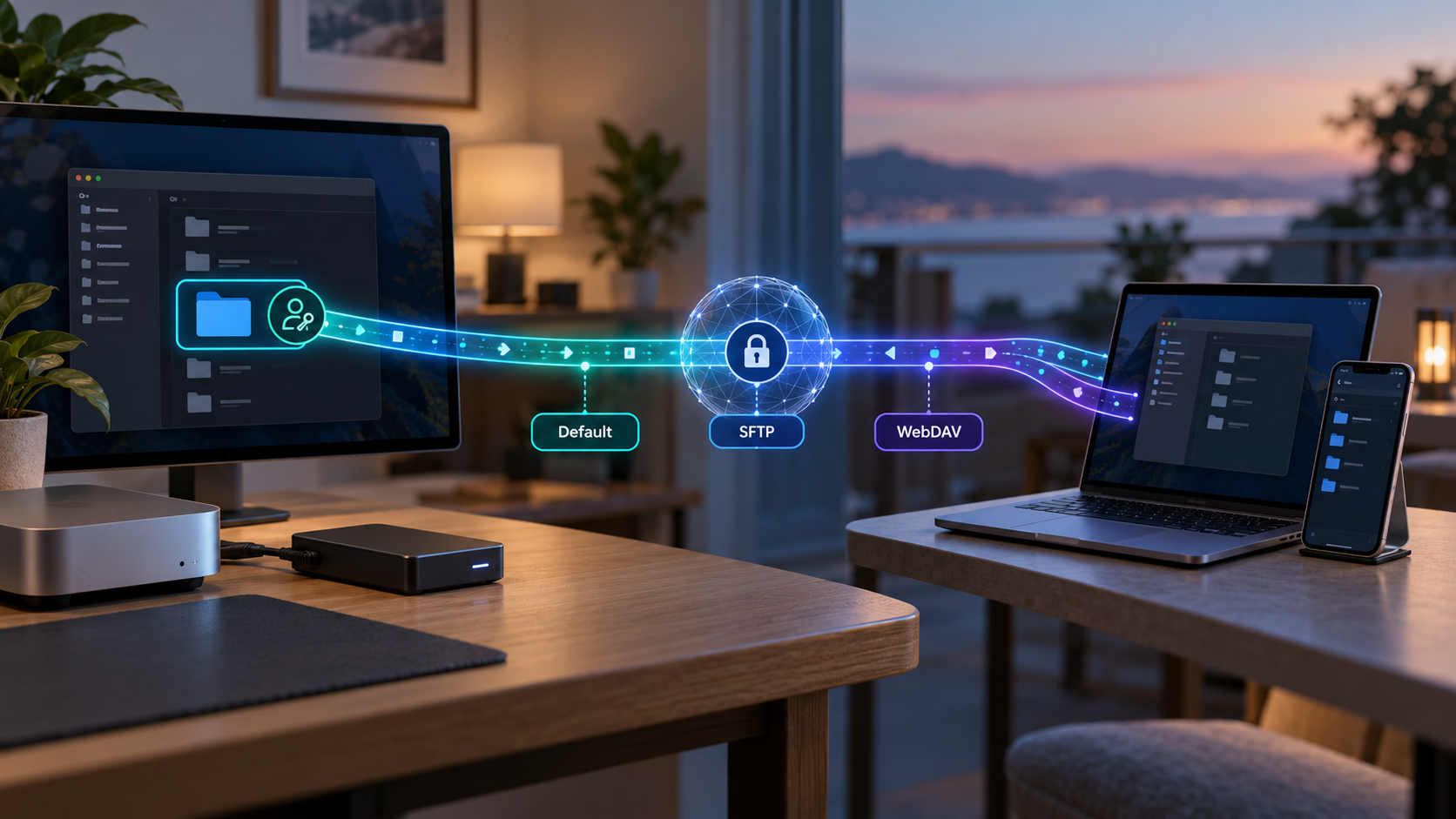
Publish a folder through a browser, SFTP client, or mounted network drive
Localtonet File Server tunnels let you serve a selected folder from a connected host without configuring inbound router port forwarding, changing firewall rules, setting up a VPN, or requiring a public IP address. Choose the Default browser-based file manager, standard SFTP access, or a WebDAV mount according to the recipient and workflow. This guide explains the architecture, verified subtype differences, complete setup sequence, validation, security controls, routine operation, and troubleshooting.
📋 What's in this guide
How a Localtonet File Server tunnel works
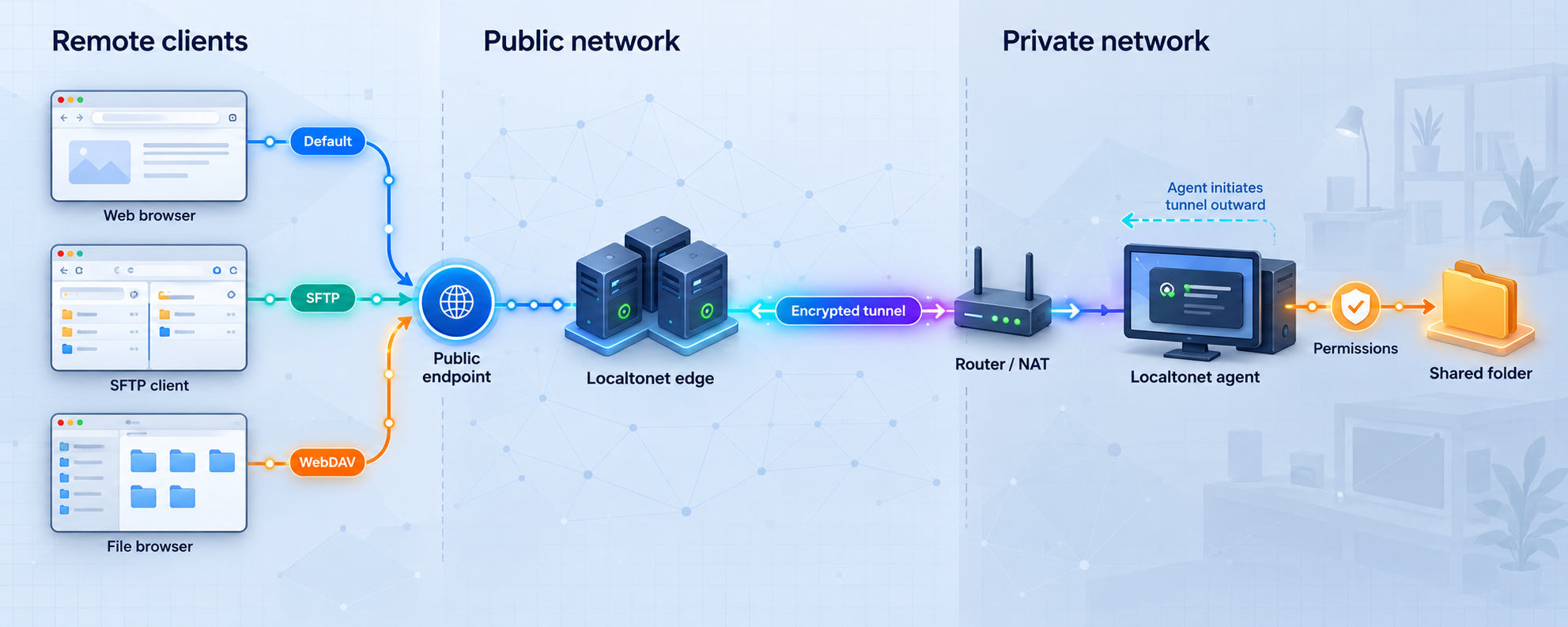
A File Server tunnel publishes a folder path rather than forwarding traffic to a conventional local IP address and port. You choose the folder on a host that runs the Localtonet client, create the appropriate File Server configuration, and start the tunnel. The client establishes an outbound connection to a selected Localtonet relay. A remote user then reaches the folder through the public address or connection endpoint assigned to that tunnel.
This outbound model means the host does not need inbound router port forwarding, a public IP address, or a separately configured VPN. It does not mean that requested file data stays entirely inside the host. When someone browses, downloads, uploads, or otherwise accesses content remotely, the corresponding data traverses the tunnel and Localtonet relay infrastructure.
A File Server tunnel serves the selected folder from its host. This differs from a synchronization service that maintains a separate cloud copy as its normal operating model. Localtonet's Default file manager can optionally run backups to S3 or S3-compatible storage, FTP, or SFTP, but that is a separate feature you configure deliberately.
Creating a tunnel record is also not enough to make it reachable. It must be started. If the host sleeps, loses connectivity, closes the client, or stops the tunnel, the public endpoint will no longer be available. Treat the host, client connection, tunnel state, folder path, and filesystem permissions as separate parts of the service.
Choose between Default, SFTP, and WebDAV
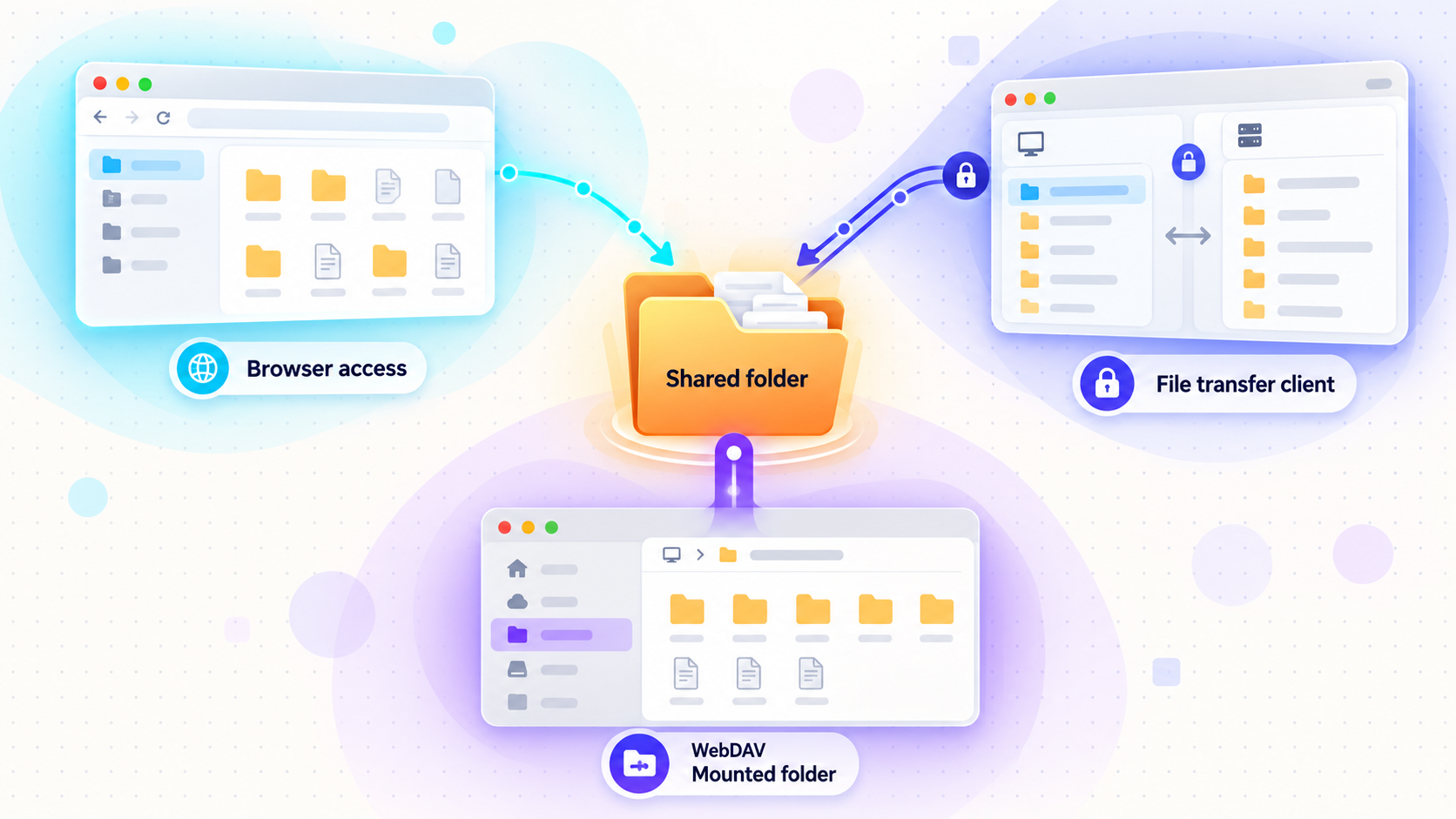
Localtonet provides three File Server subtypes. They expose the same basic resource, a selected host folder, through different access experiences. Choose the subtype based on how recipients need to work rather than assuming that every feature is shared across all three.
| Subtype | Access method | Best fit | Verified behavior |
|---|---|---|---|
| Default | Browser-based file manager | Interactive browsing, sharing, previews, file management, and built-in Default features | The recipient does not need a special client application. The host still must run the Localtonet client. |
| SFTP | Standard SFTP client | FileZilla, WinSCP, rsync, CI/CD, and other compatible transfer or automation workflows | SFTP provides its standard encrypted protocol behavior and broad tool compatibility. |
| WebDAV | Mounted network drive | Working through the operating system's normal file-management interface | The folder can be mounted in File Explorer on Windows or Finder on macOS. |
Default: an interactive browser experience
Choose Default when recipients should work in a browser without installing a specialized file-transfer client. The Default interface supports browsing and extensive file operations, previews, sharing, permissions, search, history, photo workflows, and additional management features described later in this guide.
The phrase “no client required” applies only to the recipient using the Default web interface. The host device that owns or can reach the selected folder must install and run the Localtonet client.
SFTP: standard tools and automation
Choose SFTP when the consuming workflow already uses an SFTP-compatible application, script, deployment process, or transfer tool. Documented examples include FileZilla, WinSCP, and rsync. SFTP is a protocol-specific access method, not the same interface as the Default browser file manager.
Do not assume that Default-only management features automatically appear in an SFTP client. Current evidence does not establish whether Default folder encryption, Immich-compatible backup, Smart Collections, or every other Default feature applies to the SFTP subtype.
WebDAV: a mounted operating-system folder
Choose WebDAV when users should mount the published folder as a network location and work through familiar operating-system file tools. The documented integrations are File Explorer on Windows and Finder on macOS.
As with SFTP, current evidence does not establish that every feature in the Default web manager also applies to WebDAV. Select WebDAV for its verified mounting behavior, and check the current dashboard and documentation before depending on another subtype-specific capability.
We do not make a universal end-to-end-encryption claim for every File Server subtype. The verified statements are narrower: TLS is terminated at the tunnel edge for the Default web manager, SFTP provides its own encrypted protocol behavior, and the Default manager also offers optional per-folder encryption for stored folder content. Evaluate the subtype and client configuration actually being used.
Prerequisites and planning
Before creating the tunnel, identify the host, the exact folder, the intended recipients, and the operations they require. A narrow design is easier to verify and safer to maintain than exposing a broad directory and trying to restrict it after publication.
Install and run the Localtonet client
Install the current Localtonet application for the operating system used by the host, then run it on the device that can access the selected folder. Installation methods and supported packages can change, so use the current instructions linked from the Localtonet File Server documentation rather than copying an old installer command.
Confirm that the device appears connected in Localtonet before configuring the tunnel. If the client is not connected, a correctly created File Server configuration still cannot serve files.
Choose the smallest practical folder
Avoid selecting a filesystem root, an entire user profile, or a broad project tree when recipients need only one export, delivery, media, or collaboration folder. A narrow root reduces accidental exposure and makes path-specific permissions easier to review.
Keep secrets, environment files, private keys, browser profiles, application credentials, database files, and unrelated customer data outside the shared root. Do not use file filters as a substitute for choosing an appropriate root folder.
Confirm filesystem access
The Localtonet process must be able to read the folder for browsing and downloads. Uploads, deletion, moves, renames, folder creation, versioning, or backup-related operations may require corresponding write permissions. Operating-system access controls still apply even when a tunnel permission allows an action.
A Windows path can look like C:\Users\Work. A Linux or macOS path can look like /root or /usr/share. These are syntax examples from the documented workflow, not recommendations to publish those broad directories. Prefer a dedicated, narrowly scoped folder.
Configure and start a File Server tunnel
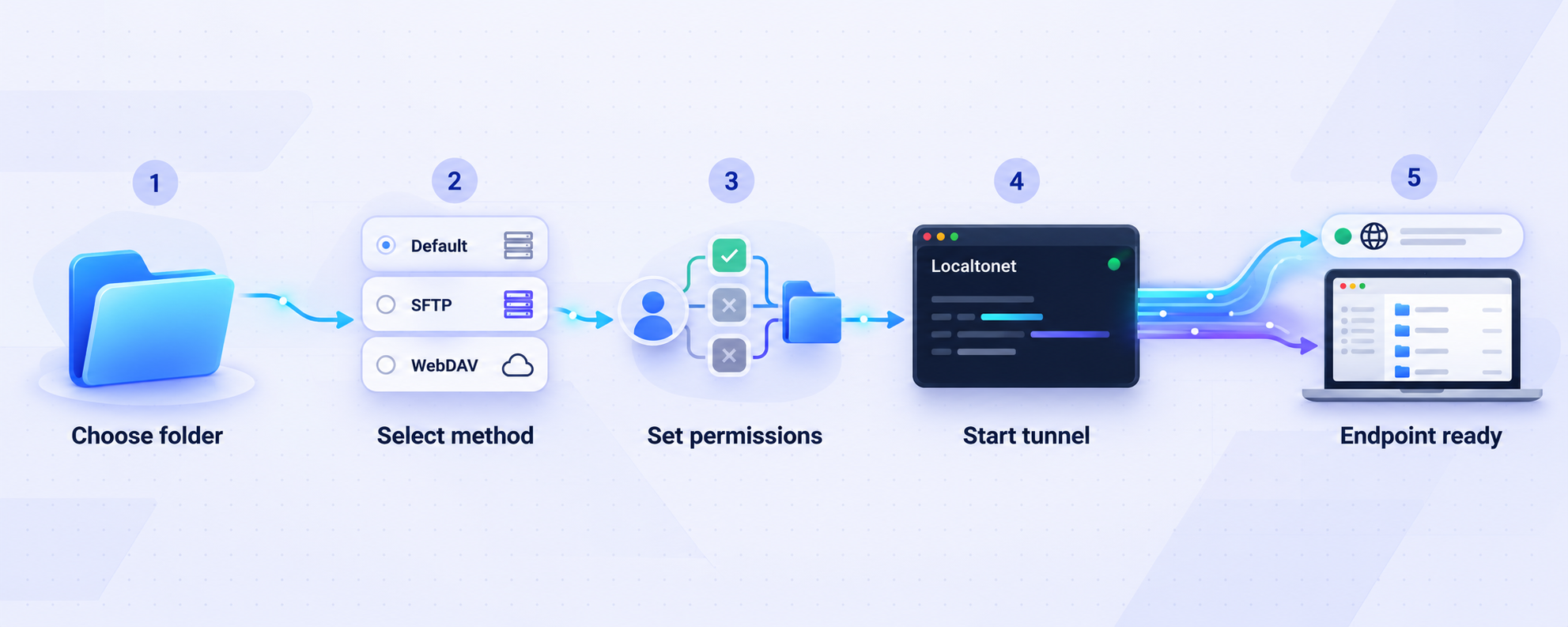
Follow the documented sequence below. The current dashboard determines the exact available relay choices and public-address options, so select only values shown in your account rather than relying on a copied server code or an old screenshot.
Install and run the Localtonet application
Install the current client for the host operating system and launch it on the device that can access the folder. Confirm that the device connects successfully before continuing.
Open the File Server Tunnel page
In the Localtonet dashboard, go to the File Server Tunnel page. Choose the File Server subtype appropriate to the workflow: Default, SFTP, or WebDAV.
Select the Process Type
Select the documented Process Type offered by the current dashboard. For File Server tunnels, supported public-address choices can include Random Sub Domain, Custom Sub Domain, or Custom Domain. They serve the same selected content through a public HTTPS address, but exact availability can vary by current product configuration or plan.
Select the AuthToken and server
Choose the AuthToken belonging to the connected host and select an available relay server from the dashboard. Do not type a guessed token or reuse a token from an unrelated device.
Enter the local folder path
Enter the exact path to the dedicated folder you intend to publish. Check spelling, separators, drive letters, capitalization where relevant, and the host process's filesystem permissions.
Press Start
Start the tunnel. Creating or saving the configuration does not start it automatically. Record the assigned public URL or connection endpoint without exposing the device token or other private identifiers.
A dashboard screenshot can reveal AuthTokens, public hostnames, personal folder paths, tunnel identifiers, or account information. Remove or obscure those values before placing a screenshot in a ticket, tutorial, chat, or public repository.
Verify local and public access
Verification should begin at the host and proceed outward. This separates a folder or permissions problem from a client, relay, public endpoint, or recipient configuration problem.
1. Verify the folder locally
On the host, open the exact configured path. Confirm that the expected files are present and that the account running Localtonet can perform the operations you intend to expose. If uploads are expected, use a disposable test file to confirm that the host can create and remove content in the folder.
2. Verify the client and tunnel lifecycle
Confirm that the selected device is connected and that the specific File Server tunnel shows as running. A tunnel record may exist while stopped. If the wrong AuthToken was selected, the running client on another device will not make this configuration work.
3. Test with the matching access method
| Subtype | Verification method | Minimum successful result |
|---|---|---|
| Default | Open the assigned public HTTPS address in a browser | The expected folder contents appear and permitted operations behave as configured. |
| SFTP | Use a compatible SFTP client with the connection details supplied by the active tunnel | The client establishes an SFTP session and can list or transfer only as intended. |
| WebDAV | Mount the assigned endpoint using supported WebDAV functionality | The folder appears in File Explorer on Windows or Finder on macOS and permitted file actions work. |
4. Test from outside the host's local environment
A local check proves that the folder exists, but it does not prove that the public endpoint works. Test from the same type of remote client the recipient will use. Verify directory listing, a small download, and only the write operations that should be permitted.
5. Test denial behavior
Verification should include operations that must fail. If deletion is disabled, attempt to delete a disposable file and confirm that the request is rejected. If a path-specific rule restricts a subfolder, test both the allowed parent area and the restricted path.
6. Test the availability boundary
During a maintenance window, stop the tunnel and confirm that the public endpoint is no longer available. Start it again and repeat the access test. This confirms that operators understand the difference between a configured tunnel and an active one.
What the Default file manager provides
The Default subtype is more than a basic directory listing. It provides a browser-based file-management environment with file operations, sharing, content tools, safeguards, backup options, and media workflows. The capabilities in this section are documented for the Default web manager. Do not assume they all apply to SFTP or WebDAV unless current documentation explicitly confirms that behavior.
File operations and content tools
Folder encryption
The Default manager can encrypt individual folders using AES-256-CBC with a folder password. The encryption key is derived with PBKDF2 using 100,000 iterations. The key and password are not stored. Instead, the system stores a salt and verification hash in a hidden .fsvault file.
There is no administrator override and no password-recovery mechanism. If the password is lost, the encrypted content cannot be recovered through an administrative reset. After a successful unlock, the unlock token lasts 30 minutes.
Use a strong, unique folder password and store it in an approved password manager. Do not place the password in the folder, a share-link message, source control, or an automation log. Confirm recovery procedures before encrypting irreplaceable content.
Permissions and path-specific overrides
Default permissions are expressed through global action flags: Upload, Download, Delete, Create Folder, Move, and Share. You can then apply overrides to specific paths. When more than one rule could apply, the most specific path wins.
Permission changes apply without restarting the tunnel. This makes it possible to narrow access during an active session, but it also means permission changes should be reviewed carefully because they affect current users immediately.
Do not reduce this model to invented “read, write, delete roles” or assume a specific multi-user role system. Configure the documented action flags and path overrides, then verify both allowed and denied operations.
Public share links
Public share links can be configured with an expiry date, a download limit, and a separate link password. Use all controls appropriate to the sensitivity of the content. A link that remains valid indefinitely or permits unnecessary downloads increases exposure if it is forwarded or logged.
Share only the intended file or folder, set the shortest practical lifetime, use a separate password where appropriate, and communicate that password through a different trusted channel. After the recipient completes the transfer, remove or expire access rather than leaving the link available for convenience.
File-event webhooks
The Default manager can emit file-event webhooks for upload, delete, rename, and move operations. A webhook can include an optional path filter and HMAC signing. Validate HMAC signatures in the receiving application before trusting an event, and keep signing secrets out of repositories and logs.
File-event webhooks are distinct from Localtonet's platform-wide Token/Tunnel webhooks. Platform webhooks report Connected or Disconnected status changes for tokens and tunnels in a selected Token Group. They do not report file uploads, deletions, renames, or moves.
Cloud backup engine
The built-in backup engine can send encrypted credentials and payloads to S3 or S3-compatible storage, FTP, or SFTP. It performs a full scan every 30 minutes and uses a 45-second debounce for file changes. Failed operations use exponential-backoff retry, and snapshot retention is supported.
Enabling backup changes the data-flow model because content is intentionally copied to the configured backup destination. Review that destination's credentials, retention, access policy, capacity, and jurisdiction according to your own requirements.
Photo and media workflows
An Immich-compatible mobile photo backup API supports checksum-based deduplication without requiring Postgres or Redis. A low-memory mode can operate with an asset cache as small as 48 MB, which is intended for constrained hardware such as a Raspberry Pi.
The photo gallery groups items by date, corrects EXIF orientation, and provides lightbox navigation. For video thumbnails, it tries cover art, then an embedded JPEG frame, and then an FFmpeg fallback.
These statements describe documented Default file-manager capabilities. They do not establish that every File Server tunnel type can run on every hardware platform or that the photo features are available through SFTP or WebDAV.
Smart Collections and disk spanning
Smart Collections are saved-query virtual folders that update live. They can filter by extension, path, name, or size without requiring users to reorganize the underlying directory tree.
Disk spanning can combine content across multiple drives and remains transparent on reads. Its failure behavior is designed to be safer than RAID 0. Disk spanning is not a substitute for backup, redundancy planning, filesystem monitoring, or recovery testing.
Built-in safeguards and customization
Default security controls include path-traversal protection, per-IP rate limiting, hidden dotfiles, blocked executable extensions, and an optional allowlist mode for executable extensions. TLS is terminated at the tunnel edge.
Operators can customize the title, favicon, and logo. A shared folder can provide favicon.ico and logo.png, or the values can be configured through the Settings modal. Keep branding files free of secrets and verify that customization does not obscure security notices or folder identity.
For a focused overview of these capabilities, see our Localtonet File Server feature guide and File Server usage guide.
Secure exposure and routine operation
A tunnel removes the need to expose an inbound router port, but it still creates a public access path to data. Security therefore depends on folder scope, host permissions, tunnel configuration, credentials, recipient behavior, client health, and ongoing review.
Apply least privilege
Enable only the operations the workflow needs. A download-only delivery folder does not require upload, delete, move, folder creation, or sharing. A collection folder may need uploads but not downloads of other content. Use path overrides when a subfolder needs stricter controls, and remember that the most specific path rule wins.
Separate public content from private data
Create a dedicated directory for remote access. Move or copy only approved content into it rather than exposing a broad working directory. This reduces the effect of a mistaken permission, an accidentally shared link, or an application-level vulnerability.
Do not publish a development workspace merely because a collaborator needs to download one build. Development folders can contain environment files, source maps, local databases, logs, package credentials, private keys, and generated artifacts with sensitive metadata.
Protect tokens and credentials
A device AuthToken identifies the client device. Never publish it, send it to recipients, embed it in examples, or expose it in a dashboard screenshot. Protect SFTP or WebDAV credentials and any share-link password according to the same principle.
Use strong, unique credentials. Do not reuse a folder-encryption password as a share-link password or service credential. For automation, store secrets in the automation platform's protected secret facility rather than a plaintext configuration file.
Keep the host maintained
Apply operating-system and Localtonet client updates through your normal maintenance process. Review filesystem permissions after account, service, mount, or storage changes. If a folder resides on a removable or network-mounted volume, confirm that it is still mounted at the expected path before starting the tunnel.
Limit public-share exposure
Configure an expiry date and download limit, then add a separate password when the content warrants it. Send endpoint details only to intended recipients. Remove obsolete links instead of assuming that secrecy of the URL alone is sufficient.
Monitor changes
Use file-event webhooks when an external system should respond to uploads, deletions, renames, or moves. Apply a path filter where appropriate and verify HMAC signatures. For tunnel availability monitoring, use the separate platform Token/Tunnel webhook system, which reports Connected and Disconnected status changes.
Stop access when the task ends
Stop a temporary tunnel as soon as the transfer or collaboration session is complete. Delete obsolete tunnel configurations when they will not be reused. Also remove expired share links, unnecessary permissions, stale credentials, webhook destinations, and backup targets.
Development servers can have file-access behavior and vulnerabilities that make public exposure unsafe. If the goal is controlled file access, publish a narrowly scoped folder through the appropriate File Server subtype instead of exposing an unrelated development service or an entire project directory.
Operate the tunnel predictably
Reliable remote file access requires more than a successful first connection. Define who owns the host, who can change tunnel settings, how access requests are approved, and when the tunnel should be stopped.
Before each access window
- Confirm that the host is powered on, connected, and not about to sleep.
- Verify that the intended folder is mounted at the configured path.
- Review global permission flags and path-specific overrides.
- Check public-share expiry dates, download limits, and passwords.
- Confirm that the selected device AuthToken corresponds to the correct host.
- Start the tunnel and perform a small remote read test.
During active use
- Watch available disk capacity when uploads, version history, backups, or photo ingestion are enabled.
- Investigate unexpected file events, repeated failures, or unusual recipient reports.
- Avoid changing the shared root path while users are transferring data.
- Do not restart the host or client during a critical transfer unless necessary.
- Verify the final file size or checksum through your normal workflow when transfer integrity is important.
After the access window
- Confirm that expected files arrived and can be opened.
- Remove temporary test files and unnecessary public shares.
- Stop the tunnel if continuing public availability is not required.
- Delete the tunnel if the configuration has no future purpose.
- Review backup and retention behavior if cloud backup was enabled.
Troubleshoot common File Server failures
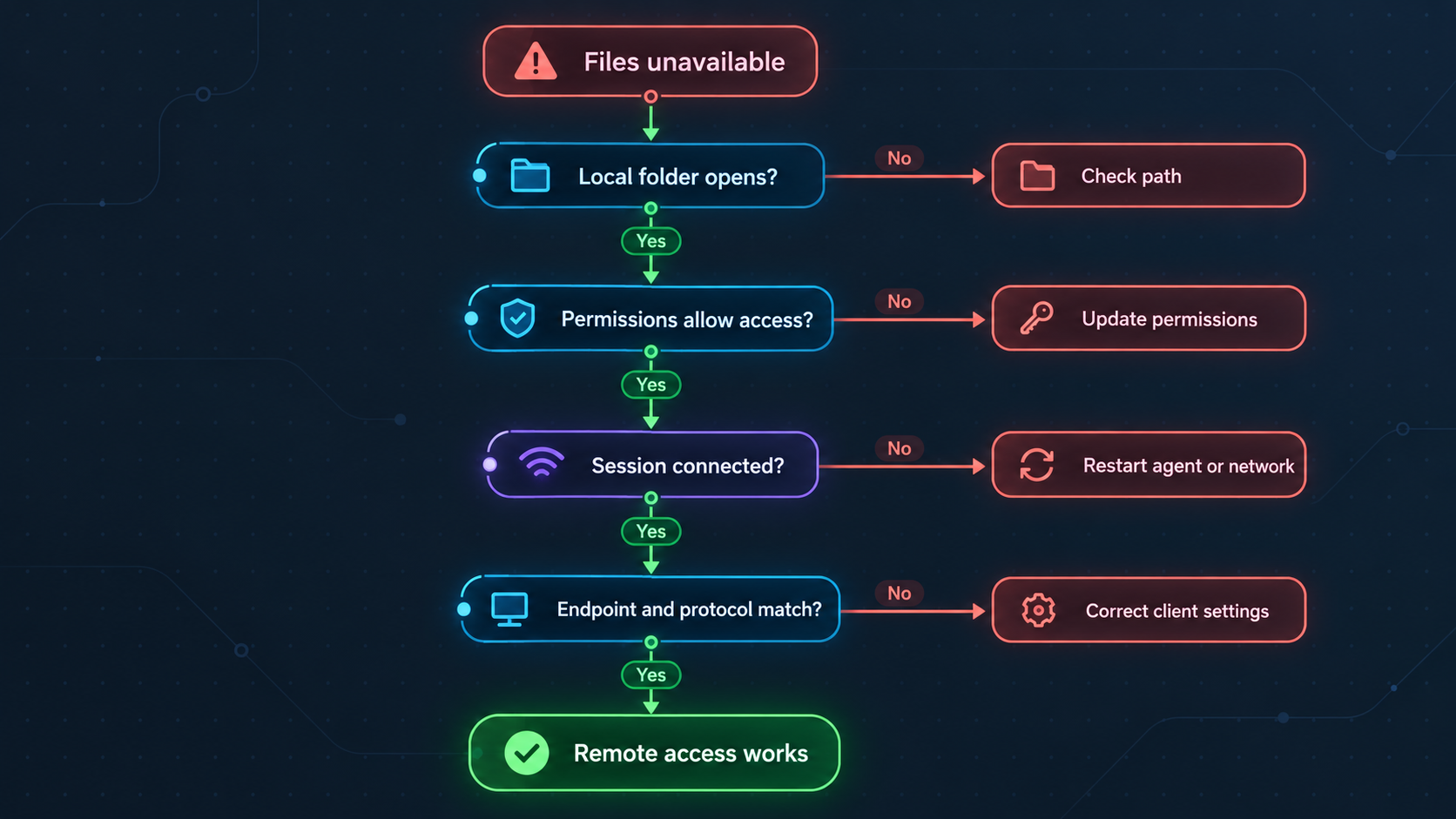
Work from the host outward. Preserve the exact error, identify the failing layer, and change one variable at a time. Recreating a tunnel repeatedly can hide the original problem without fixing it.
| Symptom | Likely checkpoint | What to verify |
|---|---|---|
| The endpoint is unreachable | Client or tunnel lifecycle | Confirm that the selected client is connected and the tunnel has been started. |
| The tunnel exists but does not respond | Stopped configuration | A created tunnel is not automatically active. Press Start and verify its running state. |
| The folder is empty or incorrect | Folder path | Check the exact host path, drive letter, separators, capitalization, mounts, and selected device. |
| Browsing works but uploads fail | Permissions | Check the Upload flag, applicable path override, host filesystem write permission, and free disk space. |
| Deletion or moving fails | Action permission or filesystem rights | Verify Delete or Move permissions and confirm that the host account can modify both source and destination paths. |
| An expected hidden file is absent | Default safeguard | The Default manager hides dotfiles. Do not disable safeguards merely to publish secrets or configuration files. |
| An executable cannot be uploaded | Extension controls | Review blocked executable extensions and any allowlist configuration before permitting the file. |
| A public share stops working | Share controls | Check its expiry date, download limit, password, target path, tunnel state, and host connectivity. |
| SFTP or WebDAV cannot connect | Client configuration | Use the active tunnel's assigned endpoint and the correct client type. Recheck credentials without disclosing them. |
| Files disappear when the host changes | Source availability | Confirm that the original folder, removable drive, network mount, or disk-spanning source remains available. |
Offline or incorrect client
Check whether the device associated with the selected AuthToken is connected. If several devices exist, verify that the token belongs to the host containing the folder. Never solve this by sharing or guessing tokens.
Stopped tunnel
Open the File Server configuration and check its running state. Creation and startup are separate lifecycle events. Start the tunnel, wait for the endpoint to become available, and repeat the smallest possible access test.
Invalid or unavailable folder path
Open the path directly on the host. Confirm that it exists and that any drive or network mount is available. A path copied from another operating system, user account, container, or machine may be syntactically valid but nonexistent on the selected host.
Insufficient filesystem permissions
Separate tunnel permissions from operating-system permissions. Enabling Upload in the Default manager cannot grant write access that the host process lacks. Likewise, a path override can intentionally reject an operation even when the filesystem itself would allow it.
Unexpected permission behavior
Review both the global flags and every relevant path override. The most specific path wins. If a parent folder allows downloads but a child path denies them, the child rule controls that child path. Test with disposable content after each change.
Unreachable or missing files
Verify that the content is inside the configured root and not dependent on an unavailable mount. Check whether hidden-dotfile rules, blocked executable extensions, or other safeguards explain the result. Avoid broadening the root folder simply to make one missing file visible.
Incorrect SFTP or WebDAV configuration
Confirm that the recipient is using the client type matching the configured subtype. Enter the current endpoint and credentials exactly as supplied by the active tunnel. Do not reuse settings from a previous tunnel unless the current dashboard confirms they are still valid.
Transfers are interrupted
Check whether the host slept, changed networks, lost internet connectivity, stopped the Localtonet client, or lost access to the storage device. Verify the resulting file before resuming business use. For large operational workflows, use client-side retry and integrity checks appropriate to the chosen protocol.
Backup does not run as expected
Confirm the configured S3 or S3-compatible, FTP, or SFTP destination and its credentials. Remember that a full scan runs every 30 minutes and file changes use a 45-second debounce. Retry behavior uses exponential backoff, so an immediate repeated transfer is not guaranteed after a failure.
Frequently asked questions
Does a File Server tunnel upload my entire folder to Localtonet storage?
Publishing the folder does not inherently copy the entire directory into managed cloud storage. The selected host folder remains the source served through the tunnel. Requested file data traverses the relay during remote access. If you enable the Default manager's backup engine, content is intentionally copied to the configured S3, S3-compatible, FTP, or SFTP destination.
Does the host need the Localtonet client?
Yes. The host device that owns or can access the folder must install and run the Localtonet client. With the Default subtype, recipients can use a normal web browser without installing a specialized file-transfer client.
Is creating a File Server tunnel enough to make it available?
No. Creating the configuration and starting it are separate actions. Press Start after completing the setup. The endpoint remains available only while the selected client is connected and the tunnel is running.
Which subtype should I choose?
Choose Default for a browser-based file manager and its documented management features. Choose SFTP for standard SFTP clients, automation, CI/CD, or tools such as FileZilla, WinSCP, and rsync. Choose WebDAV when users need to mount the folder in File Explorer on Windows or Finder on macOS.
Are all File Server subtypes end-to-end encrypted?
We do not make that universal claim. Verified behavior includes TLS termination at the tunnel edge for the Default web manager and SFTP's encrypted protocol behavior. The Default manager also offers optional AES-256-CBC per-folder encryption. Evaluate the actual subtype and configuration instead of assuming identical encryption properties.
Can an administrator recover a lost encrypted-folder password?
No. The Default manager does not store the key or password and provides no administrator override or password recovery. It stores a salt and verification hash in a hidden .fsvault file. Keep the password in an approved password manager before relying on folder encryption.
How do Default permissions work?
The documented global flags are Upload, Download, Delete, Create Folder, Move, and Share. You can add path-specific overrides, and the most specific matching path wins. Changes apply without restarting the tunnel.
Do Default features also apply to SFTP and WebDAV?
Not necessarily. Current evidence does not establish that folder encryption, Immich-compatible backup, Smart Collections, or every other Default web-manager feature applies to SFTP or WebDAV. Use each subtype for its documented access method and verify any additional requirement against the current dashboard and documentation.
Can I access the folder without a public IP or router port forwarding?
Yes. The Localtonet client establishes an outbound connection to a relay, so a public IP address and inbound router port forwarding are not required. The host still needs working internet access, a connected client, and a running tunnel.
Publish the right folder with the right access method
Install the Localtonet client on the host, choose Default, SFTP, or WebDAV, scope permissions carefully, start the tunnel, and verify both allowed and denied operations before sharing the endpoint.
Get Started Free →

