

Build a controlled maintenance path to remote IoT gateways without opening inbound ports
Secure over-the-air maintenance requires more than a public endpoint. A dependable design separates firmware signing, artifact delivery, rollout orchestration, device health, rollback, and audit records from the network path used to reach devices. This guide explains how outbound Localtonet tunnels can connect an existing OTA system or authorized operator to IoT gateways behind NAT or CGNAT. It also covers HTTP and TCP configuration, client lifecycle, staged deployment, least privilege, verification, incident response, and safe tunnel shutdown.
📋 What's in this guide
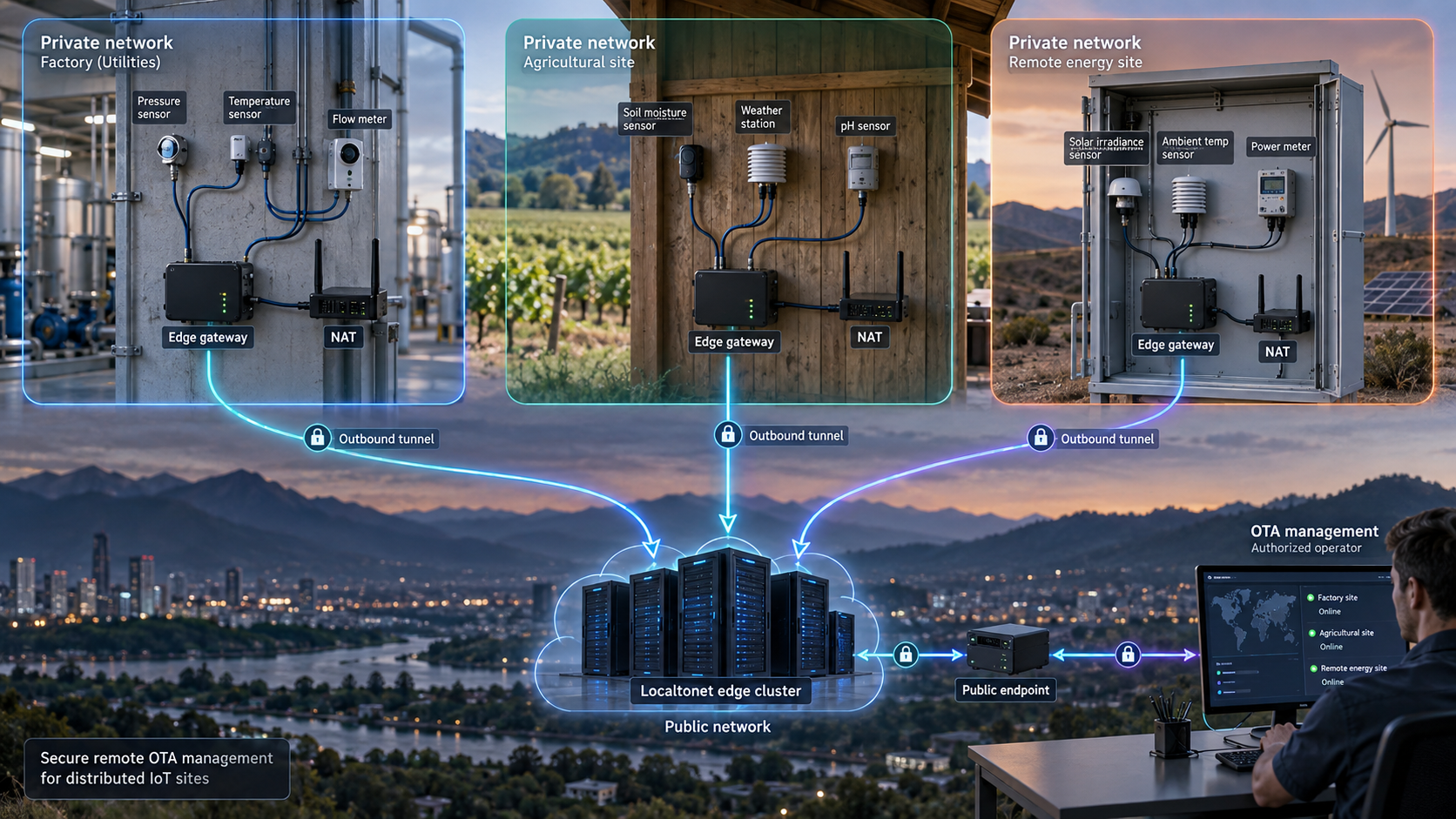
Start with the right OTA architecture
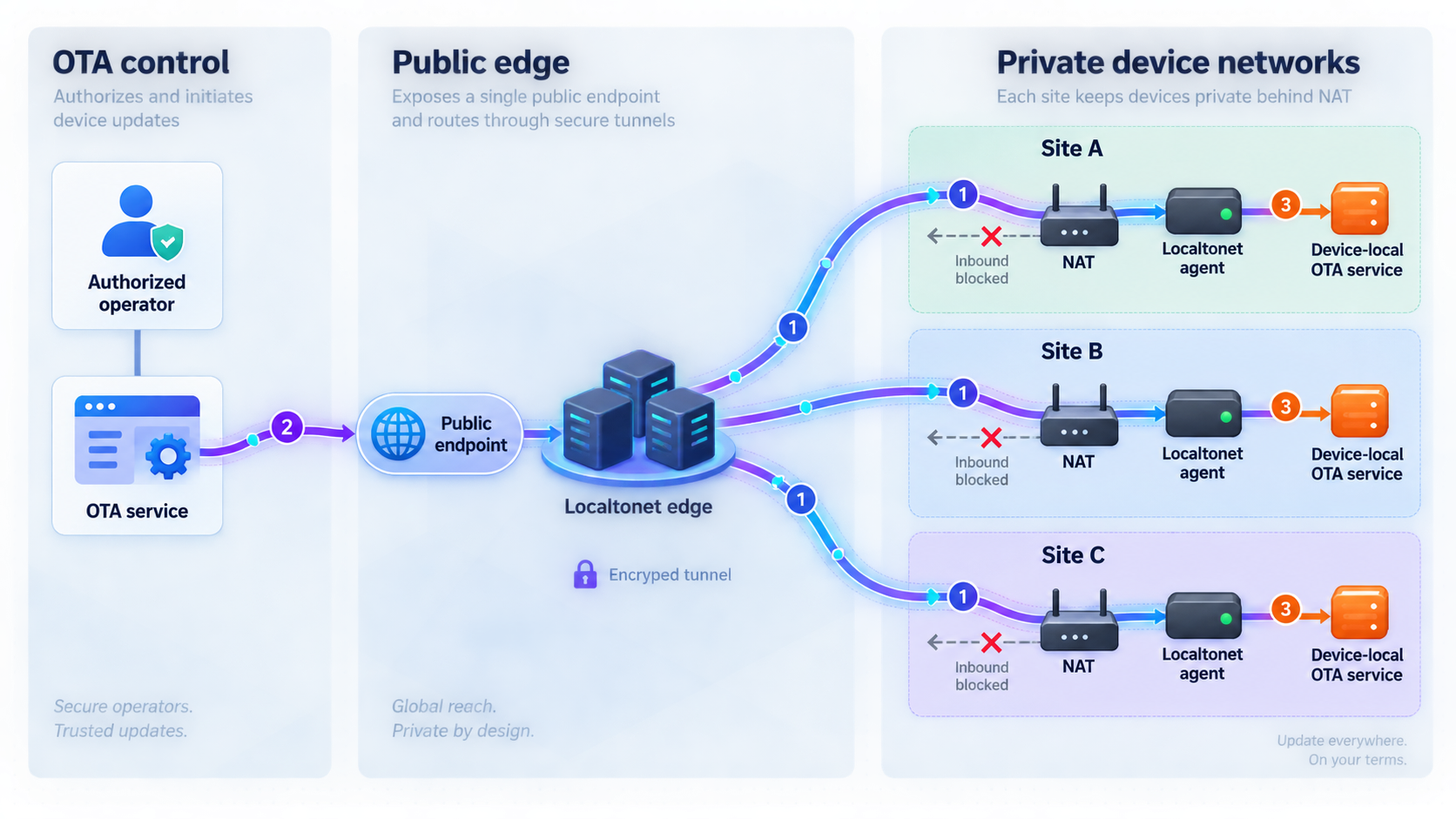
IoT devices are often deployed on private networks that fleet operators do not control. A gateway might receive a private address from a retail router, sit behind a corporate firewall, or use a cellular connection behind carrier-grade NAT. In each case, an operator on the public internet normally cannot initiate a direct connection to the gateway. A public address may not exist, and inbound port forwarding may be unavailable, prohibited, or impractical to administer across a fleet.
With Localtonet, the client on the gateway or a reachable management host establishes an outbound connection to a Localtonet relay server. A running tunnel provides either a public HTTPS address or a public host and port, depending on the tunnel type. This removes the need for inbound router port forwarding, firewall changes, a public device IP address, or a separate VPN setup for that tunnel workflow.
This solves the reachability problem, but reachability is only one part of secure OTA fleet management. Localtonet does not sign firmware, select releases, maintain hardware compatibility metadata, evaluate device health, or decide whether a deployment wave should advance. Those responsibilities remain with the fleet owner's OTA platform, device software, boot process, and operational controls.
Keeping these responsibilities separate limits the consequences of a failure. A reachable tunnel must not automatically imply permission to install arbitrary firmware. Possession of an artifact must not be enough to activate it. The maintenance service should authenticate and authorize every sensitive operation, while the device's update and boot processes independently verify that an artifact is trusted and appropriate for that device.
A typical connection path
A practical design places the Localtonet client on the IoT gateway itself or on a management host that can reach the gateway's private maintenance service. The tunnel points to that service's local IP address and port. An authorized operator or OTA component then uses the assigned public URL or host and port to reach it.
Installing the client directly on each gateway gives each client a distinct device identity. Installing it on a site management host can centralize connectivity, but it also expands that host's reach. If one site host can connect to many controllers, compromise of that host may expose a larger part of the local network. Select the placement according to trust boundaries, local routing, and recovery needs rather than convenience alone.
A public URL or host and port creates reachability. The target service must still enforce authentication, authorization, input validation, and appropriate request or connection limits. Do not expose an unauthenticated administrative interface or rely on an unguessable endpoint as the only protection.
Prerequisites and design decisions
Before configuring a tunnel, document the service that needs to be reached and the exact reason for remote access. Avoid a requirement such as “provide remote access to every device.” A safer requirement is specific, such as allowing an OTA controller to call an authenticated HTTP maintenance API during an approved deployment window.
Prepare the following before the first field test:
- A gateway or management host capable of running a currently supported Localtonet client.
- Outbound internet connectivity from that host to a relay server available in the current Localtonet dashboard.
- An existing OTA service, update agent, maintenance API, or raw TCP service that can be tested locally.
- The local IP address and port of that service as reached from the machine running the Localtonet client.
- A device-specific Localtonet authentication token obtained through the current product workflow.
- An available relay server or region selected from the dashboard rather than copied into a static fleet guide.
- A method for authenticating and authorizing operators or machines at the maintenance service.
- A controlled signing process and trusted device-side verification mechanism.
- An inventory containing hardware revision, bootloader compatibility, installed release, deployment group, and recovery state.
- A tested response for interrupted downloads, failed installation, unsuccessful reboot, and failed post-update health checks.
Install the client only on a confirmed supported platform
Start from the current Localtonet documentation and installation resources and select the installation path offered for the target operating system. Run the client on the gateway itself or on a management device that can reach the intended local service.
The verified material available for this guide does not enumerate every supported embedded operating system, CPU architecture, package format, service manager, or boot-time startup mechanism. We therefore do not provide a guessed shell command or claim support for Raspberry Pi, ARM, MIPS, RISC-V, a particular Linux distribution, or another embedded target. Confirm the current client package and architecture before standardizing hardware around it.
The same limitation applies to automatic startup. A tunnel is available only while the selected client is connected and the tunnel is running. Do not assume that installing the client also configures it to launch after reboot. If unattended OTA operation requires restart persistence, validate the supported startup procedure for the exact operating system and client version, then test it through a real power cycle.
Use only commands and packages shown by the current Localtonet installation workflow for your target platform. If an operating system, processor architecture, service manager, or automatic restart method is not listed there, treat support as unconfirmed rather than adapting an unrelated command.
Verify the service locally first
Test the maintenance service from the gateway and, when different, from the host that will run the Localtonet client. Confirm that the expected endpoint responds, valid authentication succeeds, unauthorized actions are rejected, and the service behaves correctly after its normal restart procedure. A tunnel cannot repair a failed application, incorrect bind address, local routing problem, certificate error, or host firewall rule.
Record the actual bind address. A service bound only to loopback can be reached by a Localtonet client on the same host, but not by a separate site management host. A service bound to a LAN address may be reachable from other systems at the site, which changes its local exposure. Use the narrowest binding that satisfies the architecture.
Define the maintenance window
Decide whether the tunnel should be continuously available or started only for planned maintenance. On-demand access reduces exposure time. Persistent connectivity may support unattended deployment or emergency diagnostics, but it increases the need for continuous target-service protection, ownership review, and monitoring.
Define who may create, start, stop, and delete a tunnel. Also define what should happen when the gateway reboots, how long the OTA system waits for reconnection, and how an unexpected disconnection is investigated. These are fleet-owner controls, not automatic consequences of creating a Localtonet tunnel.
Tunnel configuration and tunnel operation are separate lifecycle states. After a tunnel is created, it must be started with the Start button. It is available only while the selected client device is connected and the tunnel is running.
Choose between HTTP and TCP connectivity
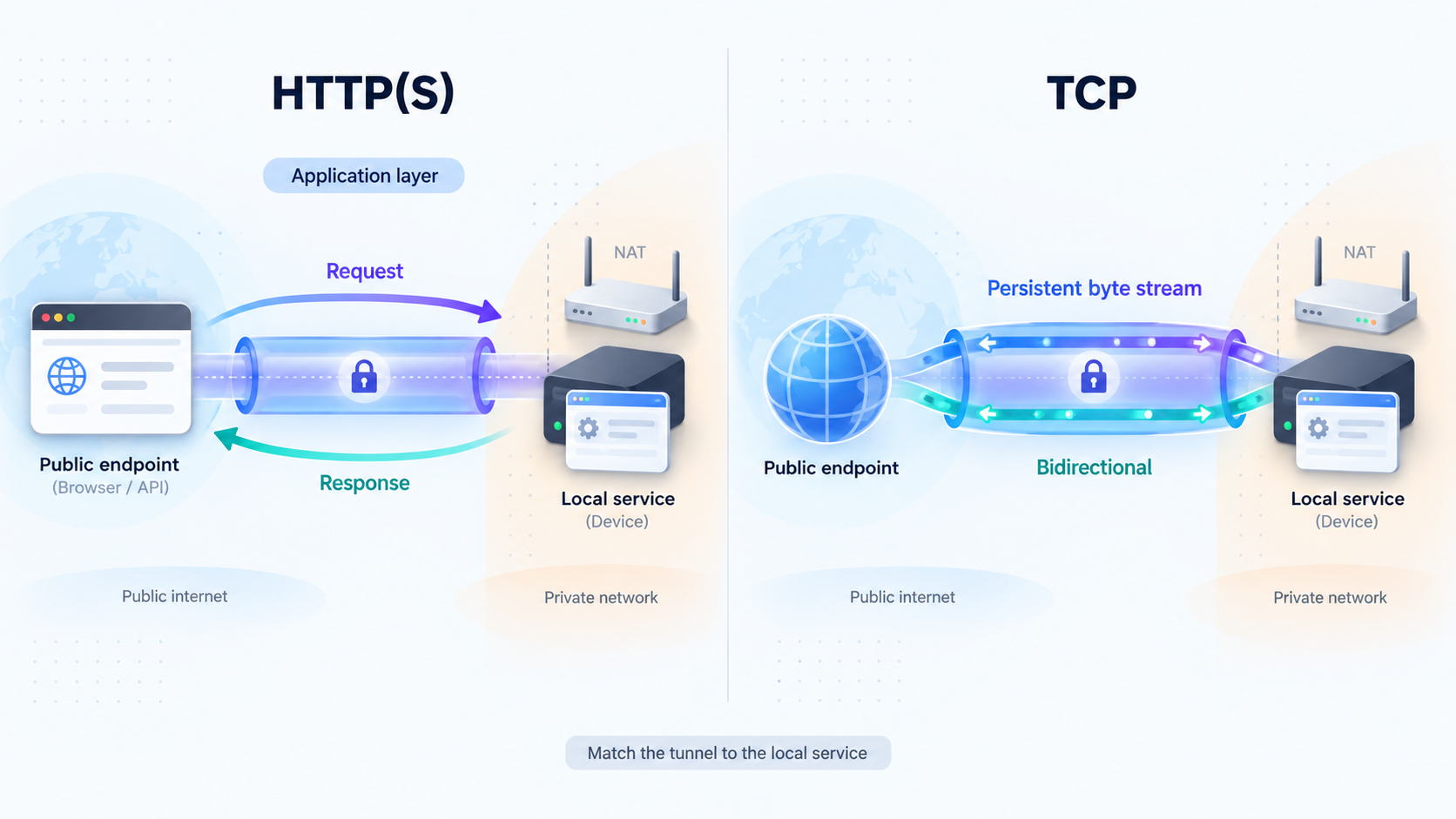
Select the tunnel family according to the protocol spoken by the local service. Do not choose TCP merely because it appears more general. An HTTP tunnel is normally the clearer fit for a web dashboard, REST API, callback receiver, or browser-based management service. A raw TCP tunnel is appropriate when the application uses a non-HTTP protocol carried over a TCP connection.
| Option | Best fit | Public access form | Important consideration |
|---|---|---|---|
| HTTP tunnel | Web dashboards, REST APIs, callbacks, and HTTP-based maintenance services | Public HTTPS address | The application must authenticate and authorize every sensitive OTA operation. |
| TCP tunnel | Non-HTTP services that communicate through a raw TCP stream | Public host and port | The connecting application must understand the protocol and enforce suitable access controls. |
| Site gateway pattern | A controlled management host that reaches one or more private devices | Depends on the selected tunnel | The gateway becomes a high-value trust point and must not provide unrestricted lateral access. |
| Per-device pattern | Devices that can run separate clients and require distinct identities | One configured endpoint for each exposed service | Token handling, endpoint ownership, inventory mapping, and lifecycle management must scale with the fleet. |
HTTP Process Type
Localtonet HTTP tunnels support Random Sub Domain, Custom Sub Domain, and Custom Domain as Process Type choices. Each serves the selected local HTTP content through a public HTTPS address. Availability can vary by the current product configuration or plan. Custom-domain DNS instructions should be taken from the current Localtonet HTTP tunnel documentation rather than inferred from another service.
A generated address can be useful during a controlled proof of concept. Production automation should not assume that an address is permanent unless the chosen configuration explicitly provides the required stability. Record endpoint ownership in the fleet inventory, and do not make the public address the device's only identity.
When a tunnel is unnecessary
A tunnel may be unnecessary when every device securely pulls signed updates from an artifact service and no remote maintenance session is required. In that design, the OTA agent initiates all communication. Add public reachability only for a defined requirement such as diagnostics, an authenticated management API, an operator-approved recovery action, or access to an existing controller that cannot complete the workflow through outbound polling alone.
Avoid exposing a broad site administration panel when a smaller purpose-built endpoint can perform the required task. A service that reports device identity and version, accepts an approved update action, and returns health status is easier to authorize and audit than an unrestricted console.
Configure the Localtonet connectivity layer
Localtonet product operations and fleet-owner OTA controls must remain distinct. Installing the client, selecting its token and relay, entering a local target, and starting or stopping a tunnel are Localtonet operations. Signing firmware, approving releases, choosing deployment groups, enforcing compatibility, interpreting health signals, and authorizing rollback belong to the fleet owner and OTA system.
The HTTP and TCP paths below are documented separately because their public endpoint types and dashboard choices differ. They preserve the verified field sequence available for each tunnel family without inventing account-specific values, relay codes, client commands, domain records, or automation requests.
HTTP tunnel workflow
Use this path when the gateway exposes an HTTP application such as a maintenance API or web interface. Supplement these instructions with the current HTTP tunnel documentation if the dashboard presents version-specific options.
Install and run the Localtonet client
Install the current supported client on the gateway or management host that can reach the HTTP service. Start the client using the supported method for that platform and confirm that the device connects to Localtonet.
Open the HTTP tunnel configuration
In the Localtonet dashboard, begin an HTTP tunnel configuration for the service. Do not select TCP for an application that expects HTTP request and response behavior.
Select the Process Type
Choose Random Sub Domain, Custom Sub Domain, or Custom Domain according to the options currently available to the account. Check current DNS instructions before using a custom domain.
Select the AuthToken and relay server
Select the device-specific authentication token for the client that will run the tunnel, then select an available server or region from the dashboard. Do not guess a token or hardcode a server code from another deployment.
Enter the local IP address and port
Enter the HTTP service address exactly as it is reachable from the Localtonet client host. Recheck the target before exposure, especially when the client runs on a shared site gateway.
Start the tunnel
Use the Start button after reviewing the configuration. The assigned public HTTPS address becomes usable only while the selected client remains connected and the tunnel is running.
TCP tunnel workflow
Use this path only when the local maintenance application speaks a non-HTTP protocol over TCP. Consult the current Localtonet TCP tunnel documentation for the dashboard workflow presented to your account.
Install and run the Localtonet client
Place the supported client on the gateway or management host that can reach the TCP service. Start it through the documented platform-specific method and confirm that its device is connected.
Open the TCP tunnel configuration
Create a TCP tunnel for the non-HTTP service. Confirm that the application really expects a raw TCP connection before continuing.
Select the AuthToken and relay server
Select the token belonging to the intended client device, then choose an available server or region from the current dashboard. Treat the token as a secret and never copy it into shared deployment records.
Enter the local IP address and port
Enter the TCP service address as reached from the client host. Test that exact address locally before exposing it, and verify that it identifies only the approved maintenance service.
Start the tunnel
Use the Start button and record the assigned public host and port in the protected operational inventory. Availability still depends on both the connected client and the running tunnel.
A token identifies the client device that runs the tunnel. Keep it out of source repositories, factory images shared across devices, screenshots, support tickets, ordinary logs, and OTA artifacts. Provision it through a protected device-specific process.
Remote verification and shutdown
After starting either tunnel type, use an authorized maintenance client to test the assigned public URL or public host and port. Confirm that the service reports the expected device identity and rejects missing or insufficient application credentials. When access is intended only for a maintenance window, stop the tunnel afterward. Delete configurations that no longer have an owner or operational purpose.
Localtonet can also be managed through its REST API, but this article does not provide an API automation recipe because the supplied verified evidence does not include current endpoints, request schemas, credential scopes, or retry behavior. Build automation only against current official API documentation. Do not treat a dashboard observation as an undocumented API contract.
Map connectivity to inventory
For every device or site, record a stable internal identifier, hardware model and revision, installed software version, deployment group, local service type, responsible owner, and Localtonet tunnel identifier or endpoint assignment. Do not use the public URL as the sole device identifier because endpoint assignments and tunnel configurations can change.
Distinguish among a configured tunnel, a connected client, and a running tunnel. These are different states. An OTA scheduler that interprets “configured” as “reachable” can initiate work against a device that has no active path.
Design a staged OTA rollout
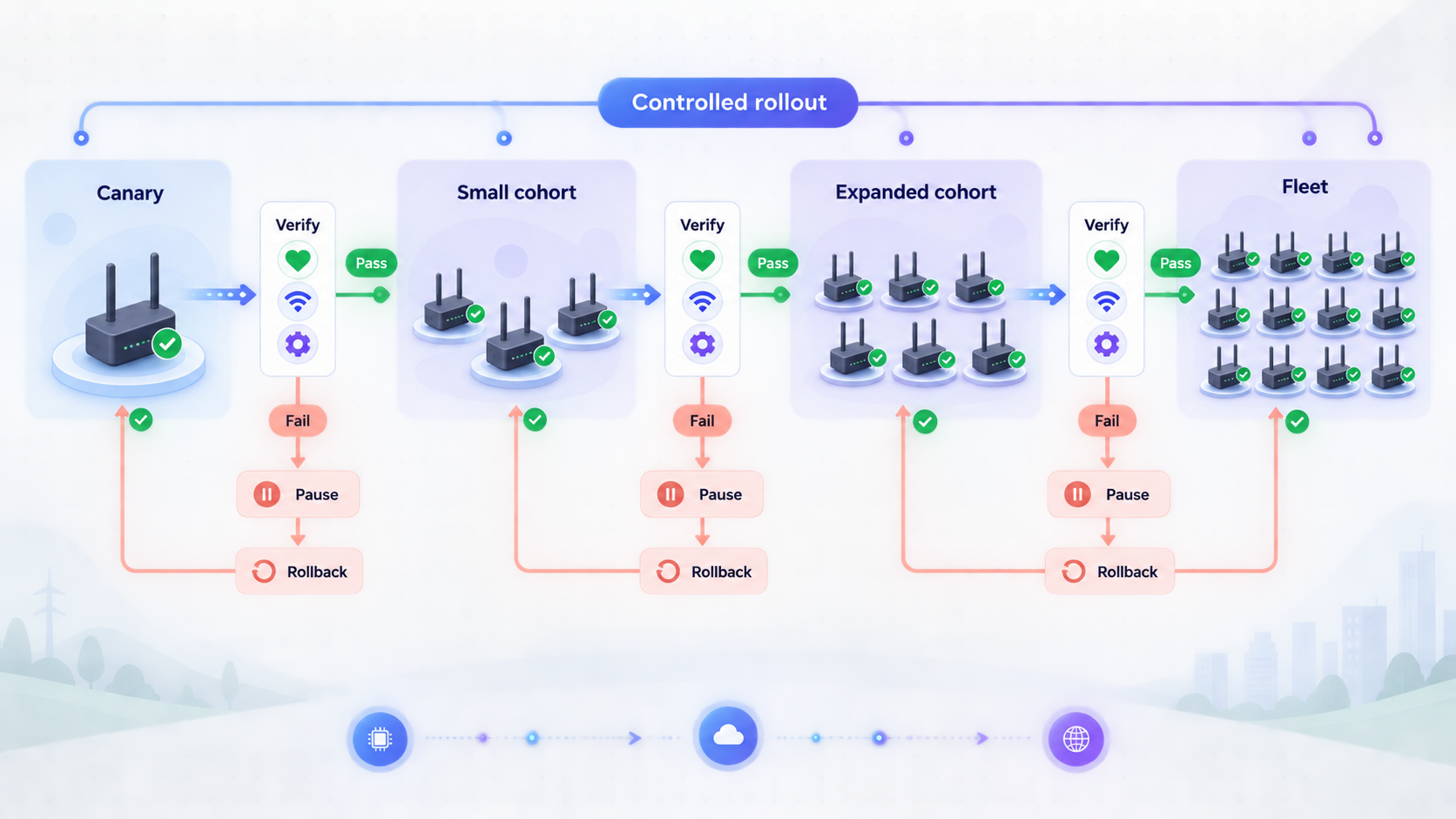
Fleet updates should move through deliberately limited groups. Start with laboratory hardware, continue to a small observable canary group, and expand only after the preceding group satisfies predefined health criteria. Group size depends on fleet scale, device criticality, network cost, failure tolerance, and the ability to recover a failed unit.
Use signed artifacts and authenticated metadata
A protected network path does not prove that a firmware image was produced and approved by the fleet owner. The device should verify authenticated update metadata and the artifact before installation or activation. The IETF SUIT architecture in RFC 9019 describes a firmware-update architecture for constrained devices, while the SUIT manifest information model in RFC 9124 covers information used to identify components, express dependencies, specify installation actions, and establish applicability.
The signed or otherwise authenticated metadata should bind the release to the intended artifact and relevant compatibility constraints. Depending on the platform, these can include product family, hardware revision, bootloader level, current version, component dependencies, and sequence or anti-rollback policy. The exact manifest format, algorithms, key storage, and trust anchors are platform-specific. Localtonet transports traffic to the local service but does not create or verify this metadata.
Reject modified, unsigned, untrusted, corrupted, incompatible, or disallowed older artifacts before changing active software. Download completion is not deployment success. Success should include metadata validation, artifact verification, installation, activation, reboot where required, and post-update health confirmation.
Resist unauthorized rollback
A correctly signed artifact can still be inappropriate if it is older and contains a known vulnerability. Maintain an authenticated release sequence or equivalent anti-rollback policy where the device platform supports it. Recovery policy must account for the tension between blocking vulnerable old software and preserving a usable known-good fallback.
The fleet owner should define which versions may replace the current one, who can authorize an emergency downgrade, and how that exception is recorded. Do not implement rollback resistance by deleting every fallback before the new image has passed health checks.
Design for firmware resilience and recovery
The device should fail safely if power or connectivity is lost during an update. Suitable mechanisms vary by hardware, but can include an atomic activation process, a validated recovery image, redundant firmware storage, a bootloader that detects failed startup, or out-of-band recovery. The NIST Platform Firmware Resiliency Guidelines organize this problem around protection, detection, and recovery principles.
Localtonet cannot recover a device when the operating system, network stack, storage, or client no longer starts. Test the device-level recovery mechanism independently of the tunnel. For critical equipment, define when remote recovery ends and field service begins.
Plan for interrupted connectivity
Field links can disappear during download or installation. Define whether a download resumes, restarts, or fails safely. Prevent a partial artifact from being treated as complete, preserve enough state to diagnose the interruption, and make retries idempotent where the OTA system supports them.
An intentional reboot may temporarily disconnect the Localtonet client and make the endpoint unavailable. The OTA workflow should expect this transition and wait for the platform-specific restart interval established during testing. Do not declare success merely because the endpoint reconnects, and do not declare immediate failure solely because it disappears during a planned reboot.
Apply least privilege across the complete path
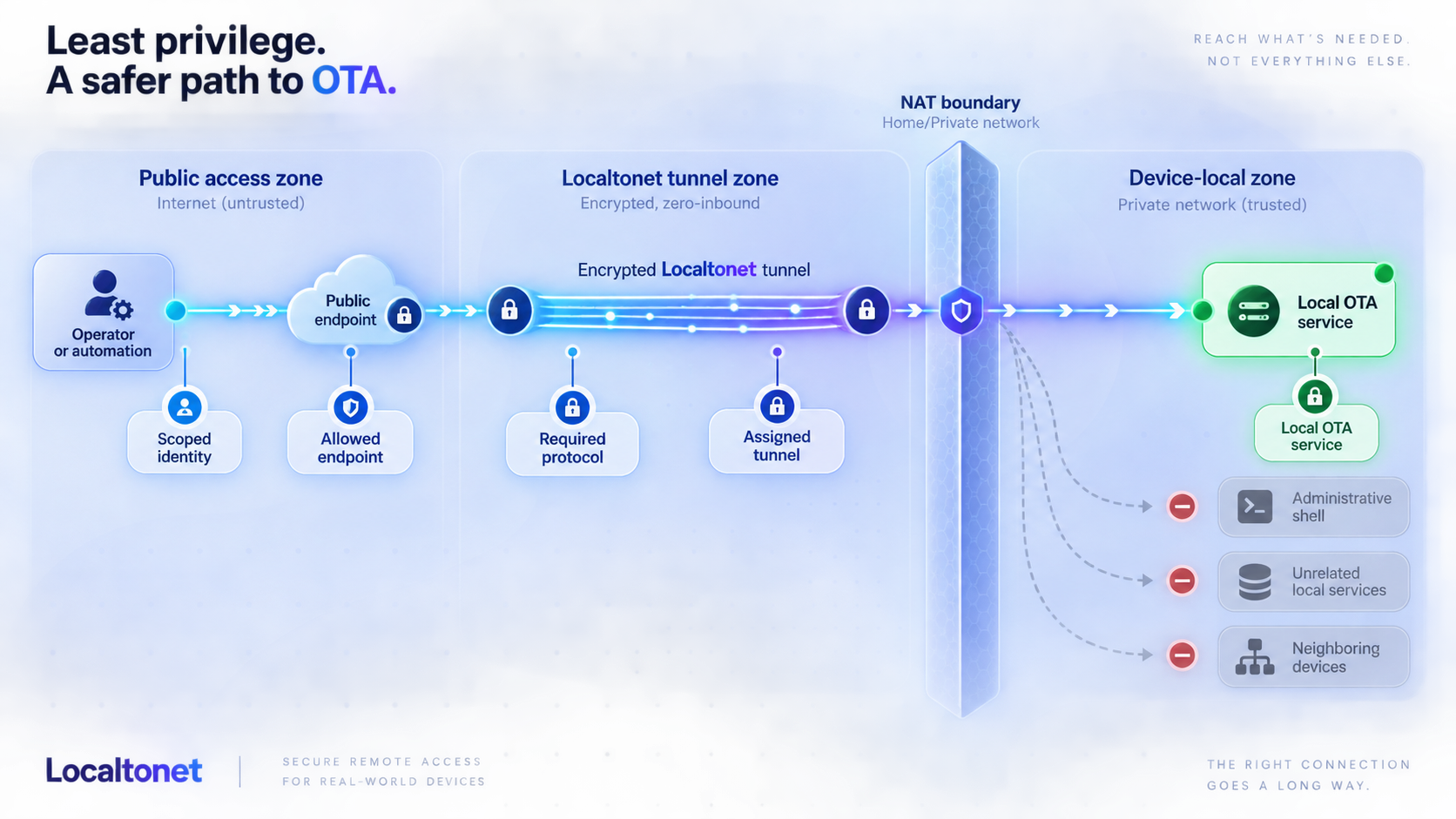
Least privilege should cover the Localtonet account, device token, tunnel target, maintenance application, OTA service, signing environment, and human operators. No single credential should unnecessarily grant control over the complete fleet.
Protect device authentication tokens
A Localtonet authentication token identifies the client device that runs a tunnel. Tokens are device-specific and must not be guessed, published, or embedded in examples. Provision each through a protected process, restrict retrieval, and avoid placing tokens in shared firmware images. If a token is exposed, use the current account controls to replace or invalidate it and securely update the affected client.
Do not print tokens into routine application logs. Diagnostic bundles from field devices should redact secrets. Support staff should identify a device through its inventory identifier without viewing the raw token.
Constrain the local target
Point the tunnel only to the required local IP address and port. Do not expose a general administrative listener when the OTA workflow needs one narrow API. If the Localtonet client runs on a site gateway, use host firewall and application policy to stop that gateway from becoming an unrestricted path to unrelated systems.
Where the maintenance application supports it, separate permissions for status checks, deployment approval, update initiation, rollback, and general administration. Machine-driven OTA access should not inherit all privileges of a human fleet administrator.
Authenticate every request or session
Require application-layer authentication at the maintenance service. Use credentials and identity mechanisms supported by the OTA product, rotate them according to fleet policy, and use individually attributable identities for human maintenance. Apply IP restrictions and other access controls where supported by the selected application and deployment.
Never place maintenance credentials, private signing keys, Localtonet tokens, or private endpoint details in source repositories, screenshots, support messages, or OTA artifacts. Treat the tunnel address as operational information, not as an authentication factor.
A device normally needs trusted public verification material, not the private key used to sign production releases. Protect signing keys in a controlled signing environment and separate release approval from tunnel operation. Compromise of one gateway must not provide the ability to create firmware accepted by the rest of the fleet.
Separate duties
Consider separate permissions for creating connectivity, approving a release, initiating a production rollout, and authorizing rollback. Separation of duties reduces the chance that one compromised account or operator error can both publish an artifact and deliver it fleet-wide.
Emergency procedures should remain controlled. A recovery incident may justify faster approval, but it should not eliminate artifact verification, device identity checks, or records of operator decisions. A tested, pre-approved recovery image is safer than inventing a new update process during an outage.
Verify connectivity before trusting it with updates
Work from the inside out. First prove that the local service works. Then confirm the correct Localtonet client and target. Next test the public endpoint with valid and invalid application credentials. Finally, exercise the complete update and recovery sequence on non-production hardware.
Confirm local service health
From the client host, connect to the configured local IP address and port. Verify status responses, device identity, authentication behavior, and rejection of malformed or unauthorized requests.
Confirm client and tunnel state
Verify that the correct device is connected, the intended tunnel is selected, and the tunnel has been explicitly started. Compare the configured target with the reviewed service address.
Test authorized remote access
Use the assigned public URL or host and port from a controlled maintenance client. Confirm that an authorized diagnostic operation reaches the expected device.
Test negative security cases
Verify that missing, invalid, expired, or insufficient credentials are rejected and that low-privilege identities cannot deploy, roll back, or perform unrelated administration.
Run a non-production OTA cycle
Deliver an approved test artifact to representative hardware. Observe verification, installation, reboot, reconnection, version reporting, and health checks. Confirm that an invalid artifact is rejected safely.
Exercise failure and recovery paths
Simulate supported failure cases such as interrupted connectivity or an unhealthy application after activation. Confirm that the device preserves or restores a known-good state and reports useful evidence.
Define success precisely
A successful tunnel test proves that traffic reached a local service. A successful OTA test proves much more: the correct device received the intended artifact, validated its metadata and signature, installed it, entered the expected runtime state, restored connectivity where applicable, and remained healthy for the required observation period.
Include device identity in the maintenance response wherever supported. Before sending a state-changing command, compare that identity with the inventory record associated with the tunnel. This helps detect endpoint-to-device mapping errors.
Use connectivity state as a signal
Localtonet provides platform-wide Token/Tunnel webhooks that report Connected or Disconnected changes for a selected Token Group. The POST body is a WebHookRequest containing Id, ActionDate, Type, and Status. Type is Token or Tunnel, and Status is Connected or Disconnected. See the Localtonet webhook documentation for the current platform workflow.
These events can help an operations system notice connectivity transitions, but they do not prove firmware installation or device health. A disconnection can result from a planned reboot, site internet loss, client shutdown, or another operational condition. Correlate webhook events with OTA state and device telemetry before initiating automated recovery.
Platform-wide Token/Tunnel webhooks report connection state. File Server webhooks report file-level upload, delete, rename, and move events and can support HMAC signing. They are separate systems. An HTTP or TCP OTA tunnel does not produce File Server file-event notifications.
Operate, troubleshoot, and recover safely
Production reliability depends on routine controls after initial setup. Assign an owner to every tunnel, review whether each endpoint remains necessary, and remove obsolete configurations. Include Localtonet connectivity in device retirement so a decommissioned gateway does not retain an active token or tunnel configuration.
Routine maintenance checklist
- Confirm that every endpoint maps to the expected inventory record and owner.
- Review whether the target IP address and port still belong to the approved maintenance service.
- Verify that persistent tunnels remain justified and that on-demand tunnels are stopped after use.
- Remove access for departed operators and rotate application credentials according to policy.
- Review failed deployments, rollback events, offline exceptions, and unexplained connectivity changes.
- Retest recovery after bootloader, partitioning, hardware, or OTA-agent changes.
- Keep secrets out of support bundles and redact them before sharing diagnostics.
Troubleshooting common failures
| Symptom | Likely area | Checks |
|---|---|---|
| The public endpoint is unavailable | Client or tunnel lifecycle | Confirm that the selected client device is connected and that the tunnel was explicitly started. A created configuration is not automatically running. |
| The tunnel is running but the service does not respond | Local target | Test the configured address from the client host. Check service state, bind address, local routing, and host firewall policy. |
| The wrong device answers | Inventory mapping | Stop state-changing activity. Compare the tunnel, token-associated client, application-reported identity, and inventory record. |
| Access works locally but authorization fails remotely | Application security | Check credentials, role, request format, and application policy. Do not weaken authentication merely to make the tunnel test pass. |
| The endpoint disappears during an update | Reboot or network transition | Determine whether the device rebooted, lost site connectivity, stopped the client, or entered recovery. Correlate tunnel state with OTA logs. |
| The client does not return after reboot | Platform startup behavior | Verify the supported startup method for the exact operating system and client version. Do not assume installation configured boot-time startup. |
| The device rejects the firmware | Artifact validation | Check signature validity, artifact integrity, authenticated metadata, hardware compatibility, version policy, and trusted verification material. |
| The device installs but fails health checks | Application or recovery | Pause the rollout, preserve diagnostics, activate the tested recovery process, and do not expand the wave until the cause is understood. |
Respond to suspected compromise
Stop the affected tunnel when operationally safe, preserve relevant records, and use current Localtonet account controls to replace or invalidate exposed access. Rotate credentials accepted by the maintenance service as well, because stopping a tunnel does not remediate a copied application credential.
Determine which device, tunnel, local service, and maintenance operations were in scope. Review the OTA platform for unexpected deployment attempts, artifact changes, rollback requests, and inventory modifications. Restore connectivity only after the target service, device state, and credentials are known to be safe.
Handle offline devices deliberately
A device that is offline during a rollout should remain pending or enter an exception state according to OTA policy. When it reconnects, re-evaluate whether the original release is still approved for its hardware and deployment group. Do not blindly replay a stale state-changing command.
For critical devices, define a maximum period on an older release and a field-service process for units that cannot be recovered remotely. Remote connectivity can reduce site visits, but it cannot guarantee recovery from failed storage, power loss, damaged hardware, or a boot failure that prevents the client from running.
Know when a mesh network is more appropriate
A per-service tunnel is useful when one gateway service needs controlled public reachability. If the requirement is private communication among multiple networks or access to many internal services, evaluate Localtonet VPN Manager. VPN Manager is our private mesh VPN feature with granular firewall rules and LAN bridging. Standard HTTP and TCP tunnels are not VPN connections.
A different network topology does not remove OTA security requirements. Artifact signing, device authorization, compatibility checks, staged deployment, inventory, health confirmation, and recovery remain separate responsibilities.
Frequently asked questions
Can Localtonet perform firmware signing or OTA orchestration?
No. Localtonet provides connectivity that can expose a local maintenance service through an outbound tunnel. Signing, artifact storage, deployment grouping, compatibility policy, health evaluation, inventory, and rollback orchestration belong to the OTA system and fleet owner's processes.
Do IoT gateways need public IP addresses or inbound port forwarding?
Not for the Localtonet tunnel workflow. The client establishes an outbound connection to a relay and exposes the selected local service without an inbound router rule or public device IP. The network must still permit the client's required outbound connectivity.
Should an OTA maintenance service use HTTP or TCP?
Use HTTP for an HTTP-based API, dashboard, or callback service. Use TCP for a non-HTTP application that communicates over a raw TCP stream. Neither tunnel type replaces application authentication or authorization.
Does creating a tunnel make the gateway immediately reachable?
No. Creating a tunnel stores its configuration. The tunnel must be started, and its selected client must be connected. If either condition is missing, the public endpoint cannot provide access to the local service.
Should every gateway receive its own Localtonet token?
A token identifies the client device that runs a tunnel. If a separate client runs on each gateway, each must use its appropriate device-specific token. A site-gateway design can instead run the client on a management host, but that centralizes trust and requires strict protection against lateral access.
Does the client automatically restart after a gateway reboot?
Do not assume that it does. Startup behavior depends on the supported client installation and operating-system procedure. The verified evidence for this guide does not establish one universal service-management method. Validate restart behavior on the exact platform through a real reboot before relying on unattended access.
Can Localtonet recover a device that no longer boots?
Not when the failure prevents the operating system, network connection, or Localtonet client from running. Recovery then requires a device-level mechanism such as a validated fallback image, bootloader recovery, out-of-band hardware management, or physical service.
Are connection webhooks proof that an OTA update succeeded?
No. Token/Tunnel webhooks report Connected or Disconnected state. They can help correlate a reboot or connectivity loss, but update success must come from authenticated OTA state and device health checks, including installed version and required runtime behavior.
Connect your OTA maintenance service with Localtonet
Start with one representative gateway, verify its local service and recovery path, then create a narrowly scoped HTTP or TCP tunnel through an outbound Localtonet connection. Keep firmware trust and rollout control in your OTA system, and expand only after the complete workflow passes security, reboot, and recovery testing.
Get Started Free →

