

Reach your self-hosted video archive through a controlled public HTTPS address
Tube Archivist provides a browser interface for organizing, searching, managing, and playing an archived YouTube collection, but that interface normally remains inside a home or private network. With Localtonet, you can publish only the web application through an HTTP tunnel established by an outbound client connection. This avoids inbound router port forwarding, firewall changes, VPN setup, and the need for a public IP address. This guide covers prerequisites, Tube Archivist preparation, the Localtonet configuration sequence, repeatable verification, security, operations, updates, and troubleshooting.
📋 What's in this guide
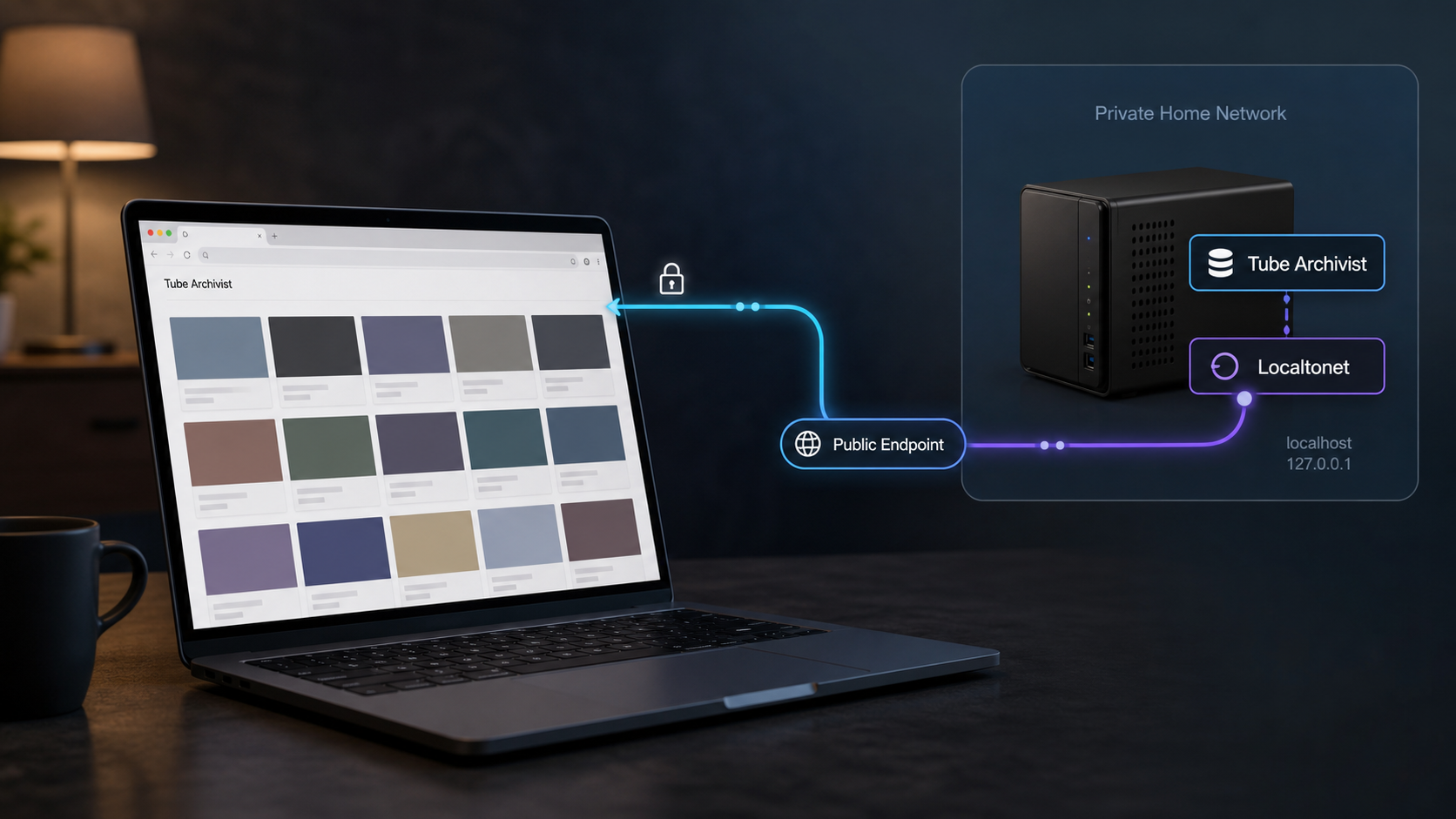
What remote Tube Archivist access involves
Tube Archivist is a self-hosted YouTube media server. It can subscribe to channels, download videos with yt-dlp, index metadata, make an archive searchable, play stored media, and track viewed or unviewed items. Its primary user experience is a web interface, so a browser on the local network connects to the hostname or IP address and port assigned to the deployment.
A private LAN address is not normally routable from the public internet. Conventional publishing may require an inbound router rule, a public IP address, firewall changes, and a carefully configured reverse proxy. Carrier-grade NAT can make that approach unavailable even when the user controls the local router.
With Localtonet, our client application runs on the Tube Archivist host or another trusted device that can reach it. The client establishes an outbound connection to a Localtonet relay server. An HTTP tunnel supplies a public HTTPS address and forwards requests to the local Tube Archivist IP address and port. The tunnel is available only while the selected client is connected, the tunnel is running, and Tube Archivist remains reachable from that client.
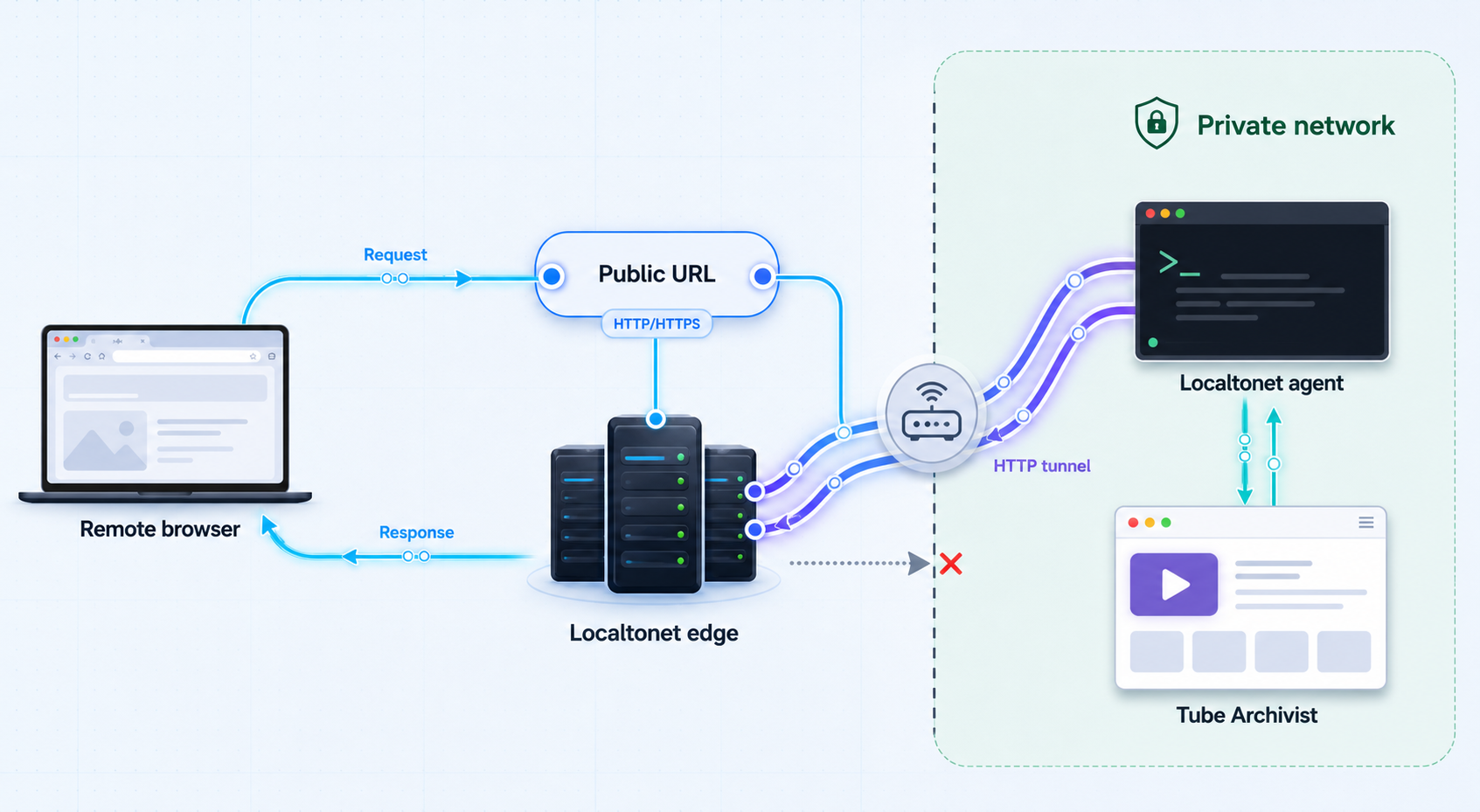
A remote browser connects to the assigned public HTTPS address. Our relay carries the request through the established tunnel to the selected client, which forwards it to Tube Archivist. Responses return through the same path. Because the client initiates the relay connection outbound, the router does not need to accept a newly configured inbound connection.
Tube Archivist depends on services such as Elasticsearch and Redis, but remote browsers do not need direct access to them. Point the HTTP tunnel only at the Tube Archivist web interface. Keep Elasticsearch, Redis, Docker APIs, container-management interfaces, and other administrative services private.
Prerequisites and information to collect
This tutorial assumes that Tube Archivist is already deployed and functional. Remote publishing should not be used to work around an incomplete installation. Resolve container startup, storage, indexing, authentication, and local playback problems before adding the tunnel.
A working Tube Archivist deployment
Tube Archivist requires Docker for its standard deployment. According to the project’s current repository guidance, a small testing stack needs around 2 GB of available memory, while a medium to large installation needs around 4 GB. The stated minimum CPU expectation is a dual-core processor with four threads, with a quad-core or better system preferred. Storage requirements depend on the size and format of the archived media and cannot be represented by one universal value.
Docker must be installed and running, and the Tube Archivist containers must start successfully. The project also documents user-contributed installation approaches for environments such as Unraid, Synology, and Podman. The networking principle in this guide remains the same for those deployments: the Localtonet client must be able to reach the user-facing Tube Archivist endpoint.
Review the current Tube Archivist repository and installation guidance for the project’s example Compose file, current image tags, environment variables, and supported dependency versions.
A Localtonet account and connected client
You need a Localtonet account and our client application installed on a trusted device. The device can be the Docker host or another system on the same private network. It must remain powered on, connected to Localtonet, and able to reach Tube Archivist whenever remote access is required.
The client uses a device-specific authentication token. Treat that token as a secret. Do not paste it into public issue reports, screenshots, documentation, source repositories, chat messages, or shared Compose files.
A reachable local web target
Record the exact local IP address or hostname and port that opens the Tube Archivist web interface from the Localtonet client device. Do not assume that an address working on your laptop will work from the client host. Test from the actual client device or its equivalent network environment.
If Localtonet and Tube Archivist run directly on the same host, a loopback address may be appropriate. If our client runs on another machine, 127.0.0.1 points back to that other machine, not to the Tube Archivist server. In that arrangement, use a private hostname or LAN address that the client can route to.
Configuration details to collect
| Information | Why it is needed | How to verify it |
|---|---|---|
| Tube Archivist local IP or hostname | Identifies the web service that receives forwarded requests. | Open the address from the device that will run Localtonet. |
| Tube Archivist web port | Completes the local HTTP target. | Check the active Docker port mapping and use the browser-facing port. |
| Current Tube Archivist version | Determines which environment-variable and release guidance applies. | Read the version shown in the Tube Archivist interface footer. |
Current TA_HOST value |
Affects host handling and has been relevant to logout redirects in specific releases. | Inspect the active Compose or deployment configuration without publishing secrets. |
| Localtonet device token | Identifies the client device that will run the tunnel. | Select the intended device in the current dashboard and keep its token private. |
| Available relay server | Selects the Localtonet relay used by the tunnel. | Use a value currently offered by your dashboard rather than an old server code. |
| Preferred Process Type | Determines the form of the public HTTPS address. | Choose among the options currently available to your account. |
Only expose content and accounts that you are authorized to make remotely accessible. Keep authentication enabled, limit account distribution, use strong unique passwords, and avoid sharing the public address more broadly than necessary.
Prepare Tube Archivist for remote access
Verify the required environment variables
The Tube Archivist project currently identifies several required variables for its standard deployment. These configure the application hostname, initial login, Elasticsearch credentials, Redis connection, and scheduler timezone. Values must match the actual deployment, and credentials must never be copied into public examples.
| Variable | Status | Purpose relevant to this guide |
|---|---|---|
TA_HOST |
Required | Defines the server IP or hostname. The project’s documented example includes protocol and port, such as http://tubearchivist.local:8000. |
TA_USERNAME |
Required | Sets the initial Tube Archivist login username. |
TA_PASSWORD |
Required | Sets the initial Tube Archivist login password. The project supports a TA_PASSWORD_FILE form for passing the password as a secret. |
ELASTIC_PASSWORD |
Required | Configures the Elasticsearch password. It must match the Elasticsearch service configuration and can use the documented _FILE secret convention. |
REDIS_CON |
Required | Supplies the connection string to the private Redis service. |
TZ |
Required | Sets the timezone used by scheduled work. |
Do not expose the values of password variables while troubleshooting the tunnel. A Localtonet HTTP tunnel only needs the local web IP address and port. It does not need the Tube Archivist password, Elasticsearch password, Redis connection string, or Docker socket.
Distinguish optional proxy settings from required deployment settings
Tube Archivist also provides optional variables such as TA_PORT, TA_BACKEND_PORT, TA_ENABLE_AUTH_PROXY, TA_AUTH_PROXY_USERNAME_HEADER, TA_AUTH_PROXY_LOGOUT_URL, TA_LDAP, and TA_LOGIN_AUTH_MODE. These support port overrides, LDAP, or authentication-forwarding arrangements. They are not automatically required merely because the application is reachable through a Localtonet HTTP tunnel.
In particular, do not enable forwarded authentication or trust an authentication header unless you have deliberately designed and validated that authentication architecture. A basic Localtonet HTTP tunnel can carry the normal Tube Archivist login interface without converting the deployment into an authentication-proxy setup.
Check TA_HOST against your installed version
The project’s current repository example documents TA_HOST in a format that includes a protocol and port, for example http://tubearchivist.local:8000. Use the hostname, protocol, and port appropriate to your actual deployment rather than copying that example literally.
Tube Archivist release v0.5.11 specifically reported unexpected logout redirects for some users and instructed them to specify the protocol and port in TA_HOST exactly as documented. That is release-specific guidance, not a timeless claim that every redirect problem has the same cause. Current Tube Archivist documentation and release notes take precedence, especially if host validation behavior changes in later versions.
Editing a Compose file does not necessarily change the already running container. Apply the change using the deployment method appropriate to your installation, confirm that the expected application version and configuration are active, and repeat local login and logout tests before testing the public URL.
Confirm local functionality from the client device
Open the exact proposed target from the device that will run Localtonet. Sign in, load the home interface, search for an archived item, open a video page, play representative media, and sign out. Also check thumbnails, stylesheets, scripts, and other static assets. If these tests fail locally, stop and repair Tube Archivist or its network path before creating the tunnel.
Verify that the address is the user-facing Tube Archivist port. Do not target the internal backend port merely because it appears in a container definition, and never target Elasticsearch, Redis, the Docker daemon, or a container-management interface.
Configure the Localtonet HTTP tunnel
The sequence below follows the documented Localtonet HTTP workflow: install and run the client, open the HTTP tunnel configuration, select a Process Type, select the device token and server, enter the local target, and start the tunnel. Use values displayed in your current dashboard because available servers, regions, address options, and plan capabilities can vary.
You can also consult our Localtonet HTTP tunnel documentation while checking the current interface. Do not copy device tokens, server codes, or private endpoints from another installation.
Install and run the Localtonet client
Install our client on the Tube Archivist host or another trusted device that has already passed the local reachability test. Run the client and confirm that the intended device is connected to your Localtonet account.
Open the HTTP tunnel configuration
In the Localtonet dashboard, go to the HTTP tunnel area and begin an HTTP tunnel configuration. This tunnel family is appropriate because the target is Tube Archivist’s browser interface.
Select the Process Type
Choose Random Sub Domain, Custom Sub Domain, or Custom Domain according to the options currently available to your account. Each Process Type serves the configured application through a public HTTPS address. Check current documentation before making custom-domain DNS changes.
Select the AuthToken and relay server
Select the device-specific AuthToken for the client that can reach Tube Archivist, then select a relay server currently offered in the dashboard. Protect the token as a secret and do not hardcode a server code from an older tutorial.
Enter the Tube Archivist local IP address and port
Enter the exact local IP address or hostname and browser-facing port verified from the client device. Use loopback only when Tube Archivist is genuinely reachable through loopback from the environment where our client runs.
Press Start
Start the tunnel and note the assigned public HTTPS address. Creating or saving the configuration alone does not make it active. The selected client must remain connected for the tunnel to carry traffic.
Choose the appropriate public-address option
| Process Type | Useful when | Important consideration |
|---|---|---|
| Random Sub Domain | You want to test the integration or use an assigned address without selecting a particular name. | Share the generated HTTPS address only with authorized users. |
| Custom Sub Domain | You want a selected subdomain where that option is supported. | Confirm current availability rather than assuming it is included for every account or plan. |
| Custom Domain | You want users to access Tube Archivist through a domain you control. | Follow current Localtonet documentation for DNS requirements instead of reusing old DNS instructions. |
Verify local and remote access systematically
Verification should proceed from the application outward. This prevents a container problem from being mistaken for a tunnel problem and gives you a repeatable test after updates or restarts.
Test the local endpoint from the client device
Open the exact local IP address and port configured in the tunnel from the Localtonet client device. Confirm that the Tube Archivist login page loads without relying on the public URL.
Confirm the client and tunnel state
Verify that the selected device is connected and that the HTTP tunnel is running. A saved configuration with a disconnected client cannot forward requests.
Open the public URL from an external network
Use a separate browser session on a genuinely external connection, such as a mobile network. This avoids a test that succeeds only because of local routing or cached authentication.
Test authentication and static assets
Confirm that the login form appears, valid credentials work, invalid credentials are rejected, and the resulting pages load stylesheets, scripts, thumbnails, and icons correctly.
Test application workflows
Search for an archived item, navigate to a channel or video page, and perform the ordinary read or management actions that authorized remote users require.
Test representative media playback
Play more than one representative video if the archive contains different formats. Check seeking and sustained playback, while recognizing that results depend on media compatibility and available upload capacity.
Test logout and redirects
Sign out through the public address and confirm that the browser returns to an expected Tube Archivist page. If it redirects to an incorrect host or port, review the installed version’s documentation and active TA_HOST value.
Repeat the test after controlled restarts
Restart Tube Archivist using your normal deployment procedure and confirm that its local address remains unchanged. Separately restart the Localtonet client, confirm that it reconnects, check that the tunnel is running, and repeat the external login and playback tests.
A successful public connection proves that traffic can reach the configured target. It does not prove that Tube Archivist authentication, host settings, account permissions, media formats, or operational policies are correct.
Security controls for public access
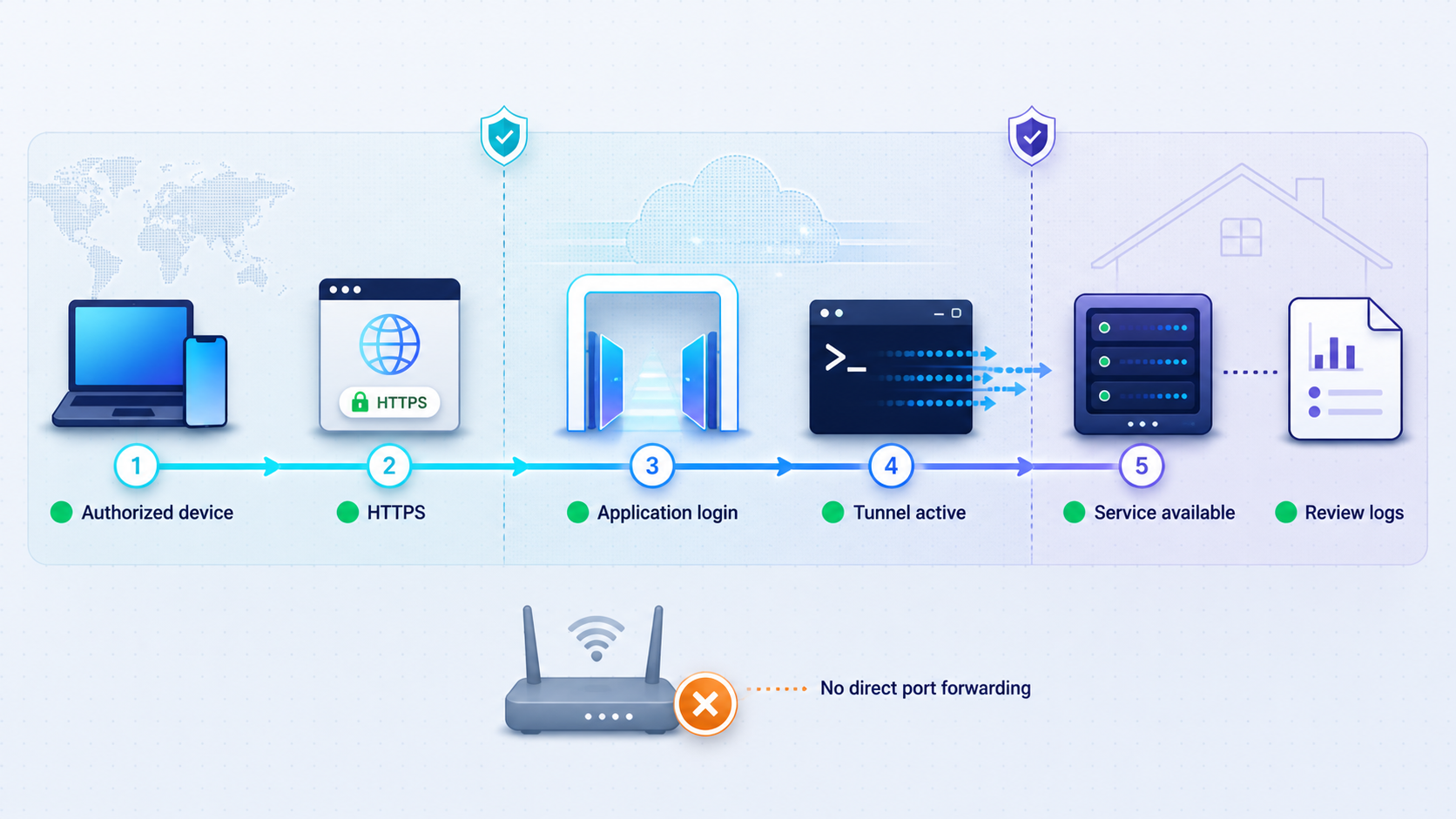
Remote publishing changes the trust boundary. Before the tunnel starts, a router may prevent outside clients from reaching Tube Archivist at all. While the tunnel is running, the public address becomes an internet-reachable entry point to the configured web service.
Keep Tube Archivist authentication enabled
Do not disable Tube Archivist authentication to simplify the integration. Use strong, unique credentials, limit the number of accounts, and change credentials promptly if they may have been disclosed. Do not put credentials in a URL or distribute them with the tunnel address.
Protect every secret independently
The Localtonet device token, TA_PASSWORD, ELASTIC_PASSWORD, Redis connection details, and any LDAP or authentication-proxy credentials serve different purposes. None belongs in screenshots or public troubleshooting output. Where supported by the Tube Archivist deployment, the documented TA_PASSWORD_FILE and ELASTIC_PASSWORD_FILE convention can keep password values out of ordinary environment-variable declarations.
Expose the smallest possible target
Configure only the Tube Archivist web interface. Elasticsearch and Redis should remain on private container or host networks and should not receive public tunnels. The same rule applies to Docker APIs, SSH, dashboards, hypervisor interfaces, and storage administration endpoints. If a separate service needs remote access, assess and configure it independently rather than widening the Tube Archivist path.
Avoid debug output on an internet-facing deployment
Tube Archivist documents DJANGO_DEBUG as a debug-only option that returns additional error messages. Do not leave debug behavior enabled merely to troubleshoot remote access. Detailed application errors can reveal information that an ordinary remote user does not need.
Apply least privilege to remote users
Give users only the accounts and application capabilities required for their role. Do not share an administrative login when ordinary access is sufficient. Review access after team changes, device loss, or credential disclosure, and stop the tunnel when temporary access has ended.
Treat the public address as a route, not as a password. Keep application authentication enabled even if the address was generated randomly, and share the URL only with authorized users.
Routine operations, updates, and compatibility
Start, stop, and delete deliberately
Creating a tunnel stores its configuration but does not start it. Press Start when remote access is required. Stop the tunnel when temporary access is complete. Delete it when the configuration should no longer be reused. Although the endpoint also becomes unavailable if the selected client disconnects, intentional lifecycle management is safer than relying on an accidental disconnection.
Before changing the local Tube Archivist port or moving containers to another host, record the existing working target. After the change, test the new local endpoint from the Localtonet client device and update the tunnel target if necessary.
Follow Tube Archivist’s supported update path
The Tube Archivist project recommends using either the latest image tag or a named semantic-version tag. Its current repository guidance states that updates are tested across one or two releases at most. Updating from much older versions may or may not be supported, so avoid allowing installations to fall many releases behind.
The project recommends applying updates at least monthly where practical and checking release notes before every update. Breaking changes may require new environment variables or changes to the Compose file. The interface footer displays the current version and includes a daily version check that can notify users of new releases.
After updating, verify the expected version in the footer. Review required variables, confirm container health, and repeat local login, search, playback, logout, and external tunnel tests. Do not assume that a healthy container automatically preserves the same port mapping, authentication behavior, or host settings.
Keep the documented Elasticsearch version aligned
Tube Archivist development and testing use the Elasticsearch version identified in the project’s supplied Compose file. The project notes that an older Elasticsearch release may still work, but recommends the documented version and provides the bbilly1/tubearchivist-es image to follow that recommendation. Check the current Compose file instead of freezing a dependency version from an old tutorial.
Plan browser-compatible download formats
Tube Archivist downloads the best available quality by default. Its project guidance warns that iOS, macOS, and some other browsers may require a compatible format to be selected before downloading. The project gives the following format as an example:
bestvideo[vcodec*=avc1]+bestaudio[acodec*=mp4a]/mp4This is a Tube Archivist download-format example, not a Localtonet setting. If a page and thumbnail load remotely but a particular video does not play, test the same file locally in the same browser. Media already downloaded in an incompatible format may require a Tube Archivist-specific remediation rather than a tunnel change.
Account for host upload capacity
Remote media playback sends data from the Tube Archivist network toward the viewer. Performance therefore depends on the host connection’s available upload capacity, the viewer’s connection, the media bitrate, concurrent activity, and the device running the stack. We do not claim a universal throughput or latency result.
If interactive pages work but playback repeatedly buffers, compare the media bitrate with real available upload capacity and test while other uploads are idle. A tunnel can provide the route, but it cannot create upstream capacity that the host connection does not have.
Troubleshooting by symptom and likely cause
| Symptom | Likely cause | Resolution |
|---|---|---|
| The public URL cannot reach Tube Archivist | The configured local target is unavailable from the Localtonet client device. | Open the exact local IP and port from that device. Start or repair Tube Archivist, correct routing, and verify the browser-facing port before retesting the tunnel. |
| Local access works on the Tube Archivist host but not from the Localtonet client | The target uses 127.0.0.1 even though the client runs on another machine or in an isolated container. |
Use a private hostname or LAN address reachable from the client. Keep the service no more broadly exposed than necessary. |
| The endpoint suddenly becomes unavailable | The selected Localtonet client disconnected, lost power, or lost outbound connectivity. | Restore the client device and its network connection, run our client, and confirm that the correct device appears connected. |
| The client is connected but the URL still fails | The tunnel configuration exists but is stopped. | Check the tunnel state and press Start. Saving a tunnel does not automatically run it. |
| Login works but logout redirects to an unexpected host or port | The active TA_HOST may not match the installed Tube Archivist version’s required format. |
Check the current project documentation and release notes. For v0.5.11 specifically, the release notes direct users to include protocol and port exactly as documented. Apply the setting, restart appropriately, and retest. |
| Valid credentials are rejected | The problem is within Tube Archivist authentication, LDAP, forwarded-auth configuration, or the active credentials rather than tunnel transport. | Test the same credentials through the local endpoint. Review the configured login mode and optional authentication variables. Do not disable authentication or send passwords to Localtonet support output. |
| The tunnel stopped working after a container update | The host port mapping changed, a new variable is required, or the application no longer starts cleanly. | Read the intervening release notes, verify the version and container health, test the local endpoint, and update the tunnel target only if the browser-facing host port genuinely changed. |
| The page loads without styles, scripts, or thumbnails | Static asset requests are failing, the host configuration is inconsistent, or Tube Archivist itself is not serving the complete interface. | Use browser developer tools to identify failed requests, compare local and public behavior, and verify the installed version’s host and proxy guidance. Avoid enabling permanent debug mode. |
| Some videos play while others do not | The affected media codec or container may not be supported by that browser. | Test the same file locally in the same browser. Review Tube Archivist’s Download Format guidance for browser-compatible formats, particularly for iOS and macOS clients. |
| Playback starts but buffers frequently | The host lacks sufficient available upload capacity for the media bitrate or concurrent use. | Test a lower-bitrate file, pause other uploads, compare results across viewers, and measure available upstream capacity. Do not treat a bandwidth limitation as proof of a tunnel configuration error. |
| The endpoint fails after restarting Tube Archivist | The application did not recover, its address changed, or the container port is no longer published as before. | Confirm container health and test the saved local target from the client. Restore a stable mapping or update the tunnel target after verifying the new address. |
| The endpoint fails after restarting the Localtonet device | The client has not reconnected or the tunnel is not running. | Run the client, confirm the correct device token is connected, check tunnel state, and start the tunnel if required. |
Use an inside-out diagnostic sequence whenever the symptom is unclear: verify Tube Archivist containers, open the local endpoint from the Localtonet client device, confirm that the selected client is connected, confirm that the tunnel is running, and finally test the public address from an external network. Change only one layer at a time so that the result identifies the actual cause.
Frequently asked questions
Do I need to forward a port on my router?
No. The Localtonet client establishes an outbound connection to our relay, so this workflow does not require inbound router port forwarding, firewall changes, a public IP address, or VPN setup.
Which Tube Archivist service should the tunnel target?
Target the local IP address or hostname and browser-facing port of the Tube Archivist web interface. Do not point the public tunnel at Elasticsearch, Redis, an internal backend port, the Docker daemon, or another infrastructure service.
Does creating the tunnel immediately make it available?
No. Creating the configuration does not start it. You must press Start, and the selected Localtonet client must be connected and able to reach Tube Archivist.
Should I disable Tube Archivist authentication behind the tunnel?
No. Keep application authentication enabled and use strong, unique credentials. The tunnel provides public network reachability, so application authorization remains an essential security layer.
Can the Localtonet client run on a different device?
Yes. It can run on another trusted device if that device can reach the Tube Archivist web address and port. Use a reachable private address rather than assuming that loopback points to the Tube Archivist host.
Does Localtonet need my Tube Archivist or Elasticsearch password?
No. The HTTP tunnel needs the local web target and a connected Localtonet device. Tube Archivist credentials remain part of the application login, while Elasticsearch and Redis credentials should remain private within the deployment.
Is this the same as using Localtonet VPN Manager?
No. This guide uses an HTTP tunnel to publish one web application. VPN Manager is our separate private mesh VPN feature and should not be confused with HTTP, TCP, UDP, TLS, or File Server tunneling.
Why does the public address stop working when the client disconnects?
The client maintains the outbound connection that carries requests to the local service. If the client disconnects, the tunnel stops, or Tube Archivist becomes unreachable from that device, the endpoint cannot forward traffic to the application.
Why does Tube Archivist work remotely but a video will not play?
If login, search, and thumbnails work, test the same media locally in the same browser. The likely issue may be browser codec compatibility or insufficient upload capacity rather than HTTP tunnel reachability. Review Tube Archivist’s current Download Format guidance before downloading future media.
Open Tube Archivist to authorized remote users
Run our client on a trusted device that can reach Tube Archivist, create an HTTP tunnel for the browser interface, keep application authentication enabled, and verify login, search, playback, and logout from an external network.
Get Started Free →

