

Deploy Wings with Docker, verify its management listener locally, and expose only the endpoint your deployment actually requires
Calagopus Wings is a Rust rewrite of Pterodactyl Wings whose stated goal is 100 percent API compatibility. That is a project aim, not a guarantee that every panel, route, extension, or integration behaves identically. This tutorial uses the project-recommended Docker path, shows how to pin and inspect the deployment before starting it, explains how to supply the panel-generated configuration, and covers local verification, updates, backups, rollback, and logs. It then shows how to connect a verified HTTP listener to Localtonet without exposing SFTP, host SSH, the Docker socket, or individual game ports.
📋 What's in this guide
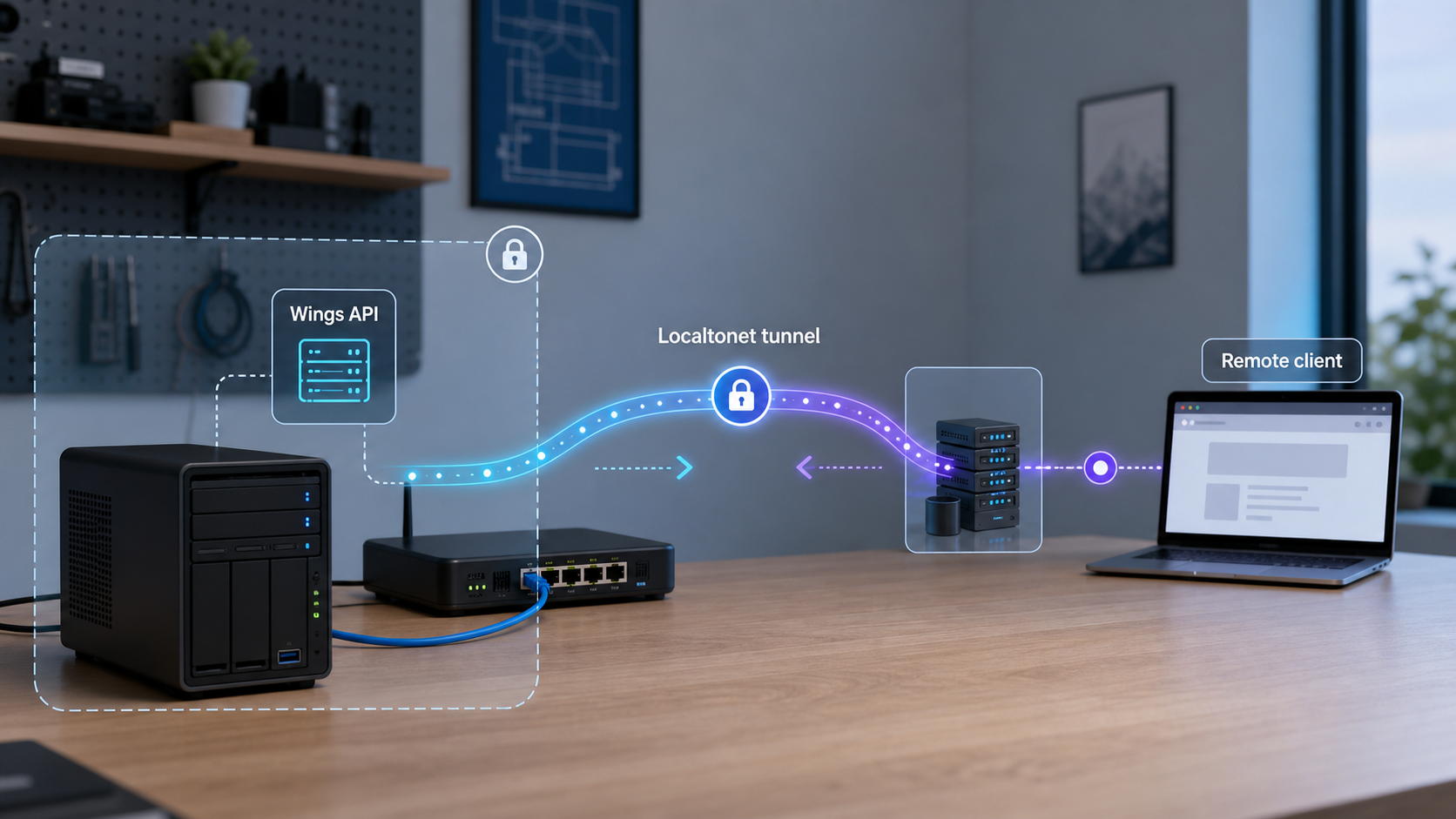
What this tutorial deploys and what it does not expose
Calagopus Wings is the node-side daemon in a game-server management architecture. The project describes it as a rewrite of Pterodactyl Wings in Rust and says that it aims to be 100 percent API compatible while adding features, performance improvements, and stability improvements. Because “aims to be” describes an engineering objective, you should test the exact Calagopus panel and Wings versions you plan to operate instead of treating compatibility as unconditional.
Calagopus currently lists Docker, APT, RPM, APK, and direct binary installation methods. Its installation page identifies Docker as the recommended path for most deployments, so this guide deliberately covers Docker. It does not mix commands from the package and binary methods into the same installation. Package-managed deployments can have different configuration paths, service names, update commands, and logging behavior.
The verified repository contains a Dockerfile, compose.yml, and compose.local.yml. The procedure below uses the release-tagged repository and its primary compose.yml. Before running it, you will render the resolved Compose configuration and inspect its images, build settings, ports, mounts, privileges, and environment. This matters because a Compose file is executable infrastructure, and its contents can change between releases.
The supplied Calagopus evidence does not establish that the project officially recommends placing the complete panel-to-Wings connection behind a third-party public HTTPS relay. It also does not establish every required proxy header, certificate-validation rule, externally advertised node URL, or WebSocket expectation. Localtonet can forward a verified HTTP target, but do not switch a production panel to the public URL until your installed Calagopus versions pass the API, authentication, certificate, and real-time console tests described below.
Requirements and deployment values to collect
Calagopus directs users to check its current minimum-requirements page before installation. The available primary evidence confirms that Calagopus manages workloads in Linux Docker containers, supports ARM64, and says its Docker Compose setup works on a Raspberry Pi. It does not provide a verified universal minimum for CPU cores, memory, free disk capacity, Docker Engine version, or Compose version in the material supplied for this article.
Do not turn that missing information into guessed requirements. Capacity depends heavily on the games you will host, their images, backups, player counts, and storage behavior. Check the current Calagopus Wings installation page before selecting a production host, and use the minimums stated there for the release you are deploying.
For the Docker path in this guide, prepare:
- A supported Linux host with adequate CPU, memory, and storage for Wings and the intended game workloads.
- Docker Engine and the Docker Compose plugin installed and working.
- Git for obtaining a release-tagged copy of the public Wings repository.
- Administrative access sufficient to create the host directories required by the resolved Compose file.
- A compatible Calagopus or supported panel deployment from which to obtain the node configuration.
- A protected location for configuration and backup copies.
- A Localtonet account and client device if remote HTTP access is required.
Verify Docker before downloading Wings:
docker version
docker compose version
docker info
All three commands should complete successfully. If docker info reports that the daemon is unavailable, resolve the Docker installation or permissions problem before proceeding. Wings cannot manage container workloads through a container runtime that is stopped or inaccessible.
| Installation method | Current project listing | Coverage in this tutorial |
|---|---|---|
| Docker | Recommended for most deployments | Covered using the release-tagged repository Compose artifact |
| APT | Listed as supported | Not mixed into this Docker procedure |
| RPM | Listed as supported | Not mixed into this Docker procedure |
| APK | Listed as supported | Not mixed into this Docker procedure |
| Binary | Listed as supported | Not mixed into this Docker procedure |
Do not paste a Localtonet device token, panel-generated Wings configuration, API credential, SFTP password, private endpoint, or game-administration password into a public command example, screenshot, issue, or support message. The placeholders in this guide must be replaced locally and must never be committed to Git.
Install Calagopus Wings with Docker Compose
The example below pins the repository to the evidenced release-1.1.4 tag instead of deploying the moving main branch. A newer release may be available when you follow this tutorial. If so, substitute its exact verified tag after reviewing its release notes. Never type a tag that you have not confirmed on the project’s release page.
Download the release-tagged repository
Clone the public repository into a dedicated directory and check the resulting revision. The command below uses the verified release tag rather than an unpinned development branch.
git clone --branch release-1.1.4 --depth 1 https://github.com/calagopus/wings.git calagopus-wings
cd calagopus-wings
git status
git describe --tags --always
Confirm that Git reports the expected tag and a clean working tree. Do not continue if the directory contains unexpected local modifications.
Inspect the supplied deployment files
Confirm that the tagged checkout contains the expected Docker and Compose artifacts. Review the files before allowing them to create containers or mount host resources.
ls -la Dockerfile compose.yml compose.local.yml
docker compose -f compose.yml config
The final command validates the Compose syntax and renders the effective configuration. Inspect at least these properties:
- The image reference or local build context.
- Every published host port.
- Every bind mount and named volume.
- The location into which the Wings configuration is mounted.
- Any Docker socket or container-directory access.
- Restart behavior.
- Environment variables and referenced environment files.
If Compose reports a missing variable, file, or directory, satisfy the requirement shown by the release artifact rather than inventing a value. Do not substitute compose.local.yml merely because the primary file requires preparation. A file named “local” can be intended for repository development rather than a persistent production node.
A game-server management daemon may require substantial access to the container runtime and host storage. The rendered Compose configuration is the authority for this checkout. Do not expose those mounts over Localtonet, and do not add broad host mounts just to bypass a permissions error.
Create the required host paths
Use the resolved Compose output to identify bind-mounted host directories. Create only those documented by the checked-out deployment file and apply the ownership and permissions required by the current Calagopus instructions.
Fixed directory commands are not included here because the supplied evidence does not establish that the host-side paths remain identical across Calagopus releases. The following command helps isolate volume definitions without modifying the host:
docker compose -f compose.yml config | sed -n '/volumes:/,/networks:/p'If that output is ambiguous, inspect the complete rendered configuration. Record the host path that maps to the container’s active Wings configuration location and the paths that retain game data, logs, and backups.
Obtain the node configuration from the panel
Create or select the Wings node in the compatible panel and obtain the configuration generated for that node. Save it at the exact host path consumed by the resolved Compose deployment. Do not hand-create authentication values or reuse another node’s configuration.
The supplied evidence does not verify the current Calagopus panel menu labels or whether every compatible panel presents the configuration as a download, a copyable block, or a command. For that reason, this article does not invent a navigation path. What matters technically is that the configuration belongs to this node, reaches the path mounted by compose.yml, and is readable only by the accounts and container that require it.
Before starting Wings, make a protected baseline copy:
cp /HOST/PATH/TO/config.yml /HOST/PATH/TO/config.yml.pre-start-backup
chmod 600 /HOST/PATH/TO/config.yml /HOST/PATH/TO/config.yml.pre-start-backup
Replace /HOST/PATH/TO/config.yml with the actual path identified in the resolved Compose configuration. Do not run the example literally.
Start the deployment
Ask Compose to pull referenced images where applicable, build local image definitions where applicable, create the containers, and detach from the terminal.
docker compose -f compose.yml pull
docker compose -f compose.yml up -d --build
docker compose -f compose.yml ps
A Compose project can contain build-only services, image-only services, or both. If pull reports that a locally built service has no image to pull, inspect the message and continue only if it matches the rendered file. The subsequent up -d --build command uses the definitions in the checked-out release.
Read startup logs
Confirm that the Wings container remains active and that startup does not report configuration parsing, permissions, storage, runtime, or listener-binding errors.
docker compose -f compose.yml ps
docker compose -f compose.yml logs --tail=200
docker compose -f compose.yml logs --follow
Exit the live log view with Ctrl+C. That stops only the log-following command, not the detached container. If the container repeatedly restarts, leave the Localtonet setup for later and resolve the local Wings failure first.
Review the active Wings configuration
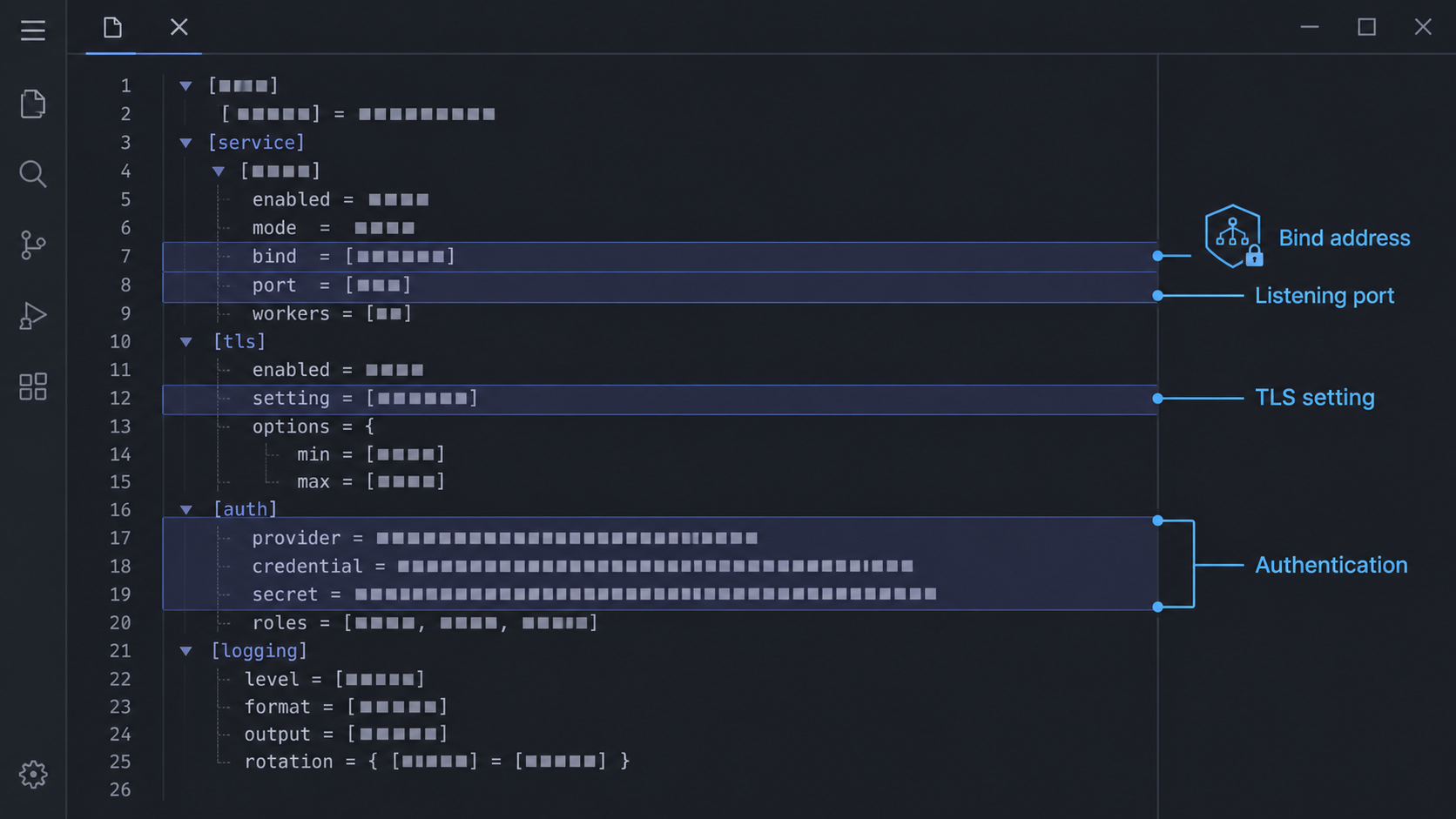
Configuration must be generated for the correct panel node and placed where the running container reads it. Editing a similarly named file outside the mounted path will not change the active service. If you are uncertain, compare the bind mounts in docker compose config with the container definition:
docker compose -f compose.yml ps
docker compose -f compose.yml config
Record the API listener without assuming defaults
Identify the configured API bind address, port, and whether the origin listener uses HTTP or HTTPS. The supplied project evidence does not establish a universal default that should be hardcoded into this tutorial. Use the active configuration and startup logs as the source of truth.
If the Localtonet client will run directly on the Wings host, a loopback listener can keep the API off the LAN. If the client runs on another machine, that machine must be able to reach the configured listener. Do not change a loopback bind to every interface until you have considered the additional LAN exposure.
Decide whether OpenAPI documentation should remain enabled
The repository documents api.disable_openapi_docs. A value of false leaves /openapi.json enabled, while setting the option to true disables that route. This makes /openapi.json useful for an initial reachability check when enabled, but it is not a universal health endpoint.
OpenAPI output describes an application interface. Once initial testing is complete, decide whether your operational workflow requires that description to remain reachable. If you disable it, verify Wings through an authenticated panel operation or another route documented for your installed release.
Review SFTP and remote-shell settings separately
The Wings repository documents SFTP controls including whether the service is enabled, the SSH host-key algorithm, password-authentication behavior, failed authentication limits, cooldown behavior, connection limits, channel limits, and handle limits. It also documents a separate Wings remote-shell setting.
These controls do not turn SFTP into HTTP. An HTTP tunnel cannot publish an SSH-based listener. If remote SFTP is required, treat it as a separate raw TCP service, retain strong authentication, and expose only the configured SFTP port. Do not expose the host’s normal SSH service by mistake.
Preserve remote-download protections
The repository’s added configuration includes blocked CIDR ranges for the remote-download pull endpoint. The documented defaults cover loopback, private, link-local, carrier-grade NAT, multicast, and other special-use IPv4 and IPv6 ranges. These restrictions help prevent a remote download request from being redirected toward sensitive local destinations.
Do not remove the blocked ranges just because a requested download fails. Check the source URL, DNS result, and trust boundary first. A tunnel should provide intended connectivity, not bypass application safeguards.
Keep the panel and Wings authentication mechanism enabled. Do not rely on an unguessable hostname, a generated subdomain, or knowledge of the API port as the only access control. Treat the node configuration and every request credential as secrets.
Verify Wings locally before creating a tunnel
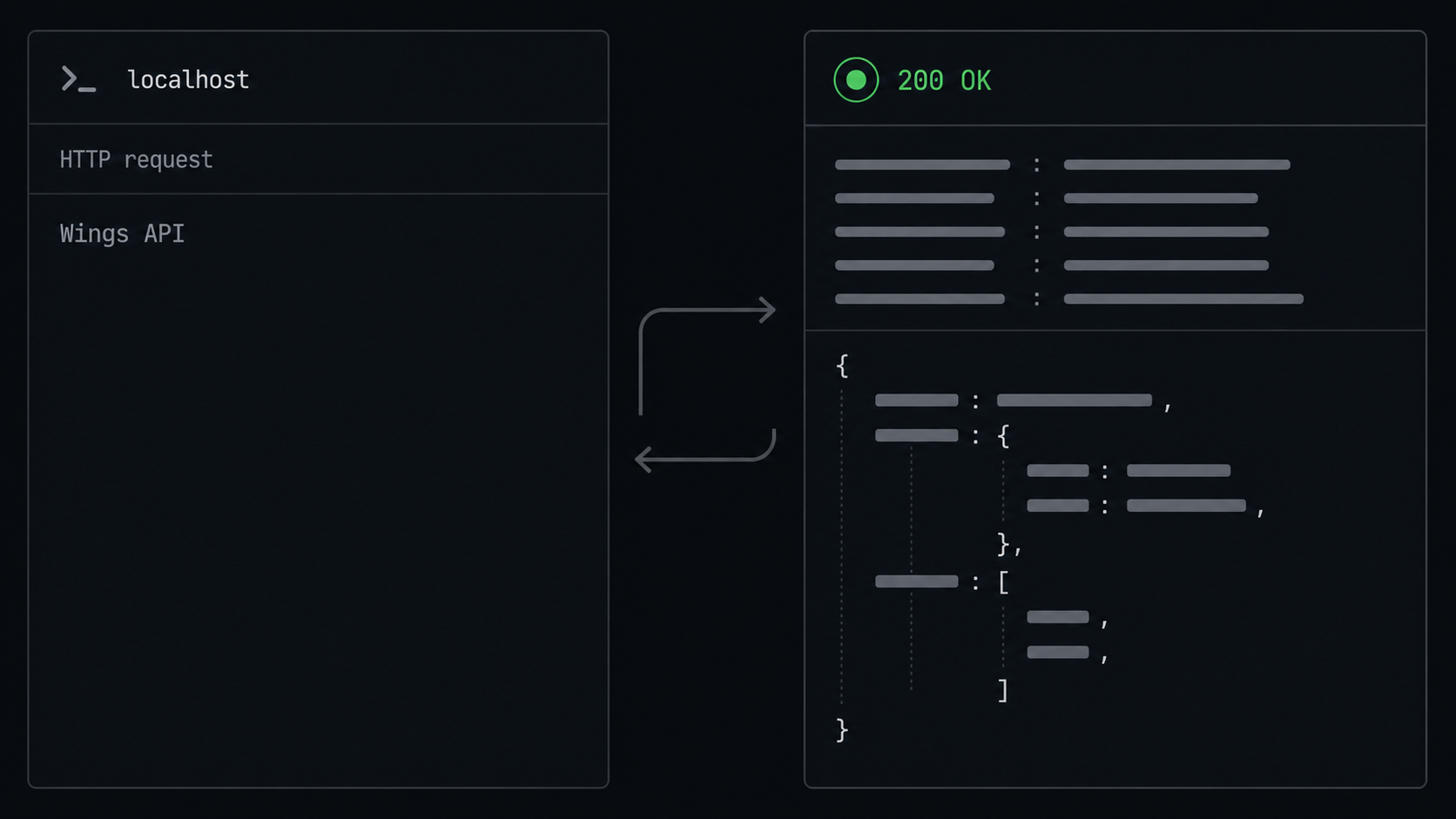
Replace the placeholders below with the address, port, and scheme from the active configuration. Do not assume that the examples’ placeholder values are Calagopus defaults.
export WINGS_SCHEME="http"
export WINGS_HOST="127.0.0.1"
export WINGS_PORT="CONFIGURED_PORT"

curl --silent --show-error --output /dev/null \
  --write-out '%{http_code}\n' \
  "${WINGS_SCHEME}://${WINGS_HOST}:${WINGS_PORT}/openapi.json"
When OpenAPI documentation is enabled, an HTTP 200 response is the clearest expected result. A 404 response can be expected when api.disable_openapi_docs is enabled or when the route differs in the installed release. An authentication response such as 401 or 403 proves that an HTTP service answered, but it does not prove that the request was authorized. A connection refusal or timeout means that you have not yet established application reachability.
To inspect response headers without printing a potentially large body:
curl --head --show-error \
  "${WINGS_SCHEME}://${WINGS_HOST}:${WINGS_PORT}/openapi.json"
If the origin uses HTTPS, do not add --insecure as a permanent workaround. Check that the requested hostname matches the certificate and that the client trusts the issuing certificate authority. A one-time diagnostic that ignores certificate validation can hide a configuration problem that will later prevent the panel from connecting.
Verify from the Localtonet client environment
If our client runs on another LAN device, repeat the request from that device. If it runs in a container, test from the relevant network namespace where practical. The address 127.0.0.1 always means the current machine or container, not automatically the Wings host.
A request that succeeds on the Wings host but fails from the Localtonet client device indicates a local bind, routing, name-resolution, or firewall boundary. Fix that before creating the tunnel.
Record a clean baseline
Save the following non-secret facts in your operational notes:
- The deployed Wings release tag.
- The Compose file and Git revision used.
- The active configuration host path.
- The local API scheme, address, and port.
- The route used for reachability testing.
- The expected HTTP status without credentials.
- Whether OpenAPI documentation is enabled.
- The separate SFTP and game-service listeners.
Do not record node secrets or authentication headers in the same unprotected notes.
Connect the panel to the Wings endpoint safely
A panel-to-Wings connection is more than a browser opening an API document. The panel must use the correct externally reachable node URL, authenticate as expected by Wings, validate TLS as required, and complete ordinary node operations. Real-time console or event features may also depend on WebSocket behavior.
The available Calagopus evidence does not verify the current names of the panel fields, the exact authentication header, a required forwarded-header policy, or a supported reverse-proxy mode. It would be unsafe to invent those values. Use the node configuration generated by the same panel and preserve its credentials exactly. Do not manually translate keys from an unrelated Pterodactyl guide unless the current Calagopus documentation explicitly instructs you to do so.
Prove the generated local configuration works
Confirm that Wings stays connected to the panel and that the panel recognizes the intended node before changing its public address.
Create and verify the public HTTP endpoint
Follow the Localtonet section below, then request the same safe route through the assigned HTTPS hostname.
Enter the public node URL only where documented
Use the complete Localtonet HTTPS origin without appending a guessed API prefix. Preserve any Calagopus setting that controls certificate validation, proxy awareness, or the externally advertised node address.
Run an authenticated panel operation
Refresh node status or perform another non-destructive operation supported by the panel. A successful anonymous OpenAPI request is not an end-to-end panel test.
Test real-time behavior
If your workflow uses live logs, console sessions, or other WebSocket-based behavior, test those features through the public endpoint. Do not declare the deployment complete based only on normal HTTP requests.
Revert if the integration is incomplete
Restore the last working panel node URL and stop the tunnel if authentication, certificate validation, forwarded-host handling, or real-time communication fails.
Test public relay behavior with a non-production node or during a maintenance window. The project’s API-compatibility goal does not replace release-specific integration testing, and basic HTTP reachability does not prove complete panel compatibility.
Create the Localtonet HTTP tunnel
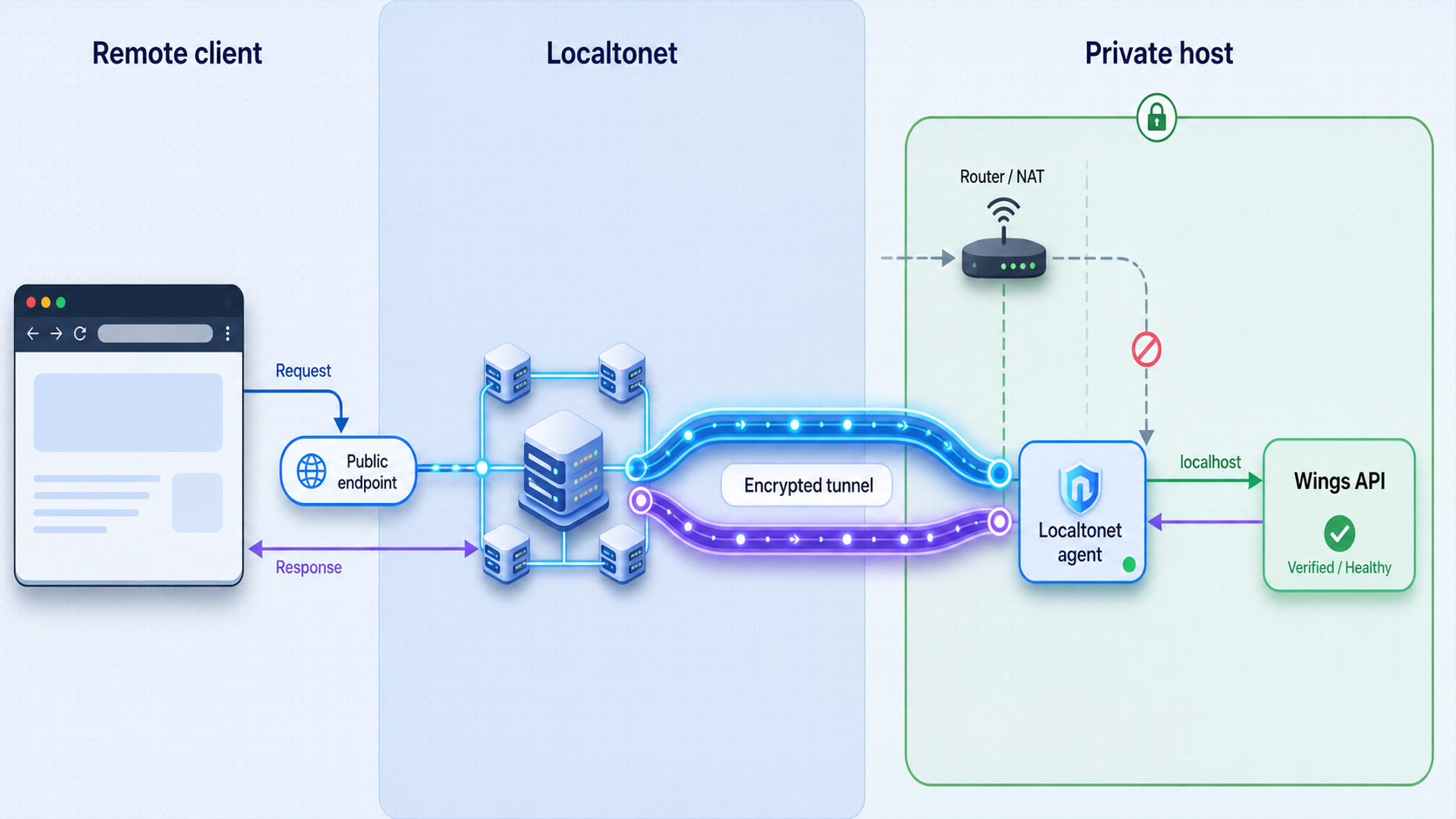
Localtonet exposes a service running on your machine without inbound router port forwarding, firewall changes, VPN setup, or a public IP address. Our client establishes an outbound connection to a Localtonet relay server. The public endpoint remains available only while the selected client is connected and the tunnel is running.
An HTTP tunnel can use a Random Sub Domain, Custom Sub Domain, or Custom Domain process type. All three serve the target through a public HTTPS address. Exact availability can vary by plan or current product configuration, so use only the options shown in your dashboard. Custom-domain DNS requirements should be taken from the current product documentation rather than copied from an older deployment.
Install and run the Localtonet client
Run our client on the Wings host or on another device that has already passed the local API test. Keeping the client on the Wings host can allow the management listener to remain bound to loopback.
Open the HTTP tunnel configuration
Create an HTTP tunnel for the Wings management listener. Do not select TCP merely because Wings runs on a port, and do not enter the SFTP or game-server listener.
Select the Process Type
Choose Random Sub Domain, Custom Sub Domain, or Custom Domain according to the options available to your account and the address required by your tested panel configuration.
Select the AuthToken device
Select the device-specific token belonging to the client that can reach Wings. Keep the token private and confirm that the intended device is connected.
Select an available server
Choose a relay server or region currently shown in the dashboard. Do not hardcode a server code from another tutorial because available values can change.
Enter the verified local IP address
Use the exact address that passed testing from the Localtonet client environment. If both services run directly on the host, that may be a loopback address. If the client is elsewhere, use the reachable LAN address established during verification.
Enter the configured API port
Use the Wings management port from the active configuration. Do not substitute the panel port, host SSH port, Wings SFTP port, Docker API, or a game port.
Start the tunnel
Creating the configuration does not make it active. Use the Start button and wait until both the selected client and the tunnel show that they are running.
Review the current Localtonet HTTP tunnel documentation alongside the dashboard if the interface presents additional release-specific choices.
Verify the public endpoint
Use the assigned hostname and the same safe route used locally:
export PUBLIC_WINGS_URL="https://YOUR-ASSIGNED-HOSTNAME"

curl --silent --show-error --output /dev/null \
  --write-out '%{http_code}\n' \
  "${PUBLIC_WINGS_URL}/openapi.json"

curl --head --show-error \
  "${PUBLIC_WINGS_URL}/openapi.json"
Compare the public result with the local baseline. If the local request returns 200 while the public request times out or returns a relay error, investigate the Localtonet client, tunnel state, and local target. If both return the same 401, 403, or 404, the relay may be working and the response may instead reflect Wings authentication or route configuration.
Do not place an API credential directly in your shell history to force an authenticated test. Use the authentication method documented for your panel and installed Wings release, and store secrets using an appropriate local mechanism.
The endpoint works only while the selected Localtonet client remains connected and the tunnel is running. After a reboot, verify the Wings container, the Localtonet client, and the tunnel independently.
Updates, backups, rollback, and restart recovery
Back up configuration and persistent data
Back up the panel-generated Wings configuration before every change. Also identify every persistent host path and named volume in the resolved Compose file. Those locations can include server data, logs, backup data, and daemon state. The exact set is release-specific, so obtain it from:
docker compose -f compose.yml config
docker volume ls
Stop or quiesce workloads according to your operational requirements before taking a filesystem-level copy. A copy made while game servers are actively writing can be inconsistent. Keep the backup outside the deployment directory and protect it because node configuration can contain credentials.
A minimal configuration backup can use:
cp /HOST/PATH/TO/config.yml \
  /PROTECTED/BACKUP/PATH/config.yml.$(date +%Y%m%d-%H%M%S)
Replace both placeholders with paths from your deployment. A complete recovery plan must also include the persistent server and backup locations shown by Compose, not only config.yml.
Review release notes before updating
The evidenced release-1.1.4 notes include changes to operation abort handling, background image pulls, startup permission caching, WebSocket log streaming, backup-restore events, quota behavior, archive behavior, SELinux or Podman-related behavior, and configuration parsing. This illustrates why an update can affect more than the binary version.
Read the release notes between the installed and target tags. Check for configuration migrations, image changes, altered mounts, database or storage changes, and compatibility requirements with the panel.
Update a release-tagged checkout
After backing up data and choosing a verified target tag:
cd calagopus-wings
git status
git fetch --tags
git checkout TARGET_VERIFIED_RELEASE_TAG
docker compose -f compose.yml config
docker compose -f compose.yml pull
docker compose -f compose.yml up -d --build
docker compose -f compose.yml ps
docker compose -f compose.yml logs --tail=200
Do not proceed if git status shows unexplained local changes. Compare the newly rendered Compose configuration with the version you previously saved, particularly its mounts, ports, images, build context, and environment.
Rollback after a failed update
A binary or container rollback may not reverse configuration, database, or filesystem migrations. Read the release notes before assuming that checking out the previous tag is sufficient. If the project documents a release-specific rollback procedure, follow it.
Where no incompatible migration occurred, the repository portion of a rollback is:
cd calagopus-wings
git checkout PREVIOUS_VERIFIED_RELEASE_TAG
docker compose -f compose.yml config
docker compose -f compose.yml up -d --build
docker compose -f compose.yml ps
docker compose -f compose.yml logs --tail=200
Restore configuration or persistent data only when the release notes and your backup plan establish that doing so is safe. Never overwrite the only current copy before confirming that the backup is readable.
Recover after a host reboot
First confirm Docker is running, then inspect the Compose project:
docker info
cd calagopus-wings
docker compose -f compose.yml ps
docker compose -f compose.yml logs --tail=100
Restart persistence is determined by the Compose service’s restart policy, which you should confirm in docker compose config. If Wings is stopped, start it with:
docker compose -f compose.yml up -d
docker compose -f compose.yml ps
Then test the local API. Only after that succeeds should you check the Localtonet client and tunnel. Starting Wings does not start a stopped Localtonet tunnel, and starting the tunnel does not repair an unhealthy Wings container.
Troubleshooting by service boundary
The Wings container exits or repeatedly restarts
Inspect Compose state and logs:
docker compose -f compose.yml ps
docker compose -f compose.yml logs --tail=300
Look for malformed configuration, unreadable files, missing directories, occupied ports, container-runtime access failures, unsupported storage settings, or permission errors. Compare the mounted configuration path with the path you edited. Do not repeatedly reinstall or add broad privileges without identifying the error.
The local API request is refused
A refusal normally means that no process is listening at the requested address and port. Confirm that the container remains active, inspect its startup logs, and compare the request with the active configuration. If Wings is bound inside a container without the required host port or network path, use the deployment’s documented networking rather than exposing unrelated ports.
The local route returns 404
Check whether api.disable_openapi_docs disables /openapi.json. Also confirm the installed version and base URL. A 404 proves that an HTTP service answered, but it does not establish that the requested route exists or that the complete API is healthy.
The public endpoint fails while the local request succeeds
Confirm that the correct Localtonet client is connected, the HTTP tunnel has been started, and its target exactly matches the working local address and port. If the client runs in another container or device, verify that the chosen address is reachable from that environment.
The public endpoint returns unauthorized
A 401 or 403 response can indicate that the relay reached Wings but the request lacked valid application credentials or permission. Do not disable Wings authentication. Test through the panel using its generated node configuration and inspect the corresponding Wings logs.
The panel reports certificate or hostname errors
Confirm that the panel uses the public HTTPS hostname exactly as assigned and does not connect using a different hostname that fails certificate validation. Do not permanently disable certificate checks. The supplied Calagopus evidence does not define a universal proxy or certificate-bypass setting, so use only options documented for your installed version.
Normal API requests work but the console does not
This can indicate a WebSocket or real-time integration problem. Confirm that the failure occurs through the public path but not through the previous working node path. Inspect browser, panel, and Wings logs without exposing tokens. If the current Calagopus documentation does not support the relay arrangement, revert to the last working topology rather than guessing proxy headers.
SFTP fails through the HTTP URL
SFTP is an SSH-based listener and cannot be reached by appending a path to an HTTPS URL. Confirm whether Wings SFTP is enabled, identify its configured port, review its authentication controls, and decide separately whether a public TCP tunnel is appropriate.
Players cannot connect to the Localtonet API hostname
The management endpoint is not a universal game proxy. Identify each game server’s real TCP, UDP, or combined transport requirements. Localtonet supports TCP, UDP, and combined UDP/TCP tunnel families, but every tunnel must target the correct local service and port.
| Symptom | Likely boundary | First checks |
|---|---|---|
| Container repeatedly exits | Wings or Docker deployment | Compose logs, configuration path, permissions, storage, and runtime access |
| Local connection refused | Wings listener | Container state, bind address, port, and origin scheme |
| Local works, public fails | Localtonet client or tunnel | Connected device, Start state, target IP, and target port |
| Public response is 401 or 403 | Wings authentication | Panel-generated credentials and authorization behavior |
| OpenAPI route returns 404 | Wings route configuration | api.disable_openapi_docs, base URL, and installed release |
| Panel status works but console fails | Real-time or WebSocket path | Panel, browser, and Wings logs; tested relay compatibility |
| SFTP fails through HTTPS | Protocol mismatch | Separate SFTP listener, TCP connectivity, and authentication |
| Game clients cannot connect | Game-service networking | Game-specific TCP or UDP listener rather than the Wings API |
Security checklist for ongoing operation
Frequently asked questions
Is Calagopus Wings guaranteed to be fully compatible with Pterodactyl?
No unconditional guarantee is established by the project statement. The repository says Wings aims to be 100 percent API compatible. Test the exact panel and Wings versions you intend to use, including authentication, node status, server operations, files, backups, and real-time console behavior.
Why does this guide use Docker instead of APT, RPM, APK, or the binary?
Calagopus lists all five methods but identifies Docker as the recommended path for most deployments. Combining several methods would make configuration paths, startup behavior, logs, updates, and rollback ambiguous, so this tutorial follows one deployment model.
What is the default Wings API port?
This article does not assert a universal default because the supplied current evidence does not establish one. Read the panel-generated active configuration, confirm the listener in startup logs, and test that exact address and port locally.
Can Localtonet expose Wings without router port forwarding?
Yes. Our client establishes an outbound connection to a Localtonet relay server, so a verified local HTTP service can receive a public address without inbound router port forwarding, a public IP address, firewall changes, or VPN setup. The client must remain connected and the tunnel must be running.
Does Localtonet’s public HTTPS URL replace Wings TLS or authentication settings?
No. The public URL supplies connectivity to the configured target. You must still preserve the authentication, authorization, certificate-validation, and externally reachable node settings required by your panel and Wings versions.
Is /openapi.json always available?
No. Wings documents the api.disable_openapi_docs option. When documentation is disabled, use an authenticated panel operation or another route documented for the installed release instead of treating a 404 as proof that Wings is offline.
Does an HTTP tunnel also expose Wings SFTP or game servers?
No. SFTP is an SSH-based service and individual games use their own TCP, UDP, or combined listeners. Each service needs a separate connectivity and security decision based on its actual configured protocol and port.
What must be checked after a reboot?
Confirm Docker is running, the Wings Compose service is active, the local API responds, the Localtonet client is connected, and the tunnel is started. These are separate lifecycle states, so success at one layer does not prove that the others recovered.
Connect your verified Wings listener with Localtonet
Deploy the release-tagged Docker configuration, supply the correct panel-generated node configuration, and prove the management listener locally first. Then create a Localtonet HTTP tunnel for only that address and port, retain Wings authentication, and validate the complete panel workflow before using the public endpoint in production.
Get Started Free →

