

Run an authoritative multiplayer server locally and make it reachable without opening router ports
Colyseus is an open-source multiplayer framework for Node.js with room-based matchmaking, real-time state synchronization, and client SDKs for major game engines and platforms. This guide builds a minimal room with a concrete health endpoint and an echo message, verifies both HTTP and WebSocket behavior locally, and then publishes the same service through a Localtonet HTTP tunnel. The Localtonet client creates an outbound relay connection, so the workflow does not require inbound router port forwarding, firewall changes, VPN setup, or a public IP address.
📋 What's in this guide
How Colyseus behind NAT works
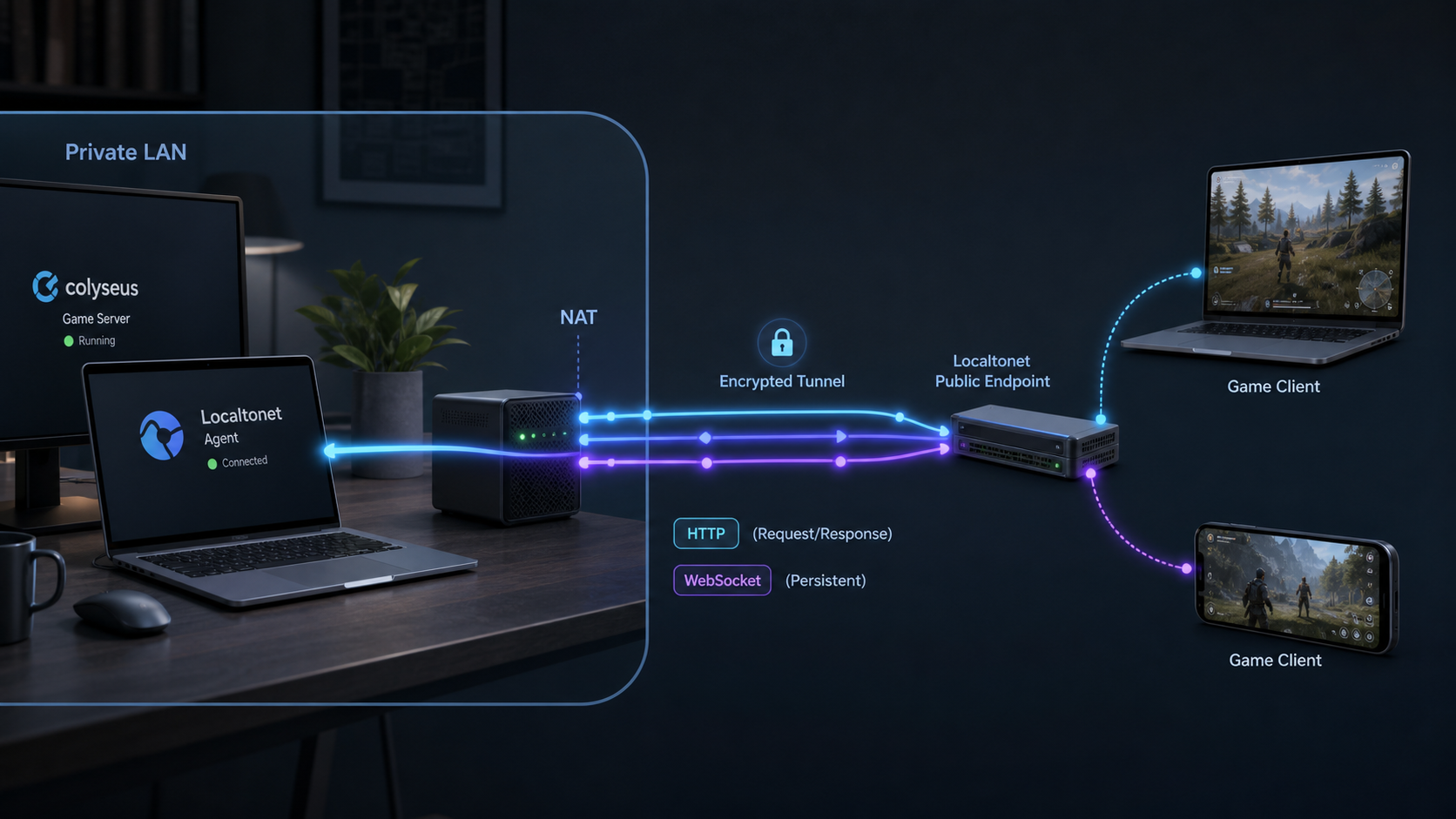
Colyseus is an authoritative multiplayer framework for Node.js. In an authoritative architecture, the server owns the important game rules and shared state. Clients submit actions or inputs, and the server decides whether those actions are valid and how they affect the game. Colyseus supplies room-based matchmaking, reconnection support, synchronizable data structures, and SDKs for JavaScript, Unity, Godot, GameMaker, Defold, Haxe, C, Construct, and other supported environments.
A typical Colyseus connection has two related networking phases. The client first performs HTTP-based matchmaking to create or join a room. It then establishes a persistent WebSocket connection for room messages and synchronized state. Publishing only an ordinary web page is therefore not enough. The public route must support both the initial HTTP requests and the WebSocket upgrade used by the room connection.
A server running on a laptop, workstation, home server, or another private device is often behind network address translation. NAT allows the device to initiate outbound connections but normally does not direct unsolicited inbound internet traffic to the process. Carrier-grade NAT, changing public addresses, and networks where you do not control the router can make conventional port forwarding unavailable.
With Localtonet, our client runs on the Colyseus host or another device that can reach it. The client establishes an outbound connection to a selected Localtonet relay server. A Localtonet HTTP tunnel maps a public HTTPS address to the private Colyseus IP address and port. HTTP tunnels support the web traffic and WebSocket connections used by this deployment, so matchmaking and the persistent room connection can use the same public endpoint.
First prove that the Colyseus process, HTTP route, matchmaking request, WebSocket connection, and room message all work locally. Add Localtonet only after those checks pass. This separates an application problem from a tunnel or remote-client problem.
Prerequisites and supported setup assumptions
The current Colyseus quickstart requires Node.js and uses npm. The official project page does not publish a numeric minimum Node.js version in the evidence available for this revision, so this tutorial does not guess one. Install a current Node.js release supported by the Colyseus version generated for your project. If the generated package.json, installation output, or current Colyseus documentation specifies a narrower runtime range, that project-specific requirement takes precedence.
Confirm that Node.js and npm are available:
node --version
npm --version
Both commands should print version information. If either command is missing, fix the Node.js installation or terminal path before proceeding. Package installation failures at this stage are local runtime problems, not NAT or Localtonet problems.
You also need permission to create files and install npm packages, a terminal that can remain open while the server runs, and a second terminal for the verification client. For public access, install the Localtonet client on the same machine as Colyseus or on another device that can directly reach the Colyseus listening address.
| Requirement | Purpose | Verification |
|---|---|---|
| Node.js and npm | Run the Colyseus server, generator, and JavaScript verification client. | Run node --version and npm --version. |
| Generated Colyseus project | Provides the current dependencies, scripts, server entry point, and configuration structure. | Generate the project and confirm that npm start launches it. |
| Known room registration | The client must request a room name registered by the server. | This guide registers echo_room explicitly. |
| Known HTTP route | Provides a concrete readiness check instead of relying on an undocumented root page. | This guide defines /health and expects {"ok":true}. |
| Localtonet client and device token | Identifies the client device and establishes the outbound relay connection. | Authenticate the intended device and keep its device-specific token private. |
| External test device | Proves the public route works independently of the host LAN. | Use a separate internet connection after local tests pass. |
This tutorial uses the standard local Colyseus endpoint http://localhost:2567 for the generated server. Keep the startup output visible and verify the actual port used by your project. If your generated project or environment changes the port, use that value consistently in the health check, client script, and Localtonet tunnel target.
A development preset may contain playground, monitoring, debugging, or example functionality. Review the generated application before publishing it. The game endpoint, operational tools, and administrative routes do not automatically have the same access requirements.
Generate and start the Colyseus project
The current official Colyseus quickstart uses three commands. Run them from the parent directory where you want the new my-server project to be created:
npm create colyseus-app@latest ./my-server
cd my-server
npm startGenerate the project
Run npm create colyseus-app@latest ./my-server. The generator may ask you to select a preset. Colyseus 0.18 documents minimal, realtime-action, and turn-based presets. Choose the minimal preset for this tutorial when it is offered.
Enter the generated directory
Run cd my-server. Keep the generated dependency manifest and lockfile because they record the versions used by this installation.
Start the generated server
Run npm start. A successful process remains active and reports its local endpoint. Resolve compilation, dependency, or address-binding errors before changing the room configuration.
Stop the initial process with Ctrl+C before editing the project. The current generated TypeScript application uses an application configuration where rooms are registered with defineRoom(). The following section replaces ambiguity with a specific room, route, and client test.
If the generator creates a materially different configuration layout because a newer Colyseus release has changed the template, do not paste code into an unrelated file. Use the generated application configuration that is imported by its server entry point, and preserve the generated startup mechanism. The room definition and registration concepts remain the same, but a future template may move the files.
The @latest generator selector is useful when starting a new project. Before production deployment, commit the dependency manifest and lockfile, review migration notes, and test upgrades in a separate environment. Do not update a live multiplayer server by changing version numbers without validating server and client compatibility.
Create a minimal room, register it, and add a health route
The minimal test room accepts a ping message and replies to that same client with pong. This deliberately small contract proves that matchmaking completed, the room WebSocket opened, a client message reached the server, and a server message returned to the client.
Create the room implementation
Create src/rooms/EchoRoom.ts with the following content:
import { Room, Client } from "colyseus";

export class EchoRoom extends Room {
  maxClients = 4;

  messages = {
    ping: (client: Client, payload: unknown) => {
      client.send("pong", payload);
    },
  };

  onJoin(client: Client) {
    console.log(`joined: ${client.sessionId}`);
  }

  onLeave(client: Client) {
    console.log(`left: ${client.sessionId}`);
  }
}
The room limits the test to four clients, logs joins and leaves using the current sessionId property, and handles one message type. The payload is returned only to the sender. This is a connectivity test, not a complete game protocol.
Register the room and health endpoint
Open the generated src/app.config.ts and configure the application as follows. If the generated file already contains imports, routes, or development tools you intend to keep, merge the echo_room registration and /health route rather than deleting required project setup.
import { defineServer, defineRoom } from "colyseus";
import { EchoRoom } from "./rooms/EchoRoom";

export default defineServer({
  rooms: {
    echo_room: defineRoom(EchoRoom),
  },

  express: (app) => {
    app.get("/health", (_request, response) => {
      response.json({ ok: true });
    });
  },
});
The key used in the rooms object is the matchmaking name. The test client must request echo_room exactly. The /health route provides a known HTTP response and avoids treating an absent root page as a server failure.
Create a repeatable client verification script
Ensure that the JavaScript client SDK is installed in the project:
npm install @colyseus/sdk
Create a scripts directory, then create scripts/verify-client.mjs:
import { Client } from "@colyseus/sdk";

const endpoint = process.argv[2] || "http://localhost:2567";
const client = new Client(endpoint);

const timeout = setTimeout(() => {
  console.error("Timed out waiting for pong.");
  process.exit(1);
}, 10000);

try {
  console.log(`Connecting to ${endpoint}`);

  const room = await client.joinOrCreate("echo_room");
  console.log(`Joined echo_room as ${room.sessionId}`);

  room.onMessage("pong", async (payload) => {
    clearTimeout(timeout);
    console.log("Received pong:", payload);
    await room.leave();
    process.exit(0);
  });

  room.send("ping", { text: "hello from verification client" });
} catch (error) {
  clearTimeout(timeout);
  console.error("Verification failed:", error);
  process.exit(1);
}
The endpoint is accepted as a command-line argument. With no argument, the script tests http://localhost:2567. Later, the same script will accept the public Localtonet HTTPS URL. Using the identical room and message check on both paths makes failures easier to compare.
Do not treat it as a secure game backend. A real room should authenticate players where required, authorize room access, validate every client-controlled value, enforce game rules on the server, and apply suitable abuse controls. Remove diagnostic logging that exposes sensitive information before production use.
Verify HTTP, matchmaking, and WebSockets locally
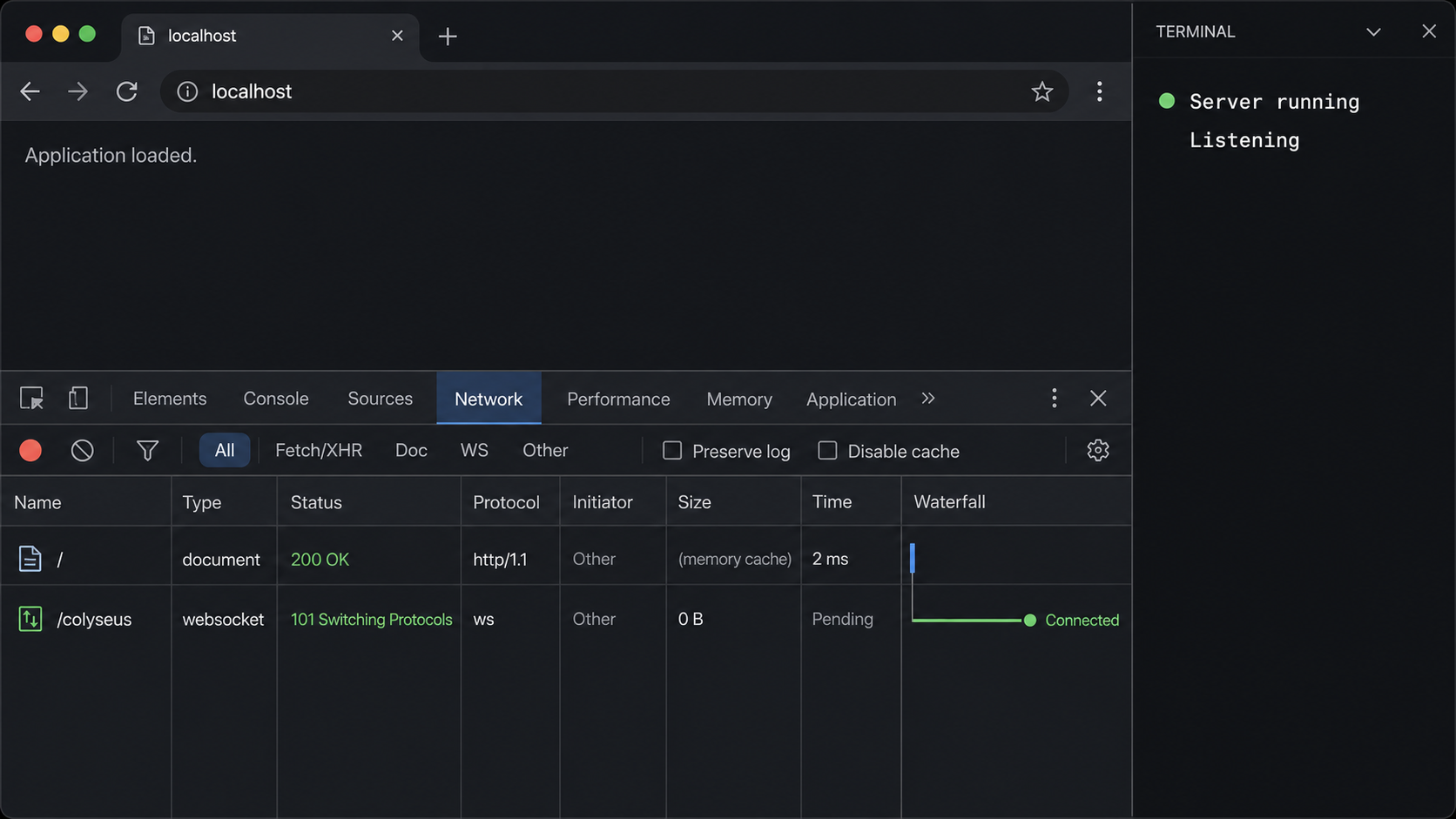
Start the configured server again from the project directory:
npm start
Leave that terminal open. The process should remain active without compilation or binding errors. Confirm that the output reports the expected local endpoint. The commands below use port 2567; substitute the port reported by your project if it differs.
Check the explicit HTTP health route
Request http://localhost:2567/health. This tests the same HTTP server that hosts the Colyseus matchmaking endpoint.
Join the registered room
Run the verification script from a second terminal. It asks Colyseus to join or create echo_room.
Confirm bidirectional room messaging
The client sends ping through the room connection. The server replies with pong, proving the WebSocket path and room handler work.
Check the server log
The server terminal should show a join and leave for the same test session. There should be no unhandled room exception.
Test the health route with a browser or an HTTP command-line client:
curl http://localhost:2567/healthThe expected body is:
{"ok":true}Now run the complete room test from another terminal:
node scripts/verify-client.mjs http://localhost:2567A successful result prints messages similar to the following. Session identifiers vary on every run:
Connecting to http://localhost:2567
Joined echo_room as <session-id>
Received pong: { text: 'hello from verification client' }
The server terminal should also log the join and leave events. Together, these results establish four facts: the HTTP listener is available, matchmaking recognizes echo_room, the WebSocket room connection opens, and application messages travel in both directions.
Do not continue to tunnel configuration if either local test fails. An HTTP success without a room success points toward registration, SDK compatibility, or room logic. A room timeout with an exception in the server terminal points toward the application. A connection refusal usually means the process is stopped, the host or port is wrong, or the service did not bind successfully.
Expose Colyseus with a Localtonet HTTP tunnel
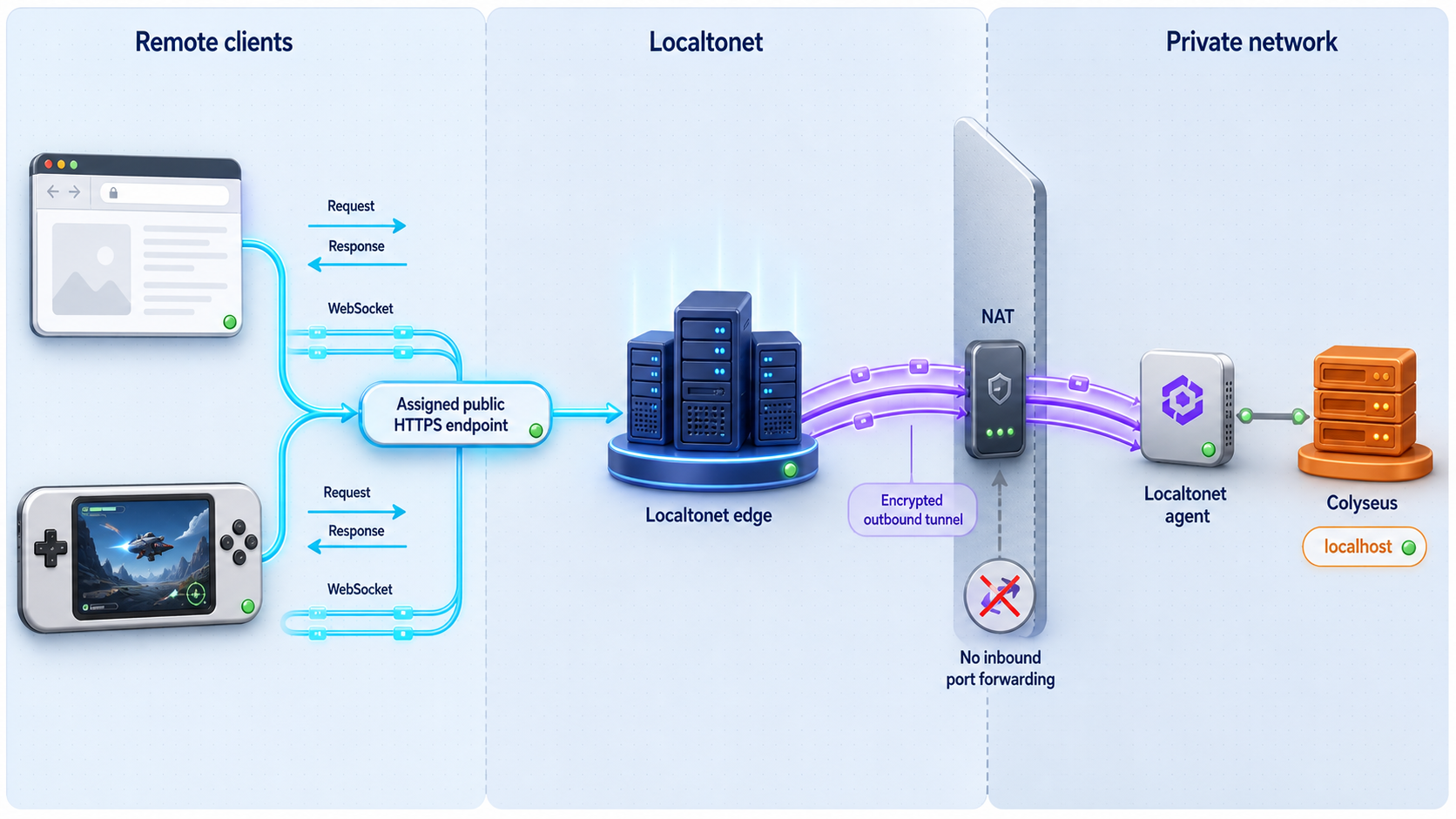
Keep Colyseus running and create an HTTP tunnel to the endpoint that passed the local tests. The HTTP tunnel is the appropriate tunnel family because Colyseus combines HTTP matchmaking with a WebSocket room connection. Localtonet HTTP tunnels handle the HTTP request and WebSocket upgrade against the same configured local target.
The exact relay choices and available process types can vary by account, client version, region, or deployment. Select values shown in your current dashboard rather than copying a server code or region from an old article.
Install and run the Localtonet client
Install our client for the host operating system on the Colyseus machine or another device that can reach it. Keep the client connected while public access is required.
Open the HTTP tunnel configuration
In the Localtonet dashboard, create an HTTP tunnel. HTTP is used here because the target needs HTTP/S and WebSocket handling through a public web endpoint.
Select the process type
Choose an available Random Sub Domain, Custom Sub Domain, or Custom Domain process type. All serve the target content at a public HTTPS address. For an initial test, an assigned subdomain avoids adding a separate custom-domain DNS task.
Select the device token and relay server
Select the device-specific AuthToken for the client that will run the tunnel, then choose an available server or region from the dashboard. Keep the token private.
Enter the verified local target
If Localtonet and Colyseus run on the same machine, use the locally reachable address and the verified Colyseus port, such as 127.0.0.1 and 2567. If they run on different devices, use the Colyseus host's reachable LAN address and test that path first.
Start the tunnel
Creating the configuration does not activate it. Use the Start button and wait until the selected Localtonet client and tunnel are connected.
Record the public HTTPS URL
Copy the public address assigned to the running tunnel. Use that URL for both the health check and the Colyseus client test.
For current dashboard details, see our Localtonet HTTP tunnel documentation. Custom-domain DNS requirements should always be taken from the current documentation rather than inferred from an assigned subdomain.
The public URL works only while Colyseus is running, the selected Localtonet client is connected, and the tunnel is started. A saved tunnel configuration is not the same as an active tunnel. Stopping either process interrupts new connections and can terminate active game sessions.
Verify the public endpoint with a real Colyseus client
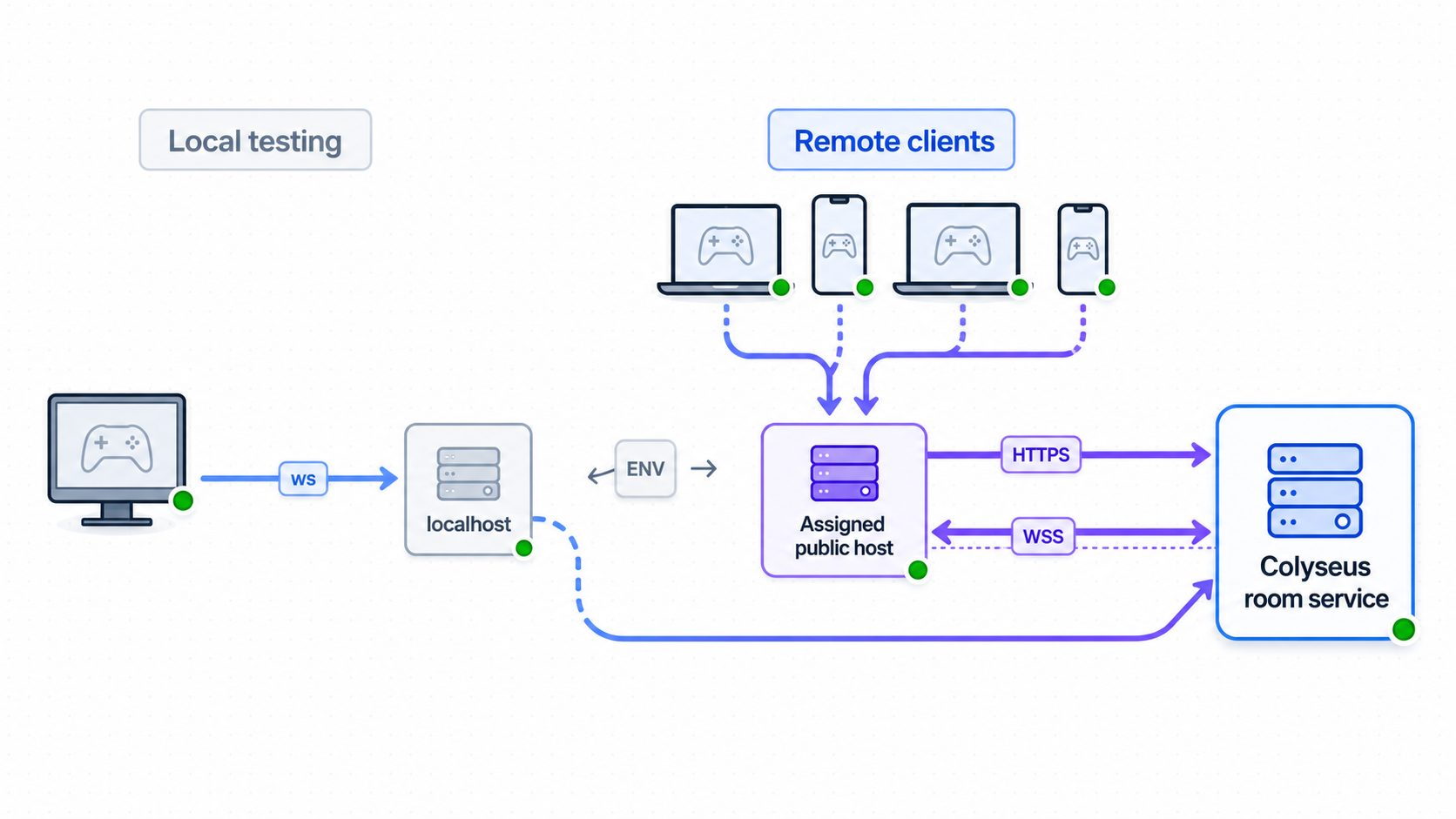
First test the known health route. Replace the example host with the complete HTTPS URL assigned to your tunnel:
curl https://your-assigned-public-host/healthThe expected response remains:
{"ok":true}Next, pass the public HTTPS URL to the same verification script used locally:
node scripts/verify-client.mjs https://your-assigned-public-host
The expected result is a successful join followed by the returned pong payload:
Connecting to https://your-assigned-public-host
Joined echo_room as <session-id>
Received pong: { text: 'hello from verification client' }
This test is stronger than opening the public URL in a browser. The health request confirms public HTTP forwarding. The script then exercises Colyseus matchmaking, the WebSocket upgrade, the room connection, and bidirectional application messaging.
Run the final test from a device outside the server's LAN, such as a computer or phone on another internet connection. If the script still succeeds, the client is using the public tunnel rather than a private route available only inside your network.
A production JavaScript or TypeScript client uses the same endpoint pattern:
import { Client } from "@colyseus/sdk";

const client = new Client("https://your-assigned-public-host");
const room = await client.joinOrCreate("echo_room");

room.onMessage("pong", (payload) => {
  console.log("Server replied:", payload);
});

room.send("ping", { text: "hello" });
Replace echo_room with the room name registered by your real application. Do not append a guessed WebSocket path or manually convert the endpoint unless the current SDK documentation for your target platform requires a different endpoint format. The JavaScript SDK accepts the HTTPS server endpoint and performs the required matchmaking and room connection flow.
SDK syntax differs across platforms. For example, current official examples show HTTPS endpoints for JavaScript, Unity, GameMaker, Defold, Haxe, and C clients, while the Godot example uses a secure WebSocket endpoint. Follow the endpoint format documented for the SDK you ship rather than mechanically copying JavaScript syntax into another engine.
Players need only the public game endpoint and application credentials intended for them. A Localtonet device token identifies the tunnel client and must remain on the trusted host. Do not place it in browser bundles, game builds, repositories, screenshots, or support logs.
Secure and operate the deployment
A reachable prototype is not automatically a production-ready multiplayer service. Localtonet supplies connectivity to the configured target. It does not replace authentication, authorization, input validation, process supervision, monitoring, persistence, backups, or capacity planning.
Keep game decisions authoritative
Treat every client message as untrusted input. Validate its type, shape, range, rate, ownership, and relationship to the current room state. A client should not be able to assign itself a privileged role, move another player's entity, submit impossible coordinates, or perform an action after it is no longer a room member.
Authenticate players when identity matters, and authorize each room join on the server. Do not assume that possession of the public URL grants permission. Public reachability and application authorization solve different problems.
Restrict development and administrative interfaces
Review playground, monitor, profiler, debug, and administration routes before exposing the server. Ordinary players usually do not need access to these interfaces. Colyseus 0.18 added guard options for monitor and playground use and introduced basic authentication middleware for HTTP routes, but those controls still require deliberate application configuration.
Colyseus 0.18 also makes playground data endpoints return a 404 on production mounts unless a guard is configured. This is specifically a 0.18 behavior and should not be assumed for an older project. Check the release and migration documentation for the version actually deployed.
Plan for process and host continuity
Colyseus and the Localtonet client are separate running processes. A closed terminal, server exception, operating system restart, sleeping laptop, lost network connection, or stopped tunnel can disconnect players. Persistent deployments should use an always-on host and a process supervision method suitable for that operating system.
Decide how deployments affect active rooms. Restarting the process interrupts WebSocket sessions and can discard in-memory state. If the game requires durable accounts, inventories, leaderboards, or recoverable room data, implement and test an appropriate persistence design. Colyseus 0.18 includes an official database package based on Drizzle ORM for SQLite and PostgreSQL use cases, but that package is not required for this basic tunnel workflow.
Monitor both failure domains
Monitor application exceptions, room creation failures, rejected joins, memory, CPU, event-loop behavior, and connection counts. Separately monitor whether the Localtonet client and tunnel remain connected. A connected tunnel cannot make an exited Colyseus process healthy, and a healthy local server is not publicly reachable through a stopped tunnel.
Apply Colyseus 0.18 migration notes only to 0.18
The following details are version-specific and are not prerequisites for the minimal room tutorial:
- A Schema supports at most 63 fields in Colyseus 0.18. Inherited fields count toward the limit.
client.idwas removed. Useclient.sessionId, as the room example in this guide does.setMetadata()andsetMatchmaking({ metadata })replace metadata instead of merging it.- Existing email and password users of
@colyseus/authhave migration considerations related to the new password hasher. - Version 0.18 adds request and response messaging, prediction and lag-compensation features, room plugins, configurable SDK reconnection, and other capabilities that are not needed for the echo test.
If an existing project runs an earlier release, do not apply these changes independently. Follow the migration path for the source and target versions, verify client SDK compatibility, and test serialized state, room lifecycle, matchmaking, and reconnection before deployment.
Troubleshooting the complete connection path
| Symptom | Likely layer | What to check |
|---|---|---|
npm create fails |
Node.js or npm environment | Confirm Node.js and npm availability, filesystem permissions, network access to npm, and the first reported error. |
npm start exits |
Build or server startup | Check TypeScript errors, missing packages, generated scripts, port conflicts, and invalid imports. |
/health returns 404 |
Application configuration | Confirm the route is in the configuration imported by the running entry point and restart the server after changes. |
| The health route works but joining fails | Room registration or SDK | Confirm the server registers echo_room, the client requests the exact same name, and the server logs contain no room exception. |
| The client joins but no pong arrives | Room message handler | Check that the handler is named ping, the client listens for pong before sending, and both sides use compatible message names. |
| Local access works only on the Colyseus host | Listening interface or LAN reachability | If Localtonet runs elsewhere, make Colyseus reachable on an appropriate local interface and test it directly from the tunnel device. |
| The public health route does not respond | Tunnel lifecycle or target | Confirm Colyseus is running, the Localtonet client is connected, the HTTP tunnel is started, and the configured local IP and port are correct. |
| Public HTTP works but the room test fails | WebSocket or client workflow | Check the public endpoint passed to the SDK, room name, WebSocket error, server logs, and whether a proxy or client appended an incorrect path. |
| Players disconnect when the host is idle | Host continuity | Check sleep settings, process exits, terminal closure, tunnel state, Localtonet client state, and network interruptions. |
| An upgrade breaks room behavior | Version migration | Restore the tested lockfile when appropriate, review migration notes, and compare server and client SDK versions before redeployment. |
Diagnose from the inside out
Start on the Colyseus host. Request /health locally and run the local verification script. If either fails, Localtonet is not the cause. Fix the server process, route, room registration, dependency versions, or application code first.
If Localtonet runs on another device, repeat the health and room tests from that device using the Colyseus host's LAN address. A service bound only to loopback on the Colyseus machine cannot be reached by another tunnel device. Do not create the tunnel until this intermediate path works.
Next, check that the intended Localtonet device is connected, the selected relay server is available, the tunnel is started, and the target exactly matches the tested local IP address and port. Avoid changing several values at once because doing so makes the successful correction difficult to identify.
Finally, run the public health and room tests from an outside network. Compare the client timestamp with the Colyseus logs. If no request reaches Colyseus, focus on the public endpoint, tunnel state, and target mapping. If Colyseus receives and rejects the request, focus on room registration, authentication, authorization, SDK compatibility, and room exceptions.
Avoid exposing every local service, removing player authorization, publishing administrative routes, or turning off host protections merely to make a test pass. Identify the failing layer and apply the smallest configuration change required for the intended game endpoint.
Frequently asked questions
Which local port does this tutorial use?
The tutorial uses the standard local Colyseus endpoint http://localhost:2567. Confirm the actual endpoint printed by your generated project. If your configuration or environment uses another port, use that value in the health request, verification client, and Localtonet tunnel target.
Why does the guide add a health route?
The explicit /health route gives you a reproducible HTTP test with a known response. It avoids assuming that the root path contains a page. It does not replace the room client test, which separately verifies matchmaking and WebSocket messaging.
Why use a Localtonet HTTP tunnel instead of a raw TCP tunnel?
This Colyseus workflow uses HTTP matchmaking followed by a WebSocket room connection. A Localtonet HTTP tunnel provides a public HTTPS endpoint and handles the corresponding WebSocket traffic to the same local service. A raw TCP tunnel is intended for direct host-and-port forwarding rather than this web-oriented flow.
Do I need router port forwarding or a public IP address?
No. The Localtonet client establishes an outbound connection to our relay server. The resulting tunnel reaches the configured local Colyseus target without inbound router port forwarding, firewall changes, VPN setup, or a public IP address.
Does creating a tunnel make it active immediately?
No. Creating a tunnel saves its configuration. You must use the Start button, and the selected Localtonet client must remain connected. Colyseus must also continue running at the configured target.
Is a successful health response enough to verify Colyseus?
No. It proves that an HTTP route is reachable. The supplied verification client also performs matchmaking, joins echo_room, opens the room connection, sends ping, and waits for pong. Both checks are needed to validate this deployment.
Can the Localtonet client run on a different machine?
Yes, if that machine can directly reach the Colyseus IP address and port over the local network. Test the health route and room script from the Localtonet machine before creating the tunnel. A loopback-only service on another host is not reachable from it.
Does Localtonet manage player authentication and room permissions?
No. Localtonet provides public connectivity to the local service. Your Colyseus application remains responsible for player authentication, authorization, room access rules, message validation, abuse controls, and administrative security.
Will the public endpoint work while the host is asleep?
No. Availability depends on the host, Colyseus process, local network, Localtonet client, and running tunnel. Sleep, shutdown, process termination, or connectivity loss can interrupt active sessions.
Make your verified Colyseus server reachable with Localtonet
Build and test the room locally, start our client on a device that can reach it, create an HTTP tunnel to the verified address and port, and repeat the same health and room tests through the assigned public endpoint.
Get Started Free →

