

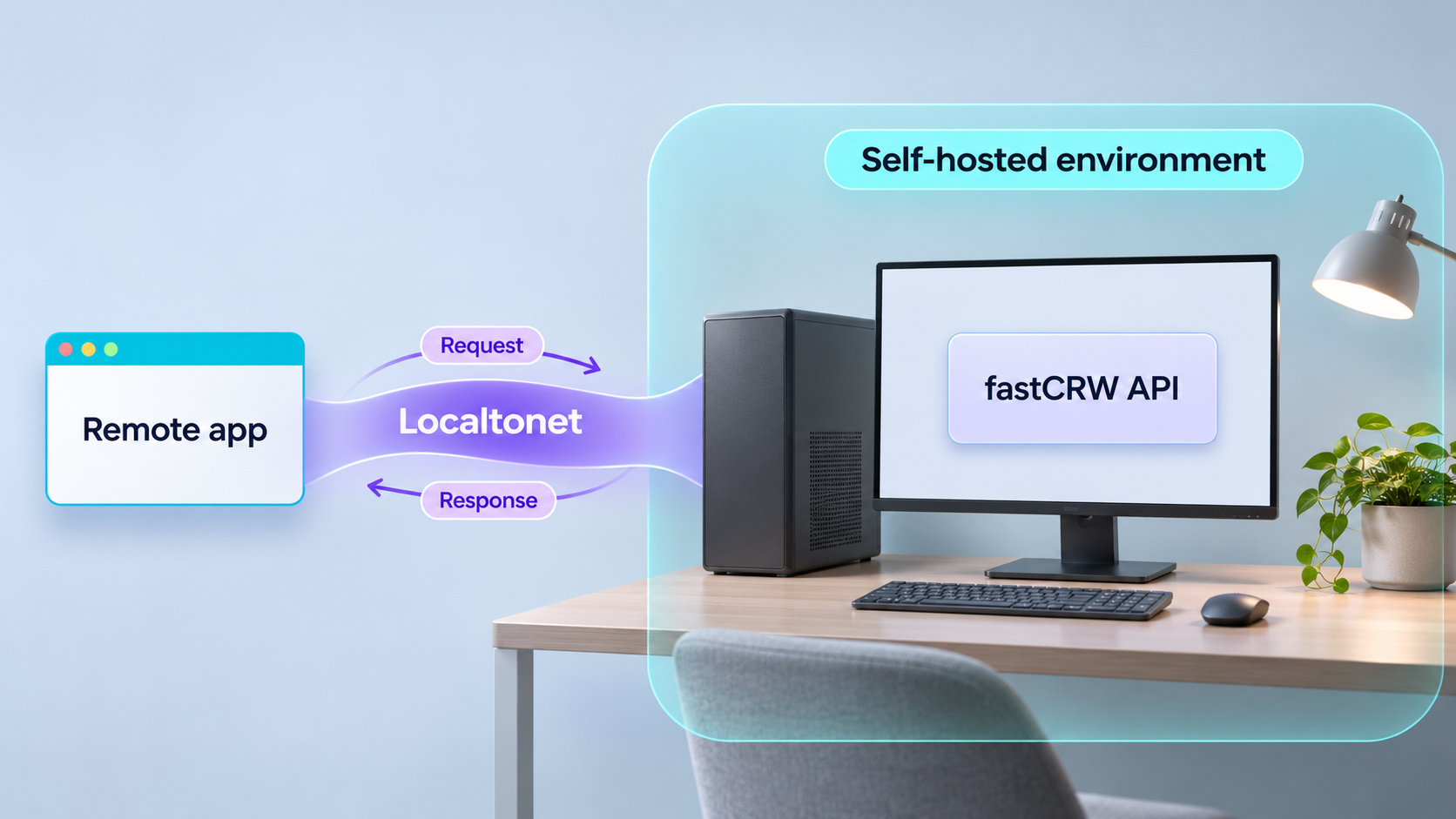
Run a Firecrawl-compatible scraping API on your own machine, verify it locally, then make it reachable by authorized remote applications
fastCRW, also called CRW, is an open-source web scraping, crawling, search, mapping, and extraction service written in Rust. Its official self-hosting documentation provides a short Docker path that runs the HTTP API at http://localhost:3000. This guide starts with that installation, explains how to test the API independently, and only then connects the verified service to an HTTP tunnel with Localtonet. Because the self-hosted API does not require an authorization header by default, we also cover the security decisions that must be made before remote access.
📋 What's in this guide
What you are building
The completed workflow has two separate layers. First, fastCRW runs as a self-hosted HTTP application on your machine. The official Docker quick start publishes the service at http://localhost:3000. Second, the Localtonet client runs on a device that can reach that address and establishes an outbound connection to one of our relay servers. The HTTP tunnel gives an authorized remote application a public HTTPS address that forwards requests to the local API.
Keeping those layers separate is important. Installing the crw command-line client does not, by itself, prove that an HTTP server is running. Likewise, creating a Localtonet tunnel cannot repair a fastCRW container that failed to start or an endpoint that does not work locally. The reliable order is to install the API, make a real local scrape request, check the response, and only then configure remote connectivity.
fastCRW describes itself as an open-source Firecrawl-compatible scraper and crawler. Its documented self-hosted routes cover search, scraping, crawling, URL mapping, and extraction. This makes it useful when an application, automation process, or AI workflow needs web content through an HTTP interface while you retain control of the machine running the service.
/v1/scrape and request output such as Markdown. This is the best first functional test because it checks the API and an outbound fetch together.
/v1/search. Search requests can specify a query, result limit, language, time filter, and selected source categories.
Self-hosting responsibilities
Self-hosting provides deployment control, but it also transfers operational responsibility to you. You must decide how the service is authenticated, who may call it, how logs are retained, when images are upgraded, and what resource limits are appropriate. You are also responsible for confirming that scraping activity complies with target-site terms, applicable laws, robots policies where relevant, and your own organizational rules.
Scraping is an outbound network workload. The machine running fastCRW must be able to resolve DNS names and reach the websites being requested. Localtonet solves the separate inbound connectivity problem for remote clients. It does not replace fastCRW's outbound access to target websites.
| Layer | Purpose | How to verify it |
|---|---|---|
| Docker host | Runs the fastCRW container and publishes local port 3000 | Confirm Docker starts the image without an immediate error |
| fastCRW API | Accepts scrape, crawl, map, search, and extraction requests | Send a local request to http://localhost:3000/v1/scrape |
| Outbound web access | Allows fastCRW to fetch a requested target URL | Check that the scrape response reports success and contains data |
| Localtonet client | Creates an outbound connection from the service host to our relay | Confirm that the selected device is connected |
| HTTP tunnel | Forwards the public HTTPS address to the local fastCRW API | Repeat the known scrape request through the assigned public URL |
Prerequisites and deployment choices
This guide uses the shortest self-hosted path documented by fastCRW: a published Docker image with local port 3000 forwarded to container port 3000. You need a machine with Docker installed, permission to run containers, an available local port 3000, internet access for downloading the image, and outbound access to the websites you intend to process.
You also need an HTTP client for verification. The examples use curl. It is commonly available on Linux and macOS and can also be installed on other systems. The Docker command is the same wherever the installed Docker environment accepts the standard docker run syntax.
For the later remote-access section, install and run the Localtonet client on the same machine or on another device that can reach the fastCRW service. Running it on the same machine keeps the local target simple because the client can forward to 127.0.0.1 on port 3000.
Check whether port 3000 is already occupied
The official quick start binds host port 3000. If another service already uses that port, Docker will normally refuse the binding. Port-inspection commands vary by operating system, so this guide does not prescribe one universal command. You can stop or reconfigure the conflicting service, or consult the fastCRW deployment documentation before selecting a different host mapping. If you change the host-side port, use that same value for local tests and as the Localtonet tunnel target.
Docker versus the fastCRW CLI
fastCRW also documents a CLI installer for macOS and Linux on Intel and ARM systems:
curl -fsSL https://fastcrw.com/install | shAfter CLI installation, a direct command such as the following can process a URL:
crw https://example.comThat is useful for local, interactive work. It is not the installation path used in this guide because a successful one-shot CLI command does not establish that a persistent REST API is listening on port 3000. Remote applications need the server deployment, so we use the documented Docker image for the API.
A pipeline ending in sh executes content obtained over the network. Use the command only when you trust the official location and are comfortable with that installation model. The Docker path below is sufficient for this REST API tutorial, so installing the separate CLI is optional.
Choose the minimum deployment that proves your use case
The fastCRW documentation also describes more involved deployment paths, including Docker Compose and profiles for browser-backed rendering. Those deployments add components and operational decisions. The single Docker command is a better baseline when the immediate goal is to verify the core API and connect a client to it. If your real workload depends on JavaScript rendering, stealth behavior, external providers, or another optional component, validate that requirement against the current fastCRW self-hosting documentation before treating the basic container as production-ready.
Install and start the self-hosted fastCRW API
The official fastCRW quick start consists of starting the published container and then making a local request. We preserve that sequence below. The image reference does not pin a version, so it follows the image publisher's current default tag. For a controlled production rollout, evaluate and pin an appropriate release according to your update policy rather than assuming that every future image is configuration-compatible.
Start the fastCRW Docker container
Run the official image and publish container port 3000 on host port 3000. This foreground command keeps the container attached to the terminal, which makes startup output immediately visible.
docker run -p 3000:3000 ghcr.io/fastcrw/crwMake the documented local scrape request
Keep the container running and use a second terminal for the request. The JSON body asks fastCRW to fetch https://example.com and return Markdown.
curl -X POST http://localhost:3000/v1/scrape \
  -H "Content-Type: application/json" \
  -d '{"url":"https://example.com","formats":["markdown"]}'
The container must remain running while you use the API. If you started it in the foreground, closing that terminal or interrupting the process stops the service. That behavior is useful during initial testing because the lifecycle is visible and easy to control. For unattended deployment, use a container-management approach that matches your operating environment, but do not copy an unreviewed restart, persistence, or upgrade policy into production.
Docker may need to retrieve image layers before the application starts. Wait for the process to finish starting before deciding that the API is unavailable. Subsequent starts can be faster when the required layers are already present locally.
Verify fastCRW before adding a tunnel
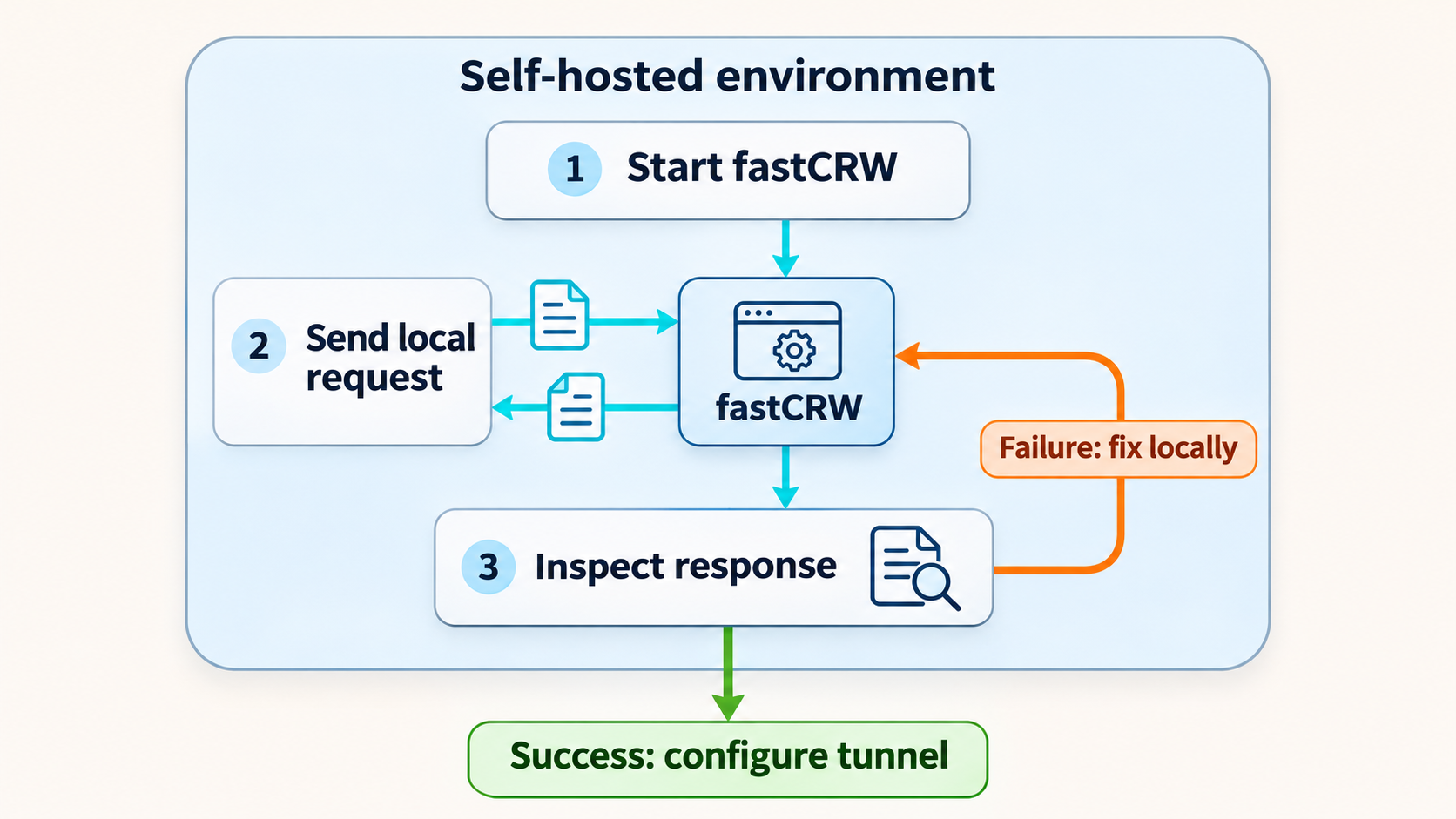
A useful verification process checks more than whether something accepted a TCP connection. For a scraping API, a functional test should confirm that the application accepted valid JSON, reached a target website, processed the response, and returned usable data. The documented /v1/scrape request does exactly that.
Inspect the response semantically
A successful request should return JSON that reports success and includes data from the requested page. The precise page content can change, so avoid tests that depend on an exact byte-for-byte response. Instead, check the response status, the success indicator, and the presence of the requested output such as Markdown.
If the command returns an HTTP error, malformed JSON, an application error, or no response, stop at this stage. Do not create the tunnel yet. A remote tunnel would only add another network layer and make diagnosis harder.
Test the API address the Localtonet client will use
When Localtonet runs on the same machine as Docker, 127.0.0.1:3000 is the natural local target. Confirm that the endpoint responds through that address as well:
curl -X POST http://127.0.0.1:3000/v1/scrape \
  -H "Content-Type: application/json" \
  -d '{"url":"https://example.com","formats":["markdown"]}'
If the Localtonet client runs on a different device, 127.0.0.1 would refer to that other device, not the fastCRW host. In that topology, the client must target an address through which it can actually reach the Docker host. The correct address depends on your LAN, container host, and firewall configuration, so do not guess it. Verify the exact target from the client device before configuring the tunnel.
Understand the main routes
| Route | Method | Documented purpose |
|---|---|---|
/v1/scrape |
POST | Process one URL and return requested formats such as Markdown |
/v1/crawl |
POST | Start an asynchronous multi-page crawl |
/v1/crawl/{id} |
GET | Poll a crawl job using the identifier returned when it was started |
/v1/map |
POST | Discover URLs associated with a site |
/v1/search |
POST | Search and return structured result data |
/v1/extract |
POST | Perform the documented extraction workflow |
Try a bounded mapping request
After the scrape test succeeds, a small mapping request can verify another route without launching a broad crawl:
curl -X POST http://localhost:3000/v1/map \
  -H "Content-Type: application/json" \
  -d '{"url":"https://example.com","limit":50}'
Treat limits as operational controls rather than decorative request fields. A crawl or map against a large site can create substantial outbound traffic and processing work. Begin with a small, authorized target, confirm the output, and expand only when you understand the resource impact.
Know what the smoke test does not prove
One successful request proves that the tested path worked at that moment. It does not establish capacity, high availability, recovery behavior, browser-rendering compatibility, authentication, rate limiting, or performance under concurrent load. It also does not prove that every website will return equivalent results. Websites vary in rendering behavior, bot defenses, authentication requirements, and content structure.
Routine operation and client integration
Once the local endpoint works, define how it will be operated. A self-hosted service needs a predictable start and stop process, an upgrade policy, log handling, and a way to detect failed requests. The foreground Docker quick start is appropriate for evaluation, but its main purpose is to establish a known working baseline.
Keep a known-good request
Save the local /v1/scrape request as a smoke test. Run it after changing the image, host networking, Localtonet target, rendering profile, or security layer. A stable test request makes it easier to identify which change caused a regression.
Use the local base URL with SDKs
fastCRW publishes Python and TypeScript SDKs. Its Python package reads CRW_API_KEY and defaults to the hosted API unless a different API URL is configured. For self-hosted use, the documented base URL is:
export CRW_API_URL=http://localhost:3000The self-hosted API documented here does not require the hosted API authorization header. That simplifies a local test, but it becomes an important security concern when the service is made remotely reachable. Do not assume that an SDK pointing to a public tunnel address automatically adds access control.
Use raw HTTP when diagnosing integrations
SDKs are convenient, but raw HTTP provides a smaller diagnostic surface. If a remote application fails, reproduce the request with curl. This separates API reachability and JSON behavior from client-library configuration. Once the raw request succeeds, compare the SDK's base URL, path, HTTP method, headers, and request body.
Account for asynchronous crawls
The crawl route is not equivalent to a single synchronous scrape. The documented flow starts a crawl with POST /v1/crawl and then polls GET /v1/crawl/{id}. A remote client must preserve the returned identifier and tolerate the time required for the job to progress. Do not interpret an accepted asynchronous job as completed content.
Plan upgrades deliberately
The quick-start image reference does not include an explicit version. Pulling or recreating the image later can therefore introduce a newer build. Before upgrading a service used by remote applications, review the target release, preserve the previous deployment information needed for rollback, and rerun the local smoke tests before reopening access. Project activity or the existence of a release does not guarantee compatibility with your workload.
Security decisions before remote exposure
The fastCRW self-hosting documentation states that the local self-hosted API needs no authorization header. If that same behavior is exposed at a public URL, anyone who can reach the address may be able to submit scraping, crawling, mapping, search, or extraction work. Add appropriate application authentication or a reviewed protective gateway before using this design beyond a controlled test.
A Localtonet HTTP tunnel provides connectivity from a public HTTPS address to the selected local target. Connectivity is not the same as application authorization. The fastCRW service remains responsible for accepting and processing requests, and your deployment remains responsible for deciding who is allowed to send them.
Apply least privilege
Give the public endpoint only to applications and people that need it. If you place an authentication-capable reverse proxy or gateway in front of fastCRW, use separate credentials where practical, rotate them according to your policy, and avoid embedding secrets in source code or URLs. Never put credentials, Localtonet device tokens, or private endpoint details into a public repository.
Control workload size
Scrape and crawl APIs can consume CPU, memory, bandwidth, and browser resources. Use bounded requests, conservative crawl sizes, and application-level rate controls appropriate to your environment. The supplied evidence does not establish a universal safe concurrency value or host-size requirement for fastCRW, so benchmark your own workload rather than copying an invented limit.
Protect the host, not only the API
Keep the operating system, Docker environment, fastCRW image, and any reverse proxy updated under a controlled process. Restrict administrative access to the host. Review container privileges and mounted data before extending the basic command. The quick start does not mount a host directory, configure durable storage, or define a backup policy.
Handle logs and scraped data carefully
Requests can reveal target URLs, query terms, and application behavior. Responses can contain page content that is sensitive or copyrighted. Decide what is logged, where logs are retained, who can read them, and how long they remain available. Avoid writing authorization values or Localtonet device tokens into diagnostic output.
Respect authorization and website policies
Remote reachability should not be used to evade network policy, website authorization, or access controls. Only scrape content you are permitted to access, and design the caller to respect applicable rate limits and terms. A self-hosted deployment changes who operates the software, not the legal or ethical constraints on its use.
Connect the verified fastCRW API with Localtonet
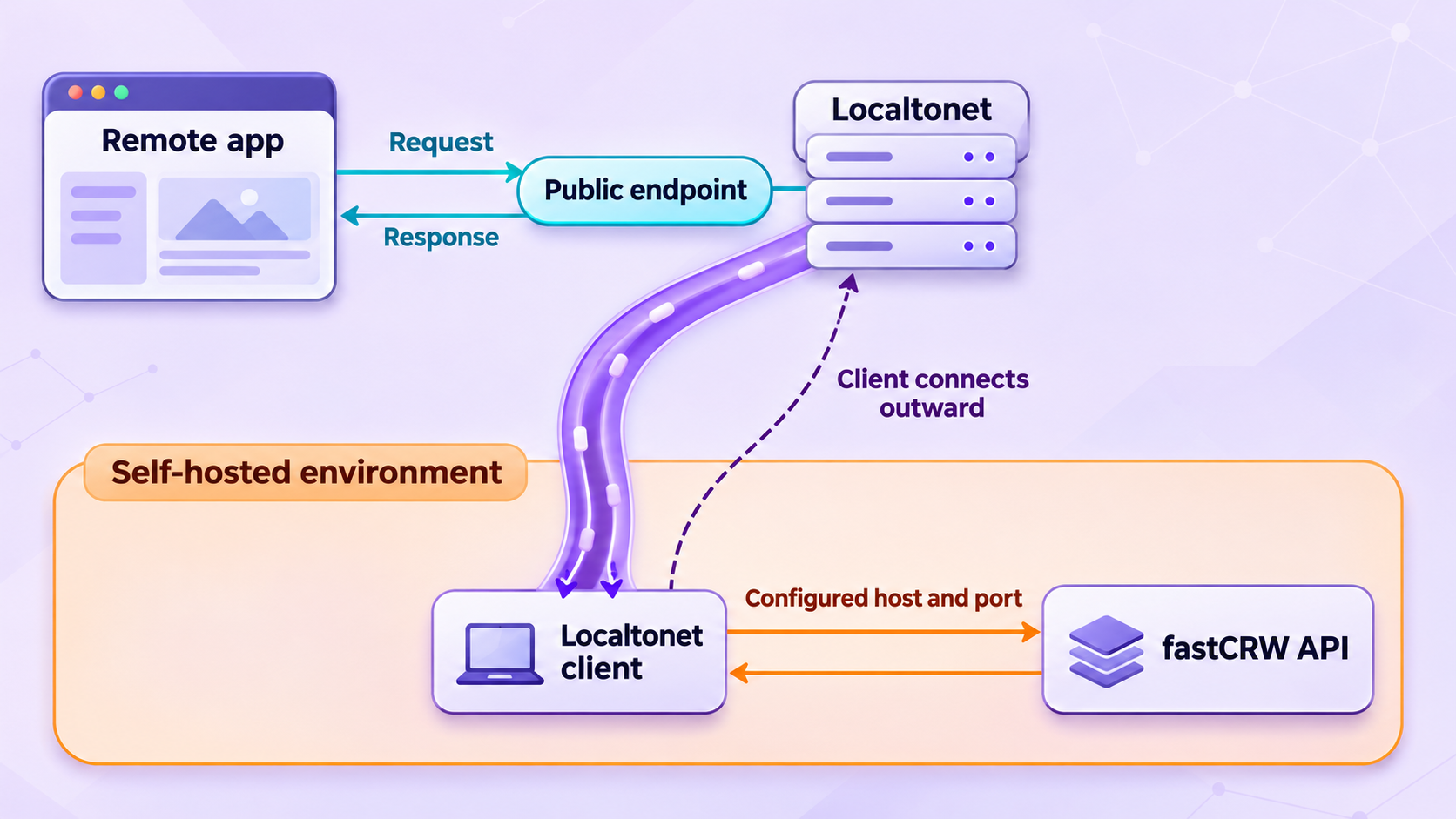
After the local smoke test succeeds and you have addressed authentication, you can create an HTTP tunnel. The Localtonet client establishes an outbound connection to our relay, so this workflow does not require inbound router port forwarding, firewall changes, VPN setup, or a public IP address.
HTTP is the appropriate tunnel family because fastCRW exposes an HTTP REST API. The local target is the IP address and port reachable from the device running our client. For a client on the same host, use 127.0.0.1 and 3000. Available relay servers and regions must be selected from the current dashboard rather than copied from an article.
Install and run the Localtonet client
Run our client on the fastCRW host or on another device that can reach it. Confirm that fastCRW is still running and that the documented local scrape request succeeds from the relevant network location.
Authenticate or select the client device
Use the device-specific token associated with the client that will run the tunnel. Treat this token as a secret. Do not paste it into scripts, screenshots, tickets, or public configuration examples.
Select an available relay server
Choose from the relay servers or regions currently shown in the Localtonet dashboard. Availability can vary, so this guide does not hardcode a server code.
Create an HTTP tunnel to fastCRW
Configure the local target as IP address 127.0.0.1 and port 3000 when our client runs on the same machine. If the client is elsewhere, enter the verified address that reaches the fastCRW host. HTTP tunnels can use a random subdomain, a custom subdomain where supported, or a custom domain, but current DNS requirements must be checked before configuring a custom domain.
Start the tunnel and record the assigned URL
Creating the tunnel does not start it. Use the Start button, wait for the tunnel to run, and use the public HTTPS address assigned to it. The endpoint is available only while the selected client is connected and the tunnel is running.
Stop or delete access when it is no longer needed
Stop the tunnel to remove active remote reachability while retaining its configuration, or delete it when the configuration is no longer required. Also stop the fastCRW container if the local service should no longer run.
For the current dashboard workflow and field names, consult our Localtonet HTTP tunnel documentation. Product options can change by client version, plan, or deployment, so use the values presented in your account rather than assuming that every option is universally available.
Verify the public route with the same request
Replace the example value below with the HTTPS URL assigned to your tunnel. Do not include a trailing API path in the variable.
export CRW_PUBLIC_URL="https://your-assigned-public-address"

curl -X POST "$CRW_PUBLIC_URL/v1/scrape" \
  -H "Content-Type: application/json" \
  -d '{"url":"https://example.com","formats":["markdown"]}'
If your security layer requires an authorization header, include it according to that layer's documented scheme. Do not reuse the hosted fastCRW API key format unless your own self-hosted authentication configuration explicitly supports it. The default local deployment and the hosted fastCRW service are different security contexts.
Compare local and remote results
Use the same request body for both tests. If local succeeds and remote fails, focus on the Localtonet client, selected device, tunnel state, local target, and any gateway in front of fastCRW. If both fail, return to the container and fastCRW logs. If both succeed but an SDK fails, inspect the SDK base URL and request construction.
The public address cannot produce a valid fastCRW response when the container is stopped, the local port has changed, or the selected client device is disconnected. Tunnel status and application health are related but separate checks.
Troubleshooting the complete workflow
Docker reports that port 3000 is already allocated
Another process or container is using the host port required by the quick start. Identify the owner using the tools appropriate to your operating system. Stop it only if doing so is safe. If you deliberately choose a different host port, update every local request and the Localtonet target to match that host-side value. The container-side service remains the value defined by the fastCRW image.
The local request cannot connect
Confirm that the Docker process is still running and has not returned to the shell with an error. Check whether the image finished downloading and whether startup output reports a failure. Also confirm that the URL uses HTTP, the correct host, port 3000, and the /v1/scrape path.
The API responds, but scraping fails
A reachable API can still fail when it cannot resolve or reach the target website, when the target rejects the request, or when the requested rendering behavior is unavailable in the selected deployment. Retry the documented https://example.com smoke test. If that works but another site fails, investigate the target-specific requirements rather than changing the tunnel.
The scrape request returns invalid-input errors
Confirm that the method is POST, the Content-Type is application/json, and the request body contains valid JSON. Shell quoting differs across command environments. If you translate the example for another shell, preserve the actual JSON structure rather than copying quote characters mechanically.
Search fails while scraping works
Search and scrape are different application paths. The official documentation states that the Docker stack boots search support, but a partial or altered deployment can behave differently. Return to the documented image and baseline command before diagnosing a customized stack. Avoid assuming that successful scraping proves every optional or sidecar-backed capability.
The public URL returns an error, but localhost works
Confirm that the Localtonet client is connected, the HTTP tunnel has been started, and the selected token belongs to the device running that tunnel. Verify that the target is 127.0.0.1:3000 only when the client runs on the fastCRW host. A client on another machine requires a reachable network address instead.
The public address works from one client but not another
Compare DNS resolution, HTTPS handling, proxy settings, request headers, and application authentication on the two clients. Also check whether a security gateway or rate policy intentionally restricts one caller. Do not weaken authentication merely to make a diagnostic request pass.
The tunnel is configured but unavailable after a restart
A tunnel is available only while the selected Localtonet client is connected and the tunnel is running. The fastCRW container must also be active. Check both lifecycles independently. Creating a tunnel does not guarantee that it has been started, and starting a tunnel does not start the fastCRW container.
An SDK still calls the hosted fastCRW service
Review the SDK's base URL configuration. The Python examples document CRW_API_URL for selecting the self-hosted address. For a remote application, set the base URL to the assigned Localtonet HTTPS address through the configuration mechanism supported by the SDK version you use. Keep secrets out of source control and avoid placing them directly in a URL.
Requests time out during crawls
Crawls are asynchronous and can take longer than individual scrapes. Start the crawl, retain its identifier, and poll the documented status route instead of holding a synchronous client request open indefinitely. Apply sensible client timeouts and backoff behavior based on your application requirements, but do not assume undocumented fastCRW timing guarantees.
Frequently asked questions
Is installing the crw CLI enough to expose the REST API?
No. The CLI can process commands locally, but its installation alone does not prove that a persistent HTTP server is listening. This guide uses the official Docker image because the documented container starts the self-hosted API at http://localhost:3000.
Which fastCRW port should the Localtonet HTTP tunnel target?
The documented Docker quick start publishes the API on host port 3000. If our client runs on the same host, use local IP 127.0.0.1 and port 3000. If you deliberately changed the host mapping, use the verified host-side port instead.
Does self-hosted fastCRW require an API key?
The documented local self-hosted endpoint needs no authorization header by default. That is convenient for local testing but unsafe to treat as a complete public security design. Add a reviewed authentication layer before exposing the API to untrusted networks or users.
Does Localtonet add fastCRW application authentication?
An HTTP tunnel provides remote connectivity to the configured local target. Do not assume that this automatically creates application-level authorization for fastCRW. Protect the API with authentication and least-privilege controls appropriate to your deployment.
Do I need router port forwarding or a public IP address?
No. Our client establishes an outbound connection to a Localtonet relay. This allows the HTTP tunnel to provide a public address without inbound router port forwarding, firewall changes, VPN setup, or a public IP address.
Can the Localtonet client run on a different machine?
Yes, provided that machine can reach the fastCRW service. In that topology, do not use 127.0.0.1 unless fastCRW also runs on the client machine. Configure the verified LAN address and port reachable from the Localtonet device.
Is the public fastCRW endpoint always available after I create it?
No. Creating a tunnel does not start it. The assigned endpoint is available only while the selected Localtonet client is connected, the tunnel is running, and the fastCRW service is listening at the configured local target.
Is the single Docker container suitable for every fastCRW workload?
It is the documented shortest path for getting the self-hosted API running and verified. More advanced rendering, stealth, search, scaling, persistence, or production-security requirements may need additional components or a different documented deployment profile. Validate those requirements before production use.
Connect your verified fastCRW API with Localtonet
Start by proving the API on localhost:3000, add the authentication and workload controls your environment requires, then create an HTTP tunnel from the connected device to the verified local target.