

Run the Hermes gateway on loopback and provide controlled remote HTTPS access
This tutorial installs Hermes Agent, configures OpenRouter as its model provider, protects the gateway with a separate API key, verifies authentication locally, and publishes the loopback service through a Localtonet HTTP tunnel. The tested interface documented here is pinned to Hermes Agent v0.21.0: hermes gateway listens on 127.0.0.1:8642, reads API_SERVER_KEY from ~/.hermes/.env, and protects its OpenAI-compatible API with Bearer authentication. Our client creates the public path through an outbound connection, so no inbound router port forwarding, firewall changes, VPN setup, or public IP address is required.
📋 What's in this guide
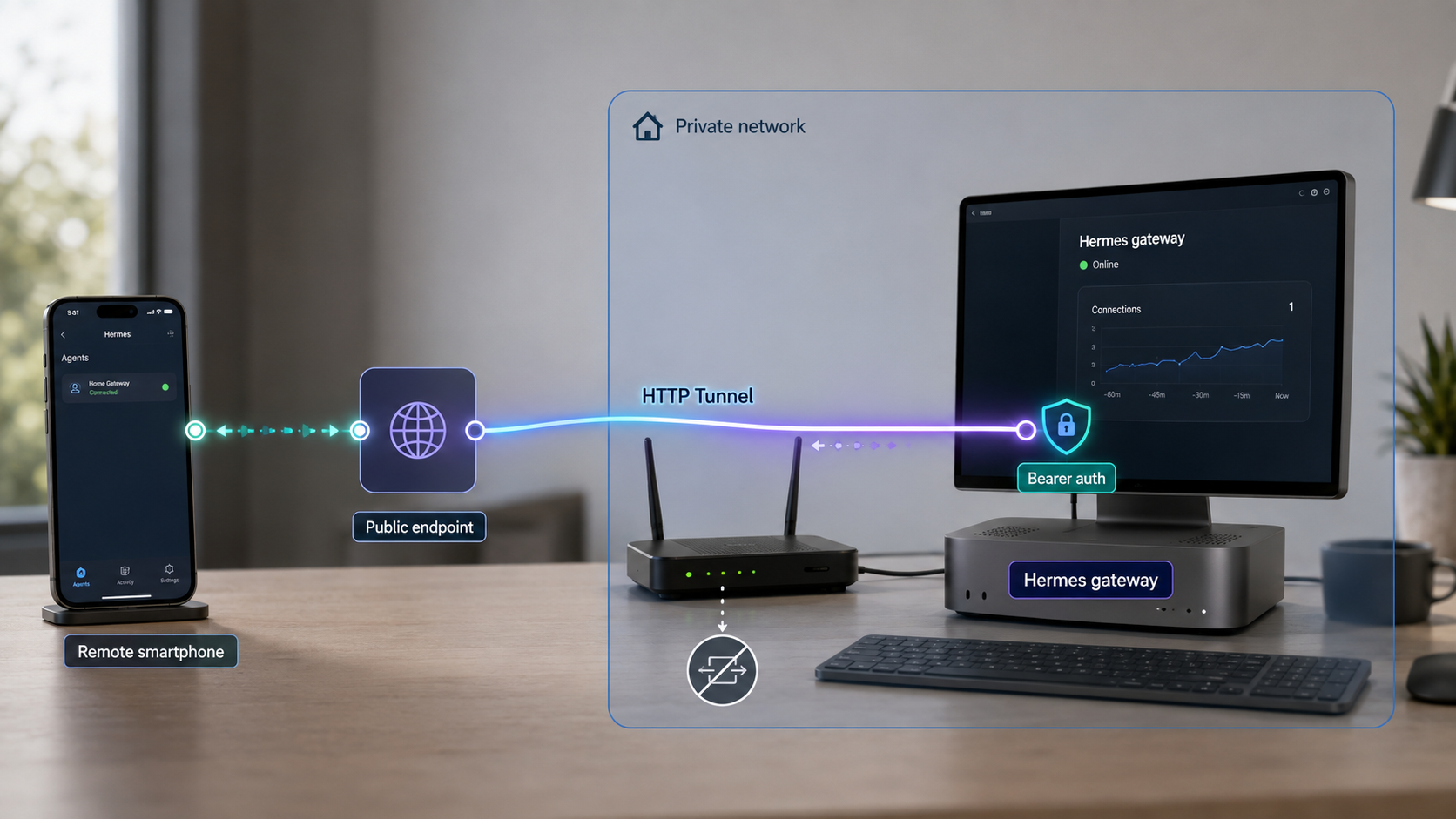
What this self-hosted architecture includes
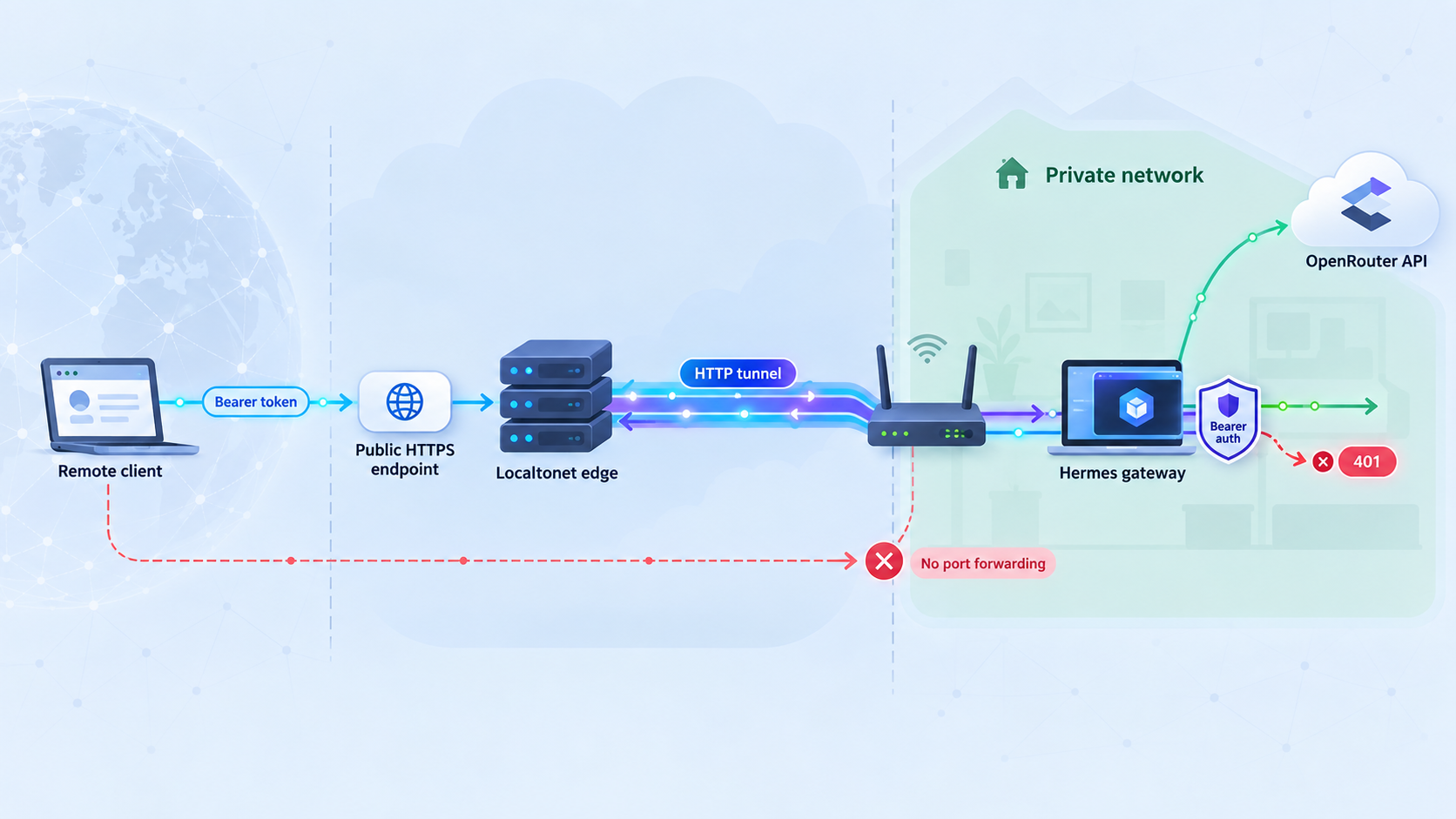
This deployment has three independent components: the Hermes Agent runtime, the model inference provider, and the remote-access path. Keeping them separate is important because they have different trust boundaries, credentials, lifecycle controls, and failure modes.
Hermes runs the agent process and gateway on your machine. For the Hermes Agent v0.21.0 workflow covered here, the gateway command listens on the IPv4 loopback address 127.0.0.1 and port 8642. A loopback listener accepts connections from the same host without opening the service on the machine's LAN or public interface.
The Localtonet client runs on that same machine and connects outward to a selected Localtonet relay. When the HTTP tunnel is running, requests to its public HTTPS address travel through that outbound connection and are forwarded to 127.0.0.1:8642. The public path exists only while the selected client is connected and the tunnel is running.
Localtonet supplies transport and public reachability. Hermes still supplies application-level authorization through API_SERVER_KEY. A remote client must send the configured value in an Authorization: Bearer header. Do not disable this protection merely because the gateway is reached through a tunnel.
API_SERVER_KEY protects the gateway independently of the Localtonet device token and the model provider credential.
OpenRouter is a hosted inference path. Review its current provider-routing, privacy, retention, and data-policy controls before sending sensitive prompts, files, tool output, or credentials. OpenRouter's current behavior and model catalog should be checked in its official documentation. A fully local inference configuration has different hardware and operational requirements and is outside this tutorial's tested scope.
Request flow from a remote client
- The caller sends an HTTPS request to the address of the running Localtonet HTTP tunnel.
- The request includes the Hermes key in the
Authorization: Bearerheader. - The request reaches the selected Localtonet relay.
- The relay carries it through the outbound connection maintained by the Localtonet client.
- The client forwards the HTTP request to
127.0.0.1:8642. - Hermes validates the Bearer credential and either rejects or processes the API request.
- If the request requires inference, Hermes contacts the configured model provider.
Stopping the Localtonet tunnel removes the public path without necessarily stopping Hermes. Stopping Hermes leaves no application listening behind the tunnel but does not delete the saved tunnel configuration. Treat these as separate lifecycle controls.
Prerequisites and supported installation paths
The installation commands below are version-qualified for Hermes Agent v0.21.0. Before using them with a later release, compare the instructions with the current official Hermes Agent repository and the installer content served from the official Nous Research domain. Do not run a downloaded installation script if its domain, contents, or behavior differs from the current project documentation.
| Platform | Installation path | Prerequisites for v0.21.0 |
|---|---|---|
| Linux | Official shell installer | Git, curl, and xz-utils; use a supported user shell |
| macOS | Official shell installer | Git and curl |
| Windows with WSL2 | Run the Linux shell installer inside WSL2 | Git, curl, and xz-utils inside the Linux distribution |
| Windows PowerShell | Official PowerShell installer | A supported PowerShell environment |
| Android with Termux | Official shell installer inside Termux | Git and curl in the Termux environment |
In the v0.21.0 installation workflow, the installer obtains the Hermes runtime dependencies it manages, including Python 3.11 through uv, Node.js, ripgrep, and FFmpeg. The project code is placed under ~/.hermes/hermes-agent/, user data and configuration are stored under ~/.hermes/, and the launcher is installed at ~/.local/bin/hermes on the shell-based path.
You also need:
- An OpenRouter account and API key, or another provider supported by the Hermes release you install.
- A currently available model compatible with the Hermes agent workflow.
- A long, independently generated value for
API_SERVER_KEY. - A Localtonet account and a device-specific Localtonet authentication token.
- The Localtonet client installed on the same host as Hermes for the loopback design used here.
curlor another HTTP client capable of sending headers, JSON request bodies, and POST requests.
The OpenRouter key authorizes model-provider usage, API_SERVER_KEY authorizes callers to Hermes, and the Localtonet token identifies the client device. Never reuse one value for another. Do not place any of them in source control, screenshots, public shell transcripts, issue reports, or browser URLs.
Plan the agent's local permissions
A valid API caller can ask the agent to use whichever tools are enabled. Authentication controls who can submit a request, but it does not reduce the operating-system permissions available after the request is accepted. Run Hermes with a non-administrative account where practical and limit access to files, commands, mounted storage, inherited environment variables, and network destinations.
Choose the model from current provider data
OpenRouter model IDs, provider routes, capabilities, context sizes, pricing, and availability can change independently of Hermes. Do not treat an old model ID or a past free-price label as permanent. Consult the current OpenRouter catalog and confirm that the selected model satisfies the requirements reported by your installed Hermes release.
The OpenRouter API key can create usage under your provider account. A remotely reachable agent may make several model calls for a single user task because planning, tool execution, retries, and follow-up processing can each require inference. Set provider-side limits where available and monitor actual usage.
Install Hermes Agent
Linux, macOS, WSL2, and Android Termux
Confirm that the prerequisite packages are present. Package-manager commands vary by operating system, so use the appropriate package manager for your host. Then inspect and run the official installer from Nous Research:
curl -fsSL https://hermes-agent.nousresearch.com/install.sh -o /tmp/hermes-install.sh
less /tmp/hermes-install.sh
bash /tmp/hermes-install.sh
rm /tmp/hermes-install.sh
Reviewing the downloaded file before execution makes the installer source and actions visible. If the current Hermes project publishes a checksum or release-specific installation procedure, prefer that current procedure.
Native Windows PowerShell
In PowerShell, download the official installer, inspect it, and then execute it:
$installer = Join-Path $env:TEMP "hermes-install.ps1"
Invoke-WebRequest "https://hermes-agent.nousresearch.com/install.ps1" -OutFile $installer
Get-Content $installer
& $installer
Remove-Item $installer
Use the native Windows path or the WSL2 path consistently. A Hermes installation inside WSL2 is separate from a native Windows installation, and 127.0.0.1 must be interpreted from the environment where the Localtonet client runs.
Reload the shell and verify the executable
The shell installer places the launcher in ~/.local/bin. Open a new terminal after installation. If the current terminal has not reloaded its startup file, reload the appropriate file:
source ~/.bashrcFor Zsh:
source ~/.zshrcThen verify that the command is available:
command -v hermes
hermes --version
The first command should resolve to the installed launcher, commonly ~/.local/bin/hermes on the shell-based installation. The version command should identify the release you intend to use. This tutorial's gateway route, listener, and authentication expectations are pinned to v0.21.0. Recheck the official Hermes release documentation if your installed version differs.
Open a new terminal first. If the command still cannot be found, confirm that ~/.local/bin/hermes exists and that ~/.local/bin is included in PATH. Do not repeatedly rerun the installer until you have checked whether installation succeeded but the current shell has stale environment settings.
Configure OpenRouter and protect the gateway
Create an OpenRouter API key
Create a key in your OpenRouter account and review the current setup instructions in the OpenRouter documentation. Do not paste the real key into an article, configuration example, or command that will be shared.
On a Unix-like shell, read the credential without echoing it and pass it to the Hermes configuration command:
read -rsp "OpenRouter API key: " OPENROUTER_API_KEY
printf '\n'
hermes config set OPENROUTER_API_KEY "$OPENROUTER_API_KEY"
unset OPENROUTER_API_KEY
For Hermes Agent v0.21.0, this stores the provider credential through the Hermes configuration workflow under ~/.hermes/. Restrict access to that directory:
chmod 700 ~/.hermes
chmod 600 ~/.hermes/.env 2>/dev/null || true
In PowerShell, use a secure secret-entry and storage procedure suitable for your environment. Avoid placing the literal credential in PowerShell history, scripts, or transcripts.
Select an OpenRouter model
Hermes stores its model selection in ~/.hermes/config.yaml. The following configuration shape selects OpenRouter:
model:
  provider: openrouter
  default: z-ai/glm-5.2:free
The example model above was listed in the OpenRouter catalog for the tested September 2026 v0.21.0 workflow. It is not a permanent availability or pricing promise. Before using it, confirm that the exact ID still appears in the current OpenRouter catalog and that Hermes accepts it. If it is no longer available, replace only the default value with a currently supported model ID.
A usable result is not merely that the YAML parses. Hermes must start without rejecting the model, OpenRouter must accept the provider key, and an actual agent request must complete. If startup reports a missing capability or insufficient context, choose a compatible current model rather than bypassing the check.
Create a separate Hermes API key
Hermes Agent v0.21.0 reads the gateway key from API_SERVER_KEY in ~/.hermes/.env. The following Python command prompts without echoing the secret, updates the setting without printing it, and restricts the file to its owner:
python3 - <<'PY'
from getpass import getpass
from pathlib import Path
import os

env_path = Path.home() / ".hermes" / ".env"
env_path.parent.mkdir(mode=0o700, parents=True, exist_ok=True)

secret = getpass("New Hermes API server key: ").strip()
if len(secret) < 32:
    raise SystemExit("Use a random API server key of at least 32 characters.")

lines = []
if env_path.exists():
    lines = [
        line for line in env_path.read_text().splitlines()
        if not line.startswith("API_SERVER_KEY=")
    ]

lines.append(f"API_SERVER_KEY={secret}")
env_path.write_text("\n".join(lines) + "\n")
os.chmod(env_path, 0o600)
print(f"Updated {env_path} with owner-only permissions.")
PY
Generate the value with a password manager or trusted secret generator. Do not reuse the OpenRouter key, Localtonet token, login password, or a key shown in an example.
Start the v0.21.0 gateway
hermes gateway
Keep this terminal open during initial verification. The expected startup result for v0.21.0 is a gateway listening on 127.0.0.1:8642. Treat a different port, wildcard listener, authentication warning, provider error, or immediate process exit as a failed startup. Resolve that discrepancy before creating a tunnel.
When the Localtonet client runs on the same machine, it can connect directly to 127.0.0.1:8642. A wildcard listener can make the gateway reachable through LAN or public interfaces and creates an additional access path outside the tunnel.
Verify the gateway and authentication locally
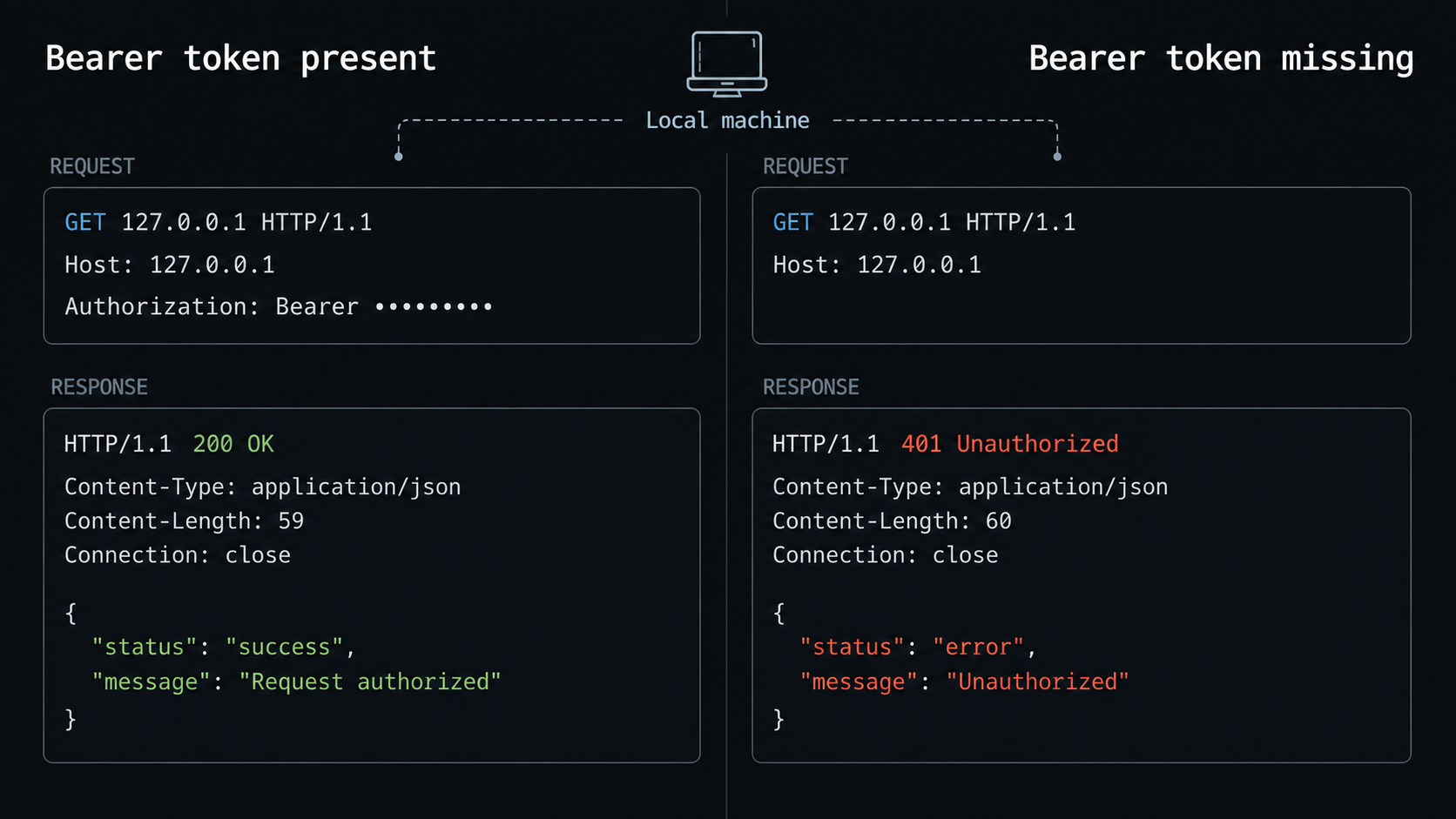
Test Hermes locally before involving Localtonet. The v0.21.0 gateway exposes an OpenAI-compatible chat-completions route at /v1/chat/completions. It expects a POST request with JSON and, when API_SERVER_KEY is configured, a Bearer credential.
Create a request body using the same model ID configured in ~/.hermes/config.yaml:
cat > /tmp/hermes-request.json <<'JSON'
{
  "model": "z-ai/glm-5.2:free",
  "messages": [
    {
      "role": "user",
      "content": "Reply with exactly HERMES_OK and do not use tools."
    }
  ]
}
JSON
If you selected another current model, replace the JSON model value with that exact identifier.
Negative test: omit the credential
curl -i \
  -X POST \
  -H "Content-Type: application/json" \
  --data-binary @/tmp/hermes-request.json \
  http://127.0.0.1:8642/v1/chat/completions
The expected v0.21.0 result is an HTTP authentication rejection, with no model operation executed. An HTTP 401 Unauthorized response satisfies this negative test. A successful completion fails the security check. Stop and confirm that API_SERVER_KEY exists in ~/.hermes/.env, then restart the gateway.
A connection-refused message is not a successful negative test. It means no process accepted a connection on 127.0.0.1:8642. A 404 response indicates a route or version mismatch rather than proof that authentication works.
Positive test: read the secret without printing it
read -rsp "Hermes API server key: " HERMES_API_KEY
printf '\n'

curl -i \
  -X POST \
  -H "Content-Type: application/json" \
  -H "Authorization: Bearer $HERMES_API_KEY" \
  --data-binary @/tmp/hermes-request.json \
  http://127.0.0.1:8642/v1/chat/completions

unset HERMES_API_KEY
The expected positive result is HTTP 200 with a JSON chat-completion response. For the supplied prompt, the assistant content should be HERMES_OK, although model formatting can vary. A successful HTTP status and a valid completion object establish that the route, Bearer key, provider configuration, model selection, and inference path are working together.
| Observed result | Meaning | Next action |
|---|---|---|
| Connection refused | Hermes is not accepting connections at the expected listener | Confirm that hermes gateway remains running on 127.0.0.1:8642 |
401 Unauthorized without the key |
The negative authentication test passed | Proceed to the authenticated test |
200 without the key |
The protected route is not enforcing the intended key | Do not create the tunnel; correct API_SERVER_KEY loading and restart Hermes |
401 with the key |
The supplied value does not match the key loaded by Hermes | Check the Bearer format and restart after changing ~/.hermes/.env |
404 |
The installed release does not expose the expected route | Confirm the Hermes version and its current official API contract |
| Provider or model error | Hermes accepted the request, but inference could not complete | Check the OpenRouter key, current model ID, account state, limits, and model availability |
200 with a completion object |
The complete local request path works | Create the Localtonet tunnel |
Remove the temporary request file when testing is complete:
rm -f /tmp/hermes-request.jsonCreate and start the Localtonet HTTP tunnel
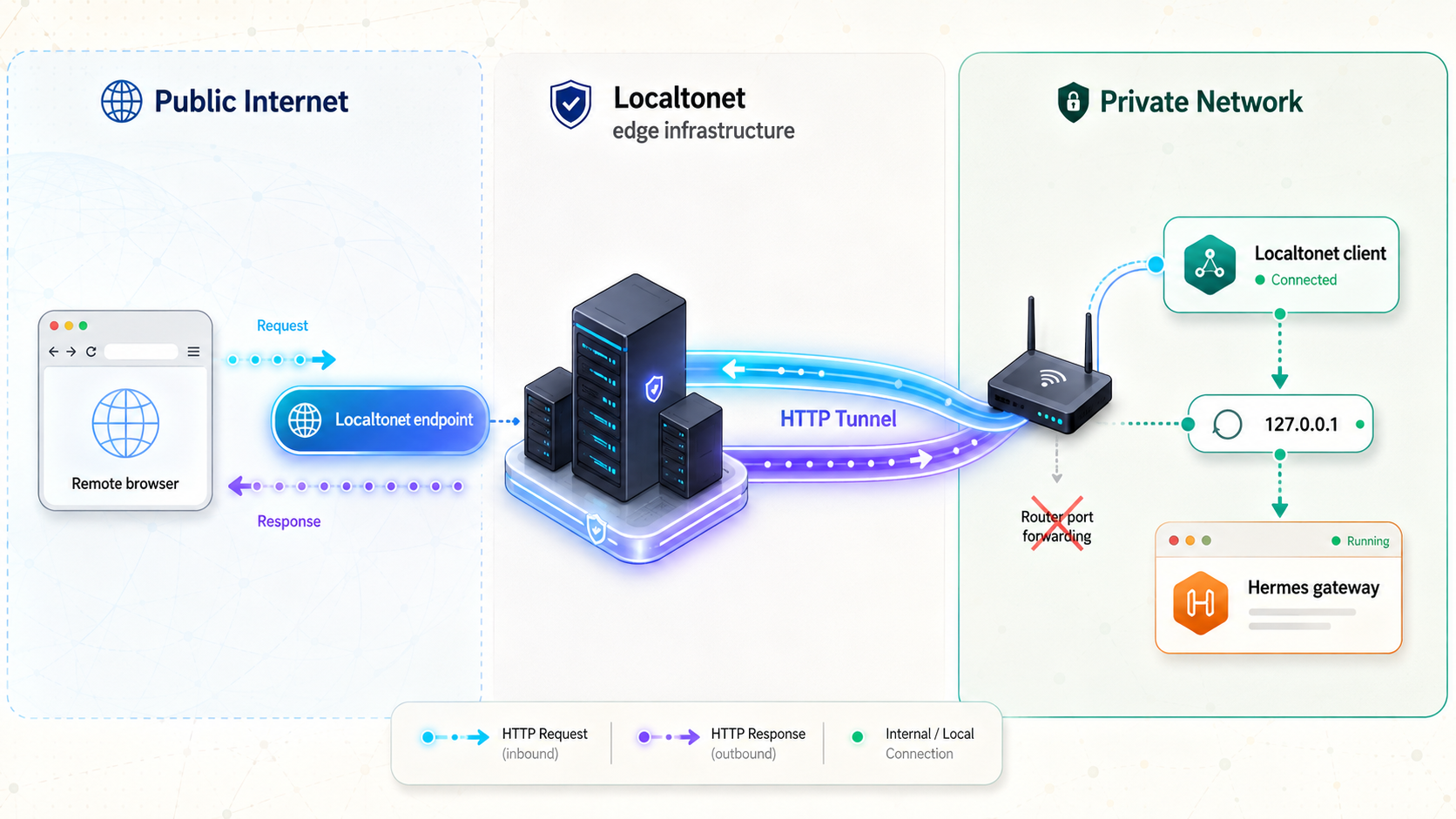
Install our client on the Hermes host so that 127.0.0.1 refers to the same machine on which the gateway is listening. Use the current operating-system instructions in the Localtonet client and tunnel documentation. Authenticate the client with the device-specific token from your dashboard, but never include that token in screenshots or shared commands.
The current HTTP workflow uses the HTTP tunnel page, an HTTP Process Type, the connected device's AuthToken, an available server, and the local IP address and port. Follow this sequence:
Install and run the Localtonet client
Install our client for the Hermes host's operating system, authenticate it with that device's token, and confirm that the device is connected. For this loopback design, do not run the client on a different computer.
Open the HTTP Tunnel page and select Process Type
Create an HTTP tunnel and select Random Sub Domain, Custom Sub Domain, or Custom Domain according to the options currently available for your deployment. Each process type serves the target at a public HTTPS address.
Select AuthToken and server
Select the AuthToken for the connected Hermes host, then select an available relay server from the current dashboard. Obtain the server or region from the product instead of copying a server code from an older tutorial.
Enter the local Hermes target
Set the local IP address to 127.0.0.1 and the local port to 8642. Review the configuration and create or save the tunnel.
Press Start and copy the public address
Creating the tunnel does not start it. Press the Start button, confirm that the tunnel is running, and copy the public HTTPS address displayed for it.
The resulting target must be exactly 127.0.0.1:8642. If the dashboard shows another device, address, port, or disconnected token, stop and correct the configuration before testing.
The Localtonet HTTP tunnel documentation contains the current dashboard workflow. If you use Custom Domain, check the current DNS instructions there before changing records. DNS requirements can change and should not be inferred from the Random Sub Domain workflow.
A saved tunnel is not necessarily active. The selected Localtonet client must be connected and the tunnel must be started. You can stop the tunnel later to remove public reachability while retaining its configuration, or delete it when it is no longer needed.
Verify unauthorized and authorized remote access
Repeat the local tests against the assigned Localtonet HTTPS address. Keep the route, method, headers, and JSON body identical. Only the base address should change.
Recreate the request body if you removed it:
cat > /tmp/hermes-request.json <<'JSON'
{
  "model": "z-ai/glm-5.2:free",
  "messages": [
    {
      "role": "user",
      "content": "Reply with exactly HERMES_OK and do not use tools."
    }
  ]
}
JSON
Set the public base URL without adding the API key to it:
read -rp "Localtonet public HTTPS base URL: " HERMES_PUBLIC_URL
HERMES_PUBLIC_URL="${HERMES_PUBLIC_URL%/}"
Remote negative authentication test
curl -i \
  -X POST \
  -H "Content-Type: application/json" \
  --data-binary @/tmp/hermes-request.json \
  "$HERMES_PUBLIC_URL/v1/chat/completions"
The expected result for the v0.21.0 API is an HTTP 401 Unauthorized response. If the operation succeeds without a Bearer key, stop the Localtonet tunnel immediately and correct the Hermes authentication configuration.
Remote positive authentication test
read -rsp "Hermes API server key: " HERMES_API_KEY
printf '\n'

curl -i \
  -X POST \
  -H "Content-Type: application/json" \
  -H "Authorization: Bearer $HERMES_API_KEY" \
  --data-binary @/tmp/hermes-request.json \
  "$HERMES_PUBLIC_URL/v1/chat/completions"

unset HERMES_API_KEY HERMES_PUBLIC_URL
rm -f /tmp/hermes-request.json
The expected result is HTTP 200 with the same type of chat-completion JSON observed locally. Test from a separate device or network where practical. A second network confirms the full remote path rather than only the host's ability to resolve and call its own public endpoint.
An HTTP response alone does not prove success. A 401, 404, provider error, and successful completion all show that an HTTP component answered, but they indicate different layers. Compare the status, body, Hermes terminal output, connected client, tunnel state, and configured target.
Harden an internet-reachable AI agent
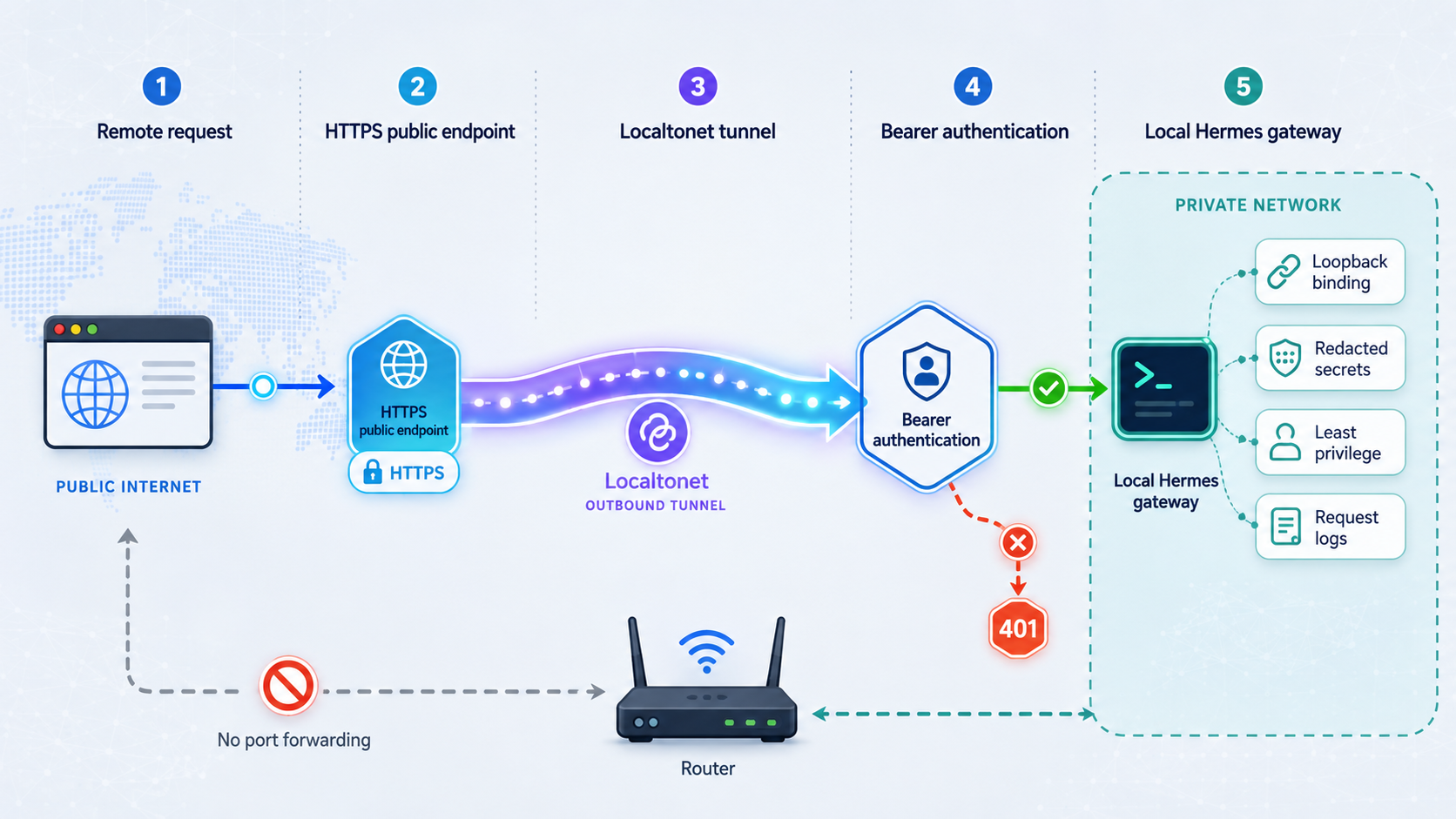
An AI-agent gateway is more sensitive than a read-only web page. An authenticated request may trigger model usage, shell commands, local file operations, network requests, or other enabled tools. The impact depends on your Hermes configuration, so protect both the gateway and the operating-system account behind it.
Keep keys out of URLs and saved commands
Send API_SERVER_KEY only in the Authorization header. Query-string secrets can appear in browser history, logs, analytics, monitoring systems, screenshots, and referrer information.
A command containing a literal Bearer value may remain in shell history. The examples above use a non-echoed prompt and a temporary shell variable so the value is not embedded in the saved command. Clear variables after each test and avoid enabling shell tracing while handling secrets.
Use a controlled key-rotation sequence
- Stop the Localtonet tunnel.
- Generate a new random Hermes gateway key.
- Update
API_SERVER_KEYin~/.hermes/.env. - Restart
hermes gateway. - Repeat the local negative and positive tests.
- Update approved clients through a secure channel.
- Start the tunnel and repeat both remote tests.
If a Localtonet device token is exposed, replace it through the appropriate account and device workflow rather than treating a Hermes key rotation as sufficient. If the OpenRouter key is exposed, revoke or rotate it through OpenRouter and review provider usage.
Protect the host itself
Patch the operating system and review the software installed for Hermes. Protect home directories, SSH keys, cloud credentials, browser profiles, source repositories, and provider secrets. Where an agent does not need access, remove permission instead of relying on a prompt telling the agent not to use it.
An instruction such as “do not read this directory” is weaker than denying filesystem access to that directory. Use operating-system permissions, a dedicated account, container isolation, service credentials, and network restrictions appropriate to your risk level. Do not expose an agent with broad host privileges merely because the API has a password.
Routine operation and troubleshooting
Recommended startup order
- Start
hermes gateway. - Confirm the v0.21.0 listener is
127.0.0.1:8642. - Run the local request without a key and confirm
401 Unauthorized. - Run the local request with the correct key and confirm a successful completion.
- Start the Localtonet client and confirm that the intended device is connected.
- Start the HTTP tunnel.
- Repeat the negative and positive tests through the public HTTPS address.
This sequence ensures that the public path is not enabled until application authentication is known to work.
Recommended shutdown order
- Stop the Localtonet tunnel to remove the public route.
- Allow intended in-flight work to complete according to your operating policy.
- Stop Hermes if the local gateway is no longer required.
- Delete the tunnel only if you do not intend to reuse its saved configuration.
The public URL does not respond
Confirm that the selected Localtonet client is connected and the tunnel has been started. Creating or saving a tunnel does not make it active. Verify that you are using the public address currently displayed for that running tunnel.
Repeat the local request against http://127.0.0.1:8642/v1/chat/completions. If the local request also fails, troubleshoot Hermes first. If local access succeeds, confirm that the Localtonet target is exactly 127.0.0.1:8642, with the colon between the IP address and port.
The tunnel returns an authentication error
Confirm that the header name is Authorization, the scheme is Bearer, and one space separates the scheme from the key. Check that the running Hermes process was restarted after the value in ~/.hermes/.env changed.
Compare a working local request with the remote request and change only the base URL. Do not disable authentication to solve a header or secret mismatch.
Unauthenticated remote requests succeed
Stop the tunnel immediately. Confirm that you tested POST /v1/chat/completions rather than an informational endpoint. Verify that API_SERVER_KEY exists in the environment file loaded by Hermes and restart the gateway. Do not resume public access until the local negative request returns 401 and the authenticated request succeeds.
The API authenticates but inference fails
This normally points beyond the tunnel. Check the OpenRouter credential, current model identifier, model availability, account state, current limits, and any compatibility message emitted by Hermes. Do not assume a past free model remains available or free.
One user task may result in several provider requests. Agent planning, tool calls, retries, and follow-up interpretation can consume additional provider capacity. Review actual provider usage rather than estimating it from the number of user messages.
Local access works, but the tunnel cannot reach Hermes
Make sure our client runs on the Hermes host. The address 127.0.0.1 always refers to the loopback interface of the device making the connection. If the Localtonet client runs on another computer, 127.0.0.1:8642 points to that other computer, not the Hermes machine.
Exposing Hermes to a separate client device would require a network-reachable listener and a revised security design. This tutorial deliberately avoids that arrangement by colocating Hermes and the Localtonet client.
The hermes command is missing after installation
Open a new terminal or reload ~/.bashrc or ~/.zshrc. Check whether ~/.local/bin is in PATH and whether ~/.local/bin/hermes exists. If it does not, inspect the installer output before rerunning anything.
The service disappears after reboot
Hermes and the Localtonet client are independent processes. Determine which one did not restart, then confirm that the tunnel itself is running rather than merely saved. If you configure operating-system service management, ensure the process runs as the intended user, loads the protected environment file, and does not print secrets into logs.
This tutorial does not prescribe a Hermes system service because service definitions and restart behavior differ across supported platforms. Whichever supervisor you choose, test a full host reboot, then repeat the local and remote negative and positive checks.
Frequently asked questions
Does Hermes need to listen on 0.0.0.0?
No. When the Localtonet client runs on the same machine, it can forward the HTTP tunnel to 127.0.0.1:8642. Keeping Hermes on loopback avoids opening a separate listener on LAN or public interfaces.
Does the Localtonet tunnel replace API_SERVER_KEY?
No. Localtonet provides the network path. Hermes should continue enforcing API_SERVER_KEY, and approved callers send it through the Authorization: Bearer header.
Which Hermes versions does the API example cover?
The command, 127.0.0.1:8642 listener, ~/.hermes/.env location, API_SERVER_KEY behavior, and POST /v1/chat/completions test in this tutorial are pinned to Hermes Agent v0.21.0. Check the official Hermes release documentation before applying them to a later version.
Do I need router port forwarding or a public IP address?
No. The Localtonet client establishes an outbound connection to a relay. This workflow does not require inbound router port forwarding, firewall changes, VPN setup, or a public IP address.
Is the tunnel active as soon as I create it?
No. Creating the tunnel saves its configuration. You must press Start, and the selected Localtonet client must remain connected. The public path stops when the tunnel is stopped or the client disconnects.
Is all AI processing local when Hermes uses OpenRouter?
No. The Hermes runtime is local, but model requests are sent through OpenRouter to a hosted inference provider. Review current privacy, routing, and retention controls before sending confidential information.
Can I put the Hermes key in the public URL?
No. Send it in the Authorization header using the Bearer scheme. URL credentials can leak through logs, browser history, monitoring systems, screenshots, and referrer data.
What should I do if API_SERVER_KEY is exposed?
Stop the tunnel, generate a new random key, update ~/.hermes/.env, restart Hermes, and repeat both local tests. Update approved clients securely before starting the tunnel again. Review provider usage and host activity for unexpected requests.
Why should I verify the OpenRouter model ID before setup?
OpenRouter model availability, provider routes, limits, capabilities, and pricing can change. Confirm that the selected ID still exists and meets the requirements enforced by your installed Hermes release instead of relying on an older catalog snapshot.
Connect your authenticated Hermes gateway with Localtonet
After Hermes rejects unauthenticated requests and completes an authenticated local request on 127.0.0.1:8642, create a Localtonet HTTP tunnel for an on-demand public HTTPS path without inbound router port forwarding.


