

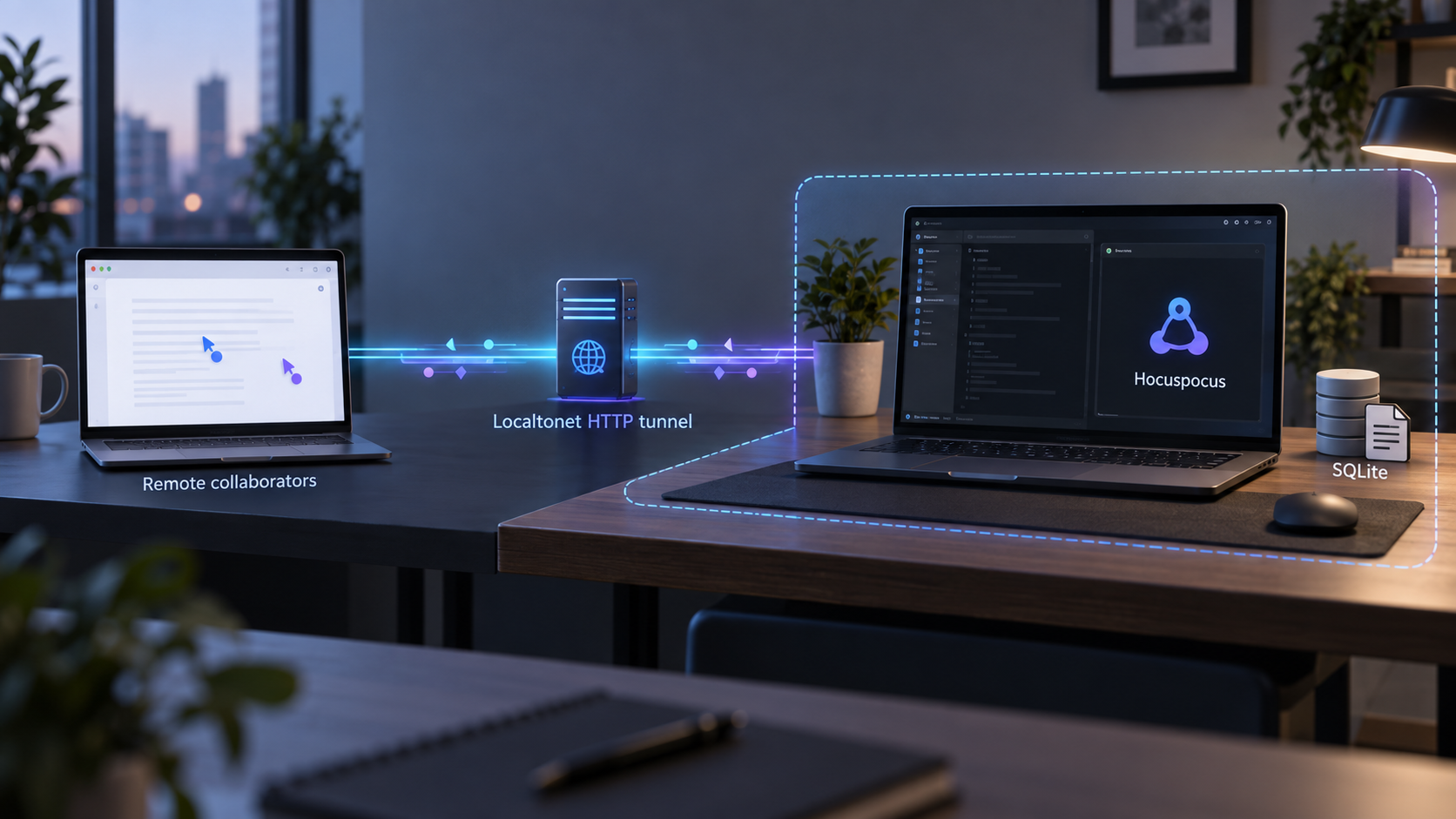
Build a persistent collaboration backend locally, verify its WebSocket endpoint, and then make it reachable for remote clients
Hocuspocus is a self-hosted WebSocket backend for applications that synchronize Yjs documents. In this guide, we configure a minimal Hocuspocus server with file-backed SQLite persistence, start it on port 1234, verify the local WebSocket service, and explain how persistence behaves across restarts. After the local deployment works, we connect it to a Localtonet HTTP tunnel so authorized collaborators outside the host network can reach it without inbound router port forwarding, firewall changes, VPN setup, or a public IP address.
📋 What's in this guide
How Hocuspocus, Yjs, SQLite, and Localtonet fit together
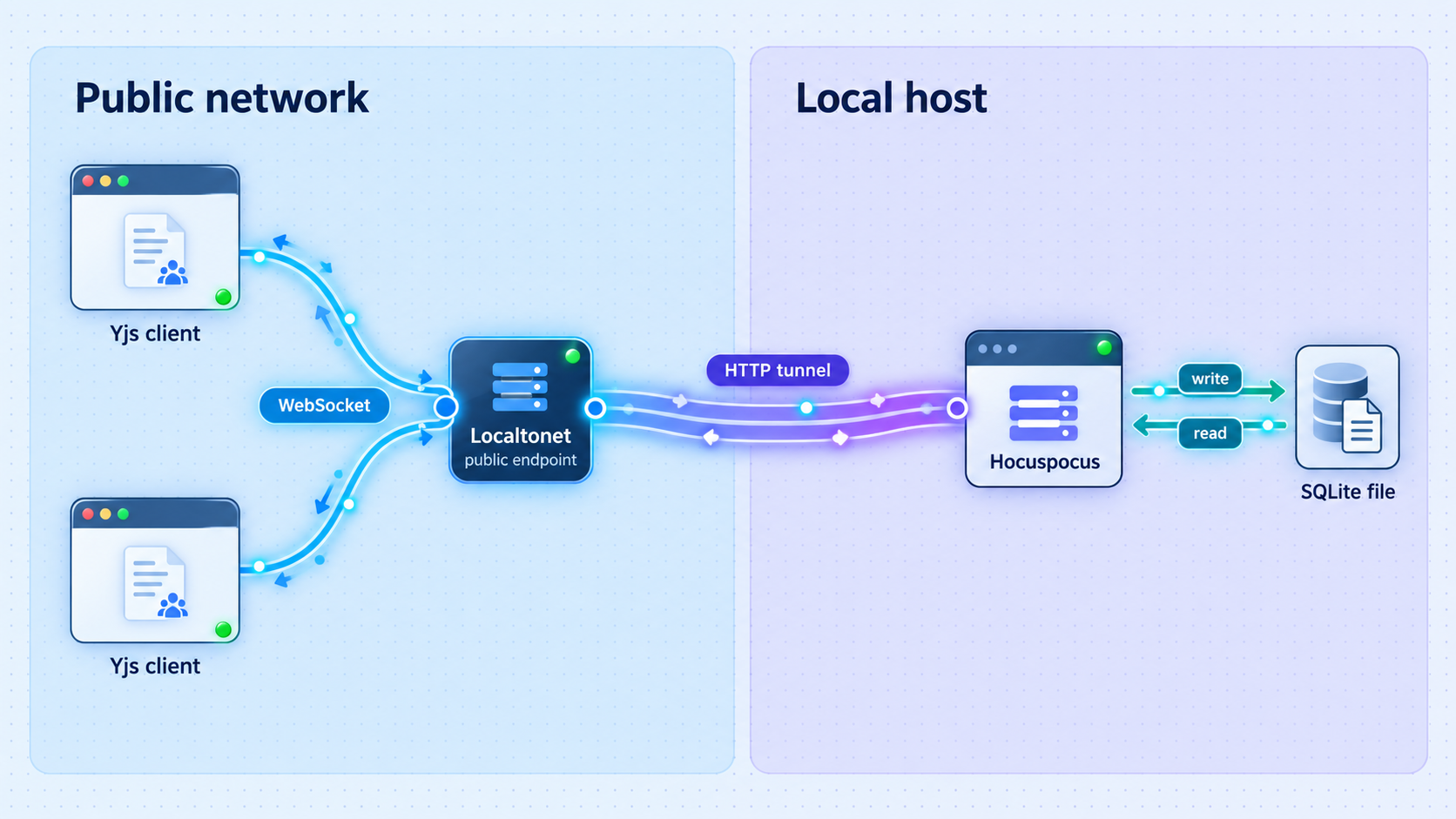
Hocuspocus is a collaboration backend built around Yjs. Yjs uses a conflict-free replicated data type, commonly abbreviated as CRDT, to merge changes made by multiple clients. The order in which compatible updates arrive does not determine whether they can be merged. This model supports real-time collaboration as well as offline-first applications that synchronize changes later.
The Hocuspocus server provides the WebSocket backend through which clients exchange those Yjs updates. An editor or application connects to a named document, receives its current state, and sends subsequent updates through the same collaboration protocol. Hocuspocus can be integrated with editors and application frameworks, but the server is not itself a complete collaborative editor. A client application still needs to create or open Yjs documents and connect them to the server.
Persistence is a separate concern. Without persistent storage, a process restart can discard server-side document state. Hocuspocus exposes document loading and storage hooks for custom database integrations, and it also provides database extensions that implement those hooks. For this deployment, we use the ready-to-use SQLite extension and point it at a file named db.sqlite.
SQLite is especially convenient for a small self-hosted deployment because the database resides in a local file. It does not require a separate database service for this workflow. The Hocuspocus documentation describes the SQLite extension as suitable for local development. Whether it is appropriate for a production deployment depends on workload, concurrency, backup requirements, process architecture, and operational expectations. This guide does not treat a single SQLite file as a universal scaling strategy.
Localtonet enters the workflow only after the Hocuspocus service works locally. Our client establishes an outbound connection from the host to a Localtonet relay server. An HTTP tunnel then maps a public HTTPS address to the local Hocuspocus IP address and port. This removes the need to open an inbound router port, but it does not replace Hocuspocus authentication, application authorization, document-level access rules, or responsible secret management.
| Component | Responsibility | What it does not replace |
|---|---|---|
| Yjs | Encodes and merges collaborative document updates | Network transport, user identity, and database operations |
| Hocuspocus server | Provides the collaboration WebSocket backend | Your editor UI and application-specific authorization policy |
| Hocuspocus SQLite extension | Loads and stores document data in SQLite | Off-host backups, monitoring, and a scaling plan |
| Localtonet HTTP tunnel | Connects a public address to the local service through an outbound client connection | Hocuspocus authentication or document access control |
Prerequisites and known limitations
Prepare a JavaScript project directory on the computer that will run Hocuspocus. The example uses ECMAScript module syntax and a file with the .mjs extension. You also need a supported JavaScript runtime and a package manager that can install the Hocuspocus server, SQLite extension, and native better-sqlite3 dependency.
Hocuspocus version 4 documentation states that the wider Hocuspocus server runs on Node.js, Bun, Deno, and Cloudflare Workers. This exact tutorial uses file-backed SQLite through better-sqlite3, so it focuses on a Node.js host where that native dependency can be installed. The supplied project evidence does not specify an exact supported Node.js version for this setup. We therefore do not recommend guessing a version number. Select a Node.js release supported by the current Hocuspocus and better-sqlite3 documentation, and verify compatibility before deploying.
The official SQLite extension instructions provide its npm installation commands, but the supplied Hocuspocus README does not state a separate package-installation command for @hocuspocus/server. Add the current Hocuspocus server package to the same project using the installation method supported by the version you select. Do not assume that an old command, lockfile, or copied dependency range matches the current release.
For the Localtonet stage, install and run our client on the Hocuspocus host or another device that can reach the Hocuspocus listener. You will also need a Localtonet device authentication token and an available relay server selection from the current dashboard. Tokens are device-specific and must not be placed in source code, committed to a repository, copied into screenshots, or included in public troubleshooting output.
The code below demonstrates listening and persistence. It does not implement user authentication, document authorization, tenant isolation, rate policy, or application-specific validation. Do not expose private collaboration data until your application verifies who may connect and which document names each identity may access.
What to have ready
- A dedicated project directory with a package manifest appropriate for your package manager.
- A compatible Node.js environment for the selected Hocuspocus and
better-sqlite3versions. - Permission to create and update
db.sqlitein the server process working directory. - A client application or test client that speaks the Hocuspocus and Yjs collaboration protocol for end-to-end document tests.
- The Localtonet client on a device that can reach
127.0.0.1:1234when the client runs on the same host. - A private, safely stored Localtonet device token and a relay selection obtained from the current dashboard.
Install the Hocuspocus server and SQLite dependencies
Work inside the project directory that will contain your server file and database. First add @hocuspocus/server using the current package installation instructions for the Hocuspocus version you have selected. The package name is established by the official server example, but the supplied evidence does not establish a canonical standalone installation command, runtime version, or version pin. That uncertainty is important because native dependencies and major-version migrations can affect installation.
The official SQLite extension documentation gives the following npm commands for the extension, its runtime database dependency, and TypeScript declarations:
npm install @hocuspocus/extension-sqlite better-sqlite3
npm install -D @types/better-sqlite3
The type declaration package is a development dependency. It is useful for TypeScript projects and editor tooling. A plain JavaScript file does not normally need declarations at runtime, but following the documented installation keeps the project prepared for type-aware development.
Starting with Hocuspocus version 4, the SQLite extension uses better-sqlite3 instead of the older sqlite3 dependency. If this is an upgrade from Hocuspocus version 3, remove the old dependency as documented:
npm uninstall sqlite3
Existing SQLite database files are documented as compatible, so this dependency change does not by itself require a data migration. A custom version 3 schema or custom queries need closer attention: version 4 uses named parameters without the $ prefix. Custom query parameters such as $name and $data need to become name and data.
The package installation directory can be recreated from the package manifest and lockfile. The SQLite database cannot. Place the database where your service account can write it, document how its path is resolved, and include it in a tested backup process rather than treating it like a disposable dependency artifact.
Configure Hocuspocus with file-backed SQLite persistence
Create a file named server.mjs in the project directory. The following configuration uses the server and SQLite extension imports shown by the project, explicitly listens on port 1234, writes the database to db.sqlite, and logs a small connection indicator when a client connects.
import { Server } from '@hocuspocus/server'
import { SQLite } from '@hocuspocus/extension-sqlite'

const server = new Server({
  port: 1234,

  async onConnect() {
    console.log('Client connected')
  },

  extensions: [
    new SQLite({
      database: 'db.sqlite',
    }),
  ],
})

server.listen()
The database path is relative. As a result, db.sqlite is resolved from the process working directory, which is usually the directory from which the server command is launched. Start the service consistently from the intended directory, or adapt the application to use an explicit path that matches your deployment layout. The evidence does not establish a universal operating-system path, so this guide does not invent one.
The SQLite extension accepts a filename, :memory:, or an empty string. A filename such as db.sqlite persists data on disk. The :memory: value creates an anonymous in-memory database. An empty string creates an anonymous disk-based database. The anonymous choices are not persistent after the database handle closes, so they are inappropriate when restart persistence is the objective.
By default, the extension creates a documents table with a unique document name and a binary data column. The documented default schema is:
CREATE TABLE IF NOT EXISTS "documents" (
  "name" varchar(255) NOT NULL,
  "data" blob NOT NULL,
  UNIQUE(name)
)
The binary column matters. Hocuspocus documentation explains that Yjs documents should be stored as the Uint8Array produced by Yjs. Do not reduce a Yjs document to JSON and later recreate a new Yjs document from that JSON when a user connects. Doing so discards information needed for correct Yjs update merging and can cause duplicated content on subsequent connections.
| Database value | Storage behavior | Appropriate use |
|---|---|---|
db.sqlite |
Named file-backed database | Local persistence across normal process restarts |
:memory: |
Anonymous in-memory database | Disposable testing where restart persistence is unnecessary |
| Empty string | Anonymous disk-based database that is not retained after close | Temporary database behavior, not durable document storage |
Start and verify the local Hocuspocus service
Launch the module from the project directory with Node.js:
node server.mjs
Keep the terminal open during initial testing so startup errors and connection messages remain visible. With the documented example configuration, Hocuspocus listens locally on port 1234. The corresponding local addresses are http://127.0.0.1:1234 and ws://127.0.0.1:1234, depending on whether a tool expresses the endpoint as HTTP or WebSocket.
A successful TCP or WebSocket connection proves that a process is accepting connections. It does not prove that a complete Hocuspocus client can synchronize, store, disconnect, reconnect, and recover the same Yjs document. Use verification in layers so networking faults are not confused with protocol or persistence faults.
Confirm that startup completes
Run node server.mjs and inspect the terminal. Resolve missing-package, syntax, native-binding, permission, or address-in-use errors before testing a client.
Check the local WebSocket endpoint
From a browser on the host, open the developer console and create a WebSocket connection to ws://127.0.0.1:1234. Watch the browser event and server log to determine whether the transport opens.
Connect a real Hocuspocus client
Configure the client application to use the local endpoint and a test document name. A generic WebSocket test does not send the Hocuspocus collaboration protocol, so use the application client for meaningful synchronization testing.
Edit from two client sessions
Open the same test document in two sessions, make changes in each, and confirm that updates converge in both views. This tests the collaboration path rather than only the listening socket.
A minimal transport check in a browser console can be performed with:
const socket = new WebSocket('ws://127.0.0.1:1234')

socket.addEventListener('open', () => {
  console.log('WebSocket transport opened')
})

socket.addEventListener('error', event => {
  console.error('WebSocket transport failed', event)
})This check is useful for confirming transport availability, but it does not implement the Hocuspocus protocol or verify Yjs document storage. Do not interpret an open socket as proof that persistence and collaborative editing are working.
Test SQLite persistence correctly
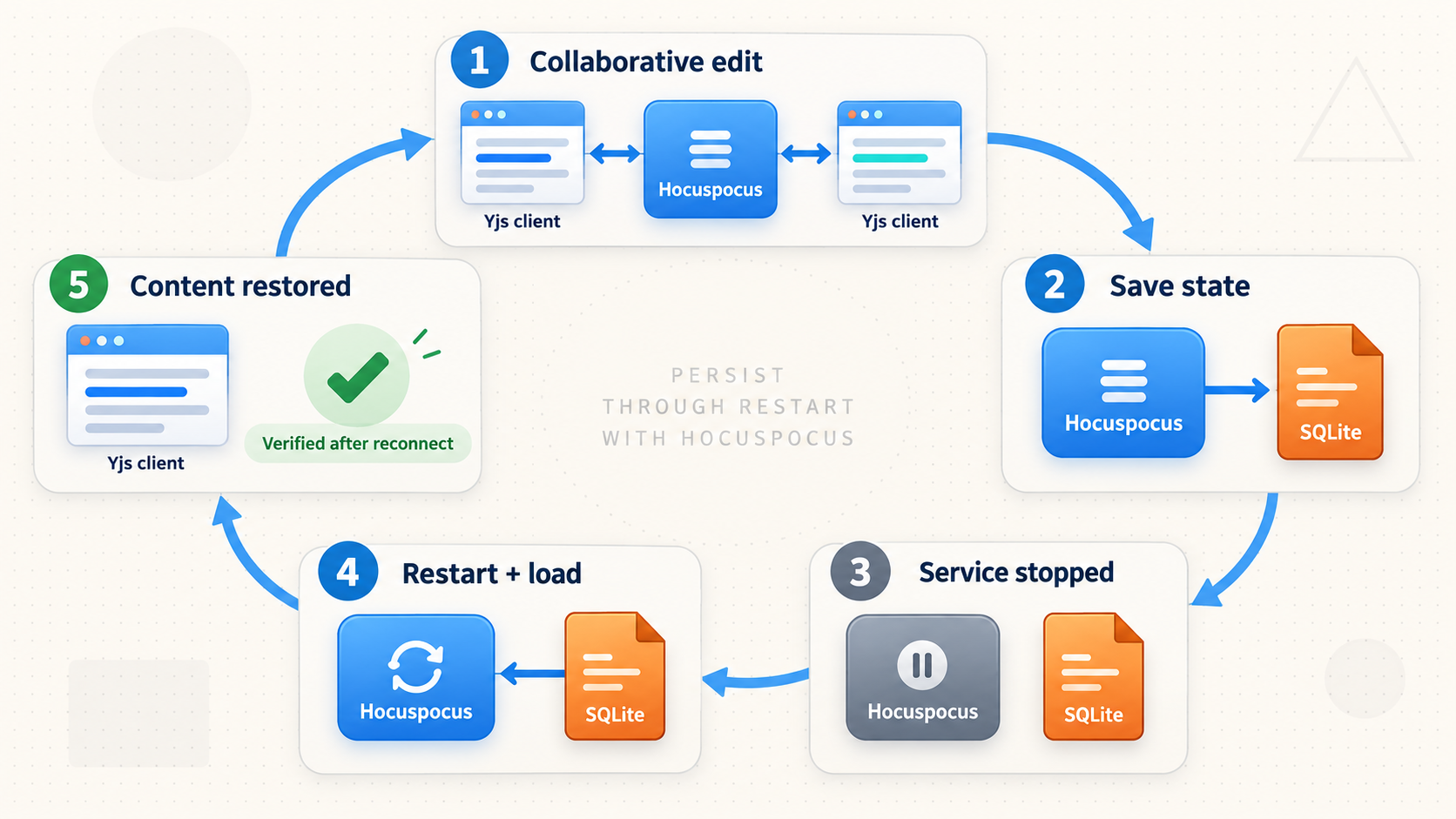
Persistence should be tested with an actual document update, not merely by checking whether db.sqlite exists. SQLite may create a database and schema before a meaningful collaboration document has been stored. A proper test changes a named document through a compatible Hocuspocus client, stops the server cleanly, starts it again, and reconnects to the same document name.
- Start Hocuspocus from the directory associated with the intended
db.sqlitefile. - Connect a compatible client to a clearly named test document.
- Add recognizable test content and allow the client and server enough time to process the update.
- Close the client and stop the server cleanly.
- Confirm that the expected
db.sqlitefile remains in the intended directory. - Start the server again from the same working directory.
- Reconnect to the same document name and verify that the saved state loads.
Document names are storage identities in the default schema because the name column is unique. Reconnecting under a different name can create or load a different document, which may look like data loss even when the original document remains intact.
The extension is built on the Hocuspocus persistence hooks. At a lower level, Hocuspocus can load documents through onLoadDocument and store them through onStoreDocument. The store hook includes debounce behavior. The SQLite extension provides an abstraction over these hooks, so custom hook code is unnecessary for the straightforward file-backed setup in this guide.
A database file is not a backup merely because it is on disk. Define a backup and restore procedure appropriate for SQLite and your service lifecycle, store copies away from the host, protect them as collaboration data, and test restoration. Avoid treating an arbitrary live-file copy as proven recoverable without validation.
Connect remote collaborators through Localtonet
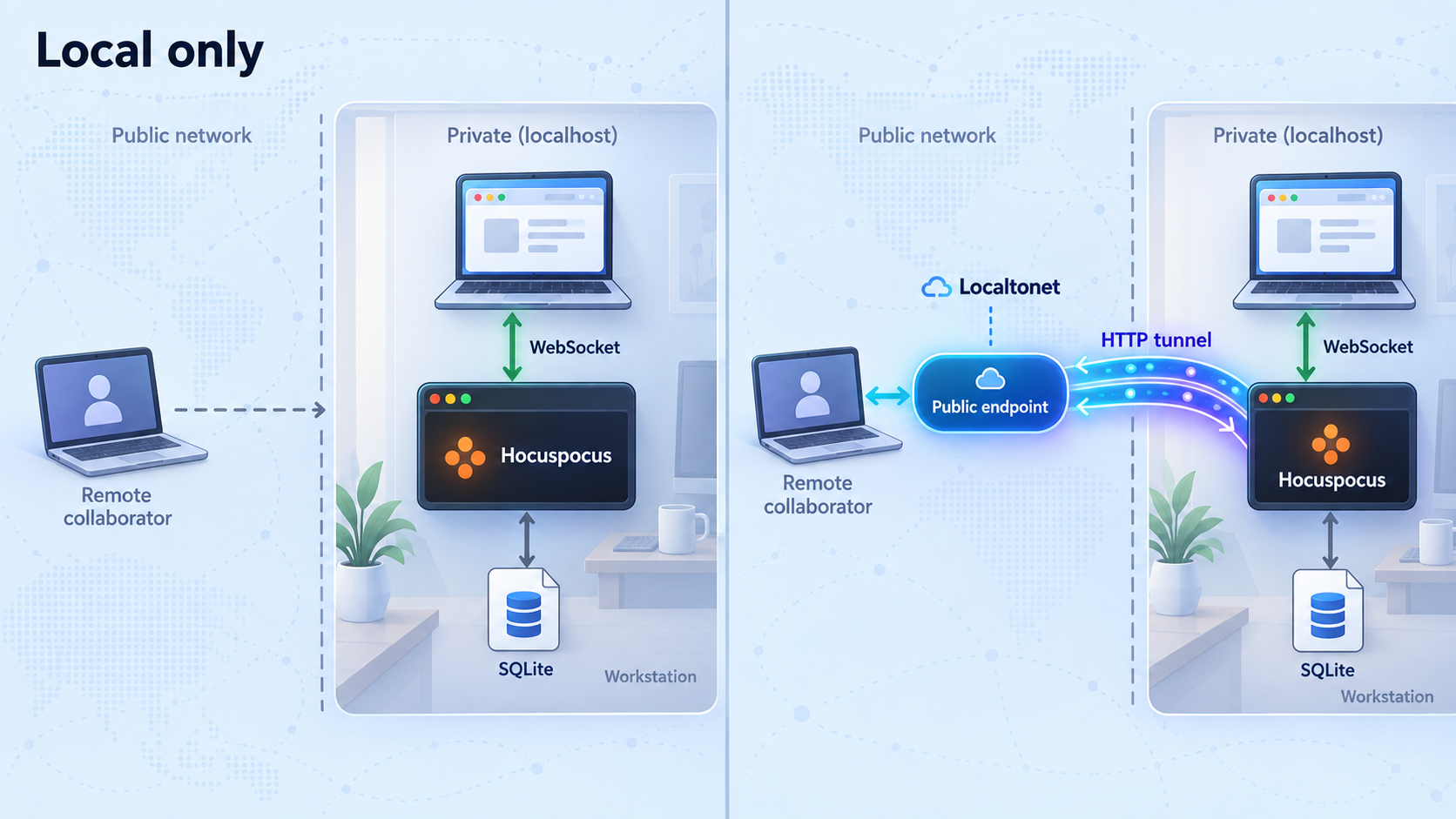
Do not create the public route until the local collaboration and restart tests pass. Separating these stages makes diagnosis much easier. If the local client cannot synchronize against ws://127.0.0.1:1234, adding a tunnel will not correct the Hocuspocus configuration.
For this workflow, use a Localtonet HTTP tunnel. HTTP tunnels are appropriate for a web-facing service whose clients establish WebSocket connections through the HTTP upgrade mechanism. HTTP and File Server tunnels can use a generated subdomain, a selected subdomain where supported, or a custom domain. The exact options available can vary, so obtain current values from the dashboard rather than assuming a particular hostname or plan capability.
Our standard workflow is to run the Localtonet client on the device that can reach the service, select that device with its token, choose an available relay server, create the tunnel with the local target, and then start it. Creating a configuration does not make the tunnel active. It must be started, and it remains available only while the selected client is connected and the tunnel is running.
Install and run the Localtonet client
Run our client on the Hocuspocus host or another device that can reach the service. If it runs on the same machine, the target can use 127.0.0.1 and port 1234.
Authenticate or select the device
Use the device-specific authentication token through the supported client workflow. Keep the token private and select the connected device that will originate the tunnel.
Select an available relay server
Choose the server or region from the values currently presented in the dashboard. Do not hardcode a server code copied from another account or an older tutorial.
Create an HTTP tunnel to Hocuspocus
Configure the local target as IP address 127.0.0.1 and port 1234 when both processes share a host. If they are on different devices, use an address reachable from the Localtonet client device and apply appropriate LAN firewall controls.
Start the tunnel
Use the Start button after reviewing the target. The dashboard will provide the assigned public HTTPS address according to the selected process type and current configuration.
Update and test the remote client
Configure the collaboration client with the public secure WebSocket form of the assigned HTTPS address, using wss:// where the client expects a WebSocket URL. Test with non-sensitive data before inviting collaborators.
The Localtonet edge provides the public HTTPS address for the HTTP tunnel. A WebSocket client normally represents the secure form of that same endpoint with the wss:// scheme. Preserve any path or document-related configuration required by your Hocuspocus client rather than assuming that changing only the hostname is sufficient for every application.
For the current dashboard workflow, consult our Localtonet HTTP tunnel documentation. Exact domain and DNS instructions should always be checked against current documentation before configuring a custom domain.
A tunnel makes the service reachable. It does not prove that a user should be allowed to open a requested document. Validate identities, document names, and permissions in the Hocuspocus application layer. Use least privilege and avoid predictable document identifiers as the only protection.
Operate the deployment safely
Keep both processes supervised
Remote access depends on two separate processes: Hocuspocus and the Localtonet client. If Hocuspocus stops, the tunnel may remain configured but have no healthy local target. If the Localtonet client disconnects or the tunnel stops, the local Hocuspocus service can remain healthy while remote clients lose access. Monitor them independently.
Protect the database and project secrets
Restrict filesystem access to the service account and administrators who need it. The SQLite file contains collaboration data in binary form, but binary encoding is not a substitute for access control. Keep Localtonet device tokens and any future application credentials outside committed source files.
Use stable startup behavior
A relative database path is convenient during development but sensitive to the process working directory. A service manager, container, scheduled task, or shell can start the same module from a different directory and silently create another db.sqlite. Record the intended working directory and confirm it after deployment changes.
Plan upgrades deliberately
Pin dependency versions through the package manifest and lockfile according to your project policy. Review Hocuspocus release notes before major upgrades, especially when using custom schemas, custom persistence queries, authentication hooks, or client packages that must remain protocol-compatible.
Stop access when it is no longer required
A Localtonet tunnel can be stopped or deleted from its lifecycle controls. Stop temporary collaboration access after the session ends. Deleting a tunnel removes its configuration, while stopping it preserves the configuration for later use. Neither action deletes the local Hocuspocus database.
Troubleshooting common failures
The server reports that it cannot locate the better-sqlite3 bindings
better-sqlite3 includes prebuilt native bindings, but a newly released Node.js version, operating system, or processor combination may not have a matching prebuilt file. The official Hocuspocus SQLite guidance recommends rebuilding the dependency from source:
npm rebuild better-sqlite3 --build-from-source
This requires a working C++ build toolchain. The documented examples are Xcode Command Line Tools on macOS, build-essential on Debian or Ubuntu, and Visual Studio Build Tools on Windows. If rebuilding still fails, compare the installed Node.js version and architecture with the versions supported by the selected better-sqlite3 release.
The database file is created in an unexpected directory
The value db.sqlite is relative to the process working directory. Check the directory from which the service is launched. Stop the service before reorganizing files, identify which database contains the expected documents, and avoid merging or replacing files without a verified backup.
The server restarts but the document appears empty
Confirm that the configuration uses db.sqlite, not :memory: or an empty string. Verify that the process starts from the same working directory, the client reconnects with the exact same document name, and the original update was sent through a compatible Hocuspocus client. The presence of a database file alone does not prove that a document update was stored.
Local connections work but remote connections fail
Confirm that the Localtonet client is connected, the HTTP tunnel is started, and its local target points to the address and port reachable from that client device. A target of 127.0.0.1 refers to the Localtonet client device itself. It cannot refer to a different machine on the LAN.
Also check that the remote application uses the assigned public endpoint and the secure WebSocket scheme expected for an HTTPS tunnel. Browser developer tools can reveal mixed-content errors, failed WebSocket upgrades, authentication rejection, or an incorrect path.
The tunnel exists but there is no public service
Creating a Localtonet tunnel does not start it. Use the Start control and verify that the selected device remains connected. The public endpoint is available only while the tunnel is running through a connected client.
Two users connect but do not see the same content
Check that both clients use the same endpoint and exactly the same document name. Then inspect application authentication or tenant-prefix logic that may intentionally map the users to different documents. A successful WebSocket connection does not guarantee that two sessions joined the same collaborative document.
Frequently asked questions
Is Hocuspocus a complete collaborative editor?
No. Hocuspocus provides collaboration tools and a Yjs WebSocket backend. Your application still supplies the editor or interface, client integration, identity model, and authorization rules.
Why does this guide use a filename instead of the SQLite default?
The SQLite extension defaults to :memory:, which loses its contents when the database closes. Setting database: 'db.sqlite' selects a named file so documents can survive ordinary server restarts.
Can I store the collaborative document as JSON?
You may maintain an additional JSON representation for application-specific purposes, but it must not replace the Yjs binary state. Hocuspocus documentation warns that rebuilding a Yjs document from JSON can break update merging and duplicate content. Preserve the Yjs document as its encoded binary data.
Does a Localtonet tunnel add Hocuspocus user authentication?
No. Our tunnel provides connectivity from a public endpoint to the local service. Authentication, document authorization, tenant isolation, and collaboration policy remain responsibilities of the Hocuspocus application.
Do I need router port forwarding or a public IP address?
Not when using Localtonet for this workflow. Our client establishes an outbound connection to a relay server, so the Hocuspocus host does not require inbound router port forwarding, firewall changes, VPN setup, or its own public IP address.
Is the public endpoint always available after I create the tunnel?
No. The tunnel must be started, the selected Localtonet client must remain connected, and Hocuspocus must continue listening on the configured local target. A saved tunnel configuration by itself is not a running service.
Is SQLite the right database for every Hocuspocus deployment?
No. The Hocuspocus documentation positions the SQLite extension as convenient for local development. It can also be useful for compact deployments, but production suitability depends on workload, scaling, backup, recovery, availability, and process architecture. Hocuspocus also exposes persistence hooks and other storage extensions for different requirements.
Connect your verified Hocuspocus server with Localtonet
Once local collaboration and SQLite restart persistence are working, create an HTTP tunnel to the Hocuspocus listener and test the public WebSocket endpoint with a non-sensitive document. Keep the device token private, add application-level authorization, and stop the tunnel whenever remote access is not required.
Get Started Free →

