

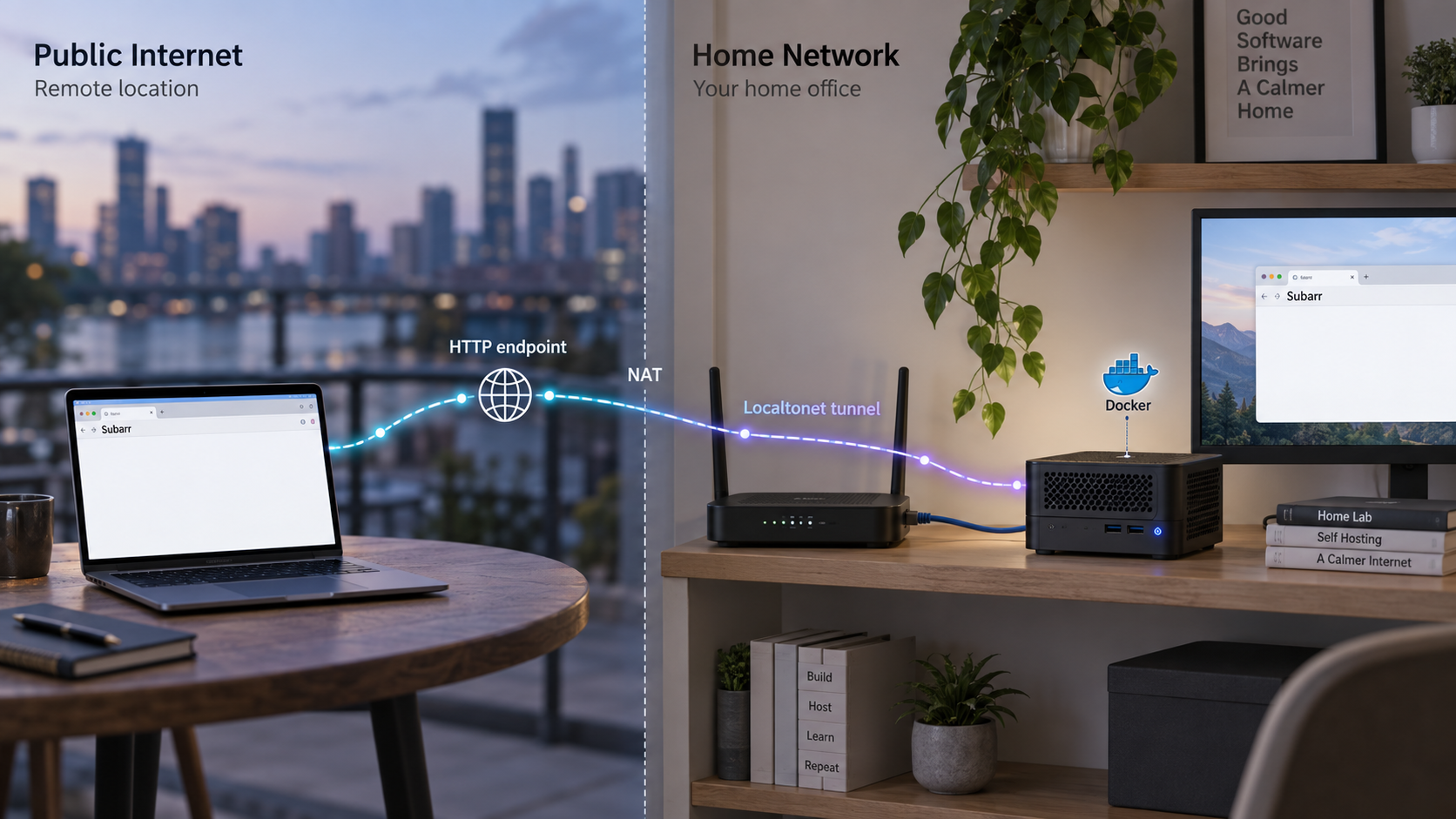
Build a working subtitle coordination service first, then give its dashboard a controlled public address
Subarr adds coordination, measurement, and quality controls to a self-hosted subtitle stack built around applications such as Sonarr, Radarr, Bazarr, and subgen. In this guide, we install Subarr with Docker Compose, prepare persistent storage and a writable media mount, complete the first-run authentication flow, and verify the dashboard locally on port 9922. Once the local deployment is healthy, we expose it through a Localtonet HTTP tunnel without opening an inbound router port or requiring a public IP address. We also cover routine maintenance, safe exposure practices, and the most common container, storage, integration, and tunnel problems.
📋 What's in this guide
What Subarr does in a self-hosted media stack
Subarr is a coordination layer for an existing subtitle automation environment. It is designed to work beside Bazarr rather than replace it. Bazarr searches for and downloads subtitles, while subgen can generate subtitles by transcription. Subarr examines the wider state of the library, identifies subtitle gaps, measures provider results, verifies audio-language information, and helps decide when a transcription job is appropriate.
That distinction matters during installation. A working Subarr container provides a dashboard, database, and coordination service, but it does not automatically create a complete media stack. Sonarr, Radarr, Bazarr, subgen, and the media files themselves remain separate systems. You must give Subarr network access to the services you want it to coordinate and filesystem access to the media paths it needs to inspect or modify.
Subarr only treats a file as an actionable subtitle gap after probing it. Files that have not yet been inspected remain in an analyzing state instead of being silently omitted or incorrectly queued. This design makes path visibility and media permissions essential. A dashboard that loads successfully does not by itself prove that Subarr can read every library or write sidecar subtitle files.
An HTTP tunnel cannot repair a container that is failing, a dashboard that is not listening, or an incorrect media mount. Complete the installation and confirm that http://localhost:9922 works on the host before creating the Localtonet tunnel.
Prerequisites and deployment decisions
This workflow uses the published container image ghcr.io/coaxk/subarr:latest and Docker Compose. The host can be a home server, NAS, virtual machine, or another system capable of running that image. The supplied evidence establishes an arm64 image as well as the standard container distribution, but host-specific Docker installation procedures vary. Install a current Docker Engine and the Compose plugin using the instructions for your operating system or server platform.
Before creating the Compose file, identify two different storage locations:
- Subarr data: a dedicated persistent directory mounted at
/datainside the container. - Media library: the existing movie or television library mounted at a stable container path, with write access if Subarr will create or update sidecar files.
Never point Subarr's database path at the media tree. The application data directory and media library have different ownership, backup, and lifecycle requirements. Current Subarr containers can reconcile ownership of their own data directory during startup, but the project deliberately treats the media mount as foreign data owned by the operator.
| Requirement | Why it matters | What to confirm |
|---|---|---|
| Docker Engine | Runs the published Subarr container image | docker --version returns successfully |
| Docker Compose plugin | Creates and manages the deployment from one configuration file | docker compose version returns successfully |
| Persistent data directory | Retains the database, settings, cache, and application state across container replacement | The host path exists and is not the media directory |
| Media library path | Allows Subarr to inspect media and, where required, write sidecar content | The path is absolute, mounted consistently, and writable for the intended workflow |
| Available host port 9922 | Publishes the Subarr web service to the host | No unrelated process is already using the port |
| Related service details | Allows later connections to Sonarr, Radarr, Bazarr, or subgen | You know the reachable service addresses and have the credentials those services require |
| Localtonet client | Creates the outbound connection used for remote access | Install it only after the local Subarr service is working |
Run the following checks before continuing:
docker --version
docker compose version
If either command fails, complete the Docker installation for your host first. Do not substitute the legacy docker-compose command unless that is specifically the Compose implementation supported by your environment. The examples below use the current docker compose form.
Choose host directories carefully
The example uses $HOME/subarr/data for persistent Subarr state. It uses /absolute/path/to/media as an explicit placeholder for the existing media library. Replace that placeholder before starting the container. An absolute path reduces ambiguity and makes it easier to compare the Docker mount with paths configured in the other applications.
If Sonarr, Radarr, Bazarr, and Subarr all run in containers, give careful attention to path consistency. For example, the same movie should not appear as one unrelated path in every container unless the applications are configured with the required path mappings. A file path reported by an integration is useful to Subarr only if that path can be resolved through its own media mount.
Current Subarr releases enable authentication by default and present a one-time account setup on a new installation. Complete that setup locally. Do not disable authentication merely to make remote access easier, especially when the dashboard will receive a public URL.
Install Subarr with Docker Compose
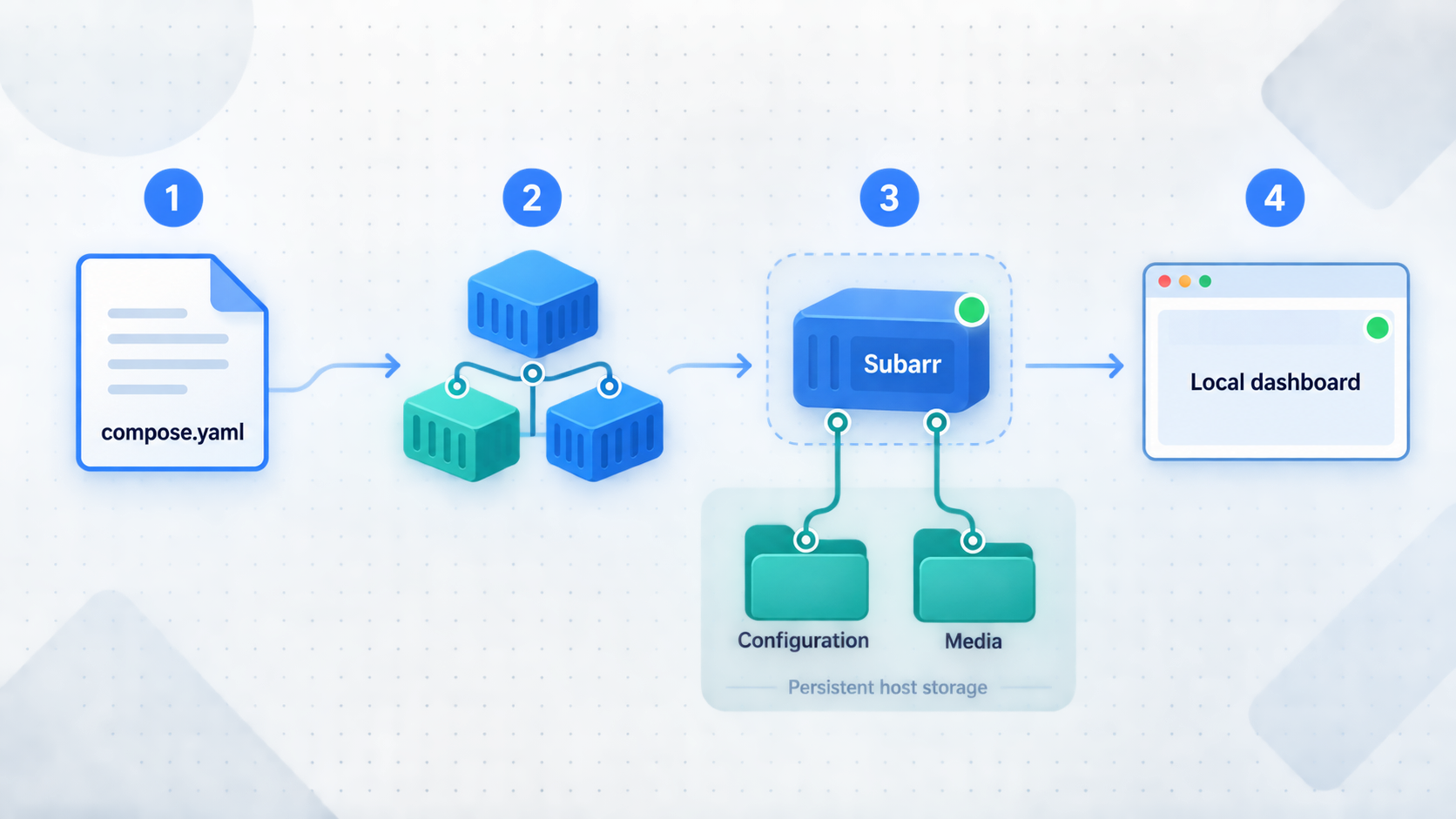
The following installation keeps the configuration intentionally small. It uses the documented image, publishes the documented port, persists /data, and supplies the required writable media mount. It does not add unverified environment variables, health checks, privilege settings, or networking assumptions.
Create the project and data directories
Create a directory for the Compose project and a separate child directory for persistent Subarr state. The media library should already exist elsewhere on the host.
Create the Compose configuration
Define the published Subarr image, map host port 9922 to container port 9922, mount the dedicated data directory at /data, and mount the media library at a stable container location.
Validate the resolved configuration
Ask Docker Compose to parse the file before downloading or starting anything. Review the resulting mounts and port mapping, paying particular attention to the host media path.
Pull the published image
Download the current ghcr.io/coaxk/subarr:latest image explicitly so that image or registry failures are visible before startup.
Start Subarr in the background
Run the documented docker compose up -d command, then inspect container state and startup logs rather than assuming that a created container is healthy.
1. Create the directories
mkdir -p "$HOME/subarr/data"
cd "$HOME/subarr"
Confirm that your real media path exists separately. This example does not create an empty media directory because accidentally mounting an empty path can conceal a typing mistake.
ls -ld /absolute/path/to/media
Replace /absolute/path/to/media with the actual path before running the check.
2. Create compose.yaml
services:
  subarr:
    image: ghcr.io/coaxk/subarr:latest
    ports:
      - "9922:9922"
    volumes:
      - ./data:/data
      - /absolute/path/to/media:/media
Replace /absolute/path/to/media with your real host library path. The mount is writable because no read-only suffix is present. Keep ./data:/data separate from that library. The container path /media is the path Subarr will see, so use it consistently when the application asks for a library or probe location.
This minimal example deliberately does not set SUBARR_AUTH_DISABLED=1. That setting disables built-in authentication and is intended for environments where a trusted reverse proxy already performs authentication. It is not appropriate for the basic public-tunnel workflow in this guide.
3. Validate the file
docker compose config
Examine the output. The resolved configuration should show host port 9922 mapped to container port 9922, a data mount targeting /data, and your actual media directory targeting /media. If the media source still contains the placeholder, edit the file before continuing.
4. Pull and start the image
docker compose pull
docker compose up -d
The second command creates or updates the service and leaves it running in the background. Check its state and initial logs:
docker compose ps
docker compose logs --tail=100 subarr
A running container is necessary but not sufficient. Read the logs for database, permission, port-binding, or startup errors. Do not proceed to the integration or tunneling stages while the container is repeatedly restarting.
Subarr 2.x runs as a non-root container. The project's hardened deployment guidance uses PUID and PGID matching the owner of the data and media paths, together with a specific capability set when all other capabilities are dropped. Those additions depend on the host's ownership model and should not be copied blindly. Start with the supported basic deployment, inspect actual permissions, and apply the project's hardened configuration as a deliberate follow-up.
Complete first-run setup and connect the media stack
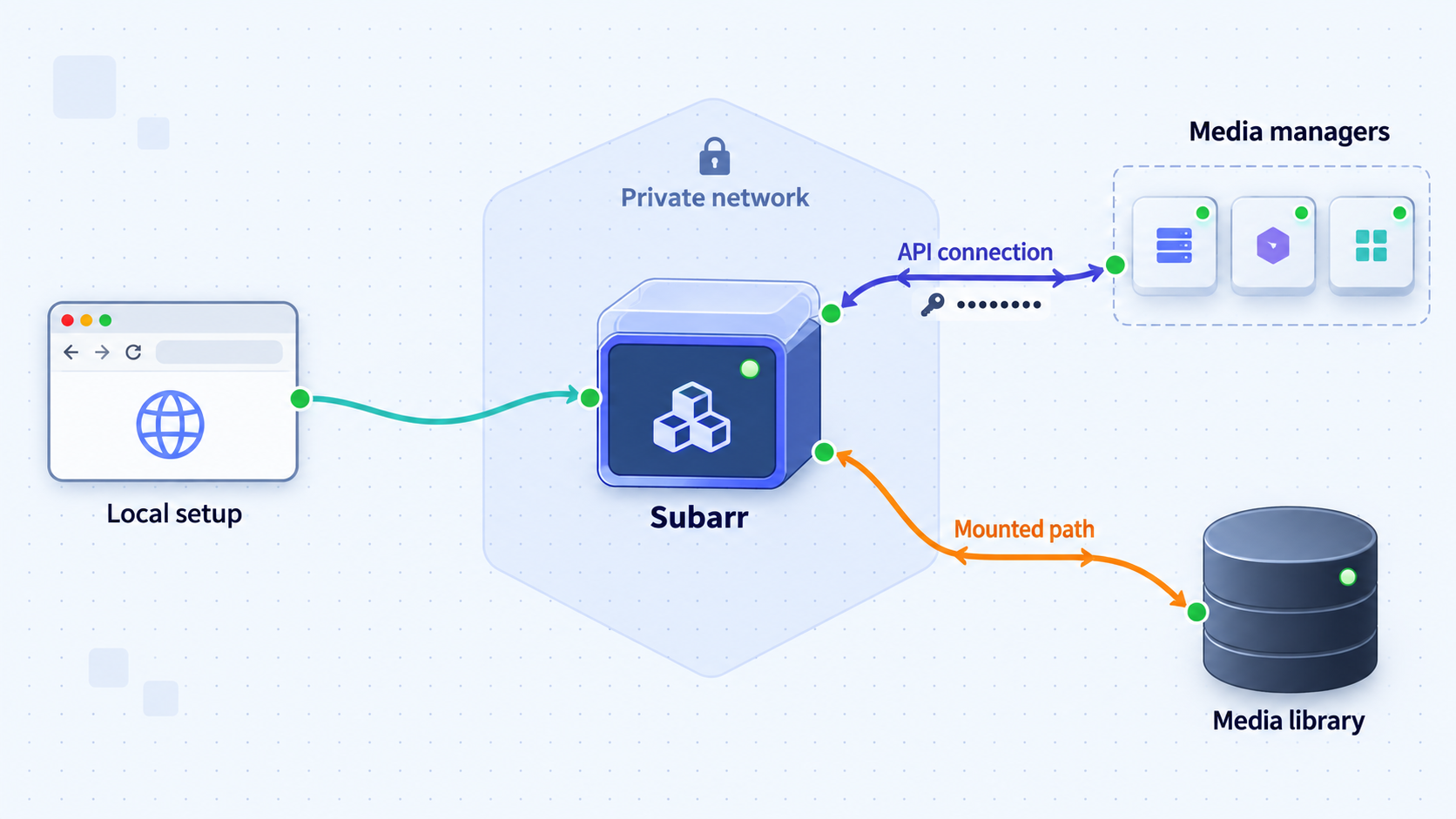
Open http://localhost:9922 in a browser running on the Docker host. If the server has no graphical browser, use http://SERVER-LAN-IP:9922 from a trusted device on the same network, provided the host firewall permits that local connection.
A new current installation should present the one-time authentication setup. Create the administrator account and store its credentials in a password manager. Exact dashboard labels can change between Subarr releases, so this guide does not invent field names that are not established by the supplied project documentation.
Plan each service connection
Subarr can coordinate information from Sonarr, Radarr, Bazarr, and subgen, but each connection still needs a network address that is reachable from the Subarr container. The correct address depends on how your services are deployed:
- If another service runs in the same Docker network, its Compose service name may be the appropriate hostname.
- If it runs directly on the Docker host,
localhostinside the Subarr container normally refers to Subarr itself, not the host service. - If it runs on another machine, use an address reachable from the Docker host and container network.
- If a service requires an API key or other credential, obtain it from that service and enter it only into the corresponding Subarr configuration.
Do not publish Sonarr, Radarr, Bazarr, or subgen merely to let Subarr reach them. Internal service-to-service connectivity should remain on the trusted LAN or container network whenever possible.
Align filesystem paths with integration data
Network connectivity and filesystem visibility are separate. Sonarr or Radarr may report a media file path that makes sense inside its own container, while Subarr sees the same host directory as /media. If those representations do not align, Subarr may connect successfully to the application API but still fail to probe the referenced files.
Use the library and probe configuration in Subarr to point at directories that actually exist within its media mount. Current Subarr releases provide a picker that lists configured libraries and folders visible beneath them, reducing errors caused by manually typing probe roots. Manual entry remains available for paths the picker cannot see.
Allow the initial analysis to finish
Initial library analysis can take time because files must be discovered and probed. Subarr keeps un-probed files in a visible analyzing state. Avoid diagnosing every temporary gap as a configuration failure while the initial scan is still active. Instead, watch the dashboard and logs for a pattern: progress indicates normal work, while repeated permission or missing-path errors indicate a configuration problem.
API keys, administrator passwords, and service URLs can grant substantial control over a media stack. Do not paste them into shell history, public issue reports, screenshots, Compose files committed to a repository, or Localtonet tunnel fields. A Localtonet device token is also device-specific and must be kept private.
Verify the dashboard and media access locally
Verification should proceed from the container outward. This makes failures easier to isolate because each test adds only one new networking layer.
Check container state
cd "$HOME/subarr"
docker compose ps
docker compose logs --tail=200 subarr
If the service is stopped or restarting, inspect the most recent error before making unrelated networking changes. Common categories include malformed configuration, an occupied port, inaccessible storage, or an image startup failure.
Confirm the published port
docker compose port subarr 9922Docker should report the host-side binding for the container's port 9922. You can then make an HTTP request from the host:
curl -sS -o /dev/null -w '%{http_code}\n' http://localhost:9922
The precise HTTP status can depend on the authentication and redirect behavior of the installed version. The important result is that the request reaches an HTTP application rather than failing with a connection error. Confirm the final behavior in a browser by loading http://localhost:9922 and signing in.
Test from the trusted local network
If you intend to run the Localtonet client on the same server, a successful localhost test is the key prerequisite. If the Localtonet client will run on another device, first open http://SERVER-LAN-IP:9922 from that device. A tunnel client can only forward to a target it can reach.
Test application behavior, not only the login page
After signing in, confirm that the expected libraries appear and that analysis progresses. Open an item from a known library and verify that Subarr can locate the corresponding file. If your workflow requires writing subtitle sidecars, test that behavior on a non-critical item and confirm that the resulting file appears in the intended media directory.
A complete local acceptance test therefore covers four independent conditions:
- The container remains running.
- The HTTP dashboard responds on port 9922.
- Authentication works.
- Configured libraries and integrations can reach their files and services.
Operate, back up, and update Subarr
Docker Compose provides a small set of commands for routine management. Run them from the directory containing compose.yaml.
| Task | Command | Operational effect |
|---|---|---|
| View service state | docker compose ps |
Shows whether the Subarr container is running, stopped, or restarting |
| Follow logs | docker compose logs -f subarr |
Streams application output until interrupted |
| Restart the service | docker compose restart subarr |
Restarts the existing container without changing the image |
| Stop the service | docker compose stop subarr |
Stops Subarr while preserving its container and persistent data |
| Start it again | docker compose start subarr |
Starts the previously stopped container |
| Pull and apply an update | docker compose pull && docker compose up -d |
Downloads the current image and recreates the service when necessary |
Back up the dedicated data directory
The ./data directory contains persistent Subarr state and should be included in your normal server backup plan. For a straightforward consistent copy, stop Subarr before creating the archive:
cd "$HOME/subarr"
docker compose stop subarr
tar -czf "subarr-data-backup-$(date +%Y%m%d-%H%M%S).tar.gz" data
docker compose start subarr
Store the resulting archive outside the project directory and preferably on another storage device. The media library requires its own backup policy and should not be duplicated into the Subarr data archive.
Update deliberately
The latest image follows current project releases, so pulling it can change the running application. Read release notes before updating, take a data backup, pull the image, and inspect logs after recreation. Recent 2.x releases are documented as upgrading transparently, while the 2.0 transition contained breaking changes. A recent release also applies a database migration automatically on first startup. These are reasons to maintain recoverable backups rather than reasons to avoid updates.
cd "$HOME/subarr"
docker compose pull
docker compose up -d
docker compose ps
docker compose logs --tail=200 subarr
After an update, sign in and check library visibility, integration status, and a representative review workflow. Do not treat a running container as proof that a database migration and every external connection completed successfully.
Recover access without disabling authentication permanently
If you are locked out, Subarr documents several recovery mechanisms. Existing installations that explicitly use SUBARR_USER and SUBARR_PASS, or SUBARR_API_KEY, retain those methods. Current versions also provide a container command for resetting authentication:
docker exec subarr python -m subarr.cli reset-auth
That exact command assumes the running container is named subarr. The minimal Compose file in this guide does not force a container name, so first obtain the actual name with docker compose ps. Alternatively, run the same application command through the Compose service:
docker compose exec subarr python -m subarr.cli reset-auth
Subarr also documents SUBARR_AUTH_RESET=1 as a recovery option. Treat it as temporary recovery configuration and remove it after regaining access. Do not leave authentication disabled as a workaround.
Expose the verified Subarr dashboard with Localtonet
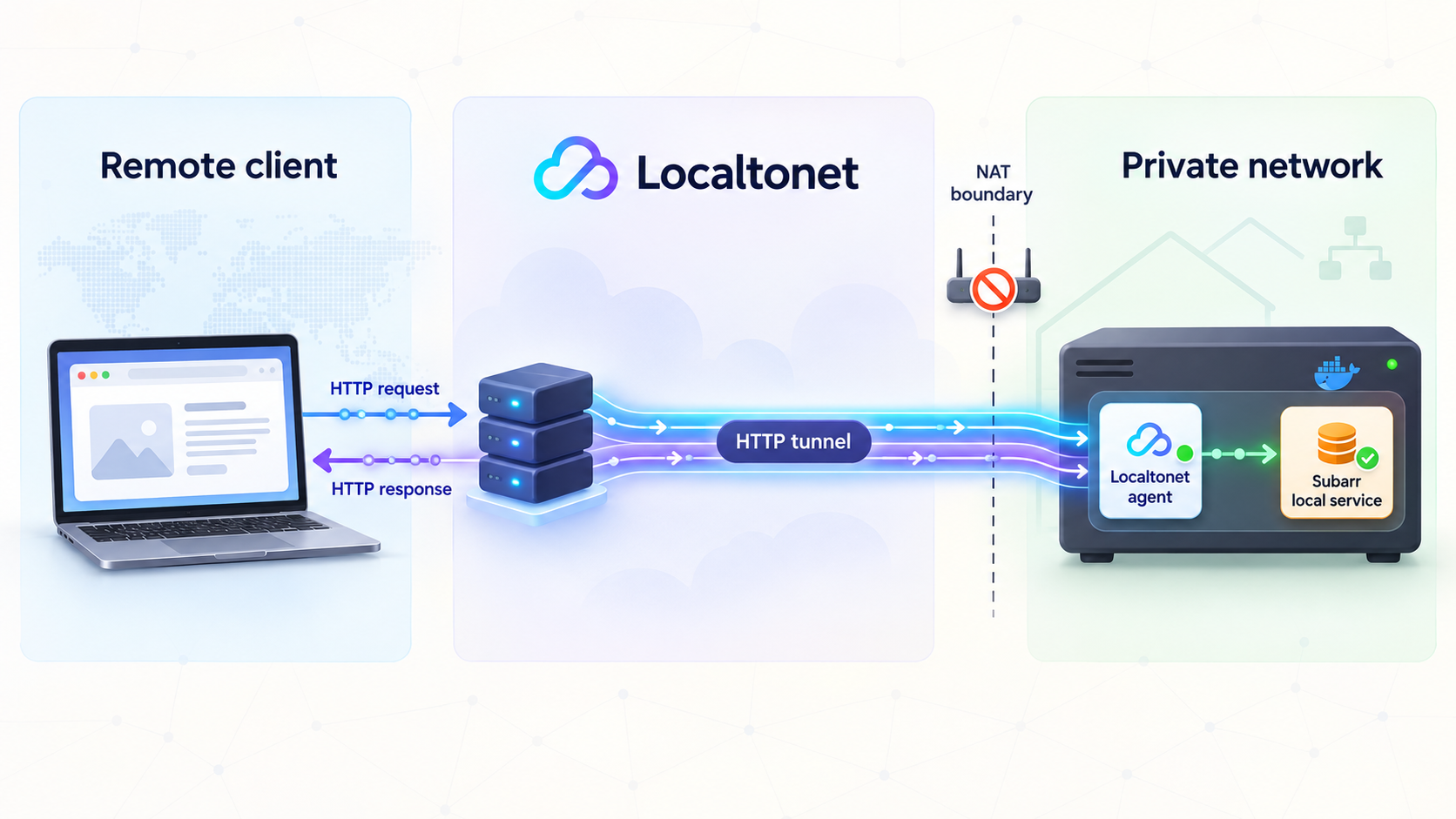
Once Subarr works locally, an HTTP tunnel can give it a public HTTPS address. With Localtonet, the client running on your server or another reachable device establishes an outbound connection to a Localtonet relay server. This means you do not need inbound router port forwarding, firewall changes for a public listener, VPN setup, or a public IP address.
The recommended arrangement is to run the Localtonet client on the same device as Docker and target 127.0.0.1:9922. If the client runs elsewhere, target the Subarr server's reachable private address and port instead. Verify that connection locally from the client device before creating the tunnel.
Install and run the Localtonet client
Install our client on the Subarr host or on another trusted device that can reach the dashboard. Keep the client running because the tunnel is available only while the selected device is connected and the tunnel itself is running.
Authenticate or select the device
Use the device-specific authentication token supplied through your Localtonet account. Do not copy the token into the article, a Compose file, screenshots, or public logs.
Select an available relay server
Choose from the server or region values currently available in the dashboard. Availability can vary, so this guide does not hardcode a server code.
Create an HTTP tunnel configuration
Choose the HTTP tunnel family and select the process type appropriate for the public address you want. A generated random subdomain is the simplest choice when you do not need custom DNS.
Set the local Subarr target
When the Localtonet client runs on the Docker host, enter 127.0.0.1 as the local IP address and 9922 as the local port. If the client runs on another device, use the private address that successfully opened Subarr during local verification.
Start and test the tunnel
Creating the tunnel does not start it. Press Start, wait for the tunnel to become active, and open the assigned public HTTPS URL from a network outside your home LAN. Confirm that the Subarr login page appears and that authentication is required.
HTTP and File Server tunnels can use a random subdomain, a custom subdomain where supported, or a custom domain. All three process types serve content at a public HTTPS address. Custom-domain DNS requirements can change, so consult the current dashboard and documentation before adding DNS records rather than copying an unverified value.
For the current product workflow, see our Localtonet HTTP tunnel documentation. Everything can be managed through the Localtonet dashboard or REST API, but this guide uses the dashboard workflow because it avoids placing credentials in scripts.
Localtonet separates creation from runtime state. After entering the configuration, use Start. The public address remains available only while the selected client device is connected and the tunnel is running. You can later stop or delete the tunnel when remote access is no longer required.
Understand the request path
A remote browser connects to the assigned public HTTPS address. The Localtonet relay routes the request through the outbound client connection to the configured local target. Subarr continues listening on its normal HTTP endpoint at port 9922. This provides internet reachability without making port 9922 an inbound router-forwarding rule.
The tunnel does not replace Subarr authentication. The public URL is an address, while the Subarr login remains the application-level control protecting administrative functions. Keep both layers operating as intended.
Secure a remotely accessible Subarr deployment
A media automation dashboard can reveal library names, file paths, integration details, job history, and operational controls. Treat it as an administrative service rather than a public website.
A generated subdomain is still a public endpoint. Anyone who obtains the URL can send requests to it. Keep Subarr's login enabled, avoid sharing the URL casually, and stop the tunnel when it is not required.
Subarr exposes Swagger/OpenAPI documentation at /docs in releases that include that feature. An authenticated administrative deployment should be treated as exposing the whole application surface behind that hostname, not only the visual dashboard page. Do not assume that hiding a navigation link removes an endpoint.
If you place Subarr behind a separate authenticating reverse proxy, the project supports SUBARR_AUTH_DISABLED=1. That is an advanced trust decision. Only use it when the proxy is guaranteed to authenticate every route and direct access to Subarr is blocked. It is unnecessary for the standard Localtonet setup described here because Subarr's own authentication can remain enabled.
Troubleshoot installation, storage, and remote access
The container exits or repeatedly restarts
Begin with the service state and complete recent logs:
docker compose ps
docker compose logs --tail=300 subarr
Validate the Compose file again with docker compose config. Confirm that the image pull completed, both source directories exist, and the host has sufficient storage for application state. Correct the first concrete error in the log rather than recreating the entire stack repeatedly.
Port 9922 is already in use
On a Linux host, inspect listeners with:
ss -ltnp | grep ':9922'
Stop the conflicting service if it is not needed. If you intentionally change only the host-side port, remember that the container side remains 9922. For example, a mapping such as 127.0.0.1:19922:9922 would make the local target port 19922, but that is an operator-selected variation rather than the documented default. Update local tests and the Localtonet target consistently.
The dashboard loads, but no media appears
Check the resolved mount:
docker compose config
docker compose exec subarr sh -c 'ls -la /media'
If /media is empty, compare the host path in compose.yaml with the real library. If files are visible there, compare the paths supplied by Sonarr or Radarr with the paths visible to Subarr. Network integration success does not correct a filesystem path mismatch.
Subarr can read media but cannot write sidecar files
Inspect ownership and permissions on the host media path. Subarr runs non-root in current 2.x releases, and it does not take ownership of the media library at startup. Align the container process identity with the ownership policy of your server rather than applying broad world-writable permissions.
ls -ld /absolute/path/to/media
find /absolute/path/to/media -maxdepth 1 -printf '%M %u %g %p\n'
The correct user and group IDs depend on your host, NAS, and other media containers. Because those values are deployment-specific, they should not be guessed. If you use Subarr's hardened Compose approach, follow its documented PUID, PGID, and capability guidance as a complete set.
An integration reports connection failures
Test reachability from inside the Subarr container, not only from the host. Do not assume localhost points to a sibling service. Verify that the configured hostname resolves on the container network and that the destination service is listening on the expected internal address.
Avoid publishing additional services to the internet as a troubleshooting shortcut. The connection between Subarr and the other applications normally belongs on a private Docker network or trusted LAN.
The Localtonet URL shows a gateway or connection error
Work backward through the request path:
- Open
http://localhost:9922on the Subarr host. - If the Localtonet client runs elsewhere, open
http://SERVER-LAN-IP:9922from that client device. - Confirm that the selected Localtonet device is connected.
- Confirm that the HTTP tunnel has been started, not merely created.
- Verify the local IP address and port in the tunnel configuration.
Use 127.0.0.1 only when the Localtonet client and the published Docker port share the same host network context. If the Localtonet client itself runs in a separate container, its loopback interface does not automatically refer to the Subarr container or Docker host.
The local dashboard works, but remote login behaves unexpectedly
Confirm that you are opening the assigned HTTPS address and that Subarr authentication is still enabled. Review Subarr logs while reproducing the request:
docker compose logs -f subarrIf you introduced a reverse proxy or changed authentication environment variables, simplify the path and test the documented direct local endpoint again. Do not disable authentication to conceal a proxy configuration problem.
An update starts a migration
Allow the process to complete and monitor logs. Do not repeatedly terminate the container during a database migration. A recent release documents automatic migration 034 on first startup and no associated configuration change. If an update fails, preserve the existing data directory and logs before attempting restoration. Use a backup created before the update and consult the release notes for the versions involved rather than guessing whether an older image can read a newer database.
Frequently asked questions
What port does Subarr use?
The documented local web endpoint is http://localhost:9922, and the Docker Compose deployment maps host port 9922 to container port 9922. If you deliberately change the host-side mapping, use the changed host port for browser tests and the Localtonet target.
Does Subarr replace Bazarr or subgen?
No. Subarr is a coordination and quality layer that stands beside the other services. Bazarr finds and downloads subtitles, subgen performs transcription, and Subarr helps determine what is missing, verifies audio-language information, tracks outcomes, and coordinates appropriate work.
Does the media mount need to be writable?
Yes, when your workflow requires Subarr to write sidecar files or make related media-library changes. The official deployment guidance calls for a writable media-library mount. Grant access only to the required library roots and align ownership with the non-root container instead of making the entire storage system broadly writable.
Should the Subarr database be stored in the media library?
No. Keep the database and application data in a dedicated volume such as /data or another dedicated configuration location. Never point SUBARR_DB_PATH at the media tree. The application data and media library should have separate mounts, ownership rules, and backup policies.
Do I need router port forwarding to access Subarr with Localtonet?
No. Our client establishes an outbound connection to a Localtonet relay server. The HTTP tunnel provides a public address without an inbound router port-forwarding rule, a public IP address, or a VPN setup. The client device and tunnel must both remain active.
Should I disable Subarr authentication when using an HTTP tunnel?
No. Keep authentication enabled for the standard tunnel workflow. The public URL provides connectivity, not application authorization. Subarr's authentication-disable setting is intended for a carefully controlled reverse proxy that authenticates every request and prevents direct access.
Can the Localtonet client run on another device?
Yes, provided that device can reach the Subarr host and port over the trusted network. Test http://SERVER-LAN-IP:9922 from the client device first, then use that reachable private address as the tunnel target. If both run on the same host, 127.0.0.1:9922 is the simpler target.
Why does a file remain in Subarr's analyzing state?
Subarr does not present an un-probed file as a confirmed subtitle gap. During an initial scan, analyzing can be normal. If the state persists, check logs, media mount visibility, probe roots, path alignment with Sonarr or Radarr, and read permissions for the non-root container.
Give your verified Subarr dashboard controlled remote reachability
Finish the local installation, keep Subarr authentication enabled, and then create a Localtonet HTTP tunnel to the working port 9922 service. You can start the tunnel when remote administration is needed and stop it without changing the underlying Docker deployment.
Get Started Free →

