


Build a durable Mastodon deployment, verify it locally, and expose it without opening inbound router ports
A Mastodon server is more than a web container. It depends on PostgreSQL, Redis, background workers, media storage, email delivery, streaming connections, stable cryptographic secrets, and a domain that becomes part of every account identity. This guide provides a production-oriented deployment workflow based on Mastodon's tagged upstream release and bundled Docker Compose definition, followed by a two-tunnel Localtonet topology for the web and streaming services. It also covers local verification, federation tests, security, backups, upgrades, rollback planning, and routine operations. Because image tags and release-specific migration steps change, you must use the current stable Mastodon release and follow its release notes rather than copying an unverified version number.
📋 What's in this guide
Understand the deployment before installing it
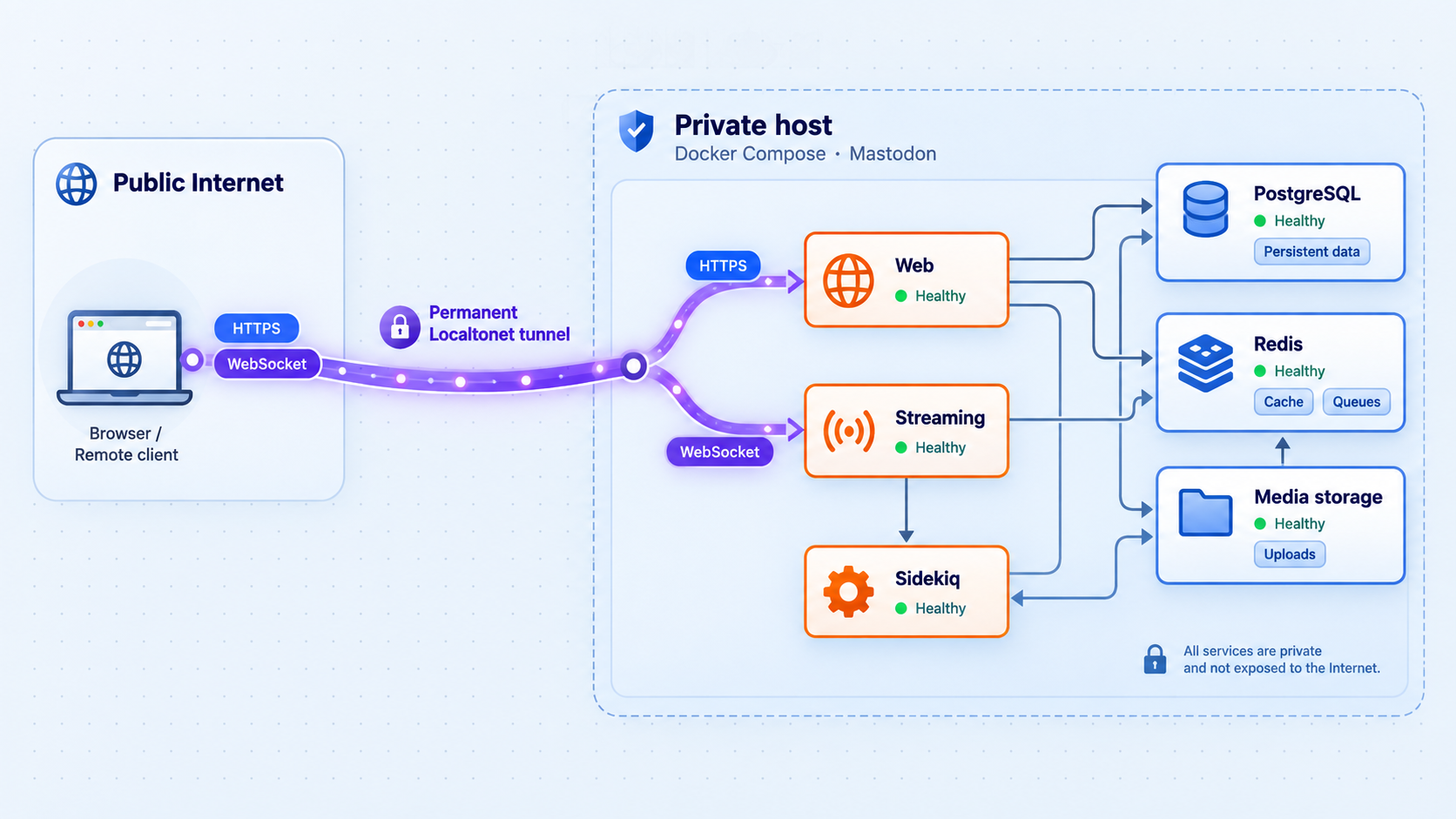
Mastodon is a federated social server built around ActivityPub. The web application serves profiles, timelines, account settings, WebFinger discovery, ActivityPub objects, and administrative pages. A separate streaming process supplies live updates over long-lived connections. Sidekiq handles asynchronous work such as email and federation delivery. PostgreSQL stores authoritative application data, Redis supports queues and transient coordination, and uploaded media must remain available from durable storage.
ActivityPub makes communication between independently operated servers possible, but it does not guarantee complete interoperability among every implementation. Different software can support different object types and behaviors. Administrators can also limit or block one another. Content sent through federation may be copied to remote systems, where deleting the local copy cannot guarantee deletion from every remote backup, cache, or database.
Browsers and mobile apps
          |
          | HTTPS
          v
mastodon.example.com
          |
          | Localtonet HTTP tunnel established outbound by the client
          v
127.0.0.1:3000  -- Mastodon web
          |
          +-- PostgreSQL
          +-- Redis
          +-- uploaded media or object storage
          +-- Sidekiq background workers
          +-- SMTP provider

Browser streaming connection
          |
          | HTTPS / WebSocket-capable connection
          v
streaming.example.com
          |
          | second Localtonet HTTP tunnel
          v
127.0.0.1:4000  -- Mastodon streaming

Remote fediverse servers
          |
          +-- WebFinger and ActivityPub requests to mastodon.example.com
          +-- inbound and outbound federation processed through web and Sidekiq
An account such as @alice@example.com is identified through its domain. Changing the deployment's identity domain later is not equivalent to changing a cosmetic hostname. Mastodon provides account migration mechanisms, but migration does not transfer every historical post, media file, interaction, or remote copy. Choose a domain you control and expect to retain, then confirm Mastodon's documented domain configuration before federation begins.
What the two-tunnel design does
In this topology, one Localtonet HTTP tunnel points to the Mastodon web service on host port 3000. A second points to the streaming service on host port 4000. The Localtonet client establishes outbound connections to our relay, so the host does not need inbound router port forwarding, a public IP address, firewall changes, or a separate VPN.
This design is suitable only after three behaviors have been verified with the current Mastodon and Localtonet versions: the web tunnel must preserve the externally visible HTTPS scheme through forwarding headers, the streaming tunnel must carry the connection behavior required by Mastodon's streaming client, and the configured domains must remain stable. Do not begin federation merely because the home page renders.
Prerequisite matrix
Mastodon's requirements and supported container definitions can change between releases. The safest installation source is the current stable tag in Mastodon's official repository, not an image tag copied from an older tutorial. Read the release notes for the exact tag you intend to deploy, including supported CPU architectures, PostgreSQL and Redis compatibility, required environment variables, and initialization commands.
| Requirement | What to prepare | Why it matters |
|---|---|---|
| Durable domain | A domain you control and intend to keep | The domain becomes part of account identifiers and federation discovery. |
| Supported host | A Linux host and CPU architecture supported by the selected Mastodon release and its container images | Do not assume that every image in the stack is published for every architecture. |
| Docker and Compose | A maintained Docker Engine installation with the Compose plugin | The tagged upstream Compose file defines the services, image references, networks, and volumes expected by that release. |
| Capacity plan | Measured CPU, memory, database, media, and backup capacity | There is no universal hardware minimum. Workload depends on users, federation traffic, worker concurrency, media volume, and retention policy. |
| SMTP | A verified sender, server name, port, authentication method, and credentials | Email confirmation and account recovery must work before public registration. |
| Backups | Encrypted off-host storage, retention rules, and a restore-test schedule | Database-only backups cannot restore uploaded media, configuration, secrets, or the complete service. |
| Localtonet | A Localtonet account, a supported client installed on the Mastodon host, and a device-specific AuthToken | The client must be connected and both tunnels must be running for public access to work. |
| Independent test account | An account on a separate federated server | It enables realistic inbound and outbound federation tests. |
A small ARM device may be able to run some Mastodon workloads, but suitability depends on whether the selected release publishes compatible images, available memory, storage reliability, database I/O, media processing, and federation volume. Confirm architecture support for every image and perform load, queue, backup, and restore tests before treating a small single-board computer as production infrastructure.
Before proceeding, confirm that Docker and Compose work:
docker version
docker compose version
docker info
Store the application under a dedicated path on a durable filesystem. Keep the database, uploaded media, configuration, and backups away from temporary directories. Monitor both free bytes and free inodes because either can stop uploads or database operations.
Install Mastodon from a verified tagged release
This tutorial deliberately does not hardcode a Mastodon version. A version copied into an article can become vulnerable or incompatible. Open the official Mastodon releases page, select the current stable production release, read all release notes between your starting and target versions, and record the exact tag. Avoid release candidates unless you have intentionally chosen to test one.
Use the Compose definition, container registry, image tag, example environment file, dependency versions, and migration instructions shipped with the selected official tag. If they differ from a command or variable shown here, the tagged release wins. This is especially important for major or multi-step upgrades.
Check out the selected official tag
Clone the official repository, fetch tags, and check out the stable tag you verified. Replace the placeholder with the exact release tag. Do not type angle brackets into the command.
Review the bundled Compose definition
Confirm that it defines the web, streaming, Sidekiq, PostgreSQL, and Redis services, plus durable database, Redis, and uploaded-media storage. Record the image references and volume destinations from that tag.
Create the production environment
Start from the release's example environment file. Configure the canonical domain, database, Redis, SMTP, streaming endpoint, registration mode, and cryptographic values required by that release.
Generate secrets with the selected release
Use the release's own container and documented tasks to generate secrets. Never copy example secrets, commit them to Git, paste them into support messages, or rotate them casually.
Start dependencies and initialize the database
Start PostgreSQL and Redis first, wait until both are healthy, then run the first-install database task documented for the release. An existing installation must use upgrade migrations rather than first-install setup.
Start web, streaming, and Sidekiq
Start the application services only after initialization succeeds. Keep ports 3000 and 4000 bound to loopback unless another trusted local proxy or the Localtonet client requires a different reachable address.
Create the first administrator
Use the administration command included with the selected release. Supply a real email address that can receive mail, use a non-obvious username, and secure the account immediately.
Check out the release
git clone https://github.com/mastodon/mastodon.git
cd mastodon
git fetch --tags

# Replace VERIFIED_STABLE_TAG with the exact stable tag from the official releases page.
git checkout VERIFIED_STABLE_TAG
git status
git describe --tags --exact-match
The final two commands should show a clean checkout at the intended tag. Save the tag in your deployment record. Do not deploy from an unreviewed moving branch when you expect repeatable upgrades and rollback preparation.
Inspect the release's Compose services and storage
docker compose config --services
docker compose config
docker compose config --volumes
The rendered configuration must contain the services referenced later in the guide. Verify the actual names because commands such as docker compose exec web work only if the selected Compose file defines a service named web. Confirm that PostgreSQL and uploaded media use durable volumes or bind mounts. Redis may contain queue state that matters during an incident, but Redis is not a substitute for PostgreSQL or media backups.
If the upstream Compose definition publishes the application on all host interfaces, add a local override that binds only the web and streaming ports to loopback. Compose merges this with the release's complete service definition:
services:
  web:
    ports:
      - "127.0.0.1:3000:3000"

  streaming:
    ports:
      - "127.0.0.1:4000:4000"
Save that as compose.local.yml only after confirming that the release uses the service names web and streaming. Run subsequent commands with both files:
docker compose -f docker-compose.yml -f compose.local.yml config
docker compose -f docker-compose.yml -f compose.local.yml config --services
If the release uses a differently named Compose file, substitute that exact filename consistently.
Configure the production environment
Copy the environment example supplied by the checked-out release. The exact filename and required variables are release-specific. The following is a planning checklist, not a replacement for the tagged example:
LOCAL_DOMAIN=mastodon.example.com
SINGLE_USER_MODE=true

DB_HOST=db
DB_NAME=release_documented_database_name
DB_USER=release_documented_database_user
DB_PASS=generated_database_password

REDIS_HOST=redis

SECRET_KEY_BASE=generated_with_selected_release
OTP_SECRET=generated_with_selected_release
VAPID_PRIVATE_KEY=generated_with_selected_release
VAPID_PUBLIC_KEY=generated_with_selected_release

STREAMING_API_BASE_URL=wss://streaming.example.com

SMTP_SERVER=verified_smtp_server
SMTP_PORT=verified_smtp_port
SMTP_LOGIN=verified_smtp_username
SMTP_PASSWORD=stored_secret
SMTP_FROM_ADDRESS=verified_sender_address

# Add every additional encryption, storage, mail, or proxy variable
# marked as required by the selected release's example and documentation.
Replace mastodon.example.com and streaming.example.com with hostnames you control. SINGLE_USER_MODE=true is appropriate only when the server is intended for one account and the release documents that setting. For a community server, configure the registration policy in Mastodon's administration interface rather than assuming open registration is safe.
Keep SMTP passwords, database passwords, private VAPID material, application secrets, and any release-specific encryption keys out of screenshots, shell history, repositories, and public backups. Restrict the environment file:
chmod 600 .env.production
git status --ignored
Confirm that the environment file is ignored by Git before adding real secrets. Back it up through an encrypted secret-management process, not through the public source repository.
Generate secrets and initialize the application
Mastodon's exact setup tasks can change. Use the setup or secret-generation commands documented by the selected tag. Before running them, pull or build the images exactly as its Compose file specifies:
docker compose -f docker-compose.yml -f compose.local.yml pull
docker compose -f docker-compose.yml -f compose.local.yml config --images
Confirm that every image comes from the registry and tag expected by the official release. Do not substitute an old tootsuite/mastodon image name from a third-party tutorial.
After completing the release-specific secret-generation procedure and placing all required values in the protected environment file, start the dependencies:
docker compose -f docker-compose.yml -f compose.local.yml up -d db redis
docker compose -f docker-compose.yml -f compose.local.yml ps
docker compose -f docker-compose.yml -f compose.local.yml logs --tail=100 db redis
Wait for both services to become ready. For a new installation, run the first-install database initialization task specified by that release. For an existing database, run only the documented upgrade migrations. Never run a destructive setup task against production data simply because a migration failed.
Start the application after initialization:
docker compose -f docker-compose.yml -f compose.local.yml up -d
docker compose -f docker-compose.yml -f compose.local.yml ps
docker compose -f docker-compose.yml -f compose.local.yml logs --tail=200 web streaming sidekiq
Create the first owner or administrator using the account-management command documented for the checked-out tag. Command syntax and role names can change, so confirm them with the release's command help rather than pasting an unverified role flag:
docker compose -f docker-compose.yml -f compose.local.yml exec web bin/tootctl accounts create --helpUse the supported syntax shown by that output, provide a working administrator email address, and securely capture any generated initial password. Change it after first login and enable multifactor authentication.
Verify every local component before public exposure
Do not create public tunnels until the stack is healthy from the same machine that will run the Localtonet client. Local success narrows later failures to domain, tunnel, proxy, or federation behavior.
Check container state and logs
docker compose -f docker-compose.yml -f compose.local.yml ps
docker compose -f docker-compose.yml -f compose.local.yml logs --tail=200 web
docker compose -f docker-compose.yml -f compose.local.yml logs --tail=200 streaming
docker compose -f docker-compose.yml -f compose.local.yml logs --tail=200 sidekiq
docker compose -f docker-compose.yml -f compose.local.yml logs --tail=100 db
docker compose -f docker-compose.yml -f compose.local.yml logs --tail=100 redis
Look for repeated restarts, authentication failures, database connection errors, missing encryption variables, SMTP exceptions, and jobs that fail repeatedly. A running container is not necessarily a healthy application.
Verify the local web and streaming ports
curl -I http://127.0.0.1:3000/
curl -v http://127.0.0.1:4000/
The web request should return an HTTP response from Mastodon. The streaming root may not return a useful page, but it must accept a connection rather than timing out or returning a host-level refusal. Use the streaming health procedure documented for your release if it provides one.
If the Localtonet client runs in a different container, virtual machine, or physical device, 127.0.0.1 points to that client environment rather than the Mastodon host. In that case, bind Mastodon only to an appropriate trusted interface and use the host address reachable from the client. Test that exact address from the client device before configuring a tunnel.
Verify PostgreSQL, Redis, and Sidekiq
Use the database and Redis checks supplied by the selected Compose definition. At minimum, confirm that the application can connect, migrations are current, and Sidekiq remains running without a repeating exception. Inspect queue latency and failed jobs through Mastodon's administration interfaces and logs after login.
Verify SMTP before inviting users
Trigger an email through a supported Mastodon workflow, such as a confirmation or password-reset test for a controlled account. Confirm all of the following:
- The job enters and leaves the Sidekiq queue.
- The SMTP provider accepts the message.
- The recipient receives it rather than finding it in the spam folder.
- The sender domain and address match the SMTP provider's verified configuration.
- Links in the message use the intended public Mastodon domain.
Do not publish open registration until delivery and account recovery have been tested end to end.
Expose Mastodon with Localtonet
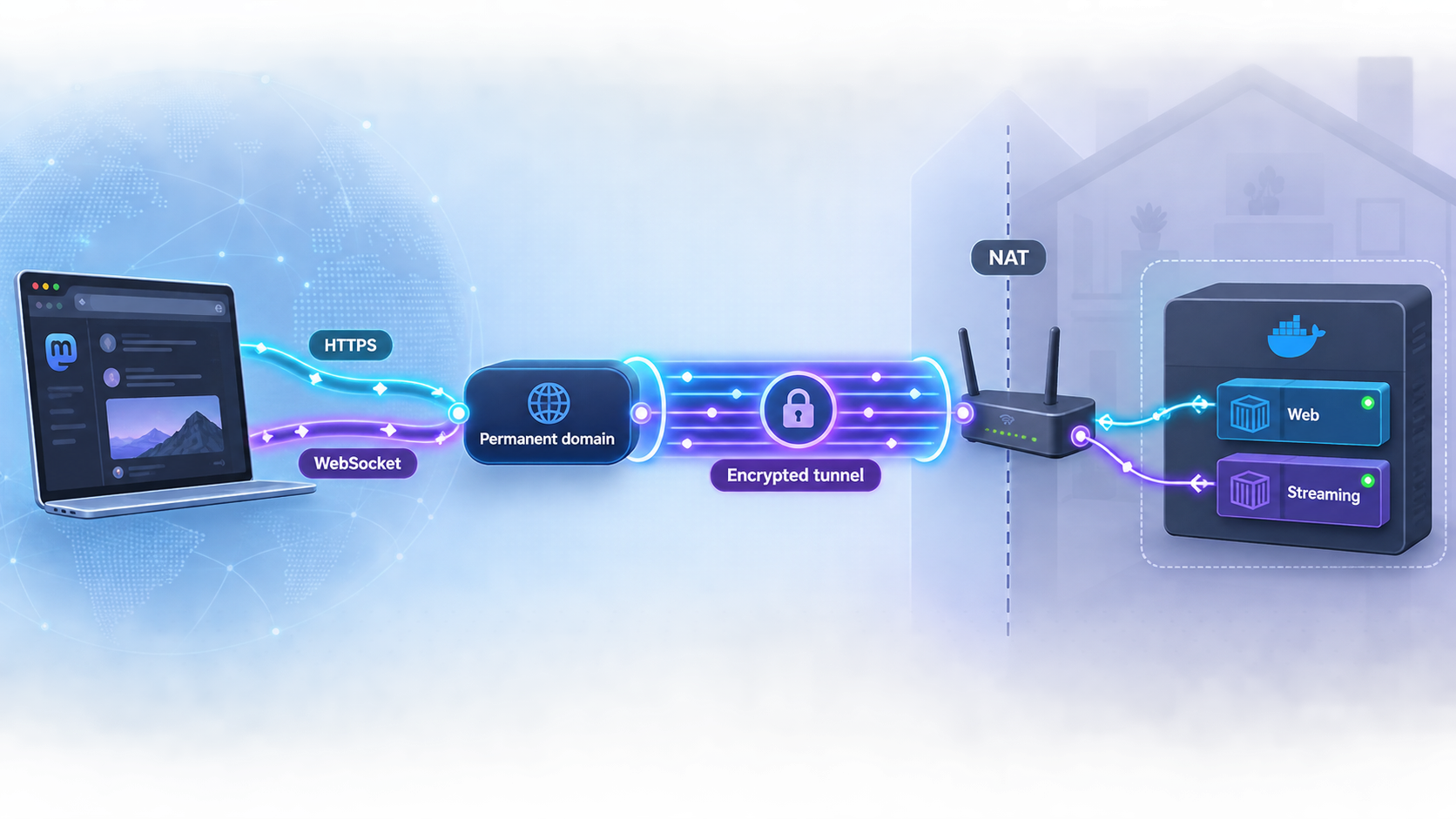
With Localtonet, the client on your Mastodon host establishes an outbound connection to a Localtonet relay server. The resulting HTTP tunnels provide public HTTPS addresses that forward to the local web and streaming targets. Creating a tunnel does not start it. The selected device must remain connected, and each tunnel must be started.
Exact installation methods vary by operating system and client version. Use the current Localtonet documentation to install and run the supported client for your host. Do not copy unofficial service-install commands or place a device AuthToken in a public shell transcript.
Install and run the Localtonet client
Install the current client for the operating system on the machine that can reach Mastodon. Start it using the documented method for that client version.
Connect the intended device
Authenticate with the device-specific AuthToken selected from your account. Treat the token as a credential. Confirm that the correct device appears connected before creating tunnels.
Select a current relay server
Choose an available relay server or region shown by the current product. Do not rely on server codes copied from an article because available values can vary.
Create the web HTTP tunnel
Create an HTTP tunnel using the connected device, selected relay, local IP 127.0.0.1, and local port 3000. If the client is not on the same host, use the tested reachable address instead.
Create the streaming HTTP tunnel
Create a second HTTP tunnel using the same connected device and relay selection, with local port 4000. Keep it separate so its public hostname can match STREAMING_API_BASE_URL.
Configure stable domains only with current instructions
HTTP tunnels support Random Sub Domain, Custom Sub Domain, and Custom Domain process types. If you use a custom domain, obtain the exact current DNS records and validation instructions from the authenticated product workflow or current documentation. Do not guess record targets.
Start both tunnels
Press Start for the web tunnel and then for the streaming tunnel. Confirm that each shows as running. A saved tunnel configuration is not publicly reachable until it is started.
Test from an external network
Open the public web domain and test the streaming connection from a device that is not relying on the Mastodon host's local network. Continue only after HTTPS, forwarded-protocol behavior, and live updates work.
Public access stops if the selected Localtonet client disconnects, the device shuts down, or either tunnel is stopped. This article does not assume automatic client startup or automatic tunnel recovery. Configure operating-system startup only with the current client documentation, then test a full reboot and confirm the device and both tunnels return to the intended state.
Custom-domain and HTTPS checks
Mastodon needs a stable canonical address for federation. A generated random subdomain is useful for a temporary connectivity test, but it should not become the identity domain of a production instance unless you know it can remain unchanged. Availability of custom domains, domain validation behavior, and subscription requirements can vary. Check the current product before committing your Mastodon identity to this topology.
After configuring the domains, test:
curl -I https://mastodon.example.com/
curl -I https://streaming.example.com/
Inspect redirects and generated links. The browser must not be redirected to http://, 127.0.0.1, a container name, or an internal port. If Mastodon generates an insecure URL while the browser is using HTTPS, stop and verify the release's trusted-proxy and forwarded-protocol configuration. Do not blindly trust forwarding headers from arbitrary internet clients. Limit trusted proxies according to Mastodon's current documentation and your actual network path.
Verify discovery, streaming, media, and federation end to end
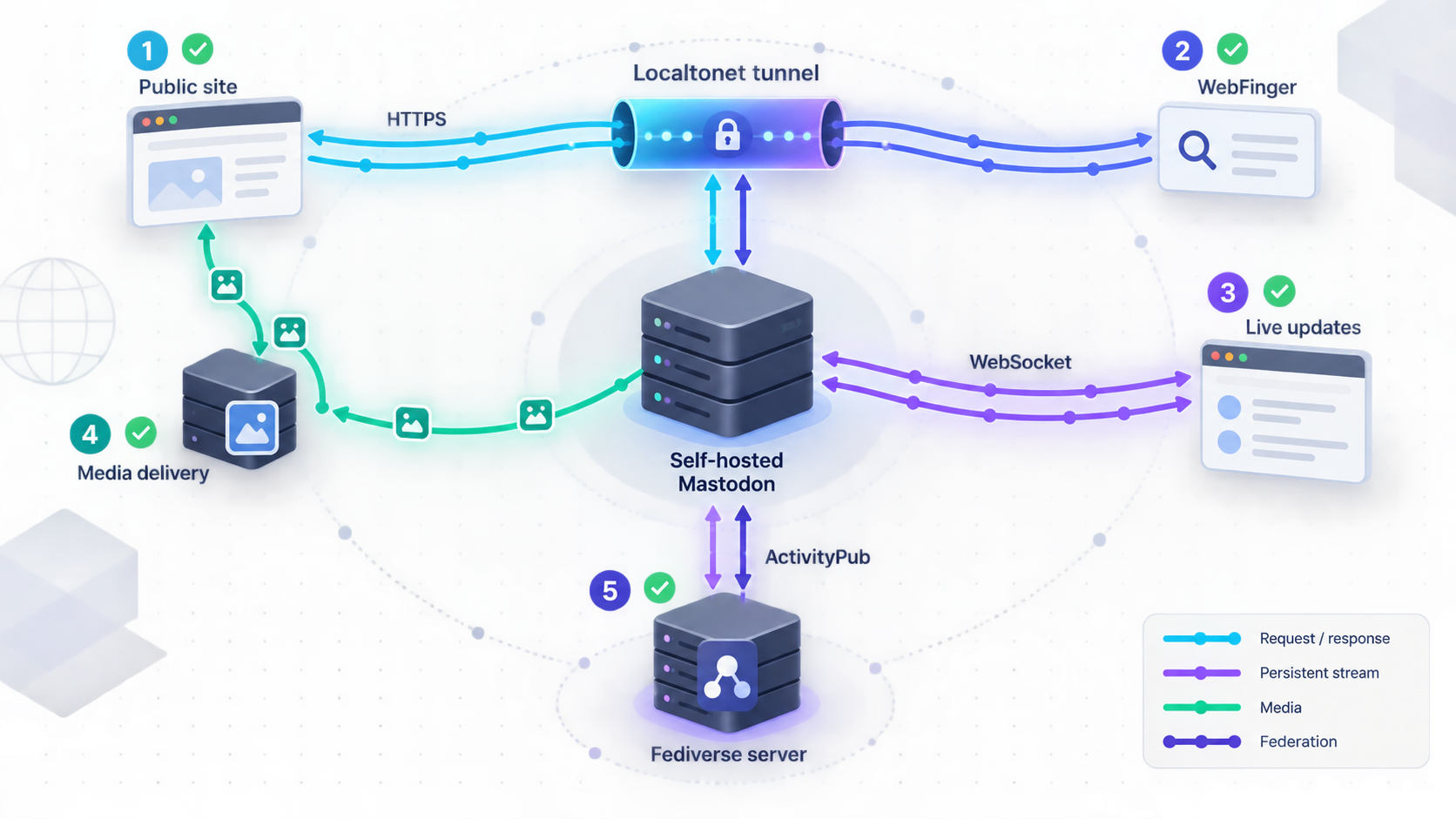
A production readiness test should cover more than the home page. Perform these checks before public registration or announcing the server.
| Check | How to test | What success means |
|---|---|---|
| Home page and login | Open the public domain, sign in, sign out, and sign in again | Pages, cookies, redirects, and assets consistently use the public HTTPS origin. |
| Email delivery | Send a confirmation or password-reset message to a controlled mailbox | Sidekiq processes the job and the message arrives with correct public links. |
| WebFinger | Request the WebFinger URL for the administrator account | The response identifies the expected account and canonical HTTPS resources. |
| ActivityPub discovery | Request the account resource with an ActivityPub Accept header | The actor document is available at the canonical domain. |
| Outbound federation | Follow and interact with a controlled account on another server | The remote account receives the activity and Sidekiq has no persistent delivery failure. |
| Inbound federation | Follow the new account from the independent server and send a reply | The local account receives the follow, post, or reply after background processing. |
| Media | Upload an image, open it while signed out, and view it from the remote server | Media URLs resolve publicly and remain available after a container restart. |
| Streaming | Keep a timeline open and generate an event from the remote account | The update appears without requiring a full page reload. |
WebFinger test
Replace the account and domain with real values:
curl -i "https://mastodon.example.com/.well-known/webfinger?resource=acct:admin@mastodon.example.com"Expect a successful JSON response that describes the intended account. If it returns a redirect to an internal host, an unexpected domain, or an insecure URL, correct the domain and proxy configuration before federation.
ActivityPub actor discovery
curl -i \
  -H "Accept: application/activity+json" \
  "https://mastodon.example.com/users/admin"
Confirm that the actor identifier, inbox, outbox, and related URLs use the canonical public domain. A successful actor response proves discovery, but it does not prove delivery. Complete the two-way follow and interaction tests with another server.
Streaming verification
Open the browser's developer tools while signed in and inspect network activity for the configured streaming hostname. Confirm that the connection remains established and that live notifications or timeline updates appear. An ordinary HTTP response from port 4000 is not sufficient proof that the browser's real streaming connection works through the tunnel.
Security, registration, and moderation controls
A public social server accepts untrusted traffic, remote content, media, and federation activity. Tunneling removes the need for inbound router configuration, but it does not replace application security, moderation, authentication, patching, or capacity controls.
Protect administrator accounts
- Use a unique password stored in a password manager.
- Enable Mastodon's supported multifactor authentication for every privileged account.
- Keep recovery material offline and test the recovery process.
- Do not use the owner account for routine browsing when a less privileged account is sufficient.
- Review active sessions and revoke unknown access.
Choose an explicit registration policy
A personal instance can use the release's documented single-user configuration. A community server should begin with registrations closed or approval-based until email delivery, moderation coverage, backups, abuse handling, and capacity are proven. Registration policy is an operational decision, not merely a checkbox.
Plan moderation before federation grows
Document rules, reporting procedures, administrator contact information, and response expectations. Mastodon administrators can limit or suspend communication with problematic servers, but these decisions affect local users and should be recorded. Servers can also block your instance, so federation reach is never guaranteed.
Separate private services from public ports
PostgreSQL and Redis should not be exposed through Localtonet or published to an untrusted network. Only the intended web and streaming targets belong in this public topology. Protect Docker access because control of the Docker daemon generally provides extensive control over containers and their data.
Manage media and remote copies deliberately
Media growth is workload-dependent. Establish retention and cleanup policies using commands documented for your Mastodon release. Understand the distinction between locally uploaded media, remote cached media, profile files, and database records before deleting anything. Run cleanup in a monitored maintenance window and verify disk usage afterward.
You control the data stored on your server and the policies applied there. When a post federates, remote servers can store copies according to their own software, retention, moderation, and backup practices. Deletion requests can propagate, but complete removal from every remote system cannot be guaranteed.
Backups, upgrades, rollback, and routine operations
Back up the complete recovery set
PostgreSQL and Redis alone are not a complete Mastodon backup. A recoverable deployment needs the authoritative database, uploaded media or object-storage data, protected configuration, cryptographic secrets, and enough deployment metadata to reconstruct the exact compatible application version.
Do not take an ad hoc copy of a live PostgreSQL data directory and assume it is consistent. Use supported database backup tooling or a storage snapshot procedure designed for PostgreSQL consistency. If object storage has versioning or retention controls, configure them according to your threat model and cost limits.
Document a restore procedure
A restore rehearsal should answer these questions:
- Which Mastodon and dependency versions are required to read the backup?
- How is PostgreSQL restored and validated?
- How are local media files or object-storage objects restored?
- Where are the original cryptographic secrets retrieved?
- How are file ownership and permissions restored?
- How are migrations handled if the recovery image is newer than the backup?
- How are login, media, SMTP, streaming, and federation tested before DNS or tunnels return?
Keep the restored test isolated from the public fediverse. Starting a cloned production database under an alternate public domain can cause identity and delivery problems.
Upgrade in a controlled sequence
- Read every official release note between the installed and target versions.
- Check for required intermediate releases, dependency changes, new secrets, and pre-deployment commands.
- Verify a current complete backup and record the installed image or tag.
- Test the upgrade against a recent restored copy in an isolated environment.
- Schedule a maintenance window appropriate for the documented migration.
- Pull or build the exact target release images.
- Run pre-deployment, migration, asset, and restart steps in the order stated by that release.
- Inspect web, streaming, Sidekiq, PostgreSQL, and Redis logs.
- Repeat local HTTP, login, SMTP, media, streaming, WebFinger, and two-way federation checks.
Do not assume that an upgrade is always just an image pull followed by one migration. Major releases may require intermediate versions or special commands. Do not promise zero message loss or a fixed downtime window without testing your own database size and federation queue.
Prepare rollback before migration
A container image rollback is not necessarily a database rollback. If a migration changes data or schema in a way the older release cannot read, switching the image back can make the outage worse. Before upgrading, identify whether the release documents rollback support. Keep the previous deployment record and a verified pre-upgrade backup. If rollback requires database restoration, account for all activity received after the backup and communicate the potential loss window.
Monitor the system routinely
- Container state, restart counts, and health-check results
- Web, streaming, Sidekiq, PostgreSQL, and Redis logs
- Sidekiq queue latency, retries, and persistent failures
- Database size, connection saturation, and backup completion
- Media storage growth, free bytes, and free inodes
- SMTP rejection, bounce, and authentication errors
- Public HTTPS availability and certificate warnings
- Localtonet device connectivity and both tunnel states
- WebFinger, actor discovery, and representative federation deliveries
Set disk-capacity alerts early enough to investigate growth and complete cleanup safely. Waiting until a filesystem is full can affect database writes, media uploads, logs, queues, and upgrades at the same time.
Self-hosting compared with joining an existing server
| Consideration | Join an existing Mastodon server | Self-host Mastodon | Centralized social platform |
|---|---|---|---|
| Moderation policy | Set by that server's administrators | Set and enforced by you | Set by the platform operator |
| Maintenance | Handled by the server operator | You manage updates, backups, email, abuse, storage, and uptime | Handled by the platform operator |
| Account migration | Supported within Mastodon's migration limits when both servers cooperate and remain reachable | You control the source server, but migration still does not transfer every historical item | Portability depends on the platform's available export and migration features |
| Data control | Your home server stores the account while federated copies may exist elsewhere | You control local storage and retention while federated copies may still exist remotely | The platform controls primary storage and policy |
| Cost | Depends on the server's funding model | Depends on hardware, power, storage, email, backups, bandwidth, and chosen Localtonet capabilities | Depends on the platform and account tier |
| Operational responsibility | Low for the individual member | High, including security and moderation duties | Low for the individual member |
Joining a well-run server is the simpler route for most people. Self-hosting is appropriate when control over the domain, moderation rules, maintenance schedule, and local data is worth the ongoing operational responsibility. It should not be presented as a way to avoid administration.
Troubleshooting the deployment
| Symptom | Likely area | What to check |
|---|---|---|
| Local port 3000 refuses connections | Web service or port binding | Inspect Compose service names, container state, web logs, published ports, and the rendered Compose configuration. |
| Local works but public domain fails | Localtonet target or lifecycle | Confirm the selected device is connected, the target is reachable from that device, the correct relay is selected, and the web tunnel is started. |
| Login redirects to HTTP or an internal address | Canonical domain or proxy headers | Check the domain variables and Mastodon's release-specific trusted-proxy and forwarded-protocol configuration. |
| Timeline loads but does not update live | Streaming tunnel | Confirm port 4000 locally, start the second tunnel, verify the streaming URL, and inspect the browser's streaming connection and service logs. |
| Emails do not arrive | SMTP or Sidekiq | Inspect queue retries and SMTP errors, then verify sender authorization, credentials, port, encryption mode, and recipient spam handling. |
| Remote servers cannot find the account | WebFinger or canonical identity | Request the WebFinger endpoint directly and verify that returned links use the expected public domain. |
| Discovery works but posts do not arrive | Sidekiq, federation delivery, or remote policy | Inspect failed jobs and delivery logs. Check whether either server has limited or blocked the other. |
| Media disappears after restart | Missing durable storage | Inspect the tagged Compose volumes or bind mounts and confirm uploaded media is stored outside the disposable container layer. |
| Upgrade migration fails | Release sequence, database, or resources | Stop retrying blindly. Read all intermediate release notes, inspect the first error, confirm free space and compatibility, and restore the test environment if needed. |
| Public service disappears after reboot | Application or tunnel startup | Check Docker services, the Localtonet client, device connectivity, and both tunnel states. Do not assume any component restarted automatically. |
Troubleshoot from the inside out: database and Redis, application services, local host ports, Localtonet client reachability, tunnel state, public HTTPS, streaming behavior, then federation. This order prevents DNS or federation debugging from hiding a simple local application failure.
Frequently asked questions
Can I change my Mastodon domain later?
Treat the identity domain as durable. Mastodon supports account migration workflows, but changing a deployment's domain is not a transparent rename. Migration does not transfer every historical post, media item, interaction, or remote copy. Review Mastodon's current migration and domain guidance before attempting a change.
Why does this guide not hardcode a Mastodon image version?
The correct production version changes as security and maintenance releases are published. Use the current stable official tag, its registry reference, bundled Compose definition, example environment, and release-specific migration instructions. Hardcoding an assumed future version would make the tutorial unsafe.
Do I need two public hostnames?
This guide uses a canonical web hostname and a separate streaming hostname because they map cleanly to local ports 3000 and 4000. Another valid architecture can use a trusted local reverse proxy to route both services behind one public entry point, but that proxy must be configured and tested according to Mastodon's current documentation.
Does ActivityPub guarantee communication with every federated server?
No. ActivityPub provides a common federation foundation, but implementations can support different features and administrators can limit or block other servers. Test the specific interactions you depend on and expect moderation policies to affect reachability.
Are PostgreSQL and Redis backups enough?
No. A complete recovery set also includes uploaded media or object-storage data, production configuration, stable cryptographic secrets, storage and SMTP configuration, and a record of the compatible Mastodon and dependency versions. Test the complete restore in an isolated environment.
Will brief downtime always preserve federation deliveries?
Federation delivery is asynchronous and remote servers commonly retry failures, but retry behavior, queue retention, server policies, and outage length vary. Do not promise that downtime can never lose activity. After an outage, inspect Sidekiq, failed deliveries, remote visibility, and two-way federation.
Does Localtonet keep Mastodon online if the host is off?
No. The Mastodon services must be running, the selected Localtonet client must be connected, and both tunnels must be started. If the host, client, or required tunnel stops, the corresponding public endpoint stops working.
How much hardware does a Mastodon server need?
There is no reliable universal minimum. Requirements depend on account count, federation volume, Sidekiq concurrency, database size, media processing, search configuration, retention, and backup operations. Confirm the selected release's supported architecture, measure the intended workload, and leave capacity for migrations and recovery.
Connect your verified Mastodon deployment with Localtonet
Finish the local health, email, backup, and restore checks first. Then connect the host to our platform, create separate HTTP tunnels for the verified web and streaming targets, start both tunnels, and test the complete public federation path.
Get Started Free →

