

Run an AI coding teammate on infrastructure you control, then give Slack a verified public HTTPS path
OpenTag combines a self-hosted Control Plane with a paired Runner that invokes an ACP coding agent against an approved local checkout. This guide installs the Control Plane from the repository's Docker Compose deployment, prepares its environment and file-backed secrets, pairs the Runner, and verifies the system locally and through the OpenTag CLI. It then installs Localtonet on a Debian or Ubuntu host and publishes the verified OpenTag HTTP service through a public HTTPS origin for Slack. OpenTag's deployment files are version-sensitive, so the guide also shows how to record the exact repository revision and inspect that revision without guessing ports, secret filenames, callback paths, or compatibility.
📋 What's in this guide
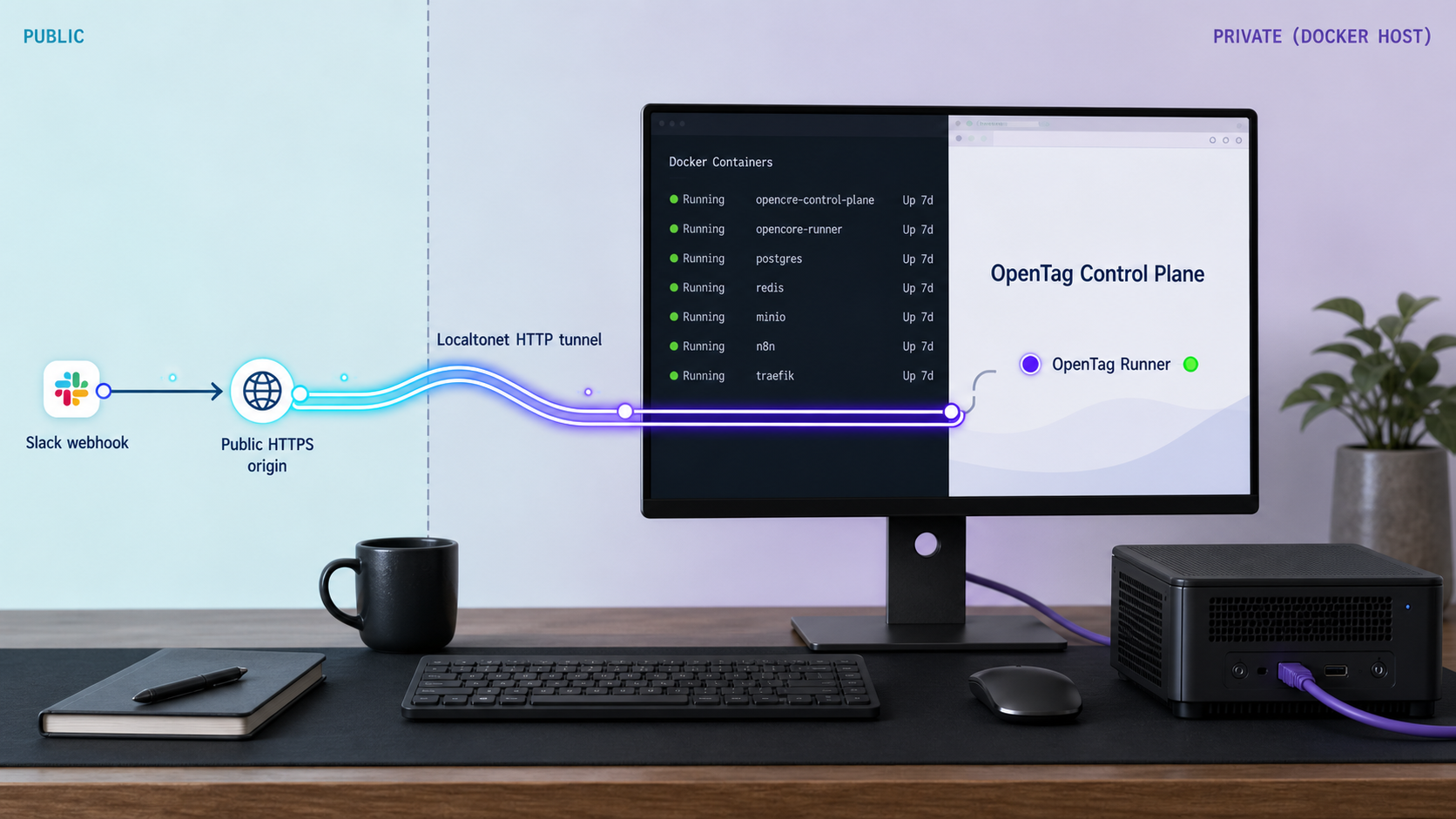
How the OpenTag deployment works
OpenTag is a persistent AI teammate for a Slack engineering channel. A request begins when someone mentions the configured OpenTag identity in Slack. The self-hosted Control Plane receives and coordinates the request, while a paired Runner performs the work on a computer that has the approved local checkout and coding-agent environment.
The current supported product path is deliberately narrow: Slack presence, a self-hosted Control Plane, one paired Runner, one ACP coding agent, optional GitHub draft pull request or evidence, and a response in the originating Slack thread. Slack is the Source App for this profile. GitHub is a Project Target and an optional publication and evidence provider, not a second request inbox.
The architecture separates sensitive material by role. Source code, local checkouts and worktrees, the coding-agent login or session, and GitHub credentials stay on the Runner. Slack credentials and Control Plane service credentials stay on the Control Plane. The Control Plane keeps coordination truth rather than becoming a copy of the development computer.
OpenTag also separates different kinds of evidence. Executor output does not automatically prove that a pull request exists, checks passed, or Slack received the final result. Provider actions are represented through Effect evidence, while terminal assessment is a separate conclusion based on the available facts. This distinction matters when a provider request times out or a side effect has an uncertain outcome.
OpenTag requires a trusted self-hosted Control Plane URL and a bootstrap pairing credential. The Runner must be paired with that Control Plane. The current repository does not provide a standalone local_direct compatibility mode.
Prerequisites and deployment decisions
Prepare the Control Plane host, Runner computer, Slack application, credentials, and ingress path before starting. The Control Plane and Runner have different responsibilities and do not need to run on the same machine. The Localtonet client must run on a device that can reach the Control Plane's published host address and port.
| Requirement | Where it is needed | Purpose |
|---|---|---|
| Git | Control Plane host | Clones the OpenTag repository and records the exact revision being deployed. |
| Docker with Docker Compose | Control Plane host | Builds and starts the self-hosted stack and included PostgreSQL profile. |
| Persistent writable storage | Control Plane host | Stores the checkout, environment file, file-backed secrets, and Docker-managed data. |
| Slack application credentials | Control Plane | Authenticates and validates Slack integration traffic. |
| Bootstrap and service credentials | Control Plane | Supports pairing and the service configuration required by the checked-out deployment. |
| Node.js and npm | Runner computer | Installs the OpenTag CLI version selected for the repository revision. |
| Approved project checkout | Runner computer | Provides the Project Target against which the ACP coding agent operates. |
| Configured ACP coding agent | Runner computer | Performs work requested through OpenTag. |
| Public HTTPS origin | Ingress to the Control Plane | Provides an internet-reachable endpoint for Slack integration traffic. |
| Localtonet account, client, and device token | Control Plane host or reachable LAN device | Establishes the outbound relay connection and publishes the local HTTP target. |
Choose the Control Plane host
Use a machine that can run the Docker Compose stack reliably and retain its database and secret files. Because the Control Plane is the persistent Slack-facing presence, it should remain available independently of the Runner whenever practical. When the Runner is unavailable, the Control Plane can keep a request visibly queued instead of disappearing with the development computer.
Choose the Runner computer
Place the Runner on the computer where the approved source checkout, coding-agent login or session, and any required GitHub credential should remain. Pairing should be performed by an operator who understands which Project Target is being made available to the OpenTag workflow.
Choose the Localtonet client location
The simplest Linux arrangement is to install Localtonet on the same Debian or Ubuntu host as the Control Plane. The tunnel can then target the host-published OpenTag port through a loopback or host-local address, subject to the binding defined by the Compose deployment. The client may instead run on another LAN device, but that device must be able to route to the Control Plane address and published port.
The Compose environment and secret files contain sensitive values. Keep them out of Git, Slack, screenshots, shell history, tickets, and shared logs. Restrict access to the operating-system account responsible for the deployment and back up only through an approved secret-handling process.
Pin and inspect the OpenTag Compose revision
OpenTag's current repository README provides the supported quick-start shape. The version-sensitive deployment files live in the repository's Compose deployment directory. Clone the repository, record the revision, and treat files from that same revision as one configuration set.
git clone https://github.com/amplifthq/opentag.git
cd opentag
git rev-parse HEAD
git status --short
cd deploy/compose
Save the commit identifier in your deployment notes. A branch such as main moves over time, so the commit is the stable identifier needed to reproduce or troubleshoot the installation later.
Render the effective Compose configuration
Before starting containers, copy the supplied environment template and inspect the files included with your checkout:
cp .env.example .env
find . -maxdepth 2 -type f -print
docker compose --env-file .env config
The final command resolves the Compose model and reports interpolation errors without starting the stack. Review its service definitions, published ports, volumes, secret mounts, profiles, health checks, and environment mappings. Do not publish the rendered output because it may contain sensitive resolved values.
The current README explicitly identifies OPENTAG_SLACK_PROJECT_TARGET_ID as the identifier that must match the active Slack binding and later be entered during Runner setup. It also requires every placeholder in .env to be replaced and requires file-backed Slack and relay-content secrets described by the Compose guide.
Create the exact file-backed secrets declared by the checkout
Secret filenames and mount locations are deployment interface details. They must match the checked-out Compose files exactly. Use the following inspection commands from deploy/compose to locate the declarations before creating any files:
grep -RInE 'secrets:|_FILE|SLACK|relay.content|relay_content' .
grep -RInE 'file:|source:|target:' .
grep -RInE 'placeholder|replace|example' .env.example . 2>/dev/null
Create each declared host-side secret file at the exact path referenced by the Compose configuration, write only the required secret value, terminate it with a newline unless the checked-out guide states otherwise, and restrict its permissions:
chmod 600 .env
chmod 600 PATH_TO_EACH_DECLARED_SECRET_FILE
PATH_TO_EACH_DECLARED_SECRET_FILE is intentionally a placeholder. Replace it with each filename actually declared by your selected OpenTag revision. The supplied evidence confirms the requirement for file-backed Slack and relay-content secrets but does not expose their current filenames or values. Inventing names would create an unsafe and non-reproducible deployment.
Record the published port and verification endpoint
Inspect the effective model for the Control Plane's ports mapping and any declared health check:
docker compose --env-file .env config | grep -nE 'ports:|published:|target:|healthcheck:|test:'Record four values in your deployment notes: the Control Plane service name, host bind address, published host port, and supported local verification path. Use the published host port for Localtonet, not the container-only target port.
The repository README confirms that the Compose deployment provides the self-hosted presence, but the evidence supplied for this revision does not include the contents of its Compose files or guide. This article therefore does not fabricate a port, secret filename, health path, or Slack callback route. Record those values from the exact commit you checked out before continuing.
Install the OpenTag Control Plane with Docker Compose
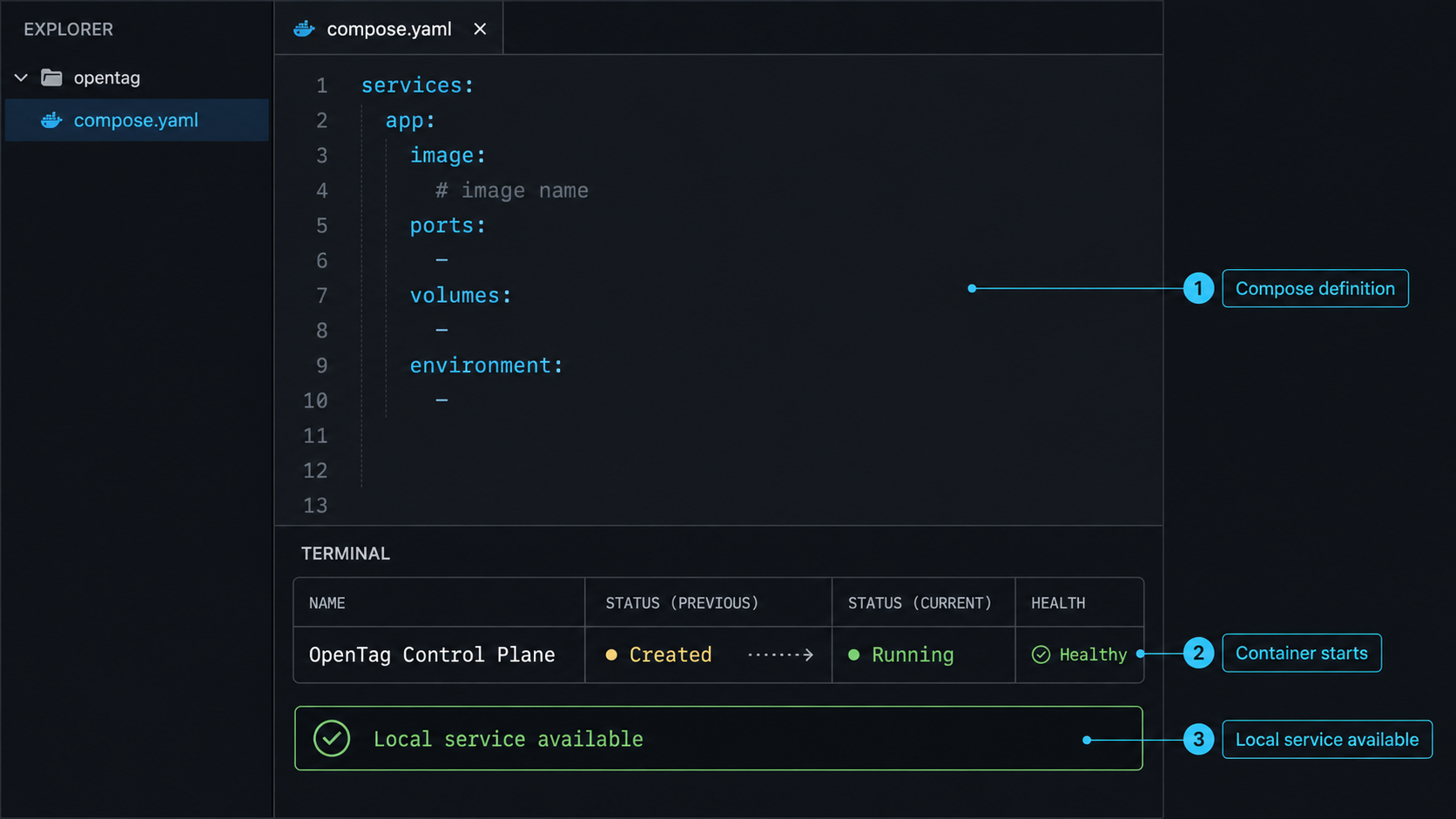
After replacing every placeholder and creating every declared file-backed secret, start the deployment from deploy/compose. The current repository quick start uses the following sequence.
Clone the OpenTag repository
Obtain the Control Plane source and supported Compose deployment, then record the selected commit as described above.
git clone https://github.com/amplifthq/opentag.gitEnter the Compose directory
Run deployment commands in the directory containing the checked-out Compose files and environment template.
cd opentag/deploy/composeCreate and complete the environment
Copy the supplied template, replace every placeholder, set the active Slack binding's OPENTAG_SLACK_PROJECT_TARGET_ID, and create every file-backed Slack and relay-content secret declared by this revision.
cp .env.example .env
docker compose --env-file .env configBuild and start the stack
Build the required images and start the Compose deployment in the foreground for the first launch.
docker compose --env-file .env up --buildForeground startup is useful because configuration errors, missing secret files, failed image builds, unavailable ports, and database startup problems remain visible. Once the initial launch is understood, use the startup mode supported by your operational policy. Do not change the documented configuration merely to hide a startup failure.
Confirm that the declared services started
In a second terminal, return to the Compose directory and inspect service state:
docker compose --env-file .env ps
docker compose --env-file .env logs --tail=200
Confirm that the Control Plane and included PostgreSQL service do not remain in a restart loop. If a service declares a health check, inspect the health result shown by Docker rather than assuming that a running process is ready.
Verify the local HTTP boundary
Use the host address, published port, and supported verification path recorded from the checked-out deployment. The command shape is:
curl -i http://HOST_ADDRESS:PUBLISHED_PORT/SUPPORTED_PATHReplace all three uppercase placeholders. Run this check from the device that will host the Localtonet client. A request that succeeds only inside a container does not prove that a host-installed tunnel client can reach the service. Record the expected status and response for the OpenTag endpoint so that the same application boundary can be tested through Localtonet later.
Install and pair the OpenTag Runner
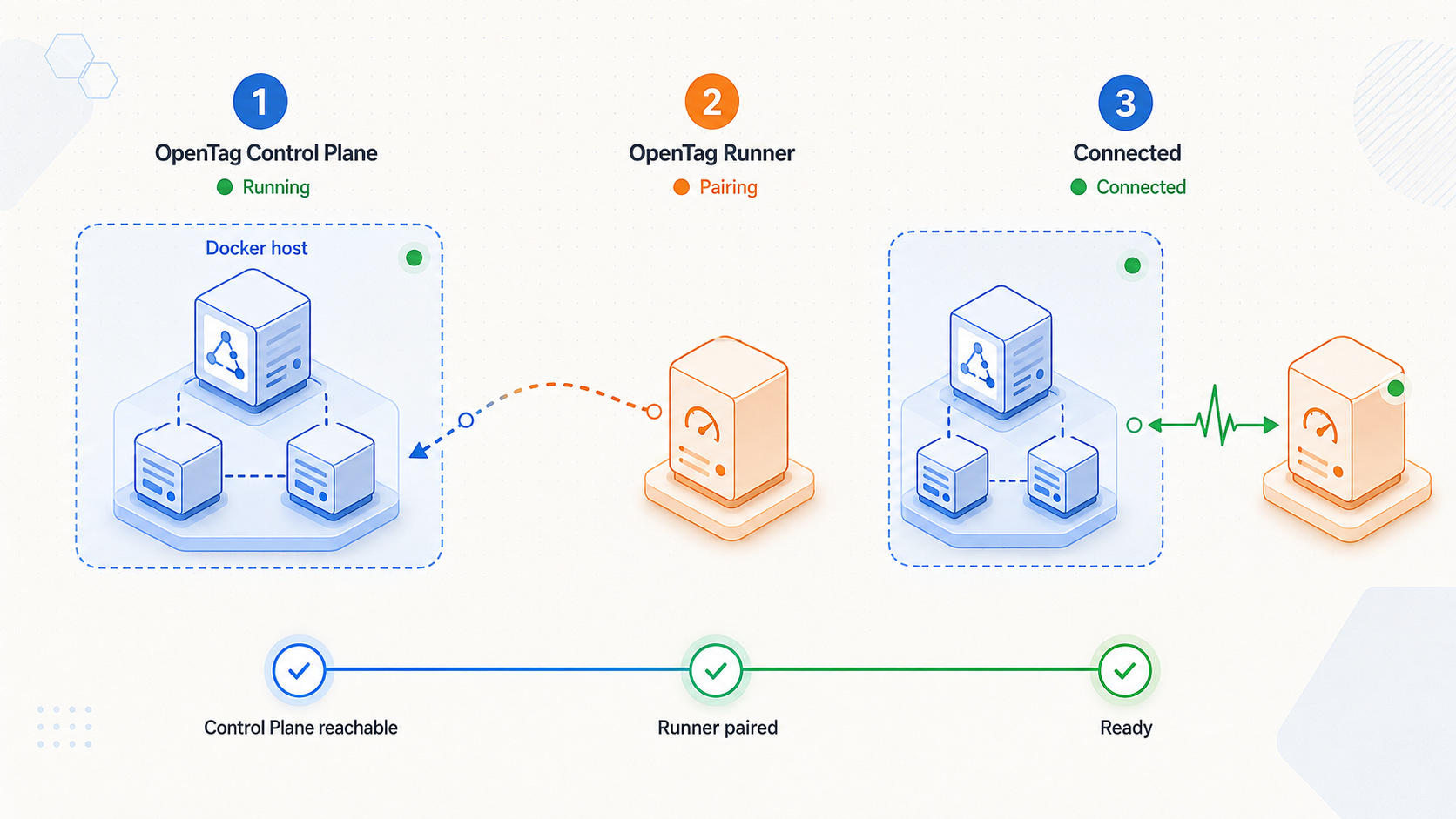
Pair the Runner after the Control Plane is reachable through the trusted origin that the Runner will use. If Localtonet will provide that origin, complete the Localtonet section first and then return here. If you already have another trusted HTTPS origin, pairing can use it.
The current repository README pins the CLI command to @opentag/cli@0.11.0. Separately, the GitHub releases page displayed v0.10.0 as the latest tagged GitHub release in the supplied evidence. These are different publication surfaces and should not be treated as proof of universal compatibility. The moving README on main can describe an npm CLI newer than the latest displayed GitHub release.
If you deploy the same repository revision whose README contains the 0.11.0 command, use that pin for this workflow. If you select a release tag or older commit, read the README at that revision and install the version it specifies. Do not assume that 0.11.0 is compatible with every checkout.
Install the CLI version pinned by the selected revision
For the current README evidence used by this guide, install version 0.11.0 on the Runner computer.
npm install -g @opentag/cli@0.11.0Run interactive setup against the trusted origin
Replace the example origin with the actual public HTTPS origin for your Control Plane. Provide the bootstrap pairing credential only when prompted, and enter the exact OPENTAG_SLACK_PROJECT_TARGET_ID used by the active Slack binding.
opentag setup --relay https://relay.example.comThe example hostname is not a working OpenTag service. Setup configures and pairs one Runner, one GitHub Project Target, and one ACP executor. It registers the target through the Runner credential and verifies the Control Plane readback before pairing completes.
Start the paired Runner
Start the Runner after interactive setup completes successfully.
opentag startopentag pair only for recovery
The normal first-time path uses opentag setup. Use opentag pair to finish interrupted pairing or pair an existing unpaired configuration, not as a substitute for initial Runner, Project Target, and ACP executor setup.
If the computer ran a pre-reset OpenTag checkout, point OPENTAG_CONFIG_HOME and OPENTAG_STATE_DIR at new empty directories before setup. The paired Runner does not reinterpret or rewrite an earlier configuration or SQLite database.
Verify the Control Plane and Runner
Verify the deployment in layers. First confirm the Compose services and local HTTP endpoint. Next run the OpenTag CLI diagnostics. Then test the same service through its public URL. Finally send a controlled Slack request. This sequence identifies which boundary failed instead of treating every problem as an ingress issue.
Run the supported CLI checks
opentag doctor
opentag status
opentag doctor checks the installation, while opentag status reports the Runner's current OpenTag status. Resolve failures before asking a team to rely on the integration. Check the configured Control Plane origin, pairing state, Project Target, and ACP executor instead of repeatedly restarting an unknown configuration.
Interpret the current Teammate work states
OpenTag exposes each active Slack binding as a long-lived Teammate. Its work state is derived from facts that already exist, including the Project Target, fresh Runner readiness, and the binding's current Work. OpenTag does not add a separate mutable presence lifecycle.
| Work state | Meaning | Operator interpretation |
|---|---|---|
ready |
The Teammate's Project Target, Runner, and fresh readiness all exist. | The documented components needed to accept work are present. |
queued |
A request is durably waiting for the paired Runner. | Check Runner availability and readiness instead of blindly resubmitting the request. |
working |
The current fenced Attempt is assigned or running on a ready Runner. | Work is active. Avoid creating duplicate Work because completion is not immediate. |
needs_attention |
A decision, reconciliation, or conflicting active work needs a human. | Review the exact action OpenTag requests before allowing the workflow to continue. |
runner_offline |
The Teammate remains in Slack, but its Runner has no fresh readiness receipt. | Check the Runner process, network path, trusted origin, and paired configuration. |
setup_required |
The Slack binding, Project Target, or Runner is incomplete. | Return to configuration and pairing rather than treating it as a tunnel-only failure. |
These states are projections, not commands. They cannot claim, retry, cancel, or settle Work. A displayed state should not be interpreted as proof that an operator action or provider side effect already occurred.
Publish the Control Plane with a Localtonet HTTP tunnel
Once OpenTag works locally, Localtonet can provide its public internet entry point. Our client establishes an outbound connection from the selected device to a Localtonet relay server. The HTTP tunnel provides a public HTTPS address and forwards requests to the verified local IP address and port without inbound router port forwarding, firewall changes, VPN setup, or a public IP address.
This is standard HTTP tunneling, not VPN functionality. Localtonet VPN Manager is a separate private mesh VPN feature. For Slack ingress to the OpenTag web service, create an HTTP tunnel targeting the verified host-published Control Plane endpoint.
Install Localtonet on Debian or Ubuntu
Our current Linux package path supports x64 and ARM64 Debian or Ubuntu systems with systemd 247 or newer and OpenSSL 3, including Debian 12 and Ubuntu 22.04 or newer. Download the package matching the machine architecture from the Localtonet download and installation documentation.
Install the downloaded package
For an x64 host, open a terminal in the directory containing the downloaded package and install it with APT. Use the ARM64 package filename instead on an ARM64 host.
sudo apt install ./localtonet-linux-x64.debSet and validate the device AuthToken
Edit /etc/localtonet/auth-token as root, replace DUMMY_AUTH_TOKEN with the device-specific token on one line, restrict the file, and check the headless configuration.
sudo chmod 600 /etc/localtonet/auth-token
sudo localtonet --headless --authtoken-file /etc/localtonet/auth-token --check-configEnable and start the service
Start the standard Localtonet service after the configuration check succeeds, then inspect its journal.
sudo systemctl enable --now localtonet.service
sudo journalctl -u localtonet.service
Do not use the separate VPN service for this HTTP tunnel. Confirm that the standard Localtonet service remains active:
sudo systemctl status localtonet.serviceCreate and verify the HTTP tunnel
Follow the current Localtonet HTTP tunnel documentation while using the OpenTag target values recorded from the checked-out Compose deployment.
Confirm local reachability from the client device
Run the same local HTTP verification used after Compose startup. If the Localtonet client is on another LAN device, use a Control Plane address that device can route to rather than the Control Plane host's loopback address.
curl -i http://HOST_ADDRESS:PUBLISHED_PORT/SUPPORTED_PATHSelect the connected device and relay server
Select the device identified by its AuthToken and choose a currently available relay server or region from the dashboard. Obtain the current server value from our product rather than hardcoding one.
Create an HTTP tunnel
Enter the verified local IP address and published host port. Choose an available Process Type such as Random Sub Domain, Custom Sub Domain, or Custom Domain. These options publish the same local content through a public HTTPS address. Check current dashboard availability and current DNS instructions before depending on a specific custom-domain option.
Start the tunnel
Creating a tunnel does not start it. Review the target and use the Start control. The tunnel is available only while the selected client is connected and the tunnel is running.
Test the public HTTPS endpoint
Request the assigned public origin with the same supported OpenTag path used for local verification. Confirm that the response belongs to the intended Control Plane before entering the origin in OpenTag or Slack.
curl -i https://ASSIGNED_PUBLIC_HOST/SUPPORTED_PATHPublish only the OpenTag HTTP service required for Slack. Do not target PostgreSQL, a Docker management interface, host administration tools, or an unspecified container port. Keep OpenTag's request validation and credentials enabled, apply least privilege to Slack and GitHub access, and stop or delete the tunnel when public ingress is no longer required.
Localtonet HTTP Process Types serve the local content through a public HTTPS address and forward it to the configured local HTTP target. This does not imply an unsupported compliance certification, uptime guarantee, plan entitlement, or additional end-to-end encryption mode.
Connect Slack to the public origin safely
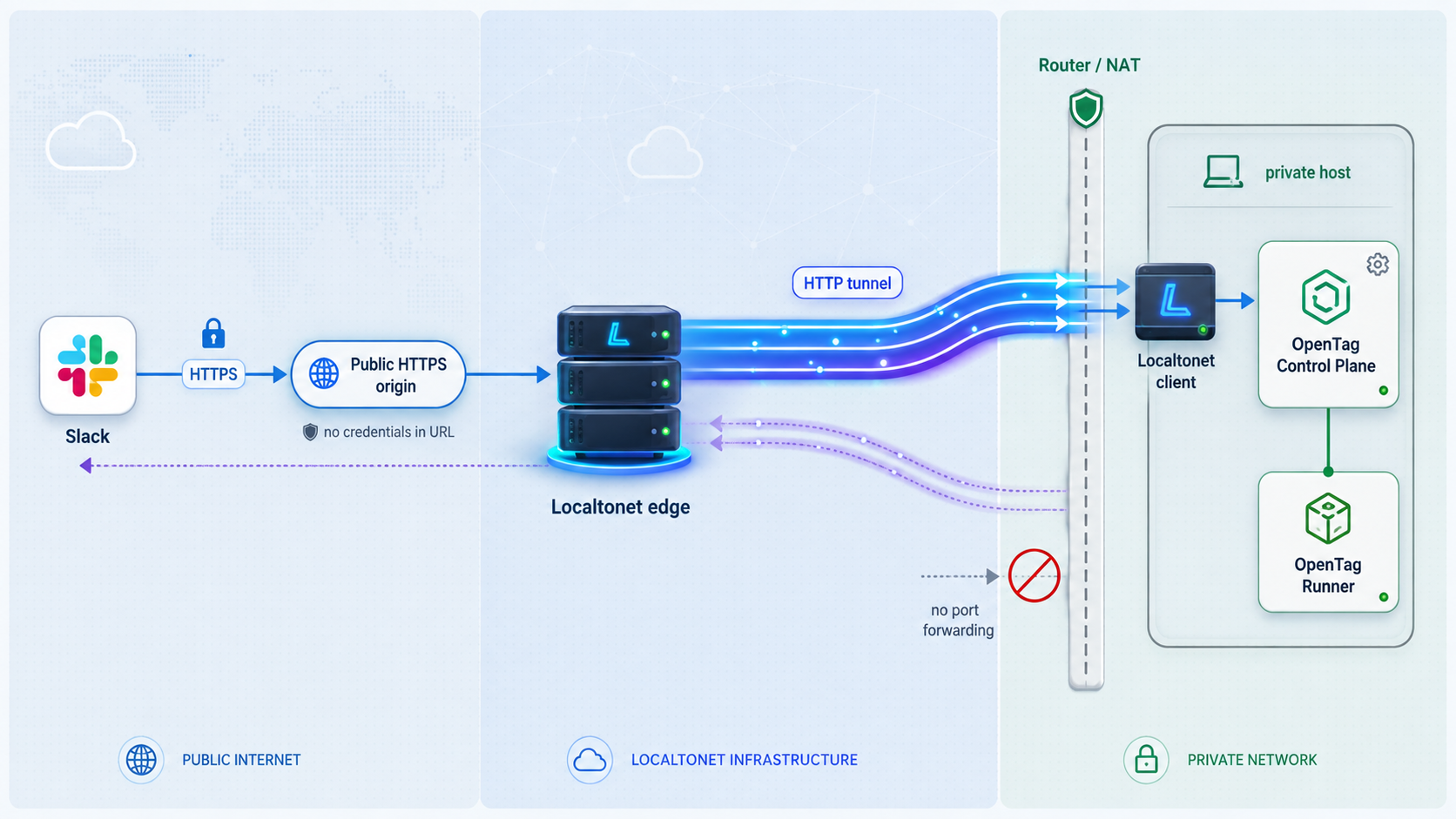
Configure Slack with the exact event, callback, interactivity, or request paths declared by the selected OpenTag deployment revision. The supplied repository evidence confirms that Slack needs a public HTTPS origin, but it does not include the current Compose guide's route strings or Slack dashboard field mapping.
Locate those paths in the checked-out deployment before changing Slack:
grep -RInE 'callback|events|interactivity|slack|public.*url|origin' .Combine each documented path with the tested Localtonet origin. Do not send Slack to the generic root path unless the checked-out OpenTag guide explicitly requires it. Save Slack's configuration, then watch the Control Plane logs while Slack performs any endpoint validation.
Keep the public origin stable while Slack depends on it. If a generated Localtonet hostname changes because the tunnel is recreated or its Process Type changes, update every OpenTag and Slack setting that references the old origin. A Custom Sub Domain or Custom Domain may provide a more stable naming workflow where currently available, but availability and plan access must be checked in the dashboard.
Perform an end-to-end Slack test
Send a small, non-destructive request in the intended channel:
@OpenTag investigate the failing check and propose a fixConfirm each layer separately: Slack accepts the mention, the Control Plane creates or projects the Work, the paired Runner receives an Attempt, the ACP coding agent operates against the intended checkout, and status returns to the same thread. Begin with investigation or proposal work rather than a request that modifies a production system.
If GitHub publication is enabled, test with a repository and permissions appropriate for controlled validation. Draft pull request publication is a distinct governed stage. A successful executor message does not independently prove publication, observed checks, provider delivery, or terminal success.
Do not include Slack secrets, bootstrap pairing credentials, Localtonet device tokens, GitHub credentials, or Control Plane service credentials in URLs, screenshots, shared commands, or troubleshooting messages. The public HTTPS origin is an ingress address, not a credential transport mechanism.
Routine operations and troubleshooting
Operate the deployment as three independently testable layers: the OpenTag Control Plane stack, the paired Runner, and the Localtonet HTTP tunnel. Add Slack as the final integration test only after those layers pass their own checks.
Recommended verification sequence
- Run
docker compose --env-file .env psand inspect recent logs. - Request the supported OpenTag path through the local host address and published port.
- Run
opentag doctorandopentag statuson the Runner. - Confirm that
localtonet.serviceis active and the HTTP tunnel is running. - Request the same supported path through the public HTTPS origin.
- Send a controlled Slack mention and observe its progress in the original thread.
The Compose stack does not start
Compare .env with .env.example from the same commit. Look for unresolved placeholders, malformed values, missing file-backed Slack or relay-content secrets, incorrect paths, permission errors, port conflicts, and a PostgreSQL service that cannot become ready.
docker compose --env-file .env config
docker compose --env-file .env ps
docker compose --env-file .env logs --tail=200
Do not respond to an application startup failure by exposing more ports. Public ingress cannot repair a service that never begins listening.
The service works inside Docker but not on the host
Confirm that the Compose configuration publishes the Control Plane port to the host. A container-only expose declaration or internal target port is not the same as a host-published port. Use the effective configuration and docker compose ps to identify the actual mapping.
The host can reach OpenTag, but the Localtonet client cannot
Check where our client runs. An address such as 127.0.0.1 refers to the client device itself. If Localtonet runs on another LAN machine, configure a reachable address for the Control Plane host and apply local firewall rules according to your network policy. Confirm the path from the client device before testing the public URL.
The public URL is unavailable
Verify that localtonet.service is active, the selected device is connected, and the tunnel was explicitly started. Recheck the selected device, current relay selection, local IP address, and published host port. If the local endpoint fails from the client device, repair that path first.
The public origin responds, but Slack requests fail
A response from the root URL proves only that some HTTP route is reachable. Recheck the exact OpenTag route required for Slack, Slack-side callback configuration, Control Plane Slack credentials, and request-validation settings. Watch the Control Plane logs while Slack sends a test request, but redact credentials before sharing logs.
The state is setup_required
Verify that the Slack binding, GitHub Project Target, and Runner pairing are complete. The identifier entered during setup must exactly match OPENTAG_SLACK_PROJECT_TARGET_ID in the active Slack binding. Also verify the trusted Control Plane origin and bootstrap pairing process.
The state is runner_offline or Work remains queued
Confirm that opentag start is running and the Runner can reach the trusted Control Plane origin. Run opentag doctor and opentag status. Do not create duplicate requests merely because the Runner was temporarily unavailable. Queued Work is intended to remain visible until a ready Runner can process it.
Pairing fails after an earlier checkout
Point OPENTAG_CONFIG_HOME and OPENTAG_STATE_DIR to new empty directories, then repeat the setup supported by the selected revision. Preserve previous data separately. Use opentag pair only to finish interrupted pairing or pair an existing unpaired configuration.
A provider result is uncertain
Keep Work, Attempt, Effect evidence, channel projection, and terminal assessment separate. If OpenTag reports outcome_unknown, inspect the provider before retrying an action that may already have occurred. Blind replay can create duplicate side effects.
Changing or removing public access
Stop the Localtonet tunnel when Slack ingress should no longer be available. Delete it when the configuration is obsolete. If the public origin changes, update OpenTag and Slack, then repeat local, public, CLI, and Slack verification.
Record the OpenTag commit, Compose configuration, CLI version, public origin, and verification result together. Before upgrading, compare the new revision's environment template, secret declarations, port mapping, Slack paths, database behavior, and CLI pin. Do not assume that settings from another revision are interchangeable.
Frequently asked questions
Does OpenTag require a public HTTPS origin?
Yes. The documented self-hosted presence requires a public HTTPS origin that Slack can reach. A Localtonet HTTP tunnel can provide that origin by forwarding a public HTTPS address to the verified local Control Plane IP address and published host port.
What port and health path should I use?
Use the published host port and supported verification path declared by the exact OpenTag Compose revision you deploy. The supplied repository evidence does not expose stable values for either field, so this guide shows how to render and inspect the effective Compose configuration instead of inventing them.
Which OpenTag work states should I expect?
The current states are ready, queued, working, needs_attention, runner_offline, and setup_required. They are projections from existing facts, not commands or a separate mutable presence lifecycle.
Why does the README install CLI 0.11.0 while GitHub shows release v0.10.0?
The README on the moving repository branch and the latest displayed GitHub release are separate version signals. The current README evidence pins @opentag/cli@0.11.0, while the supplied GitHub release page identifies v0.10.0 as the latest tagged release. Use the CLI pin documented by the exact repository commit or release tag you deploy rather than assuming universal compatibility.
Must Localtonet run on the same host as OpenTag?
No. It can run on the Control Plane host or another device that can reach the Control Plane's local address and published port. The selected Localtonet client must remain connected while the tunnel is running.
Is a Localtonet HTTP tunnel a VPN?
No. An HTTP tunnel publishes the selected local web service through a public URL. Localtonet VPN Manager is the separate private mesh VPN feature.
Can OpenTag receive work while the Runner is offline?
The Control Plane remains the persistent presence, and Work can remain visibly queued while the paired Runner is offline. The Runner must provide fresh readiness before it can execute the queued Work.
Does the Control Plane store my source checkout?
The documented architecture keeps source code, local checkouts and worktrees, the coding-agent session, and GitHub credentials on the Runner. The Control Plane keeps coordination truth plus its Slack and service credentials.
Does creating a Localtonet tunnel start it automatically?
No. Creating the configuration does not start the tunnel. Use the Start control and keep the selected client connected. The tunnel can later be stopped or deleted.
Give your verified OpenTag deployment a public HTTPS origin
Start by validating the exact OpenTag Compose revision, local endpoint, Runner pairing, and CLI status. Then create a Localtonet HTTP tunnel to the verified host address and published port, configure Slack with the revision's documented paths, and test the complete workflow with a controlled request.
Get Started Free →

