

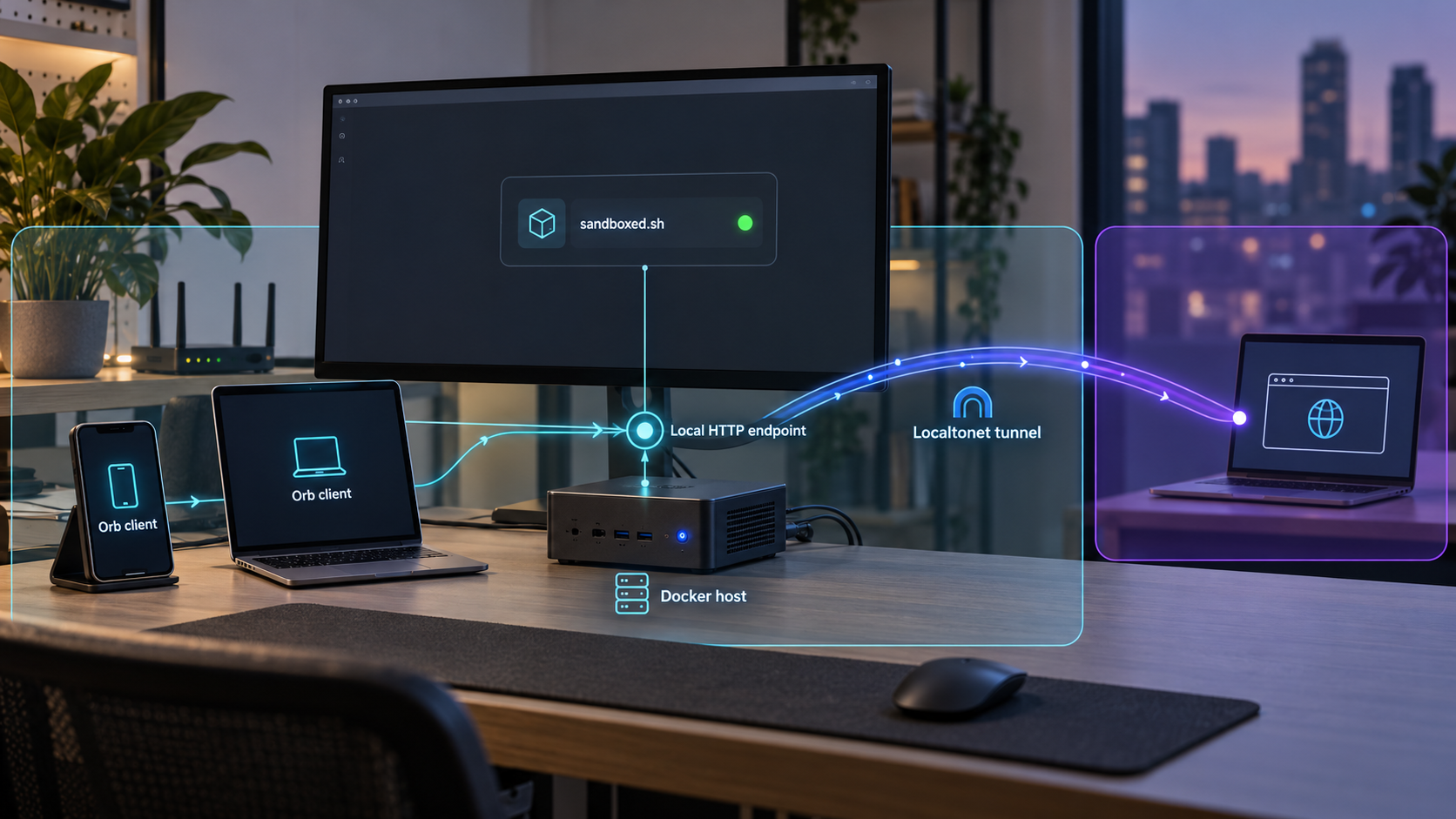
Build the backend first, verify it locally, then add remote access without guessing the service endpoint
Orb separates the client experience from the self-hosted sandboxed.sh backend that stores projects, mission history, and remote execution state. This guide explains that architecture, prepares a Docker deployment, shows what must be verified before connecting a client, and then adds a Localtonet tunnel as a separate remote-access step. The available project evidence does not establish a fixed container port, bind address, local URL, environment file, or Docker command sequence, so we do not invent those details. Instead, we show how to obtain the authoritative endpoint from the current Docker configuration and how to use it safely with Localtonet.
📋 What's in this guide
Understand the Orb and sandboxed.sh architecture
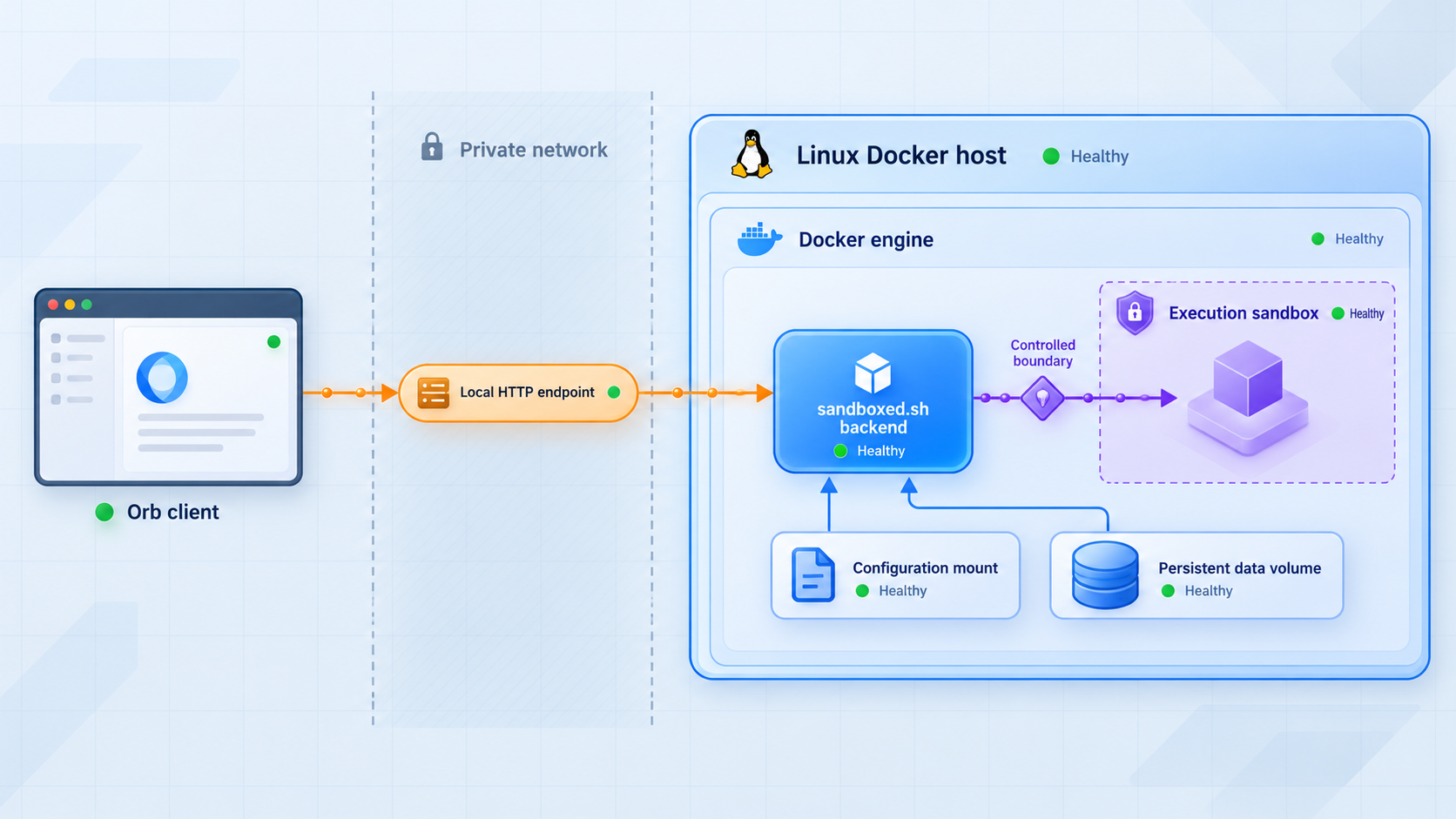
Orb is the client-facing part of the system. Its macOS and iOS clients let users organize projects, inspect mission transcripts, send follow-up instructions, work with shared context, and choose where an agent executes. The project that was formerly named sandboxed.sh now provides the backend used by those clients.
The backend is not merely a disposable web interface. It owns the persistent project records, missions, event history, and remote-node coordination used by Orb. This distinction matters during self-hosting because the backend must remain reachable and retain its data even when an individual Orb client closes. A client can reconnect to the same server and continue using the records maintained there.
Orb documents three broad execution modes. “Your computer” runs a local coding agent on the Mac through Orb’s local runner. “Your private cloud” runs work on the core backend server or registered remote machines. “Cloud agents” connect to coordinator or provider-managed services. Self-hosting the backend establishes the shared control plane, but it does not automatically install every harness, register every remote machine, or authenticate every model provider.
A healthy sandboxed.sh container proves that the backend can start. It does not by itself prove that a selected coding harness, inference provider, remote node, or cloud-agent account is ready. Test those integrations after the basic client-to-server connection works.
Prepare the Docker host and deployment information
Before installing the backend, choose a host that can remain available whenever Orb clients need access. The project provides both a Docker installation path and a native Linux path. This article focuses on Docker and does not combine the two methods. Mixing files or service-management assumptions from the native installation into a container deployment can make troubleshooting unnecessarily difficult.
The project repository contains a root Dockerfile, a docker-compose.yml file, a .env.example file, an INSTALL.md file, and Docker-specific project material. However, the supplied evidence does not include the current contents of those files or the current Docker Install page. As a result, it does not establish exact image names, build arguments, volume paths, health checks, environment variables, published ports, or startup commands.
Obtain the current repository revision and read the Docker Install instructions that belong to that same revision. This prevents a common failure mode in which an older tutorial is combined with a newer Compose file. If checking out a release rather than the main development branch, use the installation files shipped with that release.
| Requirement | Why it matters | What to record |
|---|---|---|
| Docker installation | The backend deployment follows the project’s Docker path. | The installed Docker and Compose versions, plus whether the current project guide supports them. |
| Current Orb repository | The Compose file, example environment file, and backend source must come from a compatible revision. | The branch, tag, or commit used for the deployment. |
| Persistent storage plan | The backend maintains projects, missions, and event history that should survive container replacement. | Every volume or host path declared by the current Compose configuration. |
| Confirmed service endpoint | Orb and Localtonet need the actual scheme, host or bind address, and published port. | The endpoint documented or produced by the current deployment, without assuming a default. |
| Authentication plan | Remote access should not be enabled until sign-in behavior has been tested. | How the current Orb deployment creates or accepts authorized users. |
| Backup and recovery plan | Container recreation is routine, but losing persistent application data is not. | The data locations to back up and the restoration procedure tested for this revision. |
Also confirm that the host has enough storage and memory for the deployment described by the current project documentation. No minimum resource values are established by the supplied evidence, so this guide does not assign arbitrary CPU, RAM, or disk requirements. Requirements can also vary depending on whether agent workloads execute on the core host, on remote nodes, or only on client machines.
Use the current project-provided example and installation guide as the schema for configuration. Variable names can change, and a guessed secret, hostname, database setting, OAuth owner, or storage path may either prevent startup or create an unsafe deployment. Never commit populated credentials or tokens to the repository.
Install the sandboxed.sh backend with Docker
Begin with a clean copy of the official Orb repository and select the revision you intend to operate. Review the Docker installation guide, the root Compose file, the Dockerfile, and the example environment file together. The repository itself is the deployment unit, so files from different releases should not be mixed.
Review the Compose definition before starting it
Identify every service in the Compose configuration and determine which one exposes the client-facing backend. Record any dependencies, named volumes, bind mounts, networks, restart policies, environment files, and published ports. If the configuration builds the image locally, note the build context and Dockerfile. If it references a prebuilt image, record its exact tag rather than silently changing it to an unpinned tag.
Pay particular attention to the difference between a container port and a host-published port. A service may listen on one port inside the container while Docker publishes it on a different host port. Orb clients running outside the Compose network need the host-reachable endpoint. Localtonet must also target the endpoint reachable from the machine running our client, not an unresolvable Compose-only service name.
Create the environment configuration
Follow the current Docker guide when creating the deployment’s environment file. The repository includes a .env.example, but the extracted evidence does not expose its variables or indicate which values are mandatory. Copy only the fields required by the matching documentation, generate secrets by the project’s documented method, and keep the populated file outside version control.
Do not infer that a variable shown in a release note is a universal installation requirement. For example, the project documentation discusses a SANDBOXED_OAUTH_OWNER setting in the context of CLIProxyAPI ownership of OAuth refresh. That is a provider-integration concern, not evidence that every basic backend installation must set it. Configure optional provider routing only when you actually use that integration and after the core server is healthy.
Protect persistent data
Determine which Compose volumes or host directories store backend state. Because the backend owns projects, missions, and event history, persistent application data must not be treated as container scratch space. Document ownership and permission requirements exactly as the current Docker guide specifies.
Before upgrading or rebuilding, back up the declared persistent storage and the relevant configuration. A container image can usually be recreated from a known revision, while mission history and local configuration may not be recoverable if their persistent storage is deleted. Test restoration on a non-production copy rather than assuming that possession of a volume archive is sufficient.
Start the deployment using the documented Compose operation
Use the startup operation shown in the current Docker Install guide for the selected revision. We intentionally do not print a Docker command here because the supplied project evidence does not establish whether the current flow requires a build, profiles, additional Compose files, initialization arguments, or another project-specific step.
Watch the initial output instead of immediately moving to client configuration. Confirm that required services remain running and do not enter a restart loop. Startup logs should be checked for configuration parsing failures, inaccessible storage, missing dependencies, migration problems, address conflicts, and authentication initialization errors.
The approved evidence confirms that Orb provides a Docker guide and that its repository contains Docker deployment files. It does not include the contents of that guide or establish a stable command, port, bind address, URL, or TLS mode. Printing conventional guesses would make the tutorial look complete while creating a real risk of targeting the wrong service. Use the commands and endpoint displayed by the current project documentation and configuration.
Configure the backend without assuming network defaults
Once the containers remain running, derive the service endpoint from the active configuration. You need four facts: the application protocol, the listening or published host address, the host port, and the path expected by the client if the project specifies one. Record these together as a single candidate server URL.
Do not assume that the presence of a browser interface proves the exact public endpoint. A deployment can contain multiple HTTP-speaking services, including a dashboard, API, development server, or internal health endpoint. The correct target is the backend URL that the current Orb Docker documentation tells clients to use.
| Endpoint property | Where to confirm it | Why guessing fails |
|---|---|---|
| Scheme | The current Docker guide, proxy configuration, or actual client-facing URL. | HTTP and HTTPS have different local transport and certificate behavior. |
| Bind address | The application configuration and active container networking. | A loopback-only listener is not reachable from another machine. |
| Published host port | The resolved Compose configuration or active Docker port mapping. | The host port can differ from the internal container port. |
| Required path | The server URL format documented for the current Orb client. | A root page, API prefix, and event endpoint may not be interchangeable. |
| TLS termination point | The backend or reverse-proxy configuration. | Sending plain HTTP to a TLS listener, or the reverse, causes connection failures. |
If the backend binds only to a Docker network, determine whether the documented deployment expects a reverse proxy or an explicit host port. Do not expose unrelated database, node-control, container-management, or internal coordination ports. Orb clients need only the documented client-facing service.
If a reverse proxy is part of the official deployment, verify whether that proxy is the intended server URL. In that case, Localtonet should normally target the local endpoint that actually handles client requests, not skip around the documented authentication or routing layer. Preserve any required path and application behavior.
Publishing every Compose port increases the attack surface and can bypass the application layer that provides authentication or request routing. Identify the single endpoint intended for Orb clients. Keep databases, container APIs, internal coordination services, and administrative interfaces private unless the project explicitly documents a separate secured access requirement.
Verify the deployment locally before adding remote access
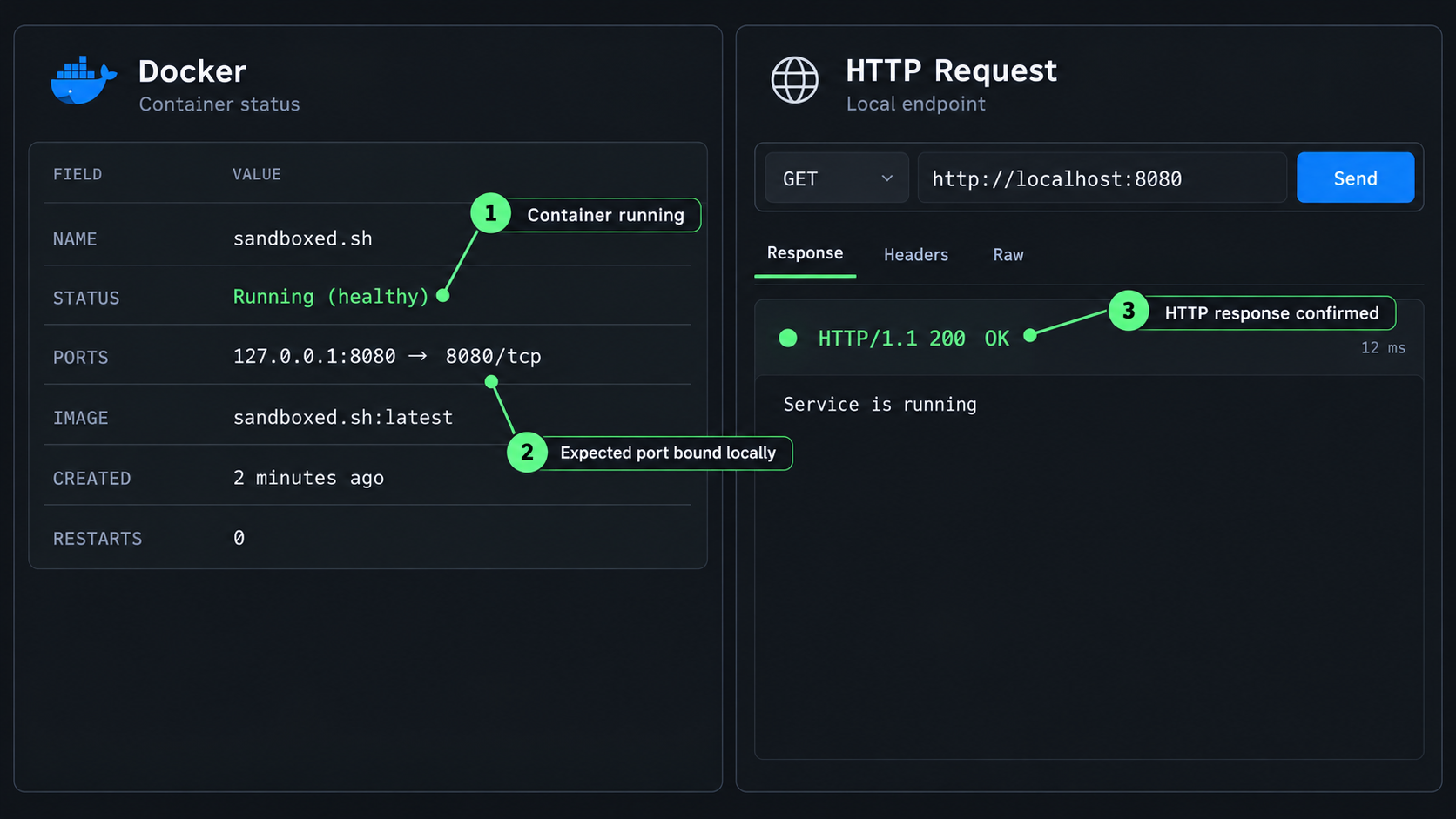
A running container is only the first verification signal. The meaningful test is whether a client on the intended local network path can reach the documented backend URL, sign in, read application state, and maintain the connection patterns used by Orb.
Check service and container health
Confirm that all required containers remain in their expected running state after initial startup. Review logs after the first few minutes, not only during container creation. Repeated restarts, migration retries, permission errors, or dependency failures must be resolved before any tunnel is created.
If the Compose file declares a health check, use its result as one signal, but do not treat it as the entire acceptance test. A health endpoint may confirm that a process is alive without proving that authentication, project storage, mission history, or event streaming works.
Test the exact local server URL
Open the confirmed server URL from the Docker host or from another device on the same network, depending on the intended bind scope. Use the exact scheme, address, port, and path established by the deployment. A successful connection should come from the backend service intended for Orb rather than an unrelated container landing page.
Record the result. If the service is available only as a loopback address, a Localtonet client running on that same host can generally target that local service. If our client runs on another device, the backend address must be reachable from that device, and host firewall policy must permit that local connection.
Complete a local client workflow
Open Orb, enter the locally reachable server URL, and sign in using the process established by the current project installation. Confirm that the client can load its initial server-backed views without repeated authentication prompts or connection errors.
Next, create or open a test project and confirm that it appears after refreshing or reconnecting the client. This checks more than basic HTTP reachability because it exercises backend persistence. If appropriate for the configured execution mode, create a small test mission and verify that its transcript or state is retained.
Restart safely and verify persistence
Perform a normal container restart using the operation documented for the deployment. Reconnect Orb and confirm that the test project and mission records remain available. If they disappear, stop and correct the volume or storage configuration before using the system for important work.
Also verify the expected behavior after a complete host restart if this server is intended for regular use. The project’s current Compose configuration determines whether services restart automatically. Do not add an arbitrary restart policy without checking how the project expects initialization, migrations, and dependent services to behave.
Connect Orb clients and execution environments
After local verification, configure Orb with the confirmed server URL and sign in. The server URL should represent the address reachable from that particular client. A Mac on the backend’s local network might use a private address, while an iPhone outside that network needs an authorized remote route such as the Localtonet URL configured later in this guide.
The next stage is choosing where agents run. For “This computer,” Orb uses the local client environment and its installed harnesses, files, tools, and existing CLI logins. For private-cloud execution, register and configure the relevant server or remote machine according to the project’s machine documentation. Cloud-agent modes have their own account or coordinator connections.
Configure inference providers only for the models and harnesses you intend to use. Provider credentials, subscription connections, and backend sign-in are separate trust boundaries. Connecting a model-routing proxy does not automatically authenticate unrelated cloud-agent integrations, and signing in to the Orb backend does not create provider accounts.
Create a test project and launch a small mission using one execution mode at a time. This isolates failures. If a local mission works but a remote-node mission does not, the backend and client connection are likely functioning, and investigation can focus on machine registration, workspace setup, or the selected harness. If no project data loads at all, return to the server URL, authentication, and backend logs.
First prove backend access and persistence. Then test one client, one execution environment, one harness, and one provider. Adding remote access, multiple machines, and several provider accounts simultaneously makes it difficult to identify which boundary is failing.
Expose the verified Orb backend with Localtonet
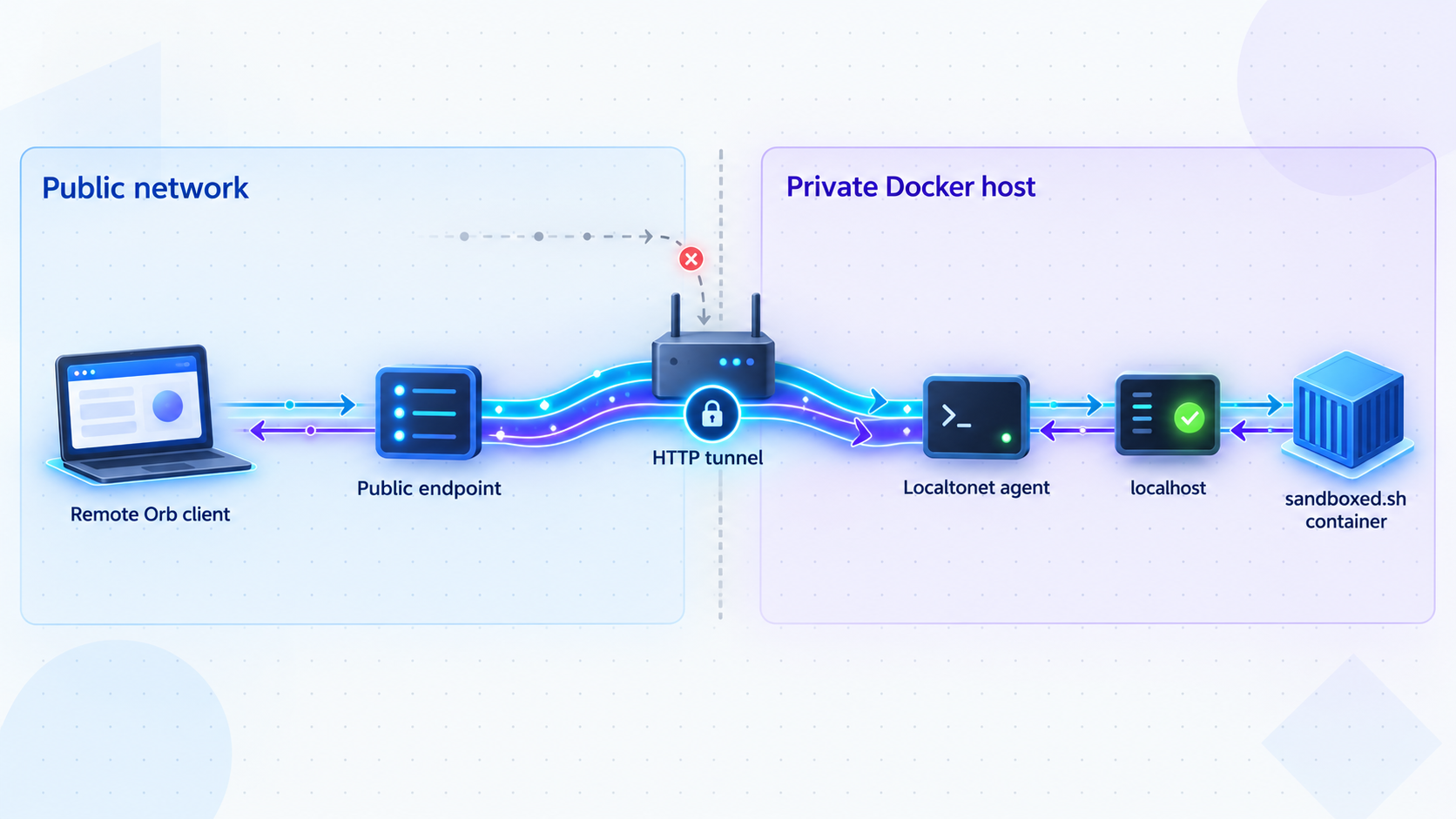
Once Orb works through the confirmed local endpoint, Localtonet can provide a public address without inbound router port forwarding, firewall changes, VPN setup, or a public IP address. Our client establishes an outbound connection to a Localtonet relay server and forwards the resulting public endpoint to the local backend.
For a backend confirmed to accept ordinary local HTTP traffic, use an HTTP tunnel. If the local service uses HTTPS or another transport, do not force it into an assumed HTTP configuration. Localtonet also supports TLS and raw TCP tunnel families, but the correct choice depends on the backend endpoint actually established by the current Orb deployment.
| Confirmed local service | Potential Localtonet family | Decision rule |
|---|---|---|
| Client-facing HTTP endpoint | HTTP/s tunnel | Use when the verified backend target accepts HTTP at the selected local IP address and port. |
| Client-facing TLS service | TLS or another documented compatible tunnel | Confirm certificate, hostname, and local TLS behavior before choosing the tunnel type. |
| Unknown or undocumented endpoint | None yet | Return to the Docker configuration and identify the protocol and published port before creating a tunnel. |
| Internal database or coordination port | Do not expose it as the Orb endpoint | Target only the documented client-facing application service. |
Configure the Localtonet tunnel
Install and run the Localtonet client
Run our client on the Docker host or on another device that can reach the confirmed Orb backend endpoint. If it runs elsewhere, test that device-to-backend connection before continuing.
Authenticate the correct device
Select the device-specific authentication token associated with the client that will carry the tunnel. Treat the token as a secret and never place it in screenshots, source control, Compose files, or published instructions.
Select an available relay server
Choose a currently available server or region from the Localtonet dashboard. Available server codes can vary, so obtain the value from the current product instead of copying a hardcoded example.
Create the appropriate tunnel configuration
For a backend confirmed to use local HTTP, create an HTTP tunnel and enter the local IP address and host port recorded during verification. For HTTP tunnels, choose the available Process Type that fits the deployment: Random Sub Domain, Custom Sub Domain, or Custom Domain. All three serve content at a public HTTPS address, but availability can vary.
Start the tunnel and test the assigned address
Creating a tunnel does not start it. Press Start, then use the assigned public URL from a separate network. Confirm that Orb’s expected sign-in boundary appears and that no unrelated internal service is exposed.
Use the public URL in the remote Orb client
Enter the working public server URL in the remote Orb client and sign in. When access is no longer required, stop or delete the tunnel. The endpoint remains available only while the selected Localtonet client is connected and the tunnel is running.
During testing, use a device that is not silently falling back to the same local network path. A mobile device on cellular data is one practical way to distinguish public tunnel access from local Wi-Fi access. Confirm project loading, sign-in, and a small read-and-write workflow rather than relying only on a successful landing page.
If the browser URL works but an Orb client does not, compare the server URL character for character, including its scheme and any required path. Then inspect the backend logs while the client connects. Client applications can depend on API calls or long-lived event streams that a simple page request does not exercise.
Do not start the tunnel until authentication has been verified. Use least-privilege accounts and expose only the client-facing service. Do not publish Docker management sockets, databases, internal machine-control ports, provider credentials, or unauthenticated development interfaces. Stop the tunnel when temporary access is complete.
Operate, update, and back up the deployment
Routine operation should keep application lifecycle, data lifecycle, and tunnel lifecycle separate. Updating a container image should not erase persistent data. Restarting Localtonet should not alter the Orb database. Stopping a tunnel should remove public reachability without shutting down the local backend.
Monitor the backend and tunnel independently
A Localtonet public endpoint is available only while its selected client device is connected and the tunnel is running. If remote Orb access stops, first determine whether the local backend still works. If it does, check the Localtonet client and tunnel state. If the local URL also fails, troubleshoot Docker and the backend before changing the tunnel.
Keep enough backend logs to diagnose startup, authentication, provider, and mission failures without recording secrets unnecessarily. Review storage consumption over time because mission history, project data, synchronized context, and execution workspaces can grow independently.
Plan upgrades around the project revision
Read the release notes and current installation instructions before upgrading. The project evolves across backend, desktop, web, and iOS components, so compatibility matters. Back up persistent data and configuration, record the current revision, and have a rollback plan before replacing containers.
After an upgrade, repeat the local verification sequence before reopening remote access: container health, backend URL, authentication, project persistence, and a small mission. Then start or retest the Localtonet tunnel. This order prevents a backend regression from being misdiagnosed as a network problem.
Protect configuration and provider credentials
Treat backend secrets, provider tokens, OAuth material, Localtonet device tokens, and remote-machine credentials as separate secrets. Do not place them in project context folders or mission prompts. Limit access to environment files and backups, and rotate affected credentials if a file is accidentally exposed.
Troubleshoot Docker, Orb, and Localtonet systematically
The backend container exits or restarts repeatedly
Inspect the first fatal error in the backend logs rather than the last secondary error. Compare the active environment configuration with the example from the same repository revision. Check required dependencies, storage permissions, occupied host ports, and migration output. Do not solve a bind conflict by exposing a random new port unless the client-facing URL and Compose configuration are updated consistently.
The container runs, but the local URL does not respond
Confirm that a host port is actually published and that you are not using only the internal container port. Verify the protocol and bind address. If the service listens only inside the Compose network, follow the project’s documented reverse-proxy or publication method. Also check whether the URL requires a specific path.
The local URL works on the host but not from another device
The service may be bound to loopback, the host firewall may block LAN access, or the client may be using the wrong host address. If Localtonet runs on the same host, a loopback target can still be appropriate. If our client runs on another machine, use an endpoint that is reachable from that machine and allowed by local policy.
Orb reaches the server but cannot sign in
Confirm that the client is using the intended backend rather than a dashboard or stale deployment. Review backend authentication logs and the account setup procedure for the installed revision. Do not disable authentication to make remote access work. Resolve clock, URL, account, or configuration issues while the service remains private.
Projects disappear after a restart
This usually indicates that application state was written to ephemeral container storage or that the wrong volume was mounted. Stop creating important projects until the declared persistent storage is identified and protected. Correct the deployment using the project’s current Docker documentation, restore from a tested backup if available, and repeat the restart test.
The Localtonet URL does not open
Confirm that the Localtonet client device is connected, the correct tunnel is running, and the local target remains reachable from that device. Recheck the target IP address and port against the verified Docker host mapping. Remember that merely creating the tunnel does not start it.
The public URL opens, but Orb does not synchronize
Test authentication and project loading through the public URL. Review backend logs during the client attempt. Confirm that the client uses the public URL’s correct scheme and any required path. A basic page response does not prove that all application requests or event streams are working.
The service works locally over HTTPS but fails when configured as HTTP
Do not downgrade or reinterpret the local protocol. Confirm where TLS terminates and select a Localtonet tunnel family compatible with the actual local service. The supplied Orb evidence does not define the backend’s default TLS behavior, so the running deployment is authoritative.
A provider or harness fails after the server connection succeeds
Treat this as a later integration layer. Verify the selected execution mode, harness installation, provider account, model access, workspace, and remote-machine registration. Do not rebuild the backend or change the Localtonet tunnel solely because one agent integration fails while server-backed projects and missions remain accessible.
Frequently asked questions
Are Orb and sandboxed.sh separate applications?
They are separate parts of the same architecture. Orb is the client experience, while the project formerly named sandboxed.sh is now the backend serving Orb clients. The backend owns projects, missions, event history, and remote-node coordination.
What port does the Orb backend use in Docker?
The supplied evidence does not establish a fixed port. Read the current Docker Install guide and inspect the Compose configuration from the exact revision you deploy. Record the published host port, not only the internal container port.
Should I use an HTTP tunnel for Orb?
Use a Localtonet HTTP tunnel only after confirming that the client-facing local backend endpoint accepts HTTP. If the deployment uses local HTTPS, TLS, or another transport, select a compatible tunnel based on the actual endpoint rather than assuming HTTP.
Does Localtonet require router port forwarding?
No. Our client establishes an outbound connection to a Localtonet relay server, so the workflow does not require inbound router port forwarding, a public IP address, firewall changes, or VPN setup.
Does creating a Localtonet tunnel immediately make Orb public?
No. Creating a tunnel does not mean it is running. It must be started, and it remains available only while the selected Localtonet client is connected and the tunnel is running. It can later be stopped or deleted.
Can I run the Localtonet client on a different machine from Docker?
Yes, provided that machine can reach the Orb backend’s confirmed local IP address and port. If the backend listens only on the Docker host’s loopback interface, run our client on that host or change the application’s network configuration only through a documented and secure method.
Does the backend also install agent harnesses and model providers?
Not as part of the basic server verification described here. Execution environments, local harnesses, remote machines, cloud-agent accounts, and inference providers have their own setup requirements. Establish backend connectivity first, then add those integrations one at a time.
What should I back up before upgrading?
Back up every persistent volume or host directory declared by the current project deployment, along with the configuration needed to recreate it. Protect secrets in those backups. Record the running project revision and test restoration before relying on the backup for production recovery.
Connect your verified Orb backend with Localtonet
After the sandboxed.sh backend works locally and authentication has been tested, use Localtonet to give authorized Orb clients a public endpoint without opening an inbound router port.
Get Started Free →

