

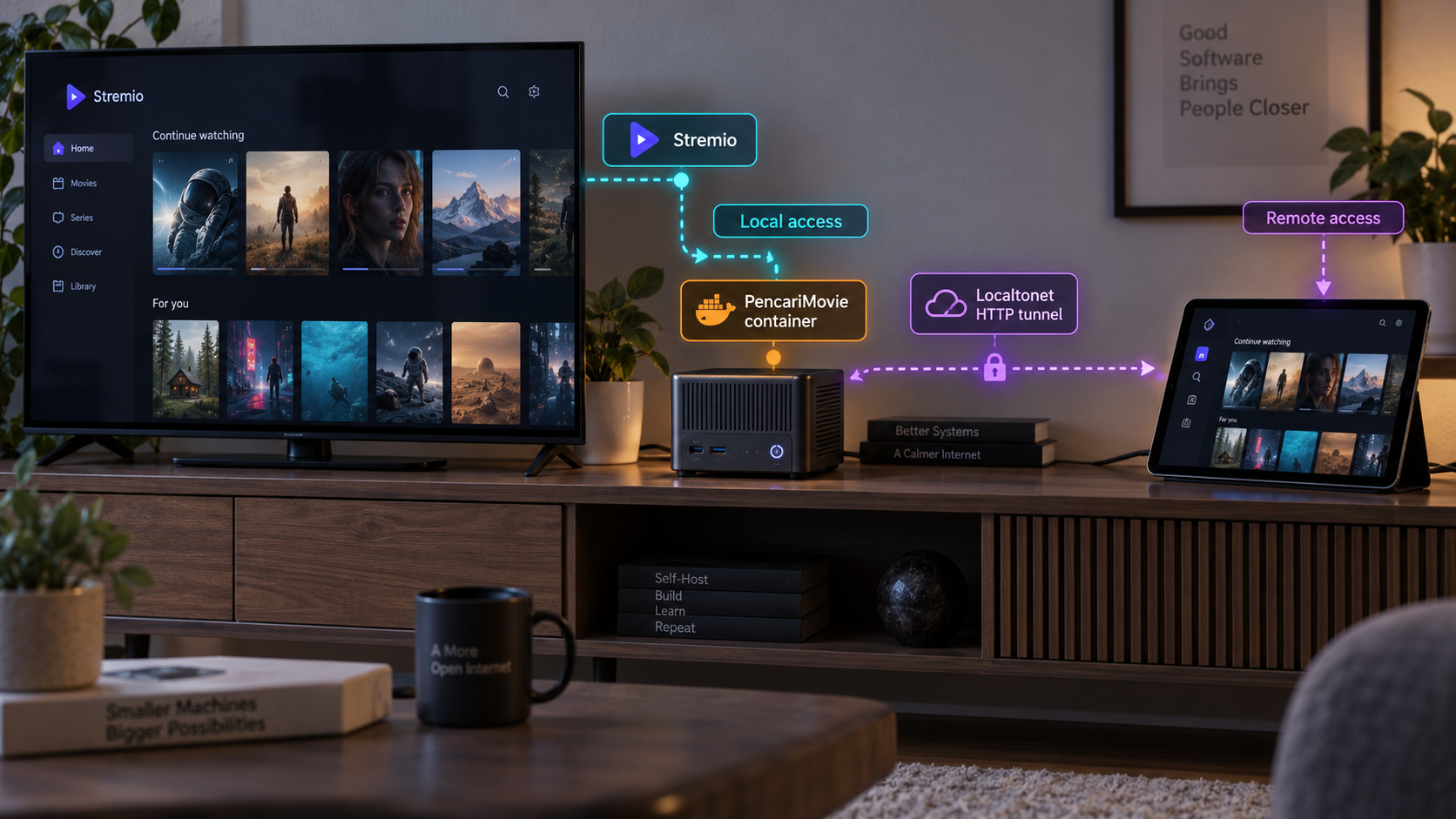
Build a persistent PencariMovie streaming bridge, connect Stremio, and add protected remote access
PencariMovie Server is a self-hosted Telegram MTProto media bridge that can provide HTTP streams to Stremio, Nuvio, Eclipse Music, and web clients. In this guide, we install it with Docker, persist its storage, configure its public-access credentials, verify the local dashboard and manifest endpoints, and connect a Stremio client. After the local service works, we expose it through a Localtonet HTTP tunnel without configuring inbound router port forwarding or requiring a public IP address. Remote access remains an additional networking layer, so the server's own password and token protections still matter.
📋 What's in this guide
How PencariMovie Server fits into the streaming path
PencariMovie Server is a self-hosted utility and protocol bridge. It connects client applications to Telegram's MTProto API and converts user-authorized Telegram file references into HTTP streams that media players can consume. Its documented streaming behavior includes HTTP range-request support, including HTTP 206 partial responses, which allows compatible players to seek within media rather than downloading an entire file before playback begins.
The server runs on hardware under your control. Docker publishes its web service on port 8088 in the documented default configuration. A browser can open the dashboard at http://127.0.0.1:8088 from the Docker host, while another device on the same network can normally use http://<LAN-IP>:8088 if the host firewall and network permit that connection.
Stremio does not connect to the container through a special Docker protocol. It receives an HTTP manifest URL and then uses the endpoints described by that manifest. This distinction is useful when troubleshooting: Docker must be healthy, the HTTP service must answer, the manifest must be reachable from the Stremio device, and any referenced streaming URL must remain reachable for playback to work.
ghcr.io/aiskendi/pencarimovie-server:latest. The container listens on port 8088, and persistent application data is stored under /app/storage.
/manifest.json. Clients on another LAN device must use the server's LAN address instead of that device's own loopback address.
/eclipse/manifest.json path. Keeping this distinct from the standard manifest avoids configuring the wrong client endpoint.
SERVER_PASSWORD protects dashboard access in the documented public-access scenarios, while SERVER_TOKEN is used in protected remote addon URLs.
PencariMovie Server is designed to stream user-authorized file references from Telegram's network to a local client. Self-hosting the bridge does not grant rights to access, copy, or distribute media. The operator remains responsible for account security, content authorization, and compliance with applicable rules and laws.
Prerequisites and deployment decisions
The Docker workflow is appropriate for a computer, server, NAS, or VPS that can run the published Linux container and make port 8088 available to the required clients. Docker Desktop is sufficient on supported desktop systems, while server and NAS deployments generally use Docker Engine. Docker Compose is recommended for this guide because it keeps environment variables, persistent storage, restart behavior, and port mapping in a reproducible configuration.
Before starting, prepare the following:
- A working Docker installation with the
dockercommand available. - The Docker Compose plugin if you intend to use the recommended Compose configuration.
- Permission to create containers, networks, images, and either a bind-mounted directory or Docker volume.
- Enough local storage for PencariMovie's persistent application data and your expected workload.
- A browser for opening the dashboard at
http://127.0.0.1:8088. - A Stremio client on the Docker host or on a device that can reach the host over the LAN.
- User-authorized Telegram access and media references required by your intended PencariMovie workflow.
- A strong, unique dashboard password and a random 32-character server token before public exposure.
- The Localtonet client on the machine that can reach PencariMovie if remote access is required.
Choose who should reach port 8088
A port mapping such as 8088:8088 publishes the container port through the Docker host. The exact interfaces and firewall reachability depend on the host's Docker and operating-system configuration. That mapping is useful when televisions, phones, or other computers on the LAN need to contact PencariMovie directly.
If only programs on the Docker host and the Localtonet client need access, limiting the published port to loopback can reduce unnecessary LAN exposure. Docker supports a host-address-qualified mapping such as 127.0.0.1:8088:8088. This is a general Docker networking option rather than a PencariMovie-specific requirement. Do not use a loopback-only mapping when direct LAN clients must connect to the server.
Decide between a Docker volume and a bind mount
The project's quick Docker command uses the named volume pencarimovie-data. Its Compose example uses ./storage:/app/storage, which stores persistent files in a visible storage directory beside the Compose file. Both approaches preserve application data outside the disposable container layer.
| Storage approach | Container target | Operational consideration |
|---|---|---|
| Named Docker volume | /app/storage |
Docker manages the host location. This is convenient for a quick installation, but administrators must use Docker volume tooling or inspect the Docker configuration to locate and back it up. |
| Relative bind mount | /app/storage |
./storage keeps the data beside the Compose file, making the deployment layout easier to inspect and include in a host backup process. |
| Absolute bind mount | /app/storage |
An administrator-selected host path can integrate with an existing storage policy, but the path and permissions must be valid on that specific host. |
The project's configuration reference lists 123456 as the default SERVER_PASSWORD. A known default is not suitable protection for an internet-accessible dashboard. Set your own strong password and a random 32-character SERVER_TOKEN before starting a Localtonet tunnel or deploying to a publicly reachable VPS.
Install PencariMovie Server with Docker
The fastest documented installation uses the published container image, maps host port 8088 to container port 8088, and creates a named volume for persistent storage. This is useful for confirming that the image starts correctly before creating a longer-lived Compose deployment.
Start the published PencariMovie container
Run the project's documented Docker command. Docker creates a container named pencarimovie-server, configures it to restart unless explicitly stopped, publishes port 8088, and mounts the named volume at /app/storage.
Open the local dashboard
After the container starts, visit http://127.0.0.1:8088 from the Docker host. If the browser is on another LAN device, use the Docker host's LAN IPv4 address instead of 127.0.0.1.
docker run -d \
  --name pencarimovie-server \
  --restart unless-stopped \
  -p 8088:8088 \
  -v pencarimovie-data:/app/storage \
  ghcr.io/aiskendi/pencarimovie-server:latest
The line continuation character above is suitable for common Unix-like shells. In a shell that does not accept backslash continuation, enter the command on one line or adapt only the line formatting for that shell. Do not change the image name, container port, or storage target unless you understand the effect.
Check the container state with:
docker ps --filter name=pencarimovie-serverIf it does not remain running, inspect its output:
docker logs pencarimovie-server
The quick command is an effective local smoke test, but it does not explicitly supply custom SERVER_PASSWORD and SERVER_TOKEN values. For a reproducible installation intended for remote access, stop and remove the test container, preserve the named volume if its data is needed, and continue with the Compose configuration below.
docker stop pencarimovie-server
docker rm pencarimovie-server
Removing the container does not by itself remove the separately named pencarimovie-data volume. Do not delete that volume if it contains application state you intend to retain.
Configure Docker Compose, authentication, and persistence
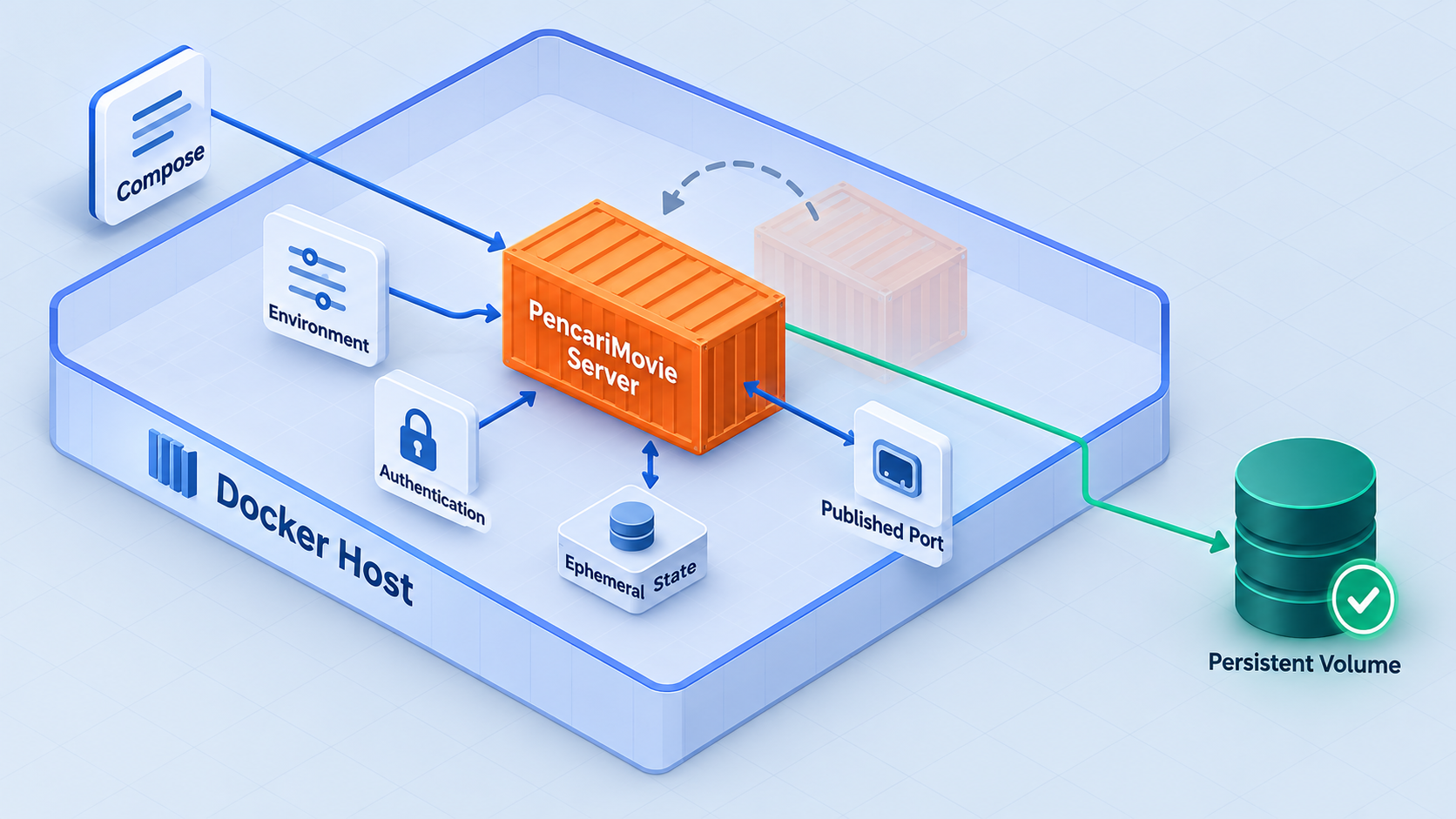
Create a dedicated project directory and place two files inside it: compose.yaml and .env. The Compose definition below follows the project's documented service configuration, including the published image, restart policy, environment file, port mapping, and persistent ./storage bind mount.
services:
  pencarimovie:
    image: ghcr.io/aiskendi/pencarimovie-server:latest
    container_name: pencarimovie-server
    restart: unless-stopped
    ports:
      - "${PORT:-8088}:8088"
    env_file:
      - .env
    volumes:
      - ./storage:/app/storage
Create .env in the same directory. The following example deliberately uses replacement markers rather than working credentials. Replace both security values before launching the service.
PORT=8088
SERVER_PASSWORD=REPLACE_WITH_A_STRONG_UNIQUE_PASSWORD
SERVER_TOKEN=REPLACE_WITH_A_RANDOM_32_CHARACTER_TOKEN
DEBUG=0
The values beginning with REPLACE_WITH are not valid secrets. Choose a strong password that is not reused elsewhere and generate a random token containing exactly 32 characters, as required by the project's documented public remote addon format. Do not commit the completed .env file to source control, paste it into support messages, or include it in screenshots.
Understand the security variables
SERVER_PASSWORD is documented as the password for dashboard access on public VPS addresses and tunnel-based public access. The project's documentation describes LAN access as password-free, so the existence of a password should not be treated as a general LAN access-control boundary. Control LAN reachability separately through the Docker port binding, host firewall, and network design.
SERVER_TOKEN is the static token used in public remote addon URLs. Instead of publishing the unprotected path /manifest.json, the documented remote format places the token in the path as /<token>/manifest.json. Anyone who receives that complete URL may also receive the token, so treat manifest URLs as sensitive configuration.
Optional performance and network variables
PencariMovie exposes additional environment variables, but the defaults should normally remain unchanged until measurements show a reason to tune them. The documented initial FrankenPHP thread count is 8, the maximum thread ceiling is 16, and the default parallel download chunk count is 4. Increasing concurrency can also increase CPU, memory, network, and upstream demand.
| Variable | Documented default | Purpose |
|---|---|---|
PORT |
8088 |
Selects the host-facing port in the documented Compose configuration. |
SERVER_PASSWORD |
123456 |
Protects dashboard access in documented public VPS and tunnel scenarios. Replace the default before public exposure. |
SERVER_TOKEN |
Auto-generated | Provides the 32-character token used in protected public remote addon URLs. |
LAN_IP |
Auto-detected | Overrides the detected LAN IPv4 address when multi-device Wi-Fi manifests need a specific host address. |
FRANKENPHP_NUM_THREADS |
8 |
Sets the initial number of FrankenPHP worker threads. |
FRANKENPHP_MAX_THREADS |
16 |
Sets the documented thread-scaling ceiling under higher stream load. |
FD_DOWNLOAD_PARALLEL_CHUNKS |
4 |
Controls parallel chunk download concurrency for each active stream. |
DEBUG |
0 |
When set to 1 or true, enables verbose stream and MadelineProto logging in storage/debug.log. |
External session storage can be configured through REDIS_URI, MYSQL_URI, or the documented PostgreSQL connection option where supported by the current project release. Those services are optional and are not required for this basic single-container workflow. Do not copy placeholder database credentials into a production configuration.
Start the Compose deployment from the directory containing both files:
docker compose up -dThen review its state and initial logs:
docker compose ps
docker compose logs --tail=100 pencarimovie
The project also documents optional variables such as BOT_TOKEN and TUNNEL_TOKEN. They are not required for the Docker and Localtonet workflow in this article. In particular, Localtonet runs as a separate access layer, so do not place a Localtonet device auth token into PencariMovie's TUNNEL_TOKEN variable. These are unrelated credentials for different systems.
Verify the dashboard, manifest, and streaming behavior locally
Finish local verification before creating any public tunnel. This keeps Docker, application, client, and networking problems separate. If the dashboard does not work locally, a tunnel cannot repair the underlying application.
1. Confirm the container remains healthy enough to serve requests
Run docker compose ps and confirm the container is running rather than repeatedly restarting. If it restarts, use docker compose logs pencarimovie and look for port conflicts, storage permission failures, invalid environment values, or application startup errors.
2. Open the dashboard from the Docker host
Visit:
http://127.0.0.1:8088
If PORT was changed in .env, use that host port instead. The container side remains port 8088 in the supplied Compose configuration.
A command-line HTTP request can provide additional connection detail:
curl -v http://127.0.0.1:8088/The exact status and authentication behavior can vary with the current release and access context. The key local checks are that a TCP connection succeeds, an HTTP response arrives, and the container does not terminate while serving the request.
3. Retrieve the standard manifest
Request the documented local manifest:
curl http://127.0.0.1:8088/manifest.jsonThe response should be a Stremio-compatible JSON manifest rather than a Docker gateway error or connection failure. Avoid publishing captured manifest output because it may reveal internal addresses or application details relevant to your deployment.
4. Test from a second LAN device
Determine the Docker host's LAN IPv4 address and open:
http://<LAN-IP>:8088/
http://<LAN-IP>:8088/manifest.json
Replace <LAN-IP> with the actual address of the Docker host. Do not use 127.0.0.1 on a television, phone, or separate computer because loopback always refers to the device making the request.
If local access works but LAN access does not, check whether Docker is bound only to 127.0.0.1, whether the host firewall allows the selected port, whether the devices are on networks permitted to communicate, and whether Wi-Fi client isolation is enabled.
5. Complete the application-specific setup in the dashboard
Follow the prompts displayed by the installed PencariMovie release to complete its Telegram and client configuration. The available setup screens can change between releases, and the supplied project evidence does not establish a stable sequence of dashboard fields that can be reproduced safely here. Do not enter Telegram credentials, bot tokens, session data, or server tokens into an untrusted page.
6. Verify playback and seeking
Once authorized media is available through the application, start a stream in a compatible client and seek to a later position. Successful seeking exercises the project's range-request support. For a deeper diagnostic, copy a temporary stream URL from your own session and request a small byte range:
curl -i -H "Range: bytes=0-1023" "YOUR_TEMPORARY_STREAM_URL"A range-aware endpoint can respond with HTTP 206 Partial Content. Stream URLs and authorization data can be sensitive, so never publish the real URL in logs, screenshots, issue reports, or shell history shared with other people.
Configure the PencariMovie manifest in Stremio
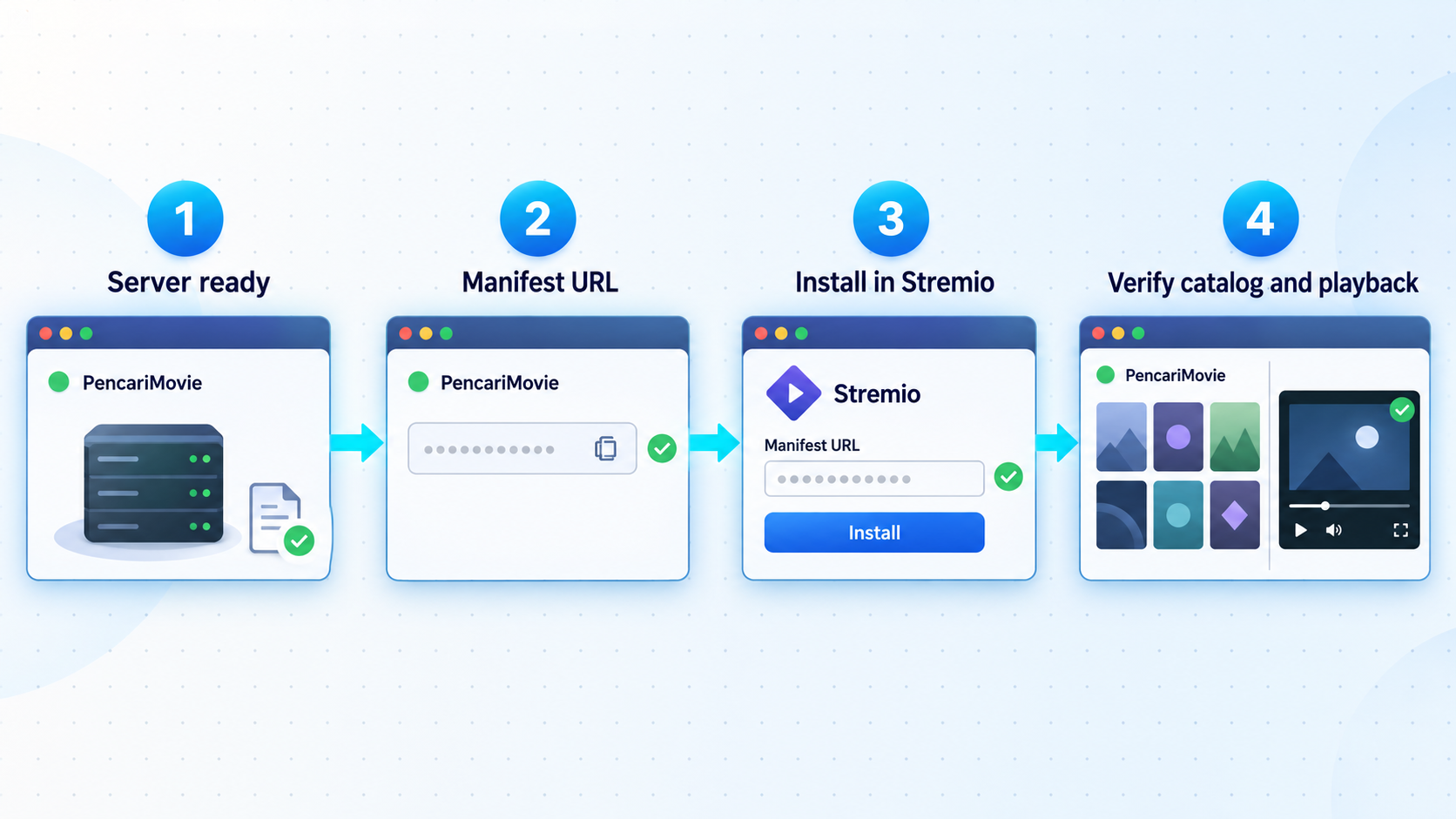
The correct manifest URL depends on where Stremio runs. Select an address reachable from the Stremio device, not merely an address that works in a browser on the server.
| Client location | Manifest URL pattern | When to use it |
|---|---|---|
| Stremio on the Docker host | http://127.0.0.1:8088/manifest.json |
Use when Stremio and Docker are running on the same machine. |
| Stremio on the same LAN | http://<LAN-IP>:8088/manifest.json |
Use when the Stremio device can directly reach the Docker host over the private network. |
| Remote Stremio client | https://<PUBLIC-HOST>/<SERVER_TOKEN>/manifest.json |
Use the Localtonet public host and your private token after the protected remote route has been verified. |
| Eclipse Music on the LAN | http://<LAN-IP>:8088/eclipse/manifest.json |
Use the separately documented Eclipse manifest path rather than the standard Stremio path. |
In Stremio, use the client's addon installation mechanism to add the full manifest URL. The exact screen name and placement can differ across Stremio versions and platforms, so this guide does not invent a fixed menu sequence. Confirm that the client accepts the manifest and displays the resulting addon before testing media playback.
A manifest loading successfully does not prove that every stream is reachable. Start an authorized item, allow playback to begin, and test seeking. If the addon appears but playback fails, inspect PencariMovie's logs while reproducing the problem:
docker compose logs --follow pencarimovie
If generated LAN URLs contain the wrong local address on a multi-interface host, PencariMovie documents LAN_IP as an override. Add the correct host LAN IPv4 address to .env, recreate the container, and retrieve a fresh manifest:
LAN_IP=192.168.1.100The address above is only an example from the private address space. Replace it with the Docker host's real LAN address. Apply the changed environment:
docker compose up -dExpose the verified service through a Localtonet HTTP tunnel
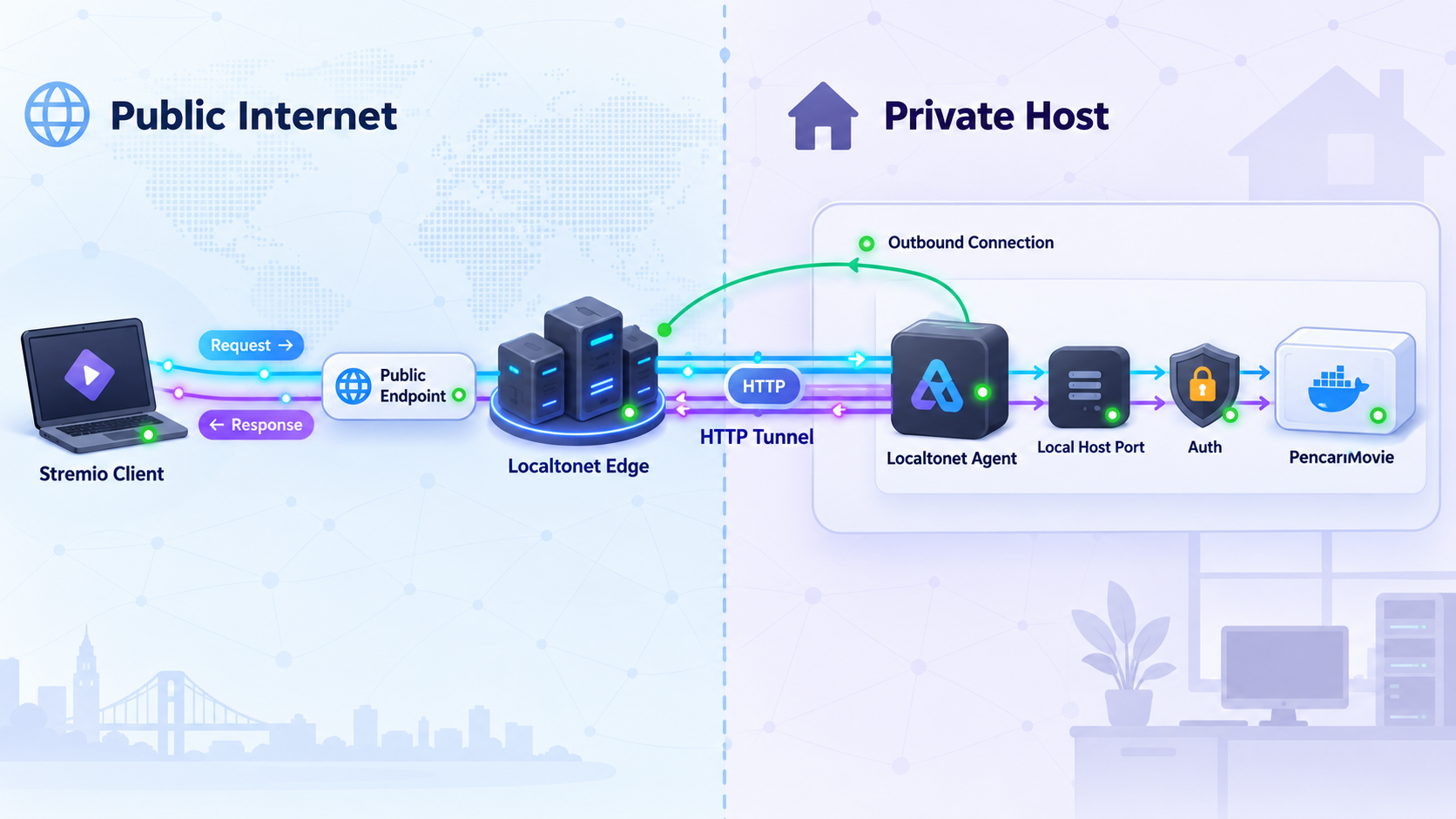
Remote access should be treated as a separate stage. PencariMovie supplies the local HTTP service and application-level password and token behavior. With Localtonet, our client establishes an outbound connection to a relay server and provides a public address for that local service. This avoids inbound router port forwarding, firewall rule changes for an inbound public port, VPN setup, and the requirement for a public IP address.
Use an HTTP tunnel because PencariMovie exposes an HTTP dashboard, manifest, and streaming endpoints. Do not configure a raw TCP tunnel unless there is a separate, verified requirement for raw TCP forwarding. HTTP process types can use a random subdomain, a custom subdomain where supported, or a custom domain, and each serves the same target content through a public HTTPS address.
Install and run the Localtonet client
Run our client on the Docker host or on another device that can reach PencariMovie's local IP address and port. Verify that PencariMovie already answers from that same device before continuing.
Authenticate and select the client device
Use the device-specific Localtonet auth token associated with the client that will run the tunnel. Keep the token private and never place it in PencariMovie's environment file, a manifest URL, source control, or public troubleshooting output.
Select an available relay server
Choose a currently available server or region in the Localtonet dashboard. Available values can vary, so obtain them from the current product interface instead of copying a hardcoded server code from a tutorial.
Create an HTTP tunnel to PencariMovie
Set the local target to the address reachable from the Localtonet client and port 8088, or the custom host port selected through PORT. If both services run on the same host, 127.0.0.1 is normally the clearest target. Select the appropriate HTTP Process Type for the public hostname you intend to use.
Start the tunnel
Creating a tunnel does not make it active. Press Start and wait for the selected client and tunnel to show as connected. The tunnel remains available only while the selected client is connected and the tunnel is running.
Test the assigned public address
Open the assigned public HTTPS address from a network outside the server's LAN. Confirm dashboard password behavior, then test the tokenized manifest path before entering it in a remote Stremio client. Stop or delete the tunnel when remote access is no longer required.
For current dashboard details, consult our Localtonet HTTP tunnel documentation. Exact regions, hostname options, dashboard labels, and plan availability can change, so this article does not hardcode values that must be selected from your account.
Anyone who learns the public hostname can send requests to it. Keep SERVER_PASSWORD enabled with a strong value, use the tokenized remote manifest path, keep the 32-character token private, and stop the tunnel when it is not needed. Do not assume that an unlisted URL is secret, and do not expose a service unless you are authorized to make it remotely reachable.
Construct the remote manifest carefully
If Localtonet assigns a public address represented here as https://<PUBLIC-HOST>, the documented protected remote addon pattern is:
https://<PUBLIC-HOST>/<SERVER_TOKEN>/manifest.jsonReplace both placeholders locally. Do not paste the completed URL into a public message because the path contains the server token. Test it from an external network, confirm that the response is the expected JSON manifest, and then enter the same protected URL into the remote Stremio client.
Keep the public hostname stable if a client is expected to retain the addon configuration. A new random public hostname would require updating the manifest URL in that client. Custom-domain DNS setup is not included here because exact records and verification requirements must be checked against the current Localtonet documentation rather than guessed.
Routine operation, backups, updates, and shutdown
A self-hosted streaming service needs basic operational care even when its container starts automatically. Keep the Compose file and non-secret configuration documented, protect the completed .env file, and back up persistent storage according to the recovery needs of your deployment.
View status and logs
docker compose ps
docker compose logs --tail=100 pencarimovie
docker compose logs --follow pencarimovie
Follow mode continues printing new events until interrupted. Debug logging should remain disabled during normal use unless detailed diagnosis is required. If you temporarily set DEBUG=1 or DEBUG=true, the project documents verbose output in storage/debug.log. Review that file for sensitive account, media, path, or request information before sharing any excerpt.
Restart or stop the service
docker compose restart pencarimovie
docker compose stop
docker compose start
The unless-stopped restart policy allows Docker to restart the container after ordinary daemon or host restarts, except when an administrator has explicitly stopped it. This does not replace monitoring, and it does not guarantee that the application is ready to serve a valid manifest.
Update the container image
The configuration uses the moving latest image tag documented by the project. A pull can therefore introduce a newer application release. Back up persistent data, review the project's release information, and schedule a maintenance window before updating.
docker compose pull
docker compose up -d
docker compose logs --tail=100 pencarimovie
After an update, repeat the local dashboard, manifest, playback, and seeking tests. Then verify the Localtonet public manifest separately. The available evidence confirms the published latest image but does not establish that every application release has a matching immutable container tag, so this guide does not invent a version-specific image name.
Back up persistent data
With the supplied Compose configuration, persistent data is in the project's storage directory. Stop the service or use a backup method that provides an application-consistent copy, then protect the backup according to the sensitivity of its contents. The exact files needed for a complete application-level restore can evolve with PencariMovie releases, so validate restoration in a separate test deployment rather than assuming that an untested file copy is sufficient.
Stop remote access independently
Stopping the Localtonet tunnel removes the public route but does not stop PencariMovie on the LAN. Stopping PencariMovie leaves the tunnel configuration present but without a working local target. For planned maintenance, stop the tunnel first, maintain and verify the local service, and start the tunnel again only after local checks pass.
Troubleshooting common Docker, manifest, and tunnel problems
| Symptom | Likely area | What to check |
|---|---|---|
| The container exits or restarts repeatedly | Container startup | Run docker compose logs pencarimovie. Check malformed environment values, storage permissions, and whether the image started successfully. |
| Port 8088 is already allocated | Host port conflict | Identify the existing listener or set a different PORT value. Keep the container target at 8088 in the documented Compose mapping. |
| Dashboard works on the host but not another device | LAN networking | Use the host's LAN IP, not 127.0.0.1. Check the Docker bind address, host firewall, subnet routing, and wireless client isolation. |
| Manifest contains an incorrect LAN address | Address detection | Set LAN_IP to the Docker host's correct LAN IPv4 address, recreate the container, and retrieve the manifest again. |
| Stremio rejects or cannot load the manifest | Manifest reachability | Open the exact manifest URL from the Stremio device's network. Confirm that it returns JSON and that the URL uses the correct host, port, path, and remote token format. |
| The addon loads but playback fails | Application or stream path | Follow container logs while starting an authorized item. Verify application setup, upstream access, generated stream reachability, and available host resources. |
| Seeking fails or playback restarts | Range requests | Test a temporary stream URL with a Range request and inspect whether the endpoint returns an HTTP 206 response. Keep real stream URLs private. |
| The Localtonet public URL does not respond | Tunnel lifecycle | Confirm the Localtonet client is connected, the tunnel was explicitly started, and the configured local IP and port work from the client device. |
| The dashboard is public without acceptable protection | Application security | Stop the tunnel immediately. Set a strong SERVER_PASSWORD, confirm the environment reached the recreated container, and retest before restarting public access. |
| A remote manifest works, then becomes unavailable | Service continuity | Check the PencariMovie container, the Localtonet client, and the tunnel state. The public route works only while the selected client is connected and the tunnel is running. |
Confirm which layer is failing
Test the same resource in a strict order: first through 127.0.0.1 on the host, then through the LAN address, and finally through the Localtonet public address. A failure at the first stage belongs to Docker or PencariMovie. A failure only on the LAN belongs to host or network reachability. A failure only through the public URL belongs to tunnel state, tunnel targeting, public-path construction, or application behavior for remote requests.
Confirm that changed environment variables were applied
Editing .env does not modify the environment inside an already-created container. Run:
docker compose up -dCompose will reconcile the service and recreate it when required. Recheck the dashboard and manifest afterward. Never print the complete environment publicly because it contains the dashboard password and server token.
Avoid enabling several remote-access systems at once
PencariMovie documents its own optional tunnel token variable, while this guide uses Localtonet as a separate remote-access layer. Running multiple connectors can create several public routes, complicate troubleshooting, and unintentionally leave an older route active. Configure only the access method you intend to operate, and inventory every public hostname before declaring the service private again.
Frequently asked questions
What port does PencariMovie Server use by default?
The documented default is port 8088. The container listens on port 8088, while the Compose configuration lets PORT select the host-facing port. With the default mapping, open http://127.0.0.1:8088 on the Docker host.
What is the PencariMovie Stremio manifest URL?
On the Docker host, use http://127.0.0.1:8088/manifest.json. On another LAN device, replace loopback with the Docker host's LAN IP. For documented protected remote access, use the public host followed by /<SERVER_TOKEN>/manifest.json.
Why does 127.0.0.1 fail from my television or phone?
Loopback always identifies the device making the request. On a television, 127.0.0.1 refers to the television, not the Docker host. Use the Docker host's reachable LAN address or the protected Localtonet public URL.
Do I still need SERVER_PASSWORD when using Localtonet?
Yes. The tunnel makes the local service reachable through a public address, but it does not replace PencariMovie's application-level dashboard protection. Set a strong unique password before starting the tunnel and verify its behavior from an external network.
Is SERVER_TOKEN the same as a Localtonet auth token?
No. SERVER_TOKEN belongs to PencariMovie and appears in its protected remote addon path. A Localtonet auth token identifies the client device that runs the tunnel. Never interchange or publicly expose either credential.
Does Localtonet require router port forwarding for this setup?
No. Our client establishes an outbound connection to a Localtonet relay server. This allows the HTTP tunnel to provide a public address without configuring inbound router port forwarding or requiring a public IP address.
Will the public PencariMovie URL remain available if the Localtonet client stops?
No. The tunnel is available only while the selected Localtonet client is connected and the tunnel is running. PencariMovie may continue working locally even when its public route is offline.
Can I use Docker Compose instead of the one-line Docker command?
Yes. Compose is preferable for a repeatable deployment because it records the image, restart policy, port mapping, environment file, and storage mount. It also makes password and token configuration explicit before remote access is enabled.
Which Localtonet tunnel type should I select?
Use an HTTP tunnel because the PencariMovie dashboard, manifests, and streams are provided over HTTP. Point it to the local IP and port reachable from the Localtonet client, then explicitly start the tunnel and test the assigned HTTPS address.
Connect your verified PencariMovie server with Localtonet
Once the dashboard, Stremio manifest, playback, and seeking work locally, create a Localtonet HTTP tunnel to provide protected remote access without opening an inbound router port. Keep the PencariMovie password and token enabled, and stop the tunnel whenever public access is not required.
Get Started Free →

