

Build a Restic-powered backup control plane, verify recovery locally, and expose its web endpoint with a carefully controlled tunnel
Zerobyte provides a web interface for scheduling, monitoring, restoring, and maintaining Restic backups. In this guide, we install the evidenced v0.42 container with Docker Compose, configure persistent local storage, create the initial administrator account, and verify the service on port 4096. We compare the standard deployment for remote filesystem mounts with a reduced-privilege deployment for local directories. After the local installation and a test restore work, we connect the HTTP interface to Localtonet without inbound router port forwarding, firewall changes, VPN setup, or a public IP address.
📋 What's in this guide
What Zerobyte does and how this deployment works
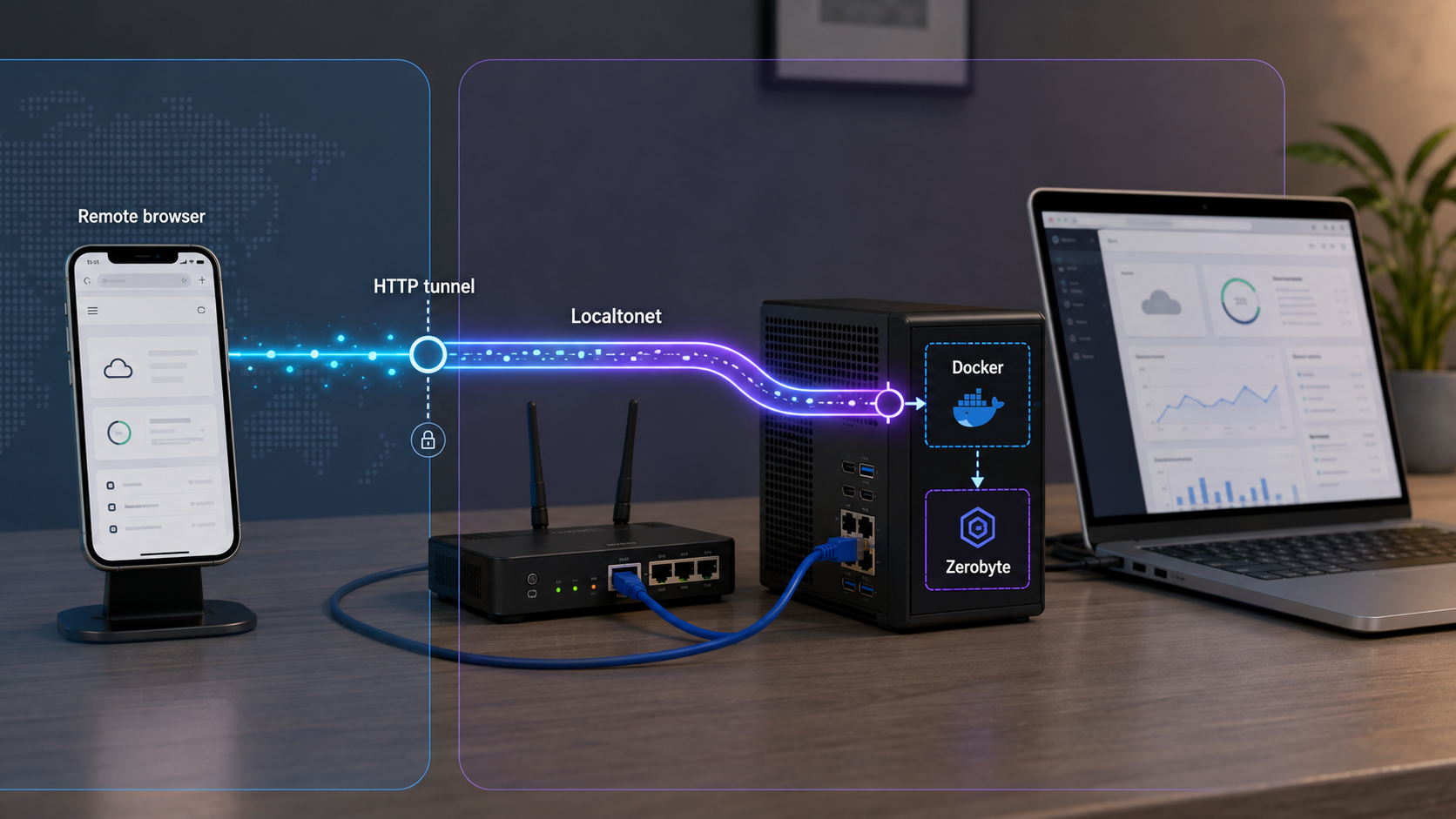
Zerobyte is an open-source backup automation service built on Restic. Restic remains the underlying backup engine, while Zerobyte provides a web control plane for routine administration. Operators can connect source volumes, create backup repositories, define schedules and retention policies, monitor runs, browse snapshots, restore data, and perform repository maintenance without assembling separate scripts for every routine task.
Zerobyte supports local directories and remote sources such as NFS, SMB/CIFS, WebDAV, SFTP, and rclone-backed storage. Backup repositories can use local storage, S3-compatible services, Google Cloud Storage, Azure Blob Storage, REST servers, SFTP targets, and providers available through rclone. The exact source and destination settings depend on your storage systems, credentials, permissions, recovery objectives, and failure model.
Zerobyte runs as a Docker container. Its web interface and API listen on port 4096 by default. Docker Compose describes the image, port mapping, environment variables, capabilities, devices, and persistent volumes. The application data directory inside the container is /var/lib/zerobyte, and it must be mapped to durable local storage on the host.
Localtonet is a separate connectivity layer. Zerobyte continues running on your own server and remains responsible for its users, roles, sessions, and application authorization. Our client establishes an outbound connection from a device that can reach Zerobyte to a Localtonet relay server. A running HTTP tunnel then maps a public HTTPS address to the local Zerobyte HTTP endpoint. The endpoint is available only while the selected Localtonet client is connected and the tunnel is running.
/var/lib/zerobyte.
4096 by default and can be verified before remote access is introduced.
Zerobyte warns that major changes can occur between versions while core features remain under active development. This tutorial uses the v0.42 image shown in the verified installation evidence. It is a version-scoped example, not a timeless claim that v0.42 will always be the newest release. Review the v0.42.0 release information and the current release list before changing image tags.
Separate application state, source data, and repositories
Zerobyte's application directory is not the same resource as a source directory or backup repository. The application directory contains the configuration, database, and encryption-related material needed to operate Zerobyte. Source directories contain the files you want to protect. Repositories contain the Restic snapshots from which you recover.
Plan persistence, permissions, capacity, and disaster recovery for all three resources. Backing up only the application directory does not protect the source data, while preserving only the repository may leave an operator without the application configuration or credentials needed for a smooth recovery.
A working dashboard is also not proof that a backup is recoverable. A complete validation includes a successful backup run, snapshot inspection, repository health checks, and a restore to a safe destination. Remote access improves administrative reachability, but it cannot validate the integrity or usability of the stored data.
Prerequisites and deployment decisions
Zerobyte requires a server with Docker and Docker Compose. Docker Compose is included with Docker Desktop and may be installed separately as a plugin on Linux servers. This guide uses the modern docker compose command form. Consult the current Zerobyte installation documentation while preparing the host, especially if its requirements have changed since the evidenced v0.42 configuration.
You also need durable local storage for /var/lib/zerobyte, a valid timezone for scheduling, and a way to generate a random application secret. If you plan to back up host directories, identify their exact host paths before creating the Compose file. If Zerobyte must mount NFS, SMB, WebDAV, or SFTP sources from inside the container, use the standard installation and understand why it grants additional privileges.
Verify Docker and Docker Compose before continuing:
docker --version
docker compose version
Both commands should return version information. If either is unavailable, install the missing component using the instructions for your operating system and Docker distribution. There is no single verified package-manager command suitable for every supported host platform.
Choose the standard or simplified deployment
| Deployment choice | Use it when | Capability profile | Important limitation |
|---|---|---|---|
| Standard installation | Zerobyte must mount NFS, SMB, WebDAV, or SFTP sources itself | Adds SYS_ADMIN and passes /dev/fuse into the container |
Elevated capabilities increase the deployment's security impact |
| Simplified installation | All source directories are already mounted locally on the Docker host | Does not require SYS_ADMIN or /dev/fuse |
Cannot mount remote shares from inside Zerobyte |
| Read-only source mount | Zerobyte should read source files without modifying them | Adds :ro to the relevant bind mount |
Cannot restore directly to that read-only location |
| Read-write source mount | Restoration to the mapped location is required | Allows writes within the permissions granted by the host | A broader write path requires careful permission management |
Prefer the simplified deployment when local bind-mounted directories meet your requirements. It removes capabilities that are unnecessary for that use case. If a network share is already mounted by the host operating system, you may expose that mounted path as a local bind mount, but you still need to evaluate ownership, permissions, ACL behavior, symlinks, and metadata fidelity.
Do not point the host path mapped to /var/lib/zerobyte at a network share. Zerobyte warns that doing so causes permission problems and severe performance degradation. A remote backup repository is a different resource and does not change the local-storage requirement for the application's own state.
Special persistence requirement for TrueNAS
Zerobyte's installation guidance notes that the host /var/lib path is ephemeral on TrueNAS and can be reset during system upgrades. Create a dedicated ZFS dataset and map that durable dataset to /var/lib/zerobyte inside the container. The documented example uses /mnt/tank/docker/zerobyte, but your pool and dataset path may differ.
volumes:
  - /etc/localtime:/etc/localtime:ro
  - /mnt/tank/docker/zerobyte:/var/lib/zerobyte
Confirm that the dataset exists, remains persistent through upgrades, and is accessible to Docker before starting the container.
Install Zerobyte with Docker Compose
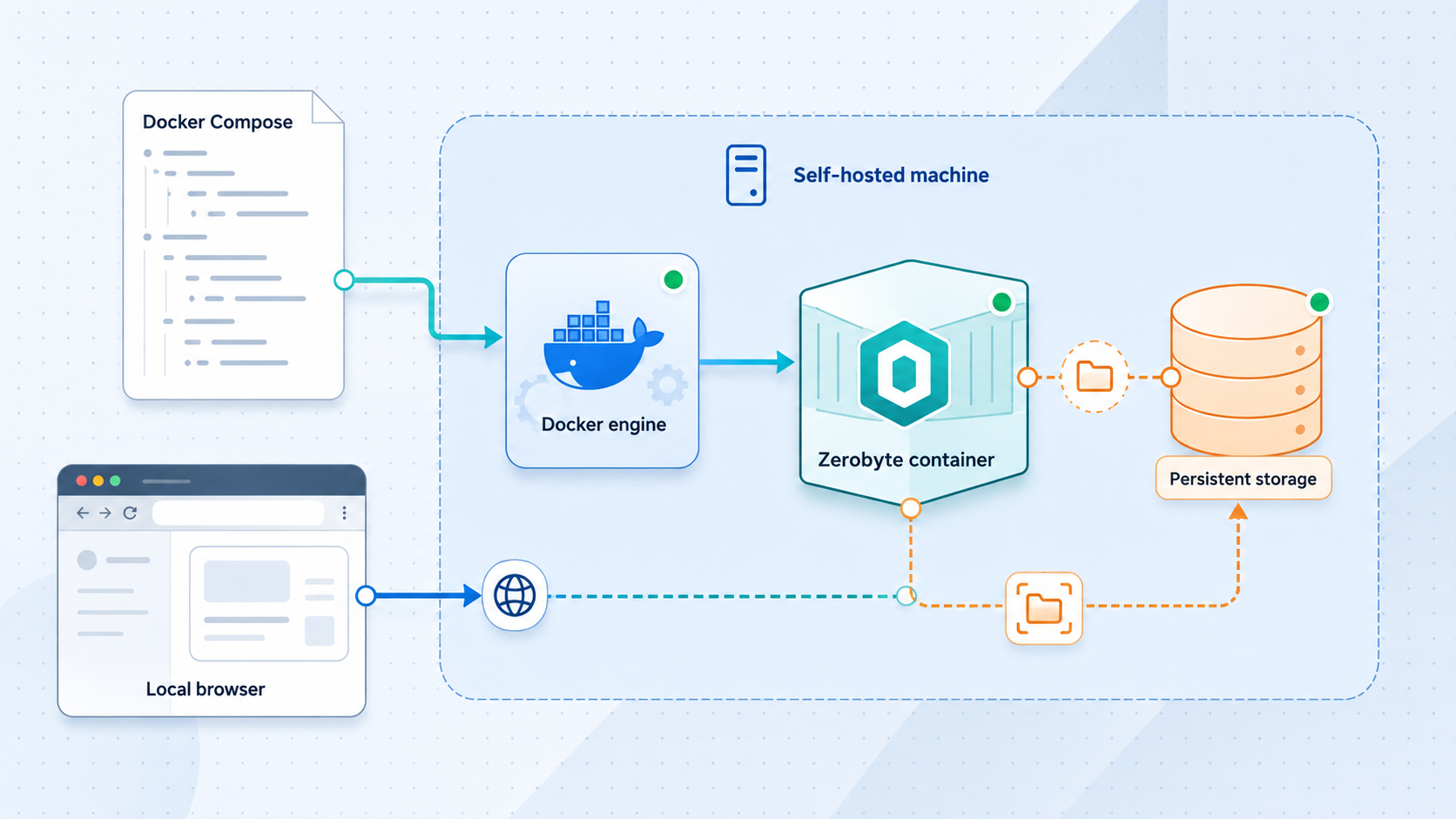
The documented installation sequence contains five stages: create the Compose configuration, set the environment variables, configure volume mounts, start the container, and access the web interface. Complete this local installation before creating a public tunnel. That boundary makes it easier to determine whether an error belongs to Zerobyte, Docker, host storage, local networking, or Localtonet.
Create compose.yaml
Create a deployment directory and place a file named compose.yaml in it. Choose the standard configuration for remote mounts or the simplified configuration for local bind-mounted directories.
Configure the environment variables
Set BASE_URL, generate a unique APP_SECRET, and select the correct TZ timezone. Never reuse or publish an example secret.
Configure persistent and source volumes
Map durable local host storage to /var/lib/zerobyte. Add explicit bind mounts for source directories, using read-only mappings when restoration to the source is unnecessary.
Start Zerobyte
Run docker compose up -d, check status with docker compose ps, and inspect startup output with docker compose logs -f zerobyte.
Open the web interface
Visit the address configured in BASE_URL. On first access, create the administrator account that will have full backup-management access.
Standard Compose configuration for remote mounts
The following example follows the documented v0.42 standard deployment while binding the host port to loopback for this tutorial. Replace the timezone and secret before starting it.
services:
  zerobyte:
    image: ghcr.io/nicotsx/zerobyte:v0.42
    container_name: zerobyte
    restart: unless-stopped
    cap_add:
      - SYS_ADMIN
    ports:
      - "127.0.0.1:4096:4096"
    devices:
      - /dev/fuse:/dev/fuse
    environment:
      - TZ=Europe/Zurich
      - BASE_URL=http://localhost:4096
      - APP_SECRET=REPLACE_WITH_YOUR_GENERATED_SECRET
    volumes:
      - /etc/localtime:/etc/localtime:ro
      - /var/lib/zerobyte:/var/lib/zerobyte
Generate the required secret with:
openssl rand -hex 32
Copy the output into APP_SECRET. Zerobyte requires a random value of at least 32 characters and uses it to encrypt sensitive data in its database. Do not paste it into tickets, screenshots, public repositories, or published shell transcripts.
Zerobyte discourages direct internet exposure and recommends a loopback mapping when using a secure tunnel. The mapping 127.0.0.1:4096:4096 works when the Localtonet client runs on the same host. If our client runs on another device, that device cannot reach the Zerobyte server's loopback interface. You would need a protected network-reachable target instead.
Simplified Compose configuration for local directories
If every source is a local directory mounted into the container, remove SYS_ADMIN and /dev/fuse. This example maps one host directory to /mydata as read-only:
services:
  zerobyte:
    image: ghcr.io/nicotsx/zerobyte:v0.42
    container_name: zerobyte
    restart: unless-stopped
    ports:
      - "127.0.0.1:4096:4096"
    environment:
      - TZ=Europe/Zurich
      - BASE_URL=http://localhost:4096
      - APP_SECRET=REPLACE_WITH_YOUR_GENERATED_SECRET
    volumes:
      - /etc/localtime:/etc/localtime:ro
      - /var/lib/zerobyte:/var/lib/zerobyte
      - /path/to/your/directory:/mydata:ro
Replace /path/to/your/directory with a real host path. Inside Zerobyte, the source is available as /mydata, not under its original host path. Add other explicit mappings as needed, but do not map the entire host filesystem merely for convenience.
A read-only source reduces write access when Zerobyte only needs to create backups. It also prevents restoration to that source location. Use a separate writable restore destination for routine recovery testing.
Understand the important environment variables
The current Zerobyte documentation should remain your final reference for version-specific configuration. The following options are established by the supplied installation and configuration evidence:
| Variable | Purpose | Default or requirement |
|---|---|---|
BASE_URL |
Defines the access origin and affects cookie security and CORS behavior | Required, no default |
APP_SECRET |
Encrypts sensitive information stored in the database | Required random value of at least 32 characters |
APP_SECRET_FILE |
Reads the application secret from a file | No default and mutually exclusive with APP_SECRET |
TZ |
Controls timezone-sensitive scheduling | UTC |
PORT |
Controls the internal web interface and API port | 4096 |
RESTIC_HOSTNAME |
Sets the hostname Restic records in snapshots | zerobyte |
GOMAXPROCS |
Limits Go scheduler threads used by newly started Restic processes | Restic default |
TRUST_PROXY |
Controls whether an existing X-Forwarded-For header is trusted |
false |
TRUSTED_ORIGINS |
Adds comma-separated trusted CORS origins | None |
WEBHOOK_TIMEOUT |
Sets the backup webhook timeout in seconds | 60 |
LOG_LEVEL |
Selects debug, info, warn, or error logging |
info |
SERVER_IDLE_TIMEOUT |
Sets the server idle timeout in seconds | 60 |
RCLONE_CONFIG_DIR |
Sets the location of rclone.conf inside the container |
/root/.config/rclone |
PROVISIONING_PATH |
Points to operator-managed repository and volume configuration | None |
Use an HTTP or IP-based BASE_URL for the initial local check. Zerobyte disables secure cookies for HTTP or IP-address access so local setup can work. An HTTPS domain enables secure cookies. When the final Localtonet public HTTPS address is known, update BASE_URL to that exact origin and recreate the container.
Do not enable TRUST_PROXY automatically merely because a tunnel exists. Its documented purpose is to trust an existing X-Forwarded-For header from a reverse proxy. Leave the default in place unless you have verified the full request path and have a specific reason to trust that header.
Start the service
docker compose up -d
docker compose ps
If the container does not remain running, inspect its logs:
docker compose logs -f zerobyteStop following the output after collecting the information you need. Before sharing logs, check them for private paths, repository addresses, account information, hostnames, or credentials.
Complete first-run setup and create a backup workflow
Open http://localhost:4096 on the Docker host when using the loopback mapping. Zerobyte prompts you to create an administrator account on first access. This account has full backup-management access, so use unique credentials and store them safely. There is no universal default username or password in this workflow.
Zerobyte organizes the initial backup lifecycle around four practical stages: connect a source volume, create a repository, define a backup job, and monitor or restore snapshots. Storage-specific form fields vary, so enter values issued by your own storage systems rather than copying generic credentials.
1. Connect a source volume
For a local bind mount, use the container-side path from compose.yaml, such as /mydata or /photos. A path that exists only on the host is not visible inside the container unless it is explicitly mounted.
For NFS, SMB, WebDAV, or SFTP mounting inside Zerobyte, use the standard deployment with SYS_ADMIN and /dev/fuse. Remote mounts can expose translated ownership, permissions, and ACL metadata. If metadata fidelity matters, test representative files, ownership, permissions, symlinks, and ACLs through an actual restore.
2. Create a backup repository
The repository stores encrypted Restic snapshots. Zerobyte supports local repositories and remote destinations including S3-compatible storage, Google Cloud Storage, Azure Blob Storage, REST servers, SFTP, and rclone-backed providers. Select a destination that matches your failure model. A repository on the same disk as the source cannot protect against failure or loss of that disk.
Preserve the credentials, recovery keys, and other information required to access snapshots independently of the live container. A repository that exists but cannot be authenticated to or decrypted is not recoverable.
3. Define the backup job
Connect the chosen volume and repository, then select a schedule appropriate for how quickly the source changes and how much data loss you can tolerate. Zerobyte supports cron-based scheduling, include and exclude rules, manual runs, compression choices, and retention policies.
Confirm that TZ represents the intended timezone. A syntactically correct job can run at the wrong local time when the container timezone is wrong. Retention should reflect both recovery requirements and available capacity. Observe actual repository growth before aggressively removing older recovery points.
4. Run, inspect, and restore
Trigger an initial backup and monitor its status. After completion, inspect the snapshot and verify that expected paths are present. Restore representative files and directories to a separate destination, open the restored content, and compare it with the source.
This test exercises repository access, decryption, snapshot traversal, write permissions, and the recovery procedure. It provides stronger evidence than a successful status indicator alone.
Signing in remotely proves only that the administrative web path works. It does not prove that jobs run successfully, snapshots contain the intended files, repositories are healthy, retention behaves correctly, or restored data is usable. Schedule recurring restore tests and preserve all credentials and keys needed during a server-loss scenario.
Verify Zerobyte locally before exposing it
Local verification creates a clean troubleshooting boundary. A tunnel cannot repair a stopped container, invalid environment variable, inaccessible mount, repository error, or host permission problem.
Check container state and logs:
docker compose ps
docker compose logs -f zerobyte
Look for missing variables, invalid filesystem paths, permission failures, mount errors, or repeated restarts. Correct the underlying setting in compose.yaml, recreate the container when required, and check again.
With the loopback binding, open:
http://localhost:4096
The browser must run on the Docker host because localhost always refers to the machine making the request. A successful check displays the Zerobyte interface. Complete administrator setup, sign in, and confirm that configured source paths are visible from the container's perspective.
If you deliberately used the upstream-style 4096:4096 mapping rather than loopback, the local network address takes this form:
http://<your-server-ip>:4096Use that form only on an appropriately protected network where the server is reachable. Do not create an internet-facing router port forward for this tutorial.
Local readiness checklist
- Docker and Docker Compose return valid version information.
- The Zerobyte container remains running.
- Logs contain no unresolved startup, mount, or storage errors.
- The interface loads at the address configured in
BASE_URL. - The administrator account has unique credentials.
/var/lib/zerobytemaps to durable local host storage.- Expected source paths are visible inside the container.
- An initial job creates a snapshot in the intended repository.
- The snapshot contains the expected files.
- A test restore succeeds to a safe destination.
Access Zerobyte remotely with a Localtonet HTTP tunnel
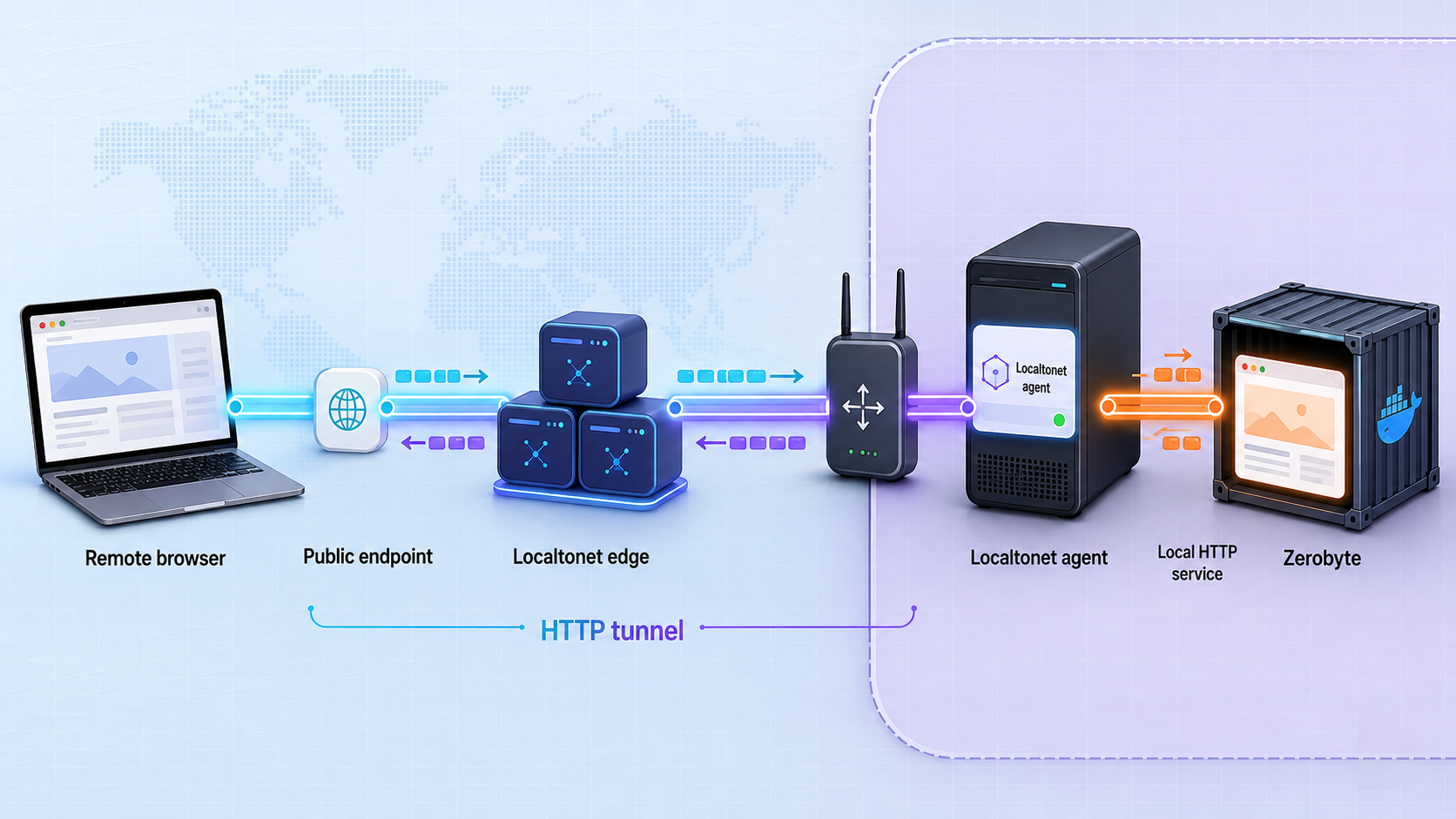
Once local access works, an HTTP tunnel can publish the web interface through Localtonet. Our client runs on the Zerobyte host or another device that can reach it. The client establishes an outbound connection to a selected relay server, and the running tunnel provides a public HTTPS address.
Review the current Localtonet HTTP tunnel documentation before configuration. Available relay servers, regions, process types, and account-specific choices must come from the current dashboard. Do not copy a server code, hostname, or region from another deployment.
An HTTP tunnel targets only the local IP address and port you configure. If the client and Zerobyte run on the same host, use 127.0.0.1 and port 4096. If they run on different devices, use an address reachable from the Localtonet client and protect that private network path appropriately.
Zerobyte credentials protect the application after a request reaches Zerobyte. They are application-layer controls. A publicly reachable Localtonet URL still creates an internet exposure boundary. Zerobyte's upstream guidance recommends a secure tunnel with authentication for remote exposure, but the supplied Localtonet evidence does not establish a tunnel-layer authentication feature for this HTTP workflow. Therefore, do not assume that an ordinary public URL by itself satisfies the upstream recommendation. Verify and use only access restrictions currently documented for your Localtonet configuration. If suitable tunnel-layer protection is not documented or available for your deployment, assess whether application authentication alone meets your risk requirements before publishing the service.
Create and start the HTTP tunnel
The current verified workflow preserves an important lifecycle distinction: creating a tunnel does not start it. Follow the dashboard and documentation in this order:
Install and run the Localtonet client
Install our client on the Zerobyte host or on a device that can reach the Zerobyte HTTP endpoint. The client must remain connected whenever remote access is required.
Authenticate or select the client device
Use the device-specific authentication token issued for that client. Treat it as a secret, never publish it, and do not substitute a guessed value.
Select an available relay server
Choose from the server or region values currently offered in your dashboard. Availability may vary by account, plan, region, or product version.
Create the HTTP tunnel configuration
Enter the local IP address and port reachable from the client. For a same-host loopback deployment, use 127.0.0.1 and 4096. Select the appropriate process type from the choices currently available in the dashboard.
Start the tunnel
Creating the tunnel only saves its configuration. Use the Start button and wait for it to run before attempting to use the assigned public address.
Use and verify the assigned address
Note the assigned public URL, update Zerobyte's BASE_URL as described below, recreate the container, and test sign-in and navigation from a separate browser session.
HTTP tunnels may use Random Sub Domain, Custom Sub Domain, or Custom Domain process types, with each serving the same target content through a public HTTPS address. Exact custom-domain DNS instructions can change and should be taken from current Localtonet documentation rather than inferred from this tutorial.
Update Zerobyte's public base URL
Replace the initial local BASE_URL with the exact assigned HTTPS origin. Do not copy this placeholder literally:
environment:
  - TZ=Europe/Zurich
  - BASE_URL=https://YOUR_ASSIGNED_PUBLIC_HOST
  - APP_SECRET=REPLACE_WITH_YOUR_EXISTING_GENERATED_SECRET
Keep your existing application secret. Changing the public origin does not require rotating APP_SECRET. Recreate the service:
docker compose down
docker compose up -d
docker compose ps
Test the assigned address only after the container is running again. If the page loads but authentication loops, browser requests fail CORS checks, or navigation returns to the wrong address, compare BASE_URL with the exact public scheme and hostname.
Anyone who knows or discovers the address can reach the exposed service unless an applicable access control blocks the request. Use strong Zerobyte credentials, assign application roles according to least privilege, monitor access, review updates, and stop the tunnel when remote administration is unnecessary. Confirm any current Localtonet access restrictions in official documentation before relying on them.
The endpoint works only while the selected Localtonet client is connected and the HTTP tunnel is running. A created but stopped tunnel is not active. You can stop the tunnel to remove remote reachability without stopping Zerobyte's local backup service, or delete the tunnel when it is no longer required.
Routine operation, security, and recovery
Use least privilege for storage
Mount only the directories Zerobyte needs. Use :ro when a source should not be modified, then restore to a separate writable destination. If remote mount support is unnecessary, use the simplified deployment rather than retaining SYS_ADMIN and /dev/fuse.
Protect compose.yaml because it may contain APP_SECRET and sensitive deployment paths. Zerobyte supports APP_SECRET_FILE as an alternative, and it is mutually exclusive with APP_SECRET. Secret-file mounting and permissions depend on your container environment, so verify them before switching.
Limit and review remote reachability
Keep the Docker mapping on loopback when the Localtonet client runs on the same host. Start the tunnel only for the periods when remote administration is needed if continuous exposure is unnecessary. Stopping the tunnel does not stop scheduled local backups, provided the Zerobyte container and its storage remain available.
Treat the public URL, application login, and any tunnel-layer restriction as separate controls. The URL provides reachability. Zerobyte credentials provide application authentication. Any additional Localtonet access restriction must be verified against current documentation and configured deliberately. Do not infer such a restriction from HTTPS alone.
Monitor application and backup outcomes
Use docker compose ps for container state and docker compose logs -f zerobyte during investigation. Inside Zerobyte, review run status, next-run timing, snapshot history, repository health, and notification outcomes. Test notification delivery rather than assuming that a saved configuration works.
A useful operating routine includes investigating failures, reviewing unexpectedly short or long jobs, checking repository growth, confirming retention results, resolving stale locks carefully, and restoring representative data on a recurring schedule.
Control backup CPU use
If Restic processes create excessive CPU pressure, Zerobyte supports GOMAXPROCS:
environment:
  - GOMAXPROCS=2
Restart the container after changing it. The value applies to Restic processes started after the restart and does not alter operations already running. Select a positive integer based on your host rather than assuming that 2 is ideal everywhere.
Repository compression also affects CPU use. Zerobyte supports off, auto, and max compression behavior through Restic. Turning compression off can reduce CPU consumption, auto provides the usual balance, and max may save more storage at the cost of additional CPU work. Measure with your own data and hardware.
Plan upgrades and server-loss recovery
Preserve the application data directory, but do not confuse it with the backup repository. Record repository locations, authentication requirements, recovery keys, and the procedure an operator would follow if the Zerobyte server disappeared.
Before changing a 0.x image tag, review the project's current releases, identify migration or configuration changes, confirm that persistent storage is healthy, and record the currently deployed tag. The v0.42 configuration in this guide is tied to the supplied evidence. Validate a newer version against its own documentation before adopting it.
Troubleshooting Zerobyte and Localtonet access
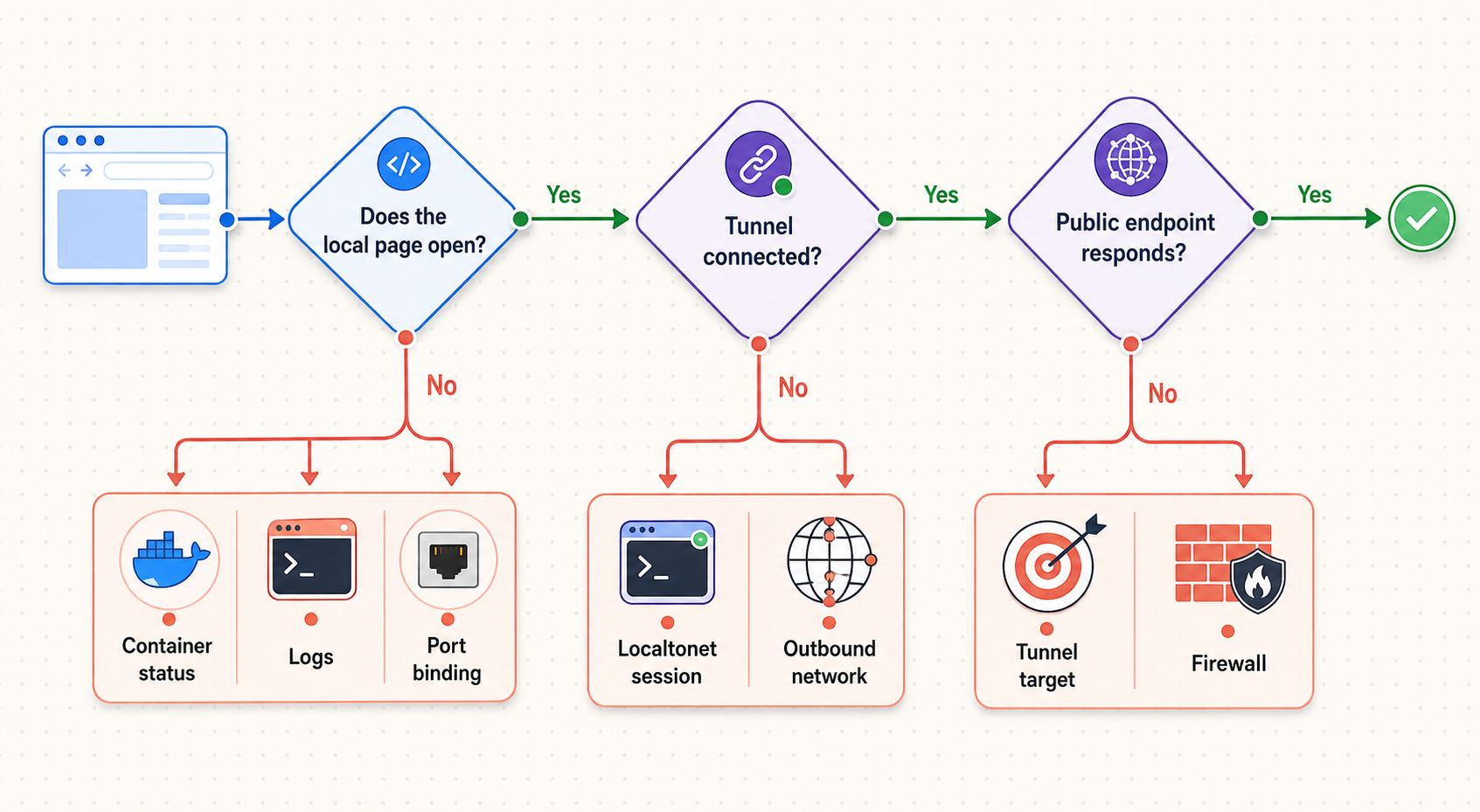
Zerobyte maintains a dedicated troubleshooting guide. Use it for current project-specific behavior while following the layered checks below.
The container exits or repeatedly restarts
Run docker compose ps and docker compose logs -f zerobyte. Confirm that BASE_URL and either APP_SECRET or APP_SECRET_FILE are configured correctly. Check YAML indentation, the application-data path, host permissions, and configured devices.
If using the standard deployment, confirm that /dev/fuse exists and can be passed to the container. If internal remote mounts are unnecessary, switch to the simplified configuration rather than forcing unsupported capabilities onto the host.
The browser cannot open localhost:4096
Confirm that the browser runs on the Docker host. Typing localhost on another computer points to that other computer. Then verify that the container is running and that Compose maps 127.0.0.1:4096 to container port 4096.
If you changed the internal PORT, update the Docker mapping and Localtonet target consistently.
A local source directory is missing
Check the bind mount in compose.yaml. For /path/to/photos:/photos:ro, Zerobyte must use /photos. It cannot access the original host path unless that path is deliberately mounted into the container.
After changing mounts, recreate the container:
docker compose down
docker compose up -d
A backup receives permission errors
Check host ownership, permissions, ACLs, and the bind mount's access mode. A read-only source supports backup reads but cannot receive an in-place restore. Network filesystems may present translated metadata, so reproduce the issue from the container's view and test representative files.
The Localtonet public URL does not load
First verify Zerobyte locally. Then confirm that the Localtonet client is connected, the correct device token is selected, and the tunnel has been started rather than merely created. Confirm that the configured target is reachable from the device running our client.
For a same-host deployment, target 127.0.0.1:4096. If the client runs elsewhere, its own 127.0.0.1 cannot reach Zerobyte. Use a protected address reachable from that client and ensure Docker listens on the required interface.
The public page loads but sign-in or browser requests fail
Compare BASE_URL with the exact public HTTPS origin. Recreate the container after changing it. Do not add speculative TRUSTED_ORIGINS values or enable TRUST_PROXY without identifying the specific CORS or forwarded-header problem being solved.
Schedules run at the wrong time
Check TZ. Zerobyte identifies timezone configuration as important for accurate scheduling. Set a valid timezone or use UTC, restart the container, and review the next scheduled run.
Backups use too much CPU
Consider a positive GOMAXPROCS limit and restart the container. Review repository compression as well. Change one factor at a time so its effect can be measured.
The tunnel works, but the security model is unclear
Stop the tunnel while you review the deployment. Confirm which controls exist at the Zerobyte application layer and which, if any, are documented at the tunnel layer. The supplied evidence confirms Zerobyte authentication and a public Localtonet endpoint, but it does not establish tunnel-layer authentication for this workflow. Do not continue under the assumption that an obscure URL is private.
Frequently asked questions
What is Zerobyte?
Zerobyte is a self-hosted backup automation service built on Restic. It provides a web control plane for sources, repositories, schedules, retention, monitoring, restores, and repository maintenance.
Which port does Zerobyte use?
The web interface and API listen on port 4096 by default. If you change the internal PORT, update the Docker mapping and Localtonet target consistently.
Is v0.42 the latest Zerobyte version?
This guide uses v0.42 because that image is supported by the supplied installation evidence. It does not claim that v0.42 will remain the latest version. Check current releases and migration guidance before deploying or upgrading.
Does Zerobyte require SYS_ADMIN?
The standard installation uses SYS_ADMIN and /dev/fuse for mounting remote NFS, SMB, WebDAV, or SFTP filesystems inside Zerobyte. A simplified deployment for local bind-mounted directories removes both.
Can I store /var/lib/zerobyte on a NAS share?
No. Zerobyte warns against placing its application-data directory on network storage because of permission problems and severe performance degradation. Use durable local storage. A remote backup repository is separate from this application state.
Why bind Docker to 127.0.0.1?
The mapping 127.0.0.1:4096:4096 keeps the Docker-published port on host loopback and is appropriate when the Localtonet client runs on the same machine. A client on another device cannot reach that loopback endpoint.
Does Localtonet require router port forwarding?
No. Our client establishes an outbound connection to a Localtonet relay server. A running HTTP tunnel can provide a public address without inbound router port forwarding, firewall changes, VPN setup, or a public IP address.
Does a Localtonet URL satisfy Zerobyte's recommendation for a tunnel with authentication?
Not by itself. Zerobyte credentials provide application-layer authentication after requests reach the service. The supplied Localtonet evidence does not establish tunnel-layer authentication for this HTTP workflow. Verify and configure only currently documented access restrictions, and do not treat an unshared public URL as private or authenticated.
Should BASE_URL use the Localtonet public address?
Yes, when that HTTPS address is the intended public origin. Set BASE_URL to the exact origin, keep the existing APP_SECRET, and recreate the container. Zerobyte uses the base URL for cookie security and CORS behavior.
Will the public URL remain available if the Localtonet client stops?
No. The endpoint is available only while the selected client is connected and the tunnel is running. Zerobyte can continue scheduled local operation while the tunnel is stopped, provided its container and storage remain available.
How do I know the deployment is ready?
Confirm that the container remains running, the local interface loads, application storage is persistent, a source is readable, a backup completes, the snapshot contains expected data, and a test restore succeeds. Add remote access only after those checks pass.
Connect your verified Zerobyte deployment with Localtonet
Finish the local Docker Compose installation first, verify a backup and test restore, then review the current HTTP tunnel documentation and your required access controls. When the security model is appropriate, create and start a tunnel to port 4096 without configuring an inbound router port forward or requiring a public IP address.


