

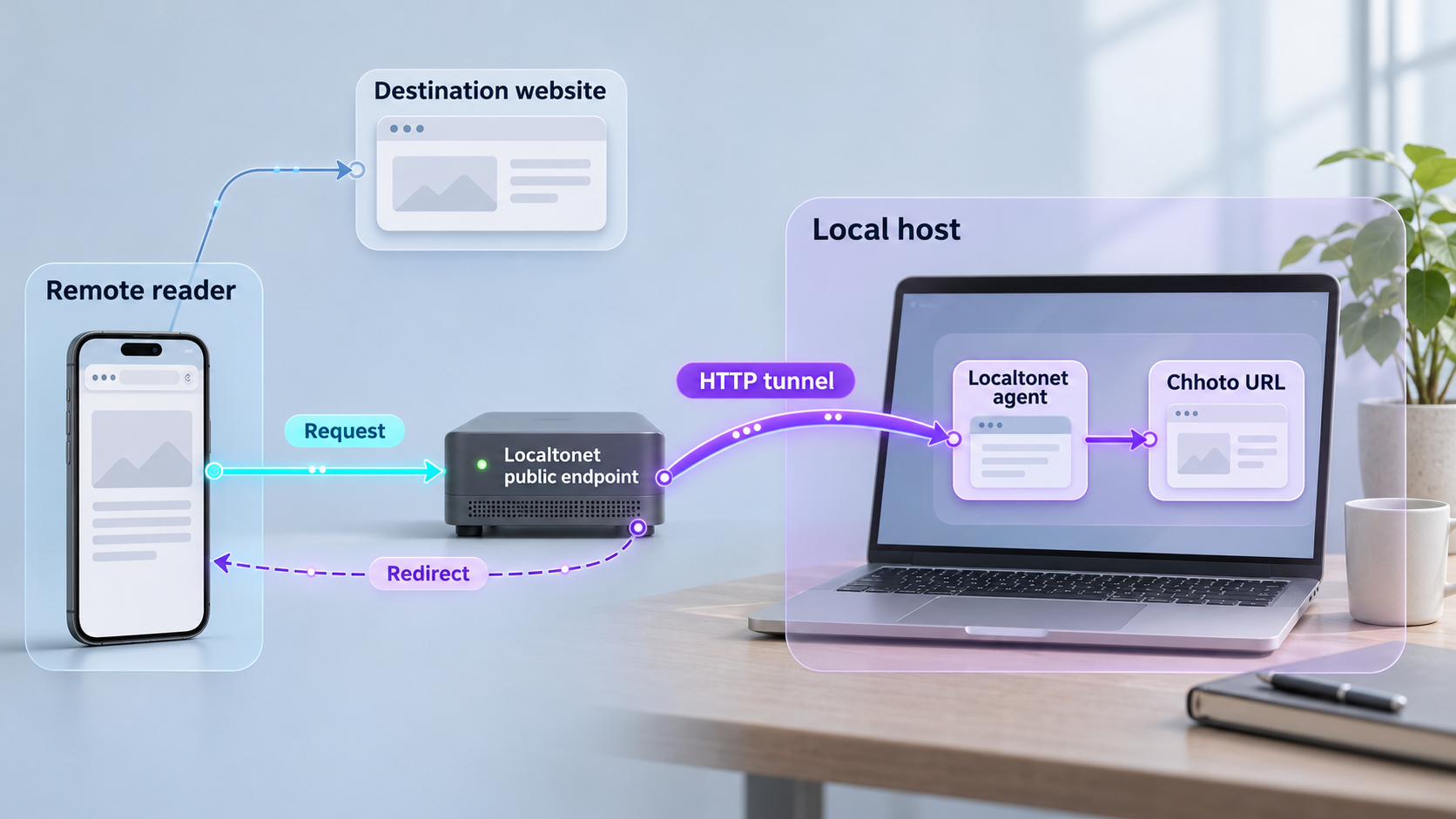
Run a lightweight URL shortener locally, verify every redirect, and then make it reachable through a controlled HTTP tunnel
Chhoto URL is a self-hosted URL shortener written in Rust with an Actix Web backend, an SQLite database, and a browser-based management interface. This guide explains what to prepare, how to approach its documented container deployment without guessing configuration values, how to test links on the local network, and how to operate the service safely. Once the local instance works, we show how to connect it to an HTTP tunnel with Localtonet so that short links can resolve outside your LAN without inbound router port forwarding, firewall changes, a VPN, or a public IP address.
📋 What's in this guide
What Chhoto URL does and why remote access matters
Chhoto URL turns a long destination URL into a shorter address hosted on infrastructure you control. A visitor opens the short address, the application looks up the corresponding destination in its SQLite database, records a privacy-respecting hit count, and redirects the visitor without inserting an interstitial page. The project focuses on a compact deployment rather than providing a multi-user marketing or analytics platform.
The application includes more than basic redirects. It can generate a random slug or accept a custom alias, apply an expiry time, edit an existing link, disable a link temporarily, attach notes, filter links in the web interface, and generate QR codes. It also exposes an API, supports API-key operation, and supports OIDC authentication. Its frontend is built with HTML, CSS, and vanilla JavaScript, while its asynchronous Rust backend uses Actix Web.
The distinction between local and public reachability is especially important for a URL shortener. A link such as a locally hosted address may work perfectly from the server itself or another computer on the LAN, but recipients outside that network cannot resolve it unless the service has a publicly reachable route. Localtonet supplies that route after the application is working locally. Our client establishes an outbound connection to a Localtonet relay and provides a public URL for the HTTP service, so inbound router port forwarding is not required.
Choose the right scope before installing
Chhoto URL is intentionally not a user-management platform. If several people need independent accounts, permissions, audit controls, or separate workspaces, confirm that its authentication model fits before deployment. The project recommends separate containers or another system when an organization requires per-user management. This is different from placing one shared administration interface on the internet and handing the same password to a large team.
Public mode also deserves careful interpretation. It allows anyone to add links without authentication, while deleting or listing links still requires administrative access. That may be appropriate for a deliberately public shortener with enforced expiry, but it is not a safe default for every installation. An unrestricted public link-creation endpoint can be abused to distribute unwanted or misleading links through your domain.
Localtonet exposes an existing local service. It does not install Chhoto URL, initialize its database, choose application credentials, or repair an unhealthy container. Confirm that the web interface and redirects work locally before creating the tunnel.
Prerequisites and deployment decisions
The documented Chhoto URL quick-start path uses Docker, Podman, or another OCI-compatible container workflow. The project distributes container images through Docker Hub and GitHub Container Registry and provides a Compose file. Before downloading or starting anything, prepare a host with a supported container runtime, durable storage for the SQLite database, and a network path that allows the Localtonet client to reach the application.
You also need to decide which public address the application should use when generating links. Chhoto URL has a site URL setting specifically so that generated short links use the intended address. A site URL that points to a private hostname, loopback address, or LAN-only IP will produce links that remote recipients cannot use. When Localtonet supplies the final public address, the Chhoto URL site URL should agree with that externally reachable origin, subject to the current application configuration instructions.
| Requirement | Why it matters | What to confirm |
|---|---|---|
| Container runtime | Runs the published Chhoto URL container image | Docker, Podman, or another OCI-compatible workflow is installed and operational |
| Current deployment definition | Defines the image, variables, storage, and networking expected by the current release | Use the project’s current installation guide and provided Compose file rather than an unofficial copied example |
| Persistent storage | Preserves the SQLite link database across container replacement | The documented database location is mapped to durable host or managed volume storage |
| Administrative credentials | Protects link management and other privileged actions | A unique strong password or the documented hashed-password mechanism is configured |
| Public site URL | Controls the origin used when producing convenient short links | The value matches the address recipients will actually open |
| Reachable local listener | Gives the Localtonet client an HTTP target | The application’s verified local IP address and published port are reachable from the client device |
| Backup location | Protects link mappings against storage failure or a damaged database | Versioned backups can be stored separately from the active database volume |
Record values without exposing secrets
Keep a private deployment record containing the image tag, Compose-file revision, persistent-storage location, selected authentication mode, public site URL, and verified local endpoint. Do not paste passwords, API keys, OIDC client secrets, or Localtonet device tokens into public notes, screenshots, issue reports, or shared shell history.
The available evidence for this guide does not include the contents of the project’s current installation document or its provided Compose file. It therefore does not establish the exact image reference, environment-variable names, volume path, default listening address, default port, or startup command. We will not invent those details. Obtain them as one consistent set from the current Chhoto URL installation guide and Compose file. Mixing old environment variables with a newer image is a common way to create a container that starts incorrectly or writes data somewhere unexpected.
A plausible port, path, variable name, or container tag is not enough for a reliable installation. Use the exact values in the current Chhoto URL installation documentation. If your chosen release differs from the documented release, review its release notes and configuration changes before upgrading.
Install and configure Chhoto URL
The project’s published quick start has three phases: deploy the service using an OCI-compatible container workflow, configure the application’s required values, and then use the web interface to create and manage links. The process below preserves that sequence. Because exact commands and variable names are not present in the supplied installation evidence, this guide identifies every decision and verification point without presenting an unverified Compose file as if it were authoritative.
Deploy the service with the current container definition
Install and test Docker, Podman, or another OCI-compatible runtime on the host. Retrieve the current Compose file from the Chhoto URL project’s installation materials and review it before starting the service. Confirm the selected image registry and tag, host-to-container port publication, restart behavior, and persistent database mapping. Pinning a deliberate release is safer than allowing an unattended deployment to move between incompatible versions.
Configure the site URL, credentials, and storage
Set the exact required environment variables documented for your chosen release. The project’s quick start identifies the site URL, credentials, and storage configuration as required setup areas. Use a strong unique administrative secret, select the intended authentication mode, and ensure the SQLite database location is persistent. If you use a hashed password or API key, follow the project’s documented format and its recommendation to use Argon2. Do not guess a hash syntax or copy the demonstration password into a real deployment.
Start the application and create a controlled test link
Start the deployment using the command specified by the current container instructions, then inspect the runtime status and application logs. Open the published local HTTP endpoint, authenticate, and create a test short link whose destination you control. Confirm that the new record appears in the interface before proceeding to remote access.
Configuration choices worth reviewing
Enable write-ahead logging, commonly called WAL mode, if the current Chhoto URL documentation supports it for your deployment. The project highly recommends WAL mode. Database behavior should still be configured through documented settings rather than by modifying a live database blindly.
Slug selection also affects long-running instances. The project warns that installations expecting more than a few thousand short links should use the UID slug style with a slug length of at least 16. Otherwise, generating new links may eventually fail as the available namespace becomes crowded. Apply this through the exact current variables documented by Chhoto URL rather than inferring their spelling from descriptive text.
Decide whether users may choose custom aliases. Custom aliases are convenient, but they create naming, impersonation, and collision concerns. Reserve sensitive names such as administrative terms, brand names, support-related labels, and login-related words where your operating process permits it. If link creation is public, forced expiry can limit how long abandoned or abusive links remain active.
Use a release policy, not an accidental update policy
The supplied release evidence confirms a signed 7.10.3 release, but repositories and container registries can move beyond any version mentioned in an article. Treat the project’s current release page and installation guide as authoritative when selecting a version. For an important instance, the project recommends regular versioned database backups and staying on a minor release tag rather than following every new image automatically.
Before updating, capture a restorable database backup, record the current image reference, read release notes between the installed and target versions, and test the new container against a copied database when practical. Confirm link creation, redirects, edits, expiry, login, and API clients before declaring the upgrade complete.
Public demo credentials exist only for testing the project’s demonstration instance. They are not deployment defaults and must never be reused. Generate private credentials for your instance and store them in a secret-management method appropriate to your container environment.
Verify Chhoto URL on the local network
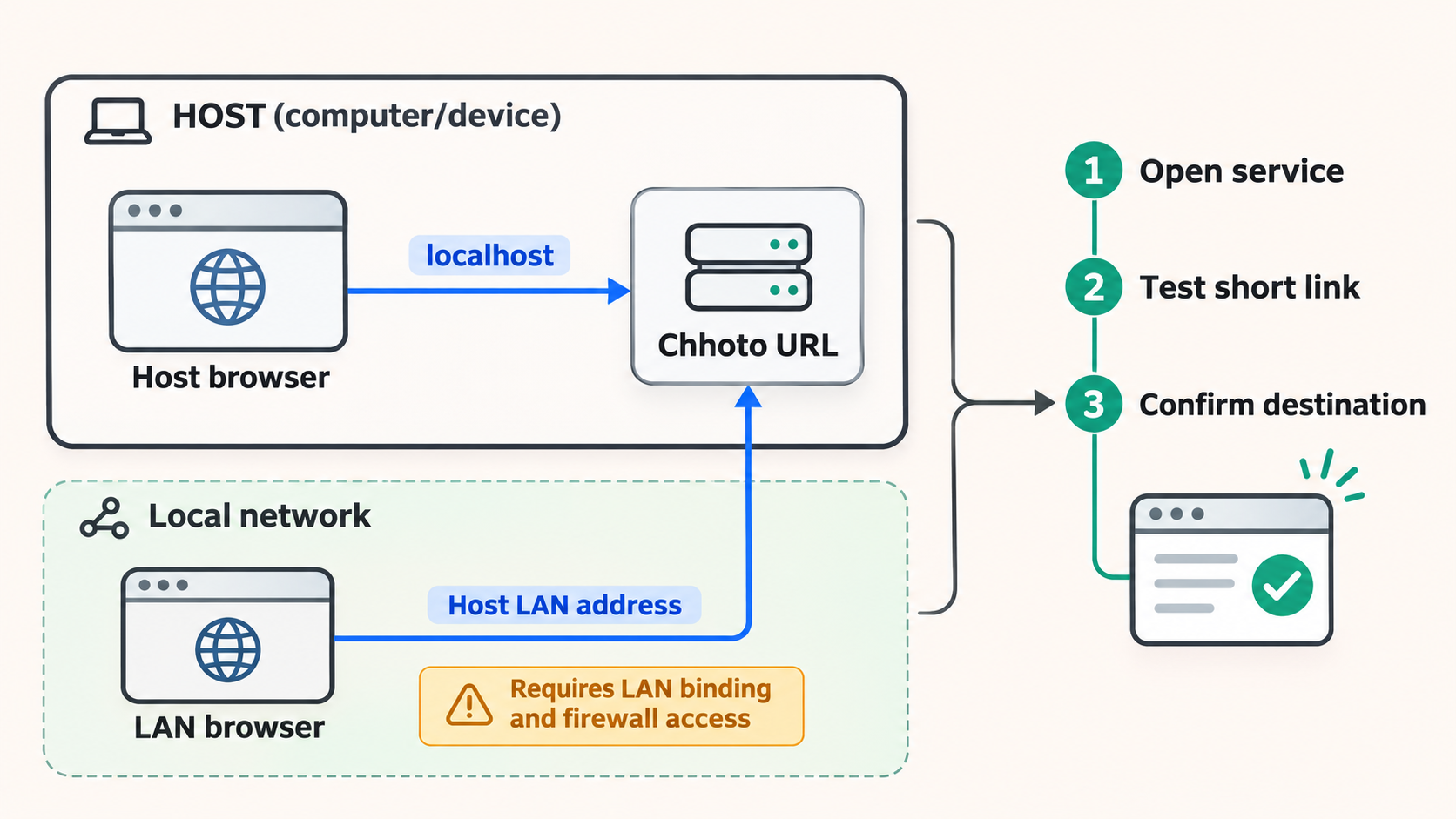
Local verification should cover the application interface, storage, redirects, and restart behavior. Merely seeing a running container is not enough. A process can remain active while listening on the wrong interface, failing database writes, using temporary storage, or producing links with an unusable origin.
Check the local endpoint
Use the exact host address and published port shown by your verified deployment configuration. First open that endpoint from the Chhoto URL host. Then, if the Localtonet client will run on another device, open the same endpoint from that client device. The second test proves that the client can actually reach the service across the LAN or container-host network.
If the service is intentionally bound only to loopback, the Localtonet client normally needs to run on that same host to reach it through the loopback address. If the client runs elsewhere, use a listener and network policy that permit only the required local path. Avoid exposing the application broadly on every LAN interface unless that access is intentional.
Create and follow a test redirect
Create a short link pointing to a harmless destination under your control. Copy the generated short address, open it in a private browser window, and verify that the destination is correct. Return to the administration interface and confirm that the hit count changes as expected. If the generated short address contains a private host or the wrong scheme, correct the configured site URL before sharing any links.
Test editing, disabling, and expiry
Edit the destination of the test record and confirm that the same short alias redirects to the new destination. Temporarily disable it and check that it no longer behaves as an active redirect. Re-enable it only if needed. For an expiring test link, use an appropriate test interval supported by the interface and confirm its behavior before and after expiration.
Prove that storage survives replacement or restart
Restart the deployment using the supported container workflow, then verify that the test record still exists and redirects correctly. This catches accidental use of ephemeral container storage. A restart test is valuable, but it does not replace a backup restore test. Persistent storage can preserve a damaged database just as effectively as a healthy one.
| Local test | Expected result | If it fails |
|---|---|---|
| Open the management interface | The page loads from the verified local endpoint | Check container status, logs, port publication, listener binding, and host firewall policy |
| Authenticate | Valid credentials grant intended administrative access | Confirm the configured authentication mode and inspect startup logs for configuration errors |
| Create a link | The record is saved and appears in the interface | Check database permissions, persistent-storage mapping, and available disk space |
| Open a short link | The browser immediately reaches the expected destination | Check the alias, destination scheme, disabled state, expiry state, and configured site URL |
| Restart the deployment | Existing records remain available | Stop and correct the database volume mapping before creating production links |
| Open it from the Localtonet device | The same local service is reachable from the device that will run the tunnel | Correct routing, binding, container publication, or local firewall rules without exposing unnecessary interfaces |
Share the working service with a Localtonet HTTP tunnel
Once every local test passes, connect the application to Localtonet. An HTTP tunnel is appropriate because Chhoto URL provides a web interface and redirect endpoint over HTTP. Our client runs on a device that can reach the verified local IP address and port, establishes an outbound relay connection, and maps the service to a public address.
HTTP tunnels support Random Sub Domain, Custom Sub Domain, and Custom Domain process types. All three serve content through a public HTTPS address. Availability and requirements can vary, so use only the options currently shown for your account. If you choose a custom domain, follow the current Localtonet DNS instructions rather than relying on a generic DNS example.
Install and run the Localtonet client
Install our current client on the Chhoto URL host or another device that can reach the application’s verified local endpoint. Keep the client running for as long as remote short links need to resolve.
Authenticate the intended device
Use the device-specific authentication token through the supported client workflow and select that device for the tunnel. Treat the token as a secret. Do not include it in screenshots, Compose files committed to a repository, browser-accessible configuration, or support posts.
Select an available relay server
Choose a current server or region from the options presented by the Localtonet dashboard. Server codes and regional availability can change and may vary by plan, so this guide does not hardcode a value.
Create the HTTP tunnel configuration
Select an HTTP tunnel and enter the exact local IP address and port proven during local verification. Choose the available process type that fits your addressing plan. Do not enter an assumed Chhoto URL default port, because the actual target is determined by your deployment’s published listener.
Start the tunnel and capture its public address
Creating a tunnel does not start it. Press Start, wait for the selected client and tunnel to be connected, and then use the assigned public URL. The tunnel remains available only while the selected client device is connected and the tunnel is running.
Test remotely, then stop or delete when no longer needed
Test the public URL from a network that is not using the Chhoto URL host’s LAN, such as a mobile connection. Verify both the management route and a test redirect according to your intended access policy. Stop the tunnel to remove temporary public reachability, or delete it when the configuration is no longer required.
The current dashboard and the Localtonet HTTP tunnel documentation should be used for the exact fields available at setup time. Do not assume that a protocol, region, domain option, or other capability is included with every subscription plan.
Align Chhoto URL with the public address
After Localtonet assigns the public HTTPS address, compare it with the site URL configured in Chhoto URL. If they differ, the application may continue generating local or otherwise incorrect short links even though the public tunnel works. Update the application through its documented configuration workflow, restart it if the current documentation requires that, and repeat local and remote link creation tests.
A URL-shortening service depends heavily on address stability. If the public hostname changes, previously shared links using the old hostname will no longer reach the current tunnel. Select a process type suitable for the expected lifetime of your links and confirm the current availability and domain requirements in the dashboard before distributing links broadly.
A saved tunnel is not automatically active. Public short links resolve through Localtonet only while the selected device is connected and the tunnel has been started. Plan client startup, host uptime, application startup, and tunnel startup together.
Security checks before public exposure
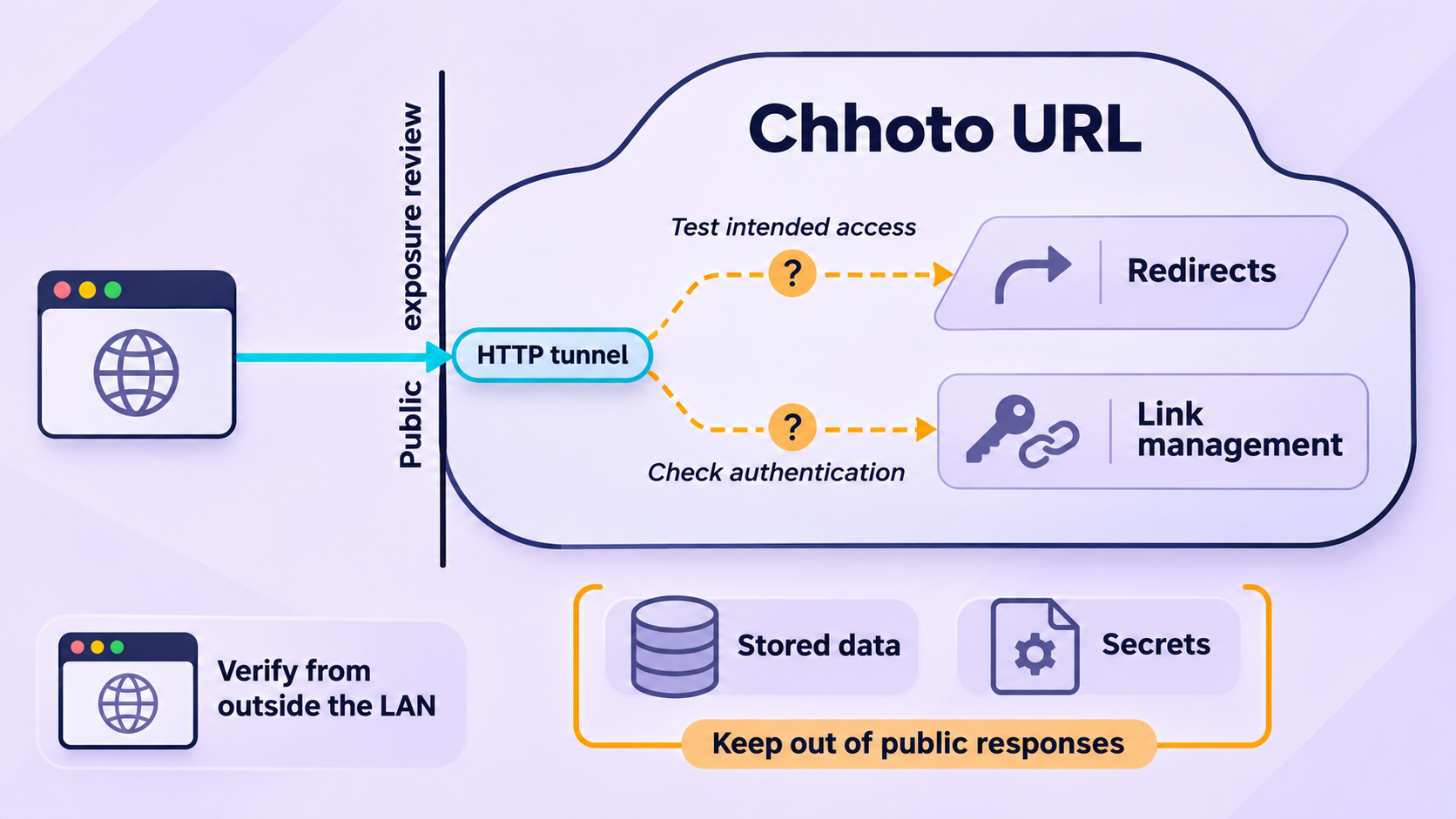
The Chhoto URL project states that its basic password authentication is not encrypted in transport and recommends placing the application behind an SSL-capable reverse proxy. Localtonet HTTP process types serve content at a public HTTPS address, but you should verify the actual browser connection rather than assuming every part of a deployment is correct. Open the assigned public URL, confirm that the browser negotiates HTTPS without a certificate warning, and inspect whether any page assets or generated links fall back to an unintended plaintext address.
The local hop between the Localtonet client and Chhoto URL still follows the local target you configured. Keep that path on the same trusted host or a controlled local network. Do not expose the application’s plaintext listener across an untrusted network merely because the public-facing address uses HTTPS.
Keep administration separate from casual link use
Recipients generally need only redirect access. Administrators need link creation, editing, deletion, listing, and configuration capabilities. Chhoto URL’s exact route and authorization behavior should be tested for the selected release. Do not assume that obscuring an administrative path is equivalent to authentication.
If you enable OIDC, validate the issuer, client settings, redirect address, claims, and account authorization against the current Chhoto URL documentation. OIDC support does not make every identity-provider configuration safe automatically. A permissive claim mapping can grant access more broadly than intended.
Review destination risk
A short link conceals its final destination until followed. That is useful, but it also means users place trust in your hostname. Establish rules for who may create links, which schemes are accepted, how abuse reports are handled, and when links are disabled. Chhoto URL’s documented safety behavior limits destinations to supported schemes including HTTPS, HTTP, FTP, and other explicitly allowed schemes. Keep the current application restrictions enabled unless you have a well-understood reason to change them.
Do not expose an instance with demo credentials, an unverified authentication mode, ephemeral database storage, or unrestricted public creation that you did not intend. Stop the Localtonet tunnel while correcting security or persistence problems.
Routine operations, backups, and link lifecycle
Back up the SQLite database safely
Your database contains the mapping between public aliases and destination URLs. Losing it breaks the practical value of every published short link. Identify the exact persistent database location from the active deployment definition, then use an SQLite-safe backup method supported by your operating environment. Avoid assuming that copying a database file during active writes always produces a consistent result.
Keep multiple versioned backups on storage separate from the container host. Protect backups according to the sensitivity of stored destination URLs and notes. Periodically restore a backup into an isolated test deployment and verify several redirects. A backup that has never been restored is only an untested file.
Monitor the whole dependency chain
A public short link depends on the Chhoto URL process, its database, host storage, local network path, Localtonet client, selected relay connection, and running tunnel. When links fail, check these layers in order rather than changing several settings at once.
Start with the local endpoint. If it fails locally, troubleshoot the application or container. If it works on the host but not from the Localtonet client device, troubleshoot local routing and listener binding. If it works from the client device but not through the public address, inspect client and tunnel status. If the public site opens but generated links contain the wrong host, correct the Chhoto URL site URL.
Use expiry and disabling deliberately
Expiry is useful for temporary campaigns, downloads, invitations, or links that should not remain active indefinitely. Temporary disabling is useful during investigation because it can stop a redirect without immediately deleting its record. Document why important links exist, who owns them, and when they should be reviewed. Notes and UI filtering can help with that process without introducing a separate tracking system.
Plan for hostname changes
The alias is only one part of a short link. The public hostname is equally important. Before changing a Localtonet subdomain or custom domain, inventory links using the old hostname and determine whether the old address will remain available. Updating Chhoto URL’s site URL changes newly generated links, but it does not rewrite URLs already copied into messages, documents, or QR codes.
Troubleshooting common installation and tunnel problems
The container starts, but the page does not open
Inspect the container status and application logs first. Confirm that the image did not exit because a required environment variable was missing or malformed. Compare the running deployment with the current installation guide, then verify the published host port and the interface on which it listens. Do not change the Localtonet tunnel until the page opens directly through the local endpoint.
The interface works, but new links disappear after restart
This strongly suggests that the SQLite database is stored in an ephemeral container layer or mapped to an unexpected location. Stop creating production links, inspect the current Compose definition and effective mounts, and identify where the active database is actually being written. Correct the persistent mapping using the project’s documented path. Back up any recoverable active database before replacing the container.
The short link redirects to the wrong host
Check the configured site URL. It should reflect the address recipients are meant to open, including the correct scheme and hostname. If Localtonet has assigned a public HTTPS URL but Chhoto URL still generates a LAN address, update the application configuration using its current documented variable and restart procedure. Create a new test link and verify the exact generated URL.
The local service works, but the Localtonet URL does not
Confirm that the Localtonet client is connected, that the correct device token was selected, and that the tunnel has been started. Then verify that the tunnel target exactly matches the working local IP address and port. If the client runs on another machine, remember that its loopback address points to itself, not to the Chhoto URL host.
The public site opens, but authentication behaves unexpectedly
Confirm which authentication mode the application actually loaded. Review startup logs for configuration warnings and test in a private browser window to avoid cached sessions. If OIDC is enabled, check the configured public callback address and claims against the current project documentation. If basic password authentication is used, verify that the public browser connection is HTTPS before entering credentials.
New slug generation begins failing on a large instance
Review the project’s recommendation for installations with more than a few thousand links. It strongly recommends the UID slug style and a slug length of at least 16 for that scale. Apply the current documented configuration carefully, back up the database first, and test link creation after the change.
Links stop working after a host reboot
Check each startup dependency separately: container runtime, Chhoto URL container, persistent database mount, Localtonet client, and tunnel state. A tunnel configuration can exist without running. Likewise, the Localtonet client can be active while the application behind it is still starting or unhealthy. Restore service in dependency order and verify locally before testing publicly.
Frequently asked questions
What port does Chhoto URL use by default?
The supplied installation evidence does not establish a default port, so this guide does not guess one. Use the host port defined by the current official Chhoto URL installation guide and provided Compose file. Enter that same locally verified port as the Localtonet HTTP tunnel target.
Can I run Chhoto URL with Podman instead of Docker?
Yes. The project describes Docker, Podman, or another OCI-compatible container workflow as supported deployment approaches. Use the current project instructions for the exact container and Compose-compatible behavior required by your runtime.
Does Localtonet install or configure Chhoto URL?
No. Install, configure, start, and verify Chhoto URL first. Localtonet then exposes its working local HTTP endpoint through an outbound tunnel. Application credentials, database storage, slug settings, OIDC, backups, and upgrades remain part of your Chhoto URL deployment.
Do I need router port forwarding or a public IP address?
No. The Localtonet client creates an outbound connection to our relay server, so an HTTP tunnel does not require inbound router port forwarding, firewall changes, VPN setup, or a public IP address. The client device must remain connected and the tunnel must be running.
Is Chhoto URL authentication safe to send over plain HTTP?
The project explicitly states that its basic authentication is not encrypted in transport and recommends SSL through a reverse proxy. Localtonet HTTP process types provide a public HTTPS address, but you should verify the public browser connection and keep the local HTTP hop on a trusted host or controlled network.
Can anyone create links on my public instance?
Only if you deliberately enable Chhoto URL’s public mode. In that mode, anyone can add links without authentication, while listing or deleting links still requires administrative access. Leave public mode disabled unless anonymous creation is part of your design and you have expiry, moderation, and abuse-handling procedures.
Why do generated links still contain a local address?
Chhoto URL’s configured site URL does not yet match the public origin. Update it through the documented configuration for your release, apply any required restart, and create a fresh test link. Existing links copied elsewhere will not automatically change merely because the application configuration changes.
What should I back up?
Back up the persistent SQLite database using a method that produces a consistent copy, along with the non-secret deployment configuration needed to reconstruct the service. Store secrets separately and securely. Keep versioned backups outside the active container storage and test restoration in an isolated deployment.
Share your verified Chhoto URL instance with Localtonet
Once the application works locally, create an HTTP tunnel to its verified IP address and port, start the tunnel, and test a short link from an external network. Keep the Localtonet client connected for as long as the public links need to remain reachable.
Get Started Free →