

Deploy a pinned private model registry, verify it locally, and publish only its required HTTP endpoint
This tutorial uses MatrixHub v0.2.0, a pinned release of the open-source, self-hosted AI model registry. It narrows the installation path to Docker Compose because the available release evidence does not establish a complete, reproducible Helm values file and database procedure. You will acquire the tagged source, start its default SQLite-based Compose deployment, discover the effective listener instead of guessing a port, verify the registry locally, protect persistent state, and add remote HTTPS access through Localtonet. MatrixHub authentication and authorization remain responsible for protecting models and projects after the endpoint becomes reachable.
📋 What's in this guide
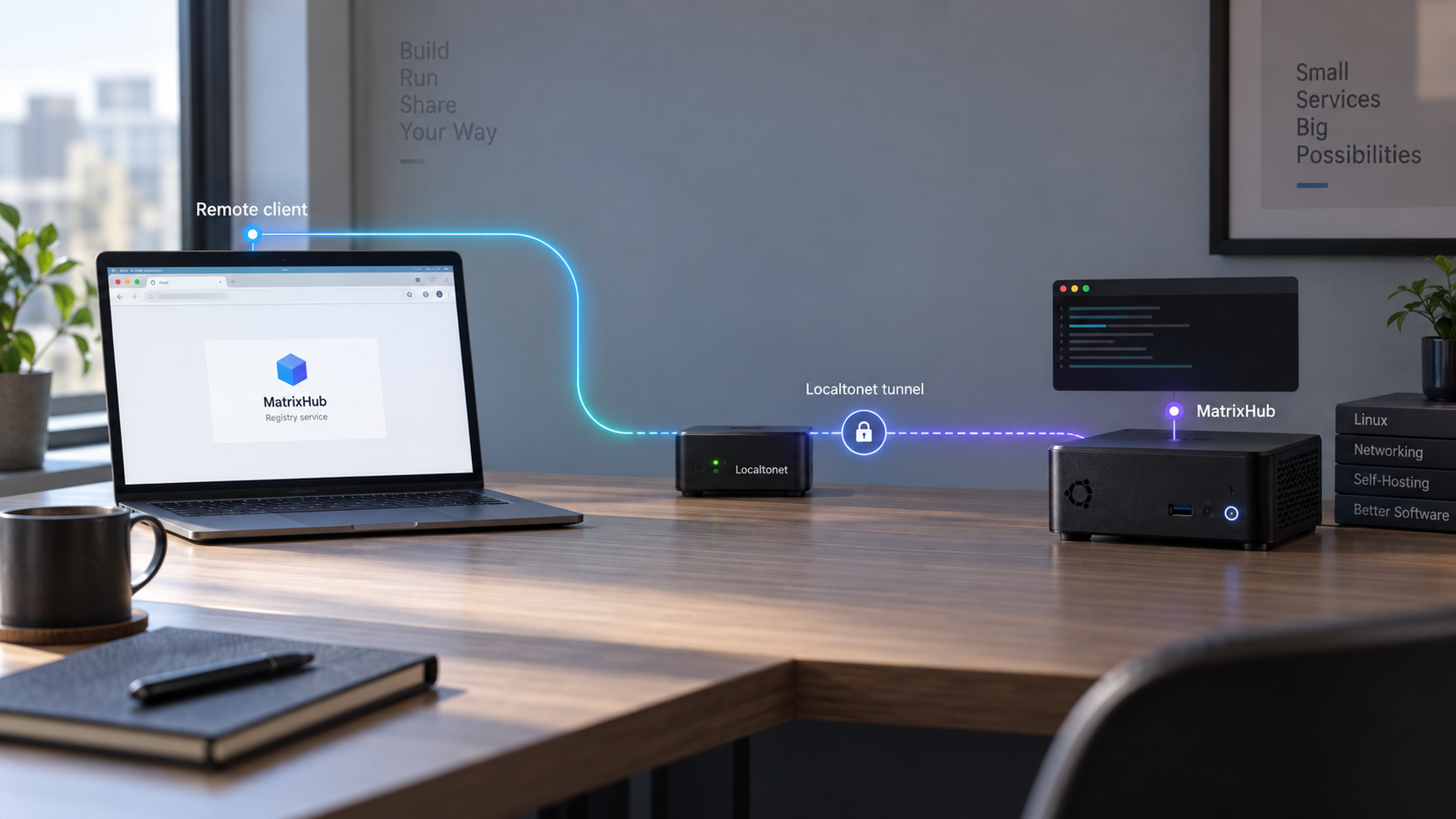
How the MatrixHub and Localtonet architecture works
MatrixHub is an open-source, self-hosted AI model registry designed for inference environments. It provides a private, Hugging Face-compatible hub for storing, organizing, caching, and distributing model assets. Compatible software can use the HF_ENDPOINT environment variable to address MatrixHub instead of the public Hugging Face service.
MatrixHub and Localtonet have separate responsibilities. MatrixHub owns the registry, projects, users, roles, model content, metadata, database, storage, and application authentication. Localtonet provides an optional network path to the HTTP service after that service is working. Our platform does not install MatrixHub, repair an unhealthy registry, or replace its authorization controls.
The safe sequence is therefore straightforward: install the pinned MatrixHub release, identify its real host-side listener, verify an authenticated workflow locally, back up the persistent state, and only then create a Localtonet HTTP tunnel. The public endpoint should never be the first test of a new registry.
HF_ENDPOINT. The value must be a base URL reachable from the specific client process.
Why this tutorial uses Docker Compose only
MatrixHub v0.2.0 supports Docker Compose and Helm deployment families. The release establishes that Docker Compose uses SQLite by default and offers MySQL through an explicit Compose configuration. It also establishes that SQLite is not supported for Helm or Kubernetes deployments.
A complete Helm tutorial would need the exact chart acquisition procedure, chart version, namespace sequence, database settings, persistent volume requirements, service configuration, values file, upgrade procedure, and rollback behavior. Those details are not present in the validated evidence for this revision. Rather than preserve an incomplete second workflow, this guide covers only the default Docker Compose path that can be tied to the v0.2.0 source tree.
Every MatrixHub-specific release statement in this guide is scoped to v0.2.0. Do not combine its Compose files with configuration examples from another tag or a moving development branch. Review later release notes before adopting a newer version.
HTTP access and SSH Git access are separate
MatrixHub v0.2.0 added SSH Git access for model repositories, including public-key authentication and configurable SSH port exposure. That listener is separate from the web interface and HTTP API. The Localtonet HTTP tunnel in this tutorial publishes only the verified HTTP target. It does not publish MatrixHub SSH Git access.
If your workflow later requires SSH Git access, assess it as a separate raw TCP service, preserve public-key authentication, and apply a separate access policy. Do not point an HTTP tunnel at an SSH port or assume that exposing the browser interface also exposes Git over SSH.
Prepare the Docker host and deployment plan
Use a Linux host or another Docker-supported system with enough storage for the registry database, repository data, cached models, logs, images, and backups. Model files can be much larger than ordinary application assets, so estimate capacity from the models you expect to retain rather than from the relatively small application container.
Install Git, Docker Engine, and the Docker Compose plugin before acquiring MatrixHub. The commands below verify that the required executables are present and that Docker can communicate with its daemon:
git --version
docker version
docker compose version
docker info
Continue only if each command succeeds. The account running the tutorial must be permitted to use Docker. Follow your operating system’s Docker installation and privilege guidance rather than changing socket permissions merely to suppress an authorization error.
Choose the host and network boundary
The Localtonet client may run on the same host as MatrixHub or on another device that can reach the published MatrixHub listener. Running both on the same host can simplify routing because the tunnel can target a loopback-bound service. If they run on different devices, MatrixHub must listen on an address reachable from the Localtonet client, and the private network must permit that connection.
Keep three addresses conceptually separate:
- The container address used inside the Docker network.
- The host-side IP address and published port used for local verification.
- The public HTTPS address assigned after the Localtonet tunnel starts.
The container address is not automatically reachable from another host. Localtonet must target the host-side address and port that work from the device running our client.
Prepare durable storage and backups
Before uploading important models, identify every bind mount and named volume declared by the pinned Compose file. These locations can include configuration, SQLite state, model repositories, cached content, or other application data. A container image is replaceable; persistent state is not.
Put backups on a different storage device or backup system from the active deployment. A copy stored only on the same disk does not protect against disk failure. Ensure that the backup destination has enough capacity for both metadata and large model objects.
Plan identities and project visibility
MatrixHub’s public demonstration credentials are for its hosted evaluation environment and may be reset. Do not reuse those credentials in a private installation. Establish deployment-specific administrator credentials and create separate identities for people and automation according to the application’s supported setup flow.
Use private projects for restricted model assets. Grant viewer access where an identity only needs to read or download content, editor access only where modification is necessary, and administrator access sparingly. MatrixHub v0.2.0 limits the Create Model action to project administrators and editors.
Do not paste MatrixHub passwords, access tokens, robot credentials, SSH private keys, Localtonet device tokens, or private repository URLs into shared shell history, screenshots, issue reports, or article examples. Commands in this guide intentionally contain no credentials.
Install the pinned MatrixHub v0.2.0 Compose deployment
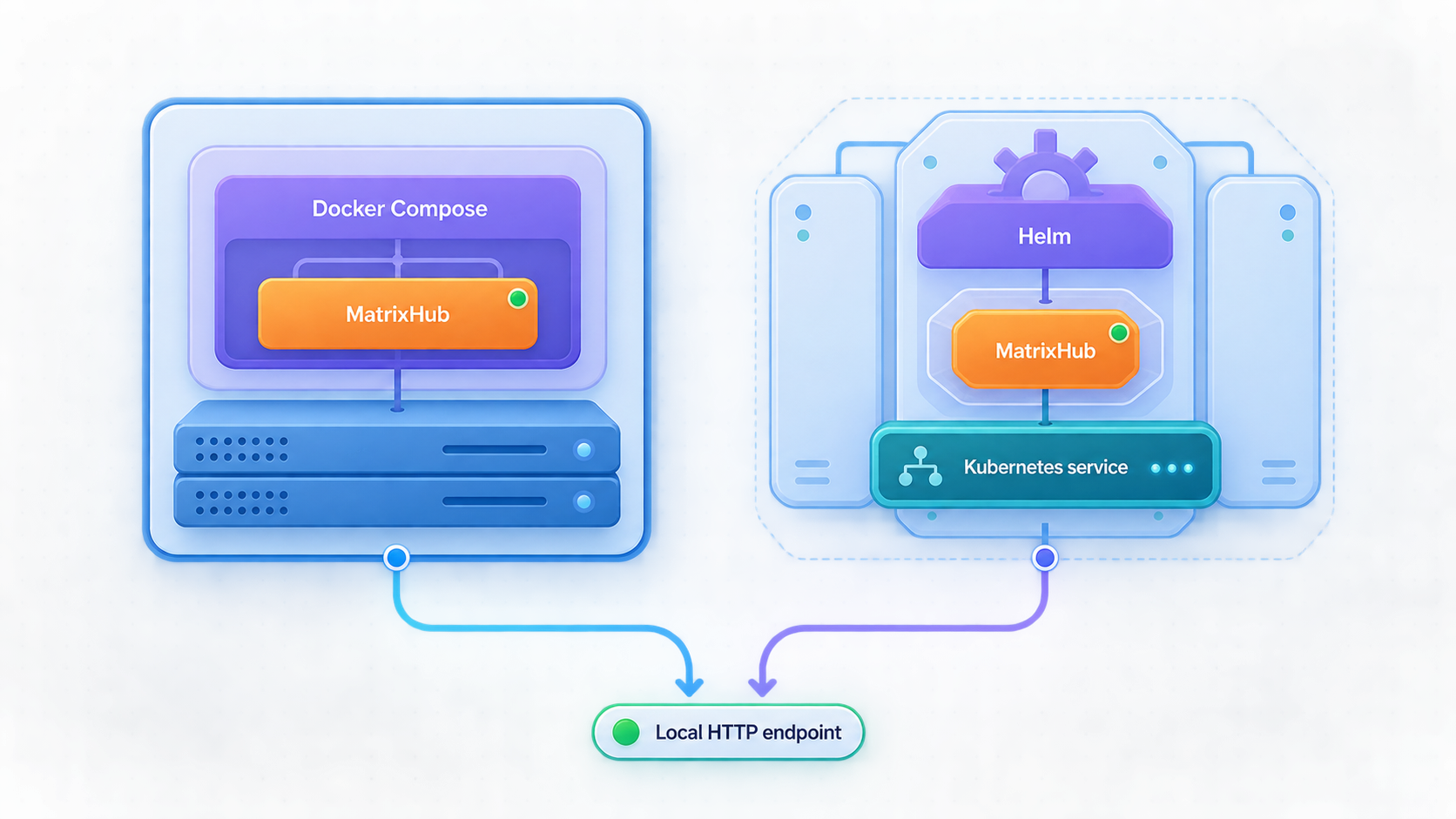
The repository and release evidence identify v0.2.0 as the validated release for this tutorial. Acquire that tag directly instead of cloning the moving default branch:
git clone --branch v0.2.0 --depth 1 https://github.com/matrixhub-ai/matrixhub.git
cd matrixhub
git describe --tags --exact-match
git rev-parse HEAD
The tag check should print v0.2.0. Record the commit ID returned by git rev-parse HEAD in your deployment notes. The v0.2.0 release identifies commit b39cfcb; recording the full local commit ID gives you a precise rollback reference.
Locate the release Compose directory
MatrixHub v0.2.0 places config.yaml in the same folder as docker-compose.yml. Locate that paired release directory without assuming a path from another version:
find . -type f \( -name 'docker-compose.yml' -o -name 'config.yaml' \) -printIdentify the directory in which both files appear together, then change into it. The following command checks that both expected files exist in the current directory:
test -f docker-compose.yml
test -f config.yaml
printf 'Compose directory: %s\n' "$PWD"
If either test fails, do not start the stack from that directory. Return to the repository root, inspect the find output, and select the paired directory supplied by the v0.2.0 tag.
MatrixHub v0.2.0 uses SQLite by default for Docker Compose. MySQL remains available through an explicit Compose configuration, but changing database modes also changes persistence, backup, recovery, and upgrade responsibilities. The MySQL variant is outside this tutorial’s validated scope.
Review the effective configuration before startup
Inspect the files locally and identify the declared services, image tag, published ports, bind mounts, and named volumes. Do not publish the resulting output because configuration expansion can reveal environment-derived values.
docker compose -f docker-compose.yml config --services
docker compose -f docker-compose.yml config --images
docker compose -f docker-compose.yml config --volumes
docker compose -f docker-compose.yml config
Confirm that the application image and files belong to the v0.2.0 checkout. Review config.yaml without inserting secrets into an article or support ticket. Preserve the release-provided structure unless a v0.2.0 setting is explicitly documented for your intended deployment.
The available v0.2.0 evidence does not define a universal external base URL or reverse-proxy setting that must be changed for a Localtonet hostname. This guide therefore does not invent a configuration key. Start with the pinned release configuration, verify the generated links and authentication flow through the eventual public hostname, and keep the tunnel private or stopped if the application emits incorrect internal URLs.
Start MatrixHub in the documented Compose order
Validate the Compose model
Run docker compose -f docker-compose.yml config from the directory containing the paired release files. Resolve syntax, interpolation, file-access, or image-reference errors before creating containers.
Pull the pinned deployment images
Run docker compose -f docker-compose.yml pull. This retrieves the images declared by the v0.2.0 Compose definition before startup.
Start the stack
Run docker compose -f docker-compose.yml up -d. Compose creates or updates the declared services and returns after starting them in detached mode.
Inspect service state
Run docker compose -f docker-compose.yml ps and docker compose -f docker-compose.yml logs --tail=200. Resolve repeated restarts, configuration errors, database failures, migration errors, storage failures, or address conflicts before continuing.
Discover the published listener
Read the PORTS column from docker compose ps and compare it with the ports entries in the effective Compose configuration. Record the HTTP host address and host-side port rather than assuming a default.
docker compose -f docker-compose.yml config
docker compose -f docker-compose.yml pull
docker compose -f docker-compose.yml up -d
docker compose -f docker-compose.yml ps
docker compose -f docker-compose.yml logs --tail=200
To print the port bindings Docker assigned to the Compose containers, use:
for id in $(docker compose -f docker-compose.yml ps -q); do
  docker inspect \
    --format '{{.Name}} {{json .NetworkSettings.Ports}}' \
    "$id"
done
A binding such as 127.0.0.1:HOST_PORT is reachable only from the Docker host. A binding on 0.0.0.0:HOST_PORT may be reachable through the host’s network interfaces, subject to host and network policy. Use the narrowest binding that supports the selected Localtonet client placement.
Use the effective v0.2.0 Compose configuration and Docker’s reported binding. Do not open a router port, expose the Docker daemon, or change the service to listen on every interface merely for convenience. If Localtonet runs on the same host, a loopback target is usually sufficient.
Verify MatrixHub locally before remote access
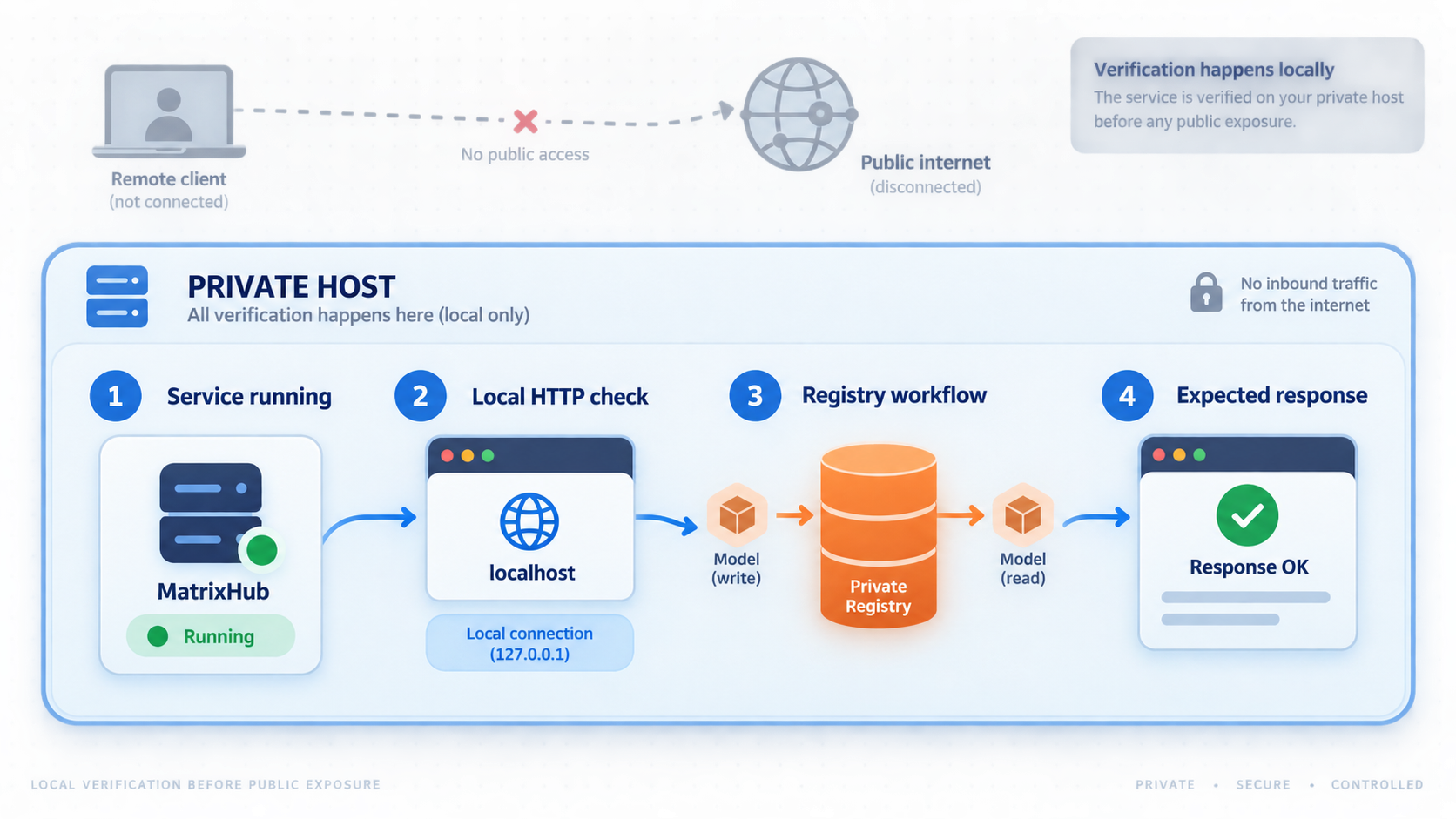
Set a shell variable to the exact local HTTP URL discovered from Docker. The example below deliberately uses a placeholder because the host-side port must come from your running v0.2.0 deployment:
MATRIXHUB_URL='http://127.0.0.1:REPLACE_WITH_DISCOVERED_PORT'
printf '%s\n' "$MATRIXHUB_URL"
Replace the placeholder before running any request. If the Localtonet client will run on another private device, use the Docker host’s reachable private address for the test from that device.
Confirm stable container state
Run docker compose ps, wait for startup to complete, and repeat the command. A service that continually restarts is not ready even if it briefly appears in the process list.
Check the local HTTP response
Request the discovered base URL with a browser and with curl. A redirect to a login route can be a valid HTTP result. Connection refusal, timeout, or a Docker-generated error must be resolved first.
Complete an authenticated browser workflow
Sign in with an identity created for this private deployment. Verify that an authorized user can reach the intended project pages and that an unauthenticated browser does not gain unintended project access.
Create a non-sensitive test project or model workflow
Use MatrixHub’s interface to exercise the intended registry workflow with test data. Confirm that the account’s role allows only the expected actions and that the operation produces no storage or database error.
Verify persistence across a controlled restart
Restart the Compose services, sign in again, and confirm that the test project, metadata, and stored content remain available. Loss of state indicates an incomplete persistence configuration and must be fixed before real data is uploaded.
curl --include --max-time 15 "$MATRIXHUB_URL"

docker compose -f docker-compose.yml restart
docker compose -f docker-compose.yml ps
docker compose -f docker-compose.yml logs --tail=200

curl --include --max-time 15 "$MATRIXHUB_URL"
Do not require a specific status code without first observing the release’s actual unauthenticated behavior. A successful page, redirect, or authorization response proves that an HTTP server answered. It does not by itself prove that login, storage, project authorization, or model transfers work, which is why the browser and persistence checks are also required.
Verify a compatible client carefully
MatrixHub documents HF_ENDPOINT for directing compatible Hugging Face workflows to the private registry. Set it in the environment of a test process, not globally across production systems:
export HF_ENDPOINT="$MATRIXHUB_URL"
printf '%s\n' "$HF_ENDPOINT"
Then run a supported, authenticated operation against non-sensitive test content using the client version in your environment. Client behavior can vary by library and release, so confirm that the process actually honors HF_ENDPOINT. Setting the variable in one interactive shell does not reconfigure an already running container, service, or inference worker.
Localtonet cannot repair an unhealthy MatrixHub service, failed migration, missing volume, invalid credential, or unreachable Docker binding. Continue only when the device that will run our client can reach the exact local target and complete the intended MatrixHub workflow.
Expose the verified MatrixHub HTTP service with Localtonet
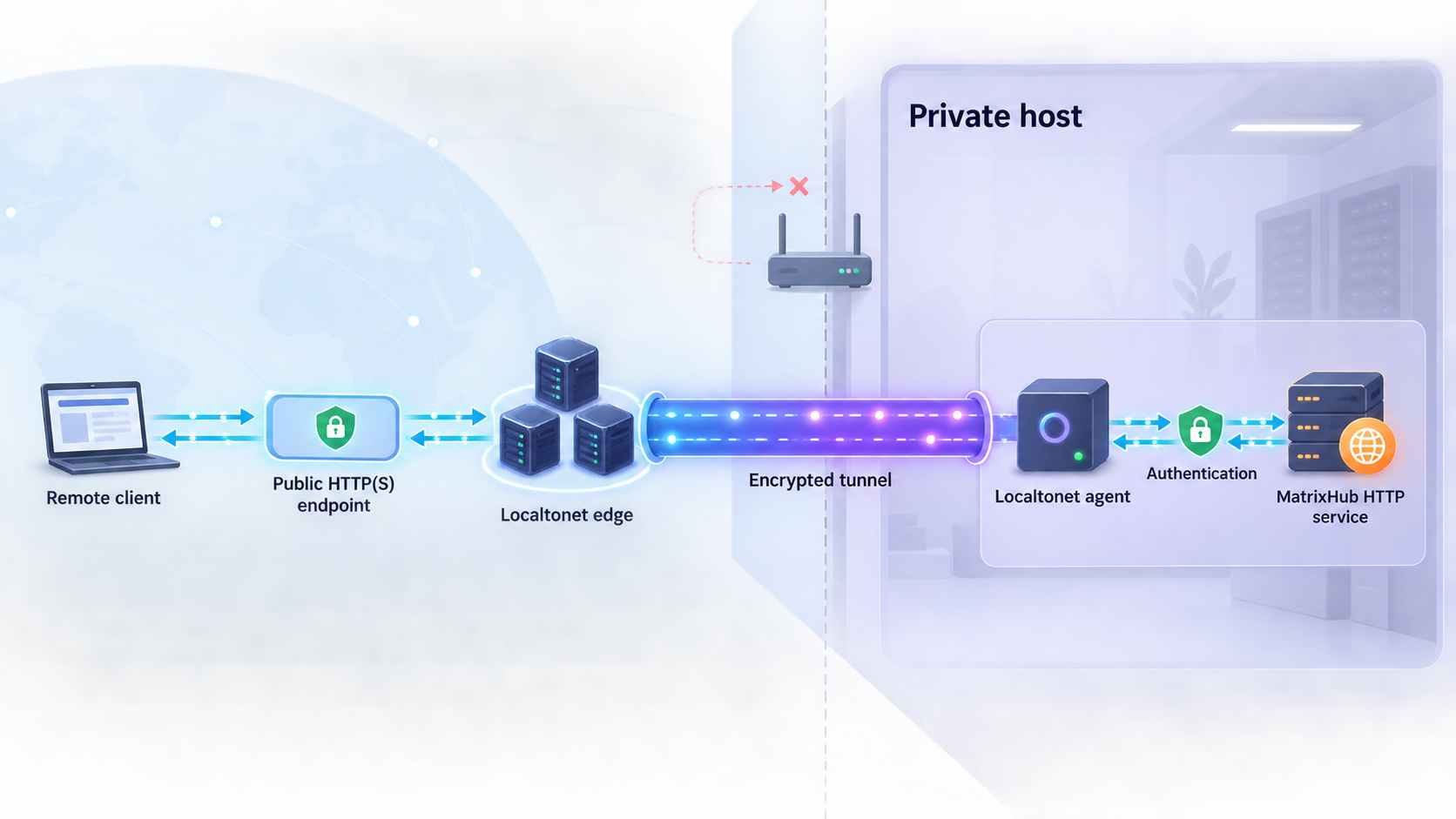
Use a Localtonet HTTP tunnel for the MatrixHub web interface and HTTP-compatible registry workflows. Our client establishes an outbound connection to a selected Localtonet relay server. The resulting public HTTPS address forwards requests to the verified local IP address and port without inbound router port forwarding, firewall changes, VPN setup, or a public IP address.
Install and run the Localtonet client
Install our client on the MatrixHub Docker host or another device that can reach the verified MatrixHub listener. Keep it running whenever remote access is required.
Authenticate and select the device
Use the device-specific authentication token from your Localtonet account and select the connected device that can reach MatrixHub. Never expose the token in commands, screenshots, logs, or shared configuration.
Select an available relay server
Choose a currently available server or region in the dashboard. Obtain the value from the current product rather than copying a hardcoded server code.
Create the HTTP tunnel
Enter the exact MatrixHub local IP address and host-side HTTP port that passed local verification. Select Random Sub Domain, Custom Sub Domain, or Custom Domain as appropriate and available. These process types serve the target through a public HTTPS address.
Start the tunnel
Press Start after reviewing the target. Creating the tunnel does not start it automatically. The selected Localtonet device must remain connected and the tunnel must remain running.
Verify the public hostname
Open the assigned HTTPS URL from a separate network, sign in with a least-privilege MatrixHub account, and repeat a limited read operation. Confirm that links, redirects, cookies, and authentication remain on the intended public hostname.
The current dashboard workflow is also covered by our Localtonet HTTP tunnel documentation. If you select a custom domain, verify its current DNS requirements in that documentation before changing production DNS.
Handle the external hostname limitation explicitly
The validated MatrixHub v0.2.0 evidence does not identify a documented external-base-URL, trusted-proxy, forwarded-header, or reverse-proxy configuration key that must be set for a Localtonet hostname. We therefore cannot safely prescribe one.
Test this behavior through the assigned HTTPS URL before allowing production clients to use it. Sign in, navigate between project and model pages, and inspect generated links, redirects, downloads, and API responses. They should continue to use the intended public HTTPS hostname rather than an internal Docker address or local HTTP URL.
If MatrixHub generates an internal address, rejects the public host, or sets unusable cookies, stop the tunnel and consult the configuration reference for the exact v0.2.0 release. Do not guess a setting name. Keep the service local until the application’s documented external URL or proxy behavior has been established.
Use the public endpoint with compatible clients
After browser verification succeeds, a remote compatible process can use the Localtonet HTTPS address as its MatrixHub endpoint:
export HF_ENDPOINT='https://REPLACE_WITH_ASSIGNED_LOCALTONET_HOSTNAME'
printf '%s\n' "$HF_ENDPOINT"
Replace the placeholder with the exact assigned URL and configure authentication using MatrixHub’s supported client mechanism. Do not place an access token in the URL. Test with a read-only identity and non-sensitive model content before using the endpoint in an inference service.
MatrixHub must continue serving the configured local target, and the selected Localtonet client must remain connected with the tunnel running. Stopping either side makes the public endpoint unavailable.
Operate, back up, upgrade, and recover MatrixHub
Routine Compose operations
Run Compose commands from the directory containing the pinned docker-compose.yml and config.yaml. These commands cover ordinary state checks, logs, controlled restarts, and shutdown:
docker compose -f docker-compose.yml ps
docker compose -f docker-compose.yml logs --tail=200
docker compose -f docker-compose.yml restart
docker compose -f docker-compose.yml stop
docker compose -f docker-compose.yml start
Use docker compose down only when you intend to remove the Compose containers and network. Do not add --volumes during ordinary maintenance because that can delete named volumes containing persistent data.
Inventory persistent state before backup
Inspect the release’s mounts and volumes before designing a backup. The following commands show the Compose volume declarations and the mounts attached to each running container:
docker compose -f docker-compose.yml config --volumes

for id in $(docker compose -f docker-compose.yml ps -q); do
  docker inspect \
    --format '{{.Name}} {{json .Mounts}}' \
    "$id"
done
Protect the Compose directory, config.yaml, SQLite database, model repositories, cached assets, and every other persistent mount needed to reconstruct the registry. Configuration backups may contain sensitive values, so encrypt and restrict access to them according to your organization’s backup policy.
Create a consistent backup
The validated v0.2.0 evidence does not specify an application-native online backup command or guarantee that copying a live SQLite database is consistent. Use a controlled cold backup unless MatrixHub’s version-specific documentation establishes another supported method.
Pause remote access
Stop the Localtonet tunnel so new remote operations do not begin during the backup window.
Stop MatrixHub cleanly
Run docker compose -f docker-compose.yml stop and confirm the services have stopped.
Copy all persistent state
Back up the Compose directory and every bind mount or named volume identified in the inventory. Preserve ownership, permissions, and timestamps where required by your recovery design.
Restart and verify locally
Run docker compose -f docker-compose.yml start, check logs, and repeat the local HTTP and authenticated workflow checks.
Resume the tunnel
Start the Localtonet tunnel only after the registry is healthy and its local listener is unchanged.
Upgrade through a staged release process
Do not run git pull against the existing pinned deployment and immediately replace its containers. A controlled upgrade should use a newly selected release tag and its matching configuration files.
- Read the target release notes for database migrations, configuration changes, image changes, storage changes, and security fixes.
- Stop public access and create a complete, tested backup of the existing deployment.
- Acquire the target tag in a separate directory.
- Compare its Compose file and
config.yamlwith the deployed version without copying obsolete settings blindly. - Test the target release against restored test data in a private environment where possible.
- Start the target version, review migration and startup logs, and repeat all local verification checks.
- Recheck the published host-side listener before restarting the Localtonet tunnel.
- Verify the public hostname, authentication, generated links, model reads, and any compatible clients.
MatrixHub v0.2.0’s release container is described as keylessly signed with Cosign and accompanied by an SPDX software bill of materials. If image verification is part of your policy, use the exact release commands associated with the image:
cosign verify \
  --certificate-identity-regexp 'https://github.com/matrixhub-ai/matrixhub/.*' \
  --certificate-oidc-issuer 'https://token.actions.githubusercontent.com' \
  ghcr.io/matrixhub-ai/matrixhub:v0.2.0

cosign download sbom ghcr.io/matrixhub-ai/matrixhub:v0.2.0
Rollback and recovery
A rollback is more than starting an older container. If an upgrade changed the database or persistent data layout, an older binary may not understand the upgraded state. The safe rollback unit is the previous application release together with a backup taken before the migration.
To recover, stop the tunnel, stop the Compose stack, restore the backed-up v0.2.0 Compose directory and every associated persistent mount, and start the pinned stack. Then verify the tag, containers, logs, local HTTP response, authenticated project access, stored test content, and compatible client workflow before restoring remote access.
A backup is useful only if it can reconstruct the registry. Periodically restore it in an isolated environment and confirm that MatrixHub can read its database and model content. Never test a destructive restore against the only production copy.
Secure the registry and public endpoint
A model registry can hold proprietary weights, internal metadata, access tokens, and operationally significant artifacts. Publishing its HTTP listener changes the network boundary even when MatrixHub authentication is enabled. Treat that change as a security review point.
| Control | Where it applies | Recommended practice |
|---|---|---|
| MatrixHub authentication | Web, API, and registry access | Use deployment-specific identities and remove evaluation or temporary credentials. |
| Project roles | Model and project authorization | Assign viewer access for read-only consumers and reserve editor or administrator privileges for approved operators. |
| Project visibility | Public and private project behavior | Review every project before starting the public endpoint and keep restricted content private. |
| Automation identities | Inference workers and CI/CD | Use purpose-specific robot accounts or access tokens instead of personal administrator credentials. |
| Secret handling | MatrixHub and Localtonet | Keep passwords, tokens, private keys, and device tokens out of URLs, files intended for publication, screenshots, and logs. |
| Storage protection | SQLite state and model assets | Restrict host permissions, monitor capacity, and maintain encrypted, tested backups. |
| Tunnel lifecycle | Public reachability | Stop or delete the tunnel when remote access is no longer required. |
Expose only the verified MatrixHub HTTP listener. Never target the Docker API, SQLite file, object-storage administration interface, host dashboard, or another management service. A Localtonet tunnel provides connectivity to the configured target. It does not authorize users inside MatrixHub or bypass organizational network policies.
Preserve MatrixHub audit information according to your operational policy, but avoid collecting credentials in plaintext. Review model upload and download activity, project membership changes, token creation, and administrative events that matter to your environment.
Keep MatrixHub authentication and role-based authorization enabled. Confirm project visibility, use least-privilege identities, and stop the tunnel outside approved access windows when continuous public reachability is unnecessary.
Troubleshoot installation and remote-access failures
The v0.2.0 files cannot be found
Confirm that the checkout is at the expected tag with git describe --tags --exact-match. Run the file search from the repository root and choose the directory where docker-compose.yml and config.yaml appear together. Do not substitute files copied from the default branch.
Compose validation fails
Run docker compose -f docker-compose.yml config and read the first reported error. Typical categories include malformed YAML, missing referenced files, unresolved environment variables, inaccessible bind-mount paths, or invalid image references. Do not start the tunnel while the Compose model is invalid.
A container exits or repeatedly restarts
Use docker compose ps and docker compose logs --tail=200. Look for configuration parsing, SQLite, migration, storage permission, missing path, address binding, or dependency errors. Correct the underlying cause rather than repeatedly restarting an unhealthy container.
The port is unclear
Read the effective ports entries from docker compose config, the PORTS column from docker compose ps, and the container inspection output shown earlier. The Localtonet target needs the host-side HTTP port, not an unverified container-only port.
MatrixHub works on the Docker host but not from the Localtonet device
Check the Docker binding. A listener bound to 127.0.0.1 is intentionally available only on the host. Either run the Localtonet client on that host or use a deliberately configured private-network listener permitted by your security policy. Do not solve the problem by opening an inbound router port.
The interface works, but models are missing after restart
Inspect every container mount and compare it with the Compose volume declarations. The database or model directory may be stored only in a container’s writable layer. Correct the persistence design, repeat the test with non-sensitive content, and verify another controlled restart before using the registry for important assets.
The tunnel runs, but the public URL fails
Test the exact target from the device running the Localtonet client. Confirm that MatrixHub is running, the host-side port has not changed, the selected Localtonet device is connected, and the intended tunnel is in its running state. A saved tunnel configuration can exist while stopped.
Authentication, redirects, or generated links fail publicly
Verify the same action locally, then repeat it through the public hostname. If MatrixHub emits an internal URL or rejects the external host, stop the tunnel. The validated v0.2.0 evidence does not provide a reverse-proxy or external-base-URL key, so do not invent one. Use a setting only after confirming its exact name and behavior in the configuration material for the pinned release.
A compatible client still contacts the public Hugging Face service
Confirm that HF_ENDPOINT is present in the environment of the actual process. A variable exported in one terminal does not modify an already running service, container, pod, or worker. Restart the process if it reads configuration only at startup, and verify that the installed client version honors the variable.
Large downloads are interrupted
Test the same object locally first. Large transfers depend on MatrixHub health, storage performance, available host resources, the Localtonet client connection, the selected relay, and the remote network. No fixed throughput or uptime result should be inferred. Avoid beginning an upgrade, backup shutdown, or tunnel restart during an active transfer.
Frequently asked questions
Which MatrixHub release does this tutorial use?
It uses MatrixHub v0.2.0 and acquires the repository through that Git tag. The release uses SQLite by default for Docker Compose, keeps MySQL as an explicit Compose option, and does not support SQLite for Helm or Kubernetes deployments.
Why does this tutorial not include Helm?
The validated evidence does not include enough version-specific chart, database, persistence, service, values, upgrade, and rollback information for a complete Helm procedure. The scope is intentionally narrowed to one reproducible Docker Compose path rather than retaining an incomplete Kubernetes workflow.
Which MatrixHub port should I enter in Localtonet?
Use the host-side HTTP port reported by the effective v0.2.0 Compose configuration and the running Docker containers. Verify that exact address from the Localtonet client device before creating the tunnel. Do not guess a port or use a container-only address.
Does MatrixHub require an external base URL for the Localtonet hostname?
The validated v0.2.0 evidence does not identify a required external-base-URL or reverse-proxy setting. Test login, redirects, cookies, generated links, downloads, and API behavior through the assigned hostname. If MatrixHub emits internal URLs or rejects the host, stop public access and use only a setting confirmed by the pinned release documentation.
Does Localtonet install or configure MatrixHub?
No. MatrixHub must already be installed, configured, persistent, and reachable locally. With Localtonet, we provide the remote path to the verified HTTP target after the registry is working.
Does the HTTP tunnel replace MatrixHub authentication?
No. The tunnel supplies connectivity. Keep MatrixHub authentication, project visibility rules, roles, automation identities, and audit controls enabled. Use least-privilege credentials for every remote workflow.
Can a remote Hugging Face-compatible client use the Localtonet address?
Yes, when that client supports HF_ENDPOINT, the public HTTPS address correctly reaches MatrixHub, and the client has appropriate MatrixHub credentials. Verify the browser flow and a limited read operation before configuring production inference workers.
Can the HTTP tunnel publish MatrixHub SSH Git access?
No. SSH Git access uses a separate protocol and listener. This tutorial publishes only the web and HTTP service. Evaluate SSH separately, retain public-key authentication, and expose it only if the workflow requires it.
How should I back up the default SQLite deployment?
Inventory all bind mounts and named volumes, stop remote access, stop the Compose services, and copy the Compose directory plus every persistent data location. The available v0.2.0 evidence does not establish an application-native online backup command, so a controlled cold backup avoids claiming that a live SQLite copy is safe.
Does the Localtonet endpoint remain online permanently?
It is available only while MatrixHub is reachable, the selected Localtonet client is connected, and the tunnel is running. Creating a tunnel does not start it automatically. You can stop or delete it when remote access is no longer needed.
Connect your verified MatrixHub registry with Localtonet
After the pinned MatrixHub deployment passes its local HTTP, authentication, storage, and persistence checks, run our client on a device that can reach it, create an HTTP tunnel for the verified listener, and test the assigned HTTPS URL with a least-privilege MatrixHub identity.
Get Started Free →

