

Build a reproducible NixOS media stack, validate every local route, then publish only the web endpoint you intend to share
Nixflix is a declarative media-server configuration manager for NixOS. It coordinates supported media applications and applies many settings through their APIs, while Localtonet can expose a verified HTTP endpoint without inbound router port forwarding, firewall changes, VPN setup, or a public IP address. This tutorial uses a pinned Nixflix flake, shows where its NixOS module is imported, provides a complete minimal host configuration, and covers evaluation, activation, rollback, logs, updates, local validation, and controlled remote access. It also explains the additional checks required before treating media playback through a public URL as ready for use.
📋 What's in this guide
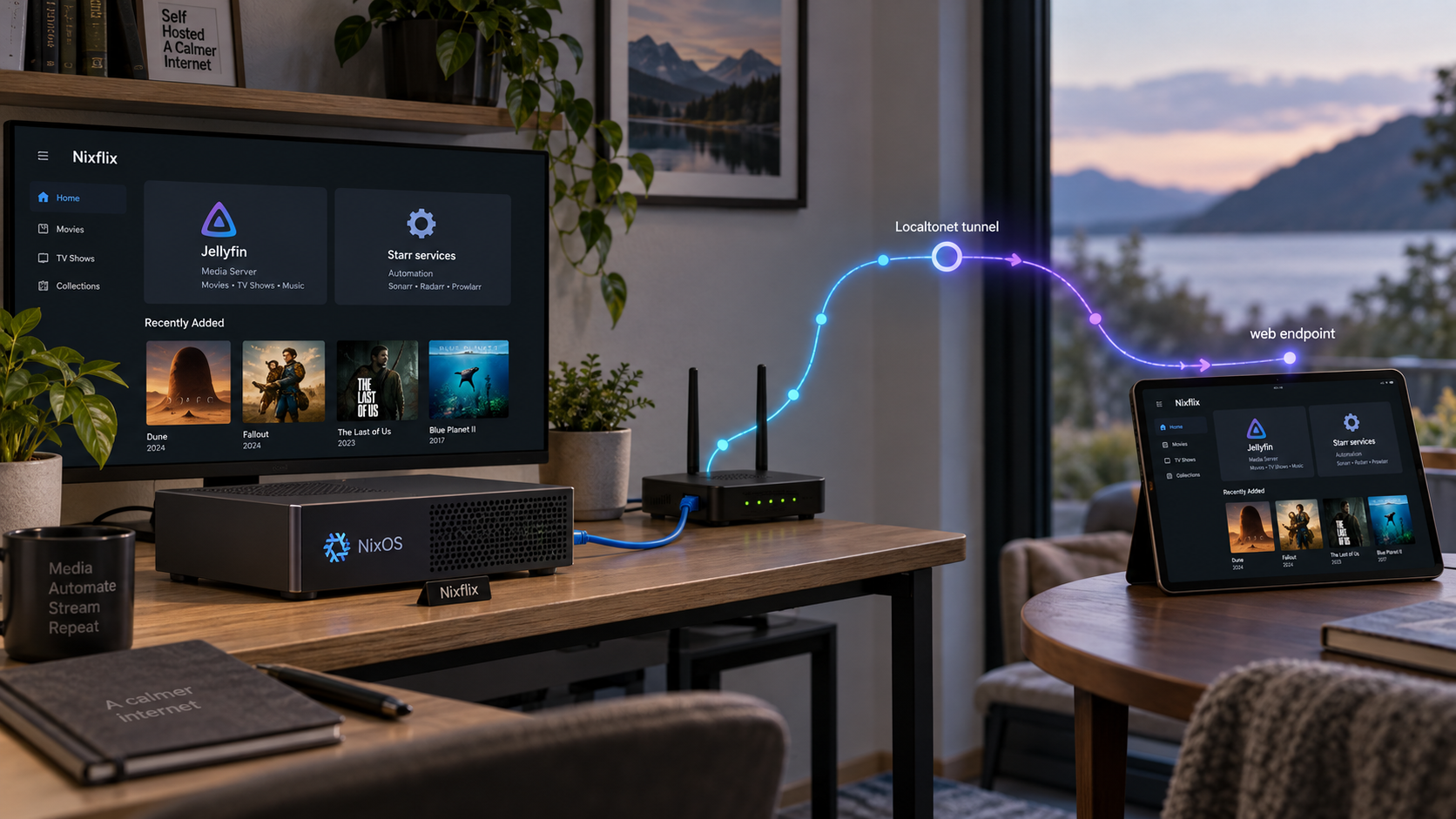
What Nixflix manages on NixOS
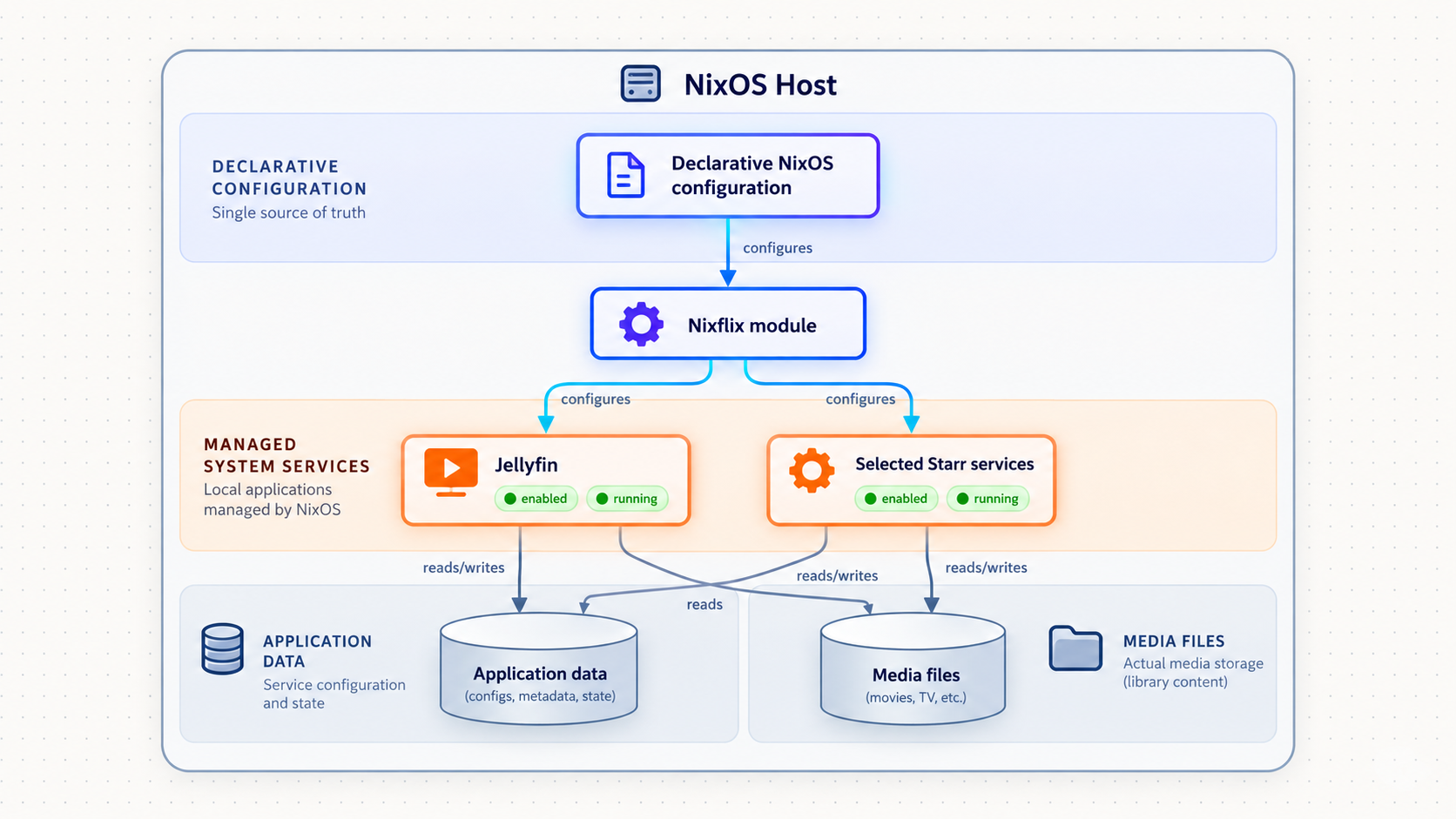
Nixflix is designed to make the connective configuration around a media-server stack reproducible. Instead of relying entirely on manual changes spread across several web interfaces, it lets a NixOS configuration describe supported applications and selected application settings. Nixflix applies much of that configuration through the applications' REST APIs, with a small number of project-documented exceptions.
Nixflix is not a media player, a media library, a public tunnel, or a replacement for NixOS itself. Its current repository describes modules and integrations for applications such as Sonarr, Radarr, Lidarr, Prowlarr, Jellyfin, Seerr, Navidrome, SABnzbd, qBittorrent, slskd, Maintainerr, PostgreSQL, reverse proxies, theming, and optional WireGuard components. These are examples from the current project documentation, not a promise that this article lists every option or every service available in future releases.
The authoritative project material is the Nixflix documentation. Its navigation includes the installation guide, examples, and generated option reference. The Nixflix repository contains the flake, modules, tests, changelog, and source history. Check both when selecting a newer release because option names and generated services can change.
The project describes its operations as idempotent and treats the configuration as the source of truth. That means supported configuration work is intended to be safe to run repeatedly. It does not mean every application database is disposable or that every manual dashboard change is preserved. Back up application state and record intended managed settings in NixOS.
The repository lists nix develop, nix fmt, and nix flake check for working on Nixflix itself. Those commands enter the source development shell, format the project, and run project checks. Installing Nixflix on a host requires adding its flake input and NixOS module to that host's configuration.
Prerequisites, compatibility, and deployment decisions
This tutorial assumes the target machine already runs NixOS, flakes are enabled, and you can use an account with permission to activate a system configuration. It selects the flake installation path because the current repository publishes flake.nix and flake.lock, and the project is identified as a flake. Although the repository also contains default.nix, the supplied upstream evidence does not establish a current supported non-flake host-installation procedure. We therefore do not invent one.
As reviewed for this 2026 revision, the available upstream material does not publish a clear compatibility matrix mapping every Nixflix release to specific NixOS releases, Nix versions, or nixpkgs branches. The safe approach is to evaluate the selected Nixflix revision against the nixpkgs revision used by your host before activation. If evaluation reports missing options, changed types, or incompatible module behavior, stop and compare the selected release with the current installation guide and option reference.
Select and pin a release
The example below selects v3.1.0, which the supplied upstream release page identifies as the latest release at the time of this article's evidence review. It is intentionally pinned by the flake reference and then recorded in flake.lock. Review the
Nixflix v3.1.0 release notes
before using this exact example. If upstream has published a newer release when you deploy, either continue with this reviewed pin or deliberately update the reference after reviewing the newer notes.
Version 3.1.0 adds Navidrome, a Jellyfin Universal Plugin Repository manifest, and additional Lidarr profile management. It also documents fixes involving Starr root-folder startup timing, ignored host configuration values, nested secret references, Seerr dependencies, Navidrome dependencies, and stale Jellyfin transcoding paths. Those statements apply to the pinned v3.1.0 context, not automatically to another revision.
Plan storage before services
Decide where media and application state will live. The upstream quick example uses /data/media for media and /var/lib for state. Those are examples, not mandatory paths. Confirm that every required filesystem is declared or mounted, available before dependent services start, large enough for its intended data, and included in an appropriate backup policy.
Media and application state have different recovery characteristics. Media can be large and may live on dedicated disks. Application state can contain databases, metadata, indexes, users, and integration state. A declarative NixOS configuration helps recreate intended services, but it does not replace those databases or user-generated records.
Choose the public entry point
A media stack usually contains both user-facing and administrative interfaces. Jellyfin and Navidrome are content interfaces. Seerr accepts requests. Sonarr, Radarr, Lidarr, Prowlarr, download clients, and maintenance applications expose operational controls. Do not publish every dashboard merely because it runs on the same machine.
| Component | Typical role | Remote-access decision |
|---|---|---|
| Jellyfin | Media library and playback interface | A possible user-facing endpoint after authentication, playback, redirects, and proxy behavior are tested |
| Seerr | Media request interface | Publish only after users, permissions, callbacks, and integrations work through the selected public route |
| Navidrome | Music server with OpenSubsonic API support | A possible user-facing endpoint when remote music access is intended |
| Sonarr, Radarr, Lidarr, and Prowlarr | Media and indexer administration | Normally keep private unless secured remote administration is an explicit requirement |
| SABnzbd, qBittorrent, or other download clients | Download control and queue management | Avoid public exposure unless it is specifically required and strongly protected |
| nginx or Caddy | Host-based or path-based reverse-proxy entry point | Useful when its routes, host matching, URL bases, upgrades, and access policy have been verified |
Plaintext values written into ordinary Nix expressions can be copied into the Nix store, which is not an appropriate location for API keys or passwords. Keep service keys in protected runtime files. Keep the Localtonet device token out of Nix files, shell history, screenshots, logs, and public repositories.
Install Nixflix with a pinned flake
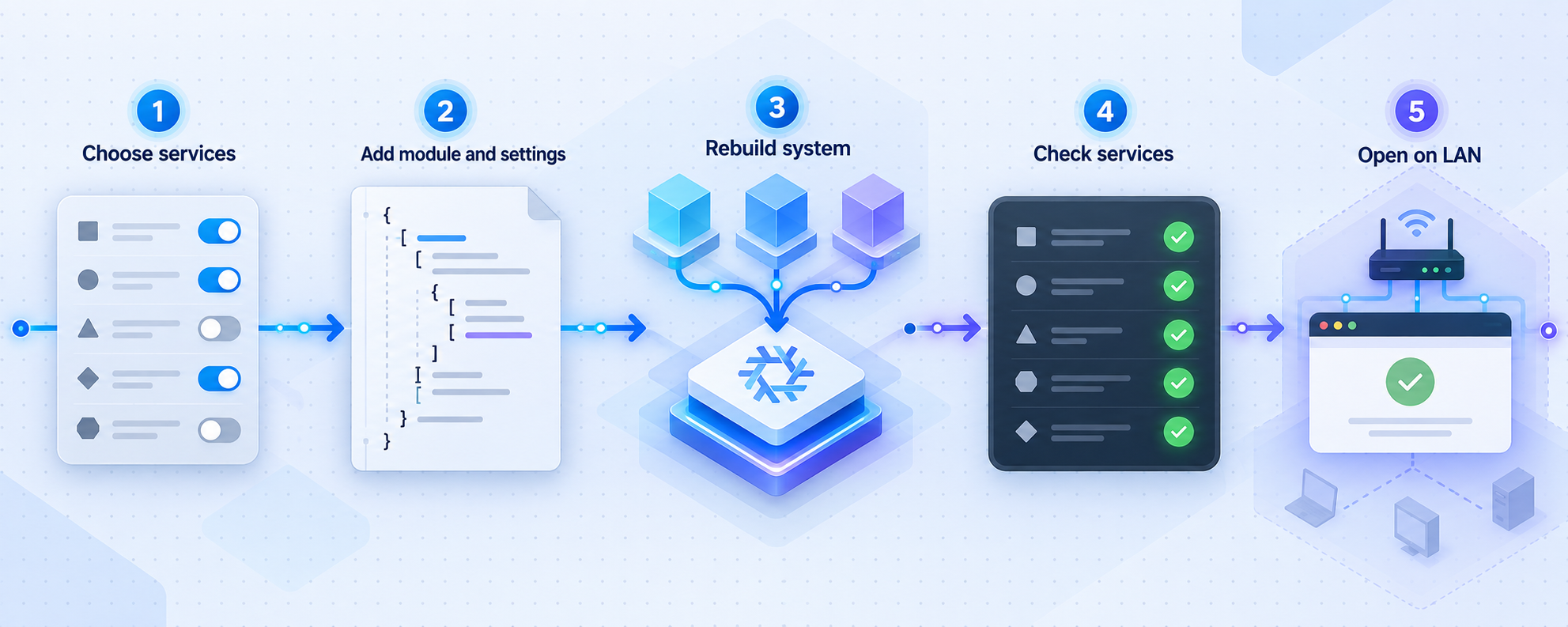
The following example uses a conventional flake-based NixOS layout with two files in one configuration directory:
.
├── flake.nix
├── flake.lock
└── configuration.nix
Replace nixflix-host with the actual configuration name you want to use. Replace the placeholder hardware import with the path already used by your machine. Do not discard an existing host's boot, filesystem, networking, user, or hardware configuration simply to copy this example.
1. Declare nixpkgs and the pinned Nixflix input
Create or update flake.nix. The Nixflix input follows the same nixpkgs input as the host, and the module is imported in the host's modules list.
{
  description = "NixOS media server with Nixflix";

  inputs = {
    nixpkgs.url = "github:NixOS/nixpkgs/nixos-unstable";

    nixflix = {
      url = "github:kiriwalawren/nixflix/v3.1.0";
      inputs.nixpkgs.follows = "nixpkgs";
    };
  };

  outputs = { nixpkgs, nixflix, ... }: {
    nixosConfigurations.nixflix-host = nixpkgs.lib.nixosSystem {
      system = "x86_64-linux";

      modules = [
        nixflix.nixosModules.default
        ./configuration.nix
      ];
    };
  };
}
The nixos-unstable branch shown here is an example input choice, not a claim that every Nixflix release supports only that branch. If your existing host uses another reviewed nixpkgs input, retain it and evaluate compatibility. Likewise, change x86_64-linux only if the host architecture differs and the complete selected package set supports that architecture.
Run the following from the directory containing flake.nix to create or refresh the lock file:
nix flake lock
Commit flake.lock with the non-secret configuration. The lock file records exact input revisions so an unrelated rebuild does not silently move the deployment to a different Nixflix or nixpkgs revision.
2. Add a complete minimal host configuration
The following configuration.nix shows where the Nixflix option block belongs. It enables Jellyfin plus Sonarr, Prowlarr, and SABnzbd, matching the structure demonstrated by the project's quick example. Remove applications you do not intend to operate.
{ config, pkgs, lib, ... }:

{
  imports = [
    ./hardware-configuration.nix
  ];

  networking.hostName = "nixflix-host";

  nix.settings.experimental-features = [
    "nix-command"
    "flakes"
  ];

  nixflix = {
    enable = true;

    mediaDir = "/data/media";
    stateDir = "/var/lib";

    sonarr = {
      enable = true;

      config.apiKey = {
        _secret = "/run/secrets/sonarr-api-key";
      };
    };

    prowlarr = {
      enable = true;

      config.apiKey = {
        _secret = "/run/secrets/prowlarr-api-key";
      };
    };

    sabnzbd = {
      enable = true;

      settings.misc.api_key = {
        _secret = "/run/secrets/sabnzbd-api-key";
      };
    };

    jellyfin.enable = true;
  };

  system.stateVersion = "24.11";
}
The system.stateVersion value above only makes the example structurally complete. On an existing NixOS installation, retain the value already assigned when that host was installed. Do not raise it merely because you updated NixOS, nixpkgs, or Nixflix.
A real host may also need filesystem declarations, boot configuration, users, storage mounts, hardware acceleration, firewall policy, database settings, reverse-proxy options, or additional Nixflix application blocks. Use the Nixflix installation guide and option reference to verify the options for the pinned release before adding them.
This minimal example deliberately does not enable nginx or Caddy. Direct local verification is easier when the first endpoint has fewer routing layers. Add a reverse proxy only when you have chosen its hostname or path design and can test the resulting redirects, URL bases, upgraded connections, and media responses.
Provision runtime secrets without storing them in Nix
The example references three files under /run/secrets. A path reference is not a secret-management system by itself. Those files must exist with the required values before the Nixflix configuration operation that consumes them.
Use an existing NixOS-compatible secret-management process, a protected provisioning system, or another controlled boot-time mechanism appropriate to your environment. This tutorial does not require or invent a specific secrets product. Whatever mechanism you select should provide these properties:
- The plaintext value is not committed to Git.
- The plaintext value is not embedded in
flake.nixorconfiguration.nix. - The runtime file is readable only by the identities that need it.
- The file exists before the dependent configuration unit runs.
- The mechanism recreates the file after reboot because
/runis temporary. - Credential rotation can occur without publishing the old value in build output or logs.
For an initial controlled test, an administrator can create the directory and protected files manually before activating the configuration. The commands below intentionally read values interactively and do not contain real credentials:
sudo install -d -m 0700 /run/secrets

sudo sh -c 'umask 077; read -r SONARR_KEY; printf "%s" "$SONARR_KEY" > /run/secrets/sonarr-api-key'
sudo sh -c 'umask 077; read -r PROWLARR_KEY; printf "%s" "$PROWLARR_KEY" > /run/secrets/prowlarr-api-key'
sudo sh -c 'umask 077; read -r SABNZBD_KEY; printf "%s" "$SABNZBD_KEY" > /run/secrets/sabnzbd-api-key'

sudo chmod 0600 /run/secrets/sonarr-api-key
sudo chmod 0600 /run/secrets/prowlarr-api-key
sudo chmod 0600 /run/secrets/sabnzbd-api-key
This manual method is suitable only for short-lived setup validation because the files disappear on reboot. Before routine operation, replace it with your established protected provisioning process and make sure the files are created early enough. Do not use a Nix expression containing the literal secret to generate these files, since that can expose the value through the Nix store.
The exact service identity that needs to read a secret can depend on the selected Nixflix release and generated unit. If restrictive ownership causes a permission error, inspect the relevant unit and logs before changing access. Do not make a secret world-readable as a shortcut.
Evaluate, activate, inspect, and roll back
NixOS provides several useful activation stages. Use them deliberately so a syntax error or incompatible module does not become a boot-time surprise.
Check flake evaluation
Run nix flake check from the configuration directory. This evaluates exposed checks and catches many structural errors before a system activation.
Build without activating
Use nixos-rebuild dry-build for the selected host. Review missing options, module import errors, package failures, and secret-path assumptions before continuing.
Activate temporarily
Use nixos-rebuild test to activate the result without making it the default boot generation. Verify services, storage, API configuration, and local access.
Make the tested generation persistent
Use nixos-rebuild switch only after the temporary activation behaves correctly. This makes the generation the current system and boot default.
Inspect services and logs
Check each enabled application and discover any Nixflix-generated configuration units on the actual host. Do not assume that successful module evaluation proves every API action completed.
Roll back if validation fails
Return to the previous NixOS generation, then diagnose the failed revision without leaving an unreviewed configuration active.
cd /path/to/your/nixos-configuration

nix flake check

sudo nixos-rebuild dry-build --flake .#nixflix-host
sudo nixos-rebuild test --flake .#nixflix-host

sudo nixos-rebuild switch --flake .#nixflix-host
Inspect the application units you enabled. For the sample configuration, begin with:
systemctl status jellyfin.service
systemctl status sonarr.service
systemctl status prowlarr.service
systemctl status sabnzbd.service

journalctl -u jellyfin.service -b
journalctl -u sonarr.service -b
journalctl -u prowlarr.service -b
journalctl -u sabnzbd.service -b
Nixflix can generate additional one-shot configuration or integration units whose names depend on the selected module and release. Discover relevant units rather than guessing all names:
systemctl list-units --type=service --all | grep -Ei 'nixflix|jellyfin|sonarr|radarr|lidarr|prowlarr|seerr|sabnzbd|qbittorrent|navidrome'

systemctl list-unit-files --type=service | grep -Ei 'nixflix|jellyfin|sonarr|radarr|lidarr|prowlarr|seerr|sabnzbd|qbittorrent|navidrome'
Once you identify a generated unit involved in API configuration, pass its exact name to systemctl status and journalctl -u. Look for missing secret files, permission errors, unavailable application APIs, wrong ports, incorrect URL bases, startup-order failures, and rejected credentials.
To return to the previous generation after a failed switch, use:
sudo nixos-rebuild switch --rollbackIf the current generation cannot boot correctly, select a previous NixOS generation from the bootloader. A system-level rollback does not automatically undo external application data changes already made through APIs, so back up application state and understand release migrations before major updates.
Verify services, routing, WebSockets, and playback locally
Local validation must happen before creating a tunnel. It establishes that the application works independently of Localtonet and identifies the exact IP address, port, hostname, and URL path the client must reach.
Confirm listeners and the browser endpoint
Check which addresses and ports are listening:
sudo ss -lntpMatch the listener to the service or reverse proxy you configured. Test from the NixOS host and, if the Localtonet client will run elsewhere, from that client device. Use your real address rather than copying a default from another installation:
curl -I http://LOCAL_ADDRESS:PORT/
Replace LOCAL_ADDRESS and PORT with the verified target. A loopback target such as 127.0.0.1 works only for a client running on the NixOS host. A Localtonet client on another LAN device needs an address reachable from that device.
Check redirects and URL bases
Follow redirects and inspect the final URL:
curl -L -I http://LOCAL_ADDRESS:PORT/
Look for redirects to localhost, a private-only hostname, an unexpected scheme, or a missing path prefix. If an application is configured under a URL base, test that exact base and its assets. A login page loading at one path does not prove that JavaScript, images, API calls, or playback URLs use the same base correctly.
Do not set a URL base merely because a tunnel exists. Configure one only when your selected application or reverse-proxy design requires it, using the documentation for that application version.
Check host-based reverse-proxy routing
nginx or Caddy can select a route according to the HTTP Host header. Test the local proxy using the hostname it expects:
curl -I -H 'Host: media.example.invalid' http://LOCAL_PROXY_ADDRESS:PORT/Replace the example hostname with the actual configured virtual host. If this succeeds while a request without the expected host reaches a default site or error page, record that dependency. Before tunneling the proxy, confirm that the public request will match the intended route. If host handling cannot be aligned using documented settings, tunnel the verified application listener directly instead of applying an unverified proxy workaround.
Check upgraded and long-lived connections
Some media interfaces use WebSockets, server-sent events, or other long-lived HTTP behavior for sessions, notifications, or live interface updates. The supplied Nixflix and Localtonet evidence does not establish that every application feature works automatically through every possible proxy arrangement. Verify the application you actually selected.
Open browser developer tools while using the local endpoint. Check the Network panel for failed WebSocket upgrades, repeatedly reconnecting requests, blocked origins, mixed-content errors, or API calls sent to the wrong hostname. Repeat this check later through the public Localtonet URL. Do not infer WebSocket success merely because the login page renders.
Validate application relationships
Confirm the integrations enabled in Nixflix. Examples include Seerr seeing intended Jellyfin libraries, Seerr reaching selected Starr applications, download clients appearing in the relevant media managers, and root folders resolving to the same storage layout.
Perform a low-risk filesystem operation where appropriate. A service may be able to read a directory but not create, rename, or move content. Two applications can also display the same textual path while seeing different filesystems or mount namespaces.
Run representative playback tests
Before describing a Jellyfin or Navidrome endpoint as suitable for remote playback, test representative content locally. For video, include playback start, pause, resume, seeking, subtitle selection, and at least one item that exercises the actual direct-play or transcoding behavior expected from remote clients. For music, test track transitions and seeking. Watch service logs and host resource usage during the test.
Media reliability depends on source formats, client capabilities, transcoding settings, CPU or hardware acceleration, storage throughput, and both ends of the network path. Neither Nixflix nor Localtonet evidence supplied for this tutorial provides a universal bandwidth requirement or performance guarantee. Measure the real deployment.
Record the address reachable from the future Localtonet client, the port, the expected hostname if a reverse proxy uses host routing, any required URL base, the redirect result, and the user workflow that passed locally. This becomes the remote-access acceptance checklist.
Expose the verified endpoint with Localtonet
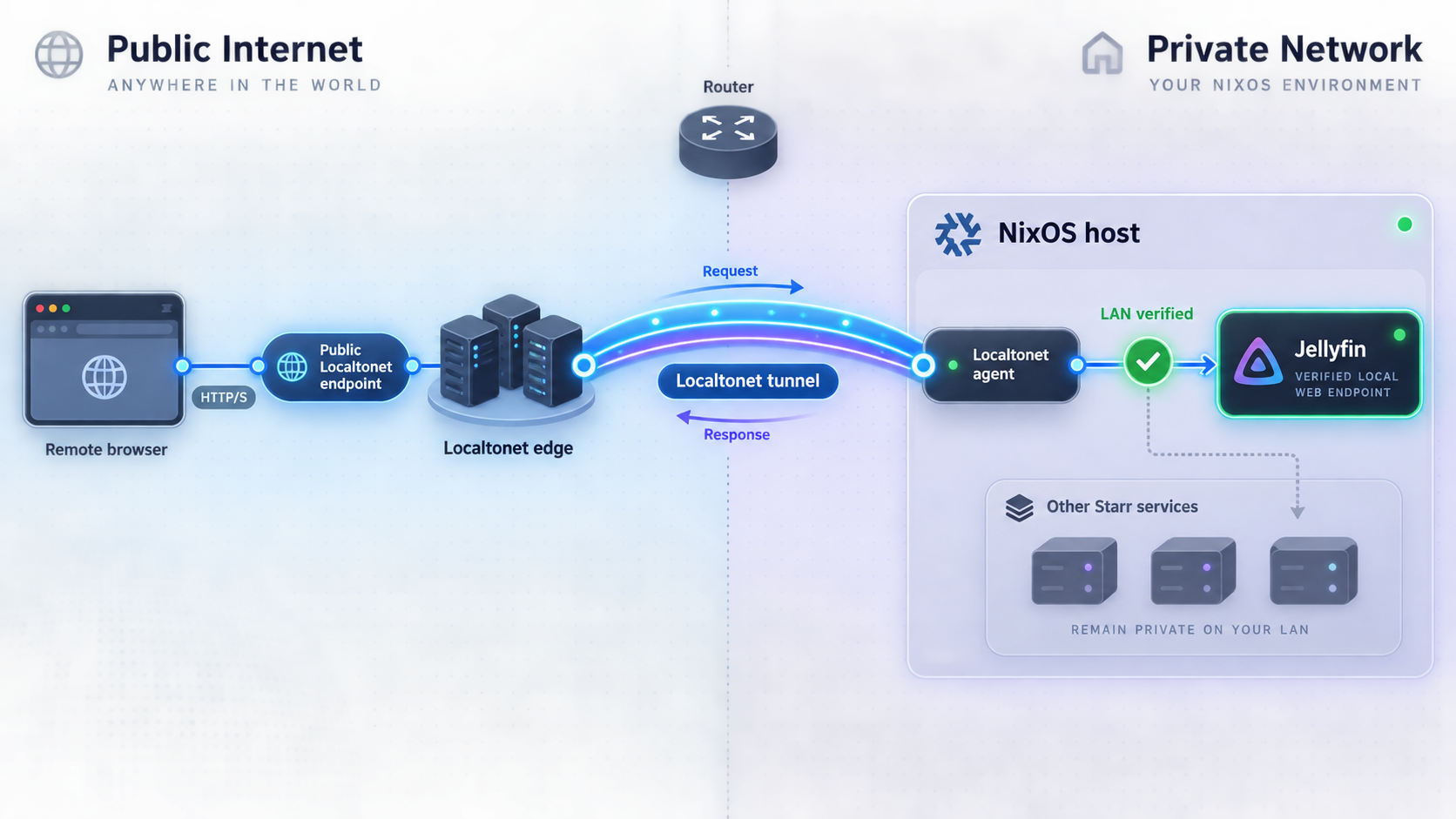
Our client establishes an outbound connection from its device to a Localtonet relay server. The resulting HTTP tunnel provides a public HTTPS URL for the selected local target. The normal workflow does not require inbound router port forwarding, firewall changes, VPN setup, or a public IP address.
Choose where the Localtonet client runs
The evidence supplied for this revision does not establish a native NixOS package, NixOS module, or verified NixOS-specific Localtonet installation command. We therefore do not present an untested Nix expression or binary command.
Use one of these operational routes:
- If the current Localtonet download workflow explicitly supports the client environment available on the NixOS host, install and run it there using the current platform instructions.
- Otherwise, run our client on a supported Windows, macOS, or Linux device on the same LAN that can reach the NixOS service.
For the second route, the alternative host must remain powered on and connected whenever remote access is required. From that device, open the local Nixflix endpoint in a browser or test it with curl. Use the NixOS machine's LAN address, not 127.0.0.1 or localhost. Then install and start the Localtonet client through the current account or client-download workflow and authenticate it with that device's token.
Consult the Localtonet HTTP tunnel documentation for the current client and dashboard workflow. Client packaging can change, so a static article should not invent a download URL, package name, service unit, or startup flag that is not present in the verified product documentation.
Install and run the Localtonet client
Use a currently supported client platform on the NixOS host or a concrete LAN device that can reach the verified endpoint. Confirm the endpoint from that exact device before continuing.
Authenticate or select the device
Use the device-specific authentication token assigned through Localtonet. Treat it as a credential and select the device that will maintain the outbound tunnel connection.
Select an available relay server
Choose from the server or region values currently shown by our platform. Available values can vary, so do not hardcode a server code copied from an older tutorial.
Create an HTTP tunnel to the local target
Enter the local IP address and port verified from the client device. Target either the selected application listener or the tested nginx/Caddy entry point.
Start and verify the tunnel
Creating a tunnel does not start it. Use the Start button, open the assigned public URL from outside the LAN, and repeat the complete remote verification checklist.
Stop or delete access when finished
Stop the tunnel when public access is temporarily unnecessary, or delete it when the configuration is no longer needed. The endpoint is available only while the selected client is connected and the tunnel is running.
Select the HTTP process type
Localtonet HTTP tunnels can use Random Sub Domain, Custom Sub Domain, or Custom Domain process types. Each serves the configured content at a public HTTPS address. Availability and plan details can vary, so use the options currently shown in the dashboard.
| Process type | Useful for | Verification requirement |
|---|---|---|
| Random Sub Domain | Initial testing or temporary access | Check every redirect, asset, API call, upgraded connection, and playback path using the assigned hostname |
| Custom Sub Domain | A selected Localtonet subdomain where supported | Confirm current availability and repeat application-origin and hostname checks |
| Custom Domain | An operator-controlled public hostname | Follow current Localtonet DNS instructions and verify the final hostname against proxy and application settings |
Repeat the public acceptance test
Test from a network outside the server's LAN, such as a phone using cellular data. Verify all of the following before sharing the address:
- The initial public URL loads and redirects remain on the intended public hostname.
- Any configured URL base is preserved for pages, static assets, API requests, and media links.
- The correct nginx or Caddy virtual host is selected if host-based routing is involved.
- Login, logout, cookie behavior, and permission boundaries work through the public origin.
- Browser developer tools show no failed WebSocket upgrades or recurring connection failures.
- Representative direct playback, seeking, subtitles, and expected transcoding behavior work.
- A large or long-lived media response remains usable in the actual network environment.
- Administrative services that were not selected remain unavailable through the public route.
This checklist is intentionally empirical. The supplied project evidence does not establish universal Nixflix settings for public origins, proxy headers, WebSockets, URL bases, or long-lived media responses. Application-specific changes should be made only when required by the deployed application version and supported by its documentation.
Configure strong application authentication, remove unused accounts, apply least privilege, and expose only the required interface. Prefer a user-facing Jellyfin, Seerr, or Navidrome route over administrative dashboards unless remote administration is specifically required and protected.
Update, monitor, back up, and retire the deployment
Update Nixflix deliberately
Review the target release notes and configuration changes before moving the input. Preserve the current flake.lock so you can identify the exact previous revisions. To update only the Nixflix input within the constraints of flake.nix, run:
nix flake lock --update-input nixflix
If you intend to move from the explicit v3.1.0 reference to another tag, edit that reference first, update the lock, inspect the lock-file diff, and repeat the complete evaluation sequence:
nix flake check
sudo nixos-rebuild dry-build --flake .#nixflix-host
sudo nixos-rebuild test --flake .#nixflix-host
Validate generated configuration operations, application APIs, storage, local routes, redirects, upgraded connections, and representative playback before running switch. Keep the old configuration and lock-file revision in version control so the system definition can be restored if necessary.
Back up state as well as code
Back up the NixOS configuration, flake.lock, protected secret material through an appropriate secure process, application databases, metadata, and irreplaceable media. The declarative configuration records intent, but it is not automatically a copy of user accounts, watch history, request history, library metadata, download queues, or application databases.
Test restoration on a controlled system. Pay attention to filesystem ownership, mount points, state paths, database versions, and runtime secret locations. A backup that cannot restore those relationships is incomplete.
Monitor applications and tunnels separately
Remote availability depends on two independent layers. The Nixflix-managed application or reverse proxy must be healthy and reachable locally. The selected Localtonet device must also be connected, and the tunnel must be running.
Localtonet platform-wide Token/Tunnel webhooks can report Connected and Disconnected changes for a selected Token Group. They do not prove that Jellyfin, Seerr, Navidrome, or a reverse proxy is healthy. Monitor application behavior separately and do not confuse these platform webhooks with File Server file-event webhooks.
Reduce exposure over time
Stop tunnels that are not in use. Delete obsolete tunnel configurations. Remove inactive application users and API keys, rotate credentials after suspected disclosure, and verify that retired administrative paths are no longer reachable. Continue applying reviewed NixOS and application updates.
Troubleshooting Nixflix and Localtonet access
The flake does not evaluate
Confirm that the Nixflix input is present, its module is included in the host's modules list, and the selected output name matches the value after .#. Compare option names and types with the reference for the pinned release. An example from another revision can contain options unavailable in yours.
If the error concerns the Nixflix module output name or installation structure, stop and compare the configuration with the current upstream installation guide. Do not replace module installation with nix develop, which is a source-development command.
A service runs, but declarative configuration is missing
Inspect the application service and any discovered Nixflix configuration units. Confirm that each secret file exists, contains only the intended value, has usable ownership and permissions, and is available at the time the unit starts. Verify the application's configured bind address, port, authentication, and URL base.
For the pinned v3.1.0 context, review its release notes if symptoms resemble previously fixed startup races, ignored host configuration values, nested secret handling, or dependency ordering. Do not publish an endpoint while its declarative integration is failing.
Jellyfin cannot read or transcode media
Confirm that the media path exists, the filesystem is mounted, and the service can traverse every parent directory. Check the configured cache and transcoding paths. Version 3.1.0 specifically documents a fix for a stale TranscodingTempPath causing a boot loop after related paths changed, so inspect both the active configuration and application logs.
The proxy works only with a specific hostname
Repeat the local request with the required Host header and compare it with the request arriving through the public address. If the public hostname reaches a default virtual host, adjust only settings documented for your reverse proxy, application, and current Localtonet configuration. Tunneling the verified application listener directly may be simpler when only one service is required.
The public page loads, but redirects or assets fail
Inspect the browser's final URL and Network panel. Look for redirects to a LAN hostname, localhost, the wrong scheme, or a path that omits the configured URL base. Check API and asset requests for hardcoded origins. Reproduce the same path locally before changing proxy or application settings.
Live updates or sessions repeatedly disconnect
Check browser developer tools for failed WebSocket upgrades, server-sent event reconnects, origin errors, or mixed content. Compare local and public behavior. A rendered page proves only ordinary HTTP delivery, not upgraded or long-lived connection behavior.
The Localtonet URL does not load
Confirm that the selected client device is connected and the tunnel was explicitly started. Test the configured local address and port from that exact device. If the client runs on another LAN machine, make sure the target is not 127.0.0.1 and that the NixOS service is listening on an appropriate reachable interface.
Playback starts but later stalls
Compare local and public tests using the same media and client. Inspect whether the server is direct-playing or transcoding, watch CPU and storage behavior, and review application logs. Test seeking and a sustained representative session. Do not assume a generic throughput figure or guaranteed duration because none is established by the supplied evidence.
Frequently asked questions
What is Nixflix?
Nixflix is a declarative media-server configuration manager for NixOS. It provides modules and API-based configuration for supported media applications and related infrastructure. It is not itself a media player, tunnel, or VPN.
Does this tutorial support a non-flake installation?
No non-flake host-installation procedure is presented because the supplied upstream evidence does not establish one. This tutorial uses the project's flake and imports nixflix.nixosModules.default into a NixOS host configuration.
Which NixOS versions are compatible with Nixflix v3.1.0?
The upstream material available for this revision does not publish a complete version compatibility matrix. Evaluate the pinned Nixflix input with the nixpkgs revision used by your host, perform a dry build, and activate it temporarily before switching permanently.
Can I install Nixflix with nix develop?
No. nix develop enters the repository's development environment. A host installation requires a Nixflix flake input and its NixOS module in the host's module list.
Should API keys be written into configuration.nix?
No. Reference protected runtime files such as files under /run/secrets, and provision them through a suitable secret-management process. Do not place plaintext values in ordinary Nix expressions or commit them to version control.
What port should I enter in Localtonet?
Use the port from the listener you verified on your deployment. Nixflix does not create one universal public endpoint for every stack. Test the exact address and port from the device running our client before creating the tunnel.
Can the Localtonet client run directly on NixOS?
This article does not claim a native NixOS package or module because the supplied product evidence does not verify one. Use a currently supported client environment if available, or run the client on a supported Windows, macOS, or Linux LAN device that can reach the NixOS endpoint.
Does a loading login page prove remote playback will work?
No. Verify redirects, URL bases, host-based routing, authentication, WebSockets or other long-lived connections, direct playback, seeking, subtitles, expected transcoding, and a sustained representative media response before sharing the endpoint.
Does creating a Localtonet tunnel start it automatically?
No. Creating a tunnel stores its configuration. You must use the Start button, and the endpoint remains available only while the selected client is connected and the tunnel is running.
Is a Localtonet HTTP tunnel a VPN?
No. An HTTP tunnel publishes one selected local web endpoint. Localtonet VPN Manager is our private mesh VPN feature. Nixflix's optional WireGuard integration is also a separate networking component.
Connect your verified Nixflix endpoint with Localtonet
Pin and activate the Nixflix module, validate the selected application or reverse proxy locally, then create an HTTP tunnel to that exact address. Repeat the redirect, routing, connection, authentication, and playback tests before sharing the public URL.
Get Started Free →

