

Build a verified subtitle-processing path before making Jellyfin remotely reachable
WhisperSubs generates subtitles for Jellyfin by running speech-to-text on the Jellyfin server or on self-hosted workers you choose to add. This guide installs the plugin, configures its engine and model, verifies local processing, explains the supported worker rollout, and shows how to distinguish self-hosted workers from optional Groq, OpenAI, and OpenRouter backends. It also covers current translation behavior, including experimental NVIDIA Canary processing through CrispASR for English audio. After the application works locally, we show how to publish the configured Jellyfin HTTP endpoint with Localtonet without exposing a worker as the public media interface.
📋 What's in this guide
How Jellyfin, WhisperSubs, workers, and Localtonet fit together
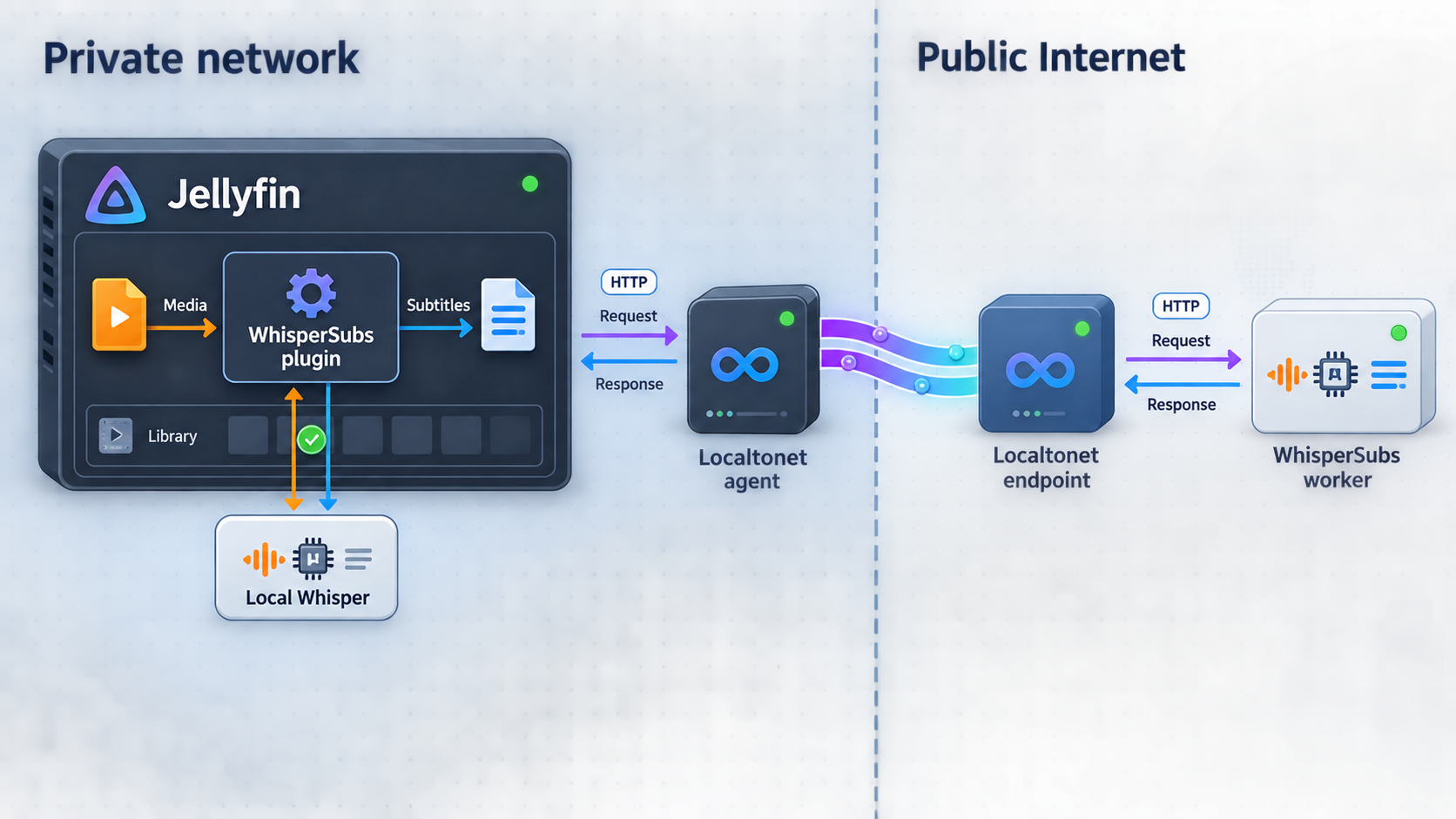

WhisperSubs is a Jellyfin plugin for generating subtitle files with speech-to-text models. Its default processing path runs on the Jellyfin server. Administrators can also add self-hosted workers so other machines, GPUs, or a NAS can process jobs. Hosted Groq, OpenAI, and OpenRouter integrations are separate optional backends. They are not the same thing as a self-hosted worker, and they change where media-derived data is processed.
Localtonet has a different role. In this tutorial, an HTTP tunnel points to Jellyfin's existing local HTTP listener. The public URL opens Jellyfin, including the WhisperSubs controls available to the signed-in Jellyfin account. The tunnel does not install WhisperSubs, register workers, distribute jobs, provide a GPU, or turn a Localtonet relay into a transcription worker.
Keep these traffic paths separate. Jellyfin-to-worker traffic carries transcription requests and requires worker authentication. Browser-to-Jellyfin traffic carries the media application interface and is governed by Jellyfin accounts and permissions. Publishing Jellyfin does not require publishing a worker endpoint.
This article was reviewed against the current upstream WhisperSubs documentation and the published WhisperSubs v4.8.0.5 release page. WhisperSubs documentation is maintained separately from release artifacts, so verify that the setup, worker fields, defaults, and container instructions shown by your installed plugin match the documentation for that deployment before changing production workloads. This guide does not invent container image names, ports, environment-variable names, or endpoint paths when those values are not fixed by the evidence supplied for this review.
Prerequisites and deployment decisions
Begin with a functioning Jellyfin server. Confirm that an administrator can sign in locally and open the Dashboard and Plugins pages. Do not create the public tunnel first. Installing and testing in stages makes it possible to identify whether a failure belongs to Jellyfin, WhisperSubs, the processing engine, a worker, storage, or remote connectivity.
| Requirement | Current documented expectation | What to verify |
|---|---|---|
| Jellyfin | Version 10.11.0 or later | Confirm the running server version before installing WhisperSubs. |
| FFmpeg | Jellyfin's bundled FFmpeg or an FFmpeg executable on PATH | Verify that the Jellyfin process can execute FFmpeg and read the selected media. |
| Whisper engine | The whisper.cpp whisper-cli executable | Use a compatible Linux download or provide the executable path manually on macOS and Windows. |
| Whisper model | A GGML model file | Download a model through settings or provide a model visible to the Jellyfin runtime. |
| Media storage | Readable media and a writable subtitle destination | WhisperSubs writes generated files next to the media, so check permissions and free space. |
| Optional vocal separation | The BSRoformer.cpp bs_roformer-cli executable | The optional binary is currently downloadable from plugin settings on Linux, macOS, and Windows. |
| Optional self-hosted worker | A supported worker service reachable from Jellyfin | Confirm processing resources, network reachability, API-key protection, and version compatibility. |
| Optional remote Jellyfin access | A local Jellyfin HTTP address reachable by the Localtonet client | Use the actual listener and port configured in your deployment. |
Account for the operating system
On Linux, WhisperSubs can download a compatible whisper-cli build and a model from the plugin settings page. The project provides multiple binary variants because CPU instruction sets and GPU acceleration environments differ. A build must match the hardware, drivers, and runtime visible to Jellyfin.
On macOS and Windows, an empty Whisper binary variant list is expected. Prebuilt whisper-cli downloads are Linux-only. Install whisper-cli separately and enter its absolute location in Whisper Binary Path. Model downloads remain available through settings on Linux, macOS, and Windows.
The optional BSRoformer.cpp behavior is different from whisper-cli. Current documentation says the bs_roformer-cli binary can be downloaded from the WhisperSubs settings page on Linux, macOS, and Windows. It is used only for optional vocal separation. If separation is unavailable, WhisperSubs can fall back to the original audio.
Account for containers and service users
Paths must be valid from the Jellyfin process or container, not merely from an administrator's shell. A host path to a binary, model, or media file does not automatically exist inside a container. Mount the required locations and use the corresponding in-container paths in plugin settings.
The same rule applies to networking. Inside a Jellyfin container, 127.0.0.1 identifies the Jellyfin container itself. It does not identify a worker container or the Docker host. Use the address that is valid on the network shared by Jellyfin and the worker.
Choose a processing boundary
Use the Jellyfin server first unless there is a specific reason to add a worker immediately. A worker is appropriate when another controlled machine has a more suitable GPU, when you want to isolate heavy processing from Jellyfin, or when you need additional parallel capacity.
GPU options documented by WhisperSubs include CUDA for NVIDIA hardware, Vulkan for Intel, AMD, or NVIDIA hardware, and ROCm for AMD hardware. A listed backend is not proof that it will work automatically. The runtime must see the GPU, compatible drivers must be installed, and the selected binary or worker container must support the intended backend.
WhisperSubs extracts audio and writes subtitle files beside media. Give Jellyfin and workers only the filesystem and network permissions required by the selected design. Do not solve a path problem by making an entire media server, worker API, or storage volume publicly accessible.
The upstream WhisperSubs setup guide, platform-specific installation guidance, and current limitations page provide the release-maintained details that should be checked before changing a working deployment.
Install WhisperSubs from the Jellyfin plugin repository
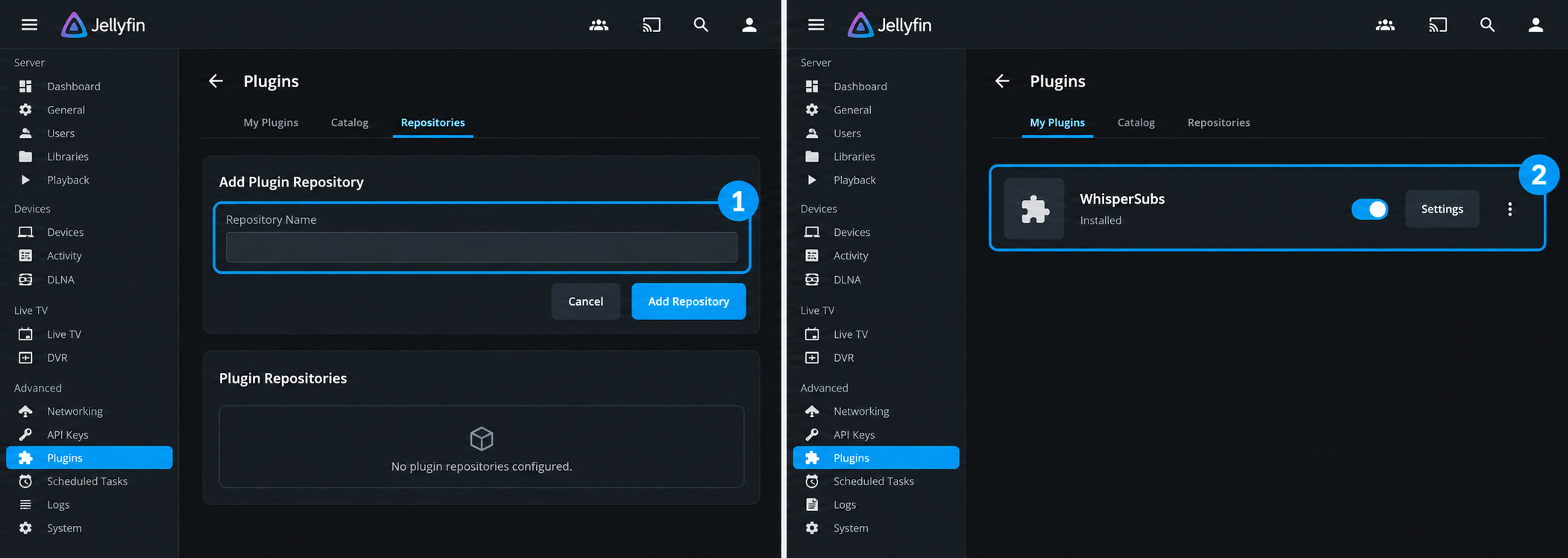
The recommended installation method uses the project's Jellyfin plugin repository. This keeps plugin discovery and installation inside Jellyfin's standard catalog workflow.
Open Jellyfin's plugin repositories
Sign in as a Jellyfin administrator. Open Dashboard, select Plugins, and then open Repositories.
Add the official repository
Add a repository using the official manifest URL below. Preserve the complete HTTPS URL and manifest filename.
Install WhisperSubs
Return to the plugin Catalog, find WhisperSubs, and select Install. Wait for Jellyfin to finish installing the plugin.
Restart the Jellyfin server
Restart the Jellyfin server process so it loads the plugin. Reloading the browser page does not replace a server restart.
Open WhisperSubs settings
After Jellyfin returns, open Dashboard, Plugins, and WhisperSubs. Installation is complete, but an engine and model are still required.
https://geiserx.github.io/whisper-subs/manifest.jsonIf the plugin does not appear in the catalog, recheck the manifest URL and confirm that Jellyfin can retrieve repository metadata. If installation finishes but settings remain unavailable, confirm that the server process was restarted and that Jellyfin meets the documented version requirement.
The settings page confirms that Jellyfin loaded WhisperSubs. It does not prove that FFmpeg can extract audio, whisper-cli can start, a model is available, the media is readable, or the subtitle destination is writable.
Configure the engine, model, translations, and output
Configure whisper-cli and a model
On Linux, select a binary variant compatible with the server and use the plugin settings to download it. If whisper-cli terminates with exit code 132, the executable commonly contains an instruction unsupported by the processor. Select a compatible variant rather than repeatedly retrying the same build.
On macOS or Windows, install whisper-cli separately and enter its absolute executable path. The Jellyfin service account must be able to see and execute that file. An executable that works in an interactive terminal can still fail under a service account with different permissions or environment variables.
Download or select a GGML model and confirm that the model path is populated. Model downloads are available through settings on all three platforms. There is no universal best model for every library or processor. Begin with a model that fits the available memory and processing capacity, then evaluate representative media before scheduling a broad library scan.
Choose the correct subtitle and translation behavior
| Mode or capability | Generated output | Current limitation or requirement |
|---|---|---|
| Full | A complete transcription of speech | This is the documented default mode and the clearest baseline for an initial test. |
| Forced only | Foreign-language dialogue segments | Uses VAD segmentation and per-chunk language detection, which adds a detection phase before transcription. |
| Full + forced | Both full and forced subtitle files | Produces more output and requires more processing than a single full transcription. |
| Whisper translation | An English translated subtitle | For non-English source audio, Whisper translation still targets English. |
| Canary translation, experimental | Subtitles in one of 24 supported European languages | Requires English source audio, including an English dub, and uses NVIDIA Canary through CrispASR on the server or a CrispASR worker. |
| Translate one title | A selected translation for a movie, episode, season, or series | Lets an administrator translate an individual title without enabling a library-wide target-language list. |
| Lyrics, experimental | An LRC file for music | Jellyfin can discover the generated lyric file automatically. |
The translation boundary depends on source audio. For audio in languages other than English, Whisper translation produces English. Current WhisperSubs documentation also describes an experimental path for English audio, including an English dub on a foreign film, to create subtitles in 24 European languages with NVIDIA Canary through CrispASR.
Canary processing is distinct from ordinary Whisper translation. It requires CrispASR on the Jellyfin server or a compatible CrispASR worker. Do not assume that selecting a normal Whisper worker automatically supplies Canary processing.
Administrators can also translate one movie, episode, season, or series from its item page. This is useful when one title needs a target language but you do not want to enable that language across the whole library. For non-English source audio, the available translation remains English. For English source audio, the per-title action can use the supported Canary target languages.
Automatic language detection first uses the audio stream's language tag. If no useful tag is present, Whisper detection is used. Media with multiple audio languages can generate a subtitle for each audio language.
Understand output naming
WhisperSubs writes output beside the media. The documented default template is {name}.{lang}.{label}{.type}, with WhisperSubs as the default label. Representative output includes:
Movie.es.WhisperSubs.srt
Movie.es.WhisperSubs.forced.srt
Movie.en.WhisperSubs.translated.srt
Movie.nl.WhisperSubs.translated.srt
Song.lrc
In this example, the Dutch translated file represents experimental Canary output from English audio. It is not an example of Whisper translating arbitrary source audio into Dutch.
The label appears in Jellyfin's subtitle picker and marks files generated by WhisperSubs. Choose a distinctive value if you change it. Files created by older versions with the .generated. anchor remain recognized.
Review skip behavior before processing an established library. The scheduled task skips media that already has a usable subtitle in the required language. Forced tracks do not satisfy that requirement while Ignore forced subtitles when skipping remains enabled. Image-based subtitles are not counted unless Count image-based subtitles as present is enabled.
Verify local transcription before adding a worker
Select one short, representative media item in a library where Jellyfin can read the source and write an adjacent subtitle file. Full mode is the simplest initial test because it does not add forced-dialogue detection or experimental translation components.
Confirm engine and model paths
Verify that the configured whisper-cli path and GGML model path are visible from the Jellyfin runtime. Check BSRoformer separately if optional vocal separation is enabled.
Submit one full subtitle request
Use the WhisperSubs administration interface or permitted item action to request a full transcription for the test item.
Watch progress and queue depth
Confirm that the live banner identifies the item, advances through processing phases, reports file progress, and eventually removes the completed work from the queue.
Inspect the generated file
Verify that the expected SRT or LRC file appears beside the media with the configured language, label, and type markers.
Test playback in Jellyfin
After metadata refresh, select the generated track in Jellyfin and inspect its language, timing, readability, and mode.
A successful job has two forms of evidence: WhisperSubs reports completion, and Jellyfin can use the resulting file. Checking only the queue does not prove that a subtitle was written. Finding an SRT file does not prove that Jellyfin indexed it or that its content matches the requested language.
WhisperSubs can resume interrupted transcription from its last timestamp. That can reduce repeated work after a temporary interruption, but recurring engine, worker, or storage failures still require investigation.
Test several representative items before enabling broad scheduled processing. Include the codecs, audio layouts, languages, and storage locations used by the library. If you plan to use Canary translation, test English source audio separately from non-English Whisper translation.
Set up and validate a self-hosted WhisperSubs worker
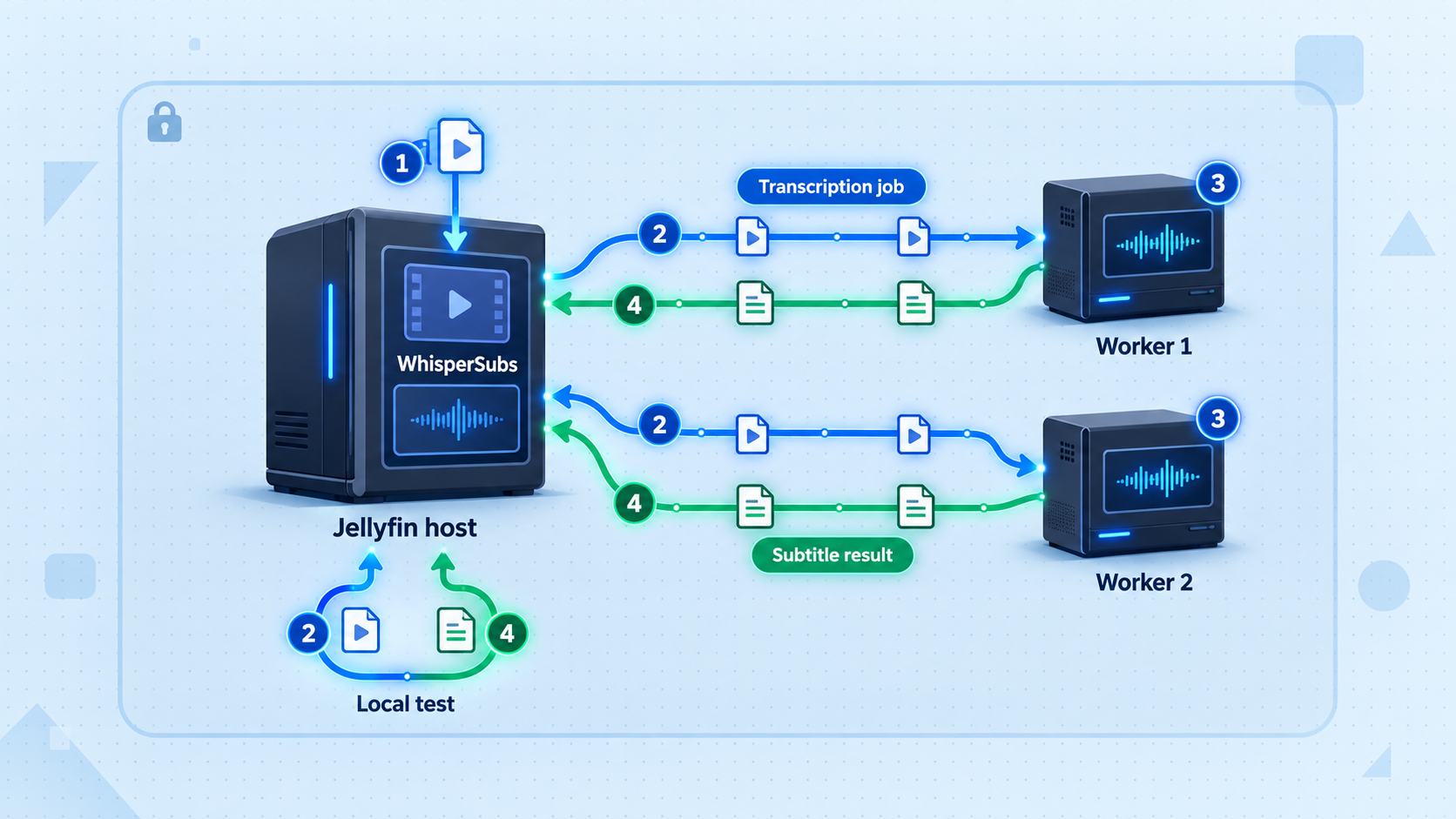
WhisperSubs supports a worker pool for additional machines, GPUs, and NAS systems. The project supplies a worker container and documents worker status, queue diagnostics, and API-key handling. Remote processing is off by default.
The worker implementation changes independently from this article. Use the container definition and configuration names published on the current WhisperSubs remote workers page for the same release you run. The supplied evidence does not establish immutable values for the current image name, listening port, environment-variable names, or endpoint paths, so this article does not fabricate them. The complete deployment sequence below identifies every value you must obtain and every verification you must complete.
Keep self-hosted workers and hosted backends separate
| Processing option | Where it runs | Configuration boundary |
|---|---|---|
| Jellyfin server | On the Jellyfin host | Uses the engine and model configured in WhisperSubs settings. |
| Self-hosted worker | On another machine or container you operate | Requires the official worker service, an authenticated endpoint, and registration in the worker pool. |
| CrispASR worker | On a compatible system you operate | Provides the experimental Canary path for English audio and is distinct from an ordinary Whisper worker. |
| Groq, OpenAI, or OpenRouter | At the selected hosted provider | Requires deliberate provider configuration and sends processing data outside your self-hosted environment. |
Worker prerequisites
Before deployment, identify the worker's CPU, GPU, memory, storage, operating system, and container runtime. Confirm that the selected worker release supports that environment. If GPU acceleration is required, establish driver and device visibility before starting the worker container.
Choose the network path from Jellyfin to the worker. Jellyfin must be able to initiate connections to the worker endpoint. The worker does not need to be publicly reachable, and publishing Jellyfin with Localtonet does not make the worker reachable from Jellyfin.
Generate or configure a unique worker API key according to the current worker documentation. Treat it as a credential. Store it in the worker's supported secret or environment configuration and enter the matching value in WhisperSubs. Do not place the key in a URL, container name, screenshot, compose file committed to source control, article, or support log.
Match the plugin and worker documentation
Record the installed WhisperSubs version. Open the current remote-worker instructions and use the worker container definition intended for that version. Do not copy an image tag or environment block from an unrelated release.
Prepare the worker host
Install the supported container runtime, provide sufficient processing resources, and confirm that the host can download the official worker image. For GPU use, verify drivers and container device access before continuing.
Create a unique API key
Configure a strong worker API key using the mechanism documented for the deployed release. Keep the value out of command history and shared compose files where the platform provides a safer secret mechanism.
Configure the engine and model
Select the documented worker engine, model, and acceleration settings that match the host. An ordinary Whisper worker and a CrispASR worker serve different processing paths, so configure the implementation needed for the requested job.
Start the official worker container
Start the worker using the current container example from the remote-worker documentation. Keep the API key protected, expose only the documented service port to the network that contains Jellyfin, and apply the documented GPU device mapping when acceleration is required.
Check worker startup locally
Inspect the container or service state and startup logs. Confirm that the process remains running, loads its configured engine and model, recognizes the intended accelerator, and listens on the configured interface.
Test the authenticated status diagnostic
From a system on the intended network path, use the status diagnostic documented for the release with the required API-key authentication. A successful status response proves service reachability and authentication, but not job completion.
Test from the Jellyfin network context
Repeat the reachability check from the Jellyfin host or container network. This catches loopback, DNS, firewall, container-network, and port-mapping mistakes hidden by a test performed only on the worker host.
Register the worker in WhisperSubs
Open the worker configuration in WhisperSubs, add the worker endpoint shown by the running service, and supply the matching API key through the authentication field provided by the installed release. Save the configuration without placing the secret in the endpoint URL.
Confirm worker and queue status
Use the plugin's worker status and queue diagnostics to confirm that the worker is available, authenticated, and eligible to receive work. Record the non-secret worker identifier so you can prove which processor receives the test job.
Dispatch one controlled test
Submit the same short item used for local verification, using a mode supported by the worker. Avoid a library-wide task. Watch queue depth and worker state while the request is assigned.
Prove that the intended worker processed it
Correlate the WhisperSubs job, worker identifier, queue activity, worker logs, completion state, and generated subtitle. Do not infer worker use merely because a subtitle appeared, since the Jellyfin server or another worker may have processed it.
Proof of worker processing should include a successful authenticated status check, an available worker in WhisperSubs, a queue transition, activity on the intended worker during the request, and the expected output file. Redact API keys, private addresses, media names, and user data before sharing diagnostic evidence.
Routine worker operation
Keep the worker image and Jellyfin plugin on compatible versions. After an upgrade, repeat the status, queue, and controlled-dispatch checks before returning the worker to broad processing. Monitor container restarts, storage pressure, GPU availability, model loading, and queue growth.
If a worker becomes unavailable, stop sending new jobs to it until the cause is understood. Repeatedly retrying a worker that cannot load its model or access its accelerator can consume queue retries without producing output.
A worker API is a processing interface protected by an API key. Keep it on a private or controlled network whenever possible. The Localtonet HTTP tunnel later in this guide targets Jellyfin's HTTP listener, not the worker endpoint.
Expose the verified Jellyfin HTTP endpoint with Localtonet
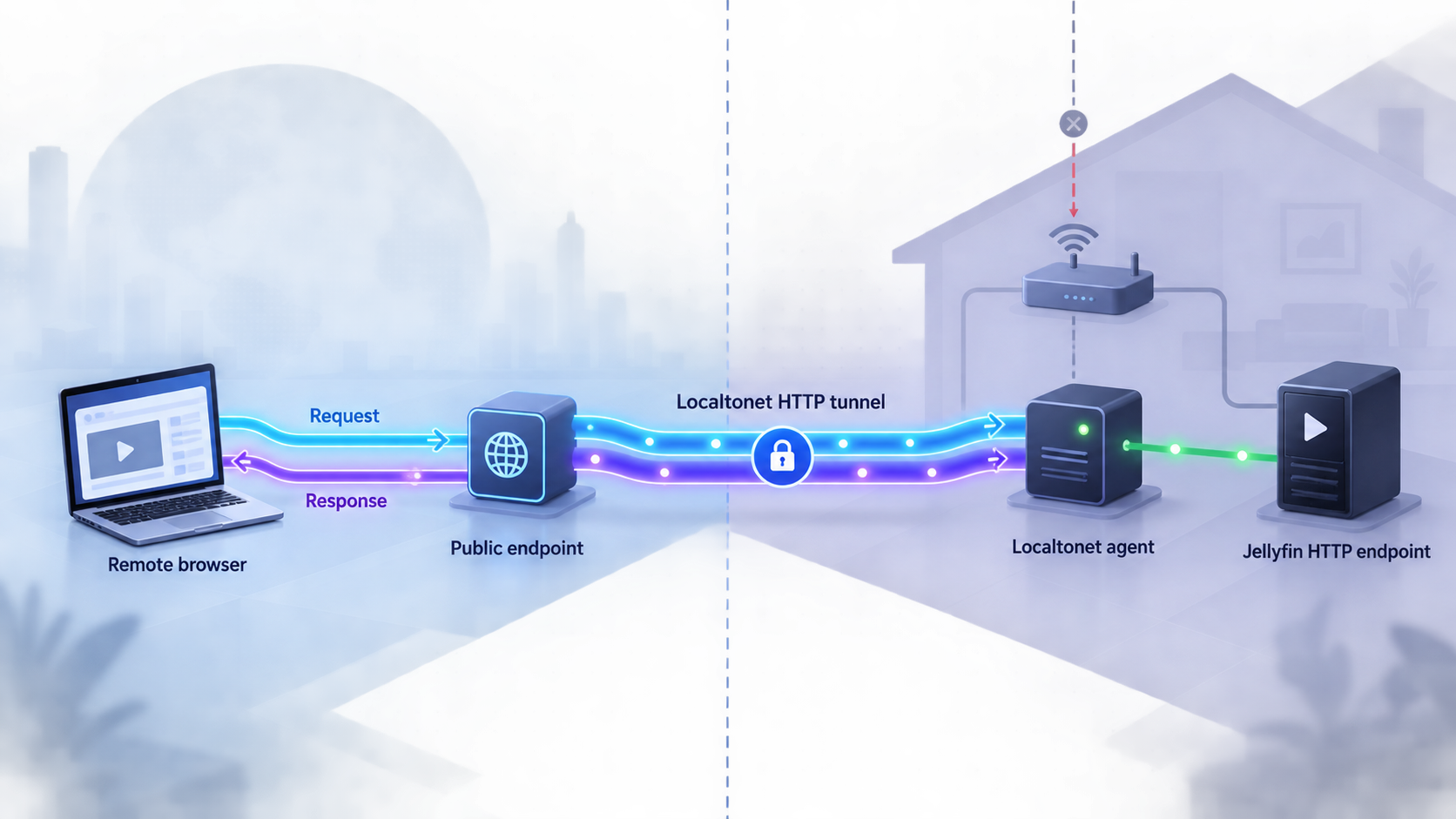
Add remote access after Jellyfin, WhisperSubs, and the intended processing path work locally. Identify the exact Jellyfin HTTP address and port reachable from the Localtonet client device. Do not assume a default port because native installations, containers, reverse proxies, and administrator settings can differ.
Our client establishes an outbound connection to a Localtonet relay server. This provides public reachability without inbound router port forwarding, firewall changes, VPN setup, or a public IP address. The tunnel remains available only while the selected client is connected and the tunnel is running.
Install and run the Localtonet client
Install our client on the Jellyfin host or another device that can reach Jellyfin's configured HTTP listener.
Select the client device
Select the device-specific authentication token for the client that will run the tunnel. Keep the token private and exclude it from screenshots, logs, and shared configuration.
Select an available relay server
Choose a server or region currently available in the dashboard. Obtain current server codes from the product rather than copying a hardcoded example.
Create an HTTP tunnel to Jellyfin
Enter the real Jellyfin IP address or hostname and HTTP port as the local target. HTTP tunnels can use a random subdomain, a custom subdomain where supported, or a custom domain.
Start the tunnel
Creating a tunnel does not start it. Select Start, wait for the client and tunnel to report a connected state, and copy the assigned public HTTPS address.
Test from an external network
Open the public URL from a device that is not using the Jellyfin LAN. Confirm that it presents the expected Jellyfin sign-in page and test with a least-privileged authorized account.
If the Localtonet client runs in a container or on another device, 127.0.0.1 refers to that environment, not automatically to the Jellyfin host. Test the local target from the client device before creating the tunnel.
Current dashboard options are authoritative for relay servers, regions, process types, and account-specific availability. Follow current DNS guidance when using a custom domain. See our HTTP tunnel documentation for the maintained product workflow.
A public HTTPS URL is reachability, not authorization. Require strong Jellyfin credentials, remove unused accounts, restrict administrator access, review user permissions, and keep Jellyfin and its plugins updated. Stop or delete the tunnel when public access is no longer required.
Routine operation and troubleshooting
Monitor scheduling and queues
Current upstream documentation states that the scheduled task runs daily at 2:00 AM and on startup by default. A persistent skip cache prevents repeat runs from probing unchanged items. Treat these as version-sensitive defaults and confirm them in the installed release before planning maintenance windows.
Manual user requests take priority over the background sweep. Non-administrator users can request subtitles from an item menu only after an administrator enables that ability. Consider server and worker capacity before enabling requests broadly.
Real-time progress shows the current item, processing phase, file progress, and queue depth. Worker status and queue diagnostics help distinguish a slow job from a worker that is unavailable or unauthenticated. The upstream WhisperSubs diagnostics guide describes the maintained status and queue checks and the information needed for a useful bug report.
Diagnose common failures
| Symptom | Likely boundary | What to check |
|---|---|---|
| Plugin absent from the catalog | Repository configuration | Check the complete manifest URL and Jellyfin's ability to retrieve repository metadata. |
| Plugin installed but settings are absent | Restart or compatibility | Restart the Jellyfin process and confirm Jellyfin 10.11.0 or later. |
| Whisper variants are empty on macOS or Windows | Expected platform behavior | Install whisper-cli manually and configure its absolute path. Model downloads remain available. |
| whisper-cli exits with code 132 | Binary compatibility | Choose a build compatible with the CPU and acceleration environment. |
| Audio extraction fails | FFmpeg or media access | Confirm that Jellyfin can execute FFmpeg and read the source media. |
| No subtitle file is written | Filesystem access | Check free space, write permission, mount mode, and the path visible to Jellyfin. |
| Subtitle exists but is absent in Jellyfin | Naming or metadata | Check the filename template, language marker, label, and metadata refresh. |
| Worker container exits immediately | Configuration or runtime | Inspect startup logs, required settings, model access, image compatibility, and architecture support. |
| Worker status rejects the request | API-key authentication | Confirm that Jellyfin and the worker use the same key without exposing it in logs. |
| Worker works locally but Jellyfin cannot reach it | Network boundary | Check bind address, firewall policy, container network, DNS, and published service port. |
| GPU is absent inside the worker | Device passthrough | Confirm compatible drivers, container GPU support, device mapping, and runtime visibility. |
| Canary target languages are unavailable | Processing implementation or source language | Confirm English source audio and a configured CrispASR server or worker rather than an ordinary Whisper-only worker. |
| Public URL fails while local Jellyfin works | Localtonet target or lifecycle | Confirm the client is connected, the tunnel is started, and the local Jellyfin address is reachable from the client. |
Troubleshoot worker containers methodically
Begin with the worker service itself. Confirm that the container stays running and that its logs show successful engine and model initialization. If it exits, resolve the startup error before testing from Jellyfin.
Next, test the documented authenticated status diagnostic from the worker host. Then test from the Jellyfin network context. If the first succeeds and the second fails, the problem is networking rather than transcription. Check bind interfaces, container networks, firewall rules, hostnames, and port publication.
If status works but jobs remain queued, inspect worker eligibility, engine type, model state, queue diagnostics, and the requested mode. A normal Whisper worker should not be assumed to handle a CrispASR Canary request. Confirm that WhisperSubs assigned the job and that worker logs show receipt.
For GPU failures, verify visibility outside WhisperSubs first. A worker cannot use a device that its runtime does not expose. Confirm compatible host drivers, container-runtime support, device passthrough, and a worker build matching the chosen CUDA, Vulkan, or ROCm path.
Maintain a clear privacy boundary
Processing on the Jellyfin server and self-hosted workers can remain on hardware you control. That boundary changes when you configure a hosted provider or a worker outside your controlled environment. Document which destination receives audio or media-derived data, protect provider credentials, and remove integrations that are no longer used.
Localtonet controls reachability to Jellyfin, not WhisperSubs authorization. You can stop the tunnel without uninstalling Jellyfin or stopping workers. When the remote-access configuration is no longer needed, delete the tunnel and retain only the application and worker components required by your local deployment.
Frequently asked questions
Does WhisperSubs require a worker?
No. WhisperSubs runs transcription on the Jellyfin server by default. Add a self-hosted worker when another machine offers useful processing capacity or when you want to isolate the workload.
Is a self-hosted worker the same as Groq, OpenAI, or OpenRouter?
No. A self-hosted worker runs the supported worker service on hardware you operate. Groq, OpenAI, and OpenRouter are optional hosted backends that must be configured separately and process data outside the local worker pool.
How do I prove that a particular worker processed a job?
Correlate the worker identifier, WhisperSubs queue transition, worker activity or logs, completion state, and generated subtitle. The appearance of a subtitle alone is insufficient because the Jellyfin server or another worker may have processed it.
Can WhisperSubs translate into languages other than English?
Yes, with an important limitation. Whisper translation still converts non-English audio to English. Experimental NVIDIA Canary processing through CrispASR can translate English audio, including an English dub, into 24 supported European languages. An administrator can also translate one title without enabling a library-wide language list.
Is a CrispASR worker the same as a regular Whisper worker?
No. CrispASR provides the experimental Canary processing path for English audio and additional European target languages. Do not assume that an ordinary Whisper worker can process Canary jobs.
Can WhisperSubs download all optional binaries from settings?
The whisper-cli download is available through settings on Linux, while macOS and Windows require a manual whisper-cli installation. Model downloads work on all three platforms. The optional BSRoformer.cpp binary is currently downloadable from settings on Linux, macOS, and Windows.
Should I expose the worker through the Jellyfin Localtonet tunnel?
No. The HTTP tunnel in this workflow points to Jellyfin's configured HTTP listener. Keep the worker endpoint on a private or controlled network and protect it with the documented API-key authentication.
What Jellyfin port should I enter in Localtonet?
Enter the port used by the actual Jellyfin HTTP listener reachable from the Localtonet client. Do not assume a default. Test the complete local address from the client device first.
Does creating a Localtonet tunnel start it automatically?
No. Creating the tunnel saves its configuration. You must select Start, and the selected Localtonet client must remain connected. You can later stop the tunnel or delete it.
Publish your verified Jellyfin setup with Localtonet
After local processing and any self-hosted workers pass status, queue, dispatch, and playback checks, use our HTTP tunnel to make the configured Jellyfin interface available to authorized users without exposing the worker API.
Get Started Free →

