

Build and verify a VirusTotal MCP service locally, then prepare a protected HTTP listener for controlled remote access
The mcp-virustotal project gives MCP-compatible AI clients access to VirusTotal reports, relationships, searches, behavior summaries, and collections. This guide covers prerequisites, source and Docker installation, HTTP streaming configuration, local verification, routine operation, and troubleshooting. It also explains the security gate that must be completed before starting a Localtonet tunnel. Because mcp-virustotal has no built-in HTTP authentication and the available project evidence does not establish a tested authentication proxy and compatible remote client combination, this guide does not publish port 3000 directly.
📋 What's in this guide
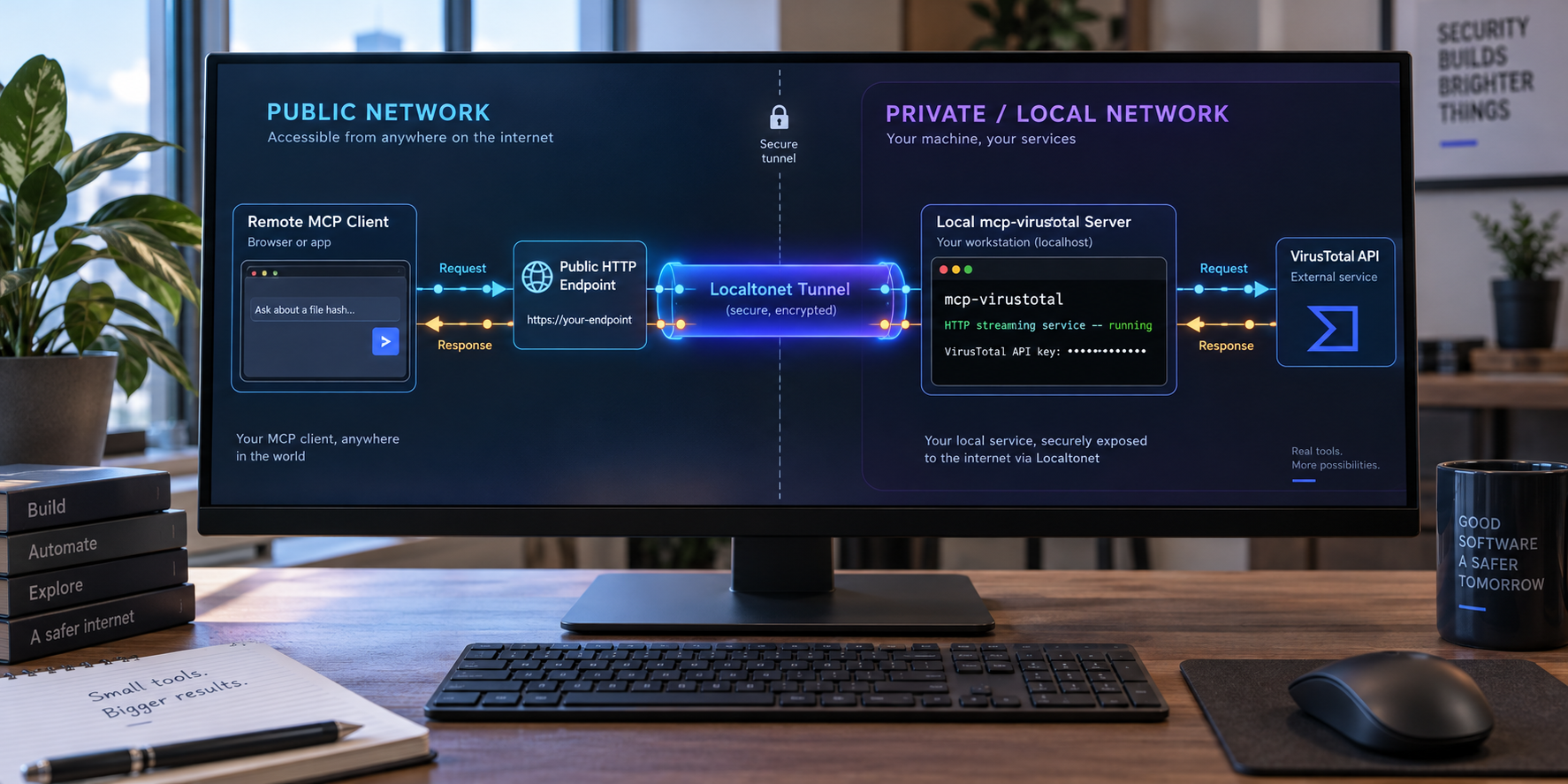
What mcp-virustotal does
mcp-virustotal is an independent Model Context Protocol server that connects AI agents to the VirusTotal v3 API. It is not affiliated with VirusTotal or Google, and it requires a VirusTotal API key supplied by the operator. An MCP client sends a structured tool request to the server, the server validates the arguments, makes the relevant VirusTotal API request, and returns a formatted result.
The project supports two transports. The default is stdio, which is suitable when a desktop or command-line MCP client launches the server as a local child process. The second is httpStream, which runs mcp-virustotal as a standalone HTTP streaming service. This guide focuses on HTTP streaming because it is the transport relevant to an HTTP tunnel.
The documented default HTTP port is 3000. The MCP endpoint is /mcp, and the health-check route is /health. A default local installation therefore provides the MCP endpoint at http://localhost:3000/mcp and the health check at http://localhost:3000/health.
The 11 documented tools
| Tool group | Documented tools | Purpose |
|---|---|---|
| Reports | get_file_report, get_url_report, get_ip_report, get_domain_report |
Retrieve primary reports and relevant relationships for common indicator types. |
| Relationship paging | get_file_relationship, get_url_relationship, get_ip_relationship, get_domain_relationship |
Continue through supported relationships using cursor pagination. |
| Search and pivot | search_vt, get_file_behaviour_summary, get_collection |
Search the corpus, inspect sandbox behavior, and retrieve collection information. |
One operational detail is especially important for URL investigations. The documented get_url_report behavior checks for a cached VirusTotal report first. If no cached result exists, it submits the URL for analysis. Operators should account for that behavior when handling confidential, internal, pre-release, or otherwise sensitive URLs.
Starting mcp-virustotal without changing its transport uses stdio. Set MCP_TRANSPORT=httpStream to run the HTTP service described here. Installing the package alone does not create a listening HTTP endpoint.
Prerequisites and deployment plan
Complete the service installation and local verification before configuring remote reachability. This order separates application failures from tunnel failures. If /health does not respond locally, a tunnel cannot repair the process, build, configuration, or API key.
Required software and credentials
- Node.js 20 or newer for the source installation path.
- A VirusTotal API key obtained from your VirusTotal account.
- Git and npm if you will clone and build the source repository.
- Docker if you prefer the documented container workflow.
- A Localtonet account and client for the later connectivity stage.
- An MCP client that supports the project's HTTP streaming transport for HTTP-based use.
- A separately documented authentication layer and compatible credential-capable MCP client before any public deployment.
The project requires Node.js 20 or newer and reports continuous integration testing on Node.js 20, 22, and 24. The evidence does not establish a complete operating-system or processor support matrix, so verify compatibility in your own environment.
Choose an installation path
| Path | Best suited to | Important characteristic |
|---|---|---|
| Source build | Development, inspection, testing, and repository-based operation | Uses npm ci followed by the project's build and unit-test command. |
| Docker image | Operators who prefer an isolated container and explicit port publication | The documented command publishes container port 3000 only on host loopback. |
| npx with stdio | Clients that launch a local MCP child process | This is a local quickstart path, not the standalone HTTP service used by an HTTP tunnel. |
Understand the required network boundaries
Port 3000 is the restricted upstream service in this design. Keep it on loopback when mcp-virustotal and the next local component run on the same host. A separate authenticating HTTP component must listen on another local address or port and forward authorized MCP traffic to 127.0.0.1:3000. Localtonet must target that protected listener, not port 3000.
The upstream project recommends keeping the HTTP port on localhost or placing it behind an authenticating reverse proxy. However, the supplied evidence does not identify a tested proxy configuration, authentication protocol, credential format, or remote MCP client that is confirmed to preserve this project's streaming behavior.
The available evidence is sufficient to install and verify mcp-virustotal locally, but not to provide a tested end-to-end authentication implementation. Do not start a Localtonet tunnel to 127.0.0.1:3000. Resume the public deployment only after you have independently selected and tested an authenticating listener that your MCP client can use.
Install mcp-virustotal
The project documents source and Docker workflows. Select one. The complete source, release files, security policy, and issue history are available in the mcp-virustotal repository.
Option 1: clone, install, build, and test from source
git clone https://github.com/w0h1v/mcp-virustotal
cd mcp-virustotal
npm ci
npm test
The project states that npm test performs the build and unit tests without requiring a VirusTotal API key or network access. A successful run validates the build and local test suite before credentials or live API requests are introduced.
Do not proceed to startup if dependency installation, compilation, or tests fail. Verify that Node.js is version 20 or newer and resolve the reported local error. The runtime command expects the compiled build/index.js file to exist.
Option 2: build the Docker image
From the cloned repository directory containing the Dockerfile, build the image with the documented tag:
docker build -t mcp-virustotal .Building the image does not start the service. It prepares a local image that can be launched with the required environment variables and loopback-only host mapping.
When the npx quickstart is appropriate
The published npm package can be launched through npx for stdio integrations. The project documents quickstart commands for Claude Code, Codex CLI, and Gemini CLI. Those commands are useful when the AI client launches the MCP process locally, but they do not create the standalone HTTP listener required for an HTTP tunnel.
If you only need a local desktop integration, stdio is simpler and avoids a network listener. Continue with httpStream only when your client specifically supports a separately running HTTP streaming MCP service.
Configure and start HTTP streaming locally
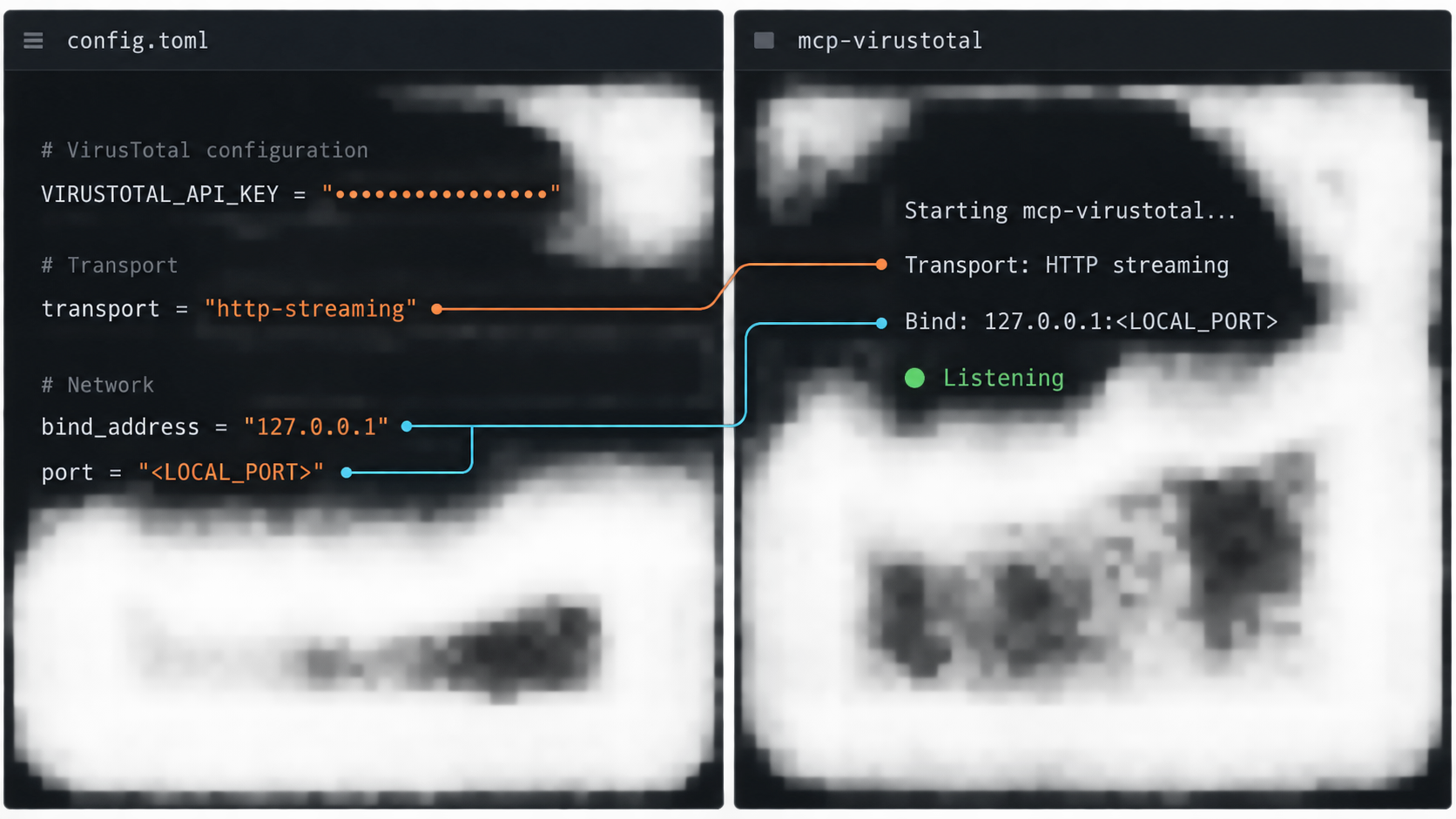
mcp-virustotal reads its runtime configuration from environment variables. The VirusTotal API key is required. HTTP-specific variables select the transport, bind address, port, and MCP path.
| Variable | Documented default | Meaning |
|---|---|---|
VIRUSTOTAL_API_KEY |
Required, no default | Your VirusTotal API key. |
MCP_TRANSPORT |
stdio |
Set to httpStream for the standalone HTTP service. |
MCP_HOST |
localhost |
Bind address in HTTP streaming mode. The Docker image sets it to 0.0.0.0 inside the container. |
MCP_PORT |
3000 |
Listening port used by the HTTP service. |
MCP_ENDPOINT |
/mcp |
Path used for MCP HTTP streaming requests. |
Start the source build
After npm test succeeds, start HTTP streaming with the documented variables:
MCP_TRANSPORT=httpStream MCP_PORT=3000 VIRUSTOTAL_API_KEY=your-key node build/index.js
Replace your-key with the real key at runtime. This is the project's documented shell form. Environment-variable syntax varies between shells and operating systems, so use the equivalent supported by your environment.
The source process uses localhost by default. Keep that setting for local testing. Do not change the bind address to 0.0.0.0 merely to prepare for tunneling. A local authentication component can reach the loopback upstream without exposing it to the LAN.
Start the Docker container
The documented Docker command publishes the container's port 3000 only on the host loopback address:
docker run -p 127.0.0.1:3000:3000 -e VIRUSTOTAL_API_KEY=your-key -e MCP_TRANSPORT=httpStream mcp-virustotal
This maps the application inside the container to 127.0.0.1:3000 on the Docker host. A local authentication component running on that host can use the mapped address as its upstream.
If Docker and the future authentication layer run on different devices, loopback will not cross that device boundary. Design and secure the private network path deliberately. Do not replace loopback with an unrestricted bind address without evaluating who can reach the resulting listener.
Do not place the key in screenshots, support messages, public repositories, tunnel URLs, or shared MCP client configurations. The server reads it from the environment and sends it to VirusTotal. Use the secret-management facilities available in your runtime where practical.
Verify mcp-virustotal locally
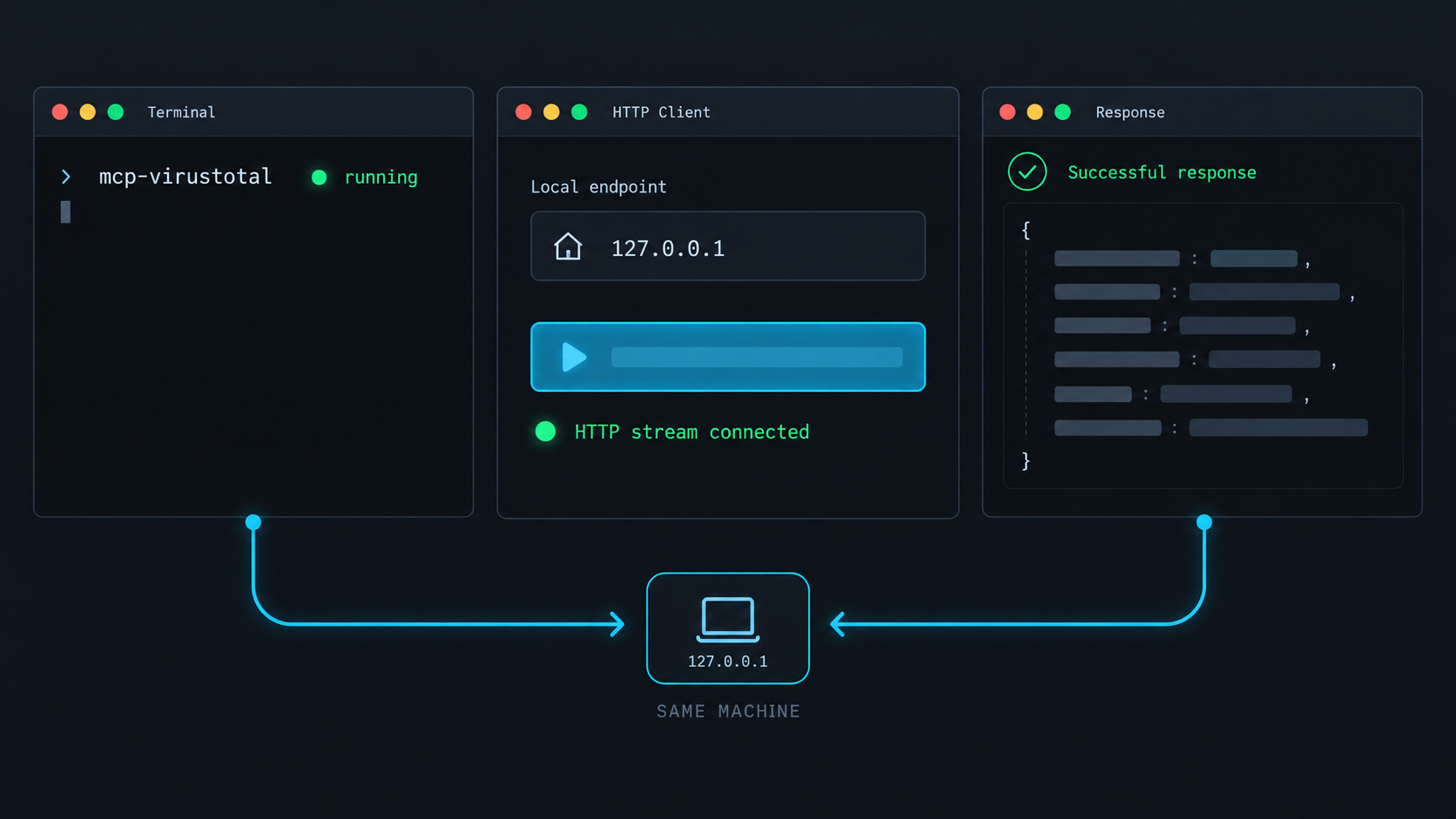
Verify the service from the process outward. First confirm that it remains running. Then test the documented health route. Finally, use an HTTP streaming compatible MCP client to perform a controlled protocol request.
Confirm the process remains active
Keep the source process or Docker container running and inspect its output for startup failures. Resolve any immediate exit before testing a URL.
Request the health route
Request http://localhost:3000/health. The evidence establishes the route but not a fixed response schema, so verify successful reachability without depending on an invented JSON body.
Configure the local MCP endpoint
Use http://localhost:3000/mcp in a client that supports the project's HTTP streaming transport. Opening this path in a browser is not a complete MCP protocol test.
Complete a controlled tool request
Invoke an appropriate report operation using a known, non-sensitive indicator. Confirm that the client receives a protocol response and account for your VirusTotal quota.
curl http://localhost:3000/healthA reachable health route proves that an HTTP server answers at the address. It does not prove that the VirusTotal key is valid, that quota is available, or that the MCP client negotiated the streaming transport correctly. Only a real MCP operation verifies the application path.
- If nothing answers on port 3000, inspect startup, binding, port conflicts, and container state.
- If
/healthworks but the client cannot connect, check the full/mcppath and client transport support. - If the client connects but a VirusTotal operation fails, inspect the API key, quota, arguments, and application log.
Complete the authentication gate before tunneling
The mcp-virustotal HTTP transport has no authentication. Localhost binding restricts ordinary network access while the service remains local, but a tunnel would intentionally create another route to it. HTTPS protects traffic in transit to the public tunnel endpoint, but it does not by itself identify or authorize an MCP user.
A safe public topology needs three distinct endpoints:
- Restricted upstream: mcp-virustotal remains on
127.0.0.1:3000. - Protected local listener: an authentication-capable HTTP component accepts credentials and forwards only authorized MCP traffic to the upstream.
- Public endpoint: Localtonet forwards the assigned public HTTPS address to the protected listener.
The protected listener must preserve the HTTP behavior required by the streaming MCP transport. It must not buffer, rewrite, redirect, or terminate the protocol in a way that breaks the MCP session. The selected MCP client must be able to send the credential format required by that listener, such as a supported authorization header or another explicitly documented mechanism.
The upstream documentation requires an authenticating reverse proxy but does not provide a tested configuration. It also does not establish which remote MCP client should be used, how that client supplies credentials, or which proxy settings preserve the stream. Providing a proxy file, credential header, or listener port here would require guessing. For that reason, this article cannot safely complete the internet-exposure procedure.
Required acceptance tests for a selected authentication layer
Do not treat a browser login page or successful health request as sufficient. Before configuring Localtonet, test all of the following against the protected listener on the local machine:
- Keep
127.0.0.1:3000inaccessible to other devices and use it only as the proxy upstream. - Send a request to the protected MCP endpoint without credentials.
- Confirm that the authentication layer rejects the request and does not forward it to mcp-virustotal.
- Configure the intended MCP client with the protected local URL and the supported credential mechanism.
- Complete a real MCP protocol session through the protected listener.
- Invoke a controlled, non-sensitive report tool and confirm that the response reaches the client.
- Confirm that streaming remains stable for the duration of the protocol exchange.
- Repeat the unauthenticated test after configuration changes to ensure that no fallback route bypasses authentication.
An HTTP rejection commonly uses a 401 or 403 status, but the exact response depends on the selected authentication product. The essential requirement is that an unauthenticated request cannot reach the MCP application. Do not rely on secrecy of the public URL as access control.
Client compatibility requirements
The remote client must support more than a generic URL field. It must support the same HTTP streaming transport as the server, preserve the MCP protocol exchange, and send the credentials required by the authentication layer. If the client only supports stdio, cannot attach the required authorization information, or does not work through the proxy's streaming behavior, it is not compatible with this public architecture.
Client configuration formats are not interchangeable. The available evidence does not establish a universal JSON block for Claude, Codex, Gemini, VS Code, or other clients in authenticated remote HTTP mode. Use the selected client's current documentation and test the exact version you intend to deploy.
Prepare Localtonet for the protected listener
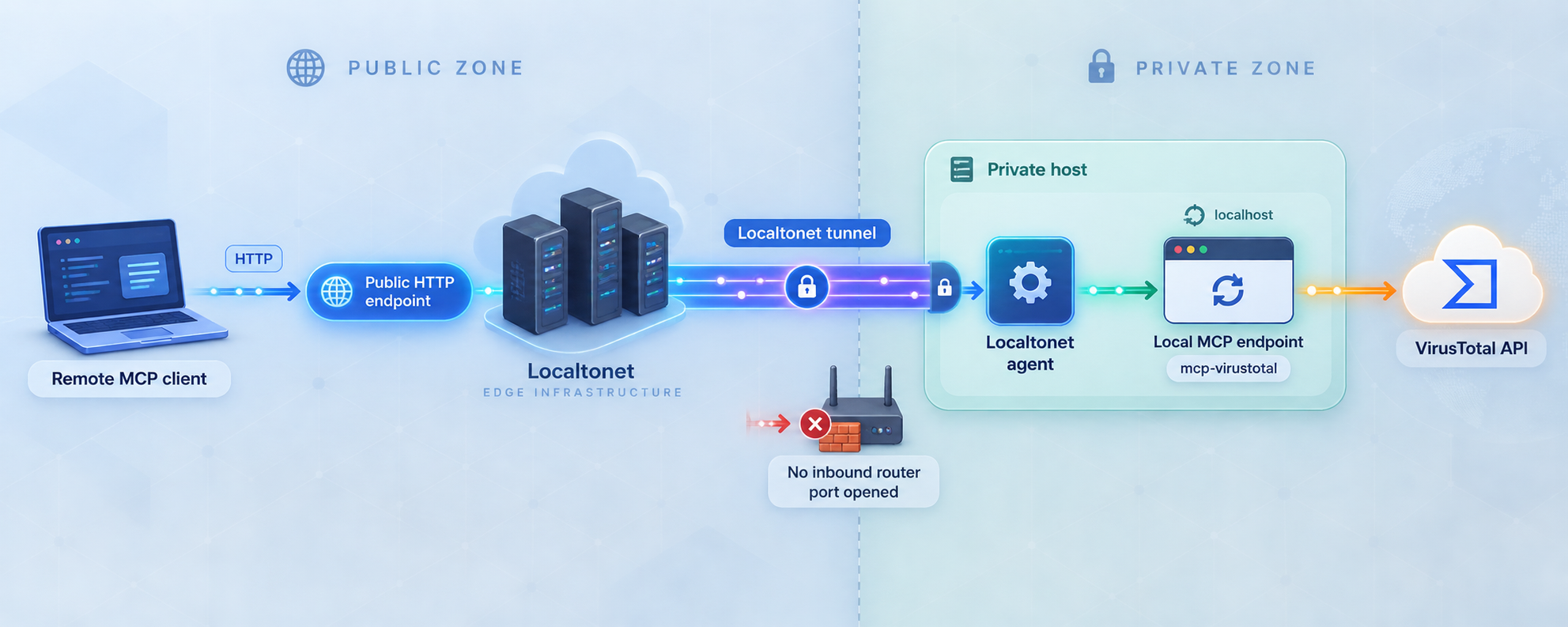
Our client establishes an outbound connection to a Localtonet relay server. This allows a local HTTP service to receive traffic through a public URL without inbound router port forwarding, a public IP address, VPN setup, or inbound firewall changes. The tunnel remains available only while the selected client is connected and the tunnel is running.
For this application, the local target must be the authentication-protected listener you tested in the previous section. It must not be 127.0.0.1:3000. The protected listener's actual address and port depend on the authentication system you select, and no verified value is available in the supplied evidence.
Review the current Localtonet HTTP tunnel documentation alongside the workflow below. Current server choices and available process types must be taken from your dashboard rather than copied from an old tutorial.
Install and run the Localtonet client
Install our client on the device that can reach the tested protected listener. Keep it running while the tunnel is needed.
Authenticate or select the client device
Use the device-specific authentication token or select the connected device in the dashboard. Treat the token as a credential and never publish or guess it.
Select an available relay server
Choose a server or region currently available in the dashboard. Availability can vary, so do not hardcode a server code from another deployment.
Create the HTTP tunnel configuration
Select an HTTP tunnel and enter the IP address and port of the tested protected listener. Do not enter port 3000. Select the appropriate available process type, such as Random Sub Domain, Custom Sub Domain, or Custom Domain.
Start only after the security tests pass
Creating a tunnel does not start it. Press Start only after anonymous requests are rejected locally and the credential-capable MCP client has completed a real tool request through the protected listener.
Repeat both tests through the public address
Verify that an unauthenticated public request is rejected. Then configure the approved MCP client with the assigned public /mcp URL and its supported credentials, and complete a real MCP tool call. Stop the tunnel immediately if anonymous traffic reaches the application or streaming fails.
Saving the configuration does not make it active. The selected device must remain connected, the tunnel must be started, the authentication layer must remain available, and mcp-virustotal must continue listening on its restricted upstream port.
HTTP tunnels may use a generated subdomain, a selected subdomain where supported, or a custom domain. Check current dashboard and documentation requirements before changing DNS records. Do not put a VirusTotal key, Localtonet device token, or authentication credential in the public URL.
Public verification checklist
- The assigned public URL resolves only while the Localtonet client and tunnel are running.
- An unauthenticated request to the protected public MCP route is rejected.
- The intended client can attach the required credentials.
- The authorized client completes an MCP protocol request through the public route.
- A controlled report tool returns a result without exposing credentials in logs or URLs.
- Streaming remains functional through both the authentication layer and tunnel.
- The Localtonet tunnel targets the protected listener, never the upstream port 3000.
Routine operation and maintenance
Use a predictable startup order
- Start mcp-virustotal in HTTP streaming mode.
- Confirm
http://localhost:3000/health. - Start the selected authentication layer.
- Verify that an anonymous request is rejected by the protected listener.
- Complete an authorized MCP tool request through that listener.
- Start the Localtonet client on the device that can reach it.
- Start the saved HTTP tunnel.
- Repeat anonymous rejection and authorized MCP protocol tests through the public address.
A process supervisor or container restart policy may be appropriate for a long-running deployment, but the upstream evidence does not prescribe one. Ensure that your chosen operational tooling supplies required environment variables without exposing the VirusTotal API key.
Stop access safely
Stop the Localtonet tunnel when public reachability is no longer required. If the service is also unnecessary, stop the authentication component and the Node.js process or Docker container. Deleting a tunnel removes its saved configuration, while stopping it is appropriate for temporary suspension.
Keep dependent settings aligned
If you change MCP_PORT, update the application, Docker port publication if used, and the authentication layer's upstream. The Localtonet target remains the protected listener and should not be changed to the new upstream port. If you change MCP_ENDPOINT, update the proxy route and MCP client URL. The evidence establishes /health as the health route but does not document a variable for changing it.
Logs and real-API testing
The documented log location is logs/mcp-virustotal-server.log in the package directory. In a container, persistence depends on your storage configuration. Determine whether logs survive container replacement before relying on them for operational history.
Developers can run the documented real-API smoke test:
VIRUSTOTAL_API_KEY=your-key npm run smokeThis invokes all 11 tools. The project paces calls at 20 seconds for the documented public-tier rate limit and warns that the smoke test is unsuitable for free tiers reduced to only a few lookups per day. It is not required merely to verify that the HTTP server is listening.
Quota and indicator sensitivity
The project documents four requests per minute for the VirusTotal public tier. Actual account limits may differ and can change, so use your current VirusTotal account information as authoritative. Relationship paging and multi-step workflows can generate multiple API calls.
Review indicators before submitting them. Hashes, domains, IP addresses, and URLs may reveal investigative interests or internal infrastructure. A cache miss for get_url_report can submit the URL for analysis. Do not use a confidential internal URL as a connectivity test.
Troubleshooting the service, security layer, and tunnel
The process starts in stdio mode
Confirm that MCP_TRANSPORT is exactly httpStream. The default is stdio. If the variable is missing, misspelled, or unavailable to the process, a standalone HTTP listener should not be expected.
Nothing responds on localhost port 3000
Verify that the process remains active and that the configured port matches the tested URL. For a source build, confirm that build/index.js exists after testing. For Docker, confirm that the container is running and that the documented publication is 127.0.0.1:3000:3000.
If another process uses port 3000, choose an available port through MCP_PORT and update the Docker mapping or authentication upstream consistently. Verify availability locally rather than copying an arbitrary port.
The health route works, but the MCP client does not
Confirm that the client supports HTTP streaming and uses the full /mcp path. A health response establishes basic HTTP reachability, not MCP compatibility. When an authentication layer is present, also confirm that the client sends the expected credentials and that the proxy preserves streaming behavior.
Unauthenticated requests reach mcp-virustotal
Stop the Localtonet tunnel immediately. Verify that its local target is the protected listener rather than port 3000. Inspect the authentication layer for unprotected routes, fallback upstreams, path exclusions, or credential checks that apply only to browser traffic. Do not restart public access until the anonymous request is rejected and confirmed not to reach the upstream.
Authorized requests receive 401 or 403 responses
Check that the selected MCP client supports the authentication method and sends credentials on every required request in the protocol exchange. A credential accepted by a browser does not prove that the MCP client can use it. Consult the selected authentication product and client documentation because the upstream project does not define this integration.
Authentication succeeds, but streaming fails
Test the same client directly against the protected local listener. If it also fails locally, inspect the authentication layer's streaming, buffering, timeout, redirect, and header behavior. If it succeeds locally but fails publicly, inspect the tunnel state and public URL while keeping the protected target unchanged.
The VirusTotal key is rejected
The project notes that a VirusTotal API key is usually 64 characters and should contain no spaces or surrounding quotes. Recheck the value and restart the process after changing it. Never post the key while requesting support.
VirusTotal returns HTTP 429
A 429 response indicates rate limiting. The project documents four requests per minute for the public tier. Reduce request frequency, avoid unnecessary repeated pivots, and wait for the applicable quota window. Confirm actual limits through your VirusTotal account.
Local protected access works, but the public route fails
- Confirm that mcp-virustotal is running.
- Confirm that the protected listener works from the Localtonet client device.
- Confirm that the correct Localtonet device is connected.
- Confirm that the HTTP tunnel targets the protected listener, not port 3000.
- Confirm that the tunnel was started rather than only created.
- Use the current public address assigned to the tunnel.
The public route works, but a tool call fails
Investigate the MCP endpoint path, client transport support, authentication credentials, VirusTotal key, quota, tool arguments, and application log. Tool arguments are validated with zod schemas before requests are built, so invalid input may be rejected before VirusTotal receives a request.
The endpoint becomes unavailable after a restart
Check every lifecycle dependency. The application, authentication layer, Localtonet client, and tunnel must all be active. A host or container restart may restore one component without restoring the complete chain.
Frequently asked questions
Does mcp-virustotal require Node.js?
The source workflow requires Node.js 20 or newer. The Docker workflow packages the application in an image, although Docker must be available on the host.
What is the default HTTP endpoint?
The documented default port is 3000, the MCP path is /mcp, and the health route is /health. Locally, these are http://localhost:3000/mcp and http://localhost:3000/health.
Can I use the npx quickstart for this HTTP workflow?
The documented npx quickstart uses the default stdio transport. Run the built application or Docker image with MCP_TRANSPORT=httpStream for a standalone HTTP service.
Does the HTTP transport include authentication?
No. The project explicitly states that its HTTP transport has no authentication. Keep it local or place a tested authenticating HTTP layer in front of it.
Does Localtonet automatically add MCP authentication?
Do not assume that an HTTP tunnel adds application-level MCP authentication. Localtonet provides reachability to the configured local target. The target must enforce the authentication and authorization required by your deployment.
Can I point the Localtonet tunnel directly at port 3000?
Not for an internet-accessible deployment. Port 3000 is the unauthenticated upstream in this architecture. Keep it restricted and point Localtonet to a separately tested authentication-protected listener.
Why is there no copy-and-paste authentication proxy configuration here?
The supplied upstream evidence does not provide a tested proxy, credential format, client configuration, or streaming settings for this exact combination. Inventing one could expose the VirusTotal-backed endpoint or break the MCP protocol, so the public workflow remains gated until a supported integration is selected and verified.
How do I prove the protected deployment works?
Verify that a request without credentials is rejected, then use the intended credential-capable MCP client to complete a real protocol request and controlled tool call. Perform both tests locally against the protected listener and again through the public URL.
Must I open port 3000 on my router?
No. Our client establishes an outbound connection to a relay server. Port 3000 should remain restricted to loopback in the same-host design, and the tunnel should target the protected local listener.
Why does a URL lookup have additional privacy implications?
get_url_report checks for a cached report first. If no cached report exists, the server submits the URL for analysis. Avoid confidential or internal URLs unless that submission is acceptable.
Prepare a protected MCP listener before connecting it
Build and verify mcp-virustotal locally, keep port 3000 restricted, and validate an authentication layer with a credential-capable streaming MCP client. After both rejection and authorized protocol tests pass, use our HTTP tunnel workflow to connect the protected listener without inbound router port forwarding.
Get Started Free →

