

Build, test, publish, and operate a private certificate service without opening inbound router ports
This guide deploys Ultimate Certificate Manager, or UCM, in Docker, limits its initial listener to the Docker host, and prepares a private CA for ACME enrollment. It then uses a bounded Certbot and DNS-01 test to exercise account registration, authorization, issuance, certificate inspection, renewal, and revocation. After local validation, we connect UCM to an HTTP/s tunnel with Localtonet and verify that ACME resource URLs continue to use the public hostname. The workflow separates ACME API reachability from UCM's outbound identifier-validation path and includes backup, restore, upgrade, rollback, and recovery procedures for the selected Docker installation.
📋 What's in this guide
Verified version, evidence limits, and tutorial scope
This revision was checked against the supplied UCM project evidence for release v2.235. The GitHub release page identifies v2.235 as the latest release and shows it as released on 26 September, while the UCM website snapshot still labels v2.231, dated 15 September 2026, as the latest release. That difference means the marketing site can lag the repository release feed. Before installation or upgrade, compare the version shown in the running application with the UCM v2.235 release page, the repository changelog, and the current UCM documentation index.
UCM is described by its maintainers as a young, actively developed project. Release v2.234, immediately before v2.235, included security-relevant corrections involving private-key encryption, ACME EAB HMAC keys, ACME account keys, encrypted backup portability, and automatic backup passwords. Those changes are a practical reason to pin and record the tested deployment instead of assuming that every image currently called latest behaves identically.
The public documentation index confirms dedicated CA Management, ACME Server, Backup and Restore, Security, and Upgrade material, but the supplied evidence does not contain the complete page text for those guides or every current UCM form. This article therefore does not invent field names, endpoint paths, backup buttons, proxy settings, or an arbitrary click sequence. Where the exact interface value is installation-generated, the workflow tells you how to capture and test that value. Stop if your v2.235 screen differs materially, and consult UCM's built-in page help before creating production keys.
The bounded topology used here is deliberately narrow:
- UCM runs in one Docker container with a named volume.
- Only container port 8443 is published, and it is bound to host loopback.
- Port 8080 is not published because its current purpose is not established by the supplied primary evidence.
- The Localtonet client runs on the same host and targets
127.0.0.1:8443. - Certbot is the test ACME client. UCM lists Certbot among compatible clients.
- DNS-01 is used for one non-production DNS name in a zone you control.
- The private root is installed only in the test client's dedicated trust path.
This is not a public Web PKI deployment. Certificates issued by your UCM hierarchy are trusted only where you intentionally install the private root. Do not request a certificate for a production name during the initial test, and do not distribute a CA private key to clients.
Understand the two independent network paths
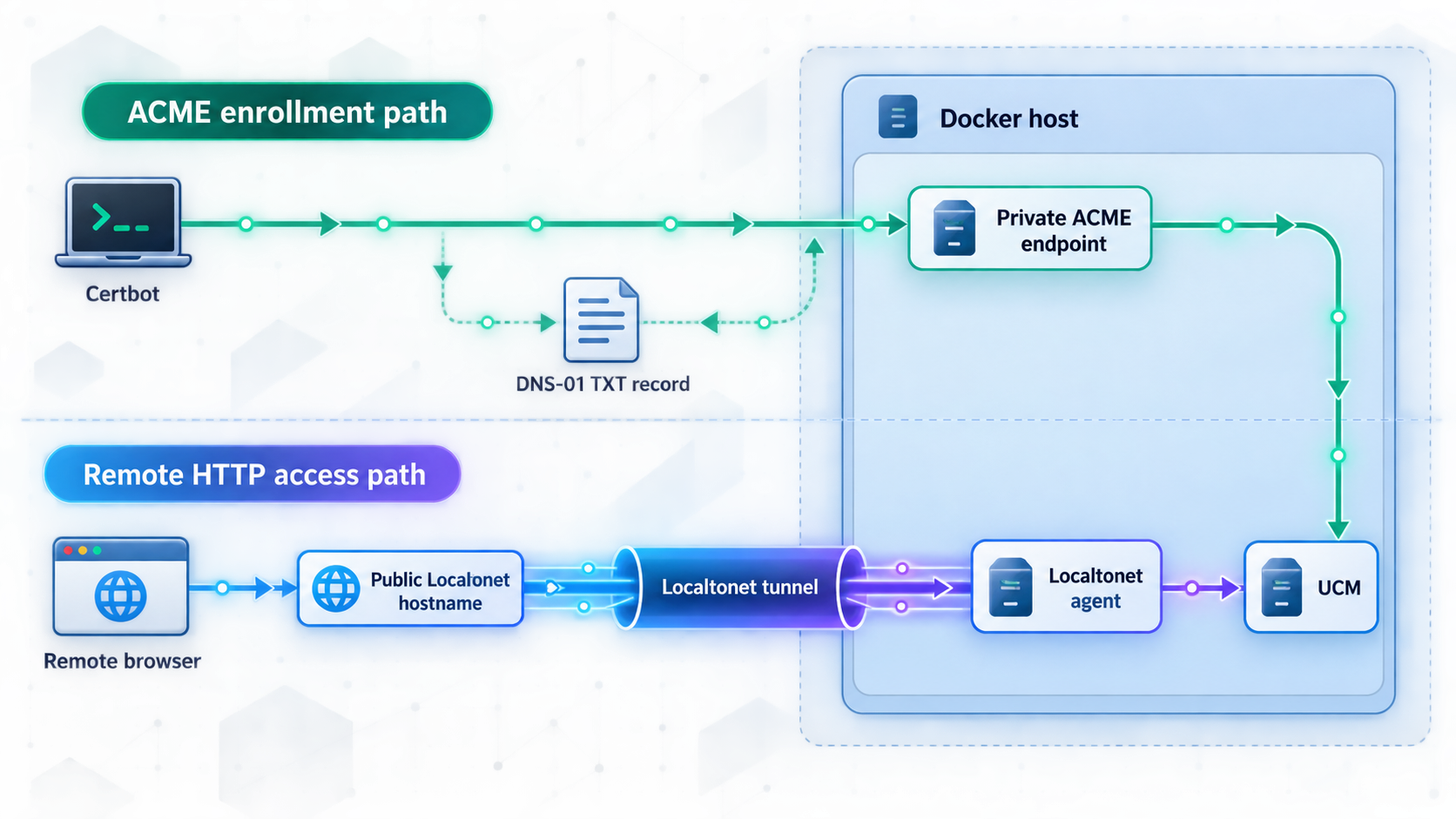
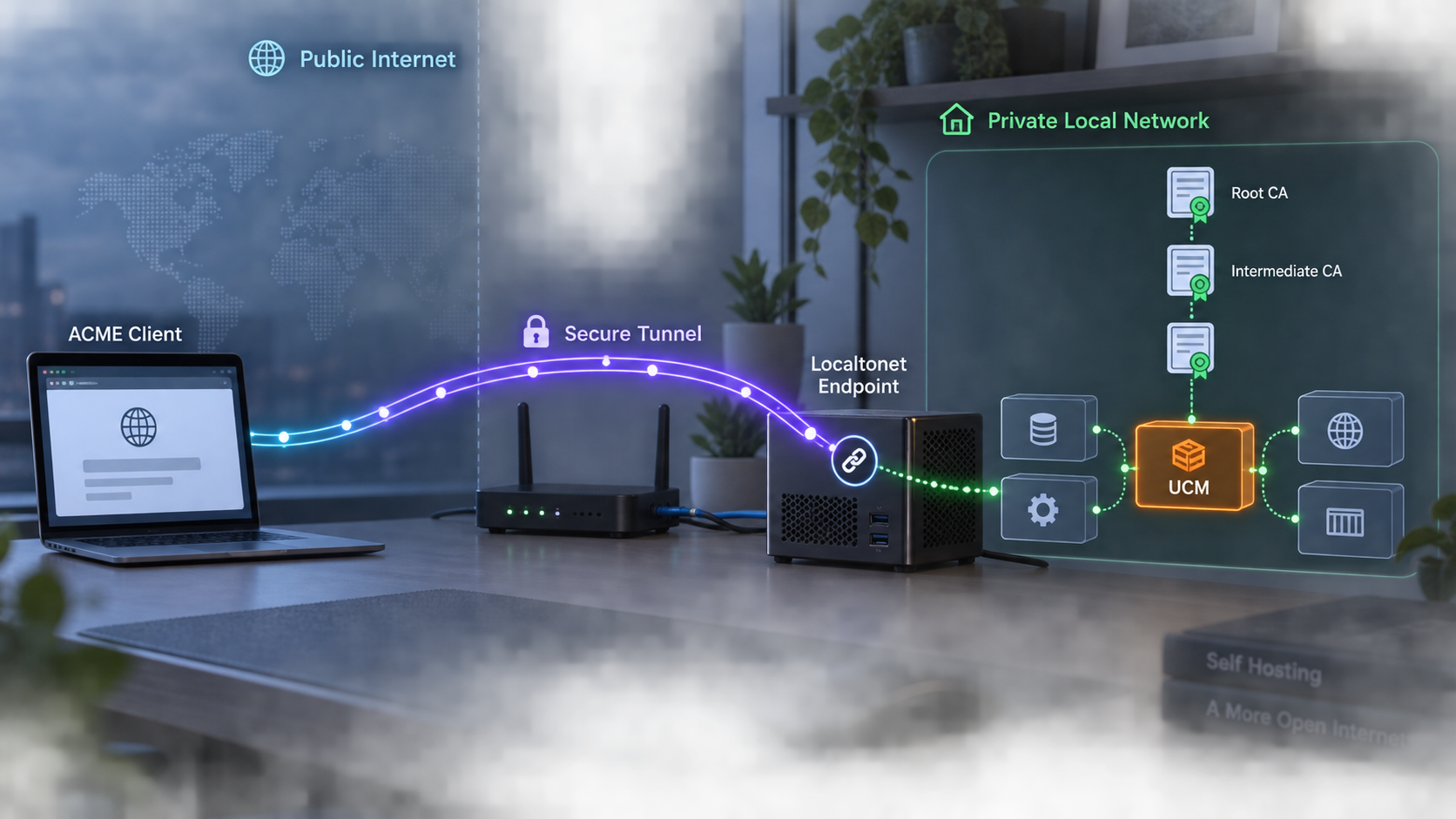
ACME is standardized by RFC 8555. An ACME client retrieves a directory, obtains a replay nonce, creates or locates an account, creates an order, completes one or more identifier authorizations, finalizes a certificate signing request, and downloads the certificate chain. The protocol also defines certificate revocation.
Two traffic paths participate in this process, and they must not be confused:
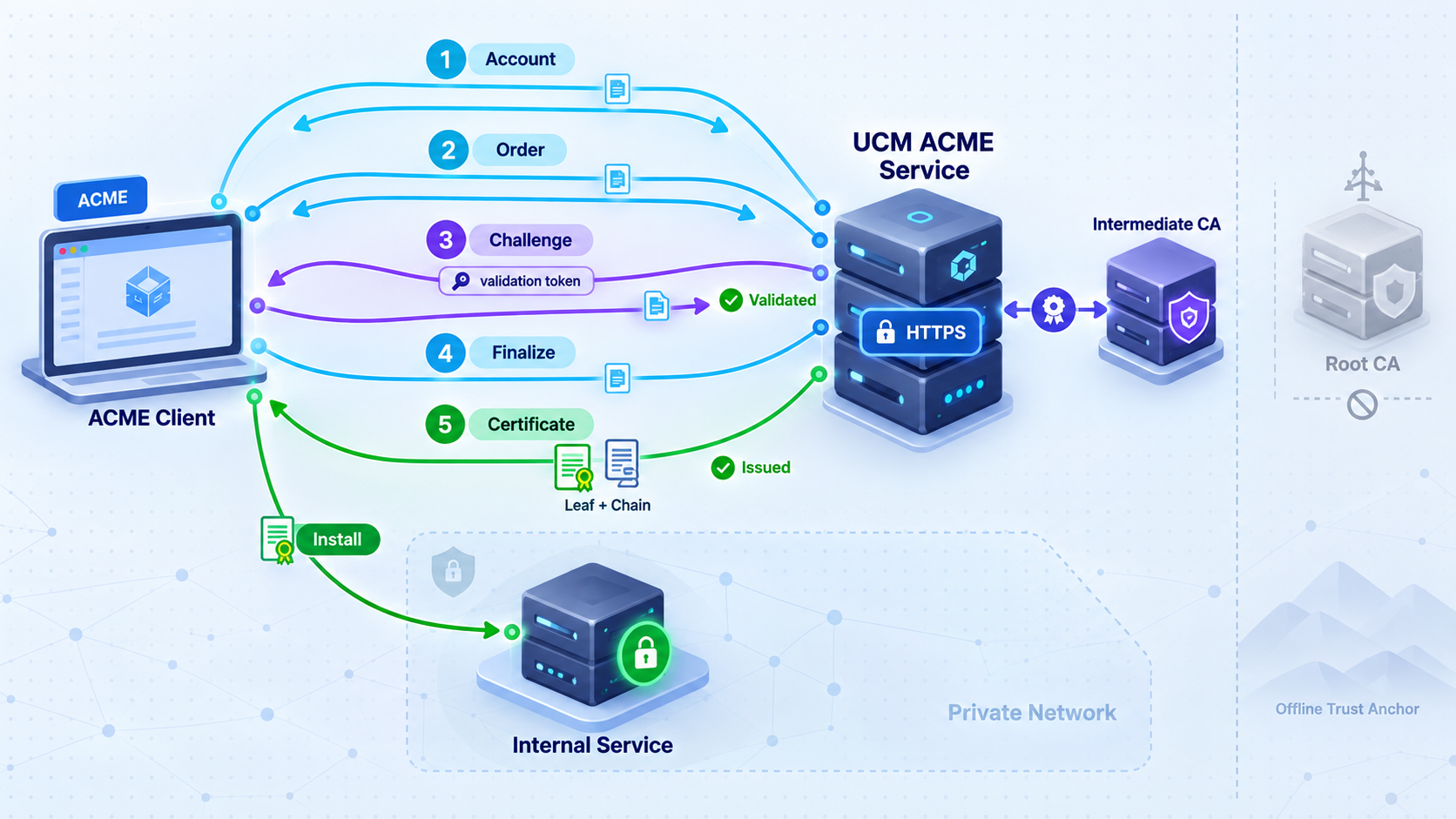
In this tutorial, the API path is Certbot to the Localtonet public URL to UCM on port 8443. The validation path is UCM to the authoritative DNS service for the test zone. When Certbot displays the DNS-01 record, you create that record with your DNS operator, wait until it is visible to the resolver UCM uses, and then allow Certbot to continue.
A valid directory response proves only that the client can reach the first ACME resource. It does not prove that UCM can validate DNS, connect to an HTTP-01 target, perform TLS-ALPN-01 validation, sign with the selected CA, or return resource URLs through the correct public hostname.
Install UCM with a safer Docker binding
UCM's website publishes a Docker quick-start command with -p 8443:8443 and -p 8080:8080. Docker normally publishes an unqualified mapping on host interfaces beyond loopback, subject to Docker and host networking configuration. It should not be described as local-only.
For this topology, publish only the documented HTTPS interface and explicitly bind it to loopback:
docker pull neyslim/ultimate-ca-manager:latest

docker image inspect neyslim/ultimate-ca-manager:latest \
  --format '{{json .RepoDigests}}'

docker run -d --restart=unless-stopped \
  --name ucm \
  -p 127.0.0.1:8443:8443 \
  -v ucm-data:/opt/ucm/data \
  neyslim/ultimate-ca-manager:latest
The first inspection command records the immutable repository digest returned for the pulled image. Keep that digest with the change record. After opening UCM, confirm that the application reports v2.235 before continuing. If latest resolves to another release, do not call the deployment v2.235. Review that release separately or deploy an image tag or digest explicitly documented by the project.
Re-running the same command later can retrieve a different build. Record the image ID, repository digest, application version, deployment date, and UCM release notes. A controlled deployment should use an approved immutable digest after it has been tested. This article does not invent a v2.235 Docker digest because none was supplied in the primary evidence.
Port 8080 is omitted. The UCM website includes it in one longer quick-start command, but the supplied documentation evidence does not establish its current role or show that this ACME deployment needs it. Do not publish it until the exact release documentation identifies its function and your design requires it.
Check the container and local listener:
docker ps --filter name=ucm

docker inspect ucm \
  --format 'status={{.State.Status}} running={{.State.Running}} restart={{.HostConfig.RestartPolicy.Name}}'

docker port ucm

curl -kI https://127.0.0.1:8443/

docker logs --tail 200 ucm
The port listing should show a loopback mapping for 8443, not 0.0.0.0:8443 or [::]:8443. The initial curl -k check is only a transport test before trust is configured. Do not use -k for ACME enrollment or routine administration.
Open https://localhost:8443 from the Docker host. UCM's published initial credentials are admin and changeme123. Change that password immediately and confirm that the old password no longer works. Review Security, users, groups, role-based access, audit logging, and the available MFA options before creating long-lived CA keys.
A LAN-facing binding can be appropriate when an authorized management workstation or a separate Localtonet client must reach UCM. In that case, bind to a specific approved host address rather than every interface where possible, document the host firewall rule, and limit source networks. This tutorial keeps the Localtonet client on the UCM host, so loopback is sufficient.
Create and protect the private CA hierarchy
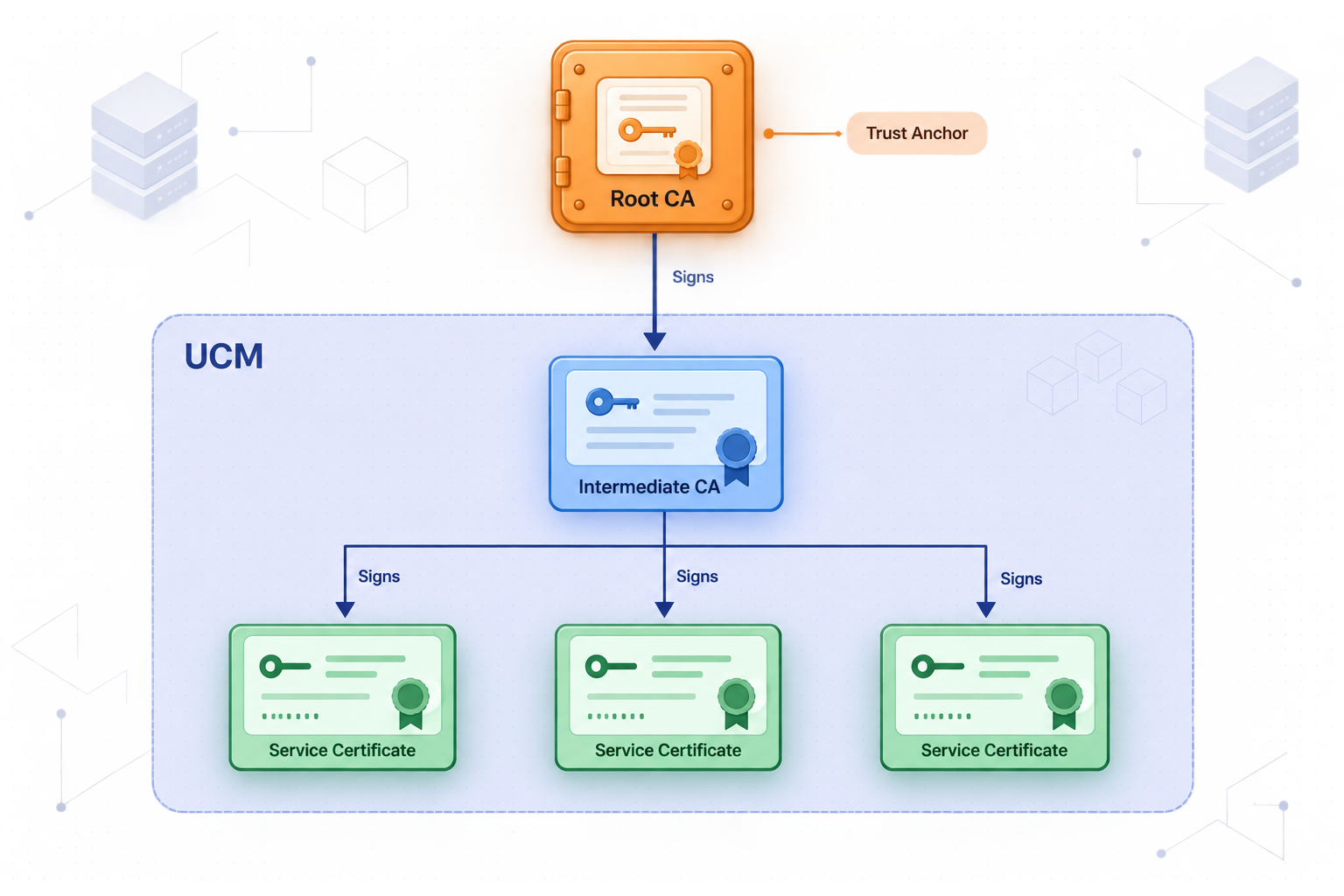
UCM v2.235 supports root and intermediate authorities, externally signed authorities, offline operation, HSM-backed signing keys, certificate-only CAs, configurable RFC 5280 profiles, and name constraints. For a disposable lab, a simple local hierarchy may be adequate. For an organizational deployment, a protected root and a separate issuing intermediate usually provide a clearer boundary between trust-anchor operations and automated issuance.
In the v2.235 interface, begin from the certificate-authority management area identified in UCM documentation as CA Management and in the product navigation as Certificate authorities. Use the page's ? help panel to confirm the release-specific create action and field labels. The supplied evidence verifies the following choices but does not provide every exact form label:
| CA decision | Value for this tutorial | Verification after creation |
|---|---|---|
| Authority role | Create a private root, then an issuing intermediate beneath it | The hierarchy view shows the intermediate chained to the intended root. |
| Certificate purpose | Server certificates for one controlled laboratory DNS namespace | The resulting template or profile does not grant unrelated client, code-signing, or email uses. |
| Name scope | Permit only the laboratory DNS subtree where your policy supports constraints | A permitted test name succeeds and an out-of-scope test name is rejected. |
| Signing authority | Use the intermediate for ACME issuance | An issued certificate names the intermediate as issuer, not the root. |
| Key protection | Enable the protection mode selected by your security policy | UCM reports the intended software encryption or HSM-backed state. |
| Validity | Use a short non-production validity appropriate for renewal testing | The certificate's not-before and not-after values match the profile. |
UCM supports RSA and EC key choices, subject defaults, Key Usage, Extended Key Usage, typed SAN validation, and predefined certificate templates. Create or select a server-certificate template restricted to the laboratory use case. Do not allow an ACME profile to request broader EKUs or namespaces than the associated workload needs.
Before enabling ACME, issue one controlled certificate from the intermediate through the web interface. Export its public certificate and chain, then inspect it:
openssl x509 -in test-certificate.pem -noout \
  -subject -issuer -serial -dates -fingerprint -sha256

openssl x509 -in test-certificate.pem -noout -text

openssl verify -CAfile private-root.pem \
  -untrusted issuing-intermediate.pem \
  test-certificate.pem
Confirm the subject alternative names, issuer, validity period, Key Usage, Extended Key Usage, signature algorithm, and chain. Keep the root private key inside the selected protection boundary. Only the public root certificate should be distributed as a trust anchor.
Configure the UCM ACME service
Open the ACME server area documented by UCM. UCM v2.235 supports RFC 8555 enrollment, HTTP-01, DNS-01, TLS-ALPN-01, wildcard certificates, IP identifiers, CAA checking, External Account Binding, Renewal Information, named certificate profiles, and local order management.
Configure one non-production ACME service using the issuing intermediate and restricted server-certificate policy created above. Enable DNS-01 for this test. Decide whether account creation requires External Account Binding. EAB is recommended when account registration must be pre-authorized, but the exact choice is part of your enrollment policy.
The current primary evidence does not expose the complete v2.235 ACME creation form, so use this field-level checklist against the labels shown by the running application:
- Select the intended issuing intermediate, not the root.
- Select or bind the restricted server-certificate profile or template.
- Enable DNS-01 for the bounded test.
- Restrict identifier scope to the laboratory namespace wherever the current profile supports it.
- Set account registration policy and EAB requirements deliberately.
- Review CAA behavior if the test zone publishes CAA records.
- Save the configuration and copy the directory URL generated by UCM.
Do not guess an ACME path from another CA or an older UCM release. The generated URL is the input to Certbot and the starting point for every other ACME resource. Save both the local URL and, after tunneling, the public URL in the deployment record.
Set a shell variable to the exact local directory URL copied from UCM. The path below is intentionally a placeholder because the supplied evidence does not establish UCM's generated v2.235 path:
export UCM_DIRECTORY='https://localhost:8443/EXACT-PATH-COPIED-FROM-UCM'
export UCM_ROOT='/absolute/path/to/private-root.pem'

curl --cacert "$UCM_ROOT" "$UCM_DIRECTORY"
A directory object should be JSON and should advertise ACME resources such as newNonce, newAccount, and newOrder. Additional metadata depends on the service configuration. Do not continue if the response is an HTML sign-in page, a redirect loop, a certificate warning, or an error page.
curl --cacert "$UCM_ROOT" "$UCM_DIRECTORY" |
  python3 -m json.tool
The ACME protocol requires HTTPS resource URLs and replay protection. Once the public tunnel is active, every advertised and generated URL must remain reachable through the public hostname. This includes directory entries plus account, order, authorization, challenge, finalize, certificate, and revocation interactions.
Run a complete Certbot DNS-01 enrollment test
Prepare one non-production name such as node1.acme-lab.example, replacing it with a real name in a DNS zone you control. UCM must be able to resolve the authoritative TXT record. The machine running Certbot must trust the UCM root for the ACME API connection.
Export the public root from UCM, transfer it through an authenticated channel, and verify its SHA-256 fingerprint against a value obtained independently from the UCM administrator:
openssl x509 -in private-root.pem -noout -fingerprint -sha256Certbot uses HTTPS to contact the custom ACME directory. In environments where Certbot's Python HTTP stack honors the standard Requests CA bundle variable, point it at the private root. If your packaged Certbot ignores that variable, install the root through the operating system's documented trust-store mechanism instead of disabling TLS verification.
1. Register the account and create an order
export REQUESTS_CA_BUNDLE='/absolute/path/to/private-root.pem'
export UCM_DIRECTORY='https://PUBLIC-UCM-HOST/EXACT-PATH-COPIED-FROM-UCM'

sudo --preserve-env=REQUESTS_CA_BUNDLE certbot certonly \
  --server "$UCM_DIRECTORY" \
  --manual \
  --preferred-challenges dns \
  --agree-tos \
  --no-eff-email \
  --email pki-operator@example.invalid \
  -d node1.acme-lab.example \
  -v
Replace the email and DNS name before running the command. Certbot creates an account if one does not already exist in its configuration and submits an order. If UCM requires EAB, obtain a one-time or otherwise controlled key identifier and HMAC key from the authorized UCM enrollment process, then add Certbot's --eab-kid and --eab-hmac-key options. Never paste an EAB secret into documentation, screenshots, source control, or shared shell history.
2. Complete the DNS-01 challenge
Certbot displays a TXT record name under _acme-challenge and a generated value. Create exactly that TXT record with the authoritative DNS service for the laboratory zone. Before pressing Enter in Certbot, query the record from the DNS path representative of UCM:
dig TXT _acme-challenge.node1.acme-lab.example

dig +trace TXT _acme-challenge.node1.acme-lab.example
The required record name for a real request is the one Certbot displays. Continue only when the expected value is visible. UCM then performs its own DNS lookup and compares the response with the challenge requirement. If split-horizon DNS is involved, test the resolver visible to UCM, not only the resolver visible to the Certbot machine.
3. Inspect the issued certificate and chain
On success, Certbot reports the certificate and private-key paths. Inspect the certificate:
sudo openssl x509 \
  -in /etc/letsencrypt/live/node1.acme-lab.example/cert.pem \
  -noout -subject -issuer -serial -dates -fingerprint -sha256

sudo openssl x509 \
  -in /etc/letsencrypt/live/node1.acme-lab.example/cert.pem \
  -noout -text

sudo openssl verify \
  -CAfile /absolute/path/to/private-root.pem \
  -untrusted /etc/letsencrypt/live/node1.acme-lab.example/chain.pem \
  /etc/letsencrypt/live/node1.acme-lab.example/cert.pem
Confirm that the SAN contains only the requested name, the issuer is the UCM intermediate, the EKU is suitable for server authentication, and verification succeeds against the intended private root.
4. Test renewal
A manual DNS plugin cannot update DNS unattended unless you add provider-specific automation hooks. For a protocol test, repeat the same Certbot command with --force-renewal, publish the new TXT value, and confirm that UCM creates a new order and issues a new serial:
sudo --preserve-env=REQUESTS_CA_BUNDLE certbot certonly \
  --server "$UCM_DIRECTORY" \
  --manual \
  --preferred-challenges dns \
  --agree-tos \
  --no-eff-email \
  --email pki-operator@example.invalid \
  --force-renewal \
  -d node1.acme-lab.example \
  -v
For unattended production renewal, replace the manual DNS action with an officially supported Certbot DNS plugin or controlled authentication and cleanup hooks for your DNS provider. That provider-specific integration is outside this bounded tutorial because no DNS platform was specified.
5. Revoke the non-production certificate
sudo --preserve-env=REQUESTS_CA_BUNDLE certbot revoke \
  --server "$UCM_DIRECTORY" \
  --cert-path /etc/letsencrypt/live/node1.acme-lab.example/cert.pem \
  --reason cessationofoperation
Confirm in UCM that the correct serial is marked revoked. If you configured CRL or OCSP services, verify that the revocation appears through the applicable service. Client applications vary in whether and how they check revocation, so a UCM revocation record does not prove that every relying application will enforce it.
Connect UCM through Localtonet and validate the public hostname
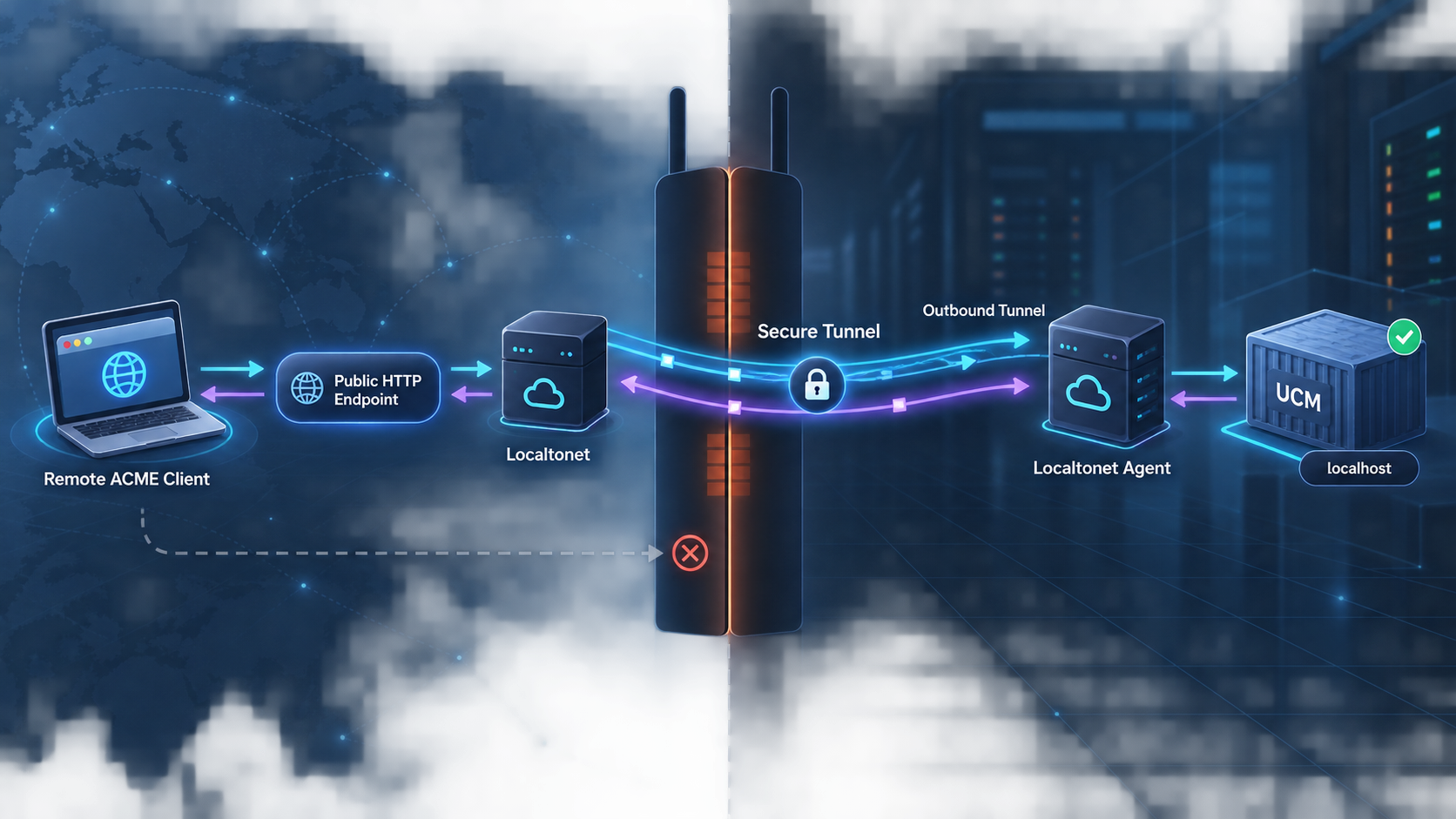
Install and run the Localtonet client on the UCM Docker host. The client establishes an outbound connection to our relay, so inbound router port forwarding, a public IP address, VPN setup, and inbound firewall changes are not required. The public endpoint remains available only while the selected device is connected and the tunnel is running.
Run the Localtonet client on the UCM host
Use the host running Docker so the client can reach the loopback-bound UCM listener at 127.0.0.1:8443.
Select the intended device token
Authenticate or select the device using its device-specific token. Keep the token out of logs, screenshots, shell examples, source control, and support messages.
Select an available relay server
Choose a server or region currently offered in the dashboard. Do not copy a server code from an old tutorial because availability can vary.
Create the HTTP/s tunnel
Set the local target address to 127.0.0.1 and the local port to 8443. Select the current HTTP/s target mode that identifies the upstream as HTTPS. Do not configure a cleartext HTTP upstream for UCM's TLS listener.
Choose the public hostname process type
Use Random Sub Domain, Custom Sub Domain, or Custom Domain according to current availability and your deployment requirements. All three provide a public HTTPS address. ACME clients should use a stable address.
Start the tunnel explicitly
Creating the configuration does not start it. Use the Start button and confirm that both the selected client and tunnel report a connected, running state.
Verify externally, then stop when finished
Test from a network outside the UCM host. When remote access is no longer required, stop the tunnel. Delete it if the public address should not be retained.
Follow the current Localtonet HTTP tunnel documentation while creating the configuration. Dashboard wording can change, so confirm that the selected mode connects to an HTTPS upstream on port 8443 before exposing the service.
UCM's administration interface and ACME service are reached through the same 8443 listener in this topology. Tunneling that listener can therefore make the administrative sign-in interface reachable at the public hostname. Localtonet is not being used here as a path-filtering control. Keep UCM authentication, MFA, RBAC, account restrictions, audit review, and least privilege enabled.
A defensible exposure model is to keep the tunnel stopped during initial CA administration, enable it only after bootstrap credentials and security controls are corrected, and use it for authorized ACME enrollment windows or continuously only when operational requirements demand it. If administrators do not need remote access, avoid using the public hostname for routine administration even though the page is technically reachable.
Test public directory and resource URL integrity
export PUBLIC_DIRECTORY='https://PUBLIC-UCM-HOST/EXACT-PATH-COPIED-FROM-UCM'

curl --fail --show-error --silent "$PUBLIC_DIRECTORY" |
  tee public-directory.json |
  python3 -m json.tool
The public Localtonet edge provides the public HTTPS connection. Inspect every absolute URL in the directory response. Each URL must use the reachable public hostname or another deliberately reachable hostname. It must not contain localhost, 127.0.0.1, a container name, or a private LAN address.
Then run the Certbot enrollment with verbose output through the public directory. Review Certbot's log and UCM's ACME order view to confirm that nonce, account, order, authorization, challenge, finalize, certificate, and revocation interactions all complete through the public origin.
Reverse proxies commonly communicate the original host and scheme through the request host and forwarding headers, but the supplied UCM evidence does not document a v2.235 external URL or trusted-proxy setting. Do not assume one exists or invent a value. If UCM emits internal URLs, redirects to its local hostname, or rejects the public host, stop deployment and use UCM's v2.235 contextual help or current proxy documentation to identify the supported setting. A directory that looks correct is not enough if later order resources contain inaccessible URLs.
Back up, restore, upgrade, roll back, and recover Docker UCM
UCM documents encrypted backups and a Backup and Restore administration area. Release v2.234 specifically corrected handling of ACME account keys and EAB HMAC keys during backup restoration under a different master key. Use the in-application encrypted backup facility according to the current v2.235 help, protect its password separately, and test restoration.
Because the supplied evidence does not include every backup form field, the following Docker procedure provides a concrete cold backup of the selected named-volume deployment. Stopping the container avoids copying an actively changing database.
Create a cold volume backup
mkdir -p "$HOME/ucm-backups"

docker inspect ucm > "$HOME/ucm-backups/ucm-container-inspect.json"
docker image inspect neyslim/ultimate-ca-manager:latest \
  > "$HOME/ucm-backups/ucm-image-inspect.json"

docker stop ucm

docker run --rm \
  -v ucm-data:/source:ro \
  -v "$HOME/ucm-backups":/backup \
  alpine \
  tar -C /source -czf /backup/ucm-data.tar.gz .

docker start ucm

sha256sum "$HOME/ucm-backups/ucm-data.tar.gz" \
  > "$HOME/ucm-backups/ucm-data.tar.gz.sha256"
Protect the archive as CA-sensitive material. It can contain encrypted or otherwise sensitive configuration, account data, certificate records, and keys. Store copies separately from the Docker host. If UCM uses an external key-encryption environment variable, HSM, cloud key manager, external database, or other dependency, back up the associated configuration and recovery material through its own approved process.
Restore into an isolated Docker volume
sha256sum -c "$HOME/ucm-backups/ucm-data.tar.gz.sha256"

docker volume create ucm-restore-test

docker run --rm \
  -v ucm-restore-test:/restore \
  -v "$HOME/ucm-backups":/backup:ro \
  alpine \
  sh -c 'cd /restore && tar -xzf /backup/ucm-data.tar.gz'

docker run -d --name ucm-restore-test \
  -p 127.0.0.1:9443:8443 \
  -v ucm-restore-test:/opt/ucm/data \
  neyslim/ultimate-ca-manager:latest
Open https://localhost:9443, confirm the expected version, inspect the CA hierarchy and ACME configuration, and verify that protected keys remain usable under the intended recovery controls. Do not connect an isolated restore test to production DNS, production Localtonet tunnels, deployment hooks, or external integrations until you have accounted for duplicate jobs and callbacks.
Upgrade with a rollback point
Review the UCM upgrade guidance, release notes, and changelog before pulling a new image. Create both an application backup and a cold volume backup. Record the old image ID and digest.
docker inspect ucm \
  --format 'image={{.Image}} status={{.State.Status}}'

docker image inspect "$(docker inspect ucm --format '{{.Image}}')" \
  --format 'id={{.Id}} digests={{json .RepoDigests}}'

docker stop ucm
docker rename ucm ucm-rollback

docker pull neyslim/ultimate-ca-manager:latest

docker run -d --restart=unless-stopped \
  --name ucm \
  -p 127.0.0.1:8443:8443 \
  -v ucm-data:/opt/ucm/data \
  neyslim/ultimate-ca-manager:latest

docker logs --tail 200 ucm
Validate sign-in, CA access, ACME directory output, a non-production order, audit logging, backup behavior, and the Localtonet public path. Do not delete the previous image until the upgrade is accepted.
If a new release migrates the database or stored secrets, starting the old application against upgraded data may be unsafe. Follow UCM's release-specific rollback guidance. The conservative rollback is to stop the new container, restore the pre-upgrade volume backup into a new volume, and run the previously recorded image against that restored copy.
Container and log checks
docker ps -a --filter name=ucm
docker stats --no-stream ucm
docker logs --since 30m ucm
docker inspect ucm --format '{{json .State}}'
docker volume inspect ucm-data
curl -kI https://127.0.0.1:8443/
Use curl -k only to isolate basic listener availability. Use the trusted root for real health checks. If the container repeatedly restarts, inspect logs before deleting or recreating it. Preserve the volume and a backup while diagnosing the failure.
Troubleshooting the CA, ACME flow, and tunnel
| Symptom | Likely boundary | Checks |
|---|---|---|
Port mapping shows 0.0.0.0:8443 |
Docker publishing | Recreate the container with 127.0.0.1:8443:8443 unless LAN exposure is explicitly required. |
| UCM does not load locally | Container or listener | Run docker ps, inspect container state, read logs, check port ownership, and test https://127.0.0.1:8443. |
| Certbot rejects UCM's TLS certificate | Private-root trust | Verify the root fingerprint, CA bundle path, hostname SAN, and whether the Certbot package honors the selected trust mechanism. |
| The directory returns an HTML page | Wrong ACME URL | Copy the generated directory URL from UCM instead of guessing a path. |
| The directory works but account creation fails | Account policy or EAB | Check whether EAB is required, whether the KID and HMAC key are current, and whether the account contact is accepted. |
| DNS-01 reports an incorrect response | TXT content or DNS propagation | Compare the exact TXT name and value, remove stale records where necessary, and query the resolver path visible to UCM. |
| UCM reports a DNS error | Outbound validation | Check UCM's configured resolver, split-horizon behavior, authoritative DNS availability, and container DNS access. |
| Public directory contains localhost or a private address | External-hostname or proxy handling | Stop the public rollout and confirm UCM's supported v2.235 external URL or trusted-proxy configuration. |
| Directory works but finalize or certificate download fails | Later ACME resource URL | Inspect verbose client logs and verify every absolute order, authorization, finalize, and certificate URL through the public hostname. |
| The public URL is unavailable | Localtonet lifecycle | Confirm the selected device is connected, the tunnel was started, and the Localtonet client can reach 127.0.0.1:8443. |
| The public URL returns an upstream error | HTTP/s target protocol | Confirm the local target is 127.0.0.1, port 8443, and HTTPS rather than cleartext HTTP. |
| The certificate is issued but untrusted | Relying-client trust | Install the correct private root and present the needed intermediate chain. Trusting a root does not correct a hostname mismatch. |
| Renewal fails after hostname changes | Stored directory address | Check Certbot's configured server, the Localtonet hostname, all generated resource URLs, and the DNS-01 automation path. |
Preserve the complete ACME problem document. Standard errors include badCSR, badNonce, caa, connection, dns, externalAccountRequired, incorrectResponse, malformed, orderNotReady, rateLimited, rejectedIdentifier, serverInternal, tls, and unauthorized. The current registry is maintained in the
IANA ACME protocol registry.
A dns or incorrectResponse problem usually belongs to the validation path. A TLS connection failure while retrieving the directory belongs to the client-to-UCM API path. An inaccessible finalize or certificate URL after successful authorization can indicate public-hostname generation or reverse-proxy handling. Diagnose the boundary before recreating accounts or CAs.
Frequently asked questions
Does Localtonet make a private UCM root publicly trusted?
No. Localtonet provides network reachability to the configured service. Every relying client must still receive and trust the private root through an authorized trust-distribution process.
Why is Docker bound to 127.0.0.1?
An unqualified Docker port publication normally listens beyond loopback. Binding to 127.0.0.1 limits direct host access while allowing a Localtonet client on the same machine to reach UCM.
Why does this deployment omit port 8080?
The supplied UCM evidence shows port 8080 in one quick-start command but does not establish its current purpose. The documented administrative URL uses HTTPS on 8443, so this security-focused topology publishes only 8443 until release-specific documentation demonstrates a need for 8080.
Does Localtonet complete DNS-01 automatically?
No. The Localtonet tunnel carries the ACME API connection to UCM. DNS-01 still requires the correct TXT record, and UCM must be able to retrieve it through its DNS validation path.
Can Certbot renew automatically with the manual DNS method?
Not without automation hooks. The manual method is suitable for proving the complete ACME flow. Production renewal should use an officially supported DNS plugin or controlled authentication and cleanup hooks for the selected DNS provider.
Can I expose ACME without exposing UCM administration?
This topology tunnels UCM's shared 8443 listener, so the administrative interface can also become reachable. This guide does not claim unsupported path filtering. Use strong UCM authentication, MFA, RBAC, account restrictions, monitoring, and limited tunnel availability.
Is the Docker named volume a backup?
No. It preserves data when a container is replaced, but the volume can still be lost or corrupted with the host. Use UCM's encrypted backup capability and a separate protected volume backup, then test restoration in isolation.
What happens when the Localtonet client or tunnel stops?
UCM can continue running locally, but clients using the public Localtonet address cannot reach it. The selected device must remain connected and the tunnel must be running for remote enrollment or administration.
Connect your verified private ACME service with Localtonet
Secure and back up UCM, complete a local non-production enrollment, then create an HTTP/s tunnel to the loopback-bound HTTPS listener. Verify the complete ACME resource flow before moving any authorized client to the public address.
Get Started Free →

