

Validate WebAuthn ceremonies where users will actually perform them
A passkey flow can succeed on a developer workstation or with a CI virtual authenticator and still fail on a physical phone, tablet, or external authenticator. Real-device testing introduces public HTTPS origins, relying-party identifiers, callback URLs, cookies, browser policy, and platform-specific prompts that local automation may not reproduce. This guide explains how to prepare a working local WebAuthn application, expose it through a Localtonet HTTP tunnel, align the application with the public hostname, and verify registration and authentication safely. The tunnel provides controlled reachability, but your application must continue to enforce every WebAuthn security requirement.
📋 What's in this guide
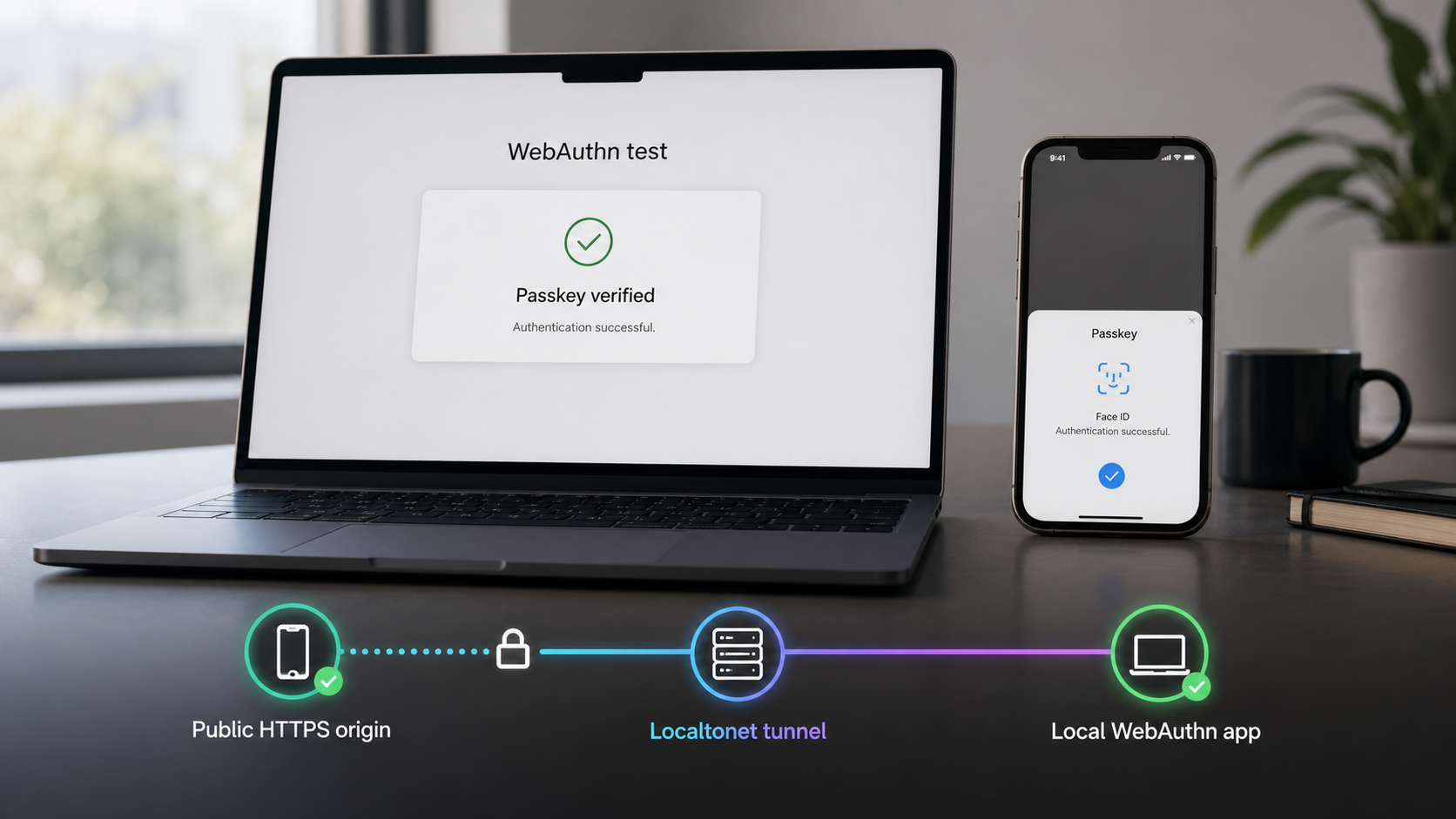
Why real-device passkey testing matters
WebAuthn coordinates several independent components: browser JavaScript, server-generated challenges, relying-party configuration, authenticator behavior, credential storage, account state, and server-side verification. A successful automated test confirms important parts of this ceremony, but it does not necessarily show what will happen when a user reaches the application from a physical device.
A virtual authenticator is a software implementation controlled by browser automation. It can let a test suite create credentials, request assertions, exercise verification logic, and test expected failures without requiring a person to touch a biometric sensor or insert a security key. That makes virtual authenticators valuable for repeatable tests on every code change.
Physical devices add another layer. A phone may use its platform authenticator, display operating-system account prompts, offer an available synced passkey, or present a browser interface that differs from desktop automation. An external authenticator may communicate through USB, NFC, or another transport supported by the test environment. Cross-device authentication can introduce another interaction pattern that a headless test does not reproduce.
Real-device testing is therefore complementary to CI testing rather than a replacement for it. Automated tests provide fast regression coverage. Physical-device sessions validate the browser, operating system, authenticator, public origin, application configuration, and network path that a user actually encounters.
Understand the WebAuthn security boundary
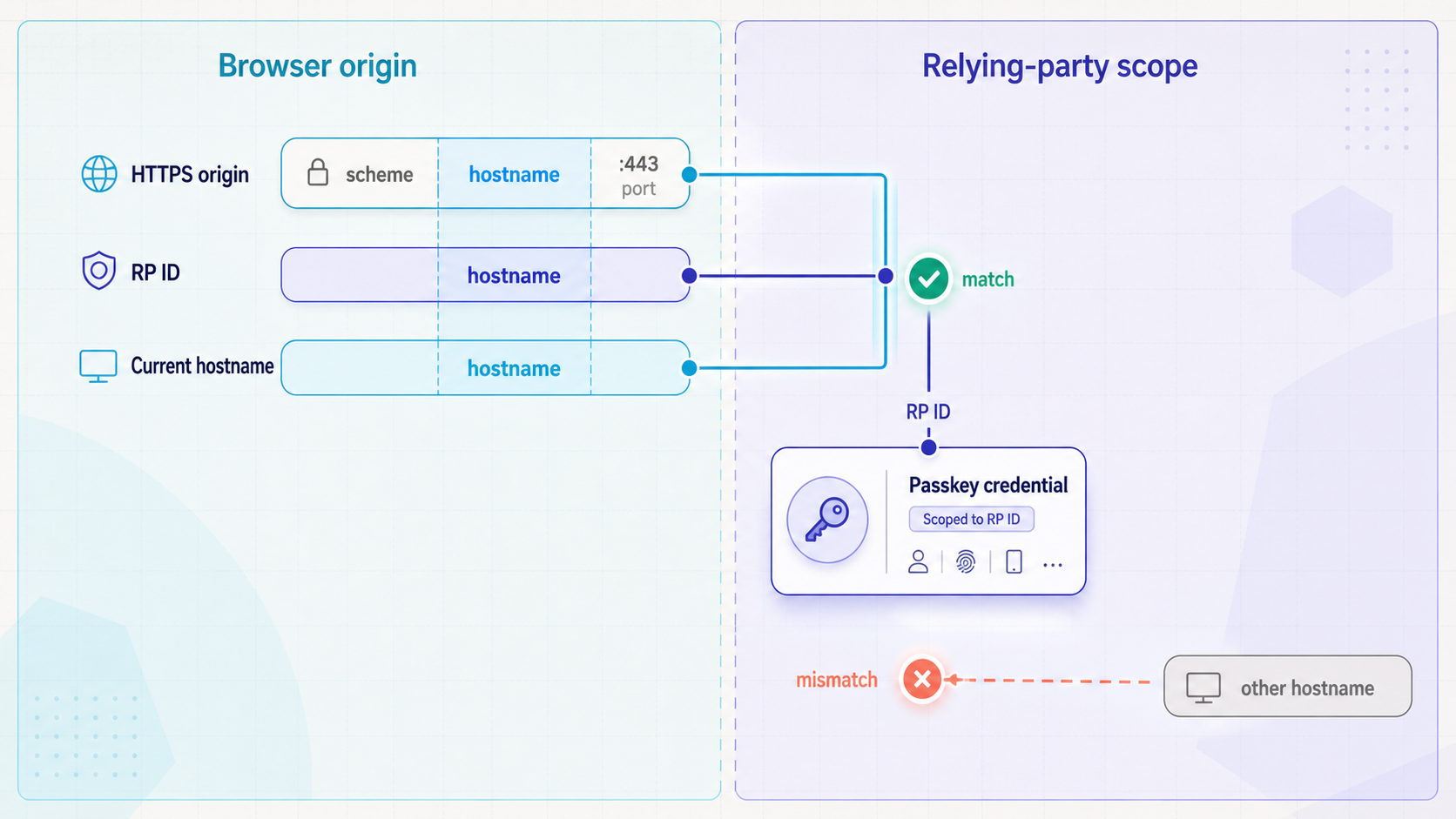
WebAuthn credentials are not general credentials that can be replayed on arbitrary websites. A credential is registered for a relying party, and each ceremony is evaluated against browser and server expectations. The browser applies origin and RP ID rules before or during the ceremony. The server must independently validate the returned client data and authenticator response.
Secure contexts and localhost
WebAuthn is exposed in secure contexts. The W3C Secure Contexts specification defines which origins browsers can treat as potentially trustworthy. An HTTPS origin normally satisfies this transport requirement when its certificate is accepted by the device. Loopback names and addresses, including localhost, receive special treatment for local development.
That localhost exception does not make another computer's development service into the phone's localhost. If a user opens http://localhost:3000 on a phone, the address refers to the phone itself. A plain HTTP URL using the development computer's LAN address also should not be assumed to provide the same secure-context behavior as localhost. A public HTTPS URL gives the physical device a secure origin it can reach without installing a development certificate on that device.
Secure-context status is necessary, but it is not proof that the WebAuthn configuration is correct. An HTTPS page can still fail because its origin is not allowed by the backend, its RP ID is invalid for the hostname, an embedded frame lacks permission, or server verification rejects the response.
Origin
An origin is formed from the URL scheme, hostname, and port, with standard URL processing applying to default ports. A path, query string, and fragment are not part of the origin. For example, pages under different paths on the same HTTPS host normally share an origin, while changing from HTTPS to HTTP, moving to another hostname, or using a different non-default port changes it.
During WebAuthn registration and authentication, the browser includes the ceremony origin in the collected client data. Your backend should compare that value with the exact origin, or an intentionally configured set of origins, permitted for the environment. If a physical device loads the page from a Localtonet HTTPS address while the backend accepts only a local development origin, correct validation should reject the ceremony.
Relying-party ID
The relying-party ID, commonly called the RP ID, is a domain identifier. It is not a full URL and does not include a scheme, path, query string, fragment, or port. Under the W3C Web Authentication specification, a caller-supplied RP ID must be valid for the origin's effective domain. In the normal web case, it is the origin hostname itself or a registrable-domain suffix of that hostname. It cannot be an unrelated domain, and a public suffix is not a valid way to broaden credential scope.
If the application does not supply an RP ID, the browser uses the origin's effective domain according to the WebAuthn processing rules. If the application does supply one, the browser validates the relationship. The authenticator data contains a hash of the RP ID, and the server must verify that hash against the RP ID expected for the ceremony.
Origin and RP ID are related, but they are not interchangeable. The origin identifies the exact web context that initiated the operation. The RP ID controls the relying-party scope of the credential. A backend should not skip origin validation merely because the RP ID hash is correct, and it should not accept an invalid RP ID relationship merely because the page arrived over HTTPS.
Localtonet makes the local application reachable through a public endpoint. It does not automatically select a valid RP ID, add the endpoint to your allowed-origin configuration, modify identity-provider callbacks, or weaken browser and server validation. Configure the testing origin deliberately and keep strict verification enabled.
Prerequisites for a controlled test
Prepare the application, Localtonet connection, device, and test data before creating the tunnel. Doing this first keeps network failures separate from WebAuthn failures and prevents a public endpoint from becoming a debugging shortcut for an application that does not work locally.
You can create a Localtonet account on the Localtonet registration page. Use the current HTTP tunnel documentation for the supported client installation path and current dashboard workflow. We do not recommend copying installation commands, relay codes, or dashboard values from an old tutorial because these details can vary by operating system, client version, region, deployment, or plan.
HTTP tunnels can use Random Sub Domain, Custom Sub Domain, or Custom Domain process types. They serve the same application through a public HTTPS address, but availability and domain requirements can vary. A temporary generated hostname is useful for an isolated session. A repeatable test that depends on stable WebAuthn credentials may require a hostname strategy that remains consistent. Confirm the currently available options in your dashboard before making that decision.
Prepare and verify the local application
Start the web application using the project's documented procedure. Do not create the tunnel yet. Open the local address from the same device that will run the Localtonet client and verify that the expected application, not a framework placeholder or unrelated service, is listening there.
Confirm the complete local path
Visit the pages involved in account creation, passkey enrollment, authentication, logout, and recovery where those features exist. Confirm that required API services, databases, session stores, and identity components are available. If registration already fails locally, tunneling the application will add another variable without fixing the underlying problem.
Record the exact local target address and port. Do not infer the port from a framework convention or from an old configuration file. The Localtonet HTTP tunnel must point to the service that is actually reachable from the client device. If the application runs inside a container, virtual machine, subsystem, or another host on the LAN, verify that the Localtonet client device can reach the selected address directly.
Identify every hostname-dependent setting
Inspect the application's WebAuthn configuration and locate the accepted origin list and RP ID. Setting names vary across frameworks and WebAuthn libraries, so use the application's actual configuration model rather than guessing variable names. Also identify its public base URL, trusted-host list, redirect policy, proxy-awareness settings, session cookie configuration, and cross-origin request policy where applicable.
If the application delegates part of sign-in to an identity provider, identify the registered redirect or callback URLs. A callback pointing to localhost, an old tunnel hostname, or a different environment can interrupt the flow before the WebAuthn ceremony completes. Make sure you have permission to add a temporary test callback before opening the endpoint.
| Configuration element | What it represents | Local check before tunneling |
|---|---|---|
| Local target | The IP address and port reached by Localtonet | The intended application responds from the client device |
| Allowed origin | The scheme, hostname, and port accepted by the WebAuthn server | You know where to add the future public HTTPS origin |
| RP ID | The domain scope used for WebAuthn credentials | You can configure a value valid for the future public hostname |
| Application base URL | The address used to build absolute links and redirects | The value can be changed without modifying validation code |
| Identity callback | The URL where an identity provider returns the browser | You can register the public callback required for the test |
| Session cookie policy | The browser state connecting ceremony requests | Domain, Secure, and SameSite behavior can support the HTTPS flow |
Configure the Localtonet HTTP tunnel
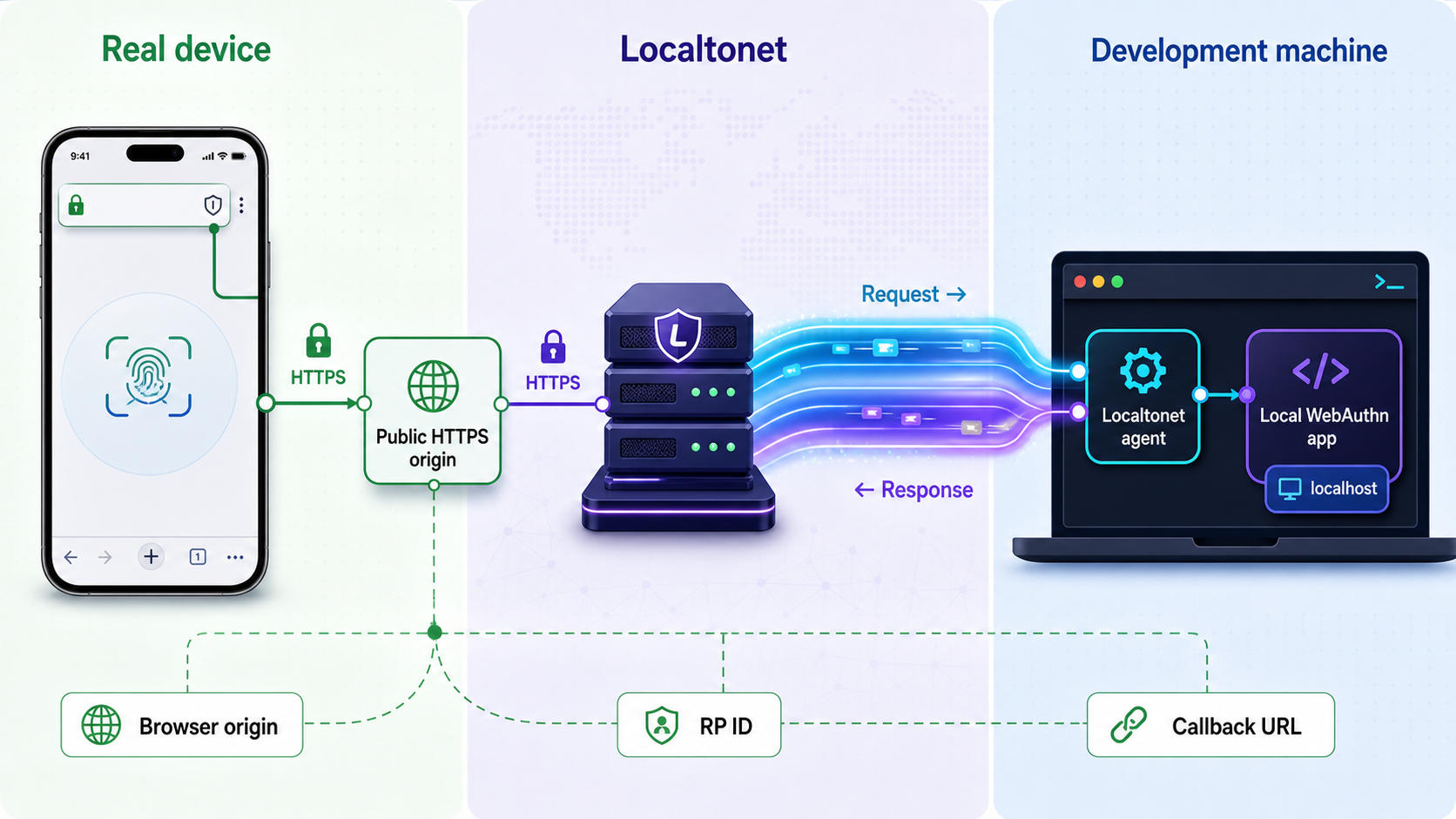
With Localtonet, the client application establishes an outbound connection to one of our relay servers. The resulting HTTP tunnel provides a public URL for the selected local service without requiring inbound router port forwarding, firewall changes, VPN setup, or a public IP address.
Follow the current documented HTTP tunnel sequence below. Keep the client running throughout the test. Creating a tunnel saves its configuration, but does not mean that the tunnel is running.
Install and run the Localtonet client
Use the installation path for your operating system in the current Localtonet HTTP tunnel documentation. Run the client on the device that can reach the verified local WebAuthn service. Confirm that the client is ready and connected before continuing.
Open the HTTP Tunnel page
Sign in to your Localtonet account and open the HTTP Tunnel page in the dashboard. This is where you create the configuration that maps a public HTTP tunnel to the local application.
Select the Process Type
Choose the appropriate available process type: Random Sub Domain, Custom Sub Domain, or Custom Domain. Confirm current availability and any custom-domain requirements in the dashboard and documentation rather than relying on an old example.
Select the AuthToken and server
Select the device-specific authentication token for the connected client and choose an available server or region shown in the current dashboard. Never expose the token, and do not hardcode a server code copied from another environment.
Enter the verified local IP address and port
Point the tunnel to the exact local target verified earlier. The target must be on the client device or reachable from it. Recheck the address if the application is running inside a container, virtual machine, subsystem, or another LAN host.
Press Start and record the public URL
Start the tunnel, confirm that its status is running, and record the assigned public HTTPS URL. The public endpoint is available only while the selected client is connected and the tunnel is running.
The Localtonet HTTP tunnel documentation is the canonical place to check the current client installation path and dashboard sequence. No Localtonet command, token, server code, or private endpoint needs to be placed in your application's source code.
A Localtonet authentication token identifies the client device. Do not place it in source control, screenshots, browser-side configuration, issue reports, test fixtures, or instructions sent to device testers. The people opening the public application URL do not need the client token.
Align the application with the public endpoint
After Localtonet assigns the public HTTPS URL, update the test environment through the configuration mechanisms supported by your application. Treat the public URL as a complete origin when configuring origin validation. Treat its hostname as the input to your RP ID decision.
Configure the exact allowed origin
Add the public HTTPS origin intentionally to the backend's allowed-origin configuration. Include the scheme and hostname, plus a port only if the public URL uses a non-default one. Do not add a wildcard merely to avoid updating the test configuration. Broad origin acceptance undermines a critical server-side check and can conceal deployment errors.
Select a valid RP ID
Configure an RP ID that is valid for the public hostname under WebAuthn's domain rules. For an isolated generated hostname, the most direct choice is often that exact hostname, provided the application supports it. A parent-domain RP ID is valid only when the public hostname is within that domain's permitted scope and the value is not a public suffix. Do not include https://, a port, or a path in the RP ID.
Update links, redirects, callbacks, and cookies
Configure the application's public base URL so absolute links and redirects remain on the public endpoint. Register the exact public callback with any participating identity provider. Review cookies used for session and challenge continuity. A cookie constrained to localhost, another domain, or an incompatible SameSite context can make the page load normally while registration or authentication fails between requests.
If the application uses forwarded request information to construct URLs, apply only the proxy settings recommended by its framework and deployment model. Do not blindly trust forwarded headers from every source. The goal is to make the application recognize the intended public scheme and host without weakening its trusted-proxy boundary.
Restart only when the application requires it
Some applications read origin and RP settings only at startup, while others reload them dynamically. Follow the project's documented behavior. After applying the configuration, restart or reload the application if required, then reopen the public endpoint in a fresh browser session.
Do not skip challenge checks, accept arbitrary origins, ignore the RP ID hash, disable signature verification, or lower user-verification requirements as a workaround. A rejection can be evidence that the WebAuthn implementation is correctly detecting a mismatched environment.
Verify the local service, public endpoint, and ceremonies
Verify each layer in order. This keeps an unreachable application from being misdiagnosed as a passkey problem and prevents a WebAuthn configuration failure from being blamed on the tunnel.
1. Recheck the local service
From the Localtonet client device, open the exact local IP address and port configured as the tunnel target. Confirm that the expected page loads, required API requests complete, and the application can reach its supporting services. If the target fails locally, correct it before inspecting the public endpoint.
2. Check the public HTTPS endpoint on the development device
Open the assigned Localtonet URL on the development device. Confirm that the browser accepts the HTTPS connection, the expected application appears, and navigation does not redirect to localhost or another hostname. This check isolates target and routing problems before a phone is added to the test.
3. Confirm secure-context status
On a browser where developer tools are available, verify that the page is a secure context. The browser property below provides a direct application-level check:
window.isSecureContext
The expected result is true. Also confirm that the page is still on the intended HTTPS hostname at the moment navigator.credentials.create() or navigator.credentials.get() is called. An earlier HTTPS page does not help if a later redirect moved the ceremony elsewhere.
4. Register a new synthetic credential
Use an isolated test account and begin a new registration ceremony. Confirm that the authenticator prompt appears, the cancellation path works, and a successful approval produces a credential associated with the expected test user. On the server, confirm that the challenge was the one issued for that session and ceremony, the client data type is correct, the origin matches the configured public origin, and the RP ID hash matches the expected RP ID.
The server should also apply the authenticator-data, attestation, user-presence, user-verification, credential uniqueness, and algorithm checks required by your implementation and policy. Store the public credential material and account relationship through the application's normal registration path. Do not use a test-only route that skips verification unless the purpose of that route is explicitly isolated from the real ceremony.
5. Authenticate after ending the registration session
Sign out or otherwise end the registration session, then start a new authentication ceremony from the public endpoint. Confirm that the expected account or discoverable credential path is used. The server should validate the new challenge, client data type, exact allowed origin, RP ID hash, credential ownership, signature, authenticator flags, and any signature-counter handling required by the application's library and policy.
6. Exercise cancellation and negative cases
Cancel the authenticator prompt and verify that the application returns a safe, understandable result without creating a credential or authenticating the account. Where the application defines challenge expiration, let a test challenge expire and confirm that the response is rejected. Try replaying a completed response only within an authorized test environment and confirm that one-time challenge state prevents reuse.
Test an account with no applicable credential, an unavailable authenticator, and an intentionally incorrect allowed origin or RP ID configuration in an isolated environment. Restore the correct configuration after each test. These failures demonstrate that validation is active rather than merely checking whether the browser returned an object.
7. Repeat from the physical device
Open the same HTTPS URL directly on the phone or tablet. Do not substitute a localhost address or an old hostname. Repeat registration, logout, authentication, and cancellation. Record the public hostname, device model, operating-system version, browser, authenticator path, account state, and outcome so the result can be reproduced.
| Checkpoint | Expected result | If it fails |
|---|---|---|
| Local target | The intended application responds from the client device | Fix the service, bind address, container route, IP, or port |
| Public endpoint | The same application loads through the assigned HTTPS URL | Check client connection, tunnel state, and target configuration |
| Secure context | window.isSecureContext is true |
Check the current scheme, hostname, certificate acceptance, and frame context |
| Registration | A verified credential is stored for the synthetic account | Inspect challenge, origin, RP ID hash, flags, and registration policy |
| Authentication | A new assertion authenticates the expected account | Inspect credential scope, signature, challenge state, flags, and user binding |
| Cancellation | The user returns safely without a partial success | Review client error handling and server-side transaction state |
| Hostname consistency | Links, callbacks, APIs, and ceremonies stay on intended hosts | Correct base URLs, redirects, callbacks, cookie scope, or stale configuration |
Run a focused real-device test matrix
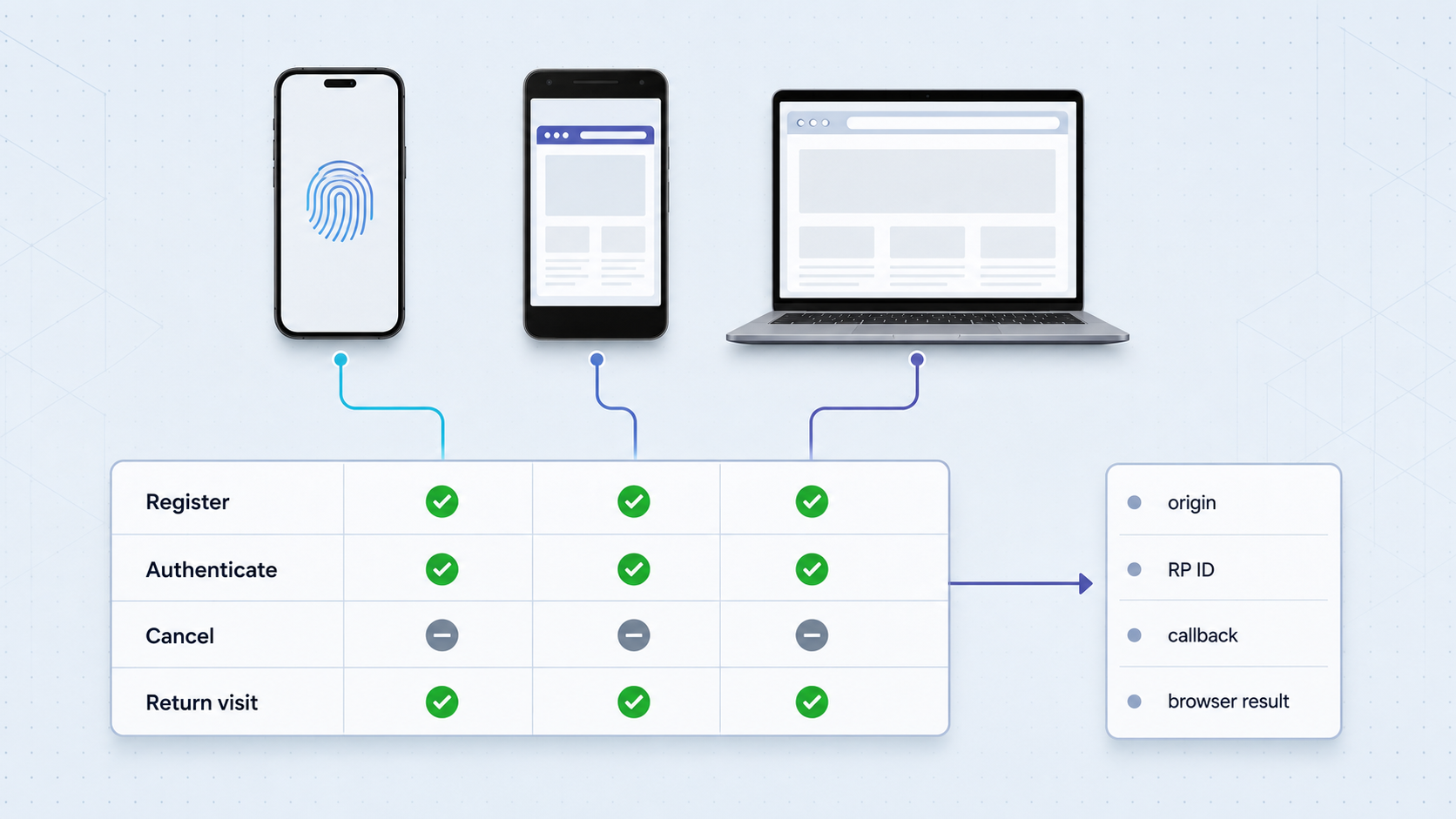
Start with one account and one physical device. Once the complete flow succeeds, add scenarios that represent your actual user population and security policy. Avoid claiming broad compatibility from one successful phone or browser. Device and browser support should be validated against the environments your application officially supports.
Separate same-device platform authentication, external authenticator use, and cross-device authentication into distinct test cases. A passkey created and used on one phone validates a different interaction from a desktop ceremony that asks the user to continue on another device. Likewise, an external security key is a separate path from an integrated platform authenticator.
| Test layer | Primary value | What it cannot establish alone |
|---|---|---|
| Unit and integration tests | Challenge storage, account logic, and validation components | Actual browser and authenticator interaction |
| CI virtual authenticator | Repeatable browser-level registration and assertion flows | Real platform prompts, physical transports, and cross-device experience |
| Real device through an HTTPS tunnel | Public-origin, browser, operating-system, and authenticator behavior | Coverage across every supported environment or deployed dependency |
| Production-like staging | Deployed domain, routing, identity-provider, and operational behavior | Safe experimentation unless the environment is properly isolated |
For each device lane, record registration, authentication, cancellation, return visit, unavailable credential, and sign-out behavior. If your product supports account recovery or passkey removal, test those flows separately. Note whether user verification is required, preferred, or discouraged by your policy, then confirm that the server enforces the intended result rather than relying only on the wording shown in the browser prompt.
Protect the temporary test environment
A public URL changes the exposure boundary of a development service. Use synthetic accounts and non-sensitive test data. Do not expose production credentials, production databases, personal records, administrative tools, unrestricted enrollment endpoints, debugging consoles, source maps containing secrets, or credentials embedded in client-side code.
Apply authentication and least privilege at the application layer. Restrict who can create test accounts and register passkeys. If your application supports IP restrictions, access controls, or narrowly scoped test permissions, use them where appropriate. Remove temporary users and credentials after the test session.
Continue using normal anti-CSRF controls, rate limits, session protections, and WebAuthn verification. A tunnel is a connectivity mechanism, not an authorization layer. It should not be used to bypass organizational network policies or expose a service without the approval required for that environment.
Point the HTTP tunnel at the intended WebAuthn application, not an unrestricted development host containing unrelated services. Keep Localtonet device tokens private, use synthetic data, apply least privilege, and stop the tunnel when testing is complete.
Operate the tunnel and handle endpoint changes
The public endpoint depends on two runtime conditions: the selected Localtonet client must remain connected, and the tunnel must be running. If the client application exits, the device loses connectivity, or the tunnel is stopped, the public URL will not continue forwarding to the local service.
Keep a session record
Record the tunnel hostname, local target, application configuration version, test account, device details, browser, and start time. Do not record authentication tokens or passkey private material. A concise session record makes it possible to distinguish a code regression from a changed hostname, expired challenge, different authenticator, or stopped client.
Recheck configuration when the hostname changes
If a new session receives a different public hostname, review the allowed origin, RP ID, public base URL, identity-provider callback, trusted hosts, cookie scope, and cross-origin settings before testing. Remove the old test origin when it is no longer required.
Credentials registered under the old RP ID should not be assumed to work under an unrelated new hostname. If the new endpoint falls outside the original RP ID scope, register a new synthetic test credential. Do not copy credential records, override RP ID validation, or widen the origin allowlist simply to preserve an obsolete test passkey.
Stop or delete after testing
When the session is complete, press Stop so the endpoint is no longer active. Delete temporary tunnel configurations when they are no longer needed. Remove temporary identity-provider callbacks, stale allowed origins, synthetic accounts, and disposable passkey registrations according to your test-data policy.
Stopping and cleanup are operational lifecycle actions, not part of the documented creation sequence. Keeping them separate makes the setup procedure accurate while still treating shutdown as a required security practice.
Troubleshoot passkey failures by symptom
Diagnose failures from the network layer upward. Avoid changing several settings at once. Establish the first failing checkpoint, change one relevant value, and repeat the smallest test that can confirm the result.
| Symptom | Likely layer | Actionable checks |
|---|---|---|
| The application does not work at the local target | Local service | Confirm the process is running, the exact address and port are correct, and the Localtonet client device can reach the target. |
| The local target works but the public URL does not | Client or tunnel state | Confirm the selected client is connected, the correct AuthToken device is selected, the tunnel has been started, and the current public URL is being used. |
| The public URL shows the wrong application or an error page | Target address | Compare the tunnel IP and port with the verified local target. Check container, virtual-machine, subsystem, and LAN routing. |
| The first page loads, then navigation fails | Base URL or redirect | Inspect generated links and redirect locations for localhost, a private LAN address, an HTTP scheme, or an obsolete public hostname. |
| WebAuthn is unavailable or throws a security error | Secure context or browser policy | Confirm the current page is HTTPS, window.isSecureContext is true, the browser supports the required operation, and the call is not blocked by frame policy. |
| The authenticator prompt appears, but registration is rejected | Origin or server verification | Compare the client data origin with the exact allowed origin. Then inspect challenge, type, RP ID hash, flags, attestation handling, and credential uniqueness. |
| The browser rejects the operation before completion | RP ID validation | Ensure the RP ID contains only a valid domain identifier and is the hostname or a permitted registrable-domain suffix of the current origin. |
| Identity login fails before the passkey screen | Callback configuration | Compare the generated callback with the exact callback registered at the identity provider. Check scheme, hostname, port, and path. |
| The ceremony loses state between requests | Cookies or challenge storage | Inspect cookie domain, Secure and SameSite behavior, session persistence, challenge ownership, expiration, and one-time-use handling. |
| Registration succeeds, but no credential is available later | Hostname or authenticator scope | Confirm authentication uses the same intended RP ID scope and that the device, account, password manager, or external authenticator containing the credential is available. |
| A credential stopped working after the endpoint changed | Stale RP context | Compare the old and new hostnames and RP IDs. Update configuration and register a new synthetic credential when the new endpoint is outside the old scope. |
| WebAuthn works at top level but not inside an embedded frame | Frame and Permissions Policy | Review same-origin or cross-origin framing, iframe permissions, and the WebAuthn Permissions Policy features used for credential creation and retrieval. |
| An old response is accepted or a challenge behaves inconsistently | Server challenge state | Bind each challenge to the expected session, user, ceremony, and expiration policy. Consume it once and reject missing, expired, mismatched, or replayed values. |
| The browser reports no suitable authenticator | Authenticator availability | Confirm the device has an available authenticator compatible with the request and that attachment, resident-key, and user-verification preferences match the intended scenario. |
When the page is unreachable
Begin with the local URL on the client device. If it fails there, do not change the WebAuthn origin. Fix the application or target route. If it succeeds locally, confirm that the Localtonet client is connected and the tunnel is running. Then compare the dashboard target with the exact tested address and port.
When the page loads but WebAuthn does not start
Check the current address after every redirect, not just the original URL. Confirm secure-context status and inspect browser errors. If the application is embedded, determine whether the ceremony is running in the top-level context or an iframe. Cross-origin iframe use is subject to WebAuthn and Permissions Policy requirements, so a working top-level page does not prove that the embedded case is allowed.
When server validation rejects the response
Compare the received client data with the server's stored ceremony state. Check the challenge, client data type, exact origin, RP ID hash, credential identifier, account binding, signature, user-presence flag, user-verification flag, and any counter logic used by the implementation. Preserve the rejection until you understand it. Do not replace a precise validation rule with wildcard acceptance.
When callbacks or cookies break the sequence
Follow the browser through every redirect and inspect which hostname receives each request. A callback can be valid at the identity provider while still returning to a route that generates localhost links. A secure session cookie can also disappear if its domain or SameSite policy does not fit the final navigation. Confirm that the challenge created before the redirect is available to the same server-side session after the browser returns.
When a previously registered passkey disappears
Verify the current RP ID and public hostname before assuming that the credential was deleted. Also confirm that the expected authenticator or credential provider is available on the device. A different browser profile, operating-system account, external security key, public hostname, or RP ID can produce a legitimate no-credential result.
Frequently asked questions
Why does a passkey work on localhost but fail on my phone?
The phone's localhost refers to the phone, not your development computer. A physical-device test also uses a different origin and may expose RP ID, callback, cookie, frame-policy, or browser differences. A public HTTPS tunnel provides reachability, but the application still needs a valid RP ID and exact allowed-origin configuration.
Does Localtonet configure my WebAuthn relying-party ID?
No. Our HTTP tunnel provides a public HTTPS URL and forwards requests to the configured local service. Your application must explicitly accept the intended origin and use an RP ID valid for the public hostname according to its WebAuthn library and security policy.
Is an HTTPS URL enough to make a passkey flow valid?
No. HTTPS helps provide the secure context required by WebAuthn, but the browser and server still enforce origin, RP ID, challenge, signature, authenticator-data, credential, and policy checks. Redirects, cookies, identity callbacks, and embedded-frame permissions must also be correct for the application.
Can real-device testing replace virtual authenticators in CI?
No. The two methods serve different purposes. Virtual authenticators provide repeatable automated coverage. Real-device tests validate physical platform behavior, authenticator prompts, public-origin configuration, and user experience. A robust test strategy uses both.
Can I reuse a passkey after the public testing hostname changes?
Not automatically. WebAuthn credentials are scoped to an RP ID. If the new hostname is outside the credential's previous relying-party scope, the old passkey will not apply to it. Recheck the origin and RP ID configuration, then register a new synthetic credential when required.
Does creating a Localtonet tunnel make it immediately available?
No. The selected Localtonet client must be connected, and the tunnel must be started. The endpoint is available only while both conditions remain true.
Should I use production accounts for realistic passkey testing?
No. Use isolated test accounts, synthetic data, restricted registration, and least-privilege access. Do not expose production credentials, sensitive user information, administrative interfaces, or Localtonet device tokens through the test application.
What should I do when testing is finished?
Stop the tunnel, delete temporary configurations that are no longer needed, remove obsolete allowed origins and identity-provider callbacks, and clean up synthetic accounts and passkey registrations according to your test-data policy.
Test your local passkey flow on a real device
Verify your WebAuthn application locally, align its testing origin and RP ID, then use a Localtonet HTTP tunnel to reach it through a public HTTPS URL without inbound router port forwarding.
Get Started Free →

