

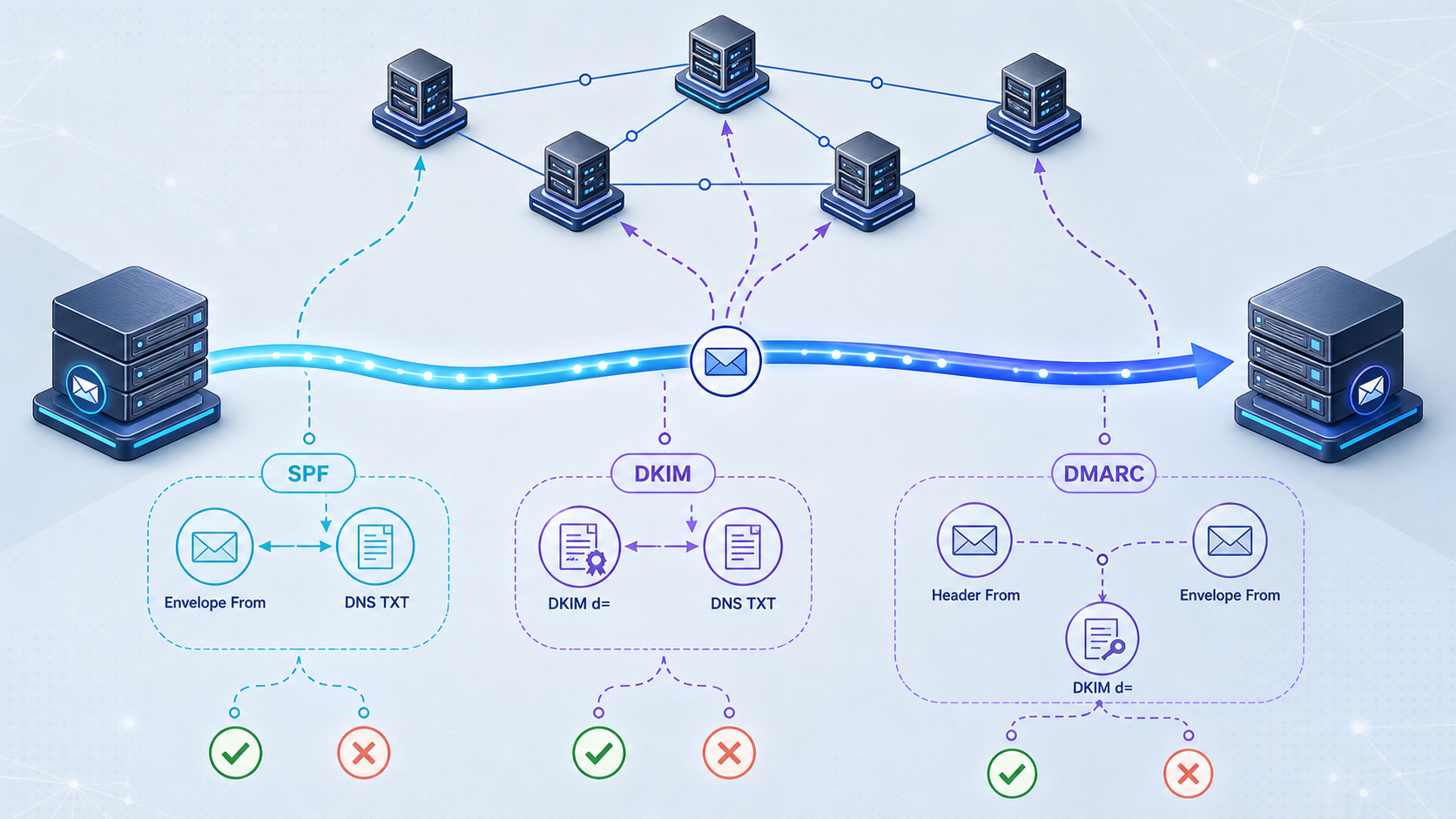
Trace email authentication failures from authoritative DNS to the headers of a received message
SPF, DKIM, and DMARC problems often appear after a sending-domain migration, email provider change, or DNS update. The fastest diagnosis comes from comparing what authoritative DNS actually publishes with what a receiving mail server reports in the message headers. In this guide, we build a repeatable workflow for checking MX, SPF, DKIM, DMARC, delegation, propagation, alignment, and SPF lookup chains. We also explain why successful authentication improves trust but cannot guarantee delivery or inbox placement.
📋 What's in this guide
How SPF, DKIM, and DMARC fit together
Email authentication is not one DNS check. SPF, DKIM, and DMARC evaluate different identities and different parts of a message. A diagnosis can therefore show SPF passing while DKIM fails, DKIM passing while SPF fails, or both underlying mechanisms passing while DMARC still fails because neither authenticated domain aligns with the domain visible in the From header.
SPF authorizes servers to send mail using a particular envelope sender domain. That identity is commonly exposed in headers as the Return-Path or SMTP MAIL FROM domain. SPF does not directly authenticate the human-visible From address. Forwarding can also break SPF because the final receiver sees the forwarding server's IP address rather than the original sender's IP address.
DKIM adds a cryptographic signature to a message. The signature identifies a signing domain through the d= tag and a selector through the s= tag. A receiving server obtains the corresponding public key from DNS and verifies the signed headers and body. Changes to signed content, an unavailable key, an incorrect selector, or a malformed DNS record can cause verification to fail.
DMARC evaluates the visible From domain and asks whether at least one successful authentication method aligns with it. DMARC can pass through aligned SPF, aligned DKIM, or both. Its DNS record can also publish a requested policy for messages that fail, such as monitoring, quarantine, or rejection. Receiving systems retain control over their final handling decisions.
| Mechanism | DNS name normally queried | Identity evaluated | Common failure signal |
|---|---|---|---|
| MX | example.com |
Inbound mail destination | No intended mail exchanger, wrong host, or broken target |
| SPF | The envelope sender domain, often the organizational domain or a bounce subdomain | SMTP MAIL FROM or, in limited cases, HELO | fail, softfail, neutral, or permerror |
| DKIM | selector._domainkey.signing-domain |
The DKIM d= signing domain |
Missing key, wrong selector, signature mismatch, or key retrieval error |
| DMARC | _dmarc.from-domain |
The domain in the visible From header | Neither passing SPF nor passing DKIM aligns with the From domain |
A message can pass SPF, DKIM, and DMARC and still be deferred, rejected, or placed in spam. Receivers may also consider sender reputation, user complaints, bounce history, recipient engagement, message content, sending patterns, blocklists, and local policy. Treat authentication as a required technical foundation rather than proof of inbox placement.
Gather the evidence before changing DNS
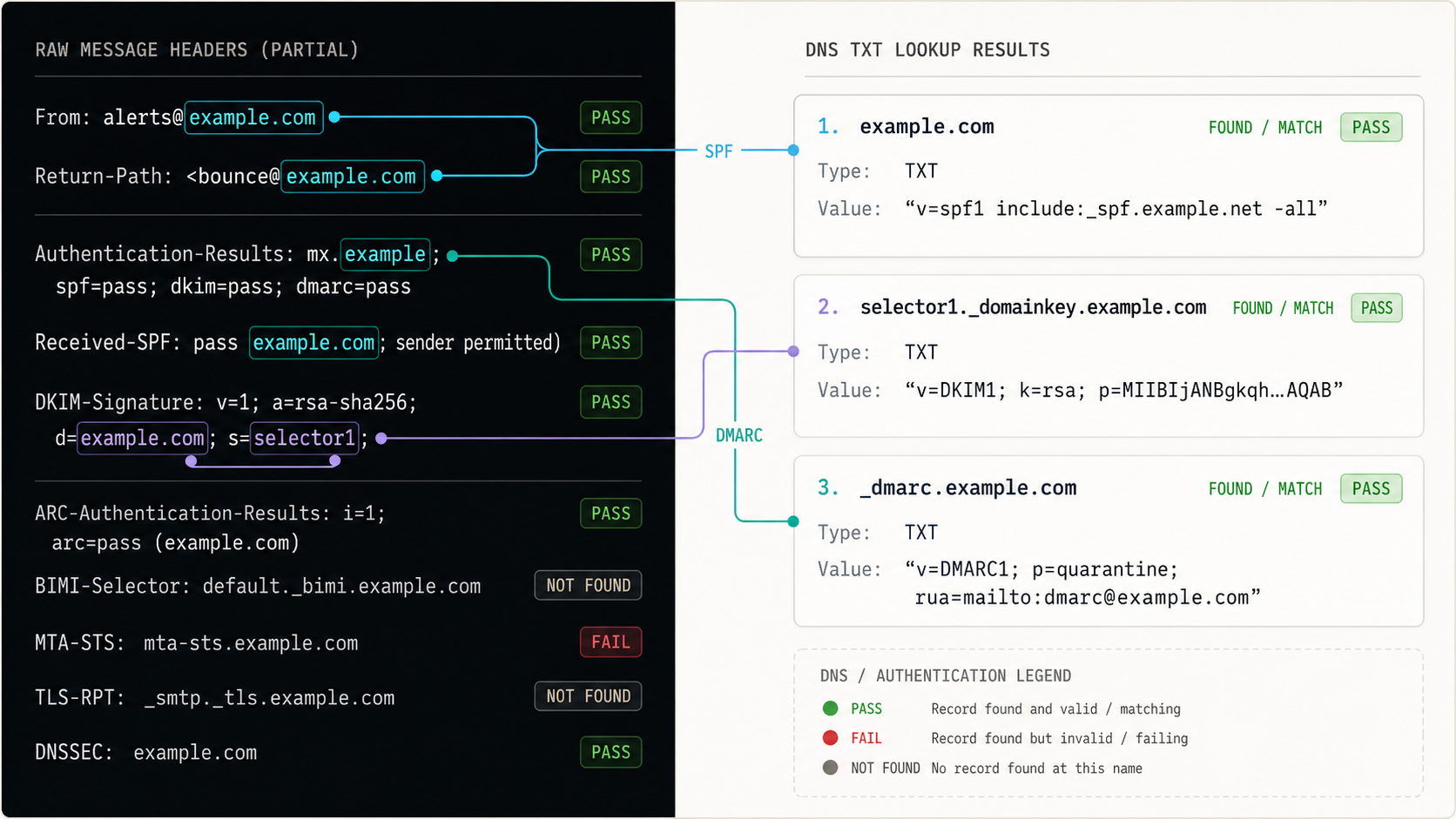
Start with one complete example of a message that failed, landed in spam, or produced an authentication warning. A provider dashboard alone is insufficient because it usually describes the records it expects, not necessarily the records currently served by the authoritative nameservers. The received message shows which identities and selectors were actually used during transmission.
Collect the following information before editing records:
- The exact visible From address and its domain.
- The Return-Path or envelope sender domain reported in the received message.
- The DKIM signing domain and selector from the
DKIM-Signatureheader. - The receiver's
Authentication-Resultsheader. - The expected SPF, DKIM, and DMARC values supplied by the sending provider.
- The domain's authoritative nameservers and the DNS account where those nameservers are managed.
- The approximate time of the last DNS change and the relevant record TTL.
- Every system currently authorized to send mail for the domain, including transactional services, marketing platforms, help desks, application servers, and mailbox providers.
The examples below use example.com, bounce.example.com, and a placeholder selector named selector1. Replace them with identities taken from your own message headers and provider instructions. Do not copy illustrative SPF includes, DKIM keys, selectors, or DMARC reporting addresses into production.
Required command-line tools
The examples use dig. It is commonly available through DNS utility packages on Linux and macOS. Windows administrators can use Resolve-DnsName in PowerShell or nslookup, although output formatting differs. A web-based DNS checker can provide a useful second view, but direct queries are better when you need to select a resolver or query an authoritative nameserver explicitly.
dig MX example.com
dig TXT example.com
dig TXT selector1._domainkey.example.com
dig TXT _dmarc.example.com
dig NS example.com
Avoid beginning with +short when diagnosing propagation or delegation. The full response exposes the response status, answer section, authoritative information, and TTL. After you have confirmed the correct owner name and response status, +short is convenient for routine checks.
SPF includes, DKIM selectors, public keys, return-path domains, and verification CNAME targets are provider-specific. Use the exact values supplied for your domain and sending configuration. A syntactically plausible record can still authorize the wrong infrastructure or make legitimate mail fail.
A repeatable email authentication troubleshooting workflow
Work from observed message identities to authoritative DNS, then return to a newly received message for final verification. This avoids changing the wrong DNS name or declaring success based only on a control panel.
Capture a fresh message and preserve its complete headers
Send a controlled test to a mailbox where you can view the original message source. Record the visible From domain, Return-Path, DKIM d= domain, DKIM s= selector, and all authentication results. Use a recent message because providers can rotate selectors or change sending routes.
Confirm authoritative DNS delegation
Query the domain's NS records and identify which nameservers are authoritative. Confirm that you edited the DNS zone used by those nameservers, not an inactive zone left at a previous registrar or DNS host.
Check inbound MX routing separately
Query MX records if the incident also involves replies, bounce handling, verification mail, or general inbound delivery. Validate that each MX target resolves as intended. Do not treat MX as a substitute for outbound SPF, DKIM, or DMARC checks.
Evaluate SPF at the actual envelope sender domain
Find every TXT answer at the envelope sender domain, identify records beginning with v=spf1, and confirm that exactly one SPF policy applies. Trace its mechanisms and includes far enough to determine whether the observed sending IP is authorized and whether processing exceeds SPF limits.
Resolve the exact DKIM selector from the message
Construct the DNS name from the signature's s= and d= values. Query both TXT and CNAME because some providers publish the key directly while others delegate the selector through a CNAME. Follow the returned target and verify that a usable key is available.
Inspect DMARC at the visible From domain
Query _dmarc beneath the From domain. Confirm that there is one valid DMARC policy and inspect its policy, alignment modes, percentage, subdomain policy, and reporting destinations where present.
Compare recursive and authoritative answers
Query an authoritative nameserver directly, then compare that response with one or more recursive resolvers. Differences can indicate normal cache expiry, stale delegation, inconsistent authoritative servers, or an edit made in the wrong zone.
Correct one understood fault at a time
Merge duplicate SPF policies rather than publishing another one, repair the exact DKIM owner name or delegation, and keep DMARC enforcement appropriate to the authentication state. Preserve every legitimate sending source when changing SPF.
Retest with a newly transmitted message
DNS visibility alone does not prove that outgoing mail uses the intended envelope domain and DKIM selector. Send a new message after the corrected answer is visible, then inspect its headers and confirm SPF, DKIM, DMARC, and alignment independently.
Baseline DNS queries
dig NS example.com
dig MX example.com
dig TXT bounce.example.com
dig TXT selector1._domainkey.example.com
dig CNAME selector1._domainkey.example.com
dig TXT _dmarc.example.com
The SPF query above intentionally uses bounce.example.com as an example envelope sender domain. Your message might use the organizational domain, a provider-managed return-path domain, or another delegated subdomain. Always follow the message rather than assuming SPF is evaluated at the visible From domain.
How to troubleshoot SPF records and lookup chains
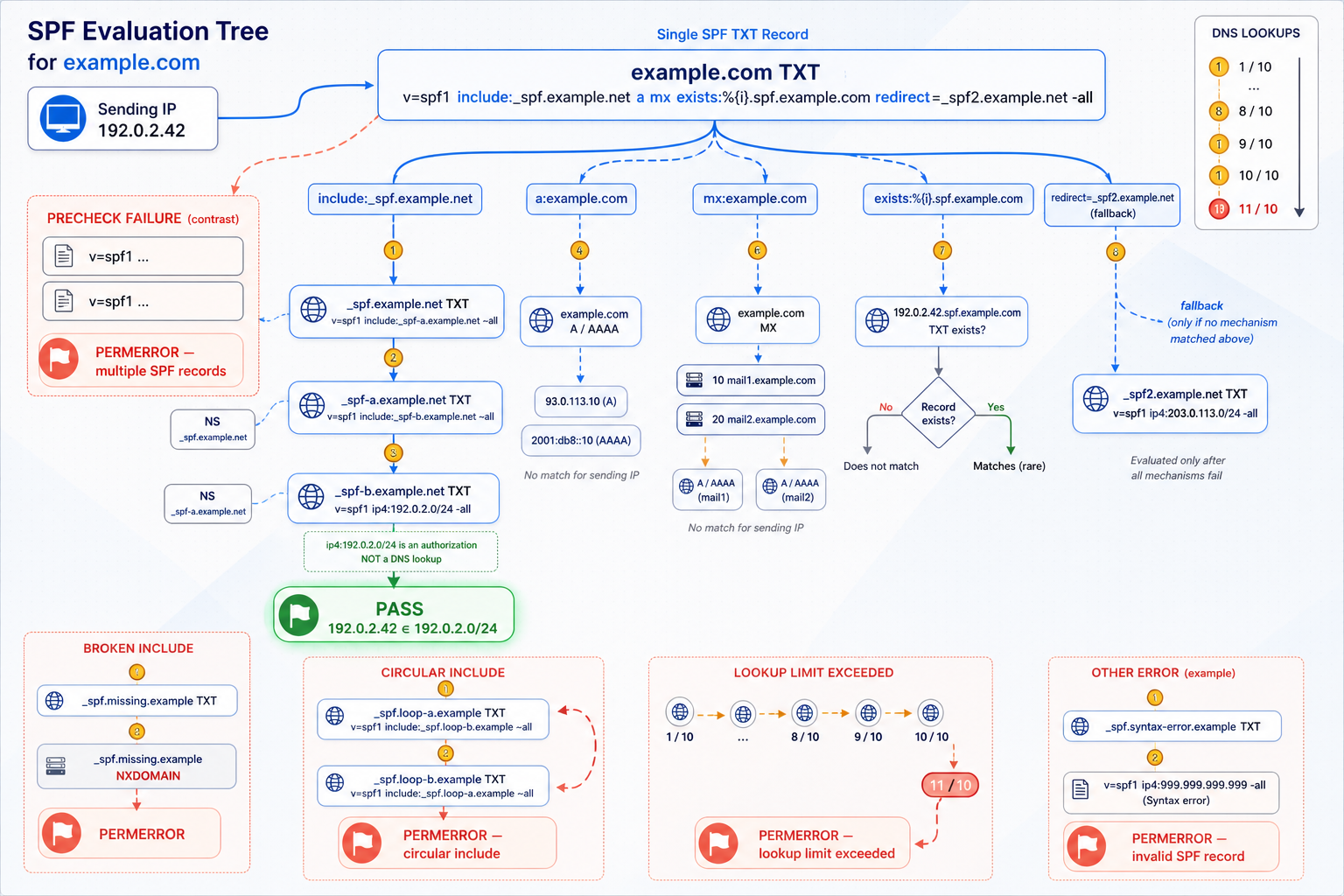
SPF is published in TXT records, but not every TXT record is SPF. Query the complete TXT response and identify the value beginning with v=spf1. Domain verification strings, DKIM keys, and unrelated service records can coexist at the same owner name.
dig TXT bounce.example.comDetect multiple SPF policies
A domain must not publish multiple SPF records that both begin with v=spf1. Multiple policies do not combine automatically. They produce an SPF permanent error because the receiver cannot select a single policy.
This illustrative configuration is invalid:
bounce.example.com. TXT "v=spf1 include:mail-service-a.example ~all"
bounce.example.com. TXT "v=spf1 include:mail-service-b.example ~all"
The correction is conceptually one SPF policy containing every currently authorized sender. However, do not mechanically concatenate records. First inventory active senders, remove retired services, validate the provider-supplied mechanisms, and evaluate DNS lookup limits. An old include may continue authorizing infrastructure that no longer needs to send for the domain.
Read the SPF result in context
| Result | General meaning | Diagnostic direction |
|---|---|---|
pass |
The connecting IP matched an authorizing mechanism | Check whether the authenticated domain aligns with the visible From domain |
fail |
The policy explicitly did not authorize the connecting IP | Check the sending route, source inventory, includes, IP mechanisms, and envelope sender domain |
softfail |
The policy indicates that the IP is probably unauthorized | Do not treat this as a pass; inspect why the sender is outside the policy |
neutral |
The policy makes no assertion about the IP | Inspect the matched mechanism and the provider's intended configuration |
none |
No applicable SPF policy was found | Verify the queried envelope sender domain and authoritative TXT response |
temperror |
A temporary DNS or processing problem prevented evaluation | Check DNS availability, timeouts, and dependent lookup responses |
permerror |
The policy could not be evaluated as a valid SPF policy | Look for multiple records, syntax errors, invalid mechanisms, or excessive DNS-dependent processing |
Trace include and redirect dependencies
An SPF record can delegate parts of its decision through include: mechanisms or a redirect= modifier. Query each referenced domain rather than assuming it is healthy:
dig TXT mail-service-a.example
dig TXT mail-service-b.example
SPF evaluation limits DNS-querying terms. A policy can look short while expanding into a deep network of nested includes, MX checks, address lookups, or redirects. Exceeding SPF processing limits can produce permerror. Count the evaluated chain, not only the number of terms visible in the top-level record. Provider-generated policies can also change over time, so an SPF record that previously stayed within the limit can later require renewed analysis.
Mechanisms such as ip4 and ip6 do not themselves require DNS expansion when they contain literal networks. By contrast, include, a, mx, exists, and redirect can contribute to DNS-dependent evaluation. The exact path can vary with the sender IP because SPF processing is ordered and stops when a mechanism matches.
Check the envelope sender, not only the From address
A common diagnostic error is querying SPF at example.com because the message says From: user@example.com, while the actual Return-Path is beneath bounce.example.com or a provider domain. The receiver evaluates SPF against the SMTP identity. DMARC then determines whether that SPF-authenticated domain aligns with the visible From domain.
If SPF passes for a provider-owned bounce domain but DMARC reports SPF misalignment, the provider may require custom return-path configuration or another documented domain-authentication step. Do not invent a CNAME or SPF record to force alignment. Use the exact return-path configuration supplied by the sender.
Adding every suggested include can retain obsolete senders, exceed SPF lookup limits, or broaden authorization unnecessarily. Inventory the systems that really send mail, maintain one policy, and apply least privilege to the authorized sources.
How to troubleshoot DKIM selectors and signatures
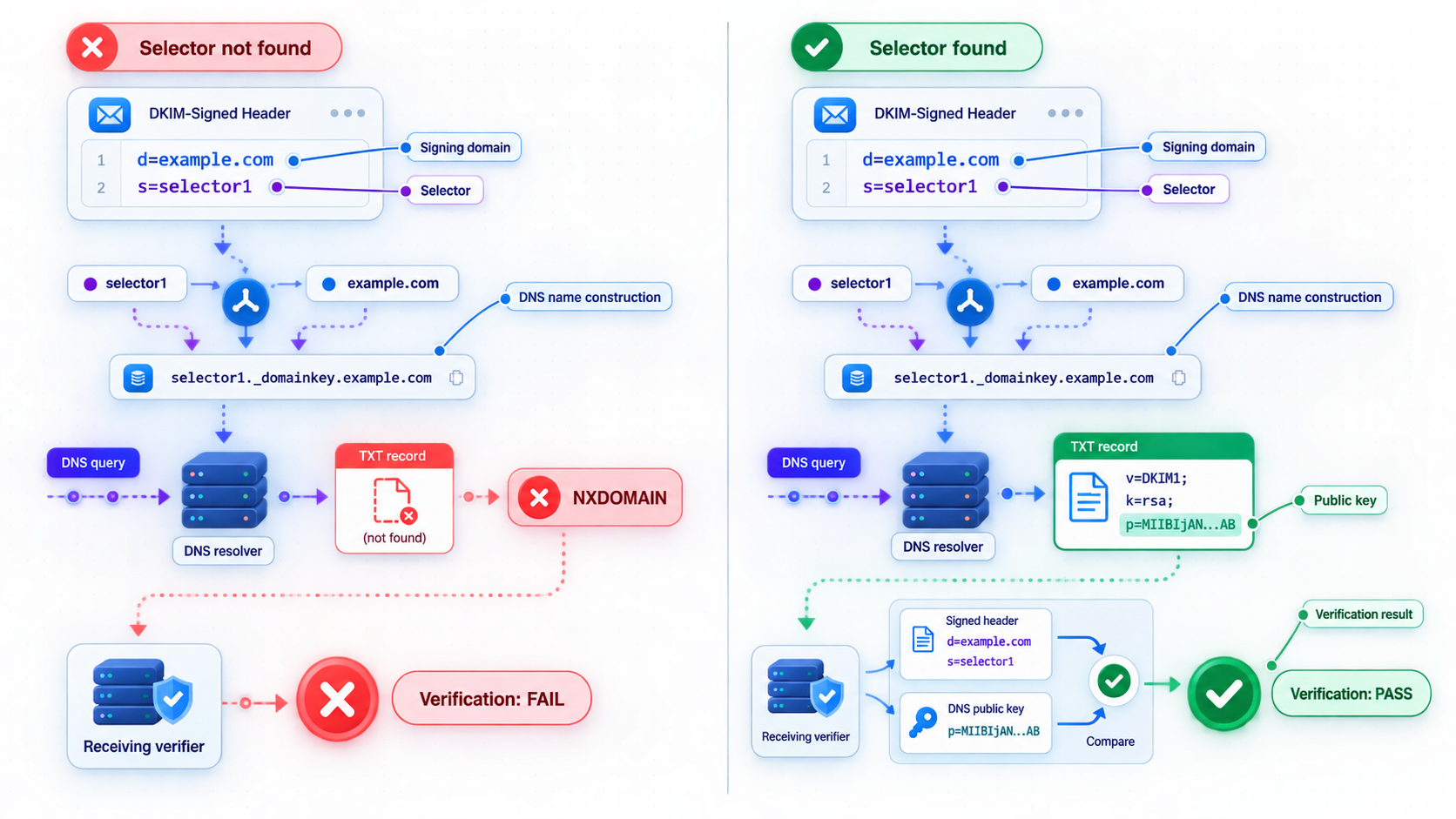
DKIM records are selector-specific. Querying only _domainkey.example.com is normally insufficient. The exact lookup name comes from the message's DKIM-Signature header:
DKIM-Signature: v=1; d=example.com; s=selector1; ...For this illustrative signature, query:
dig TXT selector1._domainkey.example.com
dig CNAME selector1._domainkey.example.com
Some senders ask customers to publish a TXT key directly. Others supply a CNAME that delegates the selector to a provider-managed hostname. Check the requested record type and owner name carefully. If a CNAME is returned, resolve its target and confirm that the final DNS path produces the provider's intended key.
Distinguish DNS failure from signature failure
A missing key and a cryptographic verification failure are different conditions:
- No DNS answer: The selector may be wrong, the record may be unpublished, the edit may be in the wrong zone, or delegation may be broken.
- Wrong record type: A provider may expect CNAME while the administrator created TXT, or the reverse.
- Wrong owner name: Some DNS interfaces automatically append the zone name. Entering a full hostname in such an interface can accidentally create a doubled name.
- Old selector: The message may still be signed with a previous selector during a rotation or incomplete migration.
- Key found but verification fails: Signed headers or body content may have changed, the sender may be using a mismatched private key, or the signature may be malformed.
- Temporary lookup error: The receiver may have encountered a DNS timeout or transient authoritative failure.
Long TXT values can appear as several quoted character strings in DNS output. DNS software concatenates the strings for the effective TXT value. Do not conclude that a DKIM key is broken merely because dig displays it in chunks. Compare the reconstructed value with the provider's expected key and check for missing characters, extra spaces introduced by the control panel, or quotation marks stored as literal data.
Account for multiple signatures
A message can contain more than one DKIM-Signature. This may occur when both an originating system and an intermediary sign the message. Inspect each signature's d= and s= values separately. One passing signature does not automatically create DMARC alignment. At least one valid DKIM signature must use a signing domain aligned with the visible From domain.
Investigate modifications in transit
DKIM signs selected headers and a representation of the body. Mailing-list modifications, disclaimer insertion, subject rewriting, body transformations, or malformed line handling can invalidate a signature. If the DNS key is present and correct but the receiver reports a body hash or signature mismatch, compare the path taken by successful and failed messages. Determine whether an intermediate gateway modifies the message after signing.
During a controlled DKIM rotation, newly sent messages may use a new selector while older messages retain signatures using the previous selector. Keep old public keys available for the period required by your mail workflow and provider guidance. Remove them only after they are no longer needed for verification.
How to diagnose DMARC alignment and policy
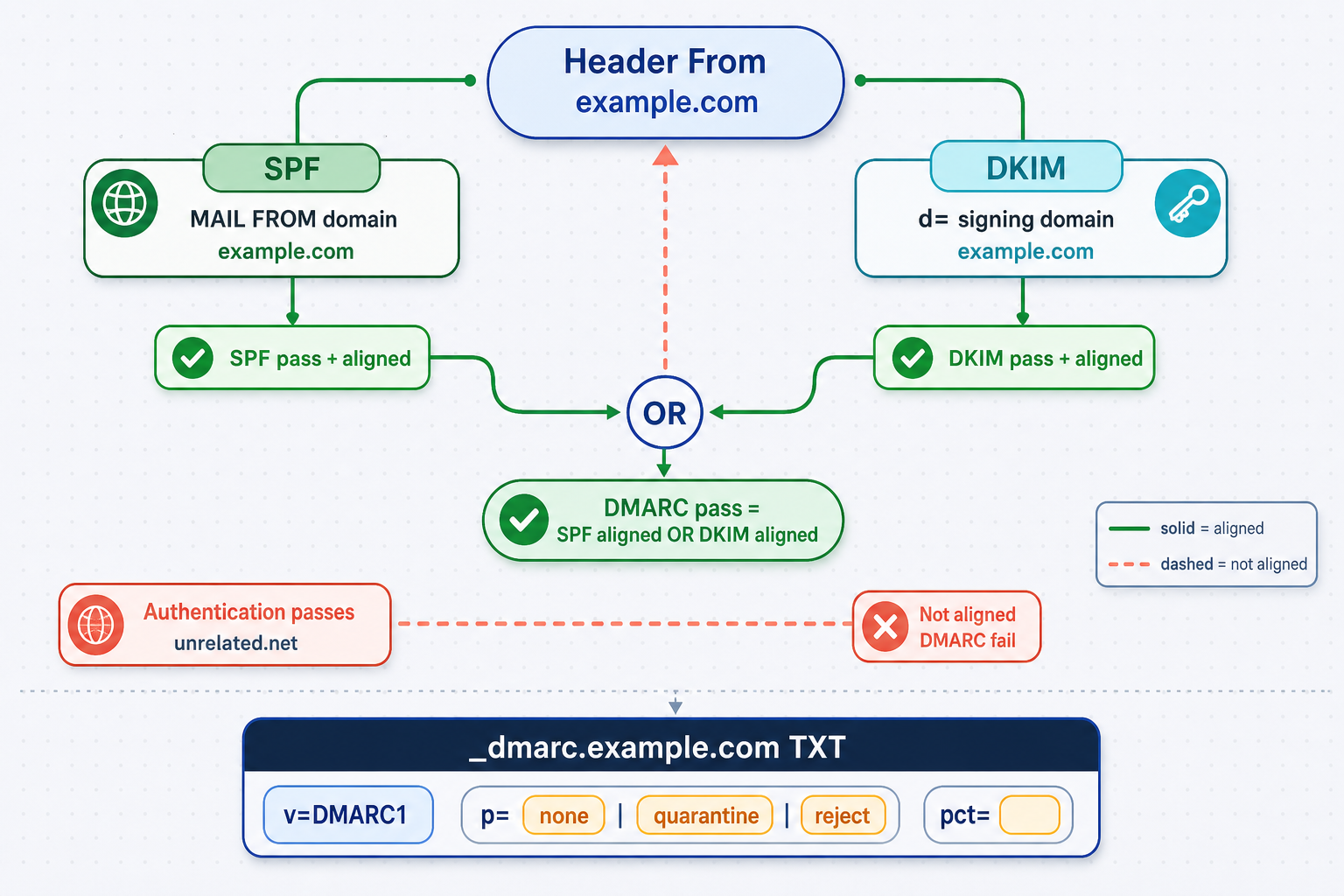
DMARC begins with the visible From domain. For a message from user@example.com, query:
dig TXT _dmarc.example.com
A DMARC policy begins with v=DMARC1. A basic illustrative policy might contain p=none, p=quarantine, or p=reject, but a production record may include reporting, alignment, percentage, and subdomain controls. Use reporting addresses controlled and authorized by your organization, and follow applicable privacy and data-handling requirements.
Understand what DMARC needs to pass
DMARC passes when at least one of these paths succeeds:
- SPF passes and its authenticated domain aligns with the visible From domain.
- DKIM passes and the DKIM
d=domain aligns with the visible From domain.
Both paths do not need to pass, although operating both correctly provides resilience. For example, forwarding may break SPF while an intact aligned DKIM signature still allows DMARC to pass. Conversely, a system with no usable DKIM signature may still pass DMARC through aligned SPF if forwarding or route changes do not invalidate SPF.
Relaxed and strict alignment
DMARC alignment can be relaxed or strict. In relaxed mode, the authenticated domain and visible From domain can share the same organizational domain. In strict mode, they must match exactly. The DMARC tags aspf and adkim control SPF and DKIM alignment modes respectively when explicitly present.
Consider a visible From domain of example.com:
- A DKIM signature with
d=mail.example.commay align under relaxed DKIM alignment. - The same signature does not meet strict alignment because the domains are not identical.
- An SPF-authenticated provider domain unrelated to
example.comdoes not align merely because SPF itself passes.
Organizational-domain evaluation depends on public suffix rules, so do not reduce every case to comparing the final two labels. Use the receiver's authentication result and a DMARC-aware parser when working with country-code structures or delegated organizational boundaries.
Interpret DMARC policy without overreading it
| Policy | Published request for failing mail | Operational use |
|---|---|---|
p=none |
No quarantine or rejection requested solely by this policy | Monitoring authentication and alignment before stronger enforcement |
p=quarantine |
Request treatment associated with suspicious mail, commonly spam placement | Intermediate enforcement after legitimate senders have been identified |
p=reject |
Request rejection of messages that fail DMARC | Stronger anti-spoofing posture after legitimate mail streams authenticate reliably |
Do not move directly to p=reject merely because one test message passes. Inventory transactional systems, mailbox providers, marketing senders, support tools, monitoring services, and forgotten applications first. Review DMARC aggregate data where available, confirm alignment for legitimate sources, and then apply an enforcement plan appropriate to your organization.
Check subdomain behavior and duplicate records
A DMARC record can include an sp= policy for subdomains. If it is absent, the organizational policy can still affect subdomains according to DMARC processing rules. Query the exact From domain first, then evaluate policy discovery at the organizational domain if no direct record exists.
As with SPF, publishing multiple DMARC records at the same owner name creates an invalid state rather than multiple policies that receivers merge. Query the complete TXT answer and remove conflicts through a controlled DNS change.
A strict DMARC policy exposes incomplete sender inventories, unaligned return paths, unsigned applications, and forgotten services. Diagnose and authenticate legitimate streams before increasing enforcement. Keep monitoring active after any provider, domain, routing, or DNS change.
Find DNS delegation, caching, and propagation problems
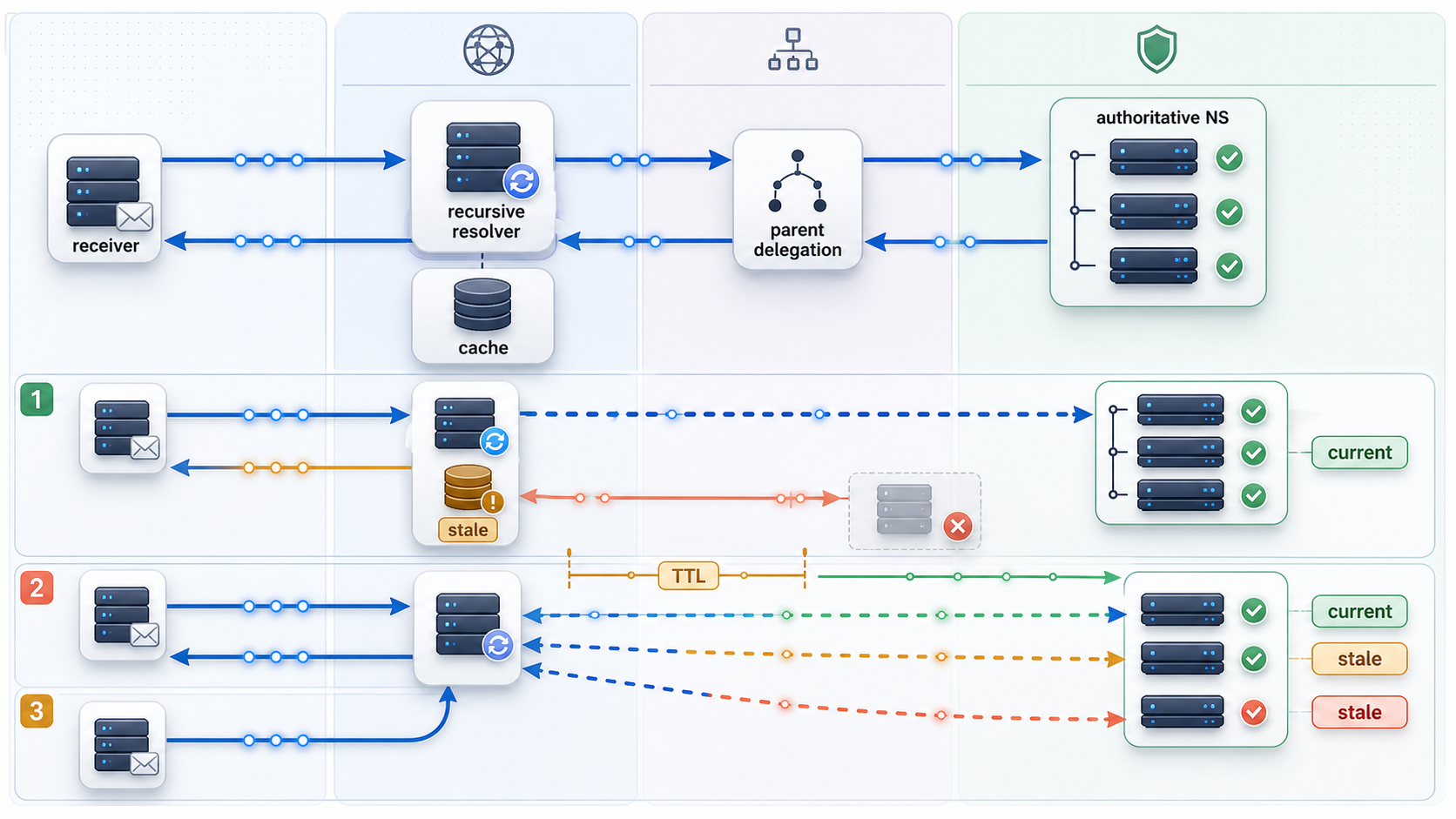
A perfectly formatted record has no effect if it was published in a DNS zone that is not authoritative. This commonly happens after moving a domain between registrars, changing nameservers, importing only part of a zone, or editing DNS at a former provider.
Identify the delegated nameservers
dig NS example.com
dig +trace example.com NS
The ordinary NS query shows the answer available through your configured resolver. A trace can help reveal the delegation path from the DNS root through the relevant parent zone. Compare the delegated nameservers with the DNS service where you made the edit.
Query an authoritative server directly
After identifying an authoritative hostname, query it explicitly:
dig @ns1.dns-provider.example TXT _dmarc.example.com
dig @ns1.dns-provider.example TXT bounce.example.com
dig @ns1.dns-provider.example TXT selector1._domainkey.example.com
The nameserver above is only a placeholder. Substitute one of the actual authoritative nameservers returned for your domain.
If the authoritative response contains the new value but a recursive resolver still returns the old value, caching is a likely explanation. If the authoritative server itself returns the old value or no value, waiting for recursive caches will not solve the underlying publication problem.
Compare every authoritative nameserver
Query each listed authoritative server. They should serve a consistent zone. If one has the new SPF value and another has the old one, users can receive different answers depending on which server responds. That is not ordinary recursive propagation. It points to inconsistent authoritative data, an incomplete zone transfer, or provider-side synchronization that needs correction.
Read response status and TTL
A response with no TXT answer is not enough to diagnose the cause. Distinguish among:
- NOERROR with an empty answer: The name or surrounding zone may exist, but the requested record type is not present.
- NXDOMAIN: The queried owner name does not exist according to that response.
- SERVFAIL: Resolution failed, potentially because of authoritative availability, DNSSEC validation, delegation, or another processing problem.
- Timeout: The selected resolver or authoritative server did not answer within the query period.
TTL indicates how long a caching resolver may retain a response. It does not promise that every observer will update at the same instant. Negative responses can also be cached. Record changes should therefore be planned around the previous TTL, not only the TTL assigned after the edit.
Check for CNAME conflicts
DKIM selectors and provider verification names are often delegated with CNAME records. A DNS owner name generally cannot simultaneously hold a CNAME and unrelated record data. If a provider requires a selector CNAME, do not also place a TXT key at that same owner unless the provider's current instructions explicitly establish a different design.
DNS control panels may display only the host portion of a name. For a zone named example.com, a provider might ask for the host selector1._domainkey. Entering selector1._domainkey.example.com in a panel that automatically appends the zone can create an unintended name such as selector1._domainkey.example.com.example.com. Confirm the final owner name with a direct query.
Account for DNSSEC carefully
If validating resolvers return SERVFAIL while direct authoritative queries appear to contain the record, investigate DNSSEC if the zone is signed or was recently moved. Stale delegation-signer data, expired signatures, or an incomplete signing transition can make valid-looking records unavailable to validating receivers. Do not disable DNSSEC casually. Correct the delegation and signing state through the responsible DNS operator.
Authoritative publication, parent-zone delegation, recursive caching, negative caching, and provider synchronization are separate layers. Compare them directly instead of waiting an arbitrary number of hours without determining which layer still serves the wrong answer.
Compare message headers with published DNS
DNS confirms policy publication. Message headers confirm how a real message was evaluated. Final verification requires both.
Start with Authentication-Results
A receiving system may add a header resembling this illustrative example:
Authentication-Results: receiver.example;
    spf=pass smtp.mailfrom=bounce.example.com;
    dkim=pass header.d=example.com header.s=selector1;
    dmarc=pass header.from=example.com
Read each identity:
smtp.mailfromidentifies the domain used for SPF evaluation.header.didentifies the DKIM signing domain.header.sidentifies the selector used to retrieve the DKIM key.header.fromidentifies the domain against which DMARC alignment is evaluated.
Header syntax and annotations vary among receivers. Prefer the authentication result added by the mailbox provider you trust at the final receiving boundary. Untrusted senders can place forged headers earlier in the message, so not every header named Authentication-Results should be accepted as authoritative.
Use Received-SPF and Return-Path as supporting evidence
A Received-SPF header may explain the SPF result, evaluated identity, and client IP. The Return-Path often reflects the envelope sender after delivery. Use these fields to verify that you queried the correct SPF domain and that the observed sending IP belongs to the expected route.
Read the DKIM-Signature carefully
Important DKIM tags include:
d=for the signing domain.s=for the selector.h=for the list of signed header fields.bh=for the body hash.b=for the signature data.
Do not paste a real signature, private message content, recipient address, internal host name, or private routing data into a public troubleshooting ticket. Redact sensitive information while preserving the domains, selector, result codes, and relevant timestamps needed for diagnosis.
Map result combinations to likely causes
| Observed result | Likely interpretation | Next check |
|---|---|---|
| SPF passes, DKIM passes, DMARC fails | Neither passing identity aligns with the visible From domain, or the DMARC record is invalid | Compare smtp.mailfrom and header.d with header.from |
| SPF fails, DKIM passes, DMARC passes | Aligned DKIM is carrying DMARC successfully | Investigate SPF separately, especially forwarding or an unauthorized sending path |
| SPF passes, DKIM fails, DMARC passes | Aligned SPF is carrying DMARC successfully | Repair DKIM for resilience and integrity verification |
| SPF passes, DKIM passes, DMARC passes, message is spam | Authentication is working, but another deliverability signal is unfavorable | Review reputation, complaints, bounce patterns, content, volume, and receiver feedback |
| SPF permerror | The policy is invalid or cannot be evaluated within protocol limits | Check duplicate records, syntax, include chains, redirects, and DNS-dependent terms |
| DKIM key not found | The selector lookup failed or returned no usable key | Query the exact s= and d= combination at authoritative DNS |
| DMARC none or no policy found | No applicable valid DMARC policy was discovered | Check the exact From domain, organizational-domain discovery, duplicates, and delegation |
Retest after the fix
Send a brand-new message after authoritative and relevant recursive responses show the intended records. Do not use an old message because its DKIM signature, route, and authentication results represent the state at the time it was transmitted.
Verify all of the following:
- The new message uses the expected From address.
- The Return-Path belongs to the intended sending configuration.
- SPF evaluates the expected domain and returns the intended result.
- The message carries the expected DKIM selector and signing domain.
- The DKIM signature verifies successfully.
- At least one passing mechanism aligns for DMARC.
- The receiver discovers the intended DMARC policy.
- Replies and bounce processing work if the workflow depends on them.
Prevent authentication regressions during migrations
Email authentication failures are easier to prevent when DNS changes are treated as a managed deployment rather than an isolated control-panel edit. A migration can involve old and new senders operating at the same time, selector rotation, custom return paths, inbound MX changes, and DMARC policy impact.
Maintain a sender inventory
Record every approved sending service, the domains it uses for SPF, its DKIM selectors, the visible From domains it is allowed to use, and the team that owns it. Include low-volume systems such as monitoring alerts, password resets, scanners, ticketing systems, and scheduled reports. These are often missed when an organization focuses only on its main mailbox and marketing provider.
Separate inbound and outbound changes
MX migration affects where inbound mail arrives. SPF, DKIM, return-path, and DMARC configuration affect outbound authentication. They may be changed in the same project, but they solve different problems. Verify each independently so an inbound routing success does not hide an outbound authentication failure.
Plan overlap without duplicate SPF records
During a provider transition, the old and new services may both need authorization temporarily. Keep one SPF policy that accurately authorizes both while they are active. Remove the old provider after the final send path has moved and any required rollback period has ended. Re-evaluate the complete lookup chain after every change.
Rotate DKIM selectors deliberately
Publish and verify the new selector according to the sending provider's process before switching signing. Confirm that fresh messages use it and pass. Retain the previous public key for an appropriate overlap period, then remove it according to operational and provider requirements.
Monitor DMARC before stronger enforcement
DMARC aggregate reporting can reveal senders that are absent from an internal inventory, authentication failures by source, and alignment problems. Reporting data still requires interpretation because forwarded mail, shared infrastructure, and organizational-domain alignment can complicate apparent results. Protect report data because it may contain operational metadata about email sources.
Rolling back only the visible From domain may not restore service if the migration also changed a return-path subdomain, DKIM selector, MX target, or delegated CNAME. Document the complete record set and previous values before making production changes.
Where Localtonet fits into the networking picture
Email authentication DNS and Localtonet tunnel configuration are separate concerns. SPF, DKIM, DMARC, and MX records describe email authorization, signing keys, policy, and inbound mail routing. They do not configure a Localtonet tunnel, and creating a tunnel does not repair or publish email authentication records.
With Localtonet, our client establishes an outbound connection to a Localtonet relay server and can expose a service running on a user's machine through a public URL or public host and port. This can be useful when a developer needs controlled remote access to a locally running web application, webhook receiver, diagnostic dashboard, or other supported service without inbound router port forwarding, firewall changes, VPN setup, or a public IP address.
That connectivity should not be confused with mail-server authorization. An HTTP tunnel can make a local HTTP endpoint reachable, but it does not make that endpoint an authorized SMTP sender. Similarly, a custom domain used with an HTTP or File Server tunnel has a separate DNS purpose from SPF, DKIM, DMARC, and MX. Exact custom-domain DNS requirements should always be checked against the current Localtonet documentation before making changes.
If a development workflow needs a temporary public endpoint, the normal Localtonet lifecycle is to install and run our client on a device that can reach the local service, authenticate the device with its device-specific token, select an available relay server from the current dashboard, create the appropriate supported tunnel, and start it. A created tunnel is not active until it is started, and it remains available only while the selected client is connected and the tunnel is running.
Email headers, DMARC reports, bounce payloads, and webhook requests may contain addresses, message identifiers, source IP information, or other sensitive metadata. Do not expose an unauthenticated debugging interface publicly. Stop or delete a temporary tunnel when remote access is no longer required.
Frequently asked questions
Can a domain have more than one SPF record?
A domain must not publish multiple applicable records beginning with v=spf1. Multiple SPF policies cause a permanent evaluation error rather than combining their authorization. Maintain one SPF record that represents all current legitimate senders, and check its complete DNS lookup chain.
Why does SPF pass while DMARC fails?
SPF may authenticate an envelope sender domain that is unrelated to the domain in the visible From address. DMARC requires alignment, not merely an SPF pass. Compare the smtp.mailfrom identity with header.from in the receiver's authentication results.
How do I find the correct DKIM selector?
Inspect the DKIM-Signature header of a newly received message. The s= value is the selector and the d= value is the signing domain. Query s-value._domainkey.d-value. Check both TXT and CNAME according to the sending provider's configuration.
Does a missing MX record cause SPF or DKIM to fail?
Not directly. MX controls inbound mail routing, while SPF and DKIM authenticate outbound mail through separate mechanisms. A missing or incorrect MX configuration can disrupt replies, inbound messages, or bounce workflows, so it should still be checked when diagnosing a complete email system.
Why does DKIM fail even though the TXT record exists?
The message may use a different selector or signing domain, the provider may expect a CNAME, the published key may not match the active private key, or the message may have been modified after signing. Query the exact s= and d= combination from the failed message and distinguish key retrieval errors from cryptographic signature failures.
How long do SPF, DKIM, and DMARC changes take to propagate?
There is no single universal delay. Visibility depends on authoritative publication, the previous TTL, recursive caches, negative caching, and any nameserver or delegation changes. Query authoritative servers directly first, then compare recursive resolvers. If authoritative DNS is still wrong, additional waiting will not correct the record.
Should I set DMARC to reject immediately?
Strong enforcement should follow a verified inventory of legitimate senders and successful alignment testing. Moving to rejection before authenticating all valid mail streams can block real application, support, marketing, monitoring, or employee mail. Use an enforcement plan based on observed authentication data and organizational risk requirements.
Do SPF, DKIM, and DMARC guarantee inbox placement?
No. They establish authorization, message-signature validity, and domain alignment. Receivers can still consider reputation, complaint rates, bounces, content, sending behavior, recipient engagement, blocklists, and local filtering policy. Passing authentication removes important technical failure modes but does not guarantee delivery or placement.
Can a Localtonet tunnel fix email DNS authentication?
No. A Localtonet tunnel can provide remote connectivity to a supported service running on a reachable device, but SPF, DKIM, DMARC, and MX remain authoritative DNS and email-provider configuration concerns. Keep tunnel custom-domain records separate from email authentication records and follow the current documentation for each workflow.
Make a local diagnostic service reachable when your workflow requires it
After email DNS is configured through the responsible DNS and mail providers, use Localtonet when you need controlled remote access to a supported application, webhook receiver, or diagnostic endpoint running on your own device.
Get Started Free →

