

Tunnel Interstitial Pages Explained: Reliable Localhost Access for Browsers, APIs, and Webhooks
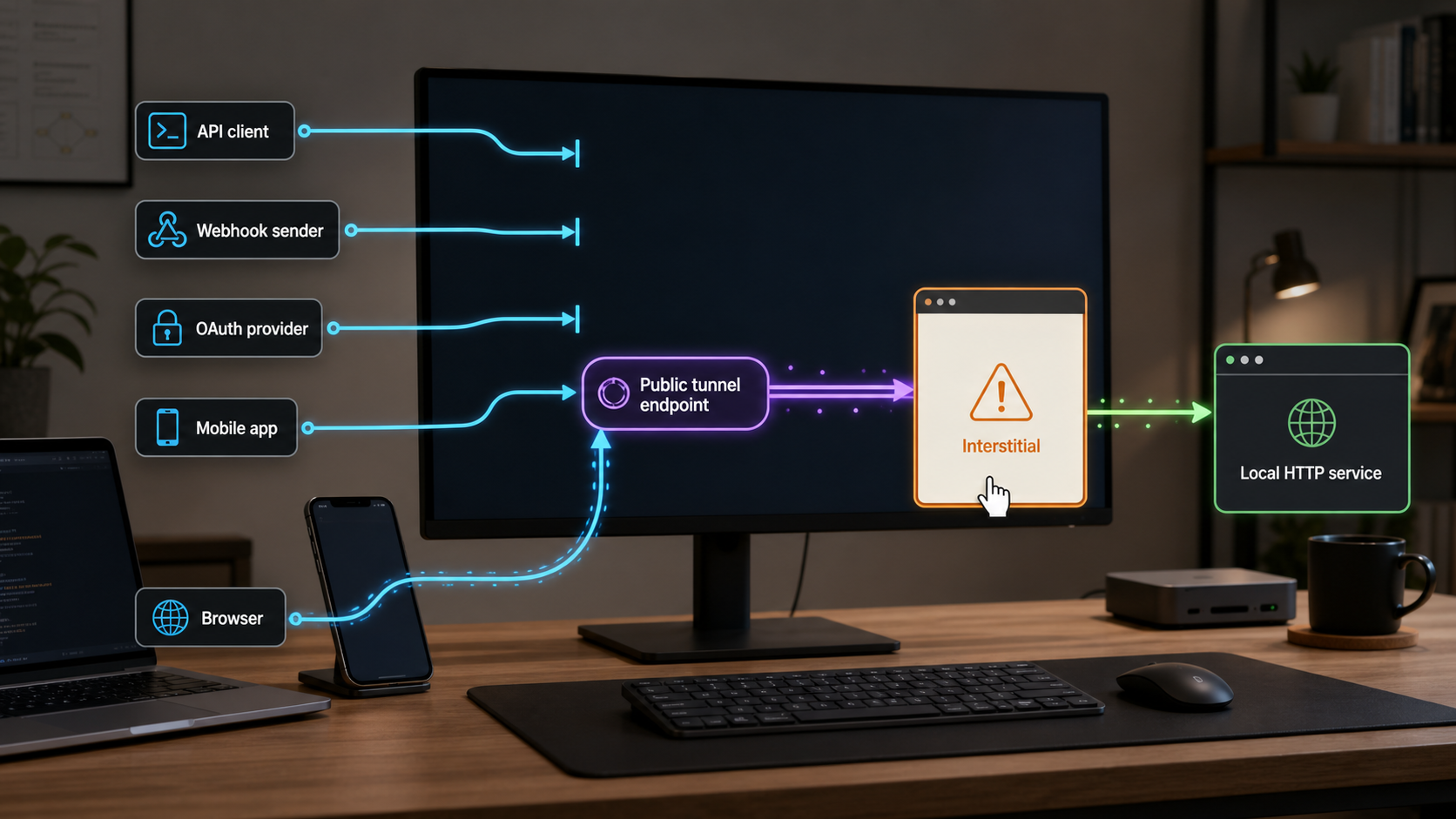
A tunnel interstitial page is an HTML warning or confirmation screen displayed before a visitor reaches an application exposed through a public tunnel. Although a person may be able to continue with one click, the unexpected response can disrupt API clients, webhook delivery, OAuth callbacks, automated browser tests, and mobile applications. The reliable solution depends on who controls the request, whether the provider documents a supported header or hostname option, and whether an additional reverse proxy is appropriate. On Localtonet, the interstitial page applies only to Free accounts. Paid accounts do not receive the interstitial page, allowing requests to reach the configured local service directly through the tunnel. This guide explains how to diagnose the response, choose a maintainable configuration, and expose a local service with Localtonet without relying on brittle page-clicking scripts.
What a tunnel interstitial page is
A public tunnel gives an internet client a public address that routes traffic toward a service running on a developer machine or another reachable device. Some tunnel providers place an intermediate warning, consent, or abuse-prevention page in front of certain requests. Instead of receiving the local application response, the client first receives HTML generated by the tunnel provider.
This behavior is easy to recognize in a normal browser because the page is visible. It is less obvious in an integration. An API client might attempt to parse the HTML as JSON, a webhook sender might classify the response as unsuccessful, or an automated test might search for an application element that is not present. The public URL can appear online while still returning the wrong representation for the intended workflow.
Interstitial rules are provider-specific and can change by plan, hostname, request type, browser state, or current provider policy. Do not assume that a workaround described in an old forum post remains supported. Check the provider's current documentation and inspect the actual HTTP exchange before changing application code.
Localtonet displays the tunnel interstitial page only for Free accounts. Paid accounts do not receive the interstitial page, so browser, API, webhook, OAuth, mobile, and other requests can be forwarded directly to the configured local service.
Why the same tunnel may behave differently across clients
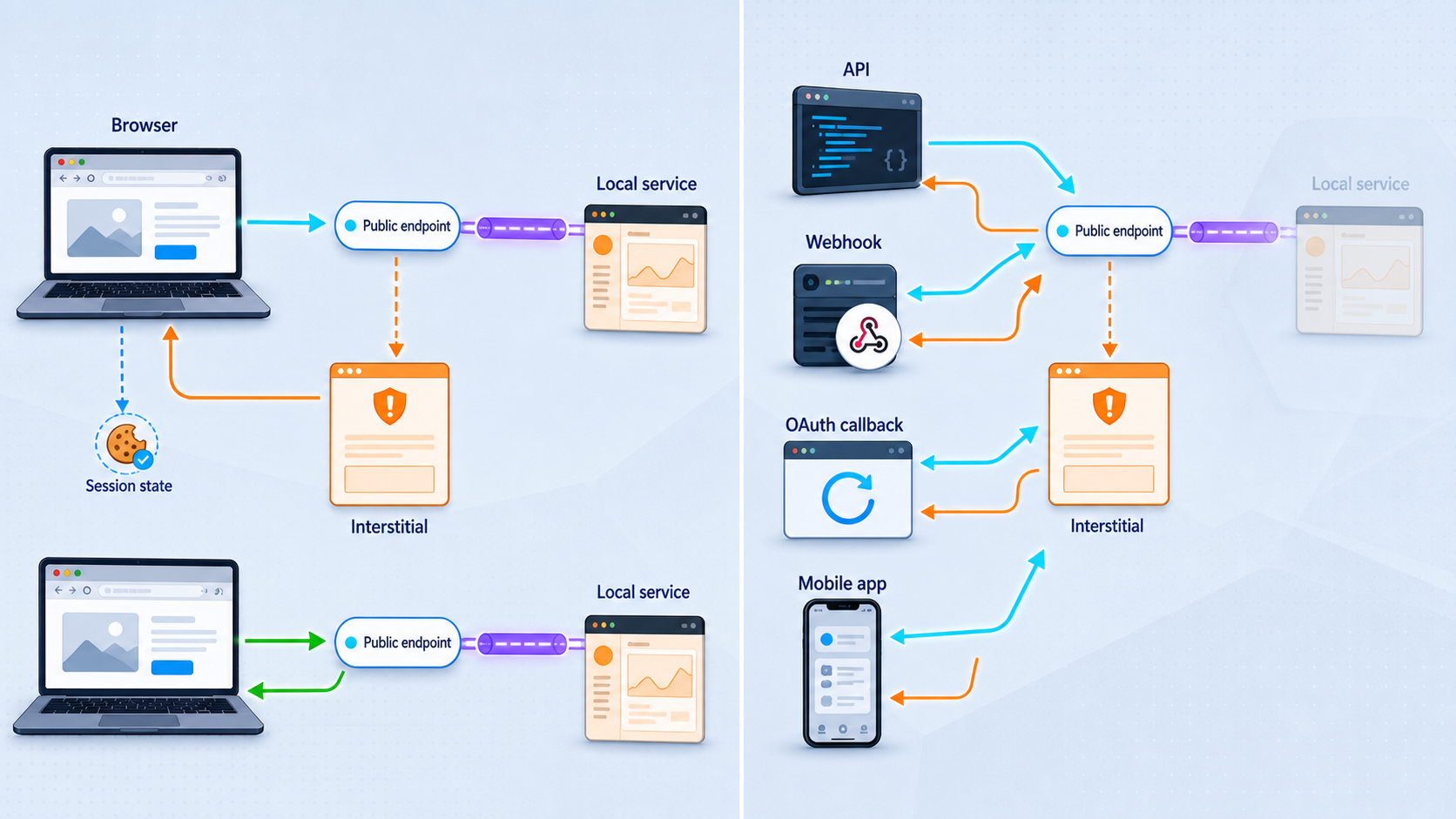
Browsers, command-line clients, webhook services, and mobile applications do not necessarily send identical requests. They can use different User-Agent values, Accept headers, cookies, redirect policies, and HTTP methods. A provider may also apply an interstitial only to a subset of traffic. Consequently, loading a URL successfully in one client does not prove that another client will receive the same content.
A browser can retain state after a person acknowledges a warning. A clean browser profile, an incognito session, a mobile WebView, or a continuous integration runner may not have that state. This is why a test can pass on a developer's laptop and fail on another device. Treat stored browser state as part of the diagnosis rather than evidence that the public endpoint is universally ready.
Start by recording the status code, response headers, redirect chain, final URL, Content-Type, and a safe sample of the response body. Do not place credentials, OAuth authorization codes, session cookies, device tokens, or private payloads into shared logs. A successful-looking status code is not enough. An HTML warning returned with a success status is still the wrong response when the caller expects application JSON.
How interstitials affect common development workflows
API tunneling usually works best when the caller reaches the local API directly and receives its documented status code and media type. If an interstitial returns HTML, JSON deserialization can fail immediately. Less defensive clients may produce a vague syntax error because the first character of the body is HTML rather than valid JSON. Validate both the response media type and the body before assuming the local API caused the error.
Webhook senders are more constrained. The sender controls the outgoing request and normally expects the configured callback URL to answer without human interaction. Some senders allow custom authentication headers, but those fields should be reserved for supported integration security rather than repurposed without documentation. If a tunnel requires a provider-specific opt-in header that the webhook platform cannot send, that approach is not suitable for the callback.
OAuth callback testing has two distinct paths. The authorization server redirects the user's browser to a registered callback URL, and the local callback handler then validates the returned state and completes the flow. An intermediate page can obscure errors, alter the visible navigation sequence, or prevent the callback handler from running until a user acts. Never disable OAuth state validation to compensate for tunnel behavior. The registered redirect URI must also match the authorization provider's rules exactly.
Mobile tests add DNS caches, embedded browsers, operating-system network policies, and certificate handling to the troubleshooting surface. Test the public URL from the actual device or emulator, not only from the development computer. Avoid weakening certificate validation. If a secure endpoint does not validate normally, investigate the hostname and TLS configuration instead of adding a permanent trust exception.
For Localtonet workflows that require unattended or machine-to-machine access, such as APIs, webhooks, OAuth callbacks, CI runners, or mobile applications, a paid account avoids the Free account interstitial and forwards the request directly to the configured local service.
Compare a normal browser, a clean browser profile, a command-line HTTP client, and the real webhook or mobile client when possible. Record differences in redirects, cookies, content type, and response body while keeping secrets out of logs.
Reliable options to evaluate
The first option is a documented request header or another provider-supported client setting. This can be appropriate for an API client, test runner, or development application that you control. Use only the current header name and behavior documented by that provider. Do not depend on an accidental parsing quirk, imitate unrelated clients, or assume that changing a browser identity is a stable contract.
The limitation is client control. A third-party webhook sender or OAuth authorization service may not let you add arbitrary headers. Even when a platform offers custom headers, confirm that it sends them on every relevant request and redirect. A browser extension can help with manual testing, but it does not fix requests from colleagues, customers, webhook systems, CI runners, or mobile devices that do not have the extension.
When the interstitial is tied to a subscription level, using a plan that does not include the interstitial is usually more reliable than building application logic around a warning page. On Localtonet, the interstitial applies only to Free accounts. Paid accounts bypass the interstitial and forward requests directly to the configured service.
A custom hostname may provide a cleaner, stable application address when the tunnel provider supports it. However, hostname availability, DNS records, certificate handling, and plan restrictions differ among providers. Check current documentation before making DNS changes. Localtonet HTTP tunnels can use generated subdomains, selected subdomains where supported, or custom domains, but exact custom-domain DNS instructions should be checked against current Localtonet documentation.
A reverse proxy can receive the public request and forward it to another endpoint while applying controlled routing, authentication, or headers. This is legitimate infrastructure when it has a clear operational purpose, but it creates another service to deploy, secure, monitor, and troubleshoot. It can also obscure the real source of errors. Do not introduce a proxy merely to preserve an undocumented workaround if a direct, supported tunnel configuration is available.
Switching tunnel services is another valid engineering decision. Evaluate the documented behavior required by the application rather than relying on a generic feature comparison. Important questions include whether the service returns the application response directly, which hostname options exist, whether the client supports the needed protocol, how tunnels are started and stopped, and which controls vary by plan. Test the chosen configuration with the actual webhook sender, OAuth flow, or mobile client before depending on it.
| Approach | Best fit | Main limitation |
|---|---|---|
| Documented request header | API clients and test tools you control | Third-party senders may not support custom headers |
| Paid Localtonet account | APIs, webhooks, OAuth callbacks, mobile apps, CI, and automated clients | Requires a paid account instead of the Free account configuration |
| Custom hostname | Stable callbacks and recognizable development URLs | DNS and certificate requirements must be verified |
| Managed reverse proxy | Teams that need centralized routing or access controls | Adds infrastructure, security, and maintenance responsibilities |
| Alternative tunnel platform | Workflows incompatible with the current provider's response behavior | Requires fresh testing of protocols, plans, and lifecycle behavior |
A Localtonet workflow for exposing a local HTTP service
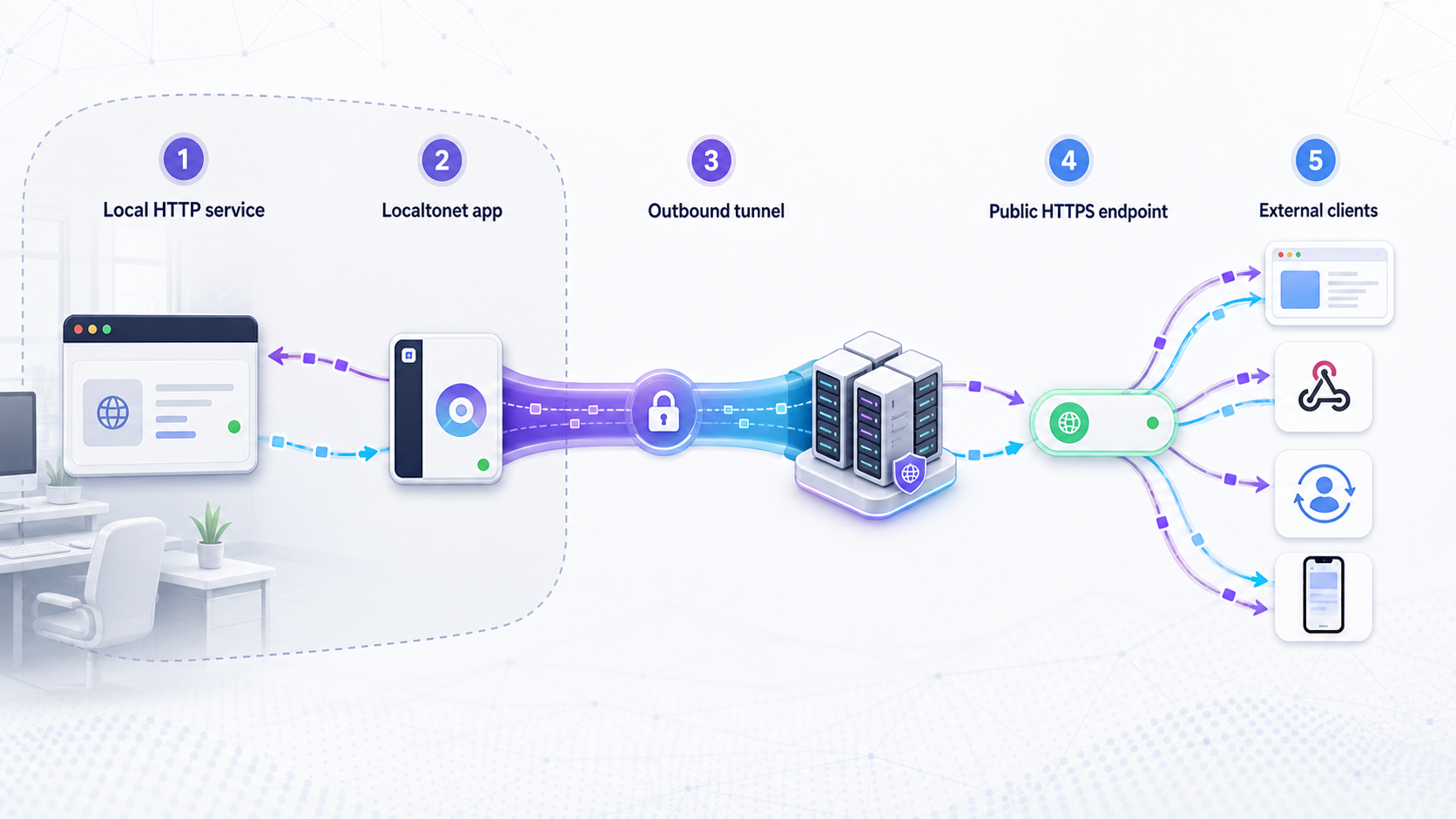
Localtonet is a multi-protocol tunneling and proxy platform. Its client application establishes an outbound connection from the device to a Localtonet relay server, so exposing a local service does not require inbound router port forwarding, firewall changes, VPN setup, or a public IP address. An HTTP tunnel can provide a public HTTPS address for a local web application or callback handler.
The available relay values, hostname options, and plan-dependent capabilities should be obtained from the current Localtonet dashboard and documentation rather than copied from an old tutorial.
The interstitial page is shown only on Free accounts. Paid accounts do not receive the interstitial page. If an API, webhook, OAuth callback, automated test, or mobile application must reach the tunneled service without manual confirmation, use a paid account.
Install and run the Localtonet client
Use the client on the device that hosts or can reach the local HTTP service. Confirm that the application itself responds locally before introducing the tunnel.
Authenticate or select the device
Select the device using its device-specific token. Treat that token as a secret, and never paste it into public examples, tickets, repositories, or client-side application code.
Select an available relay server
Choose from the values currently offered by the Localtonet product or dashboard. Do not hardcode a server code copied from an outdated guide.
Create the HTTP tunnel configuration
Point the HTTP tunnel at the local IP address and port used by the application. Choose the available process type and hostname option that fit the test.
Start and test the tunnel
Creating a tunnel does not start it. Use the Start control, then test the assigned public URL from the real browser, API client, webhook sender, OAuth flow, or mobile device.
Stop or delete it when finished
The public endpoint is available only while the selected client is connected and the tunnel is running. Stop or delete temporary exposure when it is no longer required.
Secure testing practices for public callbacks
A public tunnel changes reachability, not application authorization. Once a callback handler or development application has a public address, unexpected internet clients may attempt to reach it. Protect sensitive routes with the authentication and verification mechanisms appropriate to the integration. For webhooks, validate the sender according to that provider's documented signature scheme. For OAuth, validate state, restrict redirect URIs, protect credentials, and avoid logging authorization codes or tokens.
Apply least privilege to the local application. Expose only the port and service needed for the test. Do not publish an entire development machine, administrative dashboard, database, or debug interface when the integration needs one callback route. Where applicable, use application access controls, narrow permissions, IP restrictions, and short test windows.
Be careful when debugging payloads. Webhook bodies can contain customer or account data, and OAuth callbacks can contain short-lived secrets. Redact sensitive fields before sharing traces. Device auth tokens are also device-specific secrets and must not be guessed, published, or embedded in an article.
A script that searches for a provider page and clicks a confirmation button is fragile, browser-specific, and unsuitable for webhook delivery. Prefer a documented provider control, a supported account configuration, a supported hostname configuration, a properly managed proxy, or a tunnel service whose documented behavior matches the integration.
A practical diagnostic checklist
First, call the local service directly and save its expected status code, content type, and a non-sensitive body sample. Second, start the tunnel and repeat the same request through the public address. Third, disable automatic redirects temporarily so that every redirect target is visible. Fourth, compare the tunnel response with the local baseline.
If the public response is HTML, inspect its title and headers without assuming that it came from the local application. If the response reaches the local service but the application rejects it, examine host validation, callback URI configuration, authentication, and proxy-aware application settings. These are separate from an interstitial and should not be fixed by suppressing security checks.
Finally, rerun the test from the actual integration environment. A command-line test with a custom header does not demonstrate that an external webhook provider can send the same header. Likewise, a browser session with a stored cookie does not demonstrate first-visit behavior on a mobile device. The reliable configuration is the one that works without hidden manual state.
Why does my API return HTML through a tunnel?
The response may be an interstitial, an authentication page, an application error page, or a proxy-generated response. Check the status, redirect chain, Content-Type, headers, and body. Compare them with a direct local request before changing the API parser.
Does Localtonet show the interstitial page on paid accounts?
No. The Localtonet tunnel interstitial page applies only to Free accounts. Paid accounts do not receive the interstitial page, so requests are forwarded directly to the configured local service.
Can a custom header solve an interstitial problem?
It can when the tunnel provider explicitly documents the header and you control the requesting client. It is usually unsuitable when a webhook sender, OAuth service, or ordinary visitor cannot add that provider-specific header.
Will a reverse proxy always fix webhook delivery?
No. A reverse proxy may provide controlled routing or header handling, but it also adds another failure point. It must preserve the request method, body, relevant headers, and integration security requirements. Use it only when the architecture and maintenance cost are justified.
Does creating a Localtonet tunnel make it immediately available?
No. Creating the configuration does not mean the tunnel is running. The tunnel must be started, and it remains available only while the selected client or device is connected and the tunnel is running.
Should I disable OAuth or webhook verification during tunnel testing?
No. Public reachability does not establish trust. Keep OAuth state validation, redirect URI controls, webhook signature verification, authentication, and least-privilege access in place. Use test credentials and redact sensitive traces.
Does Localtonet require router port forwarding for a public HTTP tunnel?
No. The Localtonet client establishes an outbound connection to a relay server, so inbound router port forwarding, firewall changes, VPN setup, and a public IP address are not required for the standard tunneling workflow.
Which Localtonet account type is better for APIs and webhooks?
If the endpoint must be accessed automatically without a user confirming an interstitial page, use a paid Localtonet account. The interstitial applies only to Free accounts, while paid accounts forward requests directly to the configured local service.
Test your localhost workflow with a managed public tunnel
Create a Localtonet account, connect the device that can reach your local service, start an HTTP tunnel, and verify the resulting public address with the real API, webhook, OAuth, or mobile client. Free accounts may display the interstitial page; paid accounts do not receive the interstitial.
Get Started Free →

