

Publish local datagram services without configuring inbound router ports
UDP powers many game servers, voice systems, telemetry collectors, device protocols, and other time-sensitive applications. Exposing those services can be difficult when the host is behind NAT, carrier-grade NAT, or a network without a public IP address. This guide explains UDP behavior, application responsibilities, Localtonet prerequisites, setup, verification, routine operation, security, and structured troubleshooting. It also explains when a UDP tunnel is appropriate and when an application may require TCP or multiple public endpoints as well.
📋 What's in this guide
What UDP tunneling means
User Datagram Protocol, usually shortened to UDP, is a connectionless transport protocol. An application sends discrete datagrams without first establishing a TCP-style connection. UDP preserves message boundaries, but it does not guarantee that a datagram will arrive, arrive only once, or arrive in the order it was sent. It also does not retransmit a lost datagram for the application.
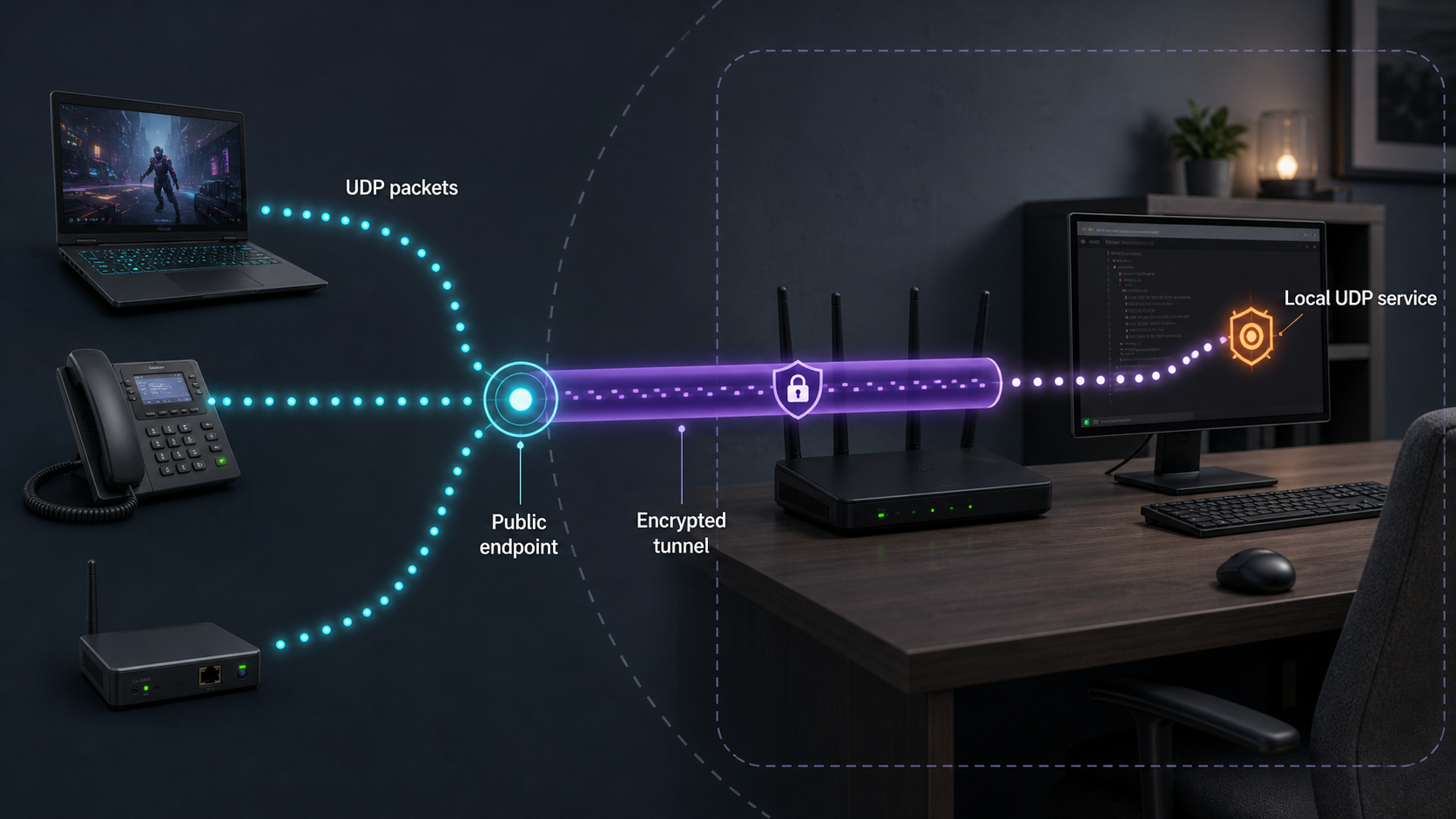
A UDP tunnel gives internet clients a public host and port through which they can send datagrams to a service running on a private device or network. With Localtonet, the client application on the selected device establishes an outbound connection to a Localtonet relay server. The UDP tunnel points to a local IP address and port on, or reachable from, that client device. Public datagrams arriving at the assigned endpoint are relayed to that local target.
This arrangement can expose a local UDP service without inbound router port forwarding, inbound firewall changes, VPN setup, or a public IP address. It does not convert the service into a different protocol or make an incompatible client work. The public client and local service must still agree on the UDP-based application protocol, message format, authentication, timing, and session behavior.
A Localtonet tunnel must be started with the Start button after it has been configured. The public route is available only while the selected client device is connected and the tunnel is running. A stopped tunnel, closed client, or disconnected device makes the route unavailable.
Reliability belongs to the application when it is needed
TCP acknowledges received data, retransmits missing segments, restores ordering, and presents an ordered byte stream. UDP does not provide those transport-level behaviors. A UDP application that needs reliable delivery must define its own acknowledgements, sequence numbers, retry timers, duplicate detection, or recovery procedure. Other applications deliberately accept occasional loss because an old packet is no longer useful by the time a replacement would arrive.
This distinction matters for games and voice traffic. A current player-position update or audio frame can supersede an older one. Retrying stale data may add delay without improving the experience. By contrast, a device command that changes physical state may require an acknowledgement and an idempotency identifier so that a retry does not execute the same action twice. UDP itself does not make that decision.
Applications must manage congestion responsibly
UDP does not provide TCP’s built-in congestion-control behavior. That does not mean a UDP application should send without limits. Applications that transmit sustained or high-volume traffic need an appropriate congestion response, pacing, backoff, or other rate-control design. Continuing to send at the same rate when the path is dropping packets can worsen loss for the application and other network users.
A tunnel cannot repair an application that overloads its destination or the available network path. If loss increases under load, investigate send rate, queueing, message size, receiver capacity, and application retry behavior before treating every missing datagram as a tunneling fault.
Message size and fragmentation affect reliability
UDP preserves each application datagram as a message, so message sizing is part of protocol design. Large datagrams may exceed the usable path size and require IP fragmentation, or may fail when a path cannot carry them as sent. Losing one fragment can prevent the receiving host from reconstructing the complete datagram. Network paths can also differ, so a message that works on one local network may fail across another route.
Protocol designers should avoid assuming that the largest locally successful datagram will work everywhere. Follow the sizing guidance for the application protocol, test over representative networks, and prefer application-level chunking when the protocol requires messages larger than the path can reliably carry. Do not arbitrarily split an existing third-party protocol unless its specification supports that behavior.
Checksums detect corruption, not identity
UDP includes a checksum field for detecting certain transmission errors. Checksum rules differ between IPv4 and IPv6, and applications should rely on their operating system and network stack to handle the transport correctly. A valid checksum does not authenticate the sender, prove that a message is recent, or show that the sender is authorized to perform an action.
Services handling sensitive telemetry or control traffic need application-level security appropriate to their protocol. That may include authenticated sessions, message authentication, sequence validation, freshness checks, replay protection, and strict authorization. The exact mechanism depends on the service and must be implemented by the application or a protocol-aware security layer.
NAT mappings and apparent sessions
NAT devices commonly create temporary mappings after outbound traffic is observed. Because UDP has no connection close handshake, a device decides when an inactive mapping expires. Applications that depend on direct UDP communication often use protocol-specific keepalives or renegotiation to maintain or recreate state. The appropriate interval and recovery behavior depend on the application and network.
Localtonet changes the inbound reachability workflow by having our client establish an outbound connection to a relay. It does not remove application-level session state. A game server, voice service, or IoT collector may still associate traffic with a source address, session identifier, negotiated media flow, or device identity. Test that behavior through the public endpoint instead of assuming that receipt of one packet proves the entire session will work.
Choose UDP, TCP, or combined UDP/TCP
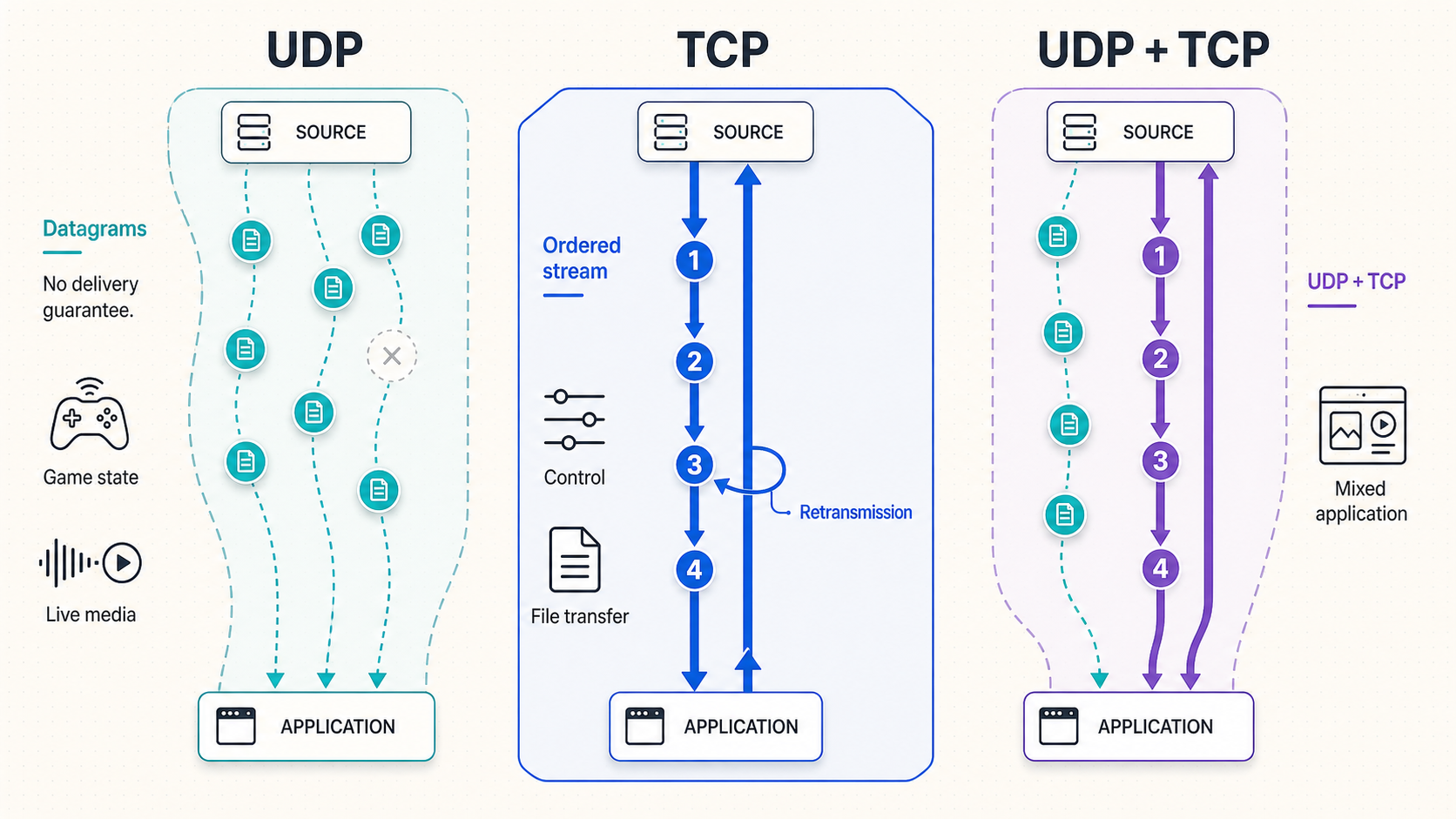
Tunnel selection must follow the transport used by the application. Choosing UDP simply because an application is described as real time is not enough. Some real-time systems use TCP. Others divide control, authentication, signaling, media, discovery, and administration across different transports or ports.
| Tunnel type | Choose it when | Operational consideration |
|---|---|---|
| UDP | The local application listens for UDP datagrams and remote clients communicate with it over UDP. | Test with valid application messages because there is no transport-level connection handshake. |
| TCP | The application expects a TCP connection and exchanges an ordered byte stream. | TCP supplies connection state, acknowledgements, ordering, and retransmission at the transport layer. |
| Combined UDP/TCP | The application or service suite genuinely requires both UDP and TCP exposure under the available product configuration. | Confirm every required transport and port. A combined option does not resolve unrelated extra-port requirements automatically. |
Localtonet documents UDP, TCP, and combined UDP/TCP among its supported tunnel categories. Availability can vary by subscription plan, client version, or product configuration, so confirm the options shown in the current dashboard. Relay server or region values must also come from the dashboard rather than an old tutorial or hardcoded example.
An application can require UDP on one port, TCP on another port, or a negotiated range of media ports. Confirm the exact requirements for the product, edition, server version, and deployment mode. A single UDP tunnel or combined UDP/TCP configuration may not cover a multi-port architecture.
Games
Many multiplayer systems use UDP for time-sensitive state updates, but protocol and port requirements vary by title, edition, platform, server build, and launcher. Before publishing a game server, confirm its listening transport, bind address, configured port, authentication controls, player permissions, and version compatibility.
Some games use TCP for login, administration, downloads, or another control function while gameplay uses UDP. Others use several UDP ports. Follow the server’s current documentation and configuration rather than copying a port list associated with a different release.
VoIP and real-time media
Voice systems can separate signaling from media. A call may authenticate and negotiate successfully while audio still fails because the media path uses different UDP ports or addressing information. Conversely, reachable media ports do not prove that signaling, authentication, device permissions, or session negotiation is correct.
When debugging, distinguish a call that never connects from a call that connects with no audio, one-way audio, or choppy audio. These symptoms point to different stages. Signaling and authentication failures occur before a usable media path, while one-way or degraded audio requires inspection of negotiated addresses, ports, packet flow, loss, timing, and application behavior.
IoT telemetry and device protocols
Sensors, gateways, and embedded applications often exchange compact datagrams, but their security and response models differ widely. Some collectors acknowledge every accepted message, while others intentionally remain silent. A receiver should validate message length, structure, device identity, freshness, and command authorization.
Be especially careful when exposing a device-control protocol. Receiving a datagram does not prove who sent it, and blind retries can repeat a non-idempotent action. Use the protocol’s supported authentication and replay defenses, expose only the necessary collector or gateway, and avoid publishing a broad device-management interface merely to test one telemetry path.
Prerequisites for a reliable UDP tunnel
Prepare the application before creating public exposure. A tunnel cannot correct a stopped process, an incorrect bind address, an invalid request, or a client-server version mismatch.
Confirm the bind address
A process can listen only on a loopback address, on one LAN interface, or on all suitable interfaces. If Localtonet runs on the same machine, a loopback target may be reachable when correctly configured. If Localtonet runs on another device, a service bound only to the target machine’s loopback interface will not be reachable across the LAN.
When the service is elsewhere on the LAN, test it from the Localtonet client device itself. This verifies the exact path that forwarded traffic will use after leaving the client. A successful test performed only on the service host is not enough to prove LAN reachability.
Know what a successful request looks like
Record the expected request and result before testing publicly. Useful evidence can include a valid client response, a new server log entry, an authenticated session, a changed test-state value, an incremented application counter, or a packet capture showing both directions. For a service that intentionally sends no response, a verified server-side event is more meaningful than waiting for a reply that the protocol never promises.
A Localtonet authentication token identifies a specific client device. Do not publish it in source code, screenshots, tutorials, shell history, logs, or support messages. Use separate test credentials where the application supports them, and never include real secrets in a packet example.
How to expose a local UDP service with Localtonet
The current general Localtonet documentation confirms support for UDP tunnels and provides client downloads, but the supplied evidence does not expose a separate, field-by-field UDP interface page. The sequence below therefore preserves our verified tunnel lifecycle and known UDP target requirements without inventing dashboard labels beyond the documented Start action. If the current dashboard differs, follow its displayed UDP workflow and the latest Localtonet documentation.
Install and run the Localtonet client
Install the appropriate Localtonet application on the device that can reach the UDP service. Run the client and confirm that the service itself already works locally. The documentation currently lists client options for Windows, Linux, macOS, Docker, and Android, with architecture-specific choices shown on the documentation page.
Authenticate or select the device
Use the device-specific authentication token to identify the client that will run the tunnel, or select that connected device through the current product workflow. Treat the token as a secret and verify that the intended device is connected.
Select an available relay server
Select a relay server or region from the values currently offered by the dashboard. Do not copy a server code or region value from an old article because availability can vary by plan, version, region, or current product configuration.
Create the UDP tunnel configuration
Choose the UDP tunnel category and configure the local IP address and UDP port used by the service. If the documented application requirements include TCP as well, evaluate the available combined UDP/TCP option or the necessary separate exposure instead of assuming UDP alone is sufficient.
Start the tunnel and use the assigned endpoint
Creating the configuration does not run it. Press Start, then read the assigned public host and port from the current dashboard. Use that endpoint with a remote, protocol-compatible client and verify both request delivery and the expected application result.
Stop or delete the tunnel when it is no longer needed
Stop the tunnel to end public availability while retaining the configuration for later use. Delete it when the configuration is no longer required. Confirm current endpoint details again before a future test rather than relying on a previously recorded address.
This guide does not hardcode relay codes, endpoint ports, plan entitlements, or unverified interface fields. Obtain those values from your current dashboard. Protocol options and availability can vary by subscription plan, client version, or product configuration.
Verify the UDP service from listener to remote client
Verification should move outward one boundary at a time. This isolates application failures from LAN reachability, device connectivity, tunnel state, and remote protocol behavior.
1. Validate the local listener
Confirm that the process is running and listening for UDP on the intended port. Also confirm the address to which it is bound. A correct port on the wrong interface is still the wrong target. Use operating-system tools or application status output that you already trust, but do not treat a listener listing alone as proof that the application accepts valid messages.
Send a valid request using the application’s normal client or test utility. Confirm the expected response or server-side event. If this fails, repair the service before testing Localtonet.
2. Test from the Localtonet client device
This step is essential when the target service runs on another machine, gateway, container host, or embedded device. From the device running Localtonet, send the same valid protocol request to the local IP address and UDP port that you plan to configure.
If the request works on the service host but fails from the Localtonet device, investigate the service bind address, LAN routing, host firewall policy, container networking, device isolation, or an incorrect local IP. Creating a public tunnel before this path works only adds another variable.
3. Confirm device and tunnel state
Verify that the intended Localtonet device is connected and that the UDP tunnel is running. A tunnel entry that exists in the dashboard may still be stopped. Confirm the configured local IP and port against the tested target, then read the currently assigned public host and port.
4. Test remotely with a protocol-aware client
Use a compatible client from a different network. Enter the assigned public host and port exactly as shown. Send a request that the service recognizes, including any required authentication, version negotiation, session setup, or message framing.
Testing from an external network ensures that the request traverses the public endpoint. A test from the same private network can be useful for some checks, but it does not provide the same evidence as a genuinely remote client.
5. Confirm both directions and application evidence
For request-response protocols, verify that the server receives a valid request and that the remote client receives the expected response. Compare timestamps, session identifiers, or application request identifiers where available. For one-way telemetry, confirm receipt using application logs, a test record, or another authoritative server-side signal.
If the server records the request but the client receives no response, the inbound route is at least partially working. Focus next on response addressing, application session state, authentication, output logs, negotiated ports, timeouts, and whether the protocol is designed to reply to that message.
UDP has no TCP-style handshake, and many applications ignore malformed or unexpected messages. A scanner may report an endpoint as open, closed, open or filtered, or simply time out without proving that the real application works. Prefer a valid protocol exchange and corroborating server-side evidence.
Security practices for public UDP exposure
Avoiding inbound router configuration does not remove the need to secure the application. Once started, the tunnel provides a public route to the configured target. Internet clients that can reach the endpoint may be able to send datagrams unless the application authenticates them or another verified access-control mechanism applies.
Reflection and amplification risk
Some UDP services reply to a small request with a larger response. If a protocol accepts requests without authentication and can be induced to send responses toward another address, it may be relevant to reflection or amplification abuse. The exact risk depends on the protocol, its handling of source addresses, the network path, and whether requests require an established or authenticated session.
Do not expose an open resolver, unauthenticated diagnostic responder, discovery service, or custom high-amplification protocol without a specific security review. Require authentication where supported, disable unnecessary response modes, constrain response size and rate, and monitor unusual request patterns. A UDP tunnel should expose a deliberately selected application, not a general-purpose reflector.
Use Localtonet only where you are authorized to expose the service. Follow organizational policies, apply least privilege, and preserve application access controls. Do not use tunneling to circumvent security controls or publish a service designed only for trusted local clients without first hardening it for public input.
Operate a UDP tunnel safely
Understand availability
The public route is available only while the selected Localtonet client device is connected and the tunnel is running. If the device shuts down, sleeps, loses network access, closes the client, or becomes disconnected for another reason, remote clients cannot rely on the route remaining available.
A disconnected device is useful evidence during troubleshooting, but it does not by itself identify why the device disconnected. Confirm local power, network access, client status, and account or product state through the current dashboard and device environment.
Know the difference between stopping and deleting
Stop a tunnel when public access should end but you expect to reuse the configuration. Delete it when the configuration is obsolete or should no longer remain in the dashboard. Neither action substitutes for disabling old application credentials or removing endpoint references from external clients when those are no longer appropriate.
Handle public endpoints deliberately
Read the active public host and port from the dashboard whenever you start or resume a workflow. Do not promise that an endpoint will remain unchanged unless the current product configuration explicitly provides that behavior. Update remote clients, test scripts, documentation, and monitoring when endpoint details change.
Share the endpoint only with intended testers or users. Treat endpoint details as operational information, not as an authentication secret. Anyone who learns a public address may still attempt to send traffic, so the application must enforce its own security controls.
Plan for service and device restarts
After restarting the UDP application, repeat local protocol validation before investigating the public path. Confirm that the service returned on the expected address and port. Configuration changes, dynamic LAN addressing, container recreation, or a different startup profile can change the effective target.
After restarting the Localtonet device or client, confirm that it is connected and that the required tunnel is running. Tunnel creation and tunnel startup are separate lifecycle states. Do not infer the running state merely because the configuration still appears in the dashboard.
Monitor application outcomes
UDP transport does not provide a universal success record. Monitor signals meaningful to the application, such as authenticated sessions, accepted messages, expected responses, rejected payloads, queue depth, processing errors, and rate-limit events. During VoIP testing, separate call establishment from media quality. During game testing, separate server discovery or login from gameplay traffic. During IoT testing, separate receipt from validation and durable processing.
Troubleshoot UDP tunnels by symptom
Begin with the local service and move outward. Change one variable at a time, record the test time and endpoint, and use the same known-valid request at each reachable boundary.
| Symptom | Likely causes to check | Next action |
|---|---|---|
| The local protocol client cannot reach the service | Stopped process, wrong UDP port, invalid request, version mismatch, or local application failure. | Repair the service locally before creating or changing the tunnel. |
| The service works on its own host but not from the Localtonet device | Loopback-only bind, wrong LAN address, host firewall policy, container networking, routing, or client isolation. | Test the exact configured IP and port from the Localtonet device and correct LAN reachability. |
| TCP testing succeeds but the UDP application does not | Wrong transport or a test tool using TCP against a UDP listener. | Confirm the listener transport and use a UDP-capable, protocol-aware client. |
| The tunnel exists but the public endpoint is unavailable | The tunnel was created but never started, or it was stopped later. | Confirm the tunnel state and use the Start button. |
| The tunnel is running but no request reaches the service | Wrong local IP, wrong port, wrong device, disconnected device, or unreachable LAN target. | Compare the configuration with the target already proven from the Localtonet device. |
| A generic UDP scanner reports no response | The service ignores invalid probes, intentionally sends no reply, or requires authentication or prior session state. | Use a valid application request and inspect authoritative server-side evidence. |
| The service logs malformed or rejected messages | Invalid payload, incompatible client version, wrong framing, missing session setup, or testing the wrong protocol. | Compare the client and server protocol configuration and reproduce locally with the same payload. |
| The request arrives but authentication fails | Invalid credentials, expired session, unauthorized device, replay rejection, or application policy. | Inspect application authentication logs and test with authorized non-production credentials. |
| One feature works but the complete application does not | The product requires additional ports, TCP, separate signaling, discovery, or a negotiated media range. | Map every documented flow and expose only the additional required targets using supported configurations. |
| The server receives traffic but the client receives nothing | The service intentionally does not reply, sends to an unexpected address or port, rejects the session, or has an output-side failure. | Inspect response generation, destination selection, application logs, packet flow, and protocol expectations. |
| VoIP connects but has one-way audio | Only one media direction is working, negotiated address or port details are wrong, or required media ports are missing. | Separate signaling from media and verify packet flow in each direction using the voice system’s own diagnostics. |
| Traffic works briefly and then stops | Application timeout, session expiry, device disconnect, service restart, changed local address, overload, or protocol keepalive behavior. | Correlate the failure time across client state, tunnel state, service logs, and application session records. |
| Loss increases during load | Excessive send rate, receiver saturation, queueing, large datagrams, fragmentation, or aggressive retries. | Reduce load, inspect message sizes and queues, and apply protocol-appropriate pacing or congestion response. |
Use a repeatable diagnostic order
- Confirm the application process is running.
- Confirm the UDP listener address and port.
- Send a known-valid local request.
- If the target is elsewhere on the LAN, repeat the test from the Localtonet client device.
- Confirm the intended Localtonet device is connected.
- Confirm the tunnel is started, not merely created.
- Compare the configured local target with the tested address and port.
- Read the current public host and port from the dashboard.
- Test remotely with a protocol-aware client.
- Correlate remote results with service logs, session state, and expected responses.
This order prevents common misdiagnoses. For example, changing relay selection cannot fix a loopback-only listener, and recreating a tunnel cannot make a UDP-only route satisfy an undocumented TCP dependency.
Frequently asked questions
Can Localtonet expose a local UDP service without router port forwarding?
Yes. The Localtonet client establishes an outbound connection to a relay server, and the tunnel provides a public host and port for the configured local UDP target. This avoids inbound router port forwarding, inbound firewall changes, VPN setup, and the requirement for a public IP address.
Should I choose UDP or TCP for a game server?
Choose the transport required by the specific game server, edition, platform, and version. Some systems use UDP, some use TCP, and some require both or use several ports. Verify the current server documentation and configuration rather than choosing solely from the application category.
When should I use a combined UDP/TCP tunnel?
Use a combined UDP/TCP tunnel when the application or service suite is documented to require both transports and the option is available in your current product configuration. Confirm whether the application uses the same port for both transports or requires additional ports.
Why does a UDP port test show no response?
UDP has no TCP-style connection handshake, and many services respond only to valid protocol messages. Silence can result from an invalid payload, an intentionally one-way protocol, a wrong target port, a stopped tunnel, a disconnected client, missing authentication, or application-level filtering. Test with a protocol-aware client and inspect the local service evidence.
Does creating a Localtonet UDP tunnel make it immediately available?
No. Creating the configuration does not mean the tunnel is running. You must start it with the Start button. It remains available only while the selected client device is connected and the tunnel is running.
Can I use a generic port scanner to verify a UDP tunnel?
A scanner can provide limited clues, but it cannot reliably prove that an arbitrary UDP application works. Many services ignore unknown payloads or send no response. A valid protocol request, an expected client result, and matching server-side evidence provide a stronger test.
What should I test when the UDP target is another device on my LAN?
Test the target IP and UDP port from the device running the Localtonet client. This confirms the service bind address, LAN route, host policy, and target address from the same device that will forward tunnel traffic.
Is a public UDP endpoint secure by itself?
No. Public reachability is not authentication. The application should authenticate clients where supported, validate each datagram, restrict commands and permissions, apply suitable rate controls, and expose only the service remote users require.
What happens when the Localtonet device disconnects?
The tunnel is available only while the selected device is connected and the tunnel is running. A disconnect therefore makes the public route unavailable. Check the device’s power, network access, Localtonet client state, and dashboard status to determine why it disconnected.
Start a controlled UDP tunnel with Localtonet
Connect the authorized device that can reach your working UDP service, configure the verified local IP address and port, select an available relay, and start the tunnel when remote access is required. Test with a protocol-aware external client and secure the application before sharing its public endpoint.
Get Started Free →

