

Give a managed data pipeline a controlled path to a database that has no public IP
A database on a workstation, office server, or homelab is normally unreachable from a managed ETL service because NAT and CGNAT do not provide an inbound route. This guide explains three practical architectures: forwarding the native database protocol through a TCP tunnel, placing an HTTPS data API in front of the data, or using a private mesh connection. It also provides a concrete Linux installation and persistent-service workflow, database preparation guidance, exact TCP tunnel setup, layered verification, security controls, operations, and troubleshooting. With Localtonet, the direct TCP design can work without inbound router port forwarding when the ETL connector accepts a custom public hostname and port.
📋 What's in this guide
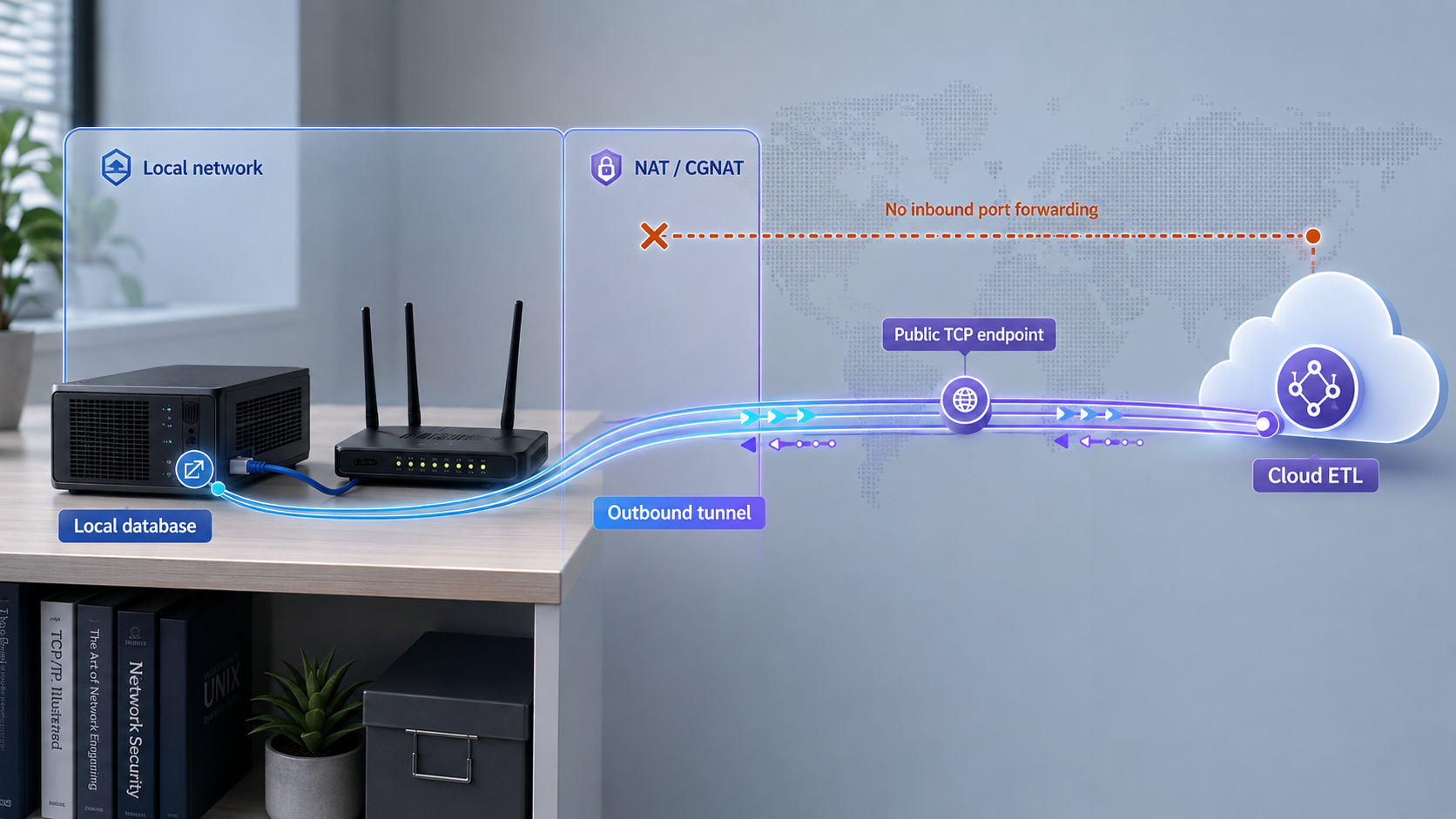
Why a cloud ETL service cannot directly reach a local database
A managed extract, transform, and load service runs outside the network that contains a local database. The service may know the database software, username, and schema, but it still needs a routable network destination. An address such as 127.0.0.1, 192.168.x.x, or another private address has meaning only within the relevant host or private network. It cannot be used as a destination from an unrelated cloud environment.
Private IPv4 address ranges are defined by RFC 1918. They are intended for private internets and are not globally routable destinations. The loopback range has an even narrower scope: 127.0.0.1 refers to the machine on which the connection is initiated. If a cloud connector is configured with 127.0.0.1, it attempts to connect to itself, not to the database server in your office or home.
Conventional NAT permits devices on a private network to initiate outbound sessions while unsolicited inbound traffic generally has no translation state or destination unless an explicit mapping is created. Carrier-grade NAT adds a provider-controlled translation layer. The shared address space reserved for this purpose is documented in RFC 6598. Under CGNAT, changing the local router alone may not create a usable inbound route because the customer does not control the provider-facing translation.
A Localtonet tunnel changes the connection path. Our client runs on a device that can reach the database and establishes an outbound connection to a Localtonet relay server. A TCP tunnel then supplies a public host and port that forward compatible TCP traffic to the configured local IP address and port. This does not require inbound router port forwarding, firewall changes for unsolicited inbound internet traffic, a public IP address, or VPN setup.
The resulting data path has several distinct segments. The managed ETL connector opens a connection to the assigned public host and port. The Localtonet relay accepts the tunnel traffic. The already-connected Localtonet client carries it toward the configured local target. Finally, the database handles authentication, authorization, queries, and database-native transport security.
Localtonet can provide a network path, but it cannot make an ETL connector support an otherwise unsupported database, database version, authentication method, TLS mode, or change-data-capture configuration. Validate those capabilities with the ETL and database documentation before exposing anything.
Compare TCP tunneling, an HTTPS data API, and private mesh access
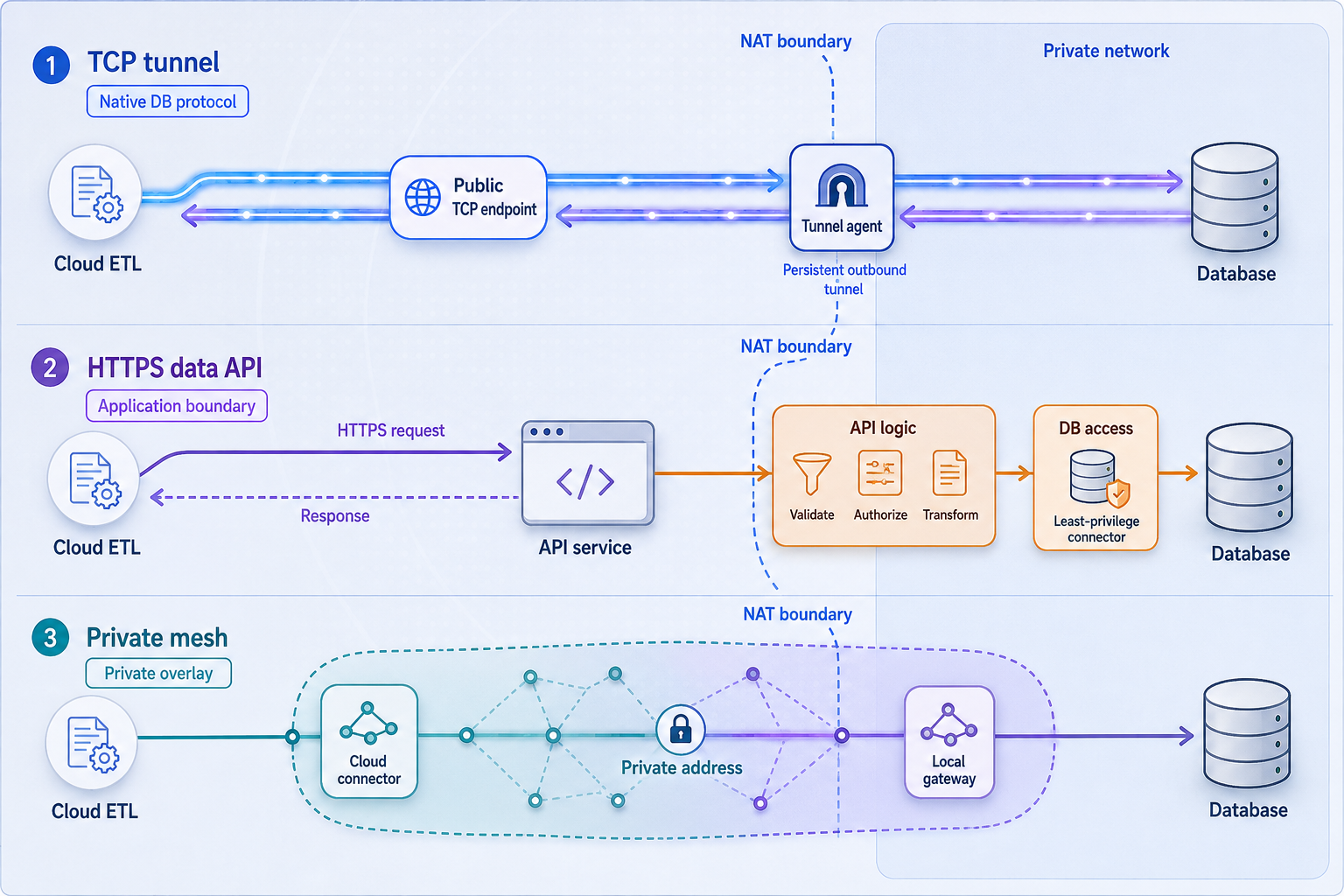
The safest design is not always the design with the fewest components. Start with the interface the ETL platform can consume, how much of the database must be available, and whether software can run inside the ETL environment. These factors usually determine whether a native TCP connection, a purpose-built HTTPS API, a private network, or a vendor-provided local extraction agent is appropriate.
| Access pattern | Best fit | Main advantage | Main constraint |
|---|---|---|---|
| Localtonet TCP tunnel | An ETL connector that supports the native database protocol plus a custom public hostname and port | Preserves the connector's normal database interface without requiring inbound router port forwarding | The public endpoint reaches a sensitive service, so database authentication, TLS, privilege limits, and lifecycle control are essential |
| HTTPS data API | An ETL tool with an HTTP, REST, or custom API connector, especially when only selected datasets should be available | The API can expose narrow operations and return only approved fields rather than presenting the full database protocol | You must build, authenticate, validate, operate, and version the API, including pagination and incremental extraction behavior |
| Private mesh access | An ETL runtime, self-hosted worker, or adjacent agent that can participate in a private network | Keeps access within a private network design and can bridge local LAN resources with granular firewall rules | Many fully managed ETL services do not let customers install a mesh client or add private routes to a hosted connector |
| Extraction agent inside the local network | An ETL vendor that provides a supported on-premises agent or self-hosted worker | The extraction component initiates outbound communication instead of accepting a direct remote database connection | Availability, security behavior, resource requirements, and supported sources depend on the selected ETL platform |
When a TCP tunnel is the direct solution
Choose the TCP pattern when the cloud connector expects to speak the database's native wire protocol and accepts a user-supplied host and port. This is often the least disruptive approach because the ETL tool continues to use its existing database connector. Features such as metadata discovery, incremental reads, or change data capture remain connector and database concerns rather than tunnel features.
The direct design is also useful when the database is temporary, the pipeline is being evaluated, or the source exists on a network where inbound forwarding cannot be configured. Convenience is not a reason to use broad administrator credentials or leave the tunnel running indefinitely. A native database endpoint deserves the same care as any other internet-reachable infrastructure.
When an HTTPS API is safer or more flexible
An API is preferable when the ETL job needs a narrow dataset rather than general database access. The application can enforce approved queries, omit confidential columns, aggregate records, validate filters, and present a stable contract even if the underlying schema changes. It can also implement API-specific authorization and auditing.
This approach introduces engineering work. A reliable extraction API needs pagination, deterministic ordering, error responses, timeout handling, and an incremental cursor or timestamp strategy where repeated full exports are impractical. It must define how deletions and updates are represented. The ETL tool must also support the API's authentication method and response format.
If the API runs locally, an HTTP/s tunnel can publish it through Localtonet. HTTP tunnel process types can use a random subdomain, a custom subdomain where supported, or a custom domain. Check current domain and DNS requirements before deployment rather than copying records from an older setup.
When VPN Manager fits
Our VPN Manager provides a private mesh VPN with granular firewall rules and can bridge local LANs. It is appropriate when both ends can join the mesh or when a participating network can route the required database resource. This is different from a standard TCP tunnel and should not be treated as the same feature under another name.
VPN Manager requires Localtonet Desktop app version 7.7 or later or Mobile app version 10.0 or later. It also requires administrative privileges on each machine running the Localtonet client because creating virtual network interfaces is an operating-system-level operation. Update older clients before building the mesh and confirm that administrative operation is permitted by organizational policy.
A fully managed ETL connector often gives the customer no operating-system access, so there may be nowhere to install the private-network participant. In that case, the mesh design is not viable unless the ETL vendor supports a customer-managed worker, gateway, or agent. Review the Localtonet VPN Manager setup and compatibility requirements alongside the deployment model of the selected ETL service.
The systemd service included with our Linux packages is configured for tunnels. VPN Manager requires a separate service configuration with the privileges necessary to create and manage virtual network interfaces.
Confirm the prerequisites before creating a tunnel
A few checks performed in advance prevent most failed deployments. Record the results as part of the pipeline design so operators know which system owns each control.
ETL connector requirements
- Supported source: Confirm that the ETL platform supports the exact database engine and version.
- Custom network destination: Verify that the connector accepts a custom public hostname and port. A connector that only supports vendor-managed instances or fixed cloud endpoints cannot use an arbitrary TCP tunnel.
- Authentication compatibility: Confirm support for the database authentication method you intend to use. Do not assume every connector supports client certificates, integrated identity, or every password mechanism.
- TLS controls: Determine whether the connector can require TLS, validate the server certificate, supply a trusted certificate authority, and verify the hostname where applicable.
- Extraction behavior: Identify whether the job performs full reads, incremental queries, log-based change capture, or another method. Each mode can require different database privileges and configuration.
- Network controls: If source IP allowlisting is part of the design, obtain the ETL service's documented egress addresses and confirm that the enforcement point can apply them.
- Connection behavior: Understand connection concurrency, query timeouts, retry policy, and scheduling. These affect database load and recovery after a temporary interruption.
Local environment requirements
- A running database that accepts TCP connections from the machine where the Localtonet client will run, or from another address reachable by that machine.
- A supported Localtonet client installation on a device that can remain powered on for the required extraction window.
- Outbound network access from that device so the Localtonet client can establish and maintain its relay connection.
- A device-specific Localtonet authentication token handled as a secret. Never place it in an article, shared ticket, source repository, pipeline log, or ETL hostname field.
- An available Localtonet relay server or region selected from the current dashboard. Availability can vary, so this guide does not hardcode a server code.
- A dedicated database account with only the schema, table, view, metadata, and operational privileges needed by the extraction method.
- A documented maintenance owner for the client, tunnel, database credentials, and ETL job.
Choose a supported client platform
Localtonet provides downloads for 64-bit, 32-bit, and ARM Windows variants; x64, ARM, ARM64, and MUSL Linux variants; Intel and ARM64 macOS; Docker; and Android. The current Localtonet installation documentation lists the available packages. Choose a platform that can remain online and reach the database consistently.
For an unattended ETL dependency, a service-managed installation on an always-on host is usually more suitable than a desktop application on a laptop that sleeps. The next section provides a complete Linux package example because the documented package installs a persistent systemd service. If you use another operating system, install its current client build and make sure its operating lifecycle matches the ETL schedule.
A connectivity test should not be performed with a database superuser simply because it is convenient. Create a dedicated ETL identity, deny unnecessary write and administrative permissions, and expose only the required schemas or curated views. If the connector later needs an additional privilege for a documented feature, review and add that privilege deliberately.
Install the Localtonet client for persistent operation
The following example uses the current Localtonet Linux packages and their included systemd unit. These packages require systemd 247 or newer and OpenSSL 3. Compatible examples include Debian 12, Ubuntu 22.04 or later, and RHEL 9. Confirm the architecture before downloading a package. Package filenames differ between x64 and ARM64.
Download the appropriate package from the Localtonet documentation and download list. Open a terminal in the directory that contains the downloaded package. Do not substitute a package for a different processor architecture.
Install the package
On Debian or Ubuntu x64, install the downloaded DEB package with the command below. ARM64 systems use the corresponding localtonet-linux-arm64.deb filename.
sudo apt install ./localtonet-linux-x64.debOn Fedora or RHEL x64, use the RPM package. ARM64 systems use the corresponding ARM64 RPM filename.
sudo dnf install ./localtonet-linux-x64.rpmPut the device token in the protected token file
Edit /etc/localtonet/auth-token as root and replace DUMMY_AUTH_TOKEN with the device-specific token on a single line. Use a root-capable editor instead of placing the real token directly in a shell command, where it could remain in command history. Do not include quotation marks, comments, or other values in the file.
Protect the token file so it is not readable by other local users:
sudo chmod 600 /etc/localtonet/auth-tokenCheck the headless configuration
Run the documented configuration check before enabling the service. It reads the token from the protected file rather than exposing it as a command-line argument.
sudo localtonet --headless --authtoken-file /etc/localtonet/auth-token --check-configDo not proceed until the check succeeds. If it fails, verify that the file contains the correct device token on one line, that the file path is correct, and that the installed client is compatible with the operating system.
Enable and start the systemd service
Enable the service so it starts during system boot, and start it immediately. This makes the client suitable for unattended tunnel operation as long as the host itself remains powered and connected.
sudo systemctl enable --now localtonet.serviceInspect service logs and status
Use the system journal to confirm that the service starts and connects. Treat log output as operational data and sanitize it before sharing.
sudo systemctl status localtonet.service
sudo journalctl -u localtonet.service
To follow new log entries during a connection test, use:
sudo journalctl -u localtonet.service -fRestart and upgrade behavior
Restart the installed service after an approved configuration or maintenance change:
sudo systemctl restart localtonet
For an upgrade, download the new package for the same operating system and architecture, install it with the appropriate apt or dnf command, and restart the service:
sudo systemctl restart localtonetThe package upgrade preserves the existing configuration. After upgrading, check the service status and journal, verify that the device returns to the connected state, and run a limited ETL connection test before declaring maintenance complete.
Keep /etc/localtonet/auth-token restricted to the required system context. Do not copy its contents into shell scripts, screenshots, tickets, monitoring labels, deployment logs, or ETL connection strings. Replace the token if it may have been disclosed.
Prepare the local database for controlled ETL access
Database configuration varies by engine, version, operating system, and connector. This guide therefore does not guess service names, configuration file paths, default ports, or vendor-specific SQL. Use the database's official administration procedure for the controls below, then test from the same device that runs the Localtonet client.
Choose the Localtonet client location
Running the client on the database host can minimize the local network path. If the database accepts connections only on its loopback interface, a client on that same host may target the loopback address. A client on another LAN machine cannot reach the database through the database host's loopback interface.
Running the client on a separate gateway or utility server can reduce software installed on the database host, but the database must then listen on an appropriate LAN interface and permit connections from that client device. The network between the client and database becomes another dependency. Choose one topology intentionally and avoid broad listening rules that make the database available to the entire LAN without need.
Create a dedicated extraction identity
Give the ETL process its own account rather than sharing an application or human administrator identity. For a basic snapshot extraction, read-only access to selected views or tables may be sufficient. Incremental replication and change data capture can require metadata, logging, replication, or other specialized permissions. Grant only requirements documented for the exact connector mode.
Curated database views are useful when the pipeline needs only a subset of fields. They can hide sensitive columns, normalize names, and provide a stable extraction surface. Row-level policies may provide additional separation where the database supports them and where the connector behaves correctly with those policies.
Plan transport security end to end
A TCP tunnel transports the database protocol but does not replace database authentication or automatically establish that the database connector is using its own TLS mode. Configure database-native TLS when supported, require it on the extraction identity where the database allows that policy, and configure the ETL connector to validate certificates rather than accepting any certificate.
Certificate hostname validation deserves special attention. The ETL connector connects to the public tunnel hostname, while the database certificate may have been issued for an internal database name. Whether a connector permits a separate TLS server name, custom trust material, or another supported configuration is product-specific. Do not disable certificate verification merely to make the first test pass. Resolve the name and trust design according to the database and ETL vendor documentation.
Test local reachability first
Before creating the public path, use an approved database client from the intended Localtonet device to connect to the exact local target address and port. Authenticate with the dedicated ETL identity and run a small read against an approved table or view. This proves that the listener, local firewall, account, grants, and TLS settings work independently of the tunnel.
If this local test fails, adding a tunnel will not repair it. Troubleshoot the listener address, local routing, firewall policy, credentials, certificate trust, and database logs before continuing.
Create the Localtonet TCP tunnel
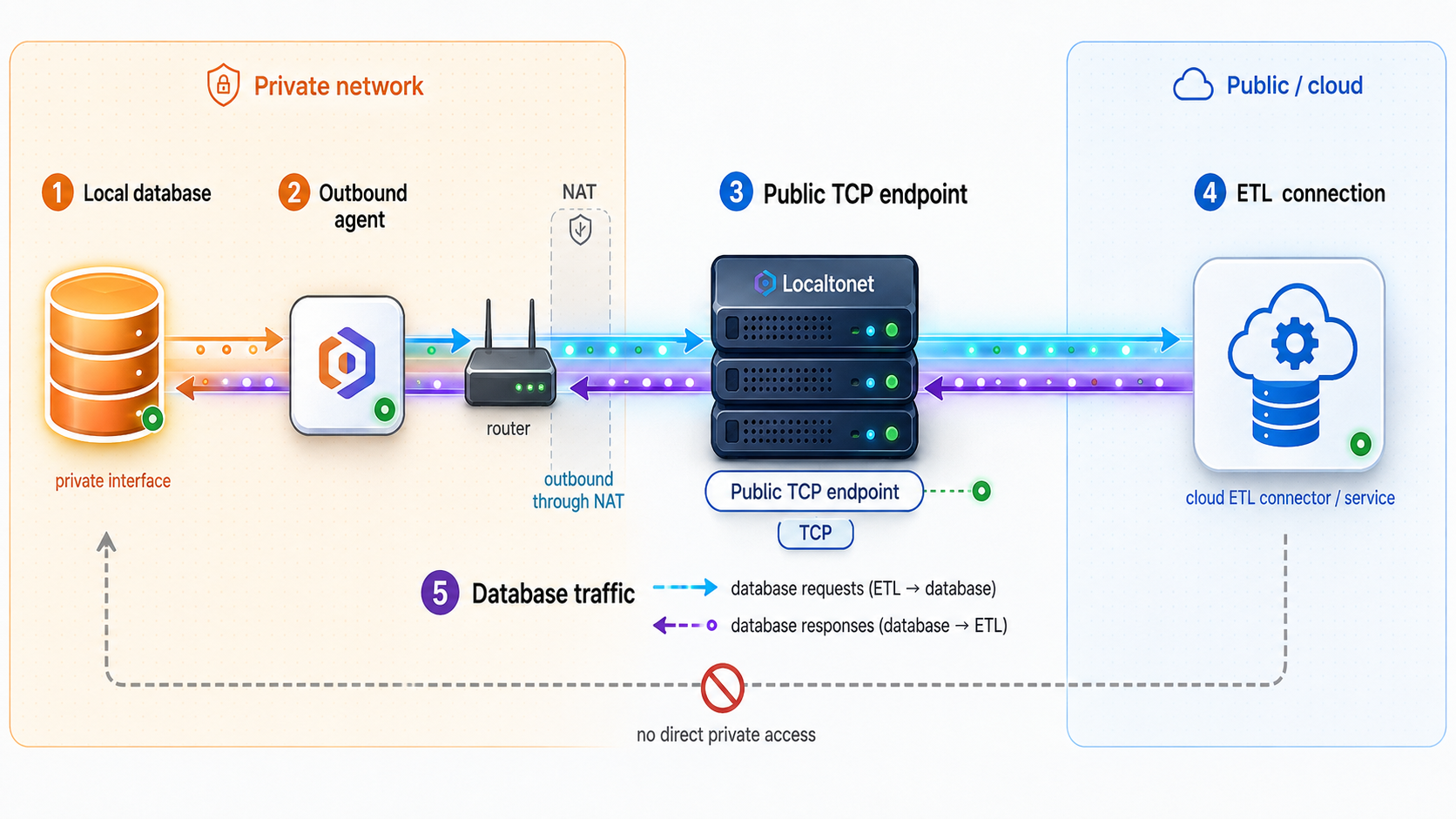
Use a TCP tunnel for a connector that communicates through the database's native TCP protocol. The documented Localtonet dashboard sequence has five steps: install and run the client, open the TCP Tunnel page, select the device token and server, enter the local target, and press Start.
Install and run the Localtonet client
Run our client on the database host or another device that can reach the database. For the Linux service workflow above, confirm that localtonet.service is active and that the intended device is connected.
Open the TCP Tunnel page
Sign in to the Localtonet dashboard and go to the TCP Tunnel page. Use TCP rather than HTTP because a native database connector exchanges raw TCP protocol traffic, not HTTP requests.
Select the AuthToken and server
Select the device-specific AuthToken for the connected client that will carry this tunnel, then select an available relay server from the current dashboard. Do not copy a server code from an old tutorial because availability can vary.
Enter the local database IP address and port
Enter the exact target that passed local verification. If the client runs on the database host, this can be a loopback target when the database listens there. If the client runs elsewhere, use the database IP address and port reachable from that client device.
Press Start
Creating the tunnel configuration does not make it active. Press Start and confirm that the selected client remains connected. Record the assigned public host and port for the ETL configuration without recording the Localtonet device token.
Configure the cloud ETL connector
In the ETL platform, choose the supported connector for the database engine. Enter the public hostname and port assigned to the TCP tunnel instead of the database's private address. Then supply the database name, dedicated extraction username, database credential, and required TLS settings.
Store the database password, client certificate, or other database secret in the ETL platform's supported secret facility. Do not place secrets in job names, tunnel descriptions, documentation, screenshots, or scripts. The Localtonet device token does not belong in the ETL connector at all. It authenticates the Localtonet client, not the database session.
Do not depend on the obscurity of the assigned endpoint. Require strong database authentication, use a dedicated identity, enable database-native TLS where supported, monitor failed logins, and stop the tunnel when remote extraction is not required. Never expose a database that has no authentication.
Verify the complete connection in layers
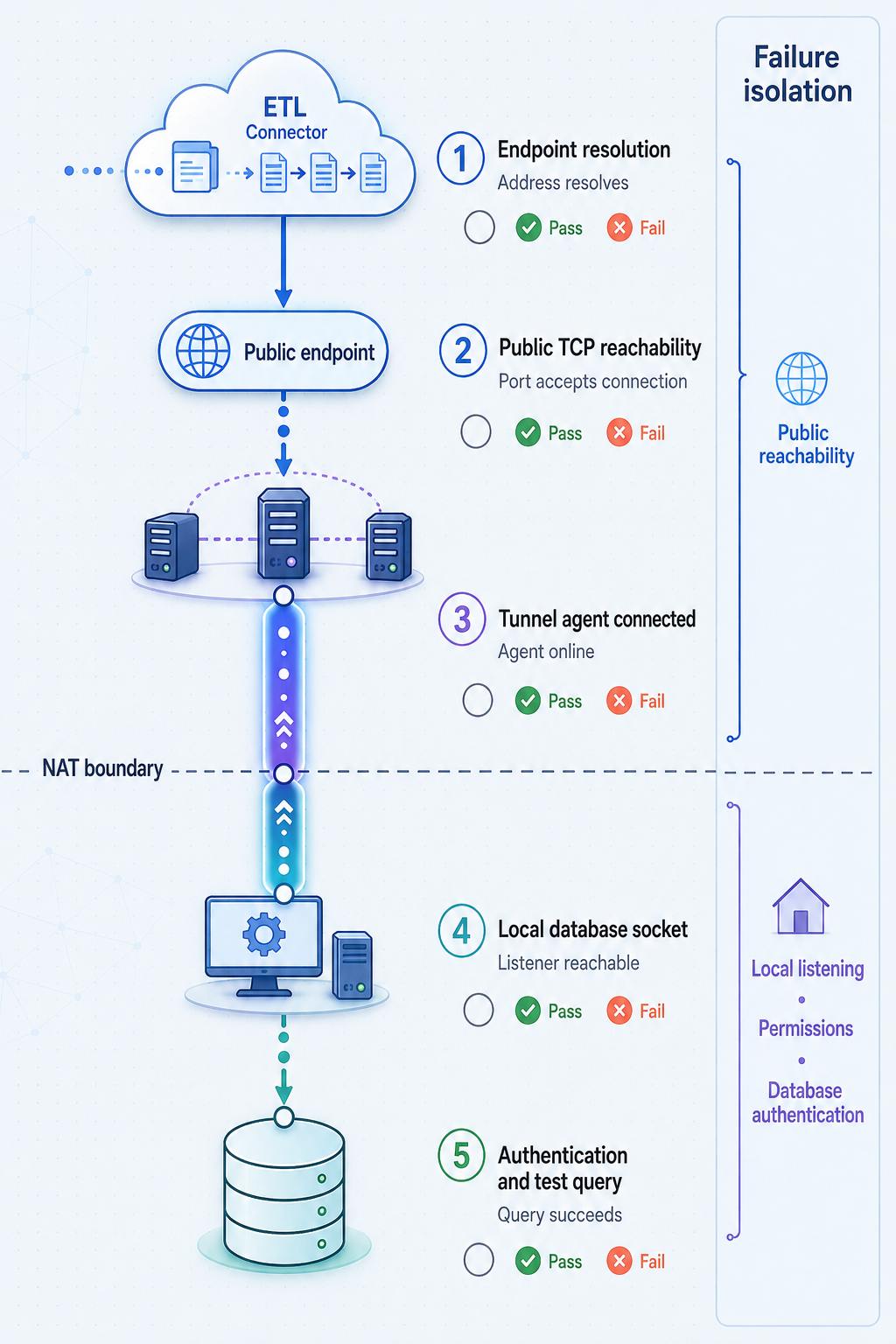
A successful dashboard status is necessary, but it does not prove that the ETL job can authenticate, validate TLS, discover schemas, or complete a query. Verify each layer separately so a failure can be assigned to the correct system.
Repeat the local database test
From the Localtonet client device, connect to the configured local target with the dedicated ETL account. Run a small read-only query against an approved object and confirm the expected result.
Confirm the client and tunnel are running
Verify that the selected device is connected and that the TCP tunnel has been started. On a systemd host, also check the Localtonet service status and journal. Creating a tunnel configuration alone is not sufficient.
Test the public endpoint from an authorized external network
When policy permits, use a compatible database client outside the local network to test the assigned public host and port. Apply the same TLS validation and dedicated credentials intended for ETL. Avoid broad or anonymous port-scanning services because they do not validate the database protocol safely.
Run the ETL connector's connection test
Use the ETL platform's supported test function. A network timeout, TLS error, authentication rejection, and authorization failure are different problems, so preserve the exact sanitized error category.
Perform a limited extraction
Start with one small table or curated view. Validate row counts, field types, timestamp handling, and destination results before widening the scope or enabling a frequent schedule.
Test interruption and recovery
During an approved maintenance window, stop the tunnel or client and confirm that the ETL job fails safely rather than producing a silently incomplete result. Restart the required components and verify that the connector retries or resumes according to its documented behavior.
Distinguish connectivity from data correctness
Network success says only that a session can reach the database. It does not prove that the extraction is complete. Validate expected row counts, update and deletion handling, timezone conversion, numeric precision, character encoding, and the incremental cursor. For change data capture, confirm that the connector progresses through changes without gaps and that required database logs are retained long enough for realistic outages.
Use a non-sensitive sentinel dataset for recurring checks when practical. A small table or view with known values can prove that the scheduled job reads from the intended database and writes to the intended destination without exposing confidential data in monitoring output.
Harden a database tunnel for ETL use
Direct database connectivity can be appropriate, but it creates a high-value access path. Security should be applied at the database, transport, connector, operating system, and lifecycle layers instead of relying on one control.
Use source IP restrictions only where they are enforceable
Some managed ETL providers publish stable egress addresses, while others use changing ranges or do not promise a fixed source. Source IP filtering is useful only if the provider documents the addresses and an enforcement point in the chosen architecture can apply them.
Do not assume which source address the local database will observe through a relayed tunnel. That behavior can depend on the protocol path. Test the observed database connection metadata in your environment. If source-based policy is mandatory, verify the full behavior before approving the architecture or place a controlled database proxy or API in front of the database where the required policy can be enforced.
Protect every credential independently
The Localtonet device token and database password serve different purposes. The device token identifies the client that runs the tunnel. The database credential authenticates the ETL session to the database. Neither should appear in the public endpoint, screenshots, source control, query text, or general logs.
Rotate credentials according to organizational policy and after suspected exposure. Test database credential rotation with a limited extraction before revoking the old secret if continuity is required. Remove obsolete accounts and device tokens when a host or integration is retired.
Control database workload
Least privilege does not prevent an authorized query from consuming excessive CPU, memory, I/O, or locks. Begin with a limited schedule and dataset. Use database-supported workload controls, statement timeouts, read replicas, or reporting views where appropriate. Exact controls differ by database and should be configured according to its official documentation.
Coordinate full refreshes with backup windows and application peaks. Incremental extraction can reduce repeated reads, but it may require more database privileges and operational preparation. Do not enable change data capture based only on a connector checkbox without reviewing the database-side consequences.
Operate the tunnel as part of the data pipeline
The tunnel and its client are infrastructure dependencies, not one-time setup tasks. Assign ownership and include them in monitoring, maintenance, incident response, change management, and decommissioning.
Align the tunnel lifecycle with the ETL schedule
A Localtonet tunnel is available only while the selected client is connected and the tunnel is running. If extraction occurs continuously, the client host must be maintained as an always-available component. Prevent unintended sleep, manage operating-system restarts, monitor disk and memory pressure, and verify the service after package or host updates.
If extraction occurs in defined windows, operators can reduce unnecessary exposure by starting the tunnel before the job and stopping it afterward through an approved operational process. Do not stop the client in the middle of an active extract unless testing interruption behavior during a controlled maintenance window.
Record the assigned host and port in the integration inventory, but confirm current dashboard state before migrations or disaster-recovery tests. Plan, relay, and feature availability can vary, so validate required behavior against the current product rather than relying on old screenshots.
Monitor connection state with platform webhooks
Localtonet platform-wide Token/Tunnel webhooks can report when a token or tunnel in a selected Token Group changes to Connected or Disconnected. Configure the webhook for the relevant Token Group in the dashboard and direct it to the receiving application used by your operations workflow. The official Localtonet webhook documentation describes the current configuration and payload.
The webhook sends a WebHookRequest JSON body containing Id, ActionDate, Type, and Status. Type identifies the event as a token or tunnel event, while Status is Connected or Disconnected. Use these events to notify operators or correlate tunnel state with failed ETL runs.
These lifecycle webhooks should not be confused with File Server file-event webhooks. File Server webhooks concern upload, delete, rename, and move events and are unrelated to database queries. A Connected event also does not prove that the database is healthy, that TLS validation succeeds, or that an extraction completed. Combine lifecycle events with ETL run monitoring and database-side checks.
Maintain the Linux service
Include the Localtonet systemd unit in host monitoring. After a reboot or upgrade, confirm that it is active and inspect recent logs:
sudo systemctl status localtonet.service
sudo journalctl -u localtonet.service
If a service restart is required, perform it in an approved window and follow it with a dashboard state check and limited ETL test:
sudo systemctl restart localtonetDocument a recovery sequence
- Confirm that the database service is healthy and that the local target still accepts the dedicated account.
- Confirm that the Localtonet client device is powered on, connected to its network, and authenticated.
- On Linux, inspect
localtonet.serviceand its journal, then restart it only if the evidence supports that action. - Confirm that the intended TCP tunnel is started.
- Verify the public host and port recorded in the ETL connector against the current tunnel assignment.
- Run the connector's connection test and classify the result as network, TLS, authentication, authorization, or query related.
- Run a limited extraction before resuming the normal schedule.
Decommission cleanly
When the pipeline is retired, disable its schedule, stop and delete the tunnel if it has no other approved purpose, revoke the dedicated database account, remove unnecessary database grants, and remove obsolete Localtonet device access. If the host is also being retired, remove or invalidate its device token and handle the protected token file according to organizational disposal policy. Preserve only the audit records required by policy.
Troubleshoot common connection failures
Troubleshooting is fastest when each error is mapped to a layer. Avoid changing the database listener, firewall, tunnel, TLS settings, credentials, and ETL configuration simultaneously because that makes the eventual fix difficult to identify and review.
| Symptom | Likely layer | Checks and corrective action |
|---|---|---|
| The Localtonet device is offline | Client host or service | Confirm that the host is powered on and has outbound network access. On Linux, inspect localtonet.service and its journal. Check that the protected token file exists and that the configuration check succeeds. |
| The ETL connector times out | Client, tunnel, endpoint, or local reachability | Confirm the client is connected, the tunnel was explicitly started, the ETL host and port match the assigned endpoint, and the client device can still reach the configured local target. |
| The tunnel is running but the target refuses the connection | Database listener or local firewall | Repeat the connection test from the Localtonet device to the exact local IP and port. Confirm that the database listens on the intended interface and permits that device. |
| Authentication fails | Database identity | Check the username, secret, authentication mechanism, account state, and allowed login context. Use the dedicated account locally to separate credential failure from tunnel failure. |
| Connection succeeds but schema discovery fails | Database authorization or connector compatibility | Review required metadata privileges and supported database versions. Grant only the documented missing permission rather than switching to an administrator account. |
| TLS handshake or certificate validation fails | Database TLS and connector trust | Inspect the certificate chain, validity, trust configuration, protocol support, and hostname expectation. Do not solve the problem by permanently disabling certificate validation. |
| Small tests pass but full extraction fails | Workload, timeout, or connection limits | Check database resource consumption, query duration, locks, ETL timeout settings, and concurrent connection limits. Reduce the initial scope and review incremental extraction options. |
| Scheduled jobs fail after the workstation sleeps | Client host availability | Keep the selected device powered and connected during extraction windows, or move the client to an appropriate always-on system that can reach the database. |
| The connector does not offer a host and port field | ETL product design | The connector may not support arbitrary database endpoints. Investigate a vendor-provided local agent, a self-hosted worker, an HTTPS API connector, or another documented integration method. |
| Extraction reconnects but data is missing or duplicated | Incremental state or change capture | Review the connector cursor, checkpoint, retry semantics, deletion handling, and database log retention. Network restoration alone cannot guarantee correct replication state. |
Record timestamps, sanitized error categories, tunnel state, connector run identifiers, systemd service state, and database log events. Remove passwords, device tokens, connection strings containing secrets, private endpoints, and sensitive query results before sharing diagnostic material.
Frequently asked questions
Can a cloud ETL service connect to a database behind CGNAT?
Yes, if the ETL connector accepts a reachable endpoint and the chosen architecture supports its protocol. With a Localtonet TCP tunnel, our client establishes an outbound relay connection and supplies a public host and port for the local TCP target. This avoids relying on an inbound route through CGNAT. The connector must still support the database, authentication method, and TLS configuration.
Does a Localtonet TCP tunnel replace database TLS?
No. A TCP tunnel provides network forwarding for the database protocol. Configure database-native TLS and certificate validation when they are supported by both the database and ETL connector. Authentication, authorization, and database protocol security remain necessary.
Must the Localtonet client run on the database server?
Not necessarily. It can run on the database host or on another device that can reach the database's local IP address and port. If it runs elsewhere, the database must listen on a reachable interface and local network policy must permit that connection. Test from the selected client device before creating the tunnel.
How do I keep the Localtonet client running after a Linux reboot?
Install the current DEB or RPM package, place the device token in /etc/localtonet/auth-token, protect it with mode 600, run the documented configuration check, and enable the included service with sudo systemctl enable --now localtonet.service. The service then starts during system boot. Monitor it with systemctl status and journalctl.
Is an HTTPS data API safer than exposing the database protocol?
It can provide a narrower interface because the API can expose only approved operations and fields. It is not automatically safe. The API still requires authentication, authorization, input validation, pagination, rate control, monitoring, and secure implementation. It must also support the ETL tool's required extraction and incremental synchronization behavior.
Can VPN Manager connect a managed ETL platform to the local LAN?
It depends on the ETL deployment model. VPN Manager provides a private mesh VPN with granular firewall rules and can bridge local LANs, but the ETL side needs a viable way to participate in or route through that private network. It requires Desktop app version 7.7 or later or Mobile app version 10.0 or later, plus administrative privileges for virtual network interfaces. Many fully managed connectors do not allow customers to install networking software, while a self-hosted worker or vendor-supported gateway may make the design possible.
Can I restrict a database tunnel to the ETL provider's source IP addresses?
Use source IP restrictions only when the ETL provider publishes stable egress addresses and the selected enforcement point supports the required policy. Do not assume which source address the database will observe through a relayed connection. Validate that behavior in your environment and retain database credentials, least-privilege grants, and TLS as independent controls.
Why does the ETL job fail even though the tunnel shows as connected?
Tunnel connectivity does not prove database readiness. The local target may be unreachable, the database may reject the account, certificate validation may fail, permissions may be insufficient, or a query may exceed resource and timeout limits. Test local reachability, tunnel state, external protocol access, authentication, schema discovery, and a limited extraction as separate layers.
Should the tunnel remain running all the time?
Only if the approved pipeline requires continuous or unpredictable access. For scheduled extraction windows, stopping the tunnel after successful completion can reduce unnecessary exposure. In every case, the tunnel works only while it is started and its selected client device remains connected.
Create a controlled path for your ETL connector
Install the Localtonet client on an always-available device that can reach your database, protect its device token, create a TCP tunnel for the verified local target, and give your compatible ETL connector the assigned public host and port. Begin with database-native TLS, a dedicated least-privilege identity, and a limited extraction before expanding the pipeline.
Get Started Free →

