

Trace passkey failures across the browser, HTTPS tunnel, reverse proxy boundary, and local application
A passkey flow can fail even when the application loads perfectly through a public HTTPS URL. WebAuthn binds credentials and signed responses to security-sensitive values such as the browser origin, relying party ID, and server-generated challenge. This guide explains how to establish a reliable localhost baseline, expose the application through a Localtonet HTTPS tunnel, configure the application for its external identity, and diagnose failures without confusing connectivity with authentication correctness.
📋 What's in this guide
Why WebAuthn behaves differently through an HTTPS tunnel
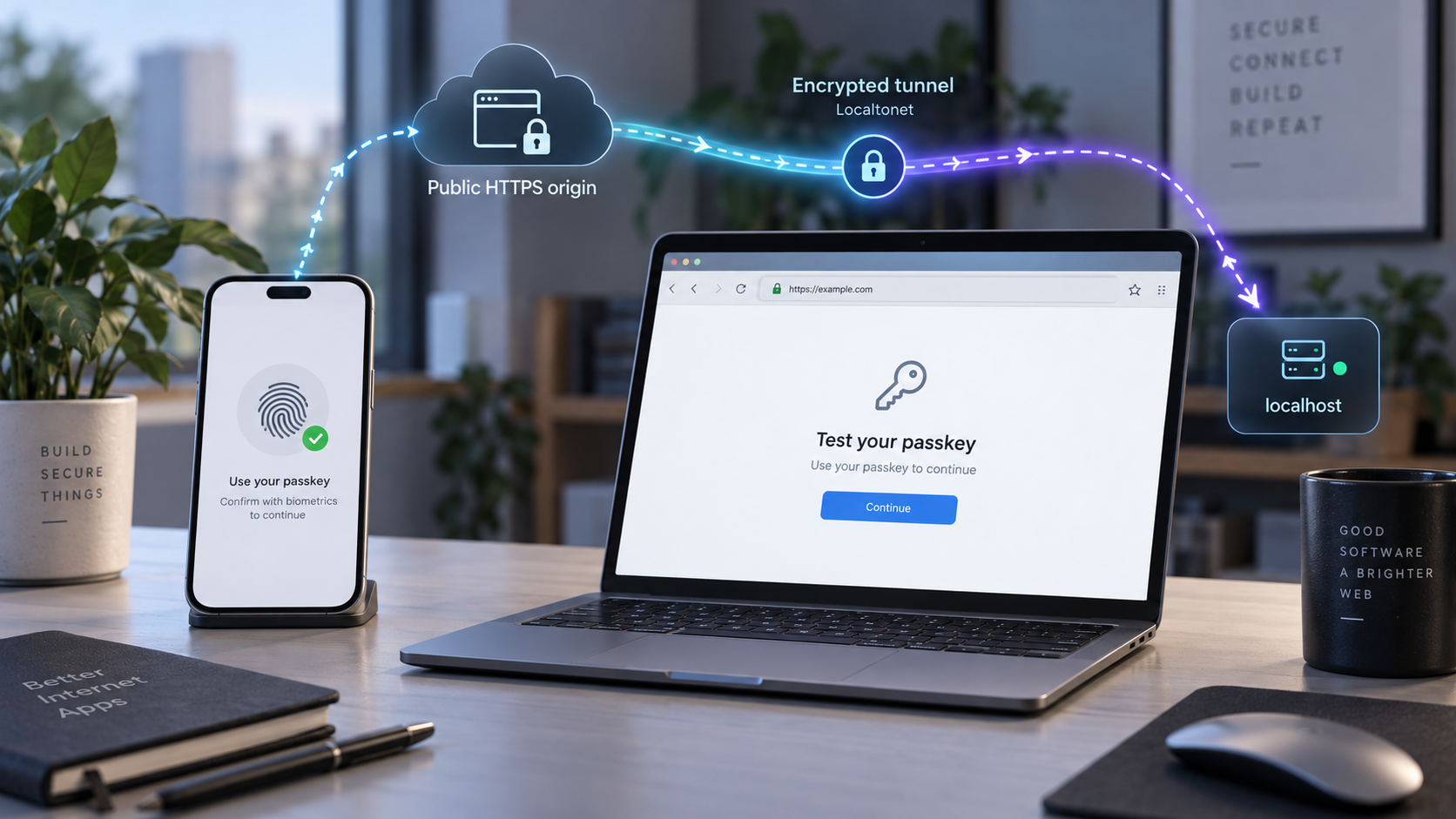
An HTTP tunnel solves network reachability. It lets a browser reach a web application running on a machine that may not have a public IP address and may be behind a router or firewall. WebAuthn adds a separate layer of validation. The browser and application must agree about the web identity for which a credential is being created or used.
With Localtonet, the client running on the device establishes an outbound connection to one of our relay servers. An HTTP tunnel points to a local IP address and port that the client device can reach, while the browser opens the tunnel's public HTTPS address. No inbound router port forwarding, firewall change, VPN setup, or public IP address is required for this workflow. The tunnel remains available only while the selected client is connected and the tunnel is running.
The important WebAuthn detail is that the browser does not consider the local upstream address to be the page's origin. If the user opens https://public-host.example, that public scheme and host define the browser-facing origin. The fact that the application ultimately runs on an internal address such as http://127.0.0.1:3000 does not change what the browser reports in WebAuthn client data. The origin and relying-party processing rules are defined by the
W3C Web Authentication specification.
Origin and RP ID are related, but they are not interchangeable
An origin is commonly represented as a value such as https://login.example.com. It includes the scheme and host. A non-default port is also part of an origin. Paths are not part of an origin, so https://login.example.com/register and https://login.example.com/sign-in have the same origin.
An RP ID looks like login.example.com or, where the application intentionally shares credentials across eligible subdomains, a registrable parent such as example.com. It must satisfy the browser's relationship rules for the current origin and generally cannot be an unrelated domain or a public suffix. The browser hashes the selected RP ID into authenticator data, and the server checks that relationship during verification. These requirements are part of the
WebAuthn relying-party and verification model.
| Value | Illustrative form | What it controls | Common mistake |
|---|---|---|---|
| Public origin | https://login.example.com |
The browser context reported in WebAuthn client data | Verifying an internal HTTP origin instead |
| RP ID | login.example.com |
The relying-party scope bound into authenticator data | Including https://, a port, or a path |
| Local target | 127.0.0.1 and an application port |
Where the Localtonet client forwards HTTP traffic | Treating it as the browser's WebAuthn origin |
| Challenge | A fresh server-generated byte sequence | Links the returned credential response to one ceremony | Losing it when the browser session crosses the proxy |
If the public URL renders HTML and API requests succeed, the tunnel can reach the local service. That result does not prove that the expected origin, RP ID, cookies, challenge store, or authenticator policy is correct. Diagnose those layers separately.
Prepare the application and test environment
This workflow assumes that the WebAuthn application already has registration and authentication endpoints. The exact commands, configuration keys, and database schema depend on the application's framework and WebAuthn library. There is no universal environment-variable name for an expected origin or RP ID, so use the documented configuration mechanism for the specific library rather than copying a made-up variable into production.
Before creating a tunnel, prepare the following:
- A local application that can complete both WebAuthn registration and authentication.
- A known local IP address and port on which that application listens.
- A Localtonet client installed and running on the machine that can reach the application.
- A device-specific Localtonet authentication token selected securely through the current client or dashboard workflow.
- An available relay server or region selected from the current Localtonet product interface. Do not hardcode server codes from an old example.
- A browser and authenticator combination that supports the type of passkey flow being tested.
- Access to application logs, browser developer tools, and the server-side WebAuthn verification result.
- A test account that does not expose production identity data or privileged administrative access.
Decide what the tunnel is intended to test
A physical-device test may exercise a platform authenticator on a phone or tablet. A desktop test may use the computer's platform authenticator, a roaming security key, or a cross-device flow offered by the browser and operating system. These are not identical paths. Record which browser, operating system, device, authenticator type, and public hostname were used for every result.
Browser and operating-system support changes over time. Features such as conditional mediation, passkey autofill, synced credentials, cross-device authentication, and specific attestation behaviors should be checked against the current browser and platform documentation. A failure in one of those optional experiences does not necessarily prove that basic navigator.credentials.create() or navigator.credentials.get() is broken.
Use a stable application process
Keep the local application running throughout the ceremony. Registration and authentication are usually split into at least two server requests: one obtains options, and another submits the authenticator response. Restarting the application between those requests can erase an in-memory challenge, session, or pending user state.
If the application uses multiple local processes, containers, or worker instances, confirm that challenge and session state survives the route taken by both requests. A tunnel cannot compensate for state stored in one process when the response reaches another process that cannot access it.
A Localtonet device token identifies the client device and must not appear in screenshots, logs, source control, shell history shared with others, or article examples. WebAuthn challenges, complete credential responses, session cookies, private endpoints, and user-identifying credential IDs should also be excluded from routine diagnostic logs.
Establish a reliable localhost baseline
Start by proving that the application works without a tunnel. This separates application defects from reverse-proxy defects. WebAuthn is exposed in secure contexts, and browsers can treat loopback origins such as localhost as potentially trustworthy for local development. The W3C Secure Contexts specification defines this trustworthiness model. Localhost's special treatment should not be generalized to arbitrary LAN IP addresses or public HTTP pages. A test that works at a localhost URL can still fail when the same application is opened through a different HTTPS origin.
Verify registration locally
Sign in with a test account and begin a new passkey registration. Inspect the creation options before calling the browser API. Confirm that the challenge is present, the relying-party information is intentional, the user information corresponds to the current account, and the algorithm and authenticator-selection policies match the application's requirements.
Complete the authenticator prompt, then verify that the server accepts the returned registration response. A robust registration verifier checks the returned challenge, the client-data type for credential creation, the expected origin, the RP ID relationship represented by the RP ID hash, and the required user-presence or user-verification flags. It also validates the attestation object according to the application's attestation policy and stores the resulting credential information needed for future authentication. The required registration verification operations are described in the W3C WebAuthn registration ceremony and verification procedures.
Verify authentication locally
Sign out or otherwise start a fresh authentication flow. Obtain new request options and complete the browser prompt. The server should verify a fresh challenge, the authentication client-data type, the expected origin, the RP ID hash, the assertion signature, and the required authenticator flags. It must look up the correct stored public key for the returned credential. The corresponding checks are defined by the WebAuthn authentication assertion verification procedure.
If the application evaluates a signature counter, use the WebAuthn library's documented handling. Authenticators differ in how counters behave, so do not invent a universal rule that treats every unchanged counter as a cloned credential. The application's library and security policy should interpret the value according to the applicable WebAuthn behavior.
Test negative paths before adding the proxy
Cancel the browser prompt and confirm that the interface returns to a usable state. Try an expired or deliberately invalidated flow through a safe test mechanism and confirm that it is rejected. Verify that a challenge cannot be reused after successful completion. WebAuthn challenges exist to bind a returned response to the ceremony initiated by the relying party, so challenge equality, freshness, and one-time consumption are essential server-side controls. If the application provides account recovery or another authentication method, verify that it remains separate from passkey enrollment and cannot be used to silently weaken enrollment controls.
For comparison later, record the local page origin, configured RP ID, expected-origin list, application environment name, session-cookie attributes, and normalized WebAuthn error name. Do not save raw attestation objects, assertions, challenges, credential secrets, or complete browser responses merely to make troubleshooting easier.
Expose the local WebAuthn application with Localtonet HTTPS
Once the local baseline passes, create an HTTP tunnel for the web application. HTTP tunnel process types can provide a random subdomain, a selected custom subdomain where supported, or a custom domain. These process types serve the application at a public HTTPS address. Availability can vary, and custom-domain DNS details should always be checked against the current dashboard and documentation rather than inferred from an old configuration.
The sequence below follows the current Localtonet HTTP tunnel documentation: install the client, open the HTTP Tunnel page, choose a Process Type, select the AuthToken and server, enter the local target, and start the tunnel. Use the live dashboard for current server choices and other options. We do not publish authentication tokens, hardcoded server codes, or guessed client commands in this guide.
Install and run the Localtonet client
Install the current Localtonet application for your operating system and run it on the machine hosting the WebAuthn application, or on another device that can reach the application's local IP address and port. Keep the client connected throughout the test.
Open the HTTP Tunnel page
In the Localtonet dashboard, go to the HTTP Tunnel page to create the web tunnel. Use an HTTP tunnel because the test requires a browser-facing public HTTPS address rather than a raw TCP endpoint.
Select the Process Type
Choose Random Sub Domain, Custom Sub Domain, or Custom Domain as appropriate for the test and as currently available to your account. All three process types serve the configured application at a public HTTPS address, but hostname stability matters for WebAuthn credential scope.
Select the AuthToken and server
Select the device-specific AuthToken for the connected client and choose an available Localtonet server from the current interface. Treat the token as a secret, and do not copy a token or server code from an old example.
Enter the local IP address and port
Set the tunnel target to the local IP address and port on which the WebAuthn application is listening. The target must be reachable from the device running the selected Localtonet client.
Start the tunnel and open its HTTPS URL
Press Start, wait for the tunnel to run, and open the assigned public HTTPS address exactly as displayed. Creating the tunnel does not start it. Do not replace the public hostname with localhost or switch to HTTP. Stop or delete the tunnel when remote access is no longer needed.
The application-specific WebAuthn settings described below still have to be configured in the local application. Starting the tunnel cannot automatically rewrite its expected origin or RP ID. If the dashboard or available options differ from an older screenshot or saved procedure, follow the current HTTP tunnel setup instructions and the live interface.
A passkey is scoped to its RP ID. If a test uses a generated tunnel hostname as the RP ID and a later tunnel receives a different hostname, the browser may not offer the earlier credential and the new origin may not be eligible to use it. Use test credentials for temporary hostnames. When long-lived identity is required, choose a stable hostname and configure it according to current product and DNS documentation.
Configure the public origin, RP ID, and reverse proxy boundary
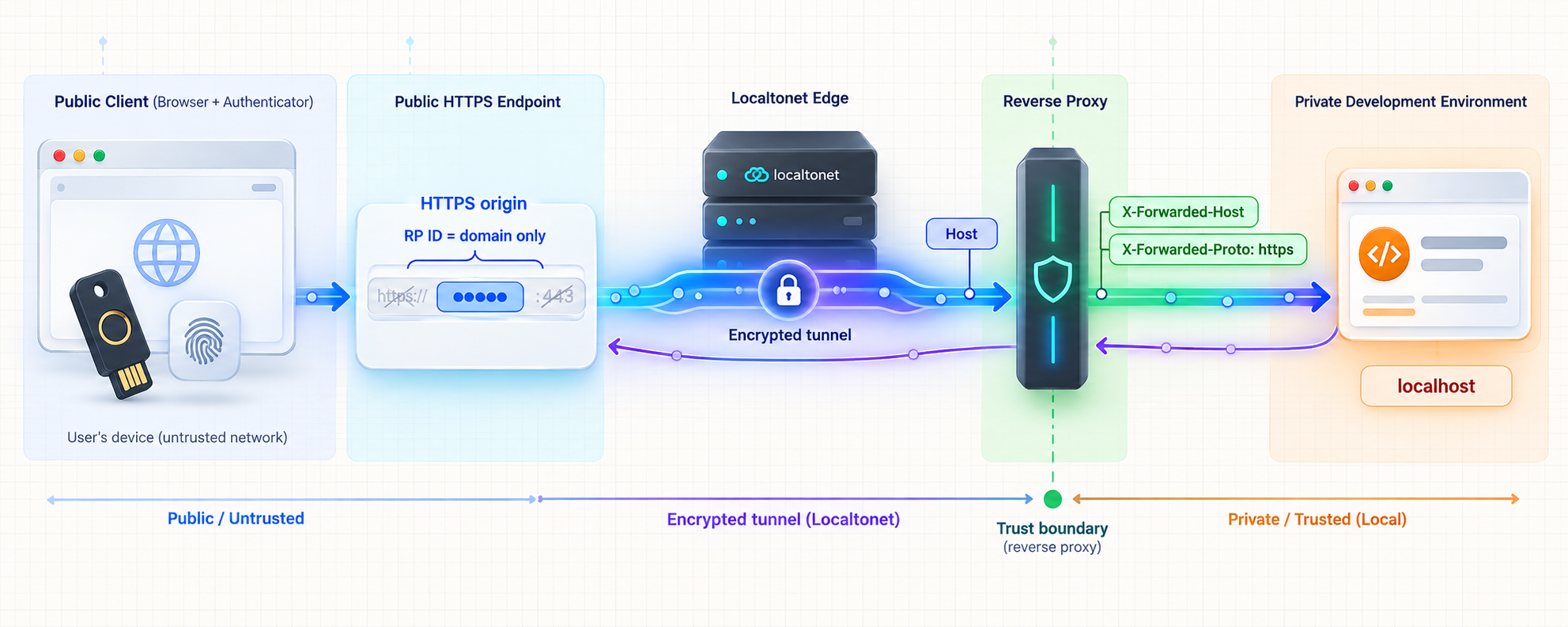
The safest setup for a small, known set of environments is usually explicit configuration. Give the WebAuthn verifier an allowlist of exact expected origins, and configure the RP ID independently. Do not derive either value by blindly trusting whatever Host, Forwarded, or X-Forwarded-* value arrived with a request.
Set the expected public origin
Suppose the Localtonet dashboard assigns an HTTPS address whose browser-visible origin is https://assigned-public-host.example. That full origin, with the real assigned hostname, is what the WebAuthn verifier must expect for a ceremony initiated from that page. The placeholder here is intentionally not a real Localtonet address and must not be copied as configuration.
{
  "webAuthn": {
    "expectedOrigins": [
      "https://assigned-public-host.example"
    ],
    "rpId": "assigned-public-host.example"
  }
}
Use the configuration shape required by the actual application. Some libraries accept one expected origin, while others support an allowlist or an origin-validation callback. Configuration keys vary by framework and library. Normalize values carefully, but do not weaken matching by accepting arbitrary origins. An origin allowlist should contain complete origins, not wildcard text that accidentally admits unrelated sites.
During registration and authentication verification, the server compares the origin in the returned client data with the authorized origin for the ceremony. This is a security check required by the WebAuthn verification algorithms, not a cosmetic deployment setting.
Choose an eligible RP ID
For a generated public hostname, the least surprising test choice is often the exact public hostname as the RP ID, provided the WebAuthn library and browser accept it under the applicable domain rules. Do not include https://, a port, a path, or a trailing slash in the RP ID.
If the application uses a custom domain and intentionally shares passkeys across eligible subdomains, a parent-domain RP ID can be appropriate. That is an identity architecture decision, not a tunnel convenience. Confirm domain ownership, browser eligibility, cookie boundaries, account isolation, and the effect on every participating subdomain before adopting a broader RP ID. The WebAuthn RP ID validation rules determine whether the page origin is eligible to use the selected domain.
Handle forwarded request information safely
A reverse-proxied request has two perspectives. The browser may be using HTTPS and a public host, while the local application receives traffic on an internal HTTP listener. Framework helpers that infer the canonical URL, callback URL, secure-cookie policy, or WebAuthn expected origin from the local request can therefore produce the wrong result.
If the framework has a documented trusted-proxy mode, configure it only for the proxy path actually used by the deployment. Strip or ignore forwarding headers supplied by untrusted clients, and accept trusted forwarding information only at a controlled boundary. Never enable a mode that treats arbitrary client-provided Forwarded, X-Forwarded-Proto, or X-Forwarded-Host values as authoritative.
Explicit WebAuthn configuration remains valuable even when proxy handling is correct. It prevents the expected origin from changing merely because a request contains an unexpected host. It also makes a comparison between development, tunnel testing, staging, and production straightforward.
Review host validation
Some web frameworks reject an unfamiliar public Host value before the WebAuthn route runs. If the page displays a disallowed-host error, add only the assigned test hostname through the framework's documented host allowlist. Do not disable host validation globally just to make a temporary tunnel work.
Review session-cookie behavior
A WebAuthn challenge is frequently associated with a server-side session. If the browser does not return the same session cookie when submitting the credential response, the server may report an absent, expired, or mismatched challenge.
Inspect the cookie in browser developer tools and verify its domain, path, expiration, Secure, HttpOnly, and SameSite attributes. A cookie created for localhost is not automatically a cookie for the public tunnel hostname. The public test should establish its own valid session under the public host.
If the framework decides whether to set a Secure cookie by examining the local upstream scheme, trusted proxy configuration may be necessary so it understands that the browser-facing request used HTTPS. Do not remove the Secure attribute as a shortcut. Correct the external URL or proxy interpretation instead.
Check cross-origin frontend and API layouts
The simplest arrangement serves the page, WebAuthn options, credential submission endpoint, and session cookie from one public origin. If the frontend calls an API on another origin, the design also involves CORS, credentialed fetch behavior, cookie SameSite rules, CSRF defenses, and potentially more than one expected origin.
Do not add a permissive CORS wildcard to fix a session problem. Credentialed cross-origin requests require a deliberate allowed-origin policy, and the API must preserve the same server-side challenge state between the options request and verification request.
Test registration and authentication through the public path
Open a new private browsing window or use a dedicated browser profile so stale localhost cookies do not hide configuration mistakes. Navigate to the exact HTTPS URL displayed by Localtonet and confirm that the address bar remains on that origin. If the application redirects to localhost, an internal hostname, HTTP, or an unexpected canonical domain, fix that redirect before testing WebAuthn.
Confirm basic tunnel behavior
- Load a non-sensitive application page through the public URL.
- Confirm static resources and API calls complete without mixed-content errors.
- Verify that the intended local application receives the request.
- Check that generated absolute URLs use the public scheme and hostname.
- Confirm that login and session continuity work before invoking WebAuthn.
If these checks fail, remain at the HTTP and application-routing layer. WebAuthn diagnostics are not useful until the browser can load the application and maintain a session.
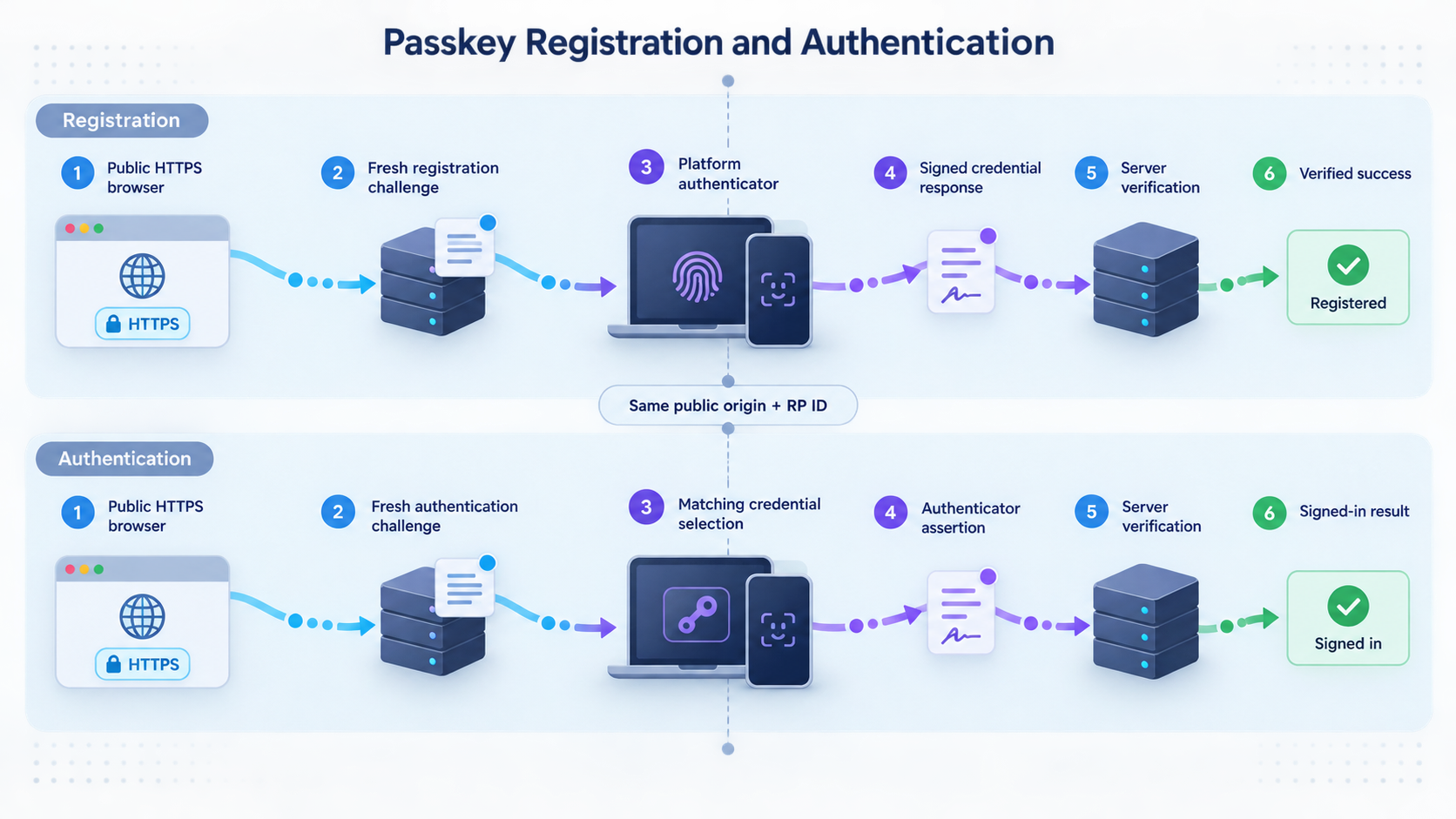
Test a new registration
- Authenticate to the test account using the application's existing enrollment policy.
- Request new registration options from the public page.
- Inspect the options in memory or a redacted diagnostic view. Confirm the intended RP ID and a fresh challenge.
- Call the browser's credential-creation API from the public origin.
- Complete the authenticator prompt.
- Submit the result using the same browser session.
- Confirm that server verification succeeds and that the credential is associated with the correct account.
If the browser rejects the request before displaying an authenticator prompt, focus on secure-context status, RP ID eligibility, malformed options, unsupported algorithms, authenticator-selection constraints, and browser policy. If the prompt completes but the server rejects the response, focus on challenge state, origin verification, RP ID hash verification, user association, and the verifier's policy.
Test authentication separately
- End the enrollment session or sign out.
- Start a fresh authentication ceremony through the same public hostname.
- Confirm that the server creates a new challenge and uses the intended RP ID.
- Complete the authenticator prompt with the newly registered test credential.
- Verify the assertion on the server and establish the intended authenticated session.
- Repeat after a page reload to prove that success does not depend on transient client-side state.
Registration success does not guarantee authentication success. Registration stores a public key and credential identifier, while authentication must locate that record, validate the signature, and apply the correct account and user-verification policy. Challenge comparison, origin validation, RP ID hash validation, signature verification, and authenticator flag checks are distinct parts of the server's WebAuthn assertion verification work.
Exercise cancellation and recovery
Cancel the authenticator prompt and confirm that the application handles the browser error without creating a credential record or leaving the account in a half-enrolled state. Repeat with an expired server challenge. If recovery is in scope, confirm that recovery cannot be used to enroll a new passkey without the authentication and authorization checks required by the application's security policy.
Repeat on the actual target device
A desktop browser test does not replace testing on the physical phone, tablet, security key, or managed device used by the target audience. Repeat the complete flow through the same public hostname. If one device fails, compare browser version, operating system, authenticator availability, user-verification support, credential synchronization state, enterprise policy, and whether the expected credential is actually available to that device.
Record the browser's exact page origin, the RP ID sent in the options, the server's normalized expected-origin configuration, and the challenge lookup result. These four facts locate a large share of reverse-proxy WebAuthn failures without exposing complete credential responses.
Troubleshoot WebAuthn and passkey failures systematically
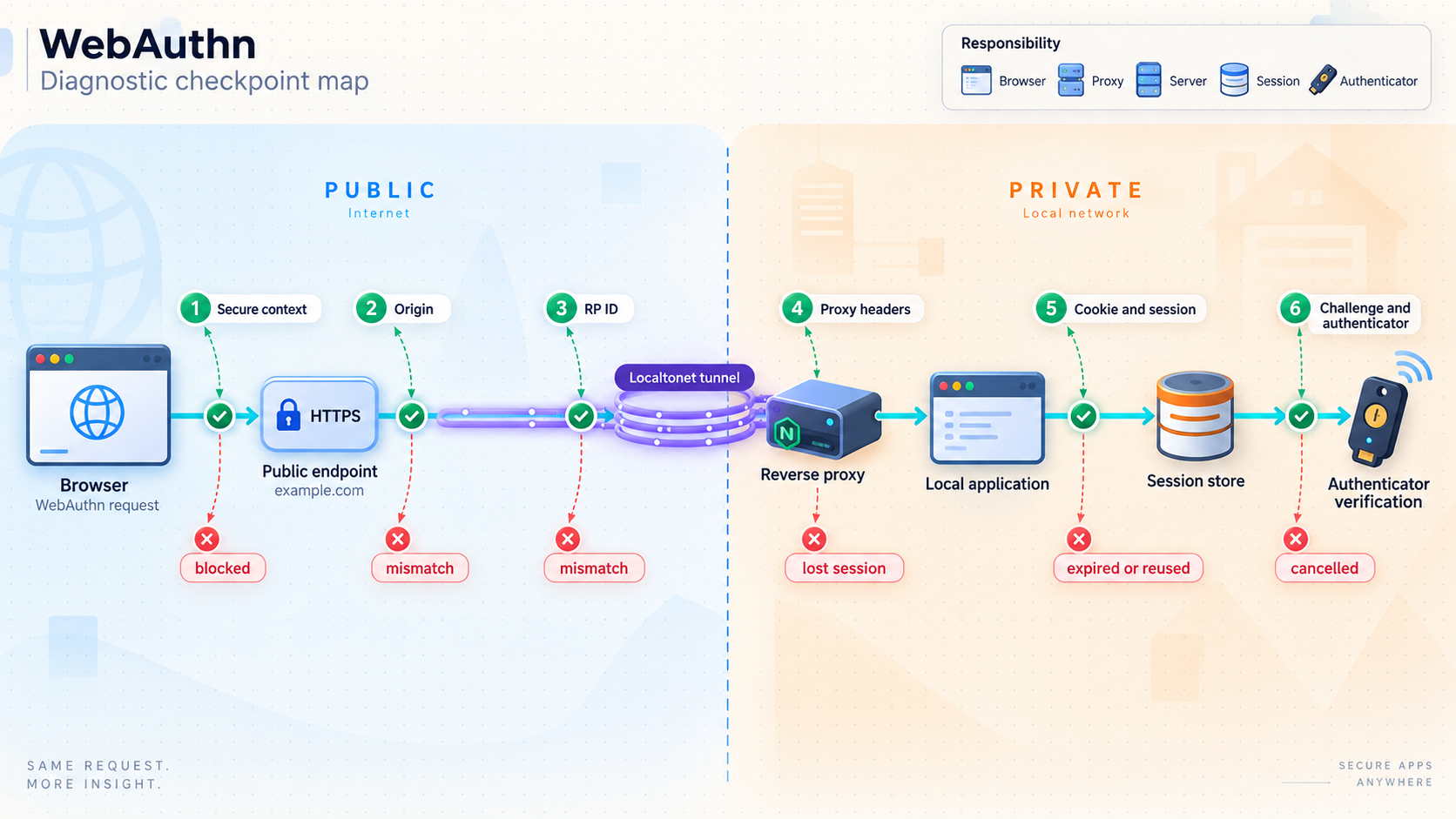
Start with the layer that produced the error. A browser exception before any verification request differs from a server rejection after the authenticator succeeds. Network errors, application exceptions, and WebAuthn verification failures should not be grouped under a single message such as “passkey failed.”
| Symptom | Likely layer | What to inspect | Corrective direction |
|---|---|---|---|
| The public page does not load | Tunnel or local service | Client connection, tunnel running state, local address, local port, application process | Restore connectivity before debugging WebAuthn |
| The page redirects to localhost or HTTP | Application proxy awareness | Canonical URL, trusted proxy mode, generated redirects | Configure the external HTTPS identity safely |
navigator.credentials is unavailable or the context is not secure |
Browser security context | Exact address-bar URL, iframe context, browser policy | Open the assigned HTTPS URL directly and remove insecure embedding |
The browser reports SecurityError |
Origin or RP ID eligibility | Public hostname, RP ID syntax, domain relationship | Use an eligible RP ID with no scheme, port, or path |
| The authenticator completes, but the server rejects the origin | Server verification | Exact public origin and expected-origin allowlist | Add the exact authorized HTTPS origin, not the local upstream URL |
| The server reports an RP ID hash mismatch | Options or verification configuration | RP ID used at creation or request time and RP ID expected by the verifier | Make both sides use the same eligible RP ID |
| The challenge is missing or mismatched | Session or state store | Cookies, load balancing, application restart, expiration, encoding | Preserve one-time challenge state across both requests |
| No credential is offered after the hostname changes | Credential scope | Original RP ID versus current RP ID | Return to the original eligible RP ID or enroll a test credential for the new one |
| One authenticator works and another does not | Authenticator policy or capability | Attachment, discoverability, user verification, supported algorithms, browser support | Align options with the capabilities and actual product requirements |
Secure-context failures
Open the exact public HTTPS URL in the top-level browser context. Confirm that the page has not been redirected to HTTP and that WebAuthn is not being invoked from an insecure or disallowed embedded frame. Also check the browser console for mixed-content and permissions-policy messages. A valid-looking page can still have a script or API dependency blocked because it was generated with an internal HTTP URL. Use the Secure Contexts trustworthiness rules when distinguishing normal HTTPS, localhost development behavior, and an insecure network origin.
Origin mismatch
Decode and inspect only the minimum diagnostic fields using trusted development tooling. The origin in the WebAuthn client data should equal the browser's public origin. Compare it with the server's configured expected origin after normalization. Do not “fix” a mismatch by accepting every origin or skipping verification. Update the explicit environment configuration or safely correct how the application determines its external URL.
RP ID mismatch
Inspect the RP ID sent in creation or request options. Confirm that it contains only the intended domain and is eligible for the page's origin. Then confirm that server verification uses the same RP ID. A credential registered under one RP ID cannot simply be reinterpreted as belonging to another because the hostname later changed.
Forwarded-header problems
If application logs report an internal scheme or host, determine whether that value is merely the local transport address or is being used to construct security-sensitive configuration. Enable only the framework's documented proxy support and restrict trust to the actual proxy boundary. Prefer an explicit expected-origin allowlist for WebAuthn verification rather than accepting request-derived values without validation.
Cookie and challenge failures
In browser developer tools, follow the request that creates the challenge and the request that submits the credential. Confirm that both belong to the same intended browser session. Check whether the session cookie is set for the public hostname, whether its path includes both endpoints, and whether its SameSite policy permits the actual request flow.
On the server, log a non-sensitive ceremony correlation value rather than the challenge itself. Confirm that the challenge is found once, belongs to the current user or ceremony, has not expired, and is consumed after verification. If challenges are held only in memory, verify that an application restart or multiple worker processes are not separating creation from verification. The WebAuthn verification procedures require comparison with the challenge issued for the ceremony, so merely receiving a structurally valid credential response is insufficient.
NotAllowedError and authenticator cancellation
A browser may use NotAllowedError for several user-agent-controlled outcomes, including cancellation, timeout, inability to satisfy the request, or policy restrictions. Treat it as a category that needs context, not as proof of an origin mismatch. Record whether a prompt appeared, whether the user canceled it, whether an eligible credential existed, and which authenticator constraints were requested.
InvalidStateError during registration
This can occur when registration attempts to create a credential that conflicts with authenticator state, including cases involving an excluded credential. Check the application's excludeCredentials behavior and whether the account already has the credential. Do not remove duplicate-prevention controls without understanding the account-security consequences.
Signature or stored-key failure
If challenge, origin, and RP ID checks pass but signature verification fails, verify that the application retrieved the correct credential record and stored the registration public key in the format expected by the library. Confirm that binary values were not corrupted by inconsistent base64url conversion, JSON serialization, text encoding, or database column handling.
Only one environment fails
Compare the environments directly. Useful differences include the page origin, RP ID, expected-origin list, trusted proxy configuration, cookie attributes, canonical URL, session store, number of workers, browser version, and authenticator policy. Avoid broad configuration changes until the differing value has been identified.
Minimal safe logging
Log the deployment environment, selected RP ID, normalized expected origins, high-level ceremony stage, browser error name, server verification category, and a non-secret correlation identifier. Do not log session cookies, Localtonet tokens, complete WebAuthn responses, private endpoints, raw challenges, authenticator data, or user-identifying credential IDs.
Keep remote passkey testing safe
A public HTTPS tunnel makes the selected local web service reachable from the internet while the tunnel is running. It does not replace the application's authorization model, enrollment policy, rate limits, CSRF protection, abuse controls, or production hardening. Treat the public URL as an exposed application endpoint, even when it is intended only for a short test.
Do not weaken verification to make a test pass
Never disable origin verification, challenge validation, RP ID hash checks, signature verification, user-presence requirements, or required user verification as a proxy workaround. These checks are separate parts of the WebAuthn security model and server verification process. If the tunnel reveals an environment mismatch, correct the environment configuration. A successful ceremony achieved by removing verification does not demonstrate a functioning passkey implementation.
Protect state-changing endpoints
Registration-option generation, credential enrollment, credential deletion, account recovery, and username or email changes are sensitive operations. Apply the application's normal session checks, reauthentication policy, CSRF defenses, authorization rules, and abuse protections. Rate limiting should be considered for authentication and recovery endpoints according to the application's threat model.
Separate testing from production readiness
A Localtonet HTTPS tunnel is useful for reaching a development application from a real browser or physical device. Passing this test does not establish production availability, capacity, compliance, monitoring, backup, incident response, or security review. Repeat the same origin, RP ID, cookie, and proxy checks in the actual production architecture.
Use an operational checklist
- Confirm the local application is the intended test build.
- Confirm the Localtonet client and selected tunnel are connected.
- Open only the exact assigned HTTPS URL.
- Verify the public origin and configured RP ID before enrollment.
- Test registration and authentication as separate ceremonies.
- Test cancellation, expiration, and recovery behavior.
- Record only redacted diagnostic facts.
- Remove test credentials if they are no longer needed.
- Stop or delete the tunnel when the test is complete.
Frequently asked questions
Why does WebAuthn work on localhost but fail through a public HTTPS tunnel?
The public URL has a different origin from localhost and may require a different eligible RP ID. Localhost also receives special treatment under secure-context rules that should not be generalized to other addresses. The local application may infer an internal HTTP scheme or hostname behind the proxy. Compare the browser's exact public origin, the RP ID in the WebAuthn options, the server's expected-origin configuration, and the session containing the challenge.
Should the WebAuthn RP ID include HTTPS or a port?
No. An RP ID is a domain value. It does not include a scheme, port, path, query, or fragment. The expected origin is separate and normally includes the HTTPS scheme, hostname, and any non-default port.
Can I use the application's localhost address as the expected origin?
Not for a ceremony initiated from the public tunnel page. The browser reports the public page origin in the WebAuthn client data. The verifier must accept that exact authorized public origin, while the localhost address remains the tunnel's internal target.
Why is my challenge missing after the authenticator prompt?
The browser may not be returning the same session cookie, the cookie may be scoped to localhost, the application may have restarted, or the two ceremony requests may have reached processes that do not share state. Inspect cookie scope and attributes, then confirm that the challenge store is available to both requests and that the challenge has not expired or already been consumed.
Will a passkey registered on one tunnel hostname work on another hostname?
Not automatically. Passkeys are scoped to an RP ID, and the new page origin must be eligible to use that RP ID. If a generated hostname changes and the RP ID changes with it, the earlier credential will normally not belong to the new relying party. Use disposable test credentials for temporary hostnames or plan a stable domain and RP ID.
Does Localtonet automatically configure my WebAuthn origin and RP ID?
No. Our HTTP tunnel provides the public HTTPS route to the local application. The application remains responsible for generating valid WebAuthn options and verifying the public origin, RP ID, challenge, signature, and authenticator data according to its framework and library.
Should I trust all forwarded headers to fix the external URL?
No. Arbitrary clients can supply forwarding headers unless the application or an upstream boundary removes and replaces them. Use the framework's documented trusted-proxy configuration, restrict trust to the controlled proxy path, and prefer an explicit allowlist of authorized WebAuthn origins.
Is HTTPS alone enough to make a WebAuthn ceremony valid?
No. HTTPS helps provide a secure browser context, but the application must still use an eligible RP ID, verify the exact authorized origin, compare the returned challenge, validate the RP ID hash and signature, enforce the required authenticator flags, and maintain the correct user and session state.
Is a successful tunnel test equivalent to production readiness?
No. It demonstrates that the tested browser, public hostname, tunnel, local application, WebAuthn configuration, and authenticator can complete the selected flow. Production readiness also requires the real domain and proxy configuration, operational controls, monitoring, capacity planning, security review, recovery design, and organization-specific requirements.
Test your local passkey flow through public HTTPS
Run the Localtonet client, create an HTTP tunnel to your local application, open the assigned HTTPS URL, and verify the public origin, RP ID, session, challenge, registration, and authentication paths as separate checkpoints.
Get Started Free →

