

Create a browser-facing HTTPS origin for local passkey registration and authentication
WebAuthn depends on more than reaching a local application over HTTPS. The browser origin, relying party configuration, RP ID, challenge, session, and stored credential must agree. In this guide, we explain how to expose a local WebAuthn application through a Localtonet HTTP tunnel, configure it for the assigned public HTTPS hostname, register an appropriate test credential, verify both WebAuthn ceremonies, and diagnose common origin or RP ID failures without disabling browser protections.
📋 What's in this guide
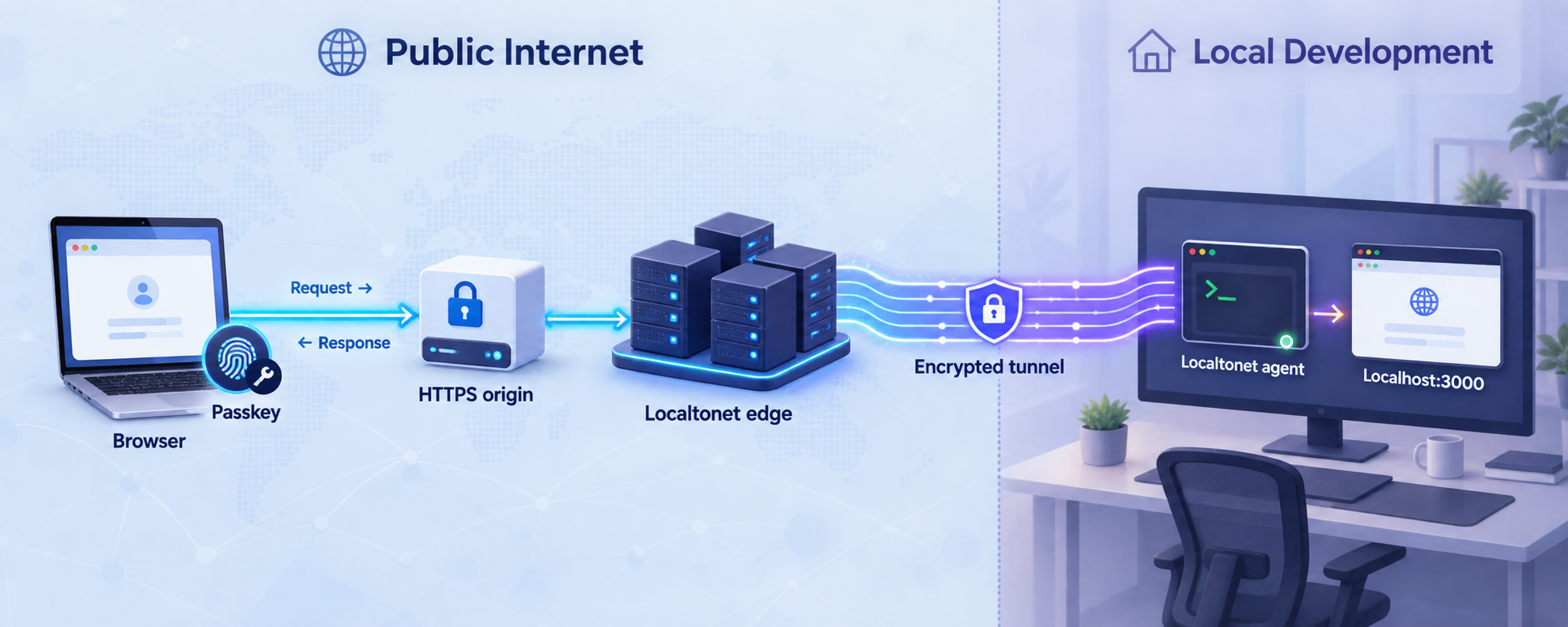
Why passkeys can fail when localhost works
A WebAuthn test can work at http://localhost and then fail after the same application is opened through a public HTTPS URL. That result is often mistaken for a tunnel, certificate, browser, or authenticator problem. In many cases, the actual cause is that the public address creates a different browser origin and a different WebAuthn relying-party relationship.
Browsers represent an origin using a scheme, host, and port, with default ports normalized according to the URL scheme. A local development page and a public HTTPS page therefore do not have the same origin, even when both requests eventually reach the same application process. The browser evaluates the address in its location bar, not the internal destination behind the tunnel. The precise origin model and serialization rules are defined by the HTML Standard origin model.
WebAuthn also uses a relying party identifier, commonly called the RP ID. The RP ID is associated with a credential during registration. A hash of that value is included in authenticator data, and both browser-side processing and server-side verification enforce the relationship. A credential registered for localhost is not automatically a credential for an unrelated public hostname.
Localtonet solves the network-reachability part of this workflow. Our client application establishes an outbound connection to a Localtonet relay server. An HTTP tunnel then provides a public HTTPS address and forwards requests to the local IP address and port you configured. This does not require inbound router port forwarding, a public IP address, firewall changes, VPN setup, or exposing the development server directly on the router.
The tunnel does not rewrite WebAuthn's security model. Your application must treat the public hostname as a real test deployment, validate the browser-facing origin on the server, choose an RP ID permitted for that hostname, and register a credential under that configuration. Successful HTTPS delivery proves that the browser can reach the application through a secure public endpoint. It does not prove that a credential registered for another RP ID can be used there.
Keep local and tunneled credentials conceptually separate. A credential created with an RP ID of localhost should not be expected to authenticate under an assigned tunnel hostname. Configure the public origin and RP ID first, then create a fresh test credential through the public page.
Understand secure contexts, origins, and RP IDs
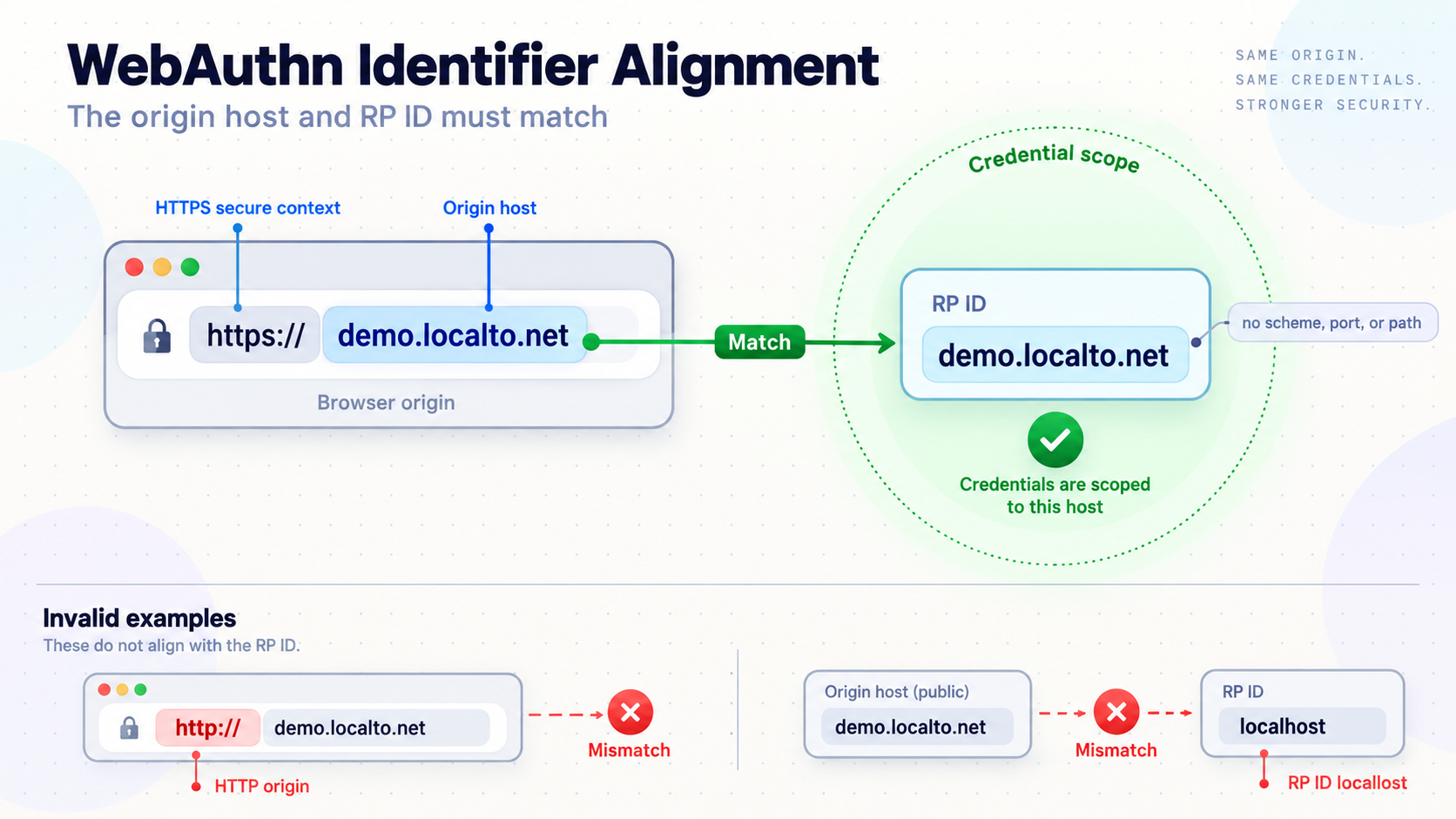
Several related but distinct checks shape a WebAuthn ceremony. Understanding what each value means, and where it is checked, makes troubleshooting considerably faster.
Secure contexts include more than the literal localhost name
Public WebAuthn testing normally requires HTTPS, but the local-development exception is broader than only the exact string localhost. Under the secure-context model, localhost names and loopback IP address ranges can qualify as potentially trustworthy even when reached over HTTP. Depending on browser support and URL handling, common examples include http://localhost, http://127.0.0.1, and the IPv6 loopback address.
This exception is limited to local contexts. It does not make an arbitrary LAN hostname, private network address, or public HTTP hostname secure. The browser's final decision is visible through window.isSecureContext. For the normative trustworthiness algorithm, see the W3C
potentially trustworthy origin criteria. MDN's
secure-context overview
provides additional browser-oriented guidance.
Secure-context eligibility and credential identity scope remain separate. HTTPS allows the WebAuthn API to operate on the public endpoint, but it does not make the public hostname equivalent to localhost or another domain.
What belongs in an origin
Configure the expected origin as the exact browser-facing origin. If the browser opens a public address over HTTPS on the default HTTPS port, the serialized origin generally consists of https:// followed by the public hostname. Do not add a path such as /login or /webauthn/register. Paths identify resources and application routes, not origins.
A non-default browser-facing port is part of the origin. The local application's internal port is not automatically part of the public origin. The authoritative browser-side diagnostic is window.location.origin, not the destination address used by the Localtonet client.
The exact RP ID relationship
An RP ID is a valid domain string. It can be the current origin's effective domain itself, or a registrable-domain suffix of that effective domain. The suffix must meet the WebAuthn rules and cannot be a public suffix that would improperly claim credentials across unrelated sites. It does not need to equal the browser hostname in every valid deployment.
For example, an application at login.example.test can deliberately use login.example.test as its RP ID. If the developer controls the relevant domain and intends credentials to be available across eligible subdomains, the application may instead use an eligible parent such as example.test. That shared scope must be an intentional architecture decision.
The WebAuthn specification describes RP ID validation in its RP ID definition and validation requirements. WebAuthn implementations and libraries should perform the applicable checks rather than relying on ad hoc string matching.
For an assigned Localtonet tunnel hostname, the safest and least ambiguous RP ID is the exact assigned hostname. Do not shorten it to a Localtonet-owned parent domain. A deliberately shared parent RP ID is appropriate only when you use a custom domain you control, the browser permits that suffix, and the application is intentionally designed to share credential scope across the relevant subdomains.
Generated hostname versus controlled custom domain
| Public-host strategy | Recommended test RP ID | Credential behavior | Operational consideration |
|---|---|---|---|
| Assigned random tunnel hostname | The exact assigned hostname | The credential is scoped to that hostname | A changed hostname normally requires new configuration and a new test credential |
| Supported custom subdomain | Normally the exact selected hostname | A stable hostname can preserve the same relying-party scope | Availability can vary by current product configuration or plan |
| Custom domain controlled by the developer | Either the exact host or an intentional eligible parent domain | A parent RP ID can support credentials across eligible subdomains | Use current Localtonet DNS instructions and document the wider scope |
Values that must remain distinct
| Value | Example form | Role | Common mistake |
|---|---|---|---|
| Local application URL | http://127.0.0.1:LOCAL_PORT |
Internal target reached by the Localtonet client | Using it as the expected public browser origin |
| Public origin | https://PUBLIC_HOSTNAME |
Expected origin for the tunneled ceremony | Adding a route, using HTTP, or retaining the localhost origin |
| Exact-host RP ID | PUBLIC_HOSTNAME |
Scopes the credential to the assigned hostname | Including a scheme, port, path, or unrelated parent domain |
| Shared parent RP ID | example.test |
Intentionally scopes credentials across eligible controlled subdomains | Using a public suffix or a parent domain the developer does not control |
| Registration route | /webauthn/register |
Application endpoint or page path | Confusing a route with an origin or RP ID |
| Credential identifier | Binary identifier encoded as required by the application | Identifies the stored public-key credential | Changing its byte representation between ceremonies |
These examples are conceptual. Replace LOCAL_PORT and PUBLIC_HOSTNAME with values from your application and active tunnel. Never copy sample tokens, credential identifiers, domains, or private endpoints into a real configuration.
Prerequisites for the test workflow
Before exposing the application, establish a working local registration and authentication path. A tunnel adds another network boundary and another origin, so beginning with an unverified local implementation makes unrelated errors harder to distinguish.
- A local web application with server-side WebAuthn registration and authentication verification.
- A known local IP address and port reachable from the device that will run the Localtonet client.
- A Localtonet account.
- The current Localtonet client application for the operating system used by the selected device.
- A device-specific Localtonet authentication token handled as a secret.
- An available relay server or region selected from the current dashboard.
- A WebAuthn-capable browser and an authenticator, such as a platform authenticator, security key, or compatible passkey provider.
- Access to the application's expected-origin and RP ID configuration.
- Browser developer tools and application logs that do not expose credentials or secrets.
The verified material available for this revision confirms that the Localtonet client must be installed and run on the device that can reach the local service. It does not provide a current, OS-specific installer URL, package-manager command, or unattended installation command. To avoid publishing a stale or invented command, use the installation option presented by the current Localtonet dashboard or HTTP tunnel documentation for your operating system, then launch the client and select that device in the tunnel workflow.
Your framework may use different names for WebAuthn settings. Common concepts include expected origin, RP ID, relying-party name, public base URL, trusted host, trusted proxy, callback URL, or allowed web origin. Map these concepts to the documented settings of your WebAuthn server library, identity provider, and application framework. Do not substitute guessed option names.
A public tunnel makes the selected service reachable from the internet while the client is connected and the tunnel is running. Use test accounts and data, remove debug and administrative endpoints, apply least privilege, and stop the tunnel when testing ends. Never place Localtonet device tokens, session secrets, private keys, raw challenges, or credential material in source code, URLs, screenshots, or public logs.
Prepare and verify the local WebAuthn application
Confirm that the complete application flow works locally before introducing the public hostname. The goal is not merely to display an authenticator prompt. Registration must persist a usable public-key credential record, and authentication must verify a fresh assertion before establishing the intended application session.
Check the application routes
A typical implementation has server endpoints that begin and finish each ceremony. Registration starts by obtaining creation options from the server and ends by returning the authenticator response for verification. Authentication follows the same pattern with request options and an assertion response. Route names and payload structures depend on your framework, so retain the implementation established by your chosen WebAuthn library.
Verify that static assets, API requests, forms, and client-side navigation use relative URLs or an environment-aware public base URL. Hardcoded localhost API addresses commonly cause the page to load through a tunnel while ceremony requests continue to target the developer's local origin.
Confirm local listening behavior
The Localtonet client must be able to reach the target IP address and port. If the client and application run on the same machine, a loopback target may be appropriate. If they run on different devices, virtual machines, or containers, the service must listen on an address reachable from the client device and local firewall policy must permit the connection.
Do not change a development server to listen on every network interface unless that is necessary and understood. Prefer the narrowest listening configuration that still lets the Localtonet client reach it. Public tunnel exposure and local network exposure are separate concerns.
Inspect browser-visible values
Run these expressions in the browser console after loading the local page and again after loading the tunneled page:
window.isSecureContext
window.location.origin
window.location.hostname
window.location.port
typeof window.PublicKeyCredential
On the public page, window.isSecureContext should be true. The origin should show the public HTTPS origin, and the hostname should correspond to the value used for an exact-host RP ID. The presence of PublicKeyCredential confirms API exposure, but it does not prove that a complete registration or assertion will pass server verification.
Preserve challenge and session state
Ensure that the server securely associates each challenge with the correct ceremony, account, and session. When the browser-facing scheme and host change, session cookies can behave differently because cookie domain, Secure, and SameSite attributes determine when they are sent.
If the request that finishes registration cannot find the session that initiated it, the error may appear to be a challenge mismatch even though the authenticator produced a valid response. Inspect browser cookie storage and request headers, then configure cookies deliberately for the public test environment. Do not remove cookie protections globally simply to make a test pass.
Create a public HTTPS endpoint with Localtonet
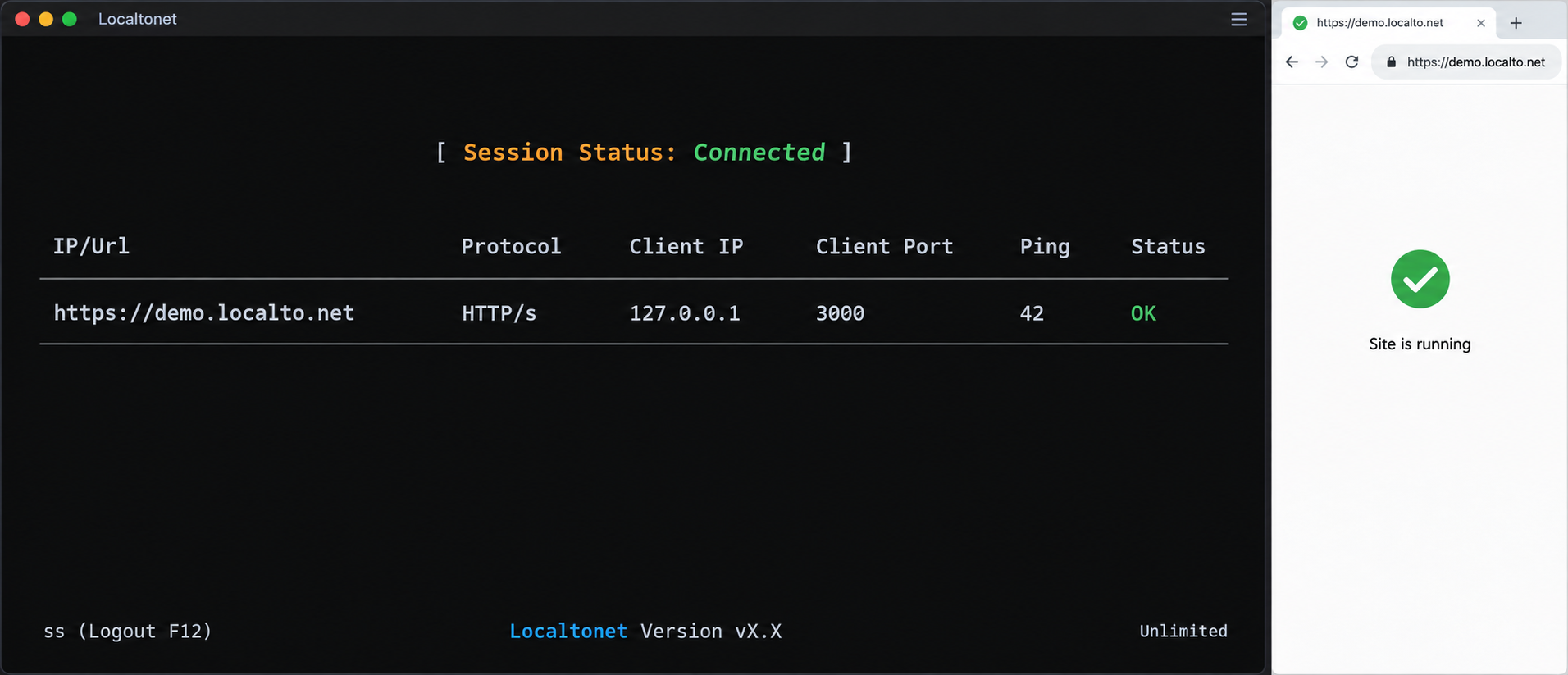
Use a Localtonet HTTP tunnel for a browser-based local web application. HTTP tunnel process types can serve the same content at a public HTTPS address using a random subdomain, a supported custom subdomain, or a custom domain. The available options, servers, regions, and plan-specific capabilities can vary, so select values from the current dashboard rather than copying identifiers from an article.
The ordered workflow below reflects the verified Localtonet lifecycle and field dependencies available for this revision. The active dashboard remains authoritative for labels and options. The supplied evidence does not include a complete current transcript of every field shown on the HTTP tunnel page, so this guide does not invent additional controls or OS-specific commands.
Install and run the Localtonet client
Use the current installation option provided for your operating system, then run the client on the application host or another device that can reach the application's local IP address and port. The client establishes the outbound connection to the Localtonet relay.
Select the client device by its authentication token
Select or authenticate the intended device using its device-specific token through the current product workflow. Treat the token as a secret and never place it in browser code, application configuration committed to source control, screenshots, or public logs.
Select an available relay server or region
Choose from the values currently shown in the dashboard. Do not hardcode or reuse a server code from an older guide because available values may change.
Create the HTTP tunnel configuration
Open the HTTP tunnel workflow, choose the appropriate process type, and enter the local IP address and port serving the WebAuthn application. Confirm that the Localtonet client device can reach this exact target before proceeding.
Start the tunnel
Creating a tunnel does not start it. Use the Start action and wait until the selected device is connected and the tunnel is running. The public endpoint is available only while that device remains connected and the tunnel remains active.
Open and record the assigned public address
Open the assigned HTTPS URL in the test browser. Record the exact value of window.location.origin and window.location.hostname. Resolve ordinary routing, host-check, asset, or application errors before beginning passkey testing.
Review the current Localtonet HTTP tunnel documentation while configuring the tunnel. If you choose a custom domain, follow its current DNS requirements rather than assuming a record type or destination from another provider or an older guide.
If the home page loads through HTTPS, basic routing is working. WebAuthn can still fail because the application expects localhost, the RP ID is incompatible with the public hostname, a session cookie is missing, or the credential was registered under a different relying party.
Align the application origin and RP ID
Once the tunnel is running, configure the application as if the public address were a separate test deployment. Avoid making one ambiguous configuration silently cover localhost, temporary tunnel hosts, staging, and production. Explicit environment values are easier to audit and less likely to weaken verification.
Set the expected origin
Copy the exact value reported by window.location.origin on the tunneled page and use it as the expected public origin in your WebAuthn server configuration. It will normally have this form:
https://PUBLIC_HOSTNAME
Do not use the internal target such as http://127.0.0.1:LOCAL_PORT. That is where Localtonet forwards the request, but it is not the origin from which the browser initiated WebAuthn.
Some libraries support an explicit collection of expected origins. If yours does, list only the exact origins that you use. Do not accept arbitrary origins through wildcards, unchecked suffix matching, or untrusted request headers.
Choose the RP ID strategy
For a generated Localtonet hostname, use the full assigned hostname without a scheme, port, or path:
PUBLIC_HOSTNAMEThis exact-host strategy avoids claiming a broader domain scope and clearly separates one generated hostname from another. Use the same RP ID when generating registration options, verifying registration, generating authentication options, and verifying the assertion.
If you use a custom domain you control, you can still choose the exact public hostname. Alternatively, you may intentionally choose a permitted registrable-domain suffix when multiple eligible subdomains are designed to share passkeys. Before using that broader model, confirm the suffix is allowed by the browser, control the relevant domain, document which applications share the scope, and ensure every participating service meets the same security standard.
If a generated tunnel hostname changes, treat the new hostname as a new relying-party environment. A credential registered for the earlier exact hostname should not be expected to work at the replacement hostname.
Configure a public base URL when required
Frameworks often construct absolute URLs, redirects, cookies, or security checks from request properties. Behind a forwarding endpoint, an application may infer its internal HTTP target instead of the browser-facing HTTPS address. When supported, configure an explicit public base URL for the test environment.
If your framework requires trusted-proxy configuration, use its documented mechanism and trust only the necessary proxy path. Proxy-header names and trust models vary, so there is no universal setting. Never trust client-supplied Forwarded or X-Forwarded-* headers from every source merely to suppress an origin error.
Review identity-provider allowlists separately
If an external identity system participates in the flow, it may maintain allowed web origins, callback URLs, or RP ID settings in addition to your application's WebAuthn configuration. Add the exact public values where required. An OAuth callback URL, a CORS allowlist, and a WebAuthn RP ID solve different problems. Configuring one does not automatically configure the others.
CORS can affect requests to your challenge endpoints when the front end and API use different origins. Permissive CORS headers do not fix WebAuthn origin or RP ID validation. Allow only the API origins required by your architecture and preserve WebAuthn verification.
Register a fresh test credential
After configuring the expected origin and RP ID, begin a new registration ceremony from the public page. Do not rely on a passkey registered through localhost. Store the resulting credential with enough environment context to distinguish tunnel, local, staging, and production records.
A development record can label the environment and display a shortened, non-sensitive identifier for operational clarity. Avoid logging complete attestation objects, assertions, challenges, session secrets, or unnecessary authenticator information.
Verify registration and authentication end to end
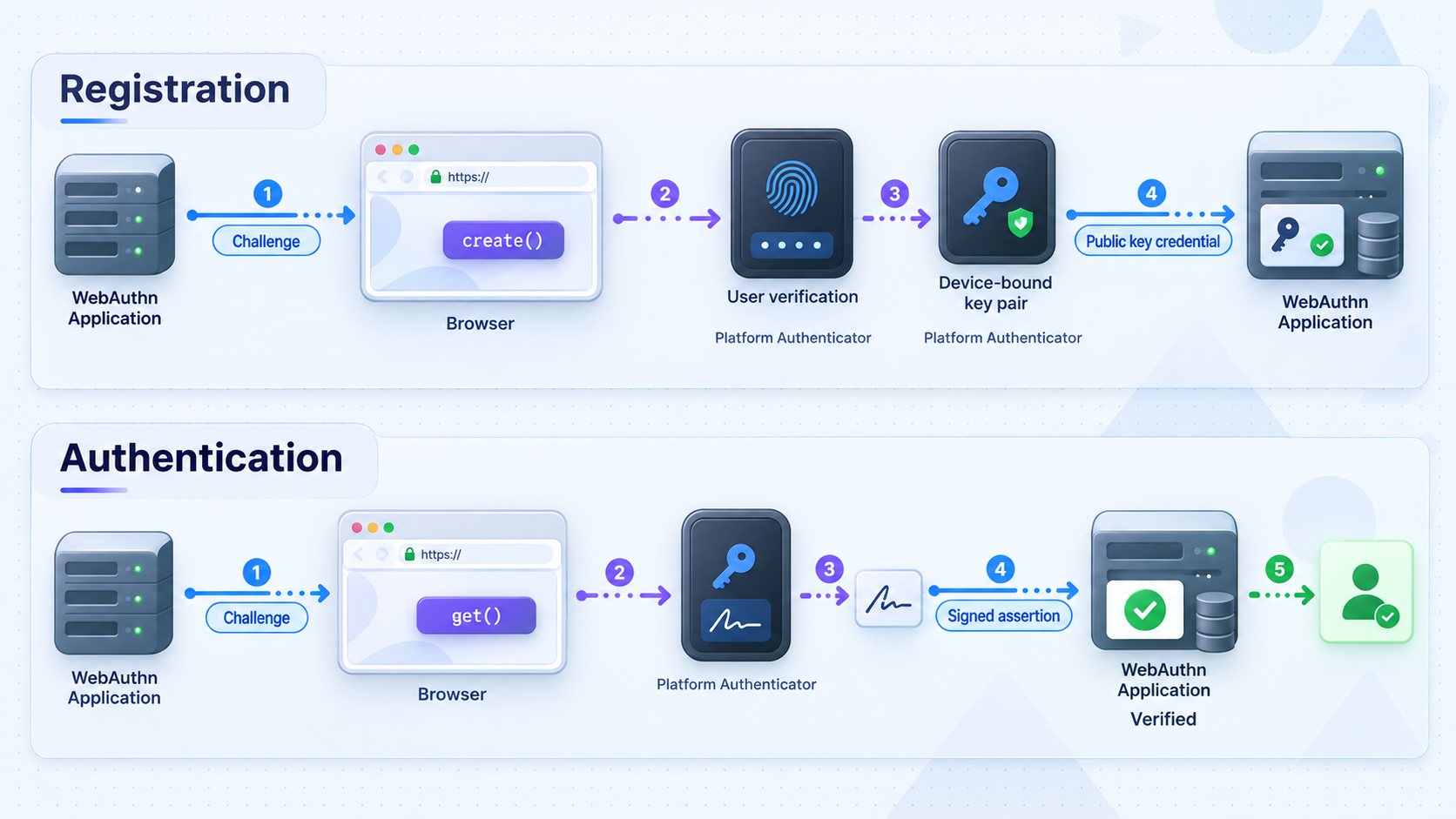
Test registration and authentication as separate ceremonies. Registration proves that the application can create and verify a new public-key credential for the selected RP ID. Authentication proves that the browser can select that credential and that the server can validate a fresh signed assertion.
The WebAuthn specification defines the server-side processing required when registering a new credential and verifying an authentication assertion. Use a maintained WebAuthn server library to implement those procedures rather than writing custom cryptographic verification.
Registration verification checklist
- Open the active Localtonet HTTPS address in the browser.
- Confirm that the application page and both registration requests use the intended public environment.
- Check that
window.isSecureContextistrue. - Confirm through safe diagnostic tooling that the registration options contain the intended RP ID.
- Start registration and complete the authenticator prompt.
- Verify that the server finds the same fresh challenge issued for the current session.
- Verify that the server accepts the exact expected origin.
- Verify the RP ID hash and the rest of the authenticator data according to your library's process.
- Confirm that the credential public key and required metadata are stored successfully.
A successful authenticator prompt is not completed registration. The ceremony succeeds only after the server validates and stores the result. If the browser appears successful but the server returns an error, inspect the finish request and the server library's structured verification result.
Authentication verification checklist
- Start a fresh authentication ceremony from the public origin used for registration.
- Confirm that the server creates a new challenge and associates it with the correct session.
- Check that the authentication options use the same RP ID as registration.
- Complete the authenticator prompt using the newly registered test credential.
- Confirm that the server validates the challenge, origin, RP ID hash, signature, and required authenticator flags.
- Verify that the credential belongs to the expected account.
- Verify that the application establishes the intended authenticated session.
- Repeat after signing out or in a fresh browser session to rule out stale application state.
For discoverable credentials, the browser may offer an account without the application first sending a credential allowlist. For non-discoverable flows, the server may need to identify the user and provide eligible credential IDs. Follow the model supported by your library and authenticator. Do not change the credential-discovery model while diagnosing an origin problem.
Test negative cases
A secure implementation must reject invalid input, not merely accept the happy path. In an isolated test environment, confirm that the server rejects an expired or unknown challenge, an unexpected origin, a response for the wrong RP ID, a credential not associated with the account, and a replayed response.
Use test fixtures, library-supported tooling, or isolated test accounts. Do not create negative tests by weakening browser security or modifying production data. Record enough server-side reason information to diagnose failures while returning restrained messages to the browser.
Troubleshoot registration and login failures
Begin at the earliest failing layer. First confirm that the page is loaded from the intended public URL. Next verify secure-context status, origin, and RP ID. Then inspect challenge and session continuity. Finally investigate credential selection, binary encoding, browser behavior, or provider-specific requirements.
| Symptom | Likely area | What to inspect | Safe corrective action |
|---|---|---|---|
| WebAuthn API is unavailable | Secure context or browser support | window.isSecureContext, public scheme, and browser capability |
Use the assigned HTTPS address and a supported browser context |
SecurityError or domain rejection |
RP ID compatibility | Current effective domain and RP ID sent in options | Use the exact host or a permitted controlled registrable-domain suffix |
| Prompt appears, but registration fails | Server verification | Expected origin, RP ID hash, challenge, session, and payload decoding | Correct the public-environment configuration and verification input |
| No credential is offered during login | Credential scope or selection | Registration RP ID, current RP ID, account, and credential allowlist | Register a credential for the current RP ID or correct selection data |
| Challenge is missing or mismatched | Session continuity | Cookie domain, Secure, SameSite, expiry, and session storage |
Configure cookies for the public environment without disabling protections globally |
| API requests still target localhost | Front-end configuration | Network panel, hardcoded URLs, environment variables, and public base URL | Use relative URLs or an explicit public API origin |
| Application redirects to internal HTTP | Proxy or base-URL inference | Generated redirects and framework proxy configuration | Set the documented external URL or narrow trusted-proxy configuration |
| Authentication stopped after hostname change | RP ID change | Old registration RP ID and current hostname | Restore a stable valid hostname or register a new test credential |
Origin mismatch
Compare three values directly: window.location.origin, the expected origin configured on the server, and the origin in the WebAuthn client data being verified by your trusted library. They must represent the intended public origin. Avoid manual normalization that strips schemes, ports, or meaningful distinctions.
If the server expects localhost while the browser reports the public HTTPS origin, change the environment configuration. Do not configure the server to accept every origin. If multiple test origins are necessary and your library supports a list, keep it explicit and environment-specific.
RP ID mismatch
Compare window.location.hostname with the RP ID generated by the server. For an assigned tunnel host, begin with the exact hostname. If you intentionally use a parent RP ID under a custom domain, confirm that it is a registrable-domain suffix permitted for the current effective domain and that it is not a public suffix.
Remove any scheme, path, and port from the RP ID. Then confirm that registration option generation, registration verification, authentication option generation, and assertion verification use the same value.
An invalid RP ID can be rejected before the authenticator is used, so no prompt may appear. A mismatch can also surface during server verification as an unexpected RP ID hash. Browser and library messages vary, so diagnose the actual values rather than relying only on exception wording.
Credential registered on localhost
If a passkey exists but is not offered on the tunnel page, identify the RP ID under which it was registered. A credential created for localhost belongs to that relying party. It is not migrated merely because the same application source is now available through HTTPS at another hostname.
Configure the public environment first, then register a fresh test passkey from the public page. Keep separate credentials if you need to test local and public environments. During cleanup, remove only the intended test records from the application and authenticator.
Challenge or session mismatch
Use the browser network panel to follow the begin and finish requests. Confirm that both use the intended environment and that the required session cookie is present. Check whether the application restarted between requests, an in-memory challenge store was cleared, or multiple application instances lack shared session state.
Verify binary encoding boundaries as well. WebAuthn uses byte arrays in several fields, while JSON transports require a text representation. Use your library's supported conversion helpers. A base64 and base64url mismatch, changed padding, or accidental text encoding can corrupt a challenge or credential identifier even when the strings look similar.
Development-server host checks
Some development servers reject requests for hostnames that are not explicitly trusted. If the public page is blocked before the WebAuthn code runs, follow your framework's documented host or development-origin configuration and allow only the required tunnel hostname. Avoid disabling host checks globally because they can protect against DNS rebinding and related development-server attacks.
Browser or passkey-provider conflicts
A platform authenticator, operating-system passkey interface, browser password manager, and third-party password-manager extension can all participate in credential selection. If an unexpected interface appears or no eligible credential is visible, retry in a clean browser profile with one intended provider enabled. Testing another supported browser can help identify a provider-specific issue.
Keep that diagnosis separate from RP ID validation. Changing password managers cannot repair an invalid RP ID. If origin and RP ID values are correct but one browser-provider combination behaves differently, record the browser version, operating system, authenticator type, and extension state.
Avoid insecure-origin overrides, certificate bypasses, disabled origin verification, broad CORS settings, or experimental browser preferences as substitutes for correct configuration. These changes can hide the actual defect and create a test environment that does not represent production behavior.
Tunnel stopped or device disconnected
A Localtonet tunnel is reachable only while the selected client device is connected and the tunnel is running. If the public page becomes unavailable, confirm both states before changing WebAuthn code. Creating a tunnel configuration alone does not activate it.
If you delete and recreate a tunnel, the assigned hostname can differ depending on the selected process type and configuration. Recheck the browser origin and hostname. A changed hostname can require updated application settings and a new credential.
Operate the WebAuthn test environment safely
A public passkey test endpoint remains an authentication service exposed to internet traffic. Keep it isolated from production identities and data. Use dedicated test accounts, a separate database where practical, and credentials created specifically for testing.
Use a stable hostname deliberately
WebAuthn testing is easier when the public hostname remains stable. Localtonet HTTP tunnels support random subdomain, custom subdomain, and custom domain process types. Availability can vary by current account configuration or plan, so verify the choices shown in the dashboard.
A controlled custom domain can make the environment resemble a persistent deployment. It can also support an intentional parent-domain RP ID strategy when multiple eligible subdomains need shared credentials. That broader scope is not automatically safer or better. Use an exact-host RP ID unless sharing is a documented requirement.
Separate environments explicitly
Maintain separate settings for local development, public tunnel testing, staging, and production. At minimum, distinguish the expected origins, RP ID, public base URL, cookie policy, credential database, and identity-provider allowlists.
Do not derive trusted security values from an unvalidated incoming Host header. Security-sensitive values should come from controlled environment configuration or a framework mechanism designed for trusted proxy deployments.
Protect logs and diagnostic output
Log high-level reasons such as origin mismatch, unknown credential, expired challenge, or signature-verification failure. Avoid recording complete WebAuthn payloads unless a reviewed development process specifically requires and protects them. Authentication tokens, cookies, Localtonet device tokens, credential private material, and user secrets must never be logged.
Stop access when testing ends
Stop the tunnel when remote testing is complete, or delete it if the configuration is no longer needed. Stopping a tunnel ends active exposure while retaining its configuration. Deleting removes a configuration you do not intend to reuse. Also remove obsolete test origins from application and identity-provider allowlists and clean up test credentials according to your retention policy.
Record the tested public origin, RP ID, browser, operating system, authenticator type, application version, and whether registration and authentication passed. Do not record secrets or complete credential payloads. This small compatibility record helps reproduce regressions after browser, authenticator, or dependency updates.
Frequently asked questions
Why does my passkey work on localhost but not through the HTTPS tunnel?
Localhost and the public tunnel URL are different origins and usually use different RP IDs. A credential registered for localhost is not automatically valid for the public hostname. Configure the public expected origin and RP ID, then register a fresh test credential through the public page.
Can WebAuthn work on a loopback IP address without HTTPS?
Loopback addresses can qualify as potentially trustworthy local contexts under the secure-context rules, as can localhost names. Confirm the actual browser result with window.isSecureContext. This local exception does not apply to arbitrary LAN or public HTTP addresses, so use the Localtonet HTTPS address for public tunnel testing.
Does HTTPS alone make a WebAuthn deployment valid?
No. HTTPS supplies the secure browser context required for public WebAuthn use, but the server must still verify the challenge, expected origin, RP ID hash, credential, signature, and relevant authenticator data. Session and cookie continuity must also work.
Must the RP ID exactly match the tunnel hostname?
Not in every WebAuthn deployment. An RP ID can be the current effective domain or an eligible registrable-domain suffix. For an assigned Localtonet hostname, however, the exact hostname is the safest choice because you should not claim a Localtonet-owned parent domain. A parent RP ID should be used only under a custom domain you control and when shared subdomain scope is intentional.
Should the RP ID include https:// or the tunnel port?
No. An RP ID is a domain value. It does not include a scheme, port, path, query string, or fragment. The expected origin is a separate value that includes the scheme and any non-default browser-facing port.
Can I reuse a credential after the assigned public hostname changes?
Not when the credential was registered for the old exact hostname and the new host does not share an intentionally configured valid RP ID. In the normal generated-hostname workflow, update the application configuration and register a new test credential for the new hostname.
Why does the authenticator prompt appear if the server later rejects registration?
The browser and authenticator can complete their part before the server performs final verification. The server can still reject an unexpected origin, incorrect RP ID hash, missing challenge session, malformed encoding, unsupported algorithm, or another invalid condition. Inspect your WebAuthn library's structured verification result.
Should I disable browser security to make the test work?
No. Correct the secure context, origin, RP ID, challenge, session, and provider configuration. A clean browser profile or another supported browser can isolate an extension conflict, but disabling security checks is not a valid replacement for correct WebAuthn configuration.
Does Localtonet change my application's WebAuthn RP ID automatically?
No. Localtonet provides the public endpoint and forwards traffic to the configured local target. Your application or identity system remains responsible for generating and verifying the expected WebAuthn origin and RP ID.
Is a Localtonet HTTP tunnel the same as a VPN?
No. In this workflow, an HTTP tunnel publishes one selected local web service through a public address. It is not a VPN. Localtonet VPN Manager is the separate feature for private mesh VPN connectivity.
Test your local passkey flow through a real HTTPS origin
Start with a locally verified WebAuthn application, create a Localtonet HTTP tunnel, configure the assigned public origin and an appropriate RP ID, and validate both registration and authentication with a fresh test credential.
Get Started Free →

