

Publish an already working chat service without opening inbound router ports
This guide starts after your chat server has been installed and verified on the local network. It explains how to expose the user-facing web endpoint through a Localtonet HTTP tunnel, configure the chat application for its public address, validate browser and real-time connections, and operate the deployment safely. Mattermost, Rocket.Chat, Matrix, and other chat systems do not share one universal architecture, so the tunnel target and any additional public services must follow the selected platform’s current deployment documentation.
📋 What's in this guide
What this tutorial covers
This tutorial covers publication of an existing, locally functional chat deployment. It does not install Mattermost, Rocket.Chat, a Matrix homeserver, or any other chat application. Before using Localtonet, the application must already start successfully, serve its local interface, connect to its database and supporting services, and permit a local user to sign in and exchange messages.
A self-hosted chat application may run directly on an operating system, inside a virtual machine, in containers, or on another device on the same LAN. Local access alone does not make that service reachable from the internet. A service listening on 127.0.0.1 accepts connections only from its own host. A service listening on a private address such as 192.168.1.50 may be reachable from the LAN, but private addresses are not routed directly across the public internet.
Localtonet changes the connection direction. Our client application runs on a device that can reach the chat service and establishes an outbound connection to a Localtonet relay server. When the tunnel is running, the assigned public endpoint forwards compatible traffic to the local IP address and port selected in the tunnel configuration. This workflow does not require inbound router port forwarding, firewall changes, VPN setup, or a public IP address.
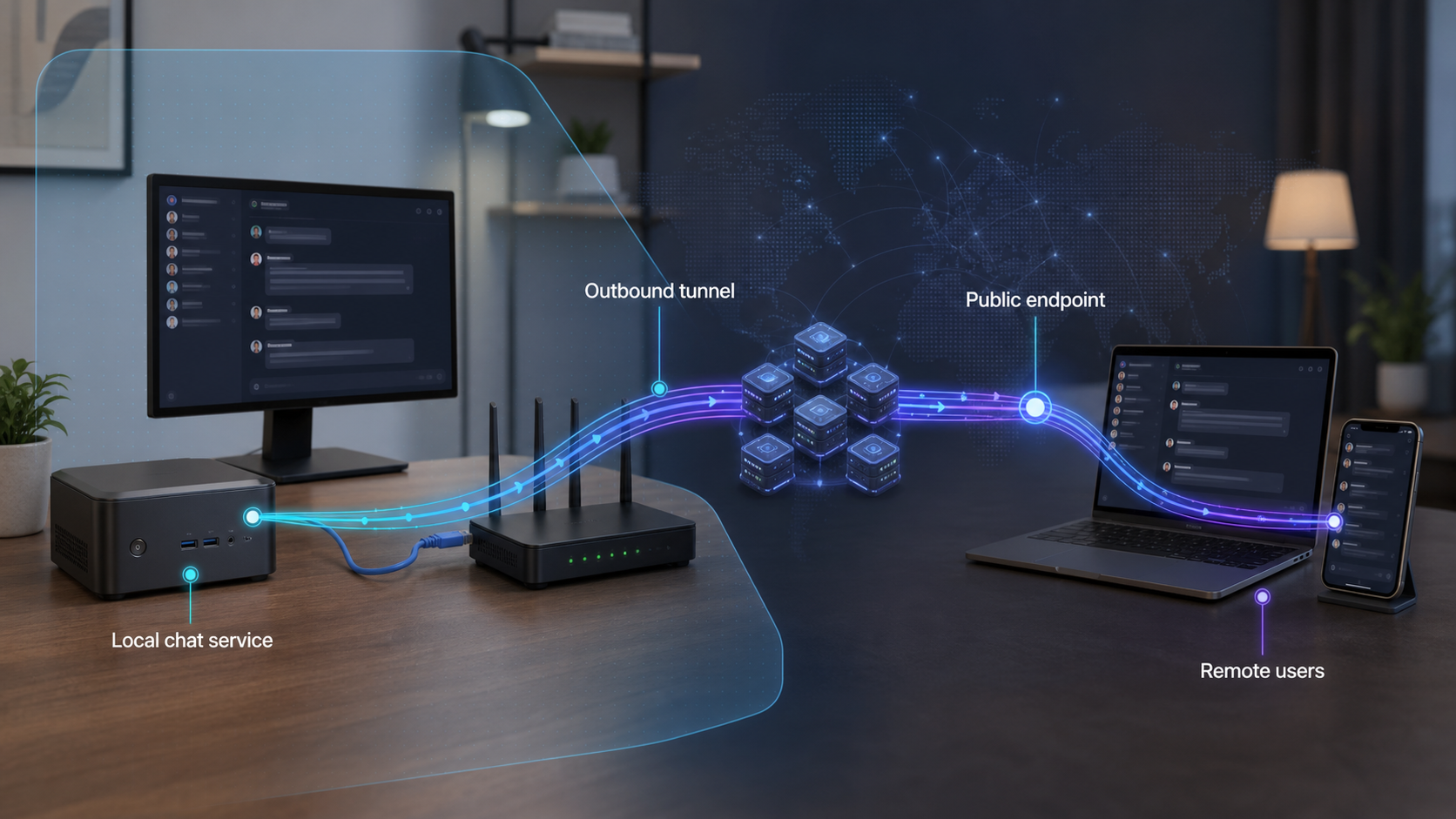
This distinction is important for multi-service chat deployments. Localtonet creates a path to the target you select, but it does not merge separate application components into one service. A database, media server, federation listener, identity provider, object store, and chat web application may all have different roles. Publish only the components that the chat platform explicitly requires clients or peer servers to reach.
Prerequisites and local checks
Gather the information below before opening the Localtonet tunnel form. Most tunnel failures are caused by a local service, container mapping, or application URL problem that can be identified before the public endpoint is created.
Install and connect the Localtonet client
Install the Localtonet application for the operating system on a device that can reach the chat server. That can be the chat host itself or another machine on the same private network. Authenticate the device through the supported client workflow using its device-specific token. Treat that token as a secret and do not place it in screenshots, shell history shared with others, source control, issue reports, or ordinary operating notes.
The current installation and HTTP tunnel interface are documented in the Localtonet HTTP tunnel documentation. Client packaging and interface details can change, so use the current operating-system path shown there rather than an old installation command from an unrelated tutorial.
Prove that the client device can reach the service
Use a browser or another appropriate HTTP client on the Localtonet device to load the exact local address you plan to enter. For example, if the chat application and Localtonet client run on the same machine, an illustrative target could be:
http://127.0.0.1:3000This is an example, not a default port for every chat platform. Replace both the address and port with the listener used by your deployment. If the chat application runs on another LAN device, an illustrative target could instead look like:
http://192.168.1.50:3000The second address works only if the Localtonet client device can reach that private IP and the chat application is listening on an interface that accepts LAN connections. Do not use a LAN address copied from this guide.
Before continuing, confirm that the login page loads, static assets render, and a test user can sign in. Send a message between two local test sessions if possible. If this local test fails, creating a tunnel will not repair the underlying application.
Check container port publishing
A container may listen on one port internally while the host exposes a different port. For example, a container’s internal application port is not automatically reachable at the same port on the host. Inspect the deployment’s current container configuration and identify the host-side published address and port. Test that host-side endpoint from the Localtonet client device.
If Localtonet runs on the host, a target inside an isolated container network may not be directly reachable. If Localtonet runs on a different LAN device, a host mapping bound only to 127.0.0.1 will also be unreachable from that device. Correct the application binding or container publishing according to the chat platform and container runtime documentation before configuring the tunnel.
Target the documented user-facing HTTP service or reverse proxy. Do not publish the database, message broker, container engine socket, internal administration listener, service-discovery endpoint, or private object-storage interface merely because it is reachable from the client device.
Chat platform compatibility is not one-size-fits-all
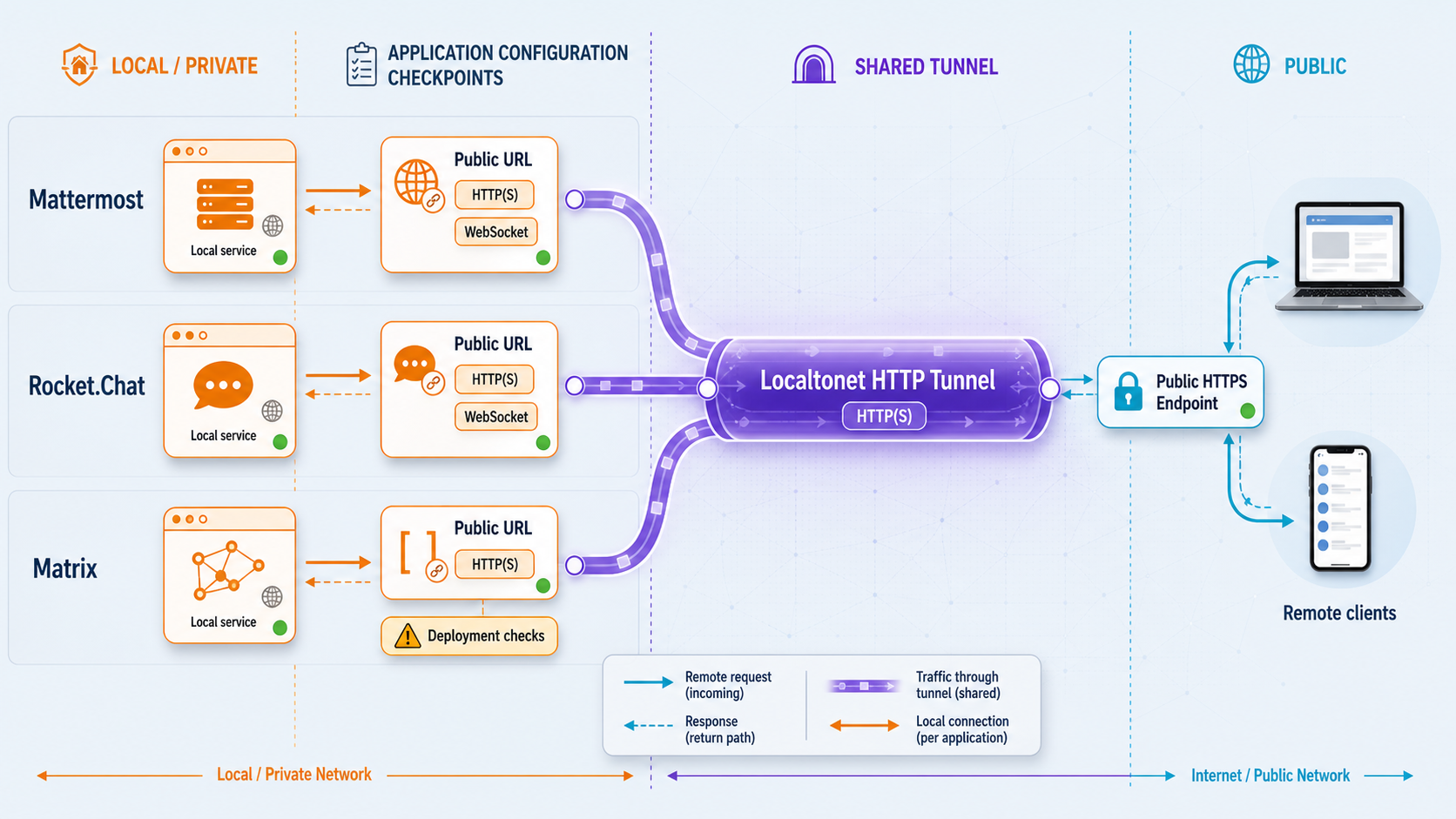
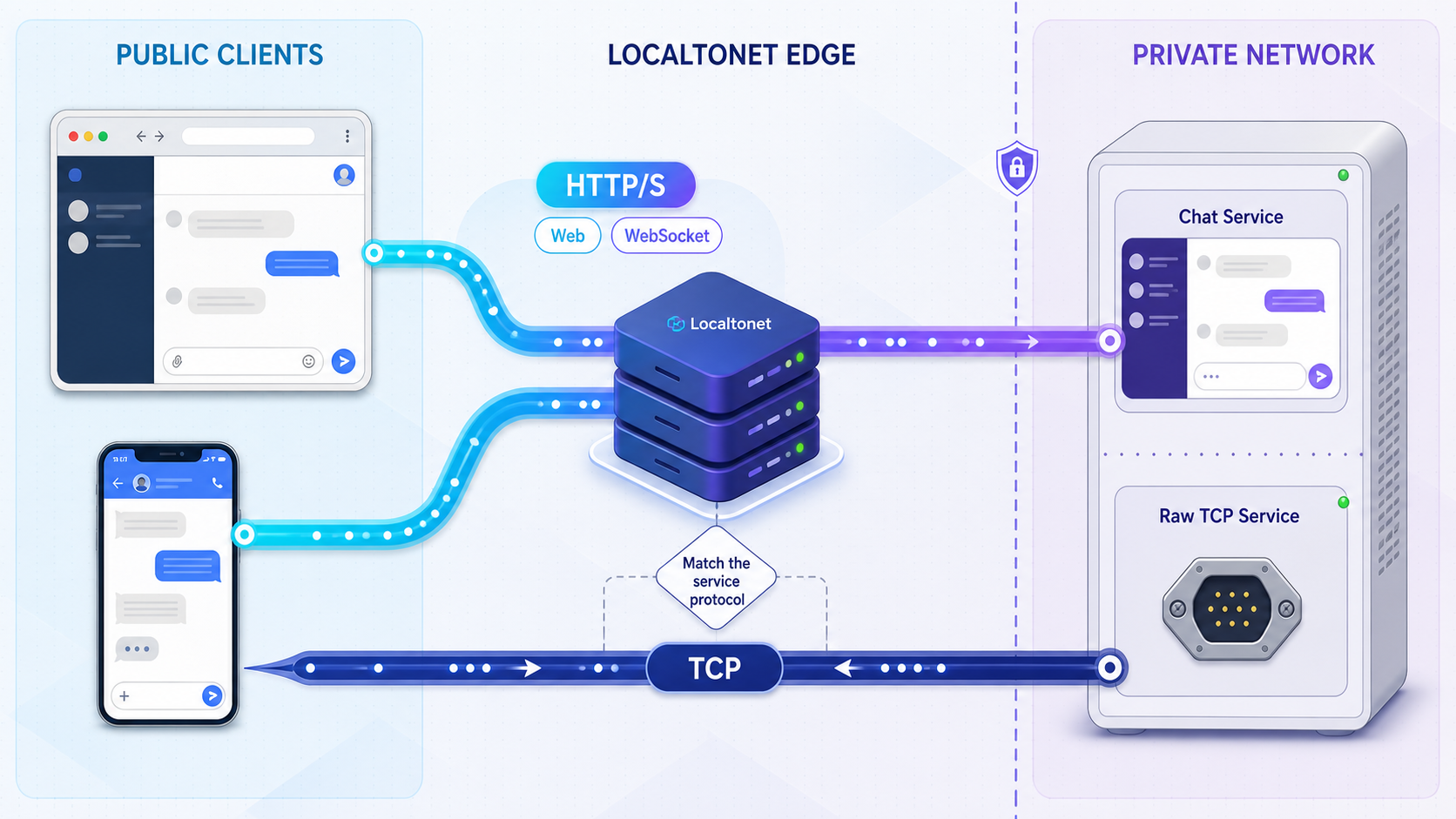
Many self-hosted chat products present an HTTP or HTTPS browser interface, but that does not mean every deployment consists of one interchangeable web port. Browser access, real-time messaging, federation, mobile clients, identity callbacks, uploads, and voice or video can have separate requirements.
| Capability | What to identify | What to validate |
|---|---|---|
| Browser chat | The public-facing HTTP application or reverse-proxy listener | Login, redirects, static assets, API calls, uploads, and message delivery |
| WebSocket or real-time HTTP connection | The application endpoint that accepts the upgrade or persistent connection | Connection upgrade, live delivery, idle behavior, and reconnect after interruption |
| Mobile or desktop client | The stable server URL and any client support limitations | Server discovery, login, notifications where configured, uploads, and reconnection |
| Matrix client access | The homeserver’s client-facing endpoints and advertised server identity | Client discovery, authentication, room sync, event delivery, and media access |
| Matrix federation | Any separately required discovery, federation, naming, or endpoint configuration | Connectivity with peer homeservers using the Matrix project’s current validation guidance |
| Voice or video | Whether the deployment uses separate media services or transports | Call setup, audio and video flow, reconnect behavior, and network traversal under real conditions |
Mattermost and Rocket.Chat
Mattermost and Rocket.Chat deployments commonly place the application behind a reverse proxy in production, but their environment variables, public URL settings, trusted-proxy behavior, WebSocket guidance, upload configuration, and deployment layouts are product-specific. A direct application port may be acceptable in one existing deployment, while another expects all public traffic to reach its configured reverse proxy.
Use the endpoint that your installed deployment designates as public. Do not infer settings for one product from the other. Review the current Mattermost documentation or Rocket.Chat documentation for the exact server URL, proxy, WebSocket, client, and deployment requirements that apply to your installed version.
Matrix client access and federation
Matrix is a protocol ecosystem rather than a single interchangeable chat-server package. A homeserver may need a client-facing endpoint, well-known discovery data, an advertised server name, media access, and optional federation behavior. Publishing a homeserver’s web listener for a client is not proof that federation is configured correctly.
If your goal is only private client access, test that scope without claiming federation support. If federation is required, follow the current Matrix documentation for the homeserver implementation, server naming, discovery, and federation checks. Additional public endpoints or configuration may be required. Do not create extra tunnels until the homeserver documentation identifies what must be public and which transport it uses.
Voice and video are separate validation scopes
Chat pages and text messages can work while voice or video fails. Media features may depend on separate services, persistent signaling, browser permissions, direct or relayed media paths, and transports beyond the main HTTP application endpoint. Localtonet supports HTTP/s, TCP, UDP, combined UDP/TCP, and TLS tunnel families, but the presence of those tunnel types does not mean a chat media stack can be made complete by exposing arbitrary ports.
Identify the media architecture from the selected chat project’s current documentation. Expose only the required public components, select a compatible tunnel family for each documented listener, and test with users on external networks. If the project expects a separate media relay or a range of endpoints, one HTTP tunnel to the chat interface is not a substitute for that architecture.
For most initial deployments, first publish and validate the single user-facing HTTP endpoint. Add federation, media, or non-HTTP exposure only after the core login and messaging path is reliable and the project documentation confirms the additional requirement.
Create the Localtonet HTTP tunnel
The sequence below follows the current Localtonet HTTP tunnel lifecycle. Available relay values, interface presentation, and options can vary by plan, client version, region, or deployment. Select values shown in the current dashboard rather than hardcoding a relay server code from an older article.
Open the HTTP tunnel configuration
Sign in to Localtonet and open the HTTP tunnel workflow. Use HTTP for the existing user-facing web service described in this tutorial.
Select the connected client device
Choose the authenticated device that can reach the chat server. Confirm that the device is connected before proceeding. Device tokens are device-specific and must remain secret.
Select an available relay server
Choose a relay server or region from the current values offered in the Localtonet interface. Do not copy a server code from this or another tutorial because availability can vary.
Choose the process type
Select Random Sub Domain, Custom Sub Domain, or Custom Domain as appropriate. All three HTTP process types serve the configured content through a public HTTPS address. Availability can vary, and exact custom-domain DNS instructions must be checked in the current product documentation.
Enter the local IP address and port
Enter the exact target already proven from the Localtonet device, such as the illustrative same-host address 127.0.0.1 and port 3000. Replace these values with the actual application or reverse-proxy listener used by your deployment.
Create the tunnel configuration
Create or save the HTTP tunnel after reviewing the selected device, relay, process type, local address, and local port. Creation stores the configuration but does not make the endpoint active.
Press Start
Start the tunnel explicitly. The tunnel can forward traffic only while it is running and the selected Localtonet client device remains connected.
Retrieve the assigned public endpoint
Copy the public HTTPS address shown for the running tunnel. Treat it as the intended public origin when completing application-specific base URL, callback, proxy, and client configuration.
Stop or delete access when it is no longer needed
Use Stop to make a saved tunnel inactive. Delete obsolete tunnel configurations when they should no longer exist. If an endpoint or device token may have been exposed unintentionally, stop or delete the tunnel and revoke or replace affected access as appropriate.
Dashboard screenshots can reveal device tokens, private target addresses, assigned endpoints, account details, or other operational information. Redact those values before adding a screenshot to documentation, an issue, or a chat message.
Configure the chat application for its public URL
After Localtonet assigns the public HTTPS endpoint, the chat application may need to know that address. This is separate from creating the network path. Applications use public URL settings to build redirects, links, callback destinations, API addresses, WebSocket URLs, invitation links, and client configuration.
The exact setting name differs by product and version. It may be described as a site URL, server URL, root URL, base URL, external URL, public origin, allowed origin, callback URL, or trusted proxy setting. Do not add a guessed environment variable or configuration key. Use the primary documentation for the installed chat application and change only the values it identifies.
Choose the correct public origin
Use the complete HTTPS origin provided by the running HTTP tunnel, including the correct hostname. Avoid mixing the public hostname with a local port in user-visible configuration. If the application emits redirects to localhost, a private IP address, an old domain, or an internal container name, its public URL configuration has not been completed correctly.
Some desktop and mobile clients require users to enter a stable server URL. Others discover endpoints from a domain or follow application-specific configuration. Validate the clients your users will actually run. A successful browser session does not establish that every native client supports the same self-hosted configuration.
Configure proxy trust narrowly
The application may see requests as arriving through a proxy because public traffic is forwarded to the local target. If the chat server documents trusted-proxy settings, follow its exact syntax and scope. Trust only the proxy path required by the deployment. A broad setting that trusts arbitrary forwarding headers can allow clients to influence security-sensitive values such as the apparent source address or scheme.
Redirect loops often occur when an application does not recognize the public scheme or when more than one layer rewrites HTTPS and host information inconsistently. Keep the routing path understandable: public Localtonet endpoint, selected local listener, and chat application. If an existing local reverse proxy is already the application’s supported public entry point, target that proxy rather than bypassing it without reviewing the deployment.
Plan domain changes carefully
HTTP tunnels support Random Sub Domain, Custom Sub Domain, and Custom Domain process types. A generated endpoint is useful for initial validation. If users, clients, identity-provider callbacks, federation settings, or invitation links depend on a stable hostname, select the appropriate supported process type and complete the required application configuration before general use.
For a custom domain, consult the current Localtonet instructions before changing DNS. Exact record requirements are not fixed in this article. DNS caches can also delay visibility after a record changes, so distinguish a DNS problem from a tunnel or local-service problem during testing.
Verify the complete chat workflow
Verification should progress from the local service outward. Testing only whether the public landing page appears can miss broken API calls, WebSocket upgrades, redirects, uploads, mobile-client behavior, and media paths.
1. Repeat the local test
From the Localtonet client device, open the exact local target again. Confirm the login page, authentication, message delivery, and static assets. If this test fails after an application restart, fix the local service before investigating the tunnel.
2. Test from an external network
Open the assigned HTTPS URL from a device that is not relying on the server’s private network. A phone using mobile data is one practical option. Confirm that the page loads without a certificate warning and that all styles, scripts, images, and other required assets load from valid public addresses.
3. Test authentication and redirects
Sign in using an ordinary non-administrator account. Verify that login, logout, password-reset links where configured, identity-provider redirects where enabled, and invitation links return to the intended public hostname. Inspect the browser address bar for unexpected transitions to localhost, a private address, an obsolete hostname, or an incorrect scheme.
4. Verify message delivery and real-time behavior
Open two independent sessions, preferably on different networks. Send messages in both directions and confirm that they appear without a manual reload. Test channel changes, direct messages, read state, typing or presence indicators where supported, and any other feature that depends on the application’s persistent real-time connection.
Use the browser’s developer tools when needed to inspect the connection used by the application. If the chat platform uses WebSockets, confirm that the upgrade succeeds and remains connected. A page can render normally even when the real-time connection is repeatedly failing and falling back, so watch for reconnect loops and repeated network errors.
5. Test interruption and reconnect behavior
Temporarily interrupt the external client’s network, then restore it. Confirm that the application reconnects and receives messages sent during the interruption according to the platform’s normal behavior. Also stop and restart the Localtonet tunnel during a controlled maintenance window so operators understand what users see when the public path is unavailable.
6. Test uploads and downloads
If the chat platform permits attachments, upload a harmless test file and download it from another external session. Verify previews and generated links where supported. A failed attachment can indicate that the application generated an internal URL, that object storage is not reachable through the expected public route, or that the deployment requires additional application-specific configuration.
7. Test supported native clients
Enter the public server address into each mobile or desktop client that the organization intends to support. Verify login, room or channel synchronization, messaging, uploads, notifications where configured, and reconnection. Consult the platform documentation if a client does not support custom self-hosted endpoints or requires a different discovery process.
8. Test optional federation and media separately
For Matrix federation, use the homeserver project’s current checks and test exchange with a peer server. For voice or video, establish calls between users on different external networks and validate both directions of audio and video. Text chat success does not validate these separate transports.
Document the local target, public hostname, application version, tunnel state, successful clients, and optional features tested. Do not include tokens, passwords, private keys, session cookies, or full logs containing sensitive values.
Troubleshoot common failures
| Symptom | Likely area | Action |
|---|---|---|
| Connection refused | Local service, address, or port | Test the exact local target from the Localtonet device and confirm the service is listening. |
| Works inside a container only | Container port mapping | Identify the host-side published port and verify it outside the container. |
| Works on the chat host but not another LAN device | Loopback-only binding | Review whether the service or host mapping is bound only to 127.0.0.1. |
| Redirects to localhost or a private address | Public base URL | Set the documented external URL or origin to the Localtonet HTTPS endpoint. |
| Too many redirects | Scheme, host, or proxy trust | Check HTTPS recognition, forwarding behavior, and overlapping reverse-proxy rules. |
| Page loads but messages do not update | WebSocket or real-time connection | Inspect browser network errors and verify the application’s documented proxy and origin settings. |
| Endpoint suddenly becomes unavailable | Client device or tunnel lifecycle | Confirm that the device is awake and connected, the Localtonet client is running, and the tunnel was started. |
| Custom hostname does not resolve | DNS configuration or propagation | Compare records with current Localtonet instructions and allow for DNS cache propagation. |
Connection refused or timeout
A refusal usually means that no service is accepting connections at the configured target. Confirm that the chat process is running, inspect its own status and logs, and verify the listener address and port. A timeout can also indicate an unreachable LAN target or a local network policy between the Localtonet client and chat host.
Do not begin by changing the Localtonet relay or creating multiple replacement tunnels. First prove that the exact local target works from the selected device. Then verify that the device is connected and the tunnel is running.
Incorrect container port mapping
Compare the container’s internal port with the host’s published port. If the mapping exposes the service only on loopback, a Localtonet client on another device cannot reach it. If no host port is published, a client outside the container network cannot target the internal listener directly. Make the smallest deployment change supported by the application’s installation guide and test again locally.
Loopback versus LAN binding
127.0.0.1 is correct only when the Localtonet client can reach the service through the same host’s loopback interface. If the client is on another machine, use the chat host’s reachable private address and configure the service to accept connections on an appropriate LAN interface. Apply local firewall and application allowlist rules according to your security policy. Do not bind unrelated administration or database services broadly.
Invalid public URL or redirect loops
Check the chat application’s generated URLs and configured origin. If a request reaches the public HTTPS endpoint but the application redirects to an internal HTTP address, update the documented external URL setting. If redirects alternate between two addresses or schemes, inspect every proxy layer and remove conflicting rewrites.
Authentication providers can also reject sign-in when their registered callback URL does not match the public endpoint. Update callbacks only through the identity provider and chat platform’s supported configuration. Never weaken callback validation to work around an incorrect hostname.
Failed WebSocket upgrade
Open the browser network panel and inspect the real-time request. A failed upgrade can be caused by a wrong public origin, a reverse proxy that is not configured for the application’s persistent connection, or an application that is advertising the wrong URL. Follow the selected chat project’s WebSocket or reverse-proxy documentation. Do not assume that settings from Mattermost apply to Rocket.Chat or a Matrix homeserver.
Sleeping or disconnected Localtonet device
The public endpoint depends on the selected device. Disable inappropriate sleep behavior for an always-needed service, provide reliable network connectivity, and arrange for the Localtonet client and chat application to return after approved host restarts. Exact service-management procedures vary by operating system and client version, so use the current supported installation method rather than inventing an unofficial startup command.
Stopped tunnel or saved-only configuration
A tunnel record can exist without being active. Check its status and press Start when access is intended. If the tunnel stops again, review the device connection, local service, application logs, client logs available in the installed version, and recent host or network changes.
Custom-domain DNS delay
Verify that the DNS record exactly matches the current Localtonet custom-domain instructions. Query the hostname from more than one network if necessary. If the generated Localtonet endpoint works while the custom hostname does not resolve, focus on DNS and domain configuration rather than the local chat listener.
Security, monitoring, and routine operations
Removing inbound router port forwarding reduces infrastructure work, but it does not make a public chat login private. Once the tunnel is running, internet users may be able to reach the application endpoint. Application security, account governance, updates, backups, and incident response remain the operator’s responsibility.
Limit registration and privileges
Close public registration or use invitation and approval controls where the selected chat platform supports them. Remove default accounts and development credentials. Require strong authentication, use multifactor authentication or an identity provider where supported, and reserve administrator access for the small number of people who need it.
Test the public endpoint with an ordinary account. An administrator’s successful login proves connectivity, but it does not demonstrate that channel visibility, upload permissions, guest access, account creation, or moderation rules are appropriately restricted.
Apply least privilege to network exposure
Publish the intended application entry point and keep databases, caches, brokers, container controls, internal APIs, management dashboards, and backup endpoints private. If the application has a supported reverse proxy, targeting that established entry point can preserve its routing and security controls. Review any additional TCP or UDP requirement independently.
Protect forwarding and application trust settings
Configure trusted proxies according to the chat project’s current documentation. Avoid trusting forwarding headers from every possible source. Review rate limiting, allowed origins, host validation, session settings, upload restrictions, invitation behavior, and administrative routes where the platform provides those controls.
Keep software current
Maintain an inventory of the chat server, database, reverse proxy, container images, operating system, Localtonet client, identity provider, media components, and plugins. Read release notes and security notices before updates. Test upgrades and migration steps against a restorable backup when the platform supports a staging workflow.
After an update, repeat local and external verification. Pay particular attention to base URL behavior, real-time connections, mobile clients, federation, plugins, uploads, and media because updates can change component compatibility or configuration requirements.
Back up data and prove recovery
Follow the chat platform’s backup documentation for its database, uploaded files, configuration, encryption material, identity data, and any external object storage. A database-only backup may be incomplete if attachments or secrets are stored elsewhere. Protect backups from ordinary application accounts and periodically test restoration in an isolated environment.
A Localtonet tunnel is not a backup system for the chat application. It provides connectivity to the configured target and does not replace application-specific data protection.
Handle logs safely
Keep enough application, proxy, operating-system, and tunnel-state information to diagnose failures, but avoid collecting or sharing secrets unnecessarily. Before posting logs in an issue, remove device tokens, passwords, API keys, cookies, authorization headers, private endpoints, user content, email addresses, and other sensitive information.
Use timestamps to correlate a failed external request with the chat application and proxy logs. This helps distinguish a local application error from a disconnected Localtonet device, stopped tunnel, DNS failure, or client-specific issue.
Monitor the service and tunnel lifecycle
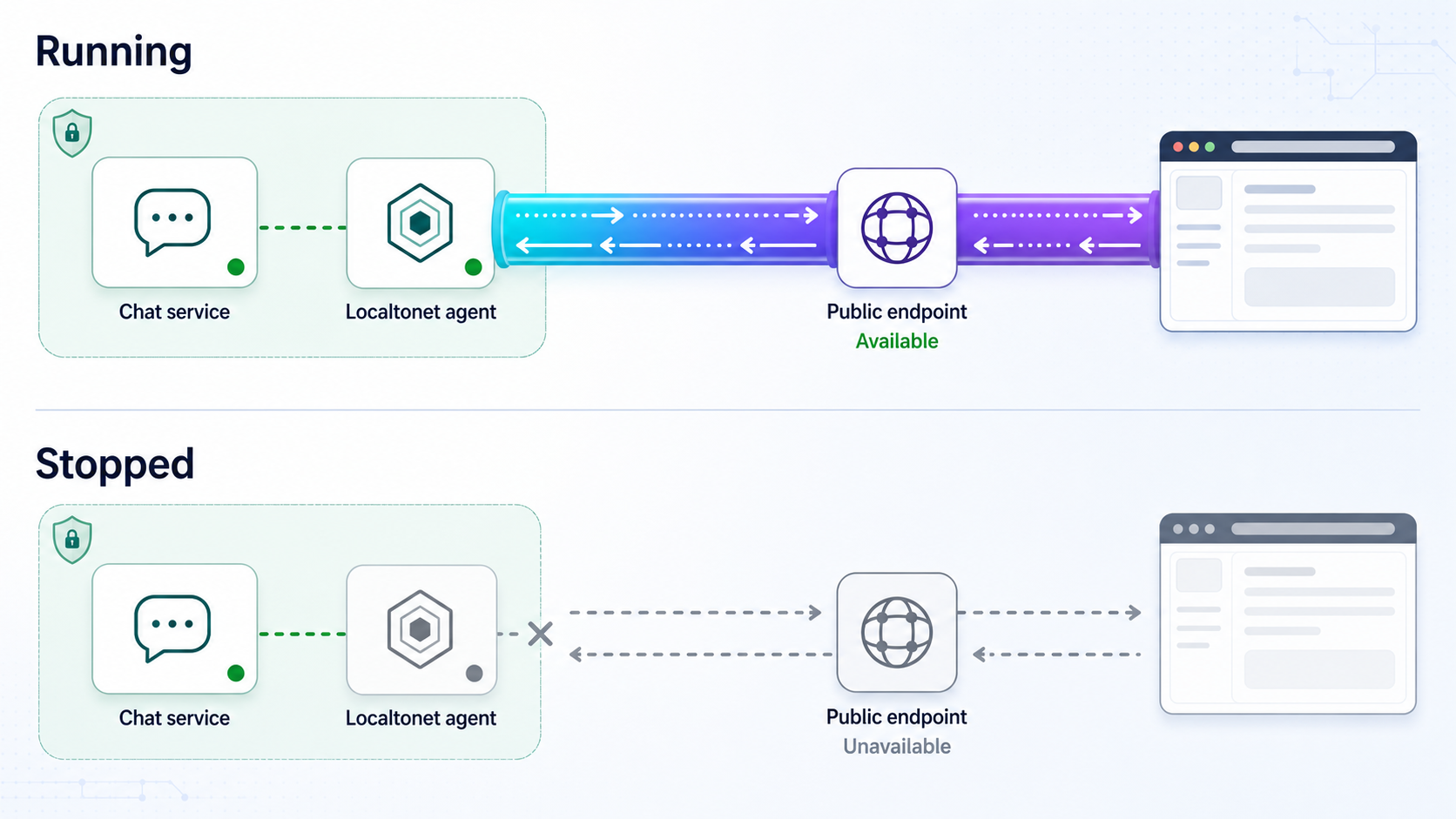
Monitor the local chat process, its dependencies, the client device, network connectivity, and the external application workflow. A basic endpoint check should not be your only signal because a login page can load while messaging, uploads, federation, or media is failing.
Localtonet platform-wide Token/Tunnel webhooks can report when a token or tunnel in a selected Token Group changes to Connected or Disconnected. The webhook sends a WebHookRequest JSON body containing Id, ActionDate, Type, and Status. Review the Localtonet webhook documentation when integrating these state changes into monitoring.
Token/Tunnel webhooks report Localtonet connection-state changes. File Server webhooks report file-level events such as uploads, deletes, renames, and moves for the File Server feature. File Server webhooks are not chat-tunnel monitoring events and should not be combined with the platform Token/Tunnel webhook model.
Define restart and maintenance procedures
Document which device runs Localtonet, which local address the tunnel targets, how the chat application and dependencies are started, and who is authorized to restart or stop each component. After a planned restart, verify the chat service locally, confirm the device is connected, confirm the tunnel is running, and complete a short external messaging test.
For an always-needed deployment, review operating-system startup and service supervision for the chat application, database, existing reverse proxy, and Localtonet client using their supported installation methods. Do not assume that creating a tunnel automatically starts it after every device restart.
Revoke access deliberately
When public access is no longer required, stop the tunnel. Delete obsolete tunnel configurations rather than leaving unidentified records in the dashboard. If a device is retired or its token may have been exposed, revoke or replace the device access through the supported account workflow. Also rotate affected application credentials, identity-provider secrets, or administrative sessions when the incident involves more than the tunnel.
Maintain an internal record of the service owner, public hostname, target device, local target, approved users, backup location, maintenance window, and revocation procedure. Keep authentication tokens and credentials in an appropriate secret-management system rather than that operating record.
Frequently asked questions
Can one generic HTTP tunnel expose every Mattermost, Rocket.Chat, or Matrix deployment?
No. An HTTP tunnel can expose a compatible user-facing web listener, but each platform has its own base URL, proxy, client, real-time connection, federation, and media requirements. Target the public entry point documented for the installed deployment and validate optional services separately.
Do I need a public IP address or router port forwarding?
No. The Localtonet client establishes an outbound connection to a relay server. The standard tunnel workflow does not require inbound router port forwarding, firewall changes, VPN setup, or a public IP address.
Should I target localhost or the chat server’s LAN address?
Use 127.0.0.1 only when the Localtonet client can reach the chat application on the same host. If the client runs on another device, use the chat server’s reachable private address and ensure the application is listening on an appropriate interface. Test the exact address from the client device before creating the tunnel.
Why does the login page work while new messages do not appear?
The static page and ordinary HTTP requests may be working while the application’s WebSocket or other real-time connection is failing. Inspect the browser network panel, confirm the public origin, and follow the chat platform’s current reverse-proxy and real-time connection documentation.
Does exposing Matrix client access automatically enable federation?
No. Client access and federation are separate concerns. Federation can require additional server naming, discovery, endpoint, and homeserver configuration. Follow the current Matrix and homeserver documentation and validate federation independently.
Will voice and video work through the same HTTP endpoint?
Not necessarily. Voice and video can depend on separate signaling, media services, endpoints, or transports. Determine the media architecture from the chat platform’s documentation and test calls between external networks. Do not expose arbitrary ports in an attempt to make media work.
Does creating a tunnel make the chat server public immediately?
No. Creating the tunnel stores its configuration. You must press Start, and the public endpoint remains available only while the selected client device is connected and the tunnel is running.
Is a standard Localtonet tunnel a VPN?
No. HTTP, TCP, UDP, combined UDP/TCP, TLS, and File Server tunnels are not VPN functionality. Localtonet provides a separate VPN Manager feature for private mesh VPN use cases.
Can I use a custom domain?
HTTP tunnels support Random Sub Domain, Custom Sub Domain, and Custom Domain process types. Check the current Localtonet documentation for exact custom-domain DNS requirements, then update the chat application’s documented public URL and callback settings.
Does the tunnel secure chat accounts automatically?
No. The tunnel supplies connectivity to the configured local target. You must still configure authentication, registration controls, account permissions, trusted proxies, updates, backups, log handling, monitoring, and incident response in the chat deployment.
Publish your verified chat endpoint with Localtonet
Connect the device that can reach your existing chat server, create an HTTP tunnel for its user-facing local service, start the tunnel, and validate the complete login and messaging workflow before inviting users.
Get Started Free →

