

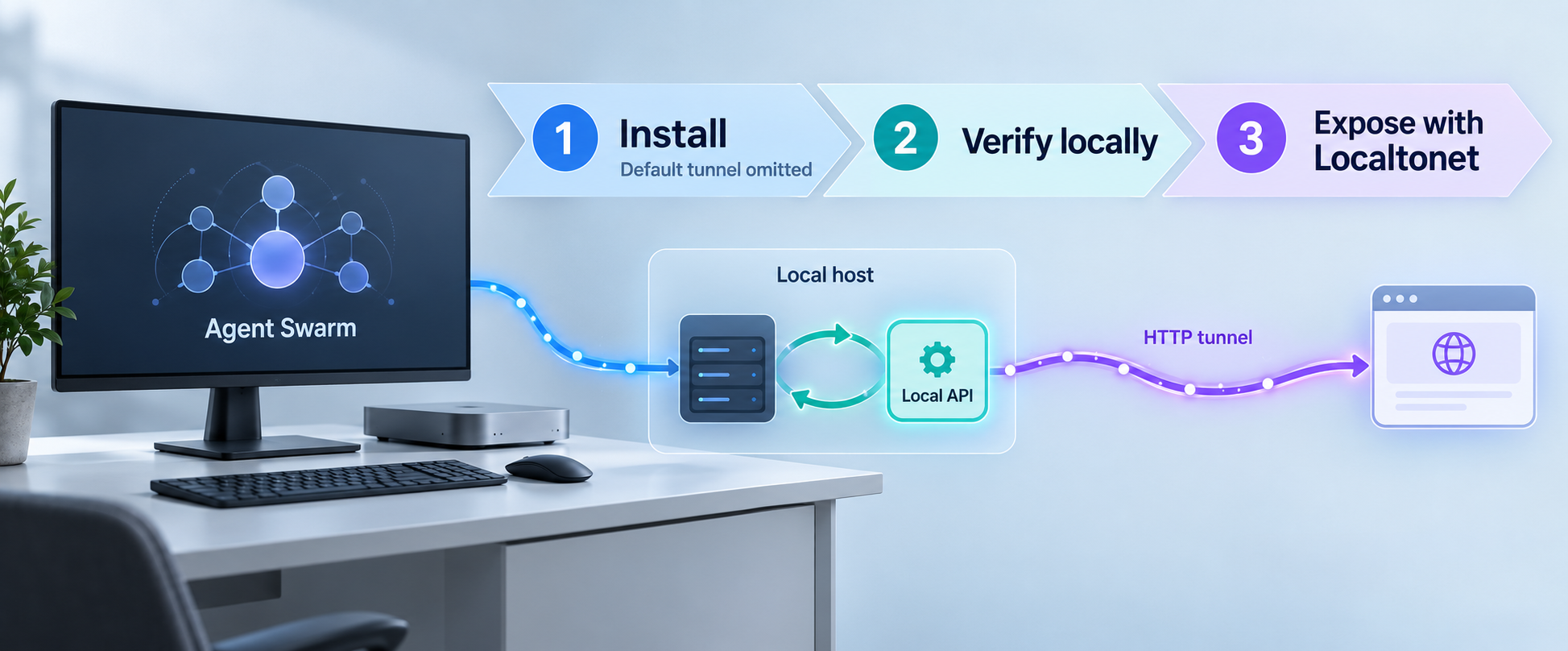
Run your AI agent orchestration API locally, verify it, and publish it through an HTTP tunnel you control
Agent Swarm is an MIT-licensed, self-hosted system for coordinating AI agents through a shared API and dashboard. In this guide, we install the documented v2.7.2 release without its automatic tunnel, confirm that the API is available at http://localhost:3013, and then expose that working HTTP service with Localtonet. Keeping installation and remote access separate makes troubleshooting clearer and avoids layering one public tunnel over another.
📋 What's in this guide
How the Agent Swarm and Localtonet workflow fits together
Agent Swarm describes itself as an open-source company operating system built around a lead agent, multiple worker agents, and shared memory. For this tutorial, the most important technical detail is simpler: the installation runs a network service with an HTTP API at http://localhost:3013. The service also documents an API reference at /docs and an OpenAPI document at /openapi.json.
The installation process and the remote-access process should be treated as two separate layers. Agent Swarm must first install successfully, start its services, and answer requests locally. Only after those checks pass should a public tunnel be added. If the local application is unhealthy, no tunnel can make it healthy. A tunnel can only forward traffic to a target that the Localtonet client device can already reach.
Agent Swarm includes an automatic tunnel in its documented installation experience. This guide deliberately disables that behavior with the documented --no-tunnel option. We then use Localtonet as the remote-access layer instead of running both tunnel mechanisms. That separation gives us one public entry point to manage and makes it easier to decide when remote access should start or stop.
http://localhost:3013. Its documentation and OpenAPI routes provide practical local checks before any remote path is introduced.
https://app.agent-swarm.dev connects to the API using API_KEY. The dashboard, API, and tunnel are separate components with separate responsibilities.
What Localtonet changes
Without remote access, a service bound to localhost is normally available only from the same host. With Localtonet, the client running on that host, or on another device able to reach it, connects outward to our relay infrastructure. Incoming requests to the assigned public URL are forwarded through that outbound connection to the configured local IP address and port.
This does not remove Agent Swarm's own security requirements. Localtonet transports requests to the selected target, while Agent Swarm remains responsible for deciding whether a request is authorized. An API key should be treated as a secret even when the transport uses a public HTTPS URL.
Use Agent Swarm's --no-tunnel
Prerequisites and deployment decisions
Choose a host that can remain online while agents and remote API clients need access. The Agent Swarm release provides npm, Bun, and container image installation paths. This tutorial uses the one-shot package runner because it supports the documented no-tunnel option and keeps the installation flow focused.
The supplied project evidence does not establish minimum CPU, memory, storage, Node.js, Bun, Docker, or operating-system versions. We therefore do not assign unsupported minimums. Confirm the current requirements for the exact Agent Swarm release before selecting a production host, especially if the deployment will run multiple workers or resource-intensive model tooling.
| Requirement | Why it is needed | What to confirm |
|---|---|---|
npm with npx, or Bun with bunx |
Runs the published Agent Swarm package and its installer. | Confirm that the selected package runner executes successfully on the host. The evidence does not define a minimum runtime version. |
| Agent Swarm application secrets | The documented configuration includes an API key and encryption material. | Use newly generated secret values, store them outside source control, and do not reuse examples or production credentials from another system. |
| Local port 3013 | The documented Agent Swarm API listens at http://localhost:3013. |
Make sure another process is not already using the port and that the service is reachable from the device that will run our client. |
| Localtonet client and device token | The client creates the outbound tunnel connection. | Install the client on the Agent Swarm host or another device that can reach the API. Keep its device-specific authentication token private. |
| Outbound internet connectivity | Package installation, external AI services, the dashboard, and the Localtonet relay may require outbound connections. | Apply your organization's network policy and permit only the outbound connectivity required by your deployment. |
Decide where the Localtonet client will run
The simplest arrangement is to run our client on the same machine as Agent Swarm. In that arrangement, the tunnel target can use the loopback address and port 3013 because both processes share the same host network.
You can instead run our client on another device that can reach the Agent Swarm server over a trusted local network. In that case, localhost on the Localtonet device refers to the Localtonet device itself, not the Agent Swarm host. You must use an address that is reachable from the client device. The Agent Swarm service must also be listening on an interface accessible from that device. The supplied evidence does not document Agent Swarm's bind-address configuration, so consult the configuration for your installed release rather than guessing a flag or environment variable.
Plan secret handling before installation
The Agent Swarm dashboard uses API_KEY when connecting to the API, and the installation documentation also calls for an encryption key. These values should be generated for the deployment and stored with the same care as other application credentials. Do not paste them into screenshots, shell history shared with others, issue reports, public environment files, or the Localtonet tunnel configuration.
A Localtonet device token is a different credential. It identifies the client device that runs the tunnel. It is not an Agent Swarm API key and should never be supplied to the Agent Swarm dashboard. Likewise, the Agent Swarm API key does not authenticate a Localtonet client.
Do not expose Agent Swarm until its API key and other required security settings are in place. A public tunnel should not be treated as a substitute for authentication, authorization, secret rotation, least privilege, or approval controls around agent actions.
Install Agent Swarm without the default tunnel
The v2.7.2 release documents package execution through npm or Bun. Pick one path based on the runtime already approved on your host. You do not need to run both commands.
Using an explicit version makes the procedure reproducible. If you intentionally install another release, review that release's instructions and configuration changes first. The commands and behavior below are based on v2.7.2.
Open a terminal on the deployment host
Use the account that will own and operate the deployment. Work in the directory where you want the installer to create or manage the Agent Swarm installation. Avoid running unreviewed package installers with elevated privileges.
Run the versioned installer with npm
If the host uses npm, execute the published package with npx and include the documented --no-tunnel option so the Agent Swarm automatic tunnel is not created.
npx @desplega.ai/agent-swarm@2.7.2 --no-tunnelOr run the versioned installer with Bun
If Bun is your selected runtime, use the documented package with bunx. This is an alternative to the npm step, not an additional command.
bunx @desplega.ai/agent-swarm@2.7.2 --no-tunnelComplete the installer prompts
Provide the deployment-specific configuration requested by the installer. Use secure values for the API key and encryption key. The available prompts can change between releases, so read each prompt rather than copying values from an unrelated deployment.
Allow the application services to start
Watch the installer output for errors and wait until the service startup completes. Do not configure public access merely because package download or image creation succeeded. The API itself must be running and reachable.
The release also publishes global npm and Bun installation commands:
npm i -g @desplega.ai/agent-swarm@2.7.2bun i -g @desplega.ai/agent-swarm@2.7.2A global installation can be useful for repeated command-line use, but it is not required for the one-shot flow above. The release also publishes separate server, worker, and dashboard container images. Those images provide building blocks for a custom container deployment, but the supplied evidence does not include a complete, verified Compose file or all required environment values. We therefore do not invent a container stack in this guide.
Agent Swarm is actively versioned, and configuration prompts can evolve. This guide pins the documented package to v2.7.2. If the installer displays a prompt not described here, follow the wording for that release and avoid guessing the purpose of a secret, provider credential, storage option, or worker setting.
Configure API access and deployment secrets
Successful installation does not automatically mean that every agent, model provider, external integration, or dashboard connection is ready. Agent Swarm coordinates multiple components, and each external service can have its own credentials and permissions. Configure only the providers and integrations you plan to use, following least-privilege principles.
Protect the API key
The hosted dashboard connects to the self-hosted API using API_KEY. This key authorizes application access and should never be embedded in a public URL, committed to a repository, or included in a tunnel name. A URL can appear in browser history, reverse-proxy logs, screenshots, and monitoring systems. Secrets belong in the authentication mechanism expected by Agent Swarm, not in query strings unless the project's current documentation explicitly requires that form.
The supplied evidence establishes the configuration name but does not establish the exact HTTP header format for manual API requests. We will not invent a header name or token prefix. When building a custom API client, use Agent Swarm's generated API documentation or the client behavior documented for the exact release.
Protect the encryption key
Treat the installation's encryption key as durable secret material. Back it up through your approved secret-management process before relying on encrypted application data. Do not rotate, delete, or replace it casually. The available evidence does not specify a recovery workflow, required key format, or rotation procedure, so any such operation should follow the documentation for your installed Agent Swarm version.
Review human approval boundaries
Remote API access can submit work to an agent system. Before making the endpoint public, review which actions can run automatically, which actions require a person to approve them, and what credentials workers can access. Network reachability and application authority are different controls. A correctly authenticated request may still trigger sensitive activity if the associated application identity is over-privileged.
Verify Agent Swarm locally before creating a tunnel
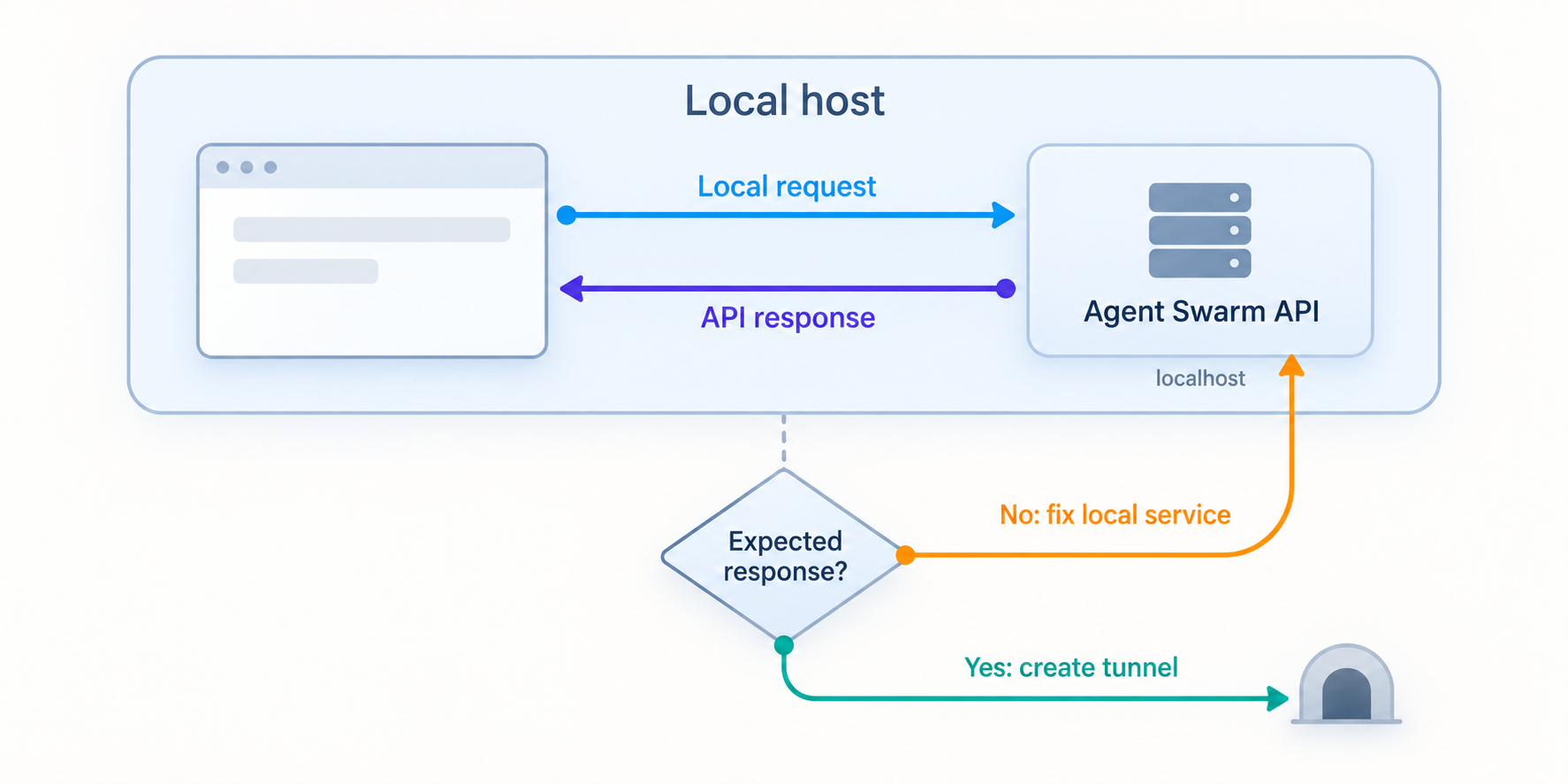
Local verification isolates application issues from remote-access issues. Run the following checks on the Agent Swarm host. If our Localtonet client will run on another device, repeat the network-reachability test from that device before creating the tunnel.
Check the API base address
Open http://localhost:3013 in a browser on the Agent Swarm host. The exact response at the root path is not established by the supplied evidence, so a redirect, application response, or authorization response may be valid. A connection refusal indicates that nothing is accepting the connection at that address.
Open the API documentation route
Visit http://localhost:3013/docs. This is the documented API reference path and is a useful way to confirm that the HTTP service is responding. If the route requires authorization in your configuration, use Agent Swarm's documented authentication flow rather than placing the key into the URL.
Request the OpenAPI document
Check http://localhost:3013/openapi.json. You can inspect the response in a browser or request the headers and body from a terminal.
curl -i http://localhost:3013/openapi.jsonInterpret the HTTP result
A successful OpenAPI response confirms both TCP connectivity and an application-level route. An authorization response can still confirm that the server is listening, but it does not verify authenticated API use. A timeout, connection refusal, or unrelated response requires local troubleshooting before continuing.
Test the actual client path
If you will use the hosted Agent Swarm dashboard, configure it to connect to the local API with the deployment's API_KEY while testing from an environment that can reach the local service. If browser security or origin rules affect the connection, follow the current Agent Swarm configuration instead of weakening browser protections globally.
A basic command-line check can distinguish network failure from an application response:
curl -i http://localhost:3013/docs
curl -i http://localhost:3013/openapi.json
Do not add an improvised authorization header to these examples. The available evidence does not establish the correct header name or scheme. Use the OpenAPI security definition or Agent Swarm documentation from the installed release when testing an authenticated endpoint.
What counts as a successful local verification?
At minimum, the intended client device should establish a connection to the service on port 3013 and receive an HTTP response from Agent Swarm. For stronger validation, confirm that an authorized dashboard or API client can perform a harmless read operation. Do not use a production-changing task merely as a connectivity test.
Do not create a public tunnel to compensate for a refused connection, failed container, missing secret, occupied port, or invalid application configuration. Fix the local service first. Otherwise, the public endpoint will only expose the same failure through another network path.
Expose the verified Agent Swarm API with Localtonet
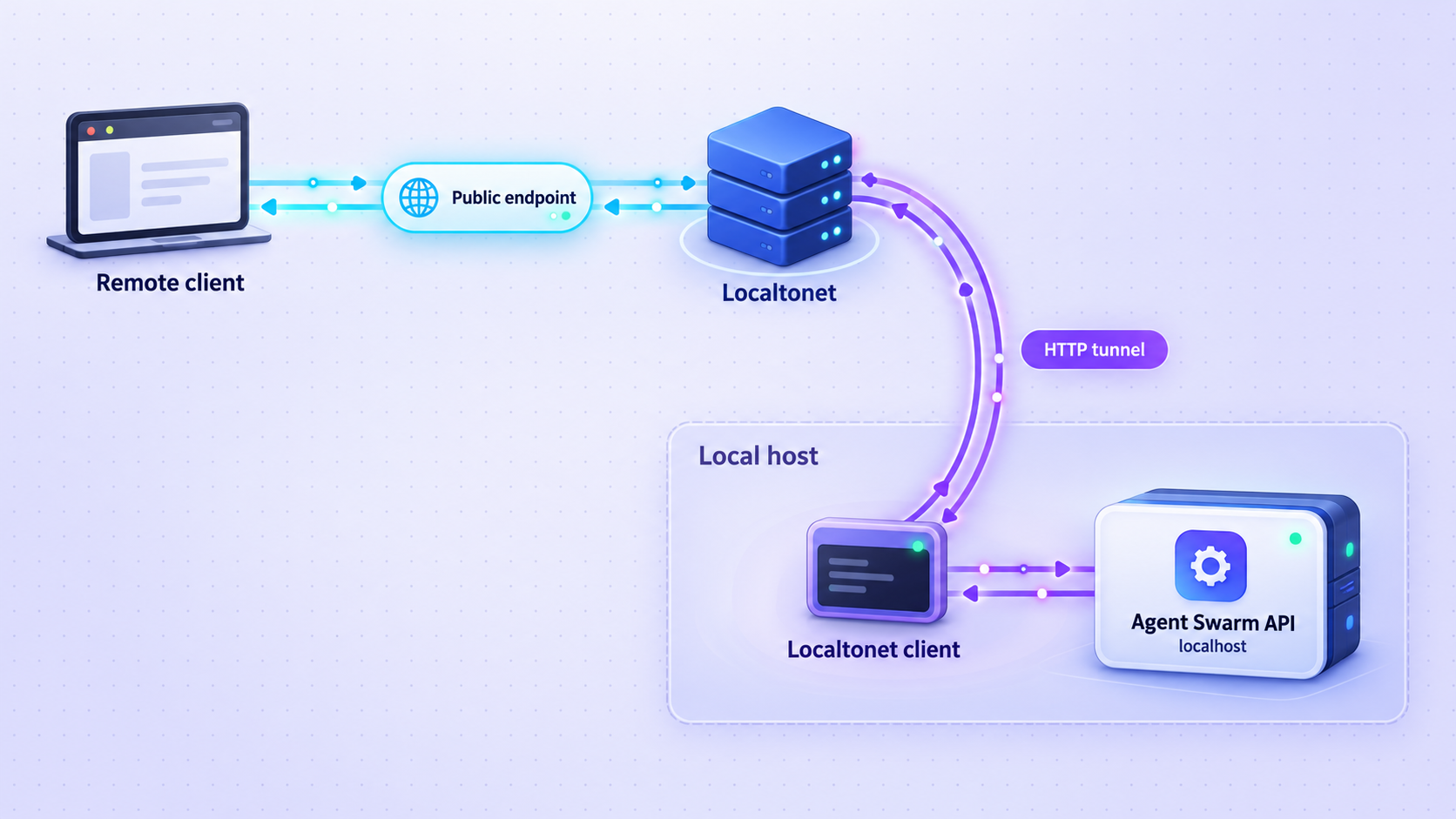
Once http://localhost:3013 works from the device that will run our client, create an HTTP tunnel. The client establishes an outbound connection to a selected Localtonet relay, so this workflow does not require inbound router port forwarding, firewall changes, VPN setup, or a public IP address.
HTTP is the appropriate tunnel family because Agent Swarm presents an HTTP API and browser-oriented documentation. A raw TCP tunnel is not necessary for this workflow unless a separate requirement specifically calls for raw port forwarding. Standard HTTP tunneling should also not be described as a VPN. Localtonet VPN Manager is the separate VPN feature.
You can review the current interface alongside our Localtonet HTTP tunnel documentation. Available relay values and product options must come from the current dashboard rather than from a hardcoded example.
Install and run the Localtonet client
Install our client on the Agent Swarm host or on another trusted device that can reach the Agent Swarm API. Keep the client running for as long as the public endpoint needs to remain available.
Authenticate the intended device
Select the device using its device-specific authentication token. Do not place the token in this article's commands, a public configuration repository, or the Agent Swarm dashboard. Confirm that the dashboard shows the intended client device rather than another machine.
Select a currently available relay server
Choose an available server or region from the current Localtonet dashboard. Do not copy a server code from an old tutorial because availability can vary by product state, plan, client version, or deployment.
Create an HTTP tunnel to the Agent Swarm API
Configure the local target as the IP address reachable from the Localtonet client and port 3013. When both services run on the same host, use the loopback target represented by localhost or 127.0.0.1 in the current interface. When they run on different hosts, use the reachable local address of the Agent Swarm server.
Start the tunnel
Creating the configuration does not make it active. Press Start and wait until both the selected device and tunnel are connected. Our platform will then provide the public URL associated with that HTTP tunnel.
Verify the public endpoint
Append /docs or /openapi.json to the assigned public URL and verify the expected HTTP behavior. Then configure the intended Agent Swarm client to use the public API base URL and its Agent Swarm API_KEY. Stop the tunnel when remote access is no longer required.
Localtonet separates configuration from lifecycle. The selected client device must be connected, and the tunnel must be started. The public URL remains usable only while the client is connected and the tunnel is running.
Generated subdomain, selected subdomain, or custom domain
HTTP tunnels can use a random subdomain, a custom subdomain where supported, or a custom domain. These process types serve the same local content through a public HTTPS address. For an initial test, a generated address avoids introducing DNS configuration into the troubleshooting path.
If you later choose a custom domain, follow the current dashboard and Localtonet documentation for its DNS requirements. Exact DNS records are not included here because they can depend on current product instructions and the selected configuration. Do not guess record targets from an unrelated tunnel or an older deployment.
Test from outside the local network
After the tunnel works, test it from a separate internet connection, such as an approved remote workstation or mobile connection. A test performed only on the server can miss client-side DNS, browser, authorization, or network-policy issues.
Start with a non-destructive route. Confirm the expected status code and content type, then test an authenticated read request using the official Agent Swarm client behavior. If a request could launch agents, modify integrations, write data, or trigger external actions, do not use it as the first remote test.
Operate and maintain the deployment safely
A self-hosted agent service needs routine operational controls beyond the initial installation. Keep the application version, application data, secrets, public endpoint, and tunnel lifecycle within a documented change process.
Startup and shutdown order
Start Agent Swarm before starting the Localtonet tunnel. Verify the local API, then start remote access. For shutdown, stop the tunnel first so new remote requests cannot arrive, allow active application work to reach an appropriate state, and then stop the Agent Swarm services.
If the host reboots, verify both layers independently. An application service may return automatically while the Localtonet client remains disconnected, or the client may connect while Agent Swarm is still starting. A public gateway error immediately after reboot can therefore be temporary, but persistent errors require checking the local API.
Upgrades
The documented installation is pinned to v2.7.2. Before upgrading, read the target release's instructions, back up application data and required secrets, and note the currently working configuration. Test the new release locally before restarting the public tunnel.
Do not assume that package versions, container images, environment fields, database formats, or API behavior remain identical across releases. The release publishes matching server, worker, and dashboard images, but a coordinated deployment should keep compatible component versions unless the project explicitly documents another combination.
Backups and recovery
A useful recovery plan includes the application data, configuration, installed version, required encryption material, and a record of external integrations. Keep the recovery copy separate from the active host and restrict access to authorized operators.
The supplied project evidence does not identify every Agent Swarm storage path, database location, or supported backup command. Do not back up guessed directories and assume the deployment is recoverable. Identify the actual storage used by your installation and perform a restore test in a non-production environment.
Public endpoint review
Periodically confirm that the public URL is still needed and that the Agent Swarm authorization policy remains appropriate. Stop or delete unused tunnel configurations. Stopping preserves the configuration for later use, while deleting removes it from the tunnel list. The client device must remain connected for any active tunnel to work.
| Operational task | Recommended check | Failure to avoid |
|---|---|---|
| Application restart | Verify /docs or /openapi.json locally before testing the public URL. |
Misdiagnosing an Agent Swarm startup problem as a tunnel failure. |
| Tunnel restart | Confirm that the intended Localtonet device is connected and the tunnel status is running. | Assuming that saving a tunnel configuration starts it. |
| Secret rotation | Follow the Agent Swarm procedure for API and encryption secrets, then update authorized clients securely. | Locking out clients or losing access to encrypted data by improvising a rotation. |
| Version upgrade | Back up, review release changes, upgrade compatible components, and test locally. | Publishing an unverified upgraded service immediately. |
| Decommissioning | Stop and delete the tunnel, revoke the Localtonet device token if appropriate, and retire application credentials. | Leaving a forgotten public endpoint or reusable credential active. |
Troubleshooting Agent Swarm and Localtonet access
The installer command is not found
If npx is unavailable, confirm that npm is installed and available to the current shell. If bunx is unavailable, confirm the Bun installation. The project evidence does not define minimum supported runtime versions, so use the requirements documented for the selected Agent Swarm release rather than installing an arbitrary version.
If the package cannot be downloaded, check outbound connectivity, DNS resolution, package-registry policy, and proxy configuration. Do not disable certificate validation to work around a network error.
Port 3013 refuses the connection
A refused connection normally means no process is listening at the target address and port. Review the Agent Swarm startup output, confirm that installation completed, and check whether its services exited. Also verify that the request is being made on the correct host.
If our client runs in another container or on another machine, remember that its own localhost is not the Agent Swarm host. Use a reachable address and confirm that Agent Swarm is configured to accept connections on the required interface. Because the bind-setting syntax is not established in the supplied evidence, do not add a guessed environment variable.
Port 3013 is already in use
Identify the process occupying the port before terminating or reconfiguring anything. It may be another Agent Swarm instance or an unrelated service. The official endpoint is documented on port 3013, but the supplied evidence does not establish a supported alternate-port setting. Follow the current Agent Swarm configuration if you need to move it.
The local API works but the public URL does not
Check the layers in order:
- Confirm that Agent Swarm still responds locally at
http://localhost:3013. - Confirm that the Localtonet client device is connected.
- Confirm that the HTTP tunnel is started, not merely created.
- Confirm that the tunnel targets the address reachable from that client and port
3013. - Confirm that you are using the current assigned public URL.
- Test
/docsor/openapi.jsonbefore testing an operation that changes application state.
If local access succeeds only from the Agent Swarm host but our client runs elsewhere, the problem is local network reachability or service binding rather than the public relay.
The public endpoint returns an authorization error
An HTTP authorization response means the network path may be working while the application rejected the request. Confirm that the client uses the correct Agent Swarm API key and the authentication format required by the installed release. Do not replace application authorization with an open endpoint merely to make a test pass.
Keep the Agent Swarm API key separate from the Localtonet device token. Supplying one where the other is expected will not authenticate the request and risks exposing a sensitive credential to the wrong system.
The dashboard cannot connect to the public API
First confirm that the public /docs or /openapi.json route responds outside your local network. Then verify that the dashboard is configured with the complete public API base URL and the correct API_KEY. Check browser developer tools for network, authorization, mixed-content, or origin-related errors.
The supplied evidence does not document a specific Agent Swarm cross-origin configuration variable. Do not add permissive wildcard settings based on guesswork. Use the configuration documented for your version and allow only the origins that genuinely require access.
The tunnel stops unexpectedly
A Localtonet tunnel is available only while the selected client device is connected and the tunnel is running. Check whether the host slept, rebooted, lost outbound connectivity, stopped the client, or changed networks. Also confirm that the tunnel was not intentionally stopped or deleted in the dashboard.
The API works but agent tasks fail
That result separates network health from application workflow health. Investigate Agent Swarm provider credentials, worker availability, integration permissions, model configuration, task input, and application logs. A functioning Localtonet URL proves reachability to the HTTP service, not the health of every downstream model or integration.
Remove API keys, encryption keys, model-provider credentials, integration tokens, Localtonet device tokens, private URLs, and sensitive task content from logs or screenshots shared during troubleshooting. Preserve status codes, timestamps, component versions, and non-sensitive error messages whenever possible.
Frequently asked questions
Why use the Agent Swarm installer with the no-tunnel option?
Agent Swarm's installer can create an automatic tunnel. The documented --no-tunnel option disables that behavior so Localtonet can serve as the single remote-access layer. This avoids maintaining two public paths to the same API and keeps tunnel lifecycle management in one place.
What is the default local Agent Swarm API address?
The documented local API address is http://localhost:3013. The API documentation is at http://localhost:3013/docs, and the OpenAPI document is at http://localhost:3013/openapi.json.
Should I use an HTTP tunnel or a TCP tunnel for Agent Swarm?
Use an HTTP tunnel for the documented Agent Swarm HTTP API. It provides a public HTTPS address that maps naturally to the API and browser-based documentation. A raw TCP tunnel is unnecessary for this specific workflow unless you have a separate protocol requirement.
Does Localtonet replace the Agent Swarm API key?
No. Localtonet provides network reachability to the configured local HTTP service. Agent Swarm remains responsible for application authentication and authorization. Continue using its API_KEY as documented, and never substitute a Localtonet device token for an Agent Swarm credential.
Does the Agent Swarm host need a public IP address?
No. Our client establishes an outbound connection to a Localtonet relay. This allows the service to receive traffic through the assigned public URL without inbound router port forwarding or a public IP address.
Can the Localtonet client run on a different device?
Yes, provided that the client device can reach the Agent Swarm API over the local network. In that arrangement, do not target localhost, because it refers to the client device. Use the Agent Swarm host's reachable local address and confirm that the service listens on an appropriate interface.
Is the public URL available after I create the tunnel configuration?
Not necessarily. Creating a tunnel does not mean it is running. The selected Localtonet client device must be connected, and you must start the tunnel. The endpoint remains available only while both conditions continue to be true.
Can I use a custom domain for the Agent Swarm API?
HTTP tunnels can use a random subdomain, a custom subdomain where supported, or a custom domain. Check the current Localtonet dashboard and documentation for availability and exact DNS requirements. Do not copy DNS values from another account or an older tutorial.
Connect your verified Agent Swarm API with Localtonet
Install Agent Swarm without its automatic tunnel, confirm that port 3013 works locally, and then create a Localtonet HTTP tunnel for controlled remote access. Keep application authorization enabled and stop the tunnel whenever the API does not need to be public.
Get Started Free →

