

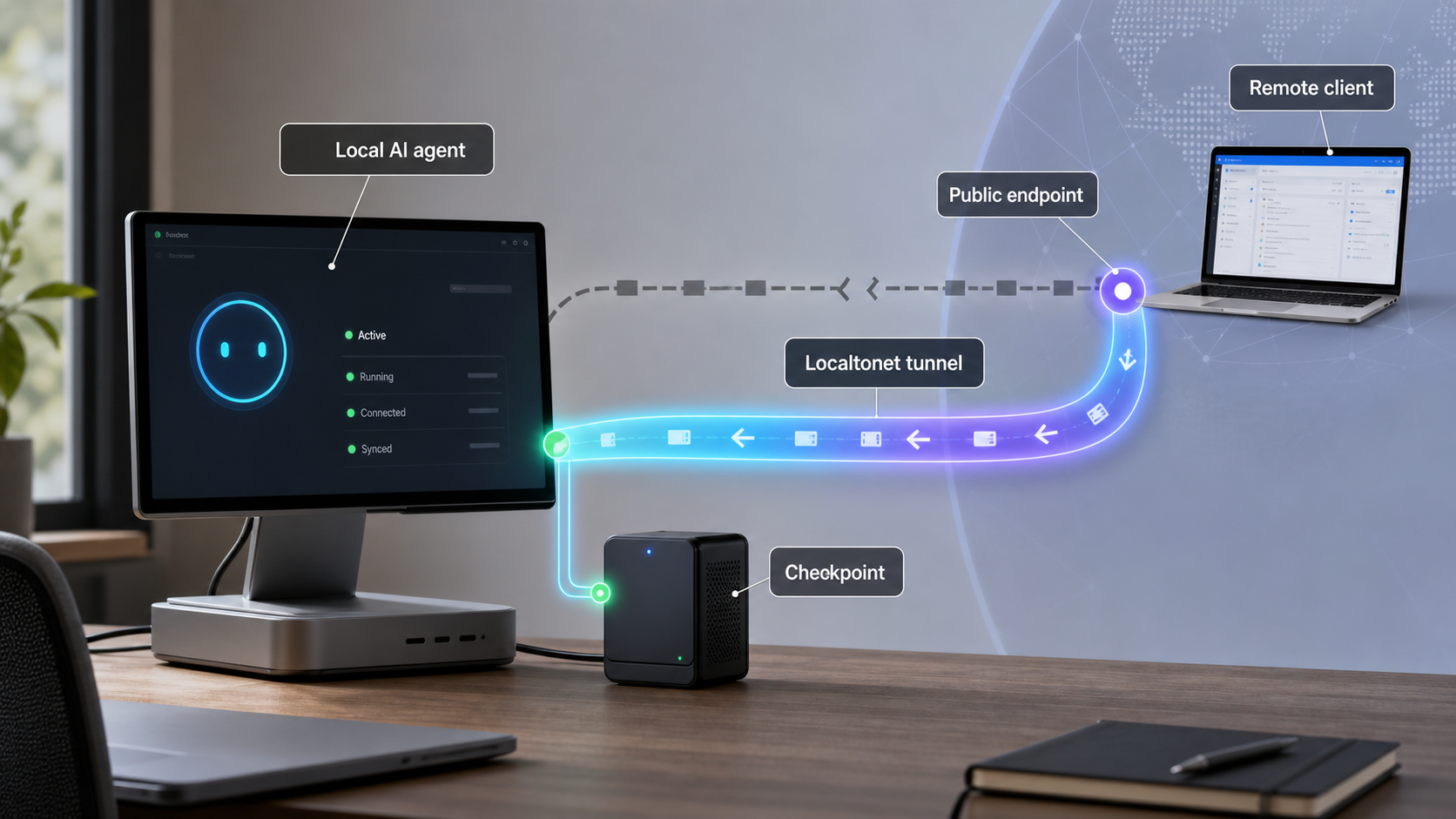
Design local AI agent workflows that can detect lost reachability, resume safely, and avoid duplicating work
A public endpoint is only one part of operating an AI agent that runs for hours. The local process, its durable state, the Localtonet client, the selected device, and the tunnel must all remain healthy, while callers must handle temporary disconnections safely. In this guide, we separate network availability from application correctness and explain how to monitor both. We also cover platform-wide connectivity webhooks, checkpointing, idempotent callbacks, endpoint verification, restart-safe recovery, and secure exposure with Localtonet.
📋 What's in this guide
Why long-running AI agents need more than a public endpoint
A short request can often be retried from the beginning. A long-running agent workflow is different. It may research a topic, call tools, update records, wait for approvals, receive callbacks, generate artifacts, and revise its output over several hours. Restarting that entire sequence after a brief connectivity interruption can waste time and can also repeat actions that should happen only once.
Reliable operation therefore requires several independent capabilities. The agent must preserve task state outside its process memory. Its tools and callback handlers must tolerate retries. The local service must expose a meaningful health signal. The tunnel must be running on a connected device. The monitoring system must distinguish an unreachable public endpoint from an application that is reachable but unhealthy.
With Localtonet, the client application on the selected device establishes an outbound connection to a Localtonet relay server. This makes it possible to expose a service running on that device, or another service reachable from it, without inbound router port forwarding, firewall changes, VPN setup, or a public IP address. Depending on the selected tunnel family, the result is a public URL or a public host and port.
That connectivity does not make application state durable. A tunnel transports traffic to a local target. It does not checkpoint an agent, preserve a model conversation, commit a database transaction, or determine whether a callback has already been processed. Those responsibilities remain in the agent application and its surrounding operational design.
Creating a Localtonet tunnel does not mean it is running. The tunnel must be started, and it remains available only while the selected client or device is connected and the tunnel is running. If the local agent process stops while the tunnel remains connected, network reachability may still exist even though the application cannot complete requests.
Availability is a chain, not a single status
A useful mental model is to treat the public endpoint as the end of a dependency chain. A caller reaches the public address, traffic crosses the active tunnel, the Localtonet client forwards it to the configured local target, the local service accepts the request, and the agent loads the relevant durable state. Success at one layer does not imply success at the next.
For example, a tunnel can be Connected while the agent process is stopped. The process can be running while its database is unavailable. The health endpoint can answer while the task queue is stalled. A callback can return a successful HTTP response while an internal deduplication bug causes the same action to be applied twice. Operations become clearer when each layer has its own signal.
Separate agent failures from connectivity failures
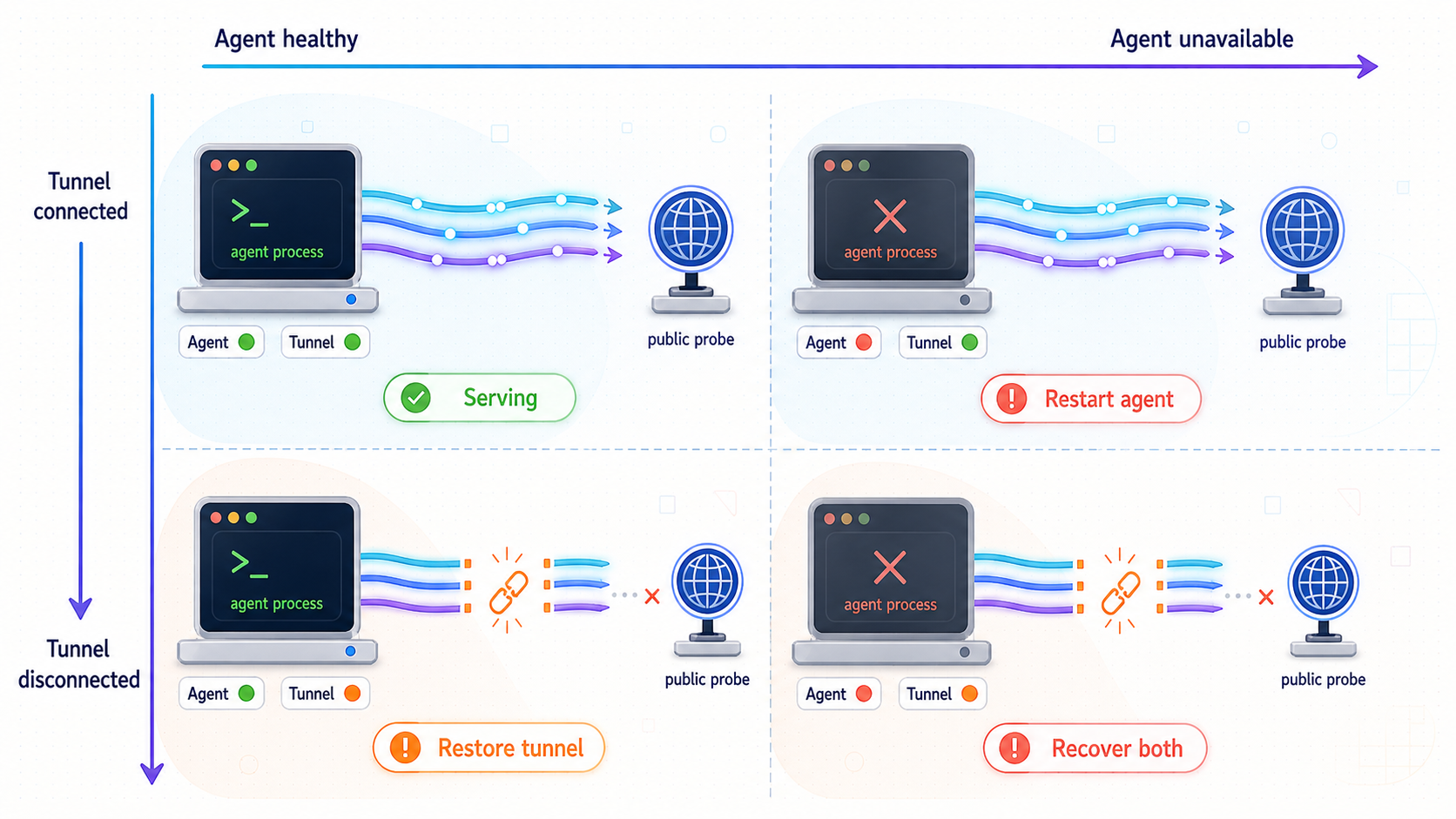
Recovery begins with classification. If every problem is reported as “the agent is down,” operators cannot choose the correct response. A process crash may require a service restart and checkpoint resume. A disconnected Localtonet device may require restoring the client or the device's outbound connectivity. A callback timeout may require a safe retry, not an agent restart.
| Failure domain | Typical observation | What it does not prove | First response |
|---|---|---|---|
| Local agent process | The local health request fails even when tested directly on the host | It does not prove that the tunnel or relay path failed | Inspect the process, dependencies, logs, and last durable checkpoint |
| Application dependency | The process answers, but readiness or task execution reports a database, queue, tool, or model dependency failure | It does not prove that public routing is unavailable | Restore the dependency and leave completed task steps intact |
| Local target configuration | The tunnel is Connected, but forwarded requests cannot reach the configured local IP address and port | It does not prove that the selected device is disconnected | Verify the listening address, port, protocol, and local reachability from the client device |
| Localtonet device or client | A platform-wide Token webhook reports Disconnected, or the selected device is shown as disconnected | It does not identify whether the cause is power, process, internet, or another local condition | Restore the device and client connection, then recheck tunnel and application state |
| Localtonet tunnel lifecycle | A Tunnel webhook reports Disconnected, or the tunnel is not running | It does not prove that the local agent lost its task state | Confirm the client is connected, start the intended tunnel, and verify the assigned public endpoint |
| Callback delivery | The sender times out or receives an error while the agent may still have processed the request | It does not prove that the operation was never applied | Query by operation or idempotency key before retrying a side effect |
| Agent logic | The endpoint is reachable, but the workflow loops, stalls, violates a constraint, or produces an invalid result | It does not prove a network failure | Stop unsafe progression, inspect checkpoints and validation results, then resume from a known state |
Build a small but meaningful health model
A single health URL that always returns success is not enough. At minimum, distinguish liveness from readiness. Liveness answers whether the process can respond. Readiness answers whether it is currently able to perform the work represented by the endpoint. A long-running worker can be alive but not ready because its durable state store, task queue, model provider, or required tool is unavailable.
Avoid turning every optional dependency into a reason for the endpoint to report total failure. Define which dependencies are essential for accepting new work, which affect only certain task types, and which can be degraded temporarily. The response should remain fast and should not start expensive agent work.
Also keep health checks separate from task status. “Service is ready” and “task 47 completed step 8” answer different questions. A status request should identify a specific task and report a durable state such as queued, running, waiting for approval, retry scheduled, completed, failed, or cancelled. Choose the vocabulary that matches your implementation and define the allowed transitions before deployment.
A timeout is an ambiguous result. The request may have reached the agent and committed its side effect before the response was lost. Check the operation record or idempotency key first. Blindly restarting or resubmitting the task can duplicate tool calls, notifications, payments, file writes, or other irreversible actions.
Design the agent to survive process and network interruptions
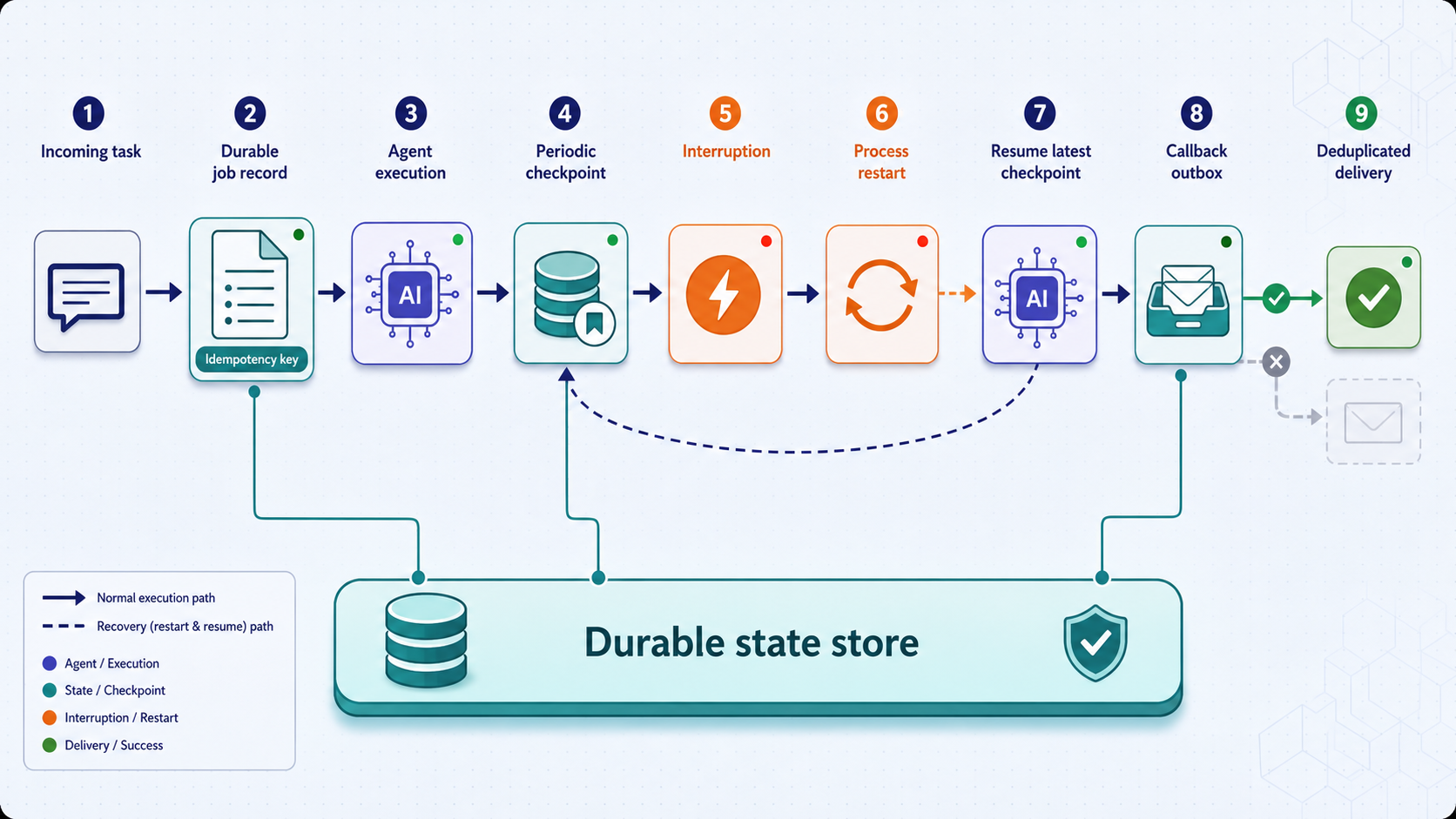
Tunnel recovery is safest when the application already treats interruptions as normal operational events. The key principle is to make task progress durable at boundaries where replay is safe. Do not rely on an in-memory conversation, an active HTTP connection, or a single callback response as the only record of progress.
Give every run and operation a stable identity
Assign a durable task identifier when work is accepted. Within that task, assign stable identifiers to operations that can be retried. Store the request, its current state, its accepted constraints, and the result or error associated with each completed operation. A recovery process should be able to answer three questions without relying on memory: what was requested, what has definitely completed, and what is safe to do next?
Stable identities also improve support and monitoring. A public request log, local process log, callback record, and checkpoint can refer to the same task identifier without exposing credentials. Avoid placing sensitive prompts, tokens, or private user data into identifiers because identifiers often appear in logs and metrics.
Checkpoint verified milestones
A checkpoint should represent a meaningful, durable boundary rather than a periodic memory dump. Useful examples include completing a research phase, validating an artifact, committing a tool result, receiving human approval, or finishing a task-graph node whose output has passed its acceptance check.
Store enough information to resume deterministically. Depending on the application, that can include the task version, completed node identifiers, output locations, decision records, pending approvals, retry counts, known errors, and the next eligible operation. Write the checkpoint before acknowledging completion to an external caller when that acknowledgement would cause the caller to discard its own retry state.
Checkpoint frequency is a tradeoff. Very sparse checkpoints increase replay after a crash. Excessively frequent writes can add cost and complexity without creating useful recovery boundaries. Base checkpoints on verified state transitions and the cost or risk of repeating the preceding work.
Make callbacks idempotent
Network clients retry because they cannot always distinguish “not received” from “processed but response lost.” An idempotent callback handler accepts an operation key that remains the same across retries. The handler records that key durably before or as part of applying the side effect. If the same request arrives again, it returns the previously recorded outcome instead of performing the action again.
Idempotency must cover concurrent duplicates as well as sequential retries. Two copies can arrive almost simultaneously after a reconnect. Use a uniqueness constraint, transaction, compare-and-set operation, or another atomic mechanism provided by your state store. A check followed by an unprotected insert can still race.
Decide how conflicting reuse is handled. If the same idempotency key arrives with a materially different payload, do not silently treat it as the original request. Reject it or flag it for review according to your application contract. Retention also matters: keep deduplication records for at least as long as senders are allowed to retry, based on your own system requirements.
Bound retries and preserve evidence
Retries should have a limit, increasing delays, and a terminal outcome. A permanent authorization error should not be retried like a transient disconnection. Preserve the last error and retry count so a restart does not reset an exhausted operation into an infinite loop.
For high-impact actions, use a recovery queue or require human approval after repeated ambiguity. The goal is not to force every task to finish automatically. It is to make failures visible, prevent duplicate effects, and retain enough information for a safe decision.
Use a reconciliation pass after connectivity returns
Reconnection should trigger verification, not immediate replay of everything marked incomplete. Reconcile local durable state with any external systems involved. Confirm whether an ambiguous operation was committed, whether a callback is still expected, whether the task was cancelled while offline, and whether credentials or approvals remain valid.
A practical reconciliation result divides work into three groups: definitely complete, definitely not started, and ambiguous. Resume definitely incomplete work from its checkpoint. Leave completed work untouched. Route ambiguous side effects through a status query, deduplication lookup, or human review.
Expose the local agent with Localtonet
Complete and verify the agent locally before adding remote access. Confirm that the process starts using your application's documented method, listens on the intended local interface and port, can load its durable state after a restart, and provides the health and task-status behavior you intend to monitor. The correct command, port, file path, environment variables, and credentials depend on the agent framework and are not universal, so they should come from that application's configuration rather than being guessed.
For an HTTP-based agent API, an HTTP tunnel is generally the relevant Localtonet family because it points to a local IP address and port and provides a public HTTPS address. If the service uses another transport, select the tunnel family that matches the actual protocol. Localtonet also supports TCP, UDP, combined UDP/TCP, and TLS tunnel categories. Do not choose a raw-port tunnel for an HTTP API merely because both use a port.
If the workflow uses a locally running McpNet Gateway, our MCP Gateway tunnel guide covers that specific integration. The operational principles in this article still apply: gateway availability, tunnel connectivity, application health, durable task state, and retry safety are separate concerns.
Install and run the Localtonet client
Install the Localtonet client on the device that runs the agent or can reach its local service. Start the client and confirm the device has the outbound connectivity required to connect to our relay platform. Use the current installation instructions for the device's operating system rather than copying an unverified command.
Authenticate and select the intended device
Use the device-specific authentication token through the supported client and dashboard workflow, then select that device for the tunnel. Treat the token as a secret. Do not paste it into source code, prompts, screenshots, logs, callback payloads, or public troubleshooting reports.
Select an available relay server
Choose a server or region from the values currently available in the Localtonet product or dashboard. Availability can vary, so do not hardcode a server code copied from an unrelated environment or an old tutorial.
Create the matching tunnel configuration
For a conventional web API, configure the appropriate HTTP tunnel with the local IP address and port on which the verified agent service listens. Use a generated subdomain, a selected subdomain where supported, or a custom domain according to the current product options. Exact custom-domain DNS instructions should be taken from current Localtonet documentation because they are not established in this guide.
Start the tunnel and verify the assigned endpoint
Use the Start button, then test the assigned public URL or host and port from a network outside the local environment. For an HTTP agent, check the lightweight public health endpoint first, followed by a non-destructive authenticated request that proves traffic reaches the intended application.
Stop or delete access when it is no longer required
Stop the tunnel when temporary remote access is not needed. Delete obsolete tunnel configurations when they should not be reused. Stopping or deleting a tunnel affects public reachability, not the durable task state inside your agent application.
The Localtonet HTTP tunnel documentation is the appropriate contextual reference for current HTTP tunnel controls. Because dashboard options, available relay values, and plan-dependent capabilities can change, confirm the current interface instead of automating around labels or values that are not documented for your environment.
A public HTTPS address makes the selected local endpoint reachable from the internet. It does not automatically provide application-specific authorization. Require authentication, validate every input, limit exposed operations, apply least privilege, and keep administrative or destructive functions behind stronger controls. Do not expose a development console, unrestricted shell, or unauthenticated tool executor.
Monitor Localtonet Token and Tunnel connectivity webhooks
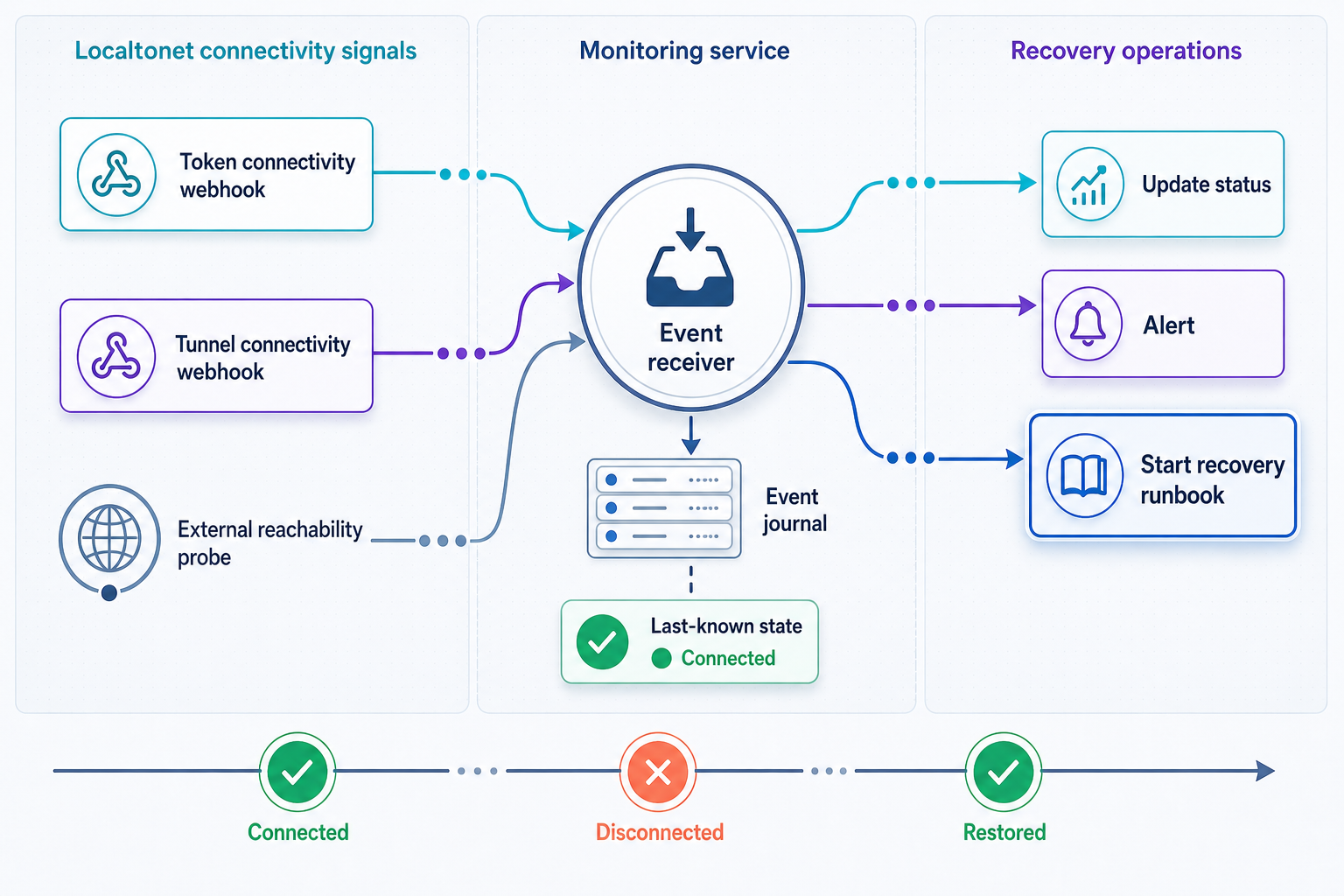
Localtonet provides platform-wide Token and Tunnel webhooks for connectivity changes in a selected Token Group. These webhooks fire when a token or tunnel changes to Connected or Disconnected. They are useful for detecting a change in the Localtonet connectivity layer without requiring an operator to watch the dashboard continuously.
The webhook sends a WebHookRequest JSON body with four documented fields. Id contains the tunnel ID or authentication token, depending on the event type. ActionDate records the action date. Type is Token or Tunnel. Status is Connected or Disconnected.
| Field | Documented meaning | Operational use |
|---|---|---|
Id |
The tunnel ID or authentication token | Associate the event with the monitored tunnel or device while protecting sensitive token values |
ActionDate |
The date associated with the connectivity action | Order observations and correlate them with application logs and endpoint checks |
Type |
Token or Tunnel |
Distinguish a selected device connection change from a tunnel connection change |
Status |
Connected or Disconnected |
Start an appropriate verification or incident workflow |
Treat a webhook as a state-change signal, not as proof of root cause. A Token Disconnected event says that the token or device connectivity changed to Disconnected. It does not tell you whether the device lost power, the client stopped, outbound internet access failed, or another local condition occurred. A Tunnel Connected event says that the tunnel connectivity state changed to Connected. It does not prove that the local agent is ready, that a particular task is progressing, or that an external dependency is healthy.
Recommended event-handling sequence
- Validate that the incoming request is expected using the controls available in your webhook deployment.
- Parse and validate
Id,ActionDate,Type, andStatus. - Store the observation durably before starting slow recovery work.
- Update the connectivity view for the relevant device or tunnel.
- If the status is Disconnected, suppress unsafe outbound callbacks and open or update an incident after applying your chosen debounce policy.
- If the status is Connected, verify the public endpoint and local application health before releasing queued work.
- Reconcile ambiguous operations before retrying them.
The supplied product information does not establish webhook retry behavior, ordering guarantees, delivery signatures, timeout behavior, or a unique event identifier for platform-wide Token and Tunnel webhooks. Do not build correctness around assumptions about those properties. Make your receiver safe for repeated observations, delayed delivery, and state changes that may arrive close together. Consult the current Localtonet webhook documentation before relying on any behavior beyond the documented payload and connectivity states.
Platform-wide Token and Tunnel webhooks report Connected and Disconnected changes for a selected Token Group. File Server webhooks report file-level upload, delete, rename, and move events and can support HMAC signing. Do not assume that File Server webhook behavior or security options automatically apply to platform-wide connectivity webhooks.
Correlate events without leaking tokens
Because Id may contain an authentication token when Type is Token, the receiver must treat that field as sensitive. Do not write raw request bodies to broadly accessible logs. Redact or transform sensitive identifiers before placing them in alerts, dashboards, tickets, or chat notifications. Maintain the protected mapping required to identify the affected device without exposing the credential.
Keep webhook handling lightweight. Persist the observation and enqueue verification rather than performing a long agent recovery inside the webhook request. This reduces coupling between event receipt and potentially slow health checks. It also lets the recovery worker apply deduplication, ordering rules, backoff, and incident suppression consistently.
Combine push events with active verification
Webhooks and active probes answer different questions. Webhooks provide prompt state-change notifications from the connectivity layer. Active probes test whether a caller can actually reach and use the endpoint. Use both where reliability requirements justify it.
A useful monitoring sequence is local liveness, local readiness, Localtonet device state, tunnel state, public health, and a non-destructive authenticated application check. Record the result of each layer separately. This prevents a failed public probe from being mislabeled as an agent crash when the real issue is a stopped tunnel, and it prevents a Connected tunnel from masking a stopped local process.
A practical recovery runbook
Write and test the recovery procedure before a multi-hour production run. The runbook should identify who or what performs each check, which actions are automatic, which require approval, and when the system must stop rather than guess. The following sequence avoids both premature replay and unnecessary full-task restarts.
Record the connectivity change
Persist the Token or Tunnel webhook observation with its documented fields. Redact token values from general logs and notifications. Correlate the event with recent public endpoint checks and local application telemetry.
Pause unsafe delivery, not durable progress
Stop sending callbacks or starting externally dependent actions that cannot succeed safely while the endpoint is unavailable. Do not erase completed milestones or reset the task to its initial state. Let independent local work continue only if the application is designed to do so safely.
Test the agent locally
From the Localtonet client device, test process liveness, readiness, and the configured local IP address and port. If the local check fails, repair the application or its dependency first. Restart it using the application's documented service controls, then load the last durable checkpoint.
Restore device and tunnel connectivity
Confirm the device has outbound connectivity and the Localtonet client is running. Verify the intended device is selected and connected. Confirm the tunnel is running, starting it when appropriate through the documented Localtonet workflow.
Verify the public path
Test the assigned public endpoint from outside the local network. Begin with a lightweight health request, then make a non-destructive authenticated application request. Do not release queued work based only on a Connected status.
Reconcile ambiguous operations
Review operations that were active around the interruption. Query their durable records and any external systems involved. Mark each operation complete, safe to retry, or requiring review. Preserve the same idempotency key when retrying the same logical operation.
Resume from the last verified checkpoint
Continue the task graph from the first incomplete verified boundary. Do not rerun completed tool calls simply to reconstruct conversational context. Rebuild the working context from durable artifacts, constraints, decisions, and checkpoint data.
Close the incident after sustained verification
Confirm that connectivity, public health, task progress, and callback delivery remain stable for the observation period chosen by your team. Record the cause when known and improve checkpoints, monitoring, or retry controls if recovery required manual guesswork.
Test recovery before depending on it
Run controlled failure exercises in a non-production environment. Stop the local agent during a checkpointed task, then confirm it resumes without repeating a completed side effect. Stop the tunnel while the agent remains healthy, then verify that monitoring reports a connectivity problem rather than an application crash. Restore the tunnel and confirm queued callbacks are reconciled before delivery.
Also test ambiguous failures. Interrupt a client after the server has accepted an operation but before the response is observed. The retry should use the same idempotency key and return the recorded result rather than applying the operation again. Finally, test a prolonged outage so retry limits, alerts, and human escalation paths are exercised.
Protect a persistent agent endpoint
Reliability controls should not weaken security. A long-lived public endpoint receives more scanning and misuse attempts than a brief development tunnel, so its application controls must be deliberate. The tunnel solves reachability. Your service remains responsible for deciding who can invoke the agent and what each caller may do.
Treat inbound content as untrusted even when it arrives through an authenticated endpoint. Authentication identifies a caller but does not make every prompt, URL, document, filename, or tool argument safe. Apply input validation and policy checks before allowing an agent to invoke local tools or access data.
Use least-privilege credentials for downstream systems. A research agent that needs read access should not receive write or administrative credentials. Require explicit approval for high-impact operations, and preserve that approval as durable state so a restart neither forgets it nor invents it.
Rotate a device token if exposure is suspected and update the client through the supported workflow. Because tokens identify devices, never include a real token in a sample webhook, issue report, screenshot, or monitoring label. When debugging webhook receipt, log only the minimum metadata required and redact the identifier when it may be a token.
Troubleshooting long-running agent reachability
The public endpoint is unavailable and a Token event says Disconnected
Start with the selected device. Confirm it is powered on, has outbound network connectivity, and is running the Localtonet client. A Token Disconnected event identifies the connectivity state change but does not reveal the local cause. Once the device reconnects, verify the tunnel state and then test application health. Do not assume the agent must restart if its local process and durable state remained intact.
The token is Connected but the tunnel is Disconnected
Confirm that the intended tunnel exists and has been started. Creating a tunnel does not start it automatically. Check that the correct device is selected and that the tunnel configuration still points to the intended local service. Start the tunnel using the current dashboard workflow, then verify the public endpoint.
The tunnel is Connected but the public health check fails
Test the target directly from the Localtonet client device using the same local IP address, port, and protocol configured for the tunnel. Confirm the service is listening where expected and that the health route is correct. If the direct local test fails, repair the application first. If local health succeeds, review the tunnel's target configuration and make sure the selected tunnel family matches the service protocol.
The health endpoint works but agent tasks do not progress
Inspect readiness, queue consumption, durable task states, dependency health, retry exhaustion, approval gates, and loop detection. A liveness response only proves that the process can answer that request. It does not prove that a worker is consuming jobs or that required tools are available.
Callbacks are duplicated after reconnection
Check whether the sender reused the same idempotency key and whether the receiver enforced uniqueness atomically. Confirm that deduplication records survive process restarts and are retained for the sender's retry period. If a new key is generated for every retry, the receiver cannot recognize that the attempts represent the same logical operation.
A callback timed out and its result is unknown
Do not immediately repeat the side effect. Query the callback or operation record by its stable identifier. If an external system was involved, use its status or reconciliation interface where available. Retry only when the operation is known not to have completed or when its idempotent contract guarantees a duplicate cannot create another effect.
The agent restarts from the beginning after a local crash
This is an application-state problem rather than a tunnel problem. Move task state out of process memory, persist verified checkpoints, and reconstruct working context from durable artifacts. Record completed operations before acknowledging them. The tunnel can restore network reachability after the process returns, but it cannot recreate an agent's missing conversation or task state.
Alerts repeatedly alternate between Connected and Disconnected
Preserve every observation, but avoid opening a separate incident for every transition. Apply an operational debounce or correlation policy chosen for your environment, then use active health checks to determine current impact. Do not hide prolonged instability merely because the endpoint briefly reconnects. The exact thresholds should be based on your task and service requirements rather than an invented universal value.
Available relay values, plan-dependent options, client behavior, dashboard controls, and webhook delivery details can change. Use current Localtonet documentation and the current product interface for those details. Keep application recovery correct even if an event is delayed, repeated, or temporarily unavailable.
Frequently asked questions
Does a Localtonet tunnel keep an AI agent running?
No. A tunnel provides network reachability to a configured local target while the selected client or device is connected and the tunnel is running. The agent process, service supervision, task queue, durable state, checkpoints, and restart behavior belong to the local application environment.
Does a Connected tunnel prove that the agent is healthy?
No. Connected describes the tunnel's connectivity state. The local process may still be stopped, misconfigured, unable to reach a dependency, or logically stalled. Combine tunnel state with local liveness, readiness, public health checks, and task-level progress monitoring.
What events do Localtonet platform-wide connectivity webhooks report?
They report when a token or tunnel in a selected Token Group changes to Connected or Disconnected. The documented WebHookRequest body contains Id, ActionDate, Type, and Status. These are connectivity signals, not task-completion or application-health events.
Are platform-wide connectivity webhooks the same as File Server webhooks?
No. Token and Tunnel webhooks report Connected and Disconnected state changes. File Server webhooks report file-level events such as upload, delete, rename, and move, and they have their own behavior, including optional HMAC signing. The two systems should not be merged operationally.
Should queued callbacks be sent immediately after a Connected event?
Not solely because of that event. First verify the public endpoint and application readiness. Then reconcile operations whose outcome became ambiguous during the interruption. Retry only the callbacks that remain necessary, preserving their original idempotency keys.
How often should a long-running agent create checkpoints?
There is no universal interval. Create checkpoints at verified boundaries where replay would be expensive or unsafe, such as after committing a tool result, validating an artifact, receiving approval, or completing a task-graph node. The checkpoint should contain enough durable information to determine what is safe to do next.
Can Localtonet expose an agent when the device has no public IP address?
Yes. The Localtonet client establishes an outbound connection to our relay platform, so the workflow does not require an inbound public IP address, router port forwarding, firewall changes, or VPN setup. The tunnel remains available only while the selected client or device is connected and the tunnel is running.
What should be verified before exposing an AI agent publicly?
Verify local startup and restart behavior, durable checkpoints, liveness and readiness checks, task-status reporting, idempotent callback handling, authentication, authorization, input validation, secret storage, and least-privilege tool access. Then configure and start the matching Localtonet tunnel and test the public path with a non-destructive authenticated request.
Make your local agent reachable without making recovery fragile
Start with a locally verified, checkpointed, retry-safe agent. Then use Localtonet to provide the public endpoint and monitor Token and Tunnel connectivity changes as one layer of a complete reliability design.
Get Started Free →

