

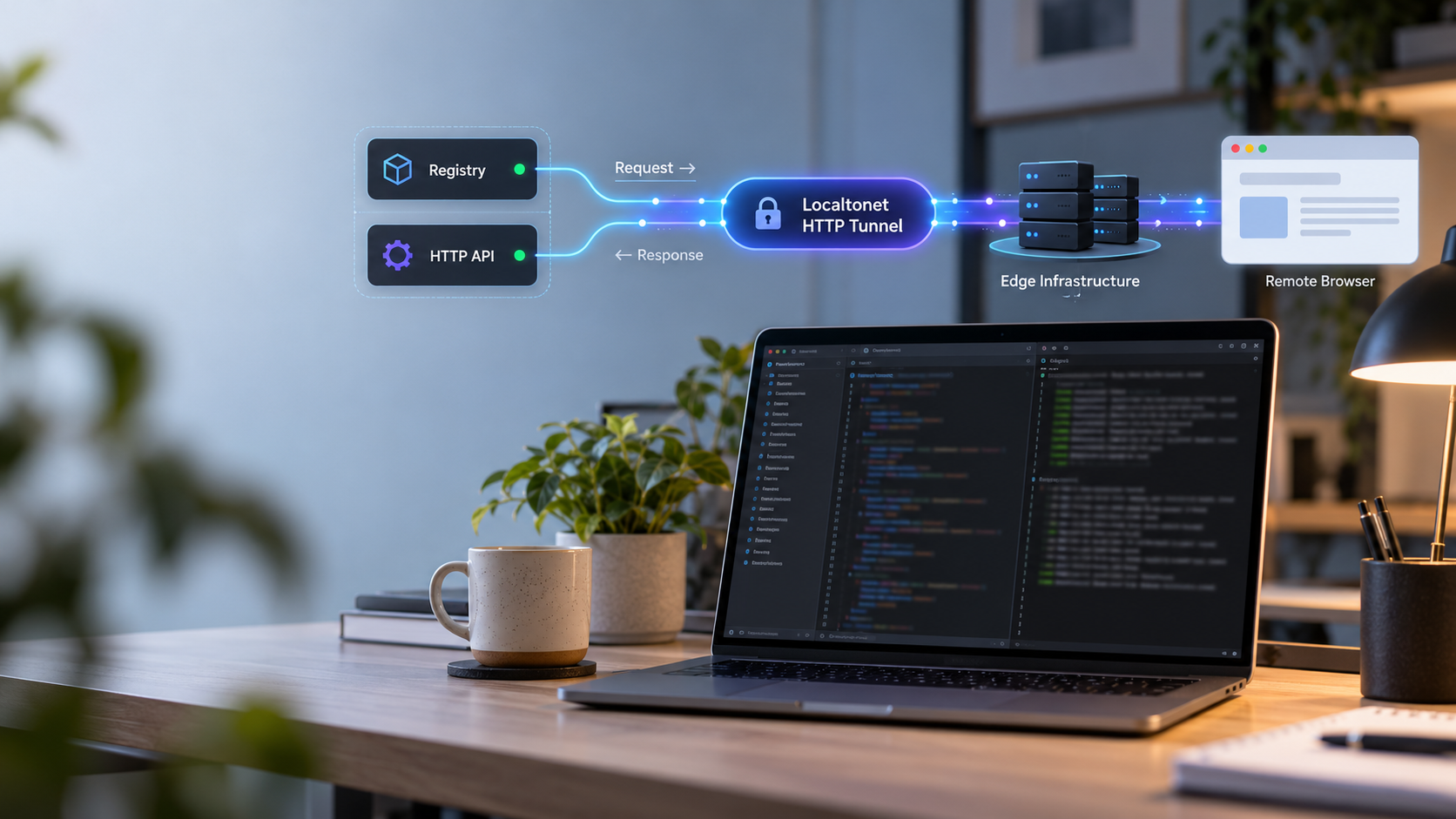
Build, verify, and remotely reach an OpenAgentSkill development environment
OpenAgentSkill is a Next.js registry and developer platform for discovering, comparing, and installing reusable AI agent skills. In this guide, we set up the project from source with its documented Node.js and pnpm toolchain, configure the required environment file, start the development server, and verify it locally. We then connect the working HTTP endpoint to a Localtonet HTTP tunnel so authorized remote users and test clients can reach it without inbound router port forwarding, firewall changes, a VPN, or a public IP address. The available evidence documents a development workflow rather than a production self-hosting procedure, so this guide keeps that distinction clear.
📋 What's in this guide
What this OpenAgentSkill workflow actually runs
OpenAgentSkill positions itself as a skill layer for AI agents. Its web application provides human-facing registry interfaces as well as HTTP APIs intended for agent-oriented discovery, recommendation, inspection, and installation workflows. The public project describes integrations and use cases involving coding assistants, MCP-compatible agents, custom agent runtimes, and people browsing the skill registry directly.
For this tutorial, the important technical detail is that the repository contains a Next.js web application. Running the documented development command starts an HTTP development server on the local machine. That server, rather than the separately distributed OpenAgentSkill command-line interface, is the service we can connect to a Localtonet HTTP tunnel.
This distinction matters. A command-line tool that runs through npx is not automatically a listening network service. It does not become remotely accessible merely because it is installed. The tunnel needs an active local process that accepts HTTP connections on a specific local IP address and port. In this workflow, that process is the Next.js development server started with pnpm dev.
pnpm dev, creating the local HTTP service used by this guide.
The available project instructions establish how to run the application from source with pnpm dev. They do not establish a supported production build, production start command, deployment topology, reverse-proxy configuration, process supervisor, database migration procedure, or production hardening checklist. We therefore describe this as a local development and remote testing workflow, not as a production deployment guide.
Localtonet does not replace the application server, database, authentication layer, or application configuration. Our HTTP tunnel forwards requests to the local target you select. OpenAgentSkill must already be running correctly, and any Supabase-backed functionality must have valid project configuration, before remote access can work reliably.
Prerequisites and planning
Prepare the development machine before cloning the repository. The documented OpenAgentSkill toolchain requires Node.js 22 and pnpm 10.28.2. The setup also uses Git to obtain the source repository and Corepack to enable the package manager workflow.
You also need Supabase configuration for the public website functionality. The repository provides an .env.example template that must be copied to .env.local. The exact required variable names and their expected values should be taken from the version of that template included in your checkout. This guide deliberately does not invent environment variable names, URLs, keys, or database credentials.
| Requirement | Documented expectation | Why it is needed |
|---|---|---|
| Node.js | Version 22 | Runs the Next.js application and its JavaScript tooling. |
| pnpm | Version 10.28.2 | Installs the repository dependencies and runs the development script. |
| Corepack | Enabled before dependency installation | Provides the documented package-manager activation workflow. |
| Git | A working Git client | Clones the OpenAgentSkill repository and later retrieves updates. |
| Supabase configuration | Values required by the checked-out environment template | Supports website functionality that depends on the configured backend. |
| Localtonet client | Installed on a device that can reach the local server | Creates the outbound connection to our relay and runs the HTTP tunnel. |
Confirm the runtime versions
Open a terminal and check the installed Node.js version. After Corepack is enabled, check pnpm as well:
node --version
corepack enable
pnpm --version
The Node.js output should identify a version in the Node.js 22 release line, and pnpm should report 10.28.2. If either command is missing or reports a different release, correct the local toolchain before installing dependencies. Using the documented versions reduces the chance of lockfile, package-manager, or runtime incompatibilities.
Installation procedures for Node.js vary by operating system and by the version manager or package source your organization permits. Use a trusted Node.js distribution method that can install Node.js 22. We do not provide an unevidenced operating-system-specific command because package names and repository configuration differ between Windows, macOS, and Linux.
Plan the network boundary
Decide whether this environment is for individual testing, collaboration with a small authorized team, webhook development, or integration with an agent running somewhere else. A Localtonet public address can make the development endpoint reachable from the internet, so the application should not contain sample secrets, unrestricted administrative functions, or data that remote users should not see.
You do not need to open an inbound router port or obtain a public IP address. The Localtonet client establishes an outbound connection to a selected Localtonet relay server. The tunnel remains available only while the selected client or device is connected and the tunnel is running.
Install OpenAgentSkill from source
Perform the source installation in a working directory where your user account can create files and install project dependencies. The following sequence follows the documented development setup: clone the repository, enter it, enable Corepack, install the pinned dependencies, create the local environment file, and start the application after configuration.
Clone the OpenAgentSkill repository
Use Git to obtain the current source tree, including the Next.js application, workspace configuration, lockfile, environment template, public assets, and supporting packages.
git clone https://github.com/Leon-Drq/openagentskill.gitEnter the repository directory
Run all remaining project commands from the cloned repository root so pnpm can find the workspace and package definitions.
cd openagentskillEnable Corepack
Enable the package-manager workflow expected by the project. Then confirm that pnpm resolves to the documented version before continuing.
corepack enable
pnpm --versionInstall project dependencies
Install the workspace dependencies using pnpm from the repository root. Keep the project lockfile intact so the package manager can resolve the dependency set selected by the project.
pnpm installCreate the local environment file
Copy the provided environment template to .env.local. This creates a machine-local configuration file that can be populated without changing the shared example template.
cp .env.example .env.localConfigure the required values and start development
Open .env.local, supply the required Supabase and application values described by the checked-out template, save the file, and then start the documented development process.
pnpm dev
The documented cp command is suitable for shells that provide that utility. If your Windows shell does not recognize cp, create a copy of .env.example named .env.local using File Explorer or your shell's normal file-copy operation. The resulting filename must remain .env.local.
Leave the terminal running after pnpm dev. A development server is normally attached to that process, so closing the terminal or stopping the command also stops the local endpoint. Do not configure the tunnel until this command remains running without a fatal startup error.
Configure the OpenAgentSkill environment safely
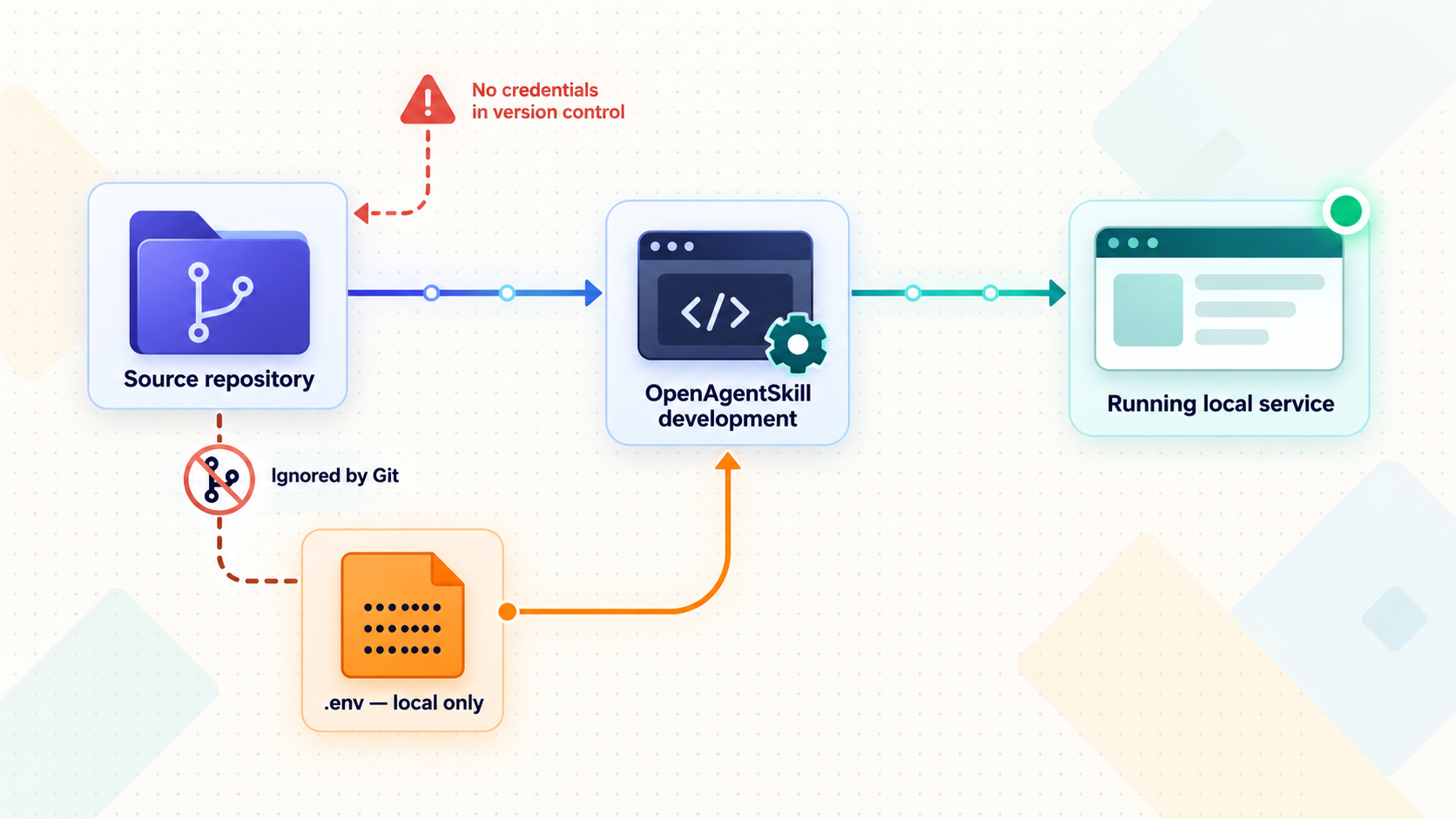
The environment template is the authoritative inventory of configuration fields for the revision you cloned. Open .env.example and .env.local side by side. Preserve the variable names exactly, but place real local values only in .env.local.
The supplied evidence establishes that Supabase configuration is required for the public website. It does not provide a complete, stable list of variable names, nor does it establish that placeholder values will support a fully functional local registry. Because environment schemas can change, copying names from an older tutorial can produce subtle errors even when the development server itself starts.
Use the template as a checklist
Review each uncommented entry and any explanatory comments in the template. Determine whether it is required, optional, intended for browser exposure, or server-only. Obtain real values from the relevant Supabase project or service configuration rather than making up URLs or keys.
Values intended for browser use and server-only credentials have different security implications. A variable being present in a local environment file does not automatically make it safe to publish. Follow the naming and handling guidance in the project template, and never move a server secret into a browser-exposed variable merely to make a build or request succeed.
Treat .env.local as sensitive. Before committing or pushing changes, inspect the Git status and confirm that credentials, tokens, service keys, private URLs, and other secrets are not staged. Do not paste the contents into support messages, screenshots, tunnel descriptions, or public issue reports.
Restart after configuration changes
If you edit environment values after the development server starts, stop the running process and launch pnpm dev again. A clean restart removes ambiguity about whether the process loaded the latest values.
A successful process start does not prove that every backend feature is configured. Some configuration errors appear only when a page or API route attempts to read data. Verification should therefore include the functions you intend to expose, not just the initial page load.
Verify the development server locally
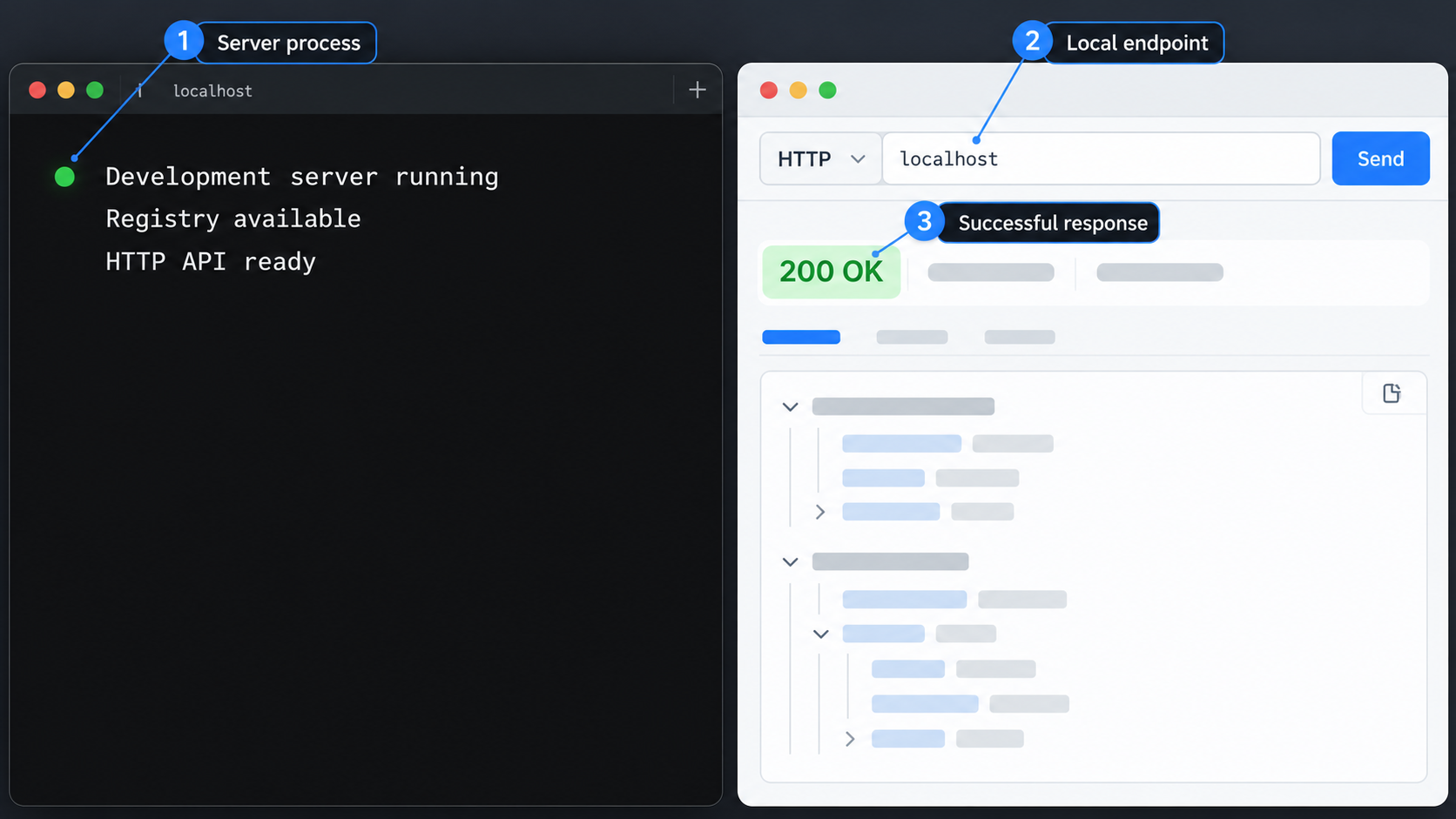
The project documentation supplied for this guide does not state a fixed development hostname or port. Do not assume a common Next.js port and do not configure Localtonet from a remembered default. Read the actual URL printed by the running pnpm dev process. That terminal output is the correct basis for the local target.
Read the startup output
Confirm that the development command remains active and reports a local HTTP address. Record the displayed hostname or IP address and port without copying any unrelated secret values from the terminal.
Open the exact local address
On the same machine, enter the displayed URL in a browser. Confirm that the application returns a page rather than a connection error, blank response, or framework error screen.
Exercise the intended workflow
Test the registry page, search or discovery behavior, and any HTTP API operation you plan to use remotely. Watch both the browser and the development terminal for application or backend errors.
Test from the Localtonet client device
If our client will run on a different device, verify that the client device can reach the same local target over your network. A URL that works only through loopback on the application host may not be reachable from another machine.
You can also make a simple HTTP request from a terminal. Replace the placeholder with the exact address shown by the development server:
curl -i "<LOCAL_URL_SHOWN_BY_PNPM_DEV>"Look for an HTTP response and sensible headers or content. A redirect can be valid depending on application behavior, but repeated server errors, backend connection failures, or missing-configuration messages should be fixed before tunneling.
Validate API behavior separately
OpenAgentSkill publicly describes agent-facing operations such as task resolution, skill inspection, and install information. Do not conclude that all APIs work merely because the homepage renders. Test the exact route, HTTP method, parameters, content type, and authorization behavior required by your integration.
Preserve the method when testing. Opening a URL in a browser sends a GET request and cannot validate a route that expects POST. Likewise, a successful browser page does not prove that an automated client receives the expected JSON schema. Use your application's documented request format and inspect status codes, response bodies, and server logs.
Localtonet can carry requests to a reachable local target, but it cannot repair a failed Next.js process, invalid Supabase configuration, missing dependency, or application-level authorization error. Establish a repeatable local success case first.
Expose OpenAgentSkill with a Localtonet HTTP tunnel
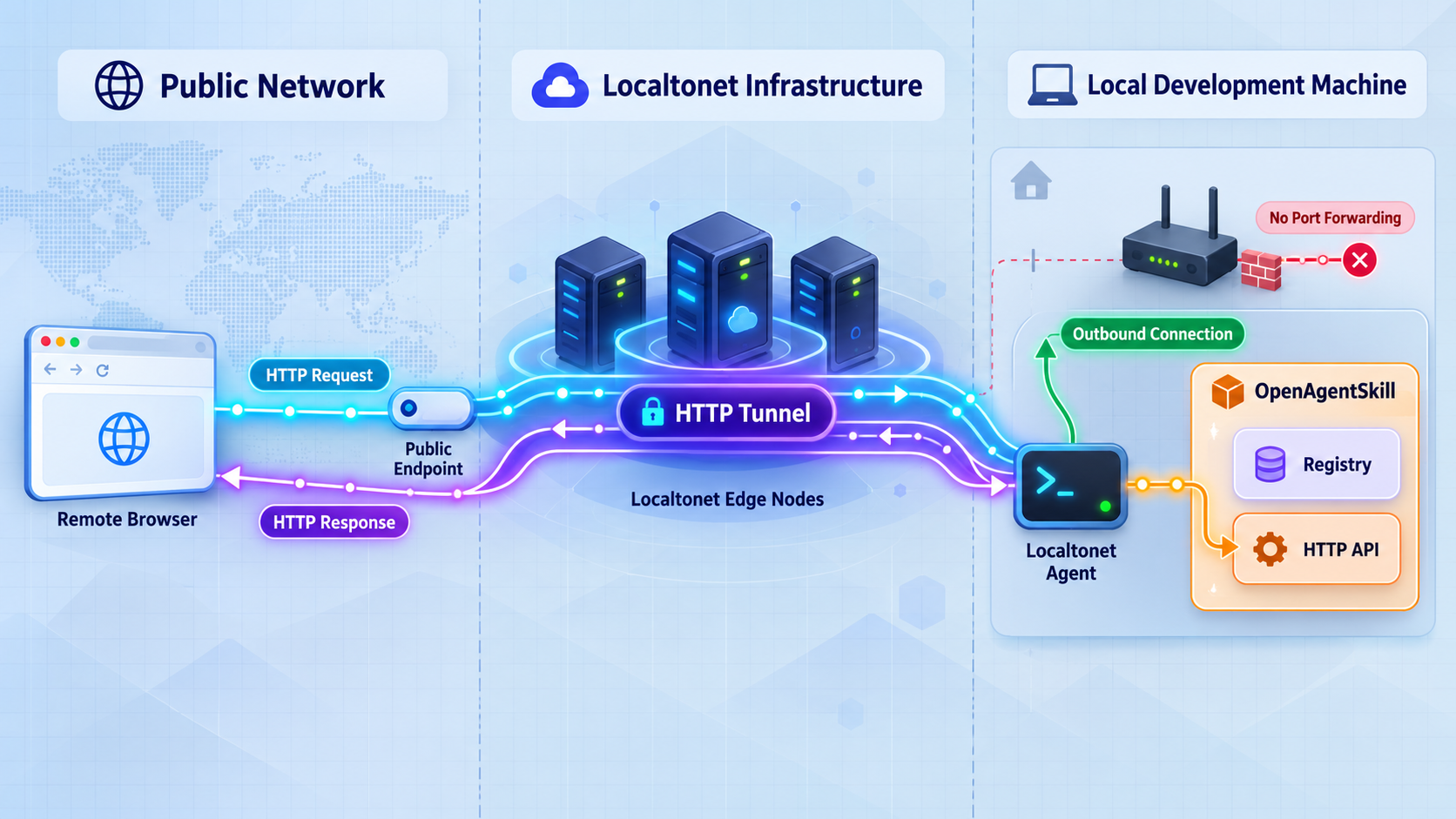
Once the development server works locally, the remote-access stage is straightforward. Install and run the Localtonet client on the OpenAgentSkill machine or on another device that can reach it. Our client creates an outbound connection to a Localtonet relay, so this workflow does not require an inbound router rule, firewall change, VPN setup, or public IP address.
Use an HTTP tunnel because the target is a Next.js HTTP service. Do not select a File Server tunnel, proxy tunnel, or VPN Manager for this workflow. Those product families solve different problems. An HTTP tunnel points to the local IP address and port where the development server is listening and presents the application at a public HTTPS address.
Current dashboard options, available relay servers, regions, and subscription availability can vary. Obtain the available values from your dashboard rather than copying a server code from an article.
Install and run the Localtonet client
Install our current client for the operating system on the device that can reach OpenAgentSkill. Start the client and keep it connected while remote access is required. Use the current installation instructions rather than an unverified command copied from an older guide.
Authenticate or select the client device
Use the device-specific authentication token associated with the client that will run the tunnel. Select the correct connected device in the dashboard. Never publish, share, or place this token in source code.
Select an available relay server
Choose an available Localtonet server or region from the current dashboard. Available values must be read from the product at configuration time and should not be hardcoded from this article.
Create the HTTP tunnel configuration
Create an HTTP tunnel and enter the local IP address and port reported by the working OpenAgentSkill development server. If our client runs on the same machine, use an address the client can reach locally. If it runs elsewhere, use the application host's reachable private-network address and verify that path first.
Start the tunnel
Creating a tunnel does not start it. Use the Start button and wait until both the selected device and tunnel show that they are connected. The public address is usable only while the client remains connected and the tunnel is running.
Test the assigned public HTTPS address
Open the assigned URL from a device outside the development machine's local session. Repeat the browser and API checks that succeeded locally, then stop or delete the tunnel when remote access is no longer required.
HTTP tunnels can use a generated subdomain, a selected subdomain where supported, or a custom domain. These process types serve the same target content at a public HTTPS address. Custom-domain DNS requirements can change, so check the current dashboard and documentation before configuring DNS.
For the maintained product workflow and current fields, consult our Localtonet HTTP tunnel documentation. The local target should always come from your actual OpenAgentSkill startup output, not from a port shown in an unrelated example.
A saved tunnel configuration is not necessarily active. The Localtonet client must be connected and the tunnel must be started. Stopping the development server, disconnecting the client, or stopping the tunnel makes the OpenAgentSkill endpoint unavailable through that public address.
Secure a remotely reachable development environment
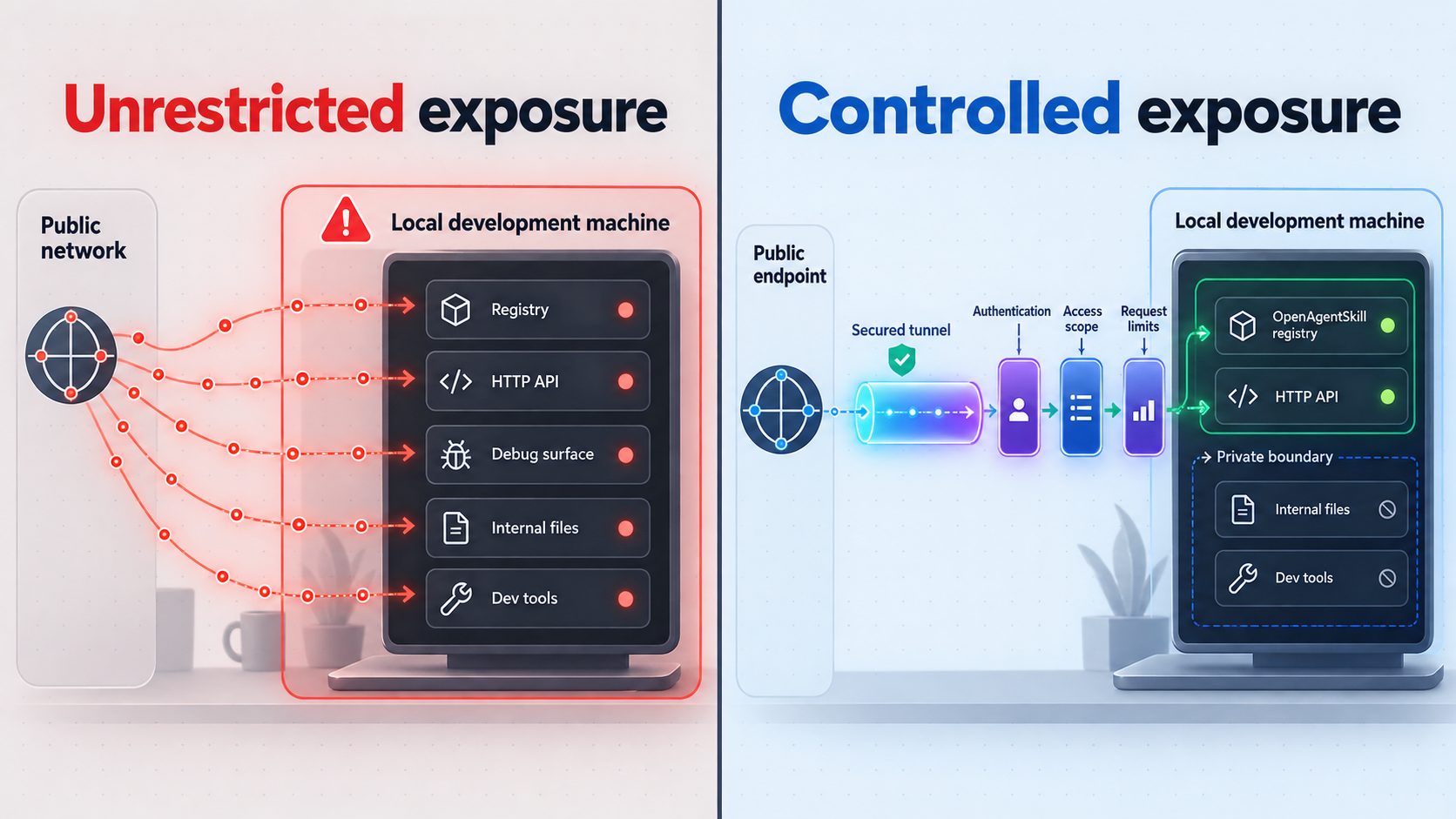
A development server is designed for development feedback, not automatically for hostile internet traffic. A Localtonet URL solves reachability, but application authorization remains the application's responsibility. Before sharing the public address, review what unauthenticated users can view, query, modify, install, or trigger.
Separate development and production resources
If practical, use a dedicated Supabase project for this development environment. Restrict its data and privileges to what the test requires. This reduces the consequences of an application bug, an overly broad backend policy, or accidental sharing of the public endpoint.
Do not infer that an API is read-only from its name or from how the web interface presents it. Confirm what each route can do. If an operation can initiate installation, modify registry state, submit data, or invoke another system, protect it according to the impact of that operation.
Be careful with logs and error pages
Development error pages and terminal traces can reveal file paths, configuration names, request details, or implementation internals. They should not be exposed casually. Fix startup and request errors locally before inviting collaborators, and avoid sharing full logs until sensitive values have been removed.
Use remote access only where it complies with your organization's security policies and the policies governing the network, device, Supabase project, and data. Do not use a tunnel to evade required access controls. Authentication, authorization, least privilege, and safe handling of agent-executed commands remain essential.
Routine operation, updates, and shutdown
During a development session, three independent components must remain healthy: the OpenAgentSkill development process, the Localtonet client connection, and the Localtonet tunnel. Treat each as a separate checkpoint when diagnosing availability.
| Component | Healthy condition | What happens if it stops |
|---|---|---|
| OpenAgentSkill development server | The pnpm dev process is active and the local URL responds. |
The tunnel may remain configured, but requests cannot receive a valid application response. |
| Localtonet client | The selected device is connected to our platform. | The relay cannot forward requests to the local machine. |
| HTTP tunnel | The tunnel has been started and is connected. | The assigned public address is unavailable even if the local application still works. |
| Supabase-backed configuration | The configured project is reachable and permits the intended operations. | Pages may load while data-dependent UI and API requests fail. |
Starting a later session
Return to the repository directory and start the development process again:
cd openagentskill
pnpm dev
Verify the locally reported URL before starting the tunnel. Do not assume the address or port is unchanged from a previous session. Then confirm that the Localtonet client is connected and start the existing HTTP tunnel if its target still matches the active server.
Stopping safely
When testing is complete, stop the Localtonet tunnel first so new public requests can no longer arrive. Then stop the development process using the normal terminal interrupt for your shell. If the tunnel is temporary and will not be reused, delete it from the dashboard. Remember that stopping and deleting are different lifecycle actions.
Updating the source checkout
Before updating, inspect your working tree and preserve intentional code changes. Never rely on an uncommitted .env.local as the only copy of important configuration, but also never place that file in a public repository. Pull project updates using your normal Git workflow, then run the documented dependency installation again if the lockfile or package definitions changed:
git pull
pnpm install
pnpm dev
After an update, compare the current .env.example with your existing .env.local. Add, remove, or adjust configuration only when the updated template or project documentation requires it. Re-run local browser and API verification before restarting public access.
Do not confuse the CLI release with the web server
OpenAgentSkill also documents a separately pinned CLI installation through npx using a GitHub release tarball. That tool can support command-line workflows, but installing it does not start the HTTP application used in this guide. The tunnel target remains the active Next.js development endpoint created by pnpm dev.
Troubleshooting OpenAgentSkill and Localtonet
node, corepack, or pnpm is not found
Confirm that Node.js 22 is installed and available in the current terminal's executable path. Close and reopen the terminal after changing the runtime installation. Run node --version, enable Corepack, and then run pnpm --version. Do not continue until the documented toolchain is available.
pnpm reports the wrong version
The project requires pnpm 10.28.2. Check that Corepack is enabled and that another globally installed package-manager binary is not taking precedence. Resolve the local toolchain conflict using the supported Node.js and Corepack procedure for your environment. Avoid deleting the project's lockfile to work around a version mismatch because that changes dependency resolution rather than fixing the runtime.
pnpm install fails
Read the first meaningful error rather than only the final summary. Common categories include an incompatible Node.js version, package registry connectivity, filesystem permissions, insufficient disk space, or a package-manager version mismatch. Confirm the prerequisites and retry from the repository root. Do not disable integrity or security checks merely to force installation.
The development server reports missing configuration
Confirm that .env.local exists in the repository root and was created from the current .env.example. Check spelling carefully, remove accidental surrounding characters, and make sure required Supabase values are real values for an accessible project. Restart pnpm dev after correcting the file.
If the template does not explain how to obtain a required value, that is a project-configuration limitation that should be resolved through the current OpenAgentSkill and Supabase setup guidance. Do not substitute guessed credentials or copy secrets from another environment.
The homepage works but registry data or APIs fail
This usually separates frontend availability from backend functionality. Inspect the development terminal, browser developer tools, HTTP status code, and response body. Check Supabase reachability and permissions, then validate the exact API method and parameters. A GET request in a browser cannot verify a POST-only route.
Local access works but the tunnel returns an error
First confirm that the Localtonet client is running and that the selected device is connected. Next, confirm that the tunnel was started rather than merely created. Compare its local IP address and port with the current address printed by pnpm dev.
If the client runs on another device, test the target directly from that device. A loopback address refers to the device itself, so a client on a separate machine cannot use the application host's loopback service as though it were local. The application must listen on an interface reachable by the client, and local network policy must allow that connection. The supplied project evidence does not establish a supported Next.js host-binding flag, so this guide does not invent one.
The public page loads but assets or redirects are wrong
Compare browser network requests between the local and public sessions. Look for absolute URLs, environment-dependent base addresses, failed asset requests, or redirects to a local-only hostname. Correct these in the application's documented configuration. Do not solve an application URL problem by exposing additional unrelated local ports.
The public address suddenly stopped responding
Check the three-layer health sequence: local application, Localtonet client, then tunnel. Verify that pnpm dev is still active, test the local URL, confirm the device is connected, and confirm the tunnel is running. The tunnel is intentionally available only while its client connection and tunnel process remain active.
A different process is using the expected port
Read the new address selected or reported by the development server rather than assuming the old port. If the active OpenAgentSkill URL changes, update the HTTP tunnel's local target accordingly and repeat local verification. Do not terminate an unfamiliar process without first identifying it and understanding its purpose.
Frequently asked questions
What port does OpenAgentSkill use locally?
The supplied project documentation does not establish a fixed hostname or port. Start the application with pnpm dev and use the exact local URL printed in the terminal. Configure the Localtonet target from that observed address rather than assuming a framework default.
Is this a production OpenAgentSkill deployment?
No. The evidenced setup uses the Next.js development command pnpm dev. A supported production build procedure, production start command, process manager, deployment architecture, and hardening checklist were not established by the supplied project material. Use this workflow for development and controlled remote testing.
Does installing the OpenAgentSkill CLI create a tunnelable server?
No. The separately documented CLI installation is a command-line workflow and is not itself the HTTP server used here. For this tutorial, the tunnel target is the running Next.js development service started from the source repository with pnpm dev.
Do I need router port forwarding or a public IP address?
No. Our client establishes an outbound connection to a Localtonet relay server. This allows the HTTP tunnel to provide a public address without inbound router port forwarding, firewall changes, VPN setup, or a public IP address.
Does Localtonet configure Supabase for OpenAgentSkill?
No. Localtonet provides connectivity to the local HTTP endpoint. You remain responsible for creating and securing the required Supabase resources, populating the current .env.local fields, and confirming that application-level permissions are correct.
Is the public Localtonet URL enough to protect the application?
No. A public URL provides reachability, not application authorization. Protect sensitive pages and API operations with appropriate authentication and least-privilege controls. Use test data, avoid exposing secrets, and stop the tunnel when the remote session ends.
Can the Localtonet client run on another machine?
Yes, if that client device can reach the OpenAgentSkill server's local IP address and port. Test the target directly from the client device before creating the tunnel. A loopback-only service on the OpenAgentSkill host will not automatically be reachable from another machine.
Why does the tunnel stop working when I close the terminal?
Closing the terminal can stop pnpm dev, which removes the local service behind the tunnel. Remote access also requires the Localtonet client to remain connected and the tunnel to remain started. All three components must be active.
Connect your verified OpenAgentSkill server
Once the development server works locally and its configuration contains no exposed secrets, use Localtonet to create an HTTP tunnel for controlled remote testing without opening an inbound router port.
Get Started Free →

