

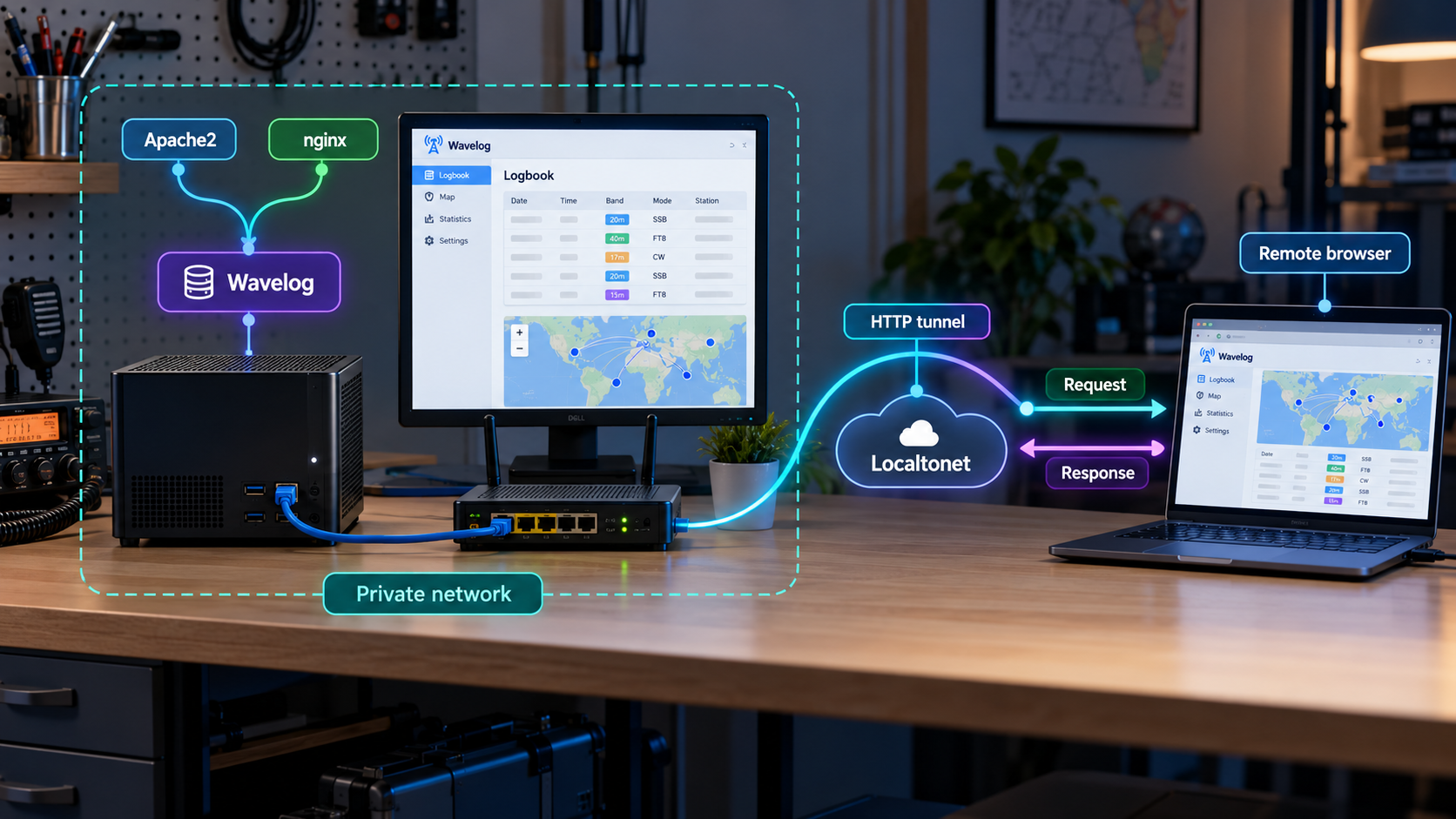
Build a private amateur radio logbook, verify it locally, and provide controlled remote browser access
Wavelog is a self-hosted PHP application for logging amateur radio contacts through a browser. This guide explains how to plan and validate a Wavelog deployment using Apache2 or nginx, PHP, and MySQL or MariaDB before connecting the working web interface through a Localtonet HTTP tunnel. Because Wavelog does not prescribe one universal hostname or port, the tunnel must use the address and port from your actual web-server configuration. We also cover security, routine operations, upgrades, and troubleshooting without inventing distribution-specific commands or configuration paths.
📋 What's in this guide
How a self-hosted Wavelog deployment works
Wavelog is a web-based amateur radio logbook. Unlike a desktop logbook tied to one workstation, it runs as a web application and can be used from a browser. Its published features include browser-based QSO logging, statistics, mapping, award tracking, QSL management, DX cluster tools, contest logging, multiple operators, and multiple station profiles. A browser-based design is particularly useful for a station with several computers or for an amateur radio club whose authorized operators need a shared interface.
A classic Wavelog installation has several distinct layers. Apache2 or nginx accepts browser requests. PHP executes the application. MySQL or MariaDB stores application data. Wavelog provides the user interface and application logic. These layers must work together locally before remote connectivity is added.
Localtonet belongs after that local installation has been completed and tested. Our client runs on the Wavelog host, or on another device that can reach it, and establishes an outbound connection to a Localtonet relay server. An HTTP tunnel then maps a public HTTPS address to the local web service. This does not replace Apache2, nginx, PHP, Wavelog, or the database. It provides a route to the already functioning web interface.
A tunnel cannot repair a broken PHP runtime, database connection, web-server virtual host, or Wavelog installation. Confirm that Wavelog loads from a browser on the local network before configuring remote access.
Requirements and deployment planning
Wavelog identifies two main installation paths. The easiest path is its prebuilt image with Docker Compose. The classic path uses a LAMP-style Linux deployment with Apache2 or nginx, PHP, and a supported SQL database. This article concentrates on the classic web-server architecture because it makes the relationship between the application, web server, and Localtonet target especially clear. The same target-selection principle applies to a container deployment: use the host address and published port that actually reach the containerized web interface.
Published Wavelog requirements
| Component | Published requirement | Planning note |
|---|---|---|
| Operating system | 64-bit Linux is highly recommended | Windows may work, but 32-bit systems are no longer supported. |
| Web server | Apache2 or nginx | Apache2 is identified by Wavelog as the recommended classic option. |
| PHP | PHP 8.2 through PHP 8.5 | The web server and PHP execution mode must be configured consistently. |
| Database | MySQL 8 or newer, or MariaDB 10.11 or newer | Create a dedicated database and account rather than using a database administrator account in the application. |
| Remote access | A working local HTTP endpoint | The exact hostname and port come from your Apache2, nginx, or container configuration. |
Before installing anything, decide where the application will run and who will maintain it. A small personal installation might run on a dedicated Linux computer or home server. A club installation may need clearer ownership, regular backups, multiple authorized operators, and a defined maintenance window. Wavelog also supports club-station and multi-operator use, so account and station-profile planning matters independently of network access.
Information to record before installation
- The Linux distribution and release running on the host.
- Whether Apache2 or nginx will serve Wavelog.
- The selected supported PHP version and the way the web server passes requests to PHP.
- Whether MySQL 8 or MariaDB 10.11 or newer will be used.
- The database name, application database username, and securely stored password.
- The filesystem location selected for the Wavelog release.
- The local hostname, IP address, and listening port configured for the web server.
- Whether Localtonet will run on the Wavelog host or on another device that can reach it.
- Who is responsible for application, database, operating-system, and backup maintenance.
Package names, service names, PHP integration methods, document-root conventions, and configuration paths differ between Linux distributions and versions. The available Wavelog evidence establishes the required software versions and supported server families, but it does not establish one universal package command or virtual-host file. Use the package manager and paths documented for your operating system, and use the current Wavelog release documentation for release-specific application steps.
Install and configure Wavelog
Treat the installation as a sequence of testable layers. Do not configure remote exposure while the application is still being assembled. The objective of this phase is a Wavelog page that loads correctly through the local web server and can communicate with its database.
Prepare a supported 64-bit Linux host
Update the operating system through its normal maintenance process and confirm that you have administrative access. Record the distribution and release because they determine the correct package names, service controls, firewall tools, and configuration locations.
Install Apache2 or nginx
Select one web server and install it through the operating system package manager. Avoid running both on the same address and port unless you deliberately design a reverse-proxy arrangement. Confirm that the selected service starts successfully before adding Wavelog.
Install a supported PHP runtime
Install PHP 8.2 through 8.5 and the modules required by the current Wavelog release documentation. Connect PHP to Apache2 or nginx using the integration supported by your distribution. Do not assume that installing the PHP command-line interpreter automatically enables web requests.
Install MySQL or MariaDB
Use MySQL 8 or newer, or MariaDB 10.11 or newer. Start the database through the operating system service manager, apply the database vendor's recommended initial security process, and keep the database listener limited to trusted interfaces unless remote database access is explicitly required.
Create an application database and account
Create a dedicated database for Wavelog and a dedicated database user with only the permissions required for that database. Store the password in a password manager or another protected secret store. Do not use the database root or administrative account as the routine application identity.
Obtain a Wavelog release
Select a current stable Wavelog release rather than treating the development branch as a production package. Place the release in the application directory selected for the web server. Release numbers change over time, so verify the current stable version during installation rather than relying on a version embedded in an older tutorial.
Apply ownership and permission requirements
Give the web-server process only the read and write access required by the current Wavelog release. Do not make the entire application tree universally writable. The exact writable locations and ownership model must come from the current Wavelog instructions and your operating system because the supplied evidence does not define universal permission commands.
Configure the web server and complete setup
Point the Apache2 virtual host or nginx server block at the correct Wavelog web root, enable PHP processing, and reload the service only after validating its configuration. Open the local Wavelog address in a browser and complete the release's setup workflow using the dedicated database details. Remove or disable any installation mechanism if the current Wavelog documentation instructs you to do so.
These steps deliberately avoid fabricated shell commands. The exact packages and PHP modules are distribution-specific, while Wavelog's release-level installation details can change. For example, Debian-family and Red Hat-family systems do not necessarily use the same package names, web-service account, PHP integration, or configuration paths. A command that is correct on one host may be wrong or unsafe on another.
What about Docker Compose?
Wavelog identifies its prebuilt image with Docker Compose as the easiest installation path. It can be a good choice when you already understand container volumes, environment configuration, image updates, and port publication. The classic and container paths lead to the same networking question for Localtonet: which host address and port successfully open the Wavelog web interface?
Do not assume a container port from a generic example. Read the active Compose configuration and determine which host port is published for the web service. Test that host endpoint locally. That verified address and port, not the container's internal-only address, normally becomes the target when the Localtonet client runs on the host.
Choose and configure Apache2 or nginx
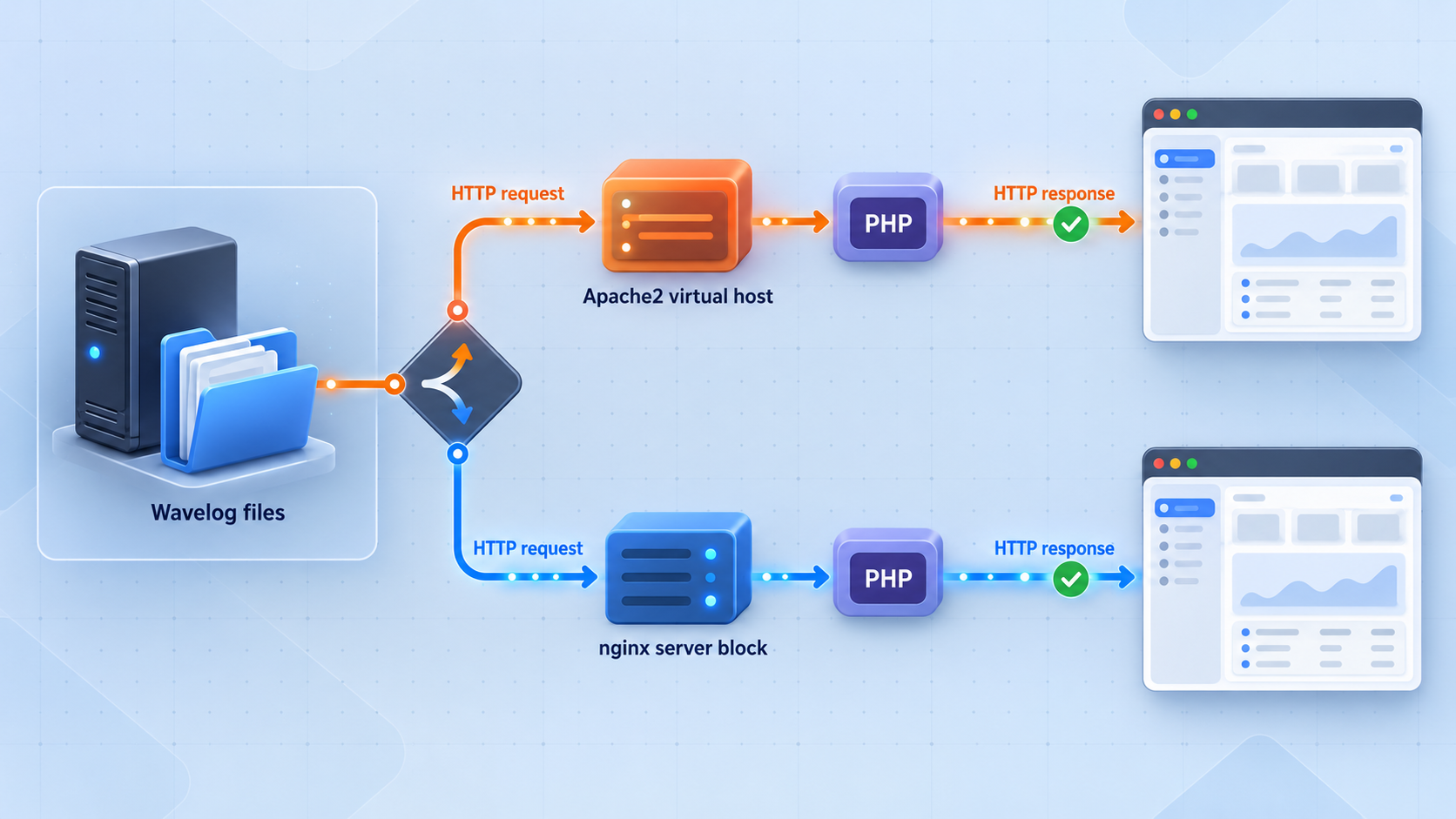
Both Apache2 and nginx are supported by Wavelog's published requirements. Apache2 is identified as the recommended classic choice, but an existing nginx environment can also be appropriate. The best option is usually the server your administrator already knows how to patch, inspect, back up, and troubleshoot.
| Consideration | Apache2 | nginx |
|---|---|---|
| Wavelog status | Supported and identified as recommended | Supported |
| PHP handling | Depends on the PHP integration provided by the operating system | Typically requires a separately configured PHP application service |
| Configuration model | Uses an Apache virtual-host configuration appropriate to the distribution | Uses an nginx server block appropriate to the distribution |
| Localtonet target | The actual address and port on which the Apache site is reachable | The actual address and port on which the nginx site is reachable |
| Best choice | Often suitable for a new classic installation following Wavelog's recommendation | Suitable when nginx is already operated and understood |
Apache2 checklist
- Confirm the intended virtual host is enabled.
- Confirm its document root points to the required Wavelog location.
- Confirm PHP requests are handled rather than downloaded or displayed as source text.
- Confirm the web-service account can read the application and write only where required.
- Validate the Apache2 configuration before reloading or restarting it.
- Record the address and port on which the virtual host accepts local requests.
nginx checklist
- Confirm the intended server block is enabled.
- Confirm its root points to the required Wavelog location.
- Confirm PHP requests are sent to the correct PHP application service.
- Confirm the PHP service is running and that nginx can reach it.
- Validate the nginx configuration before reloading or restarting it.
- Record the address and port on which the server block accepts local requests.
If a browser downloads a PHP file or displays PHP source, stop immediately and correct the web-server integration. Do not create a public tunnel until PHP files are executed correctly and sensitive configuration is inaccessible from the browser.
Hostnames and virtual hosts
A web server may choose a site based on the request's host header rather than the destination port alone. This matters when several sites share one listener. If a local request to the server's IP address opens a default site instead of Wavelog, first correct or understand the virtual-host routing. The public tunnel cannot reliably target an application whose local web-server selection is ambiguous.
The supplied Wavelog evidence does not provide a universal local hostname, URL, or port. It would therefore be incorrect to state that every installation uses a particular loopback address or conventional web port. Use the listener defined in your own active Apache2, nginx, or Compose configuration.
Verify Wavelog locally before remote access
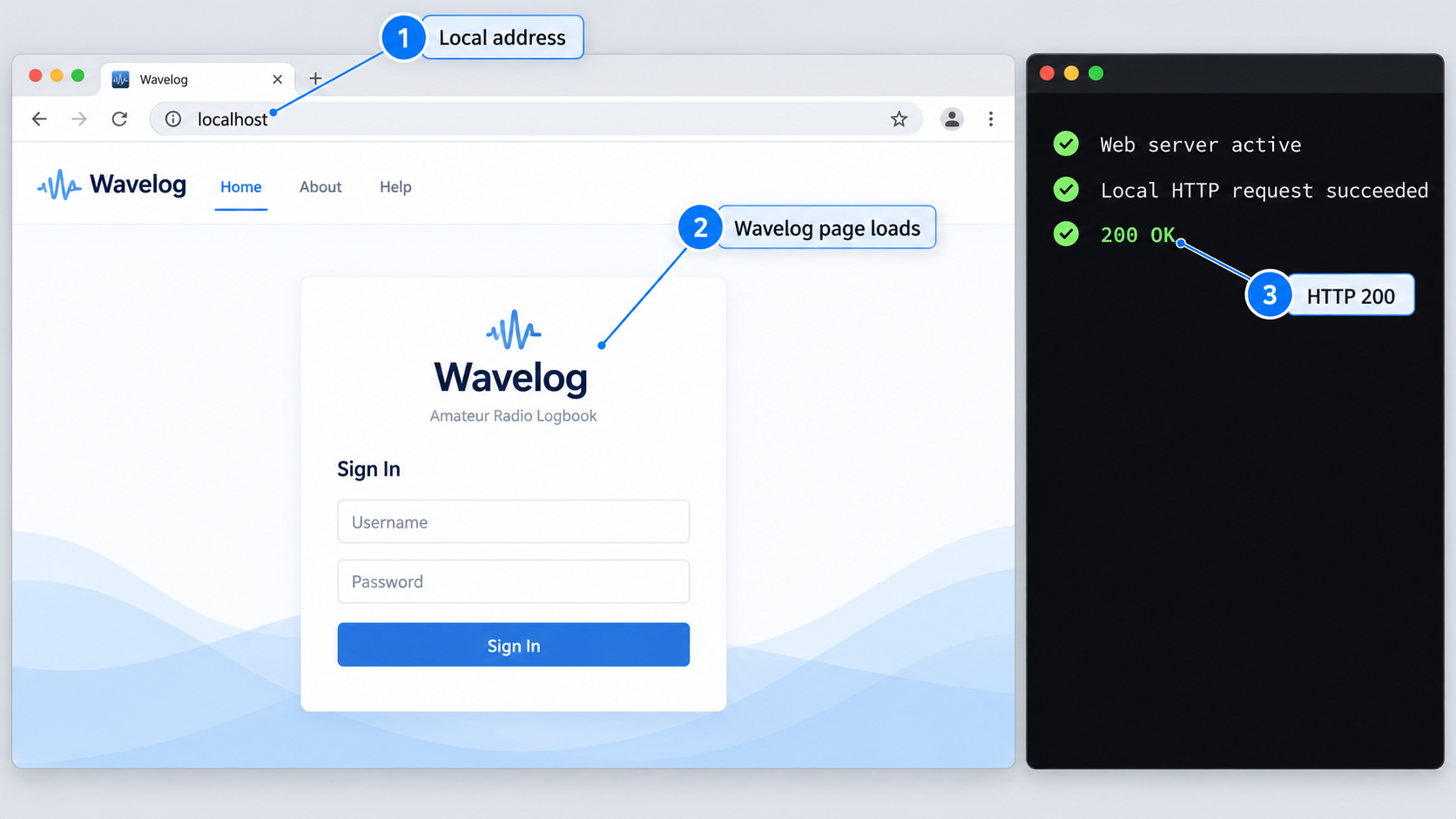
Verification should progress from the host outward. This isolates failures and prevents a tunnel from becoming an extra variable while the application is still broken.
Check the database service
Confirm MySQL or MariaDB is running and that the dedicated Wavelog account can access the intended database. A successful administrative login with a different account does not prove that the application credentials work.
Check PHP execution
Confirm the web server passes application requests to the supported PHP runtime. Review web-server and PHP logs if the browser shows a server error, a blank response, raw source, or a download prompt.
Open Wavelog on the host
Use a browser or an HTTP request tool on the Wavelog host to open the configured local endpoint. Record the exact address and port that return the expected Wavelog page.
Test from the Localtonet client device
If our client will run on another machine, open the same service from that machine using an address reachable across the local network. A loopback address on the Wavelog host cannot be reached from a separate client device.
Exercise an authenticated workflow
Sign in using an authorized application account and verify that key pages load, database-backed data can be read, and an appropriate test operation succeeds. Use a reversible test rather than modifying valuable logbook data unnecessarily.
At the end of this process, you should know three facts: which device can reach Wavelog, which local IP address or hostname it uses, and which port serves the interface. Those values define the Localtonet HTTP tunnel target.
If Wavelog opens locally at an endpoint selected in your server configuration, use that endpoint. Do not substitute a hostname or port from another tutorial. Container port mappings, reverse proxies, existing sites, and distribution defaults can all change the correct target.
Connect the Wavelog web interface through Localtonet
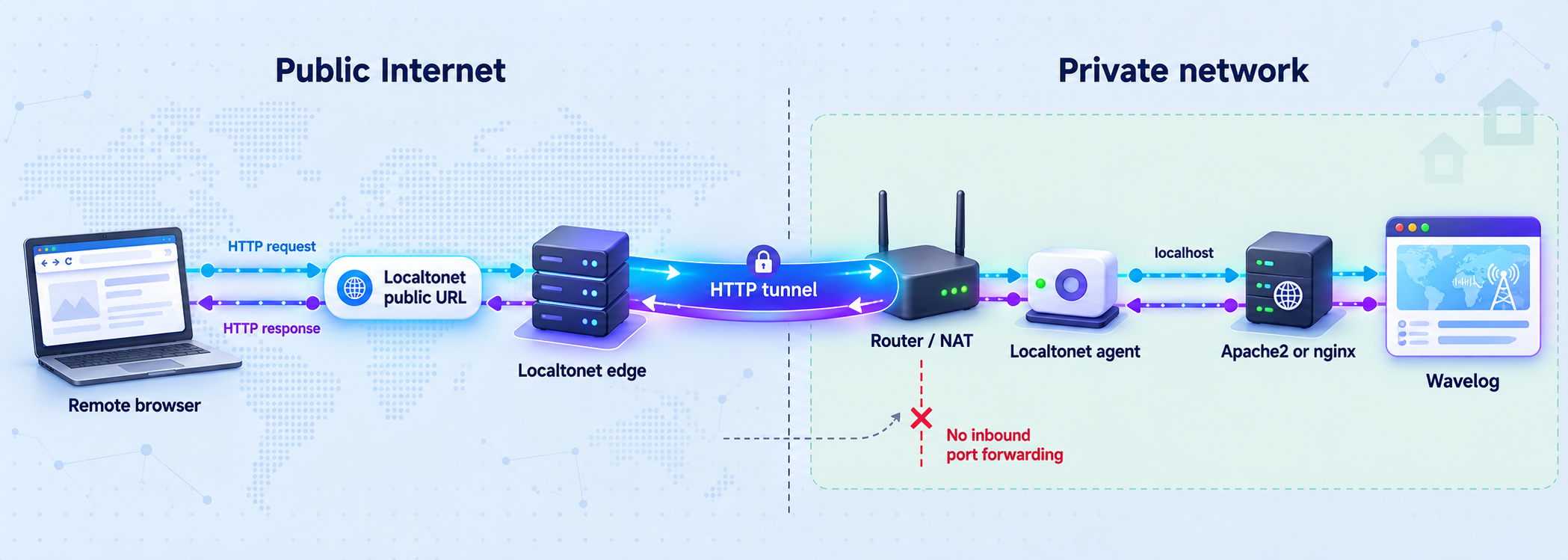
Once Wavelog works locally, an HTTP tunnel can make the web interface reachable through a public HTTPS address. The Localtonet client establishes the outbound connection, so this workflow does not require an inbound router port-forwarding rule, firewall change, VPN setup, or public IP address.
Install our client on the Wavelog server when practical. This often allows the tunnel to target the service through the host's local interface. Alternatively, install it on another device that remains online and can reach the Wavelog listener over the local network. In that arrangement, use the Wavelog server's reachable LAN address rather than the other device's loopback interface.
Install and run the Localtonet client
Install our client on the Wavelog host or on a device that can reach the verified web endpoint. Keep the device online whenever remote access is required. The tunnel is available only while the selected client is connected and the tunnel is running.
Authenticate the client device
Use the device-specific authentication token assigned through Localtonet. Treat this token as a secret. Do not place it in screenshots, shell history shared with others, public issue reports, or Wavelog configuration files.
Select an available relay server
Select a current server or region from the Localtonet dashboard. Available server codes and regions can vary, so obtain the value from the current product rather than copying a hardcoded value from an article.
Create an HTTP tunnel to Wavelog
Create an HTTP tunnel and enter the local IP address and port verified earlier. For an HTTP tunnel, the process type can be Random Sub Domain, Custom Sub Domain, or Custom Domain. These options serve the target content at a public HTTPS address, although availability can vary by plan or current product configuration.
Start the tunnel
Creating the tunnel does not start it. Use the Start button and confirm that the selected client remains connected. Do not treat a saved configuration by itself as evidence that Wavelog is publicly reachable.
Test the assigned public address
Open the assigned public HTTPS URL from a device outside the local network. Confirm that it displays Wavelog, that sign-in works for an authorized account, and that browser assets and application requests load correctly. Stop the tunnel when remote access is no longer needed.
For current dashboard details, consult our HTTP tunnel documentation. Exact custom-domain DNS instructions should always be checked against current documentation rather than inferred from an older deployment.
Do not expose an unfinished installer, diagnostic page, database administration interface, or unauthenticated maintenance tool. Verify Wavelog's account controls, remove test accounts, use strong unique passwords, and limit access to people who need it. A tunnel provides connectivity, not application authorization.
Secure the complete deployment
Security is shared across the operating system, web server, PHP runtime, database, Wavelog accounts, Localtonet device token, and public tunnel lifecycle. A secure public transport path does not compensate for weak application credentials or an unmaintained server.
Expose only the web interface
The normal remote-access target is the Wavelog web service. Do not create a public tunnel to MySQL or MariaDB merely because the application uses a database. Wavelog should reach the database through a local or otherwise trusted path. Database administration should use a separate protected workflow.
Use least privilege
The Wavelog database account should be dedicated to its database and should not be a global administrator. The web-service account should have only the filesystem access required by Wavelog. Human users should receive the application access appropriate to their role, especially in a club or multi-operator environment.
Protect the Localtonet device token
The authentication token identifies the device that runs a tunnel. Keep it outside public repositories, support screenshots, browser-visible files, and shared configuration archives. If you believe a token has been disclosed, replace it through the appropriate account workflow rather than continuing to use it.
Maintain supported software
Keep Linux, Apache2 or nginx, PHP, the database, and Wavelog within supported versions. Before a Wavelog update, review the release instructions and release notes. Updates may include schema changes, performance improvements, robustness fixes, API changes, or corrections to logging and synchronization behavior.
Back up before upgrades
A useful Wavelog backup must cover the information required to restore the application, not only a copy of its public files. Protect the database, application configuration, user-generated content, and any other persistent paths identified by the current release documentation. If containers are used, make sure the backup covers persistent volumes rather than only the disposable container filesystem.
Test restoration periodically. A backup job reporting success does not prove that the resulting data is complete, readable, or compatible with the recovery procedure. Store at least one backup separately from the Wavelog host so a disk failure or host compromise does not destroy both the service and every backup.
Limit tunnel uptime when appropriate
A Localtonet tunnel can be stopped without deleting its saved configuration. For an installation that only needs occasional remote access, start the tunnel for the required session and stop it afterward. For an always-available station or club service, monitor both the Localtonet client and Wavelog host, and maintain a defined patching and incident-response process.
Routine operations and troubleshooting
Divide troubleshooting into layers. First test Wavelog locally. Then test it from the device running our client. Finally test the public address. This order identifies whether the failure belongs to the application stack, local routing, tunnel lifecycle, or public browser path.
Routine maintenance checklist
- Review operating-system, web-server, PHP, database, and Wavelog update notices.
- Create and verify backups before application or database upgrades.
- Check that the database and web server start after host maintenance.
- Review Wavelog, PHP, and web-server logs for recurring errors.
- Remove unused Wavelog accounts and review authorized club operators.
- Protect and rotate secrets according to your operational policy.
- Confirm the Localtonet client reconnects after an intentional host restart.
- Confirm the tunnel is actually running when remote access is expected.
- Stop or delete obsolete tunnels rather than leaving unused exposure paths.
Wavelog does not load locally
Check whether the web server is running and listening on the address defined in its active configuration. Validate the server configuration. Confirm that the selected virtual host or server block points to the intended Wavelog location. If another site appears, inspect hostname-based routing and default-site behavior.
The browser shows raw PHP or downloads a file
PHP is not being executed correctly. Disable public access and repair the web-server-to-PHP integration. For nginx, verify the configured PHP service and request routing. For Apache2, verify that the selected PHP integration is enabled and compatible with the installed PHP version.
Wavelog reports a database error
Confirm that MySQL or MariaDB is running, that its version meets Wavelog's requirement, and that the application is using the intended database name and dedicated credentials. Check whether the account has access from the connection origin used by Wavelog. Do not solve an application connection problem by granting global database privileges.
Wavelog works on the host but not from the Localtonet device
This commonly indicates a target-address issue. If our client runs on a separate device, an address that refers to the Wavelog host's loopback interface will not refer to Wavelog from the client device. Use the reachable LAN address configured for the Wavelog listener, then verify that local network policy permits the connection.
The public URL is unavailable
Confirm that the Localtonet client is connected, the correct device token is selected, the tunnel has been started, and the Wavelog target still responds from the client device. Remember that creating a tunnel does not automatically make it run. Also confirm that the host has not gone to sleep or shut down.
The public URL opens the wrong site
Test the same target directly from the Localtonet client device. If that request also opens the wrong site, correct the Apache2 virtual host or nginx server block selection before changing the tunnel. Multiple hostname-based sites on one listener may require a carefully planned web-server arrangement.
The page loads but assets or actions fail
Use the browser's network view and the server logs to identify the failed request. Look for incorrect redirects, unreachable asset paths, permission errors, PHP failures, or an application assumption about its external URL. Do not suppress errors blindly. Determine whether the behavior occurs locally as well as through the tunnel.
An upgrade fails
Stop and preserve the current state before making repeated changes. Review the release-specific upgrade requirements, PHP compatibility, database migration status, permissions, and logs. Restore from a tested backup if the supported recovery procedure requires it. Do not overwrite the only working copy or attempt an unverified database downgrade.
If the local Wavelog endpoint fails, troubleshoot Wavelog and its dependencies. If local access works but the Localtonet client device cannot connect, troubleshoot local addressing and reachability. If both work but the public URL fails, inspect the client connection and tunnel state.
Frequently asked questions
Which Wavelog installation method should I use?
Wavelog identifies its prebuilt image with Docker Compose as the easiest method. Its classic deployment uses 64-bit Linux, Apache2 or nginx, PHP 8.2 through 8.5, and MySQL 8 or newer or MariaDB 10.11 or newer. Choose Docker when you are comfortable maintaining containers and persistent volumes. Choose the classic stack when you want direct control over the web server, PHP runtime, and database services.
Is Apache2 or nginx better for Wavelog?
Wavelog supports both and identifies Apache2 as recommended for the classic stack. nginx remains a supported option. Operational familiarity is important, so an administrator who already maintains nginx successfully may reasonably use it rather than introducing another web server.
What local port should I enter in Localtonet?
Enter the port on which your verified Apache2, nginx, or container-published Wavelog endpoint is listening. Wavelog's general project information does not define one universal local port, so the correct value must come from your actual server configuration and local test.
Does Localtonet replace Apache2 or nginx?
No. Apache2 or nginx serves Wavelog locally and integrates with PHP. Our HTTP tunnel connects a public HTTPS address to that existing local service. The web server, PHP runtime, database, and Wavelog application must already work.
Do I need router port forwarding or a public IP address?
No. The Localtonet client establishes an outbound connection to our relay server. This allows the tunnel to provide a public endpoint without an inbound router port-forwarding rule or public IP address.
Should I expose the Wavelog database through a tunnel?
Not for normal browser access. The HTTP tunnel should target the Wavelog web interface. Keep MySQL or MariaDB private and allow the application to reach it through a local or trusted network path. Use a separate, carefully protected administrative workflow if remote database management is genuinely required.
Does creating a Localtonet tunnel start it automatically?
No. Creating and saving a tunnel does not mean it is running. Start it with the Start button. The selected client must also remain connected. You can later stop the tunnel without deleting its configuration, or delete it when it is no longer needed.
Can the Localtonet client run on another device?
Yes, provided that device can reach the Wavelog web service. Use the Wavelog host's reachable local-network address and configured port. Do not use an address that refers only to the Wavelog host's loopback interface when our client runs elsewhere.
Can I use a custom domain for Wavelog?
HTTP tunnels support Random Sub Domain, Custom Sub Domain, and Custom Domain process types. Availability can vary by plan or current product configuration. Check the current Localtonet dashboard and documentation for the exact custom-domain and DNS requirements before changing DNS records.
Connect your verified Wavelog installation
Once Wavelog works through Apache2 or nginx on the local network, create a Localtonet HTTP tunnel to that verified address and port. Keep the application authenticated, protect the device token, and stop the tunnel whenever remote access is no longer required.
Get Started Free →

