

Validate the Python, Tornado, and MySQL game server locally before publishing its HTTP endpoint
This guide explains the documented setup sequence for the svzdev/doudizhu project and shows how to forward its local web service through a Localtonet HTTP tunnel. We will identify the repository discrepancy in its README, prepare MySQL, install the Python dependencies, configure DATABASE_URI, start the server, and verify the documented endpoint at http://127.0.0.1:8080. We will then test the complete browser workflow through the assigned public URL, not merely the first page response. Because the available repository evidence does not include an immutable tested commit, verified database grants, or proof of application-level authentication, those limitations are stated plainly instead of being filled with assumptions.
📋 What's in this guide
Define the project scope and evidence limits
This tutorial concerns the public repository svzdev/doudizhu. Its current repository page describes an HTML5 Dou Dizhu game with a Python and Tornado backend, MySQL persistence, and a Phaser frontend. The repository contains client, server, requirements.txt, and schema.sql. Its README documents Python 3.8 or newer, MySQL 5.7 or newer, the DATABASE_URI environment variable, python3 app.py as the startup command, and http://127.0.0.1:8080 as the local address.
There is an important repository identity conflict. The page is hosted under svzdev/doudizhu, but the README still tells readers to clone mailgyc/doudizhu. This guide resolves which repository it is discussing by consistently using the reviewed svzdev/doudizhu repository. It does not silently redirect readers to the differently named checkout in the README.
The reviewed evidence identifies the master branch and shows 277 commits, but it does not provide the full commit SHA that was tested. A branch name is movable and is not an adequate long-term pin. Before treating this as a reproducible production procedure, an editor or operator must select a reviewed commit from the svzdev/doudizhu commit history, record its full SHA, and rerun every schema, dependency, startup, local verification, and remote verification step against that exact checkout. This article does not invent a SHA or claim that an unprovided revision was tested.
To create a controlled checkout, clone the repository that this guide actually reviews, inspect its current commit, and then check out the approved full SHA. Replace the placeholder only with a SHA copied from the reviewed repository. Do not copy a SHA from an unrelated fork.
git clone https://github.com/svzdev/doudizhu.git
cd doudizhu
git rev-parse HEAD
git checkout APPROVED_FULL_COMMIT_SHA
git rev-parse HEAD
Record the final output of git rev-parse HEAD with your deployment notes. The checked-out revision should contain the same README, schema.sql, requirements.txt, and server directory that you review. If any of those files differ from the assumptions in this guide, stop and reassess the installation sequence for that revision.
The evidence also does not establish that the application authenticates players, protects rooms, or authorizes a person merely because they received a URL. It confirms that browser-facing templates exist, including index.html and poker.html, but it does not prove the exact multiplayer protocol or access-control behavior. Accordingly, this tutorial explains remote HTTP access and requires manual game-flow testing. It does not promise authenticated remote multiplayer.
Understand the Doudizhu server architecture
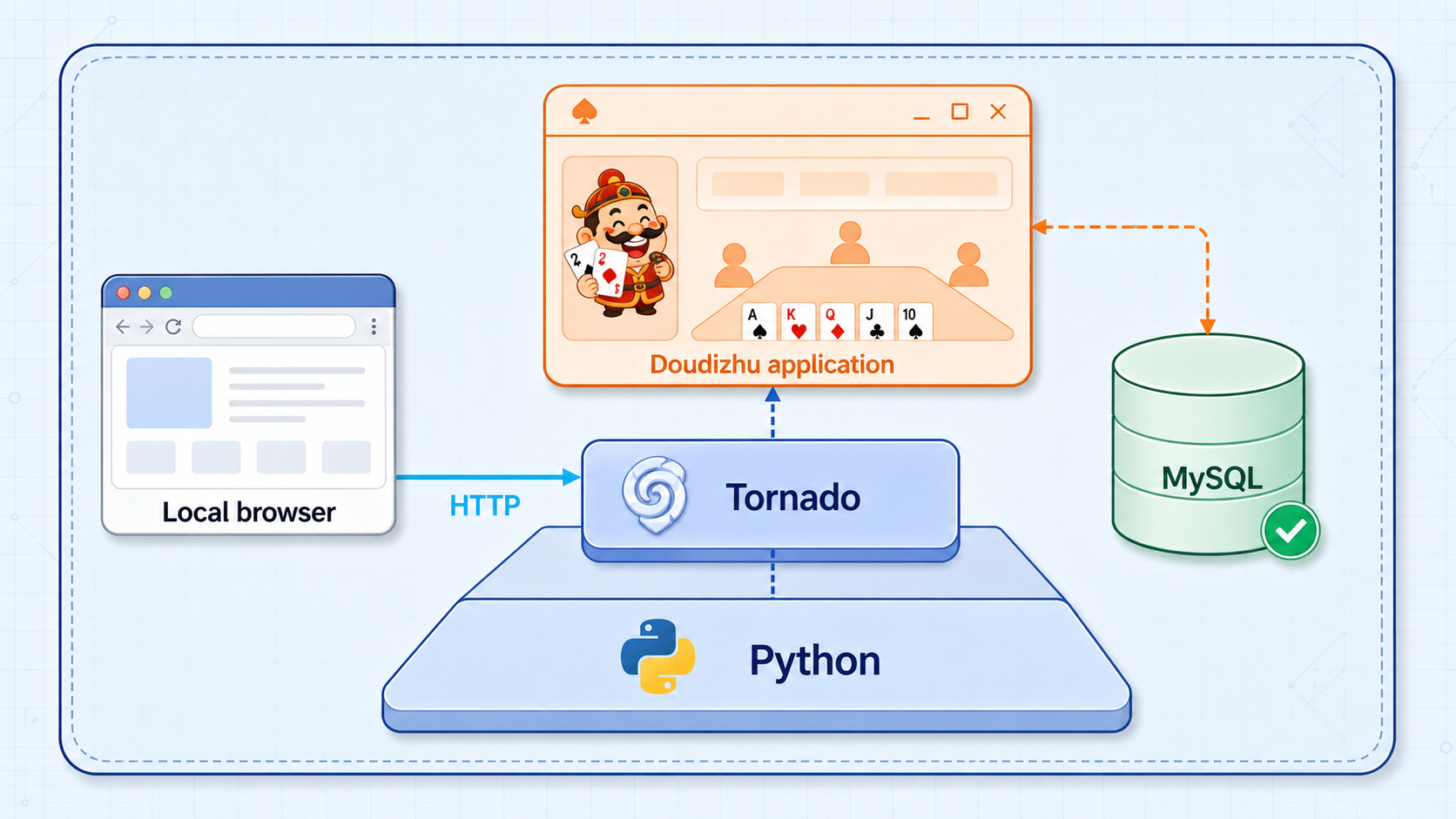
This project is not a single HTML file that can be opened directly in a browser. The documented stack includes a Python backend based on Tornado, a MySQL database, and a Phaser frontend. The server template directory contains browser-facing pages, but those templates are part of the application. They do not replace the running Python service.
A complete request path therefore has several dependencies. The browser requests the application over HTTP. The Tornado process handles the request and serves the appropriate frontend resources. Operations that depend on persistence require a valid connection to MySQL and the schema expected by the checked-out code. When remote access is enabled, Localtonet forwards HTTP traffic to that same local Tornado endpoint. It does not connect players directly to MySQL.
python3 app.py from the server directory.
127.0.0.1:8080.
schema.sql for database initialization.
Keep these layers separate while troubleshooting. A healthy MySQL service does not prove that Tornado is listening. A successful first page does not prove that database-backed actions work. A running tunnel does not prove that its local target is correct. The most reliable workflow validates each boundary in order.
Prepare the host and reviewed checkout
Use a host on which you can install Python packages, run a persistent Python process, and administer or reach a MySQL service. The repository does not identify a specific operating system, distribution, package manager, Python virtual-environment tool, or process supervisor. Install Python and MySQL through the supported procedure for your operating system, then verify the actual executables before running project code.
| Requirement | Repository evidence | Verification goal |
|---|---|---|
| Python | Python 3.8 or newer | The interpreter used for dependency installation and startup meets that requirement. |
| MySQL | MySQL 5.7 or newer | The service is running and reachable from the Doudizhu host. |
| Git checkout | svzdev/doudizhu is the reviewed repository |
The full approved commit SHA is recorded before installation. |
| Project files | requirements.txt, schema.sql, and server |
All files come from the same reviewed checkout. |
| HTTP target | http://127.0.0.1:8080 |
The application responds locally before a tunnel is started. |
| Localtonet client | Runs on the service host or a device that can reach it | The client device can connect to the exact configured target address. |
On a POSIX-style shell, the following checks display the selected Python and MySQL client versions. They do not install anything and do not prove that the MySQL server is running, but they help prevent an accidental mismatch between the interpreter used by pip3 and the interpreter used to launch the application.
python3 --version
python3 -m pip --version
mysql --version
git rev-parse HEAD
Review the pinned files before executing them. In particular, inspect schema.sql for database creation, database selection, tables, indexes, seed data, destructive statements, and any account or grant statements. Inspect requirements.txt to understand what will be installed. The available extracted evidence confirms that these files exist, but it does not expose their complete contents, so this article cannot accurately enumerate every object created by the schema.
The project README documents pip3 install -r requirements.txt, but it does not prescribe a virtual-environment tool. An isolated environment can reduce conflicts with system packages, but the exact creation and activation procedure depends on the operating system and Python installation. Whichever method you use, install and run the application with the same interpreter.
Import and verify the MySQL schema
The README imports schema.sql through a MySQL administrative account:
mysql --user=root -p < schema.sql
The -p option prompts for the password instead of placing it directly in the command. Run the import from the project root, where schema.sql is present. Using an administrative account for schema creation does not mean the application should continue running as that account.
The documented application URI ends with /ddz, which indicates that the application expects a database named ddz. However, the available evidence does not list the exact statements inside schema.sql. Confirm the file itself creates or selects the expected database before relying on the root-level import command. If it does not, follow your MySQL administration policy to create the target database and import the file into the intended database.
Confirm that the import completed
Do not treat a command that returned to the prompt as sufficient proof. First review its exit status and any MySQL errors. Then connect to MySQL and check that ddz exists and contains the objects defined by the pinned schema.sql.
SHOW DATABASES LIKE 'ddz';
SHOW TABLES FROM ddz;
Compare the reported tables with the CREATE TABLE statements in the exact schema file you imported. If the schema contains seed rows or other required initialization data, verify those objects and rows with read-only queries based on their actual names. This guide does not invent table names or expected row counts because they are not present in the supplied evidence.
Provision an application account before configuring DATABASE_URI
Use a dedicated MySQL account for the game instead of the README’s root-oriented example. The account must be able to connect from the application host and perform only the operations required by the checked-out code. Determining that precise privilege set requires inspection or testing of the application’s database operations.
The repository evidence supplied for this revision does not document a least-privilege username, account-host pattern, or exact set of MySQL grants. Providing a complete CREATE USER and GRANT script would therefore require guessing. Have a MySQL administrator inspect the pinned schema and application queries, create the dedicated account under your normal credential policy, grant only the required privileges on ddz, and test the account before setting DATABASE_URI. Do not place an unprovisioned example username into the URI and assume it exists.
Test the dedicated account by connecting to the expected database and listing its tables. Use MySQL’s password prompt rather than putting the password on the command line:
mysql --user=APP_DB_USER -p --host=127.0.0.1 --port=3306 ddz
Once connected, run SHOW TABLES;. A successful login and table listing confirm basic connectivity and metadata access. They do not prove that every game operation has the necessary privilege, so exercise the complete local application flow and inspect its logs for permission errors.
Handle the database URI carefully
The README documents a POSIX shell environment variable using the mysql+aiomysql scheme:
export DATABASE_URI='mysql+aiomysql://APP_DB_USER:APP_DB_PASSWORD@127.0.0.1:3306/ddz'Replace the placeholders only on the host. Do not publish the completed value. The repository evidence does not document a secret file, operating-system credential store, container secret, or production process-manager configuration. The shell export is therefore best understood as the project’s temporary startup method, not a universal credential-storage recommendation.
A value exported in one shell normally applies to processes launched from that shell and is lost when the session ends. On restart, the variable must be provided again through a method appropriate to the tested operating system and process manager. If a password contains characters with special meaning in a URI, encode it according to the database driver’s URI rules rather than changing the password silently or committing a working URI to source control.
Install and start the Doudizhu server
The sequence below preserves the order described by the reviewed README while adding the missing verification boundaries. It assumes that an approved full commit SHA has been selected, the schema has been reviewed, and a working application database account has been provisioned. If those conditions are not met, the installation is not yet reproducible.
Obtain and pin the reviewed repository
Clone https://github.com/svzdev/doudizhu.git, enter the checkout, and switch to the approved full commit SHA. Record the result of git rev-parse HEAD. Do not use the README’s differently named clone destination without a separate review.
Review, import, and verify schema.sql
Inspect the schema for the database and objects it creates, import it with the documented MySQL command, check for errors, and compare the objects in ddz with the pinned schema file.
mysql --user=root -p < schema.sqlInstall the pinned Python dependencies
Review requirements.txt, then install it with the same Python environment that will run the application.
python3 -m pip install -r requirements.txtEnter the server directory
Change into the documented directory containing app.py.
cd serverSet the tested database connection
Export DATABASE_URI using the dedicated account that was actually created and tested. Keep the completed value out of source control, screenshots, shell transcripts, and support posts.
export DATABASE_URI='mysql+aiomysql://APP_DB_USER:APP_DB_PASSWORD@127.0.0.1:3306/ddz'Start the application
Launch the documented entry point from the server directory and keep the terminal open while testing. Capture startup errors without exposing credentials.
python3 app.py
The foreground process is part of the service lifecycle. Closing its terminal, interrupting the process, logging out without a supervisor, or rebooting the host can stop the application. The repository evidence does not prescribe a production process manager or automatic restart policy, so this tutorial does not claim that python3 app.py survives a restart.
Remote browsers need the Doudizhu HTTP service, not direct database access. Keep port 3306 restricted to the application host or a controlled private network. Do not create a public tunnel to MySQL, and never disclose DATABASE_URI, database passwords, Localtonet device tokens, or private administrative endpoints.
Verify the complete application locally
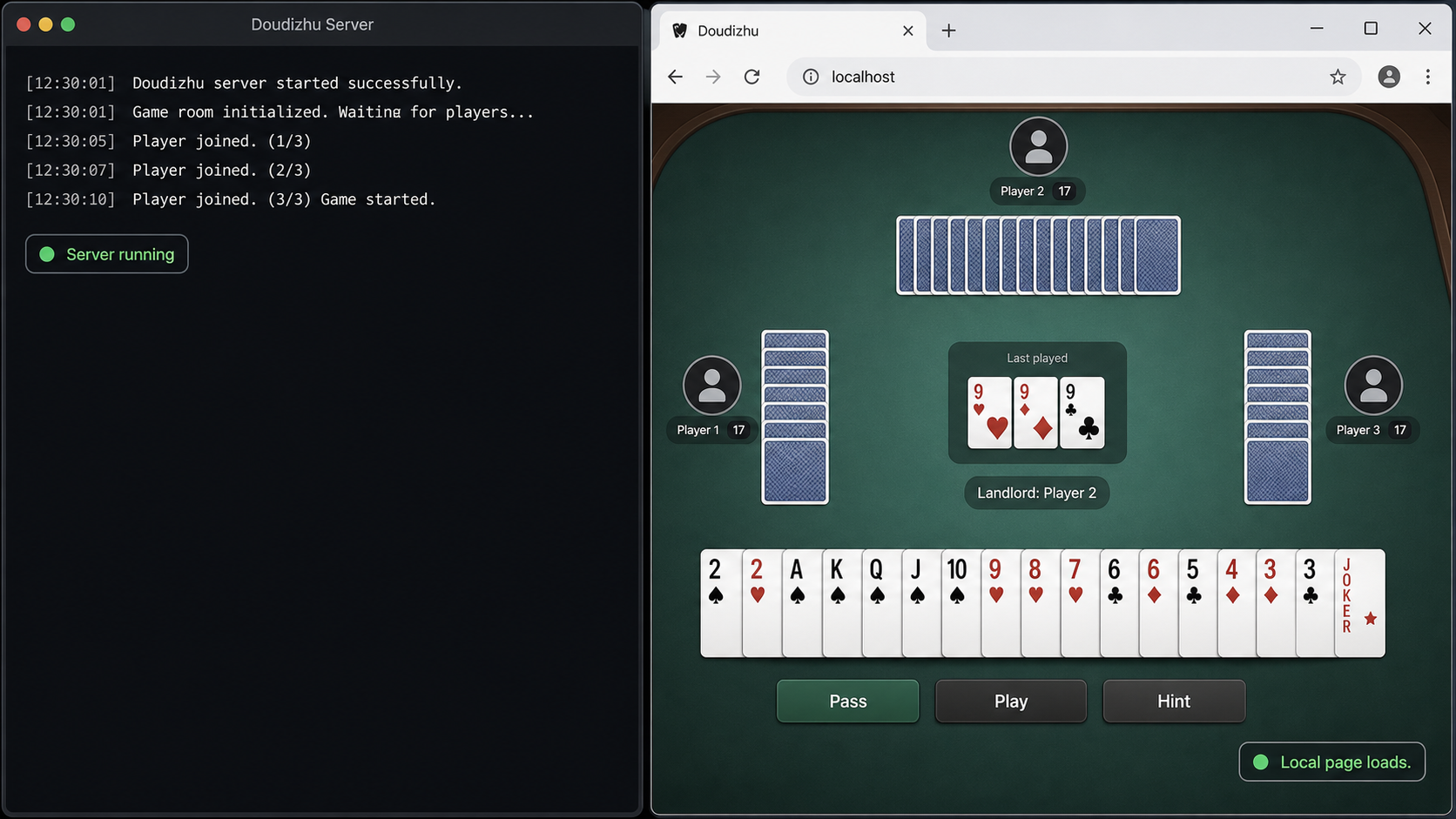
Open http://127.0.0.1:8080 in a browser on the application host while app.py is running. The first response establishes only that something is listening and can return an HTTP page. It does not validate the whole game.
Keep the application terminal visible and perform a structured local test:
- Confirm that the initial page loads from
127.0.0.1:8080without an HTTP or browser connection error. - Confirm that styles, scripts, images, and other required browser assets load rather than returning missing-file errors.
- Open the browser developer console and network panel, then look for failed HTTP requests or JavaScript errors.
- Navigate through the available game interface instead of stopping at the landing page.
- Start or join whatever session flow the pinned application actually presents.
- Exercise actions that cause server or database activity and watch the Python terminal for tracebacks, database permission failures, or connection errors.
- If the application supports multiple browser participants, test with separate browser contexts and verify state changes in each context. Do not assume this behavior merely because the project is a game server.
- Refresh or reconnect a test browser and observe the actual behavior instead of claiming session persistence that has not been verified.
The evidence does not specify a health-check endpoint, automated test suite, expected database row count, room workflow, or browser protocol. It also does not establish whether the application uses WebSocket, long polling, repeated HTTP requests, or another persistent browser mechanism. Browser developer tools and application logs are therefore essential for identifying the connections used by the pinned revision.
If our client will run on the Doudizhu host, verify 127.0.0.1:8080 there. If our client will run on another device, test the game host’s reachable private address from that other device. Loopback always refers to the device making the connection, not to a different machine on the network.
Stop here if local testing fails. Localtonet can route traffic to a working target, but it cannot repair missing Python packages, an unavailable database, an invalid URI, a failed schema import, a port conflict, or an application process that exited.
Create the Localtonet HTTP tunnel
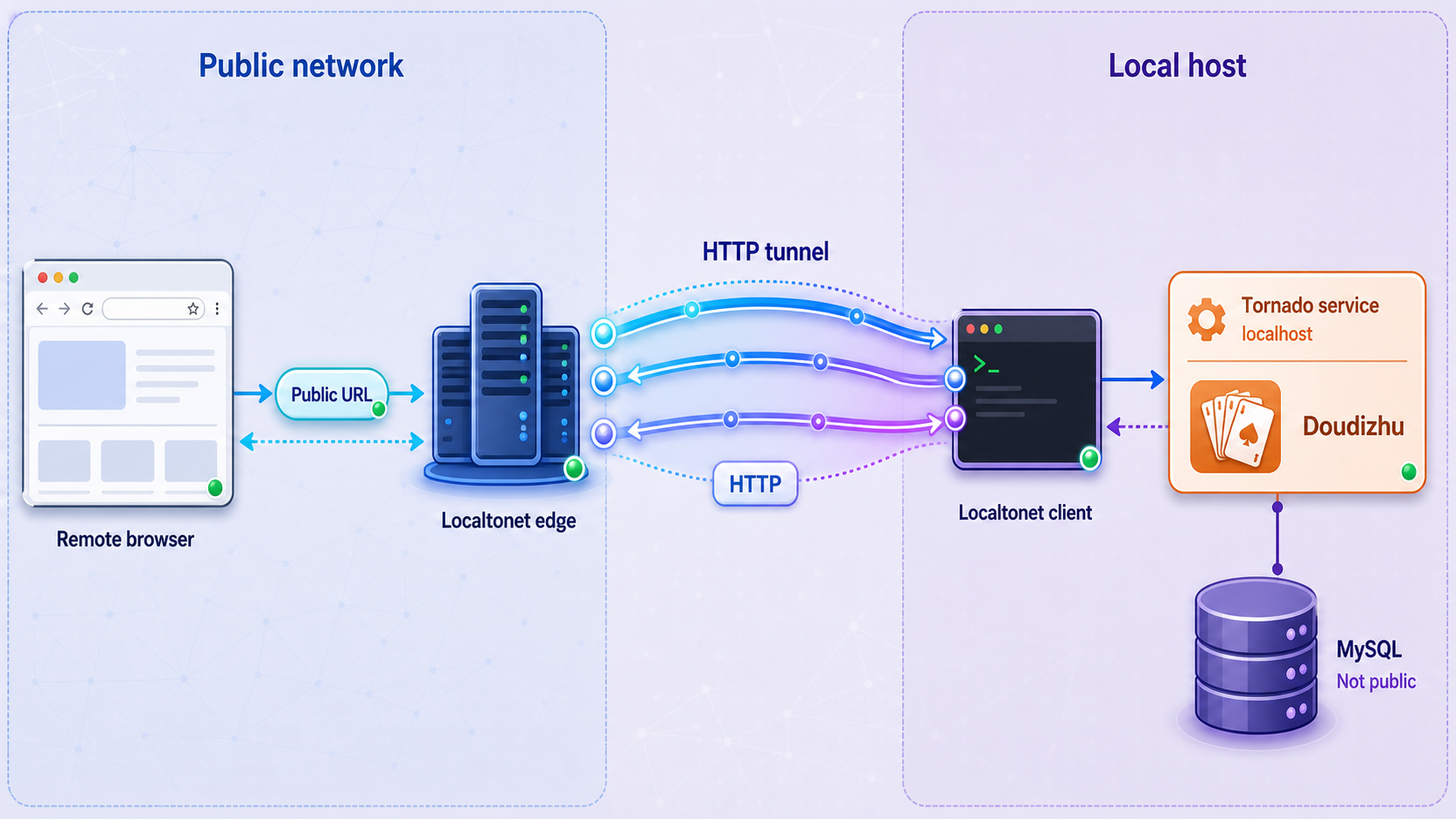
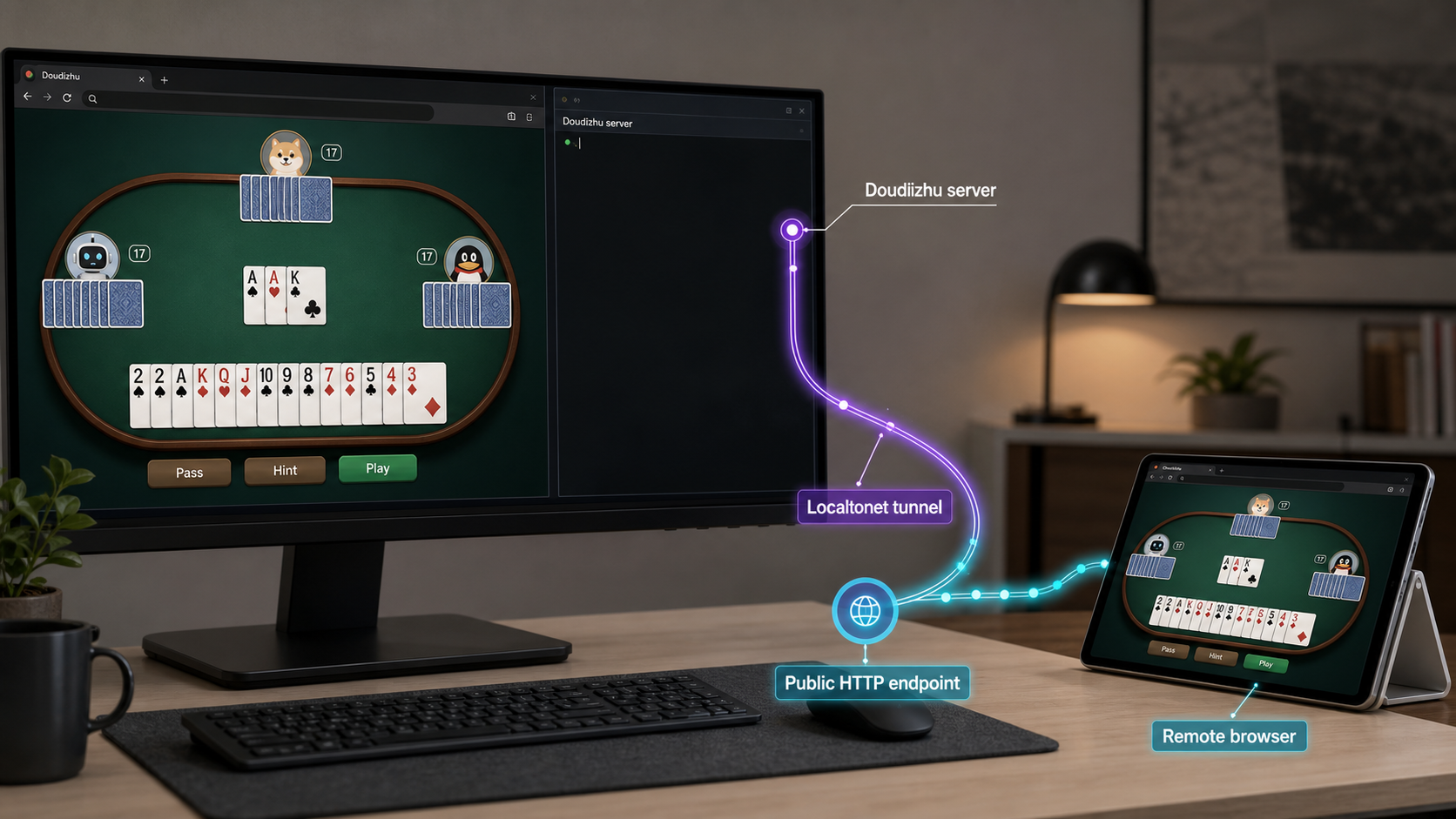
Use an HTTP tunnel because this project exposes a browser-facing HTTP service. Our client establishes an outbound connection to a Localtonet relay server, so the application can be reached without inbound router port forwarding, firewall changes, VPN setup, or a public IP address. The resulting tunnel provides a public HTTPS address and forwards requests to the local target configured in the dashboard.
HTTP tunnels may use a random subdomain, a custom subdomain, or a custom domain where the selected plan and current dashboard support those options. All three process types serve the local content through a public HTTPS address. Do not assume that every process type, relay server, region, or option is available on every plan. Choose from the values currently presented by the dashboard.
The sequence below follows the verified Localtonet tunnel lifecycle and target model. Refer to our HTTP tunnel documentation alongside the current dashboard if labels or available choices have changed.
Install and run the Localtonet client
Run our client on the Doudizhu host or on another device that can reach the verified HTTP service. The Doudizhu process must already be running.
Select the client device and its AuthToken
Use the device-specific token associated with the client that will carry the tunnel. Treat the token as a secret and do not place it in the project, screenshots, logs, or shared instructions.
Choose a current relay server
Select an available server or region from the dashboard. Obtain the current value from the product instead of copying a server code from an older tutorial.
Create an HTTP tunnel with the correct process type and target
Choose the supported process type appropriate to your address requirements. For a client on the same host as Doudizhu, set the local IP address to 127.0.0.1 and the local port to 8080. If the client is on another device, use the game host address that was successfully tested from that client device.
Start the tunnel
Creating a tunnel does not start it. Use the Start button, then confirm that the selected client is connected and the tunnel is running. The public address is available only while the client remains connected and the tunnel remains active.
Copy and test the assigned public URL
Open the assigned URL from a separate network or remote browser. Continue with the full verification procedure below before sharing it more broadly.
Possession of the URL does not prove that a visitor is authorized, and the available project evidence does not establish application-level login, room passwords, player approval, or another access-control mechanism. Treat the endpoint as publicly reachable unless you have separately verified and configured effective access controls. Do not describe remote visitors as authorized solely because they received the link.
Test the real game flow through the public endpoint
A successful landing page is only the first remote check. The public test should repeat the local workflow through the assigned Localtonet URL and cover every browser connection type the application actually uses. This matters because a page can load while subsequent assets, API calls, persistent connections, or database-backed actions fail.
Use a browser on a separate network when practical. Keep the Doudizhu terminal and Localtonet client available for observation, then perform these checks:
- Open the public HTTPS URL and confirm that the expected Doudizhu page appears.
- Use the browser network panel to confirm that required scripts, styles, images, and page requests complete through the public origin.
- Watch for mixed-origin assumptions, hardcoded localhost URLs, failed requests, or browser console errors.
- Follow the same navigation and session-creation flow that succeeded locally.
- Perform representative game actions and confirm that server-side state changes remain synchronized.
- If the pinned revision opens a WebSocket, long-lived request, or repeated polling request, leave the session active and verify that updates continue in both directions.
- If actual multiplayer exists, use separate browsers or devices, create or join a session through the public URL, and confirm that each participant sees the expected state changes. Record the exact tested flow.
- Disconnect and reconnect one test browser to observe the project’s real recovery behavior. Do not promise reconnection or persistence unless the test confirms it.
- Review the Python terminal and browser console for errors that did not occur during local testing.
If the page loads but the game flow fails remotely, compare browser network activity from the local and public tests. Look for requests that refer directly to 127.0.0.1, a private host name, or a private IP address. A remote browser interprets its own 127.0.0.1 as itself, not as the Doudizhu server. Also check whether the application constructs absolute URLs or connection endpoints that differ from the public origin.
The current evidence is insufficient to certify remote multiplayer for this specific project. Publication should describe successful multiplayer only after a pinned revision has been tested with the required number of browser participants and every persistent or bidirectional connection has been observed through the public endpoint.
Operate and shut down the service safely
Three independent components must remain available: the Doudizhu Python process, the Localtonet client, and the Localtonet tunnel. MySQL must also remain reachable for any application behavior that uses the database. A failure in any required component can make the public game partially or completely unavailable.
Restart behavior
The documented startup command runs the application in the foreground. If the process exits, restart it from the pinned checkout’s server directory with the correct Python environment and a valid DATABASE_URI. A newly opened shell will not necessarily retain an earlier exported environment variable. Confirm the credential source before restarting and avoid printing its value into logs.
The Localtonet tunnel has its own lifecycle. A tunnel configuration can remain in the dashboard while its client is disconnected or the tunnel is stopped. After a host reboot or client restart, verify both the client connection and the tunnel status rather than assuming that the public address is active.
Logs and observations to retain
- The approved full Git commit SHA.
- The Python and MySQL versions used for the tested installation.
- The dependency installation result, excluding credentials or tokens.
- The schema import result and a list of verified schema objects.
- The Doudizhu startup output and any Python traceback.
- Browser console and network errors from local and public tests.
- The Localtonet client connection state and tunnel running state.
- The tested local target address from the Localtonet client device.
Redact passwords, complete database URIs, device tokens, session secrets, private endpoints, and personal data before retaining or sharing logs.
Safe shutdown
When remote access is no longer needed, stop the Localtonet tunnel first so new public requests are no longer forwarded. Then stop the Doudizhu process using the normal foreground-process interruption for your operating system. If the database is dedicated to the test environment, stop it according to your database administration policy only after confirming that no other service depends on it.
Deleting a tunnel removes its configuration, while stopping it preserves the configuration for later use. Choose the action that matches your operational intent. In either case, verify that the public URL no longer reaches the application. Do not leave an unnecessary development service reachable.
Security boundaries
Review the pinned project for debug mode, administrative handlers, unsafe defaults, dependency vulnerabilities, data validation, and secrets in source files before exposing it to untrusted traffic. The supplied repository evidence does not establish current maintenance activity, production hardening, security review, rate limiting, application authentication, or suitability for an unrestricted public audience.
Use a dedicated database account, restrict MySQL network access, protect Localtonet device tokens, and expose only the HTTP target required by the game. Share the public URL cautiously. If the application does not provide sufficient authentication or room access control, do not treat obscurity of the generated address as a substitute.
Troubleshoot by symptom
| Symptom | Likely boundary | What to inspect |
|---|---|---|
python3 app.py exits immediately |
Application startup | Read the complete traceback. Confirm the working directory, Python version, installed dependencies, and DATABASE_URI. |
| Python reports a missing module | Dependency environment | Confirm that requirements.txt was installed with the same interpreter that launches app.py. |
| Database authentication fails | MySQL account or URI | Test the dedicated account with the MySQL client. Check username, password encoding, host, port, database name, and account-host restrictions. |
| Database or table does not exist | Schema import | Review import errors, confirm ddz exists, list its tables, and compare them with the pinned schema.sql. |
| Access denied during a game action | Database privileges | Identify the exact failed statement from application and MySQL logs, then have the administrator adjust only the required privilege. |
| Port 8080 is already in use | Local listener conflict | Identify the process already bound to port 8080. Do not terminate an unknown service without checking its purpose. |
127.0.0.1:8080 refuses connections |
Doudizhu process | Confirm that app.py remains running and inspect its terminal for startup or database errors. |
| Local access works, but the public URL does not | Localtonet lifecycle or target | Confirm the client is connected, the tunnel was started, and the configured IP and port match the target reachable from the client device. |
| The client is on another machine and cannot connect | Incorrect loopback target | Do not use 127.0.0.1 for the remote game host. Use an address the client device can reach and verify it before updating the tunnel. |
| The public page loads but gameplay fails | Secondary browser connections | Inspect failed assets, API calls, persistent connections, hardcoded localhost URLs, browser console errors, and Python logs. |
| The public endpoint stopped after a reboot | Process and tunnel restart | Restart Doudizhu with its environment, run the Localtonet client, confirm device connectivity, and start the tunnel if it is stopped. |
Diagnose a port conflict
A port conflict usually appears as a bind or address-in-use error in the Python terminal. Determine which process owns port 8080 using the supported network-inspection tools for your operating system. The repository evidence does not document a supported alternative Doudizhu port, so do not change it casually. A code or configuration change could also require updating browser assumptions and the Localtonet target.
Diagnose local success and remote failure
Test from the Localtonet client device, not only from the application host. If the client and Doudizhu run on the same machine, 127.0.0.1:8080 is appropriate. If they run on different machines, loopback is wrong. Verify the game host’s reachable address from the client device before placing it in the tunnel.
Next confirm that the tunnel is running. Creation alone is not enough. Check that the selected device is connected, that the correct relay is selected, and that the target port is 8080. If the first page succeeds, inspect later requests for private or loopback addresses embedded by the application.
Diagnose a database failure after startup
Some applications connect to the database lazily, so startup may appear successful even when the first database-backed action will fail. Reproduce the action locally, inspect the Python traceback, and test the same database account through the MySQL client. Distinguish invalid credentials from a missing schema, unreachable server, unsupported connection settings, or insufficient grants.
Frequently asked questions
Which Doudizhu repository does this guide use?
It uses svzdev/doudizhu. That is the reviewed repository and the project named in the audit. Its README contains an inconsistent clone command for mailgyc/doudizhu, so this guide does not repeat that command.
What commit should I install?
The supplied evidence does not include an approved full commit SHA, so this article cannot name one without inventing it. Select and review a commit from the repository history, record its full SHA, check it out explicitly, and retest all commands against that revision. Do not treat the movable master branch as an immutable pin.
What software versions does the repository document?
The reviewed README specifies Python 3.8 or newer and MySQL 5.7 or newer. Those claims belong to the reviewed repository documentation and should be rechecked against the exact pinned revision before installation.
What does schema.sql create?
The supplied evidence confirms that schema.sql exists but does not include its complete contents. Inspect the pinned file, identify every database object and any seed data it creates, import it, and compare the resulting ddz schema with those statements. This guide does not invent table names or row counts.
Can I run the application with the MySQL root account from the README?
The README uses root for schema import and in its example URI, but that is not a safe enduring configuration. Use an administrative account only for reviewed setup tasks, then provision and test a dedicated application account with the privileges required by the pinned code. The repository evidence does not provide a verified grant script.
What local address should work after startup?
The README documents http://127.0.0.1:8080. Verify it on the application host before tunneling. If the Localtonet client runs on another device, use and test a private address for the game host that is reachable from that client device.
Does this project support authenticated remote multiplayer?
The available evidence does not establish authentication, room protection, or the complete multiplayer protocol for this revision. A public HTTP tunnel makes the service reachable, but reachability is not authorization. Test the actual multi-browser game flow and review the pinned code before making a multiplayer or access-control claim.
Should I expose MySQL through Localtonet?
No. Remote browsers need the Doudizhu HTTP endpoint, not direct database access. Keep MySQL private and configure the Localtonet HTTP tunnel only for the verified game service.
Why does the public URL fail when localhost works?
Confirm that our client is connected, the tunnel is started, and its local IP and port are reachable from the client device. If the client runs elsewhere, 127.0.0.1 points to the wrong machine. If the landing page works but gameplay fails, inspect subsequent browser requests and persistent connections for private or hardcoded localhost addresses.
Does creating a tunnel make it run immediately?
No. Creating and starting are separate lifecycle actions. The tunnel is usable only while the selected Localtonet client is connected, the tunnel has been started, and Doudizhu is listening at the configured target.
Publish the verified HTTP endpoint with Localtonet
After you pin and review the Doudizhu checkout, verify its schema and database account, and complete the local game flow, use our HTTP tunnel to connect the tested local target to a public HTTPS address. Keep MySQL private, protect your device token, and stop the tunnel when the test session ends.
Get Started Free →

