

Keep a remote Vite preview connected from the first HTTPS request through every HMR update
A Vite application can load through a public HTTPS address while Hot Module Replacement remains disconnected. The page and the HMR WebSocket use related but separately negotiated connections, and Docker introduces another address boundary between the browser, host, and container. This guide provides a version-qualified Vite configuration, a reproducible Docker Compose setup, the documented Localtonet HTTP tunnel sequence, OAuth callback guidance, and end-to-end verification procedures. It also separates settings that are normally required from HMR overrides that should be added only when browser evidence shows they are necessary.
📋 What's in this guide
Why the page can load while Vite HMR remains disconnected
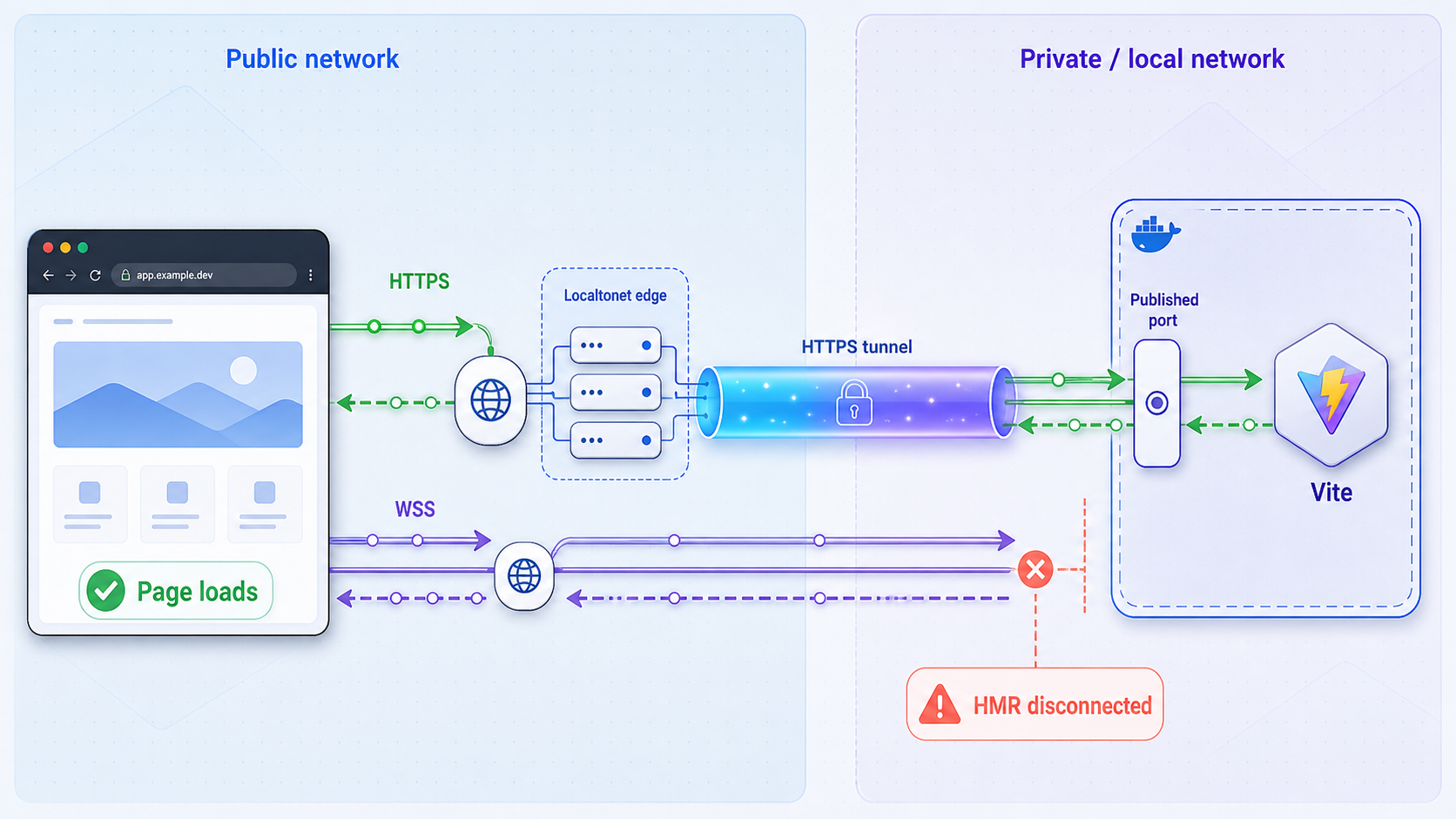
A remote Vite development session involves at least two browser connection types. The initial document, JavaScript modules, stylesheets, source maps, and other assets use ordinary HTTP requests. Hot Module Replacement uses a persistent WebSocket connection so the Vite development server can notify the browser when a source file changes. A successful page load proves that ordinary HTTP traffic reached the application, but it does not prove that the WebSocket request reached Vite, upgraded successfully, or stayed connected.
With Localtonet, our client application runs on a device that can reach the development service. The client establishes an outbound connection to a Localtonet relay server. An HTTP tunnel then provides a public HTTPS URL and forwards requests to the local IP address and port selected for the tunnel. No inbound router port forwarding, public IP address, VPN setup, or inbound firewall change is required. The endpoint is available only while the selected client is connected and the tunnel is running.
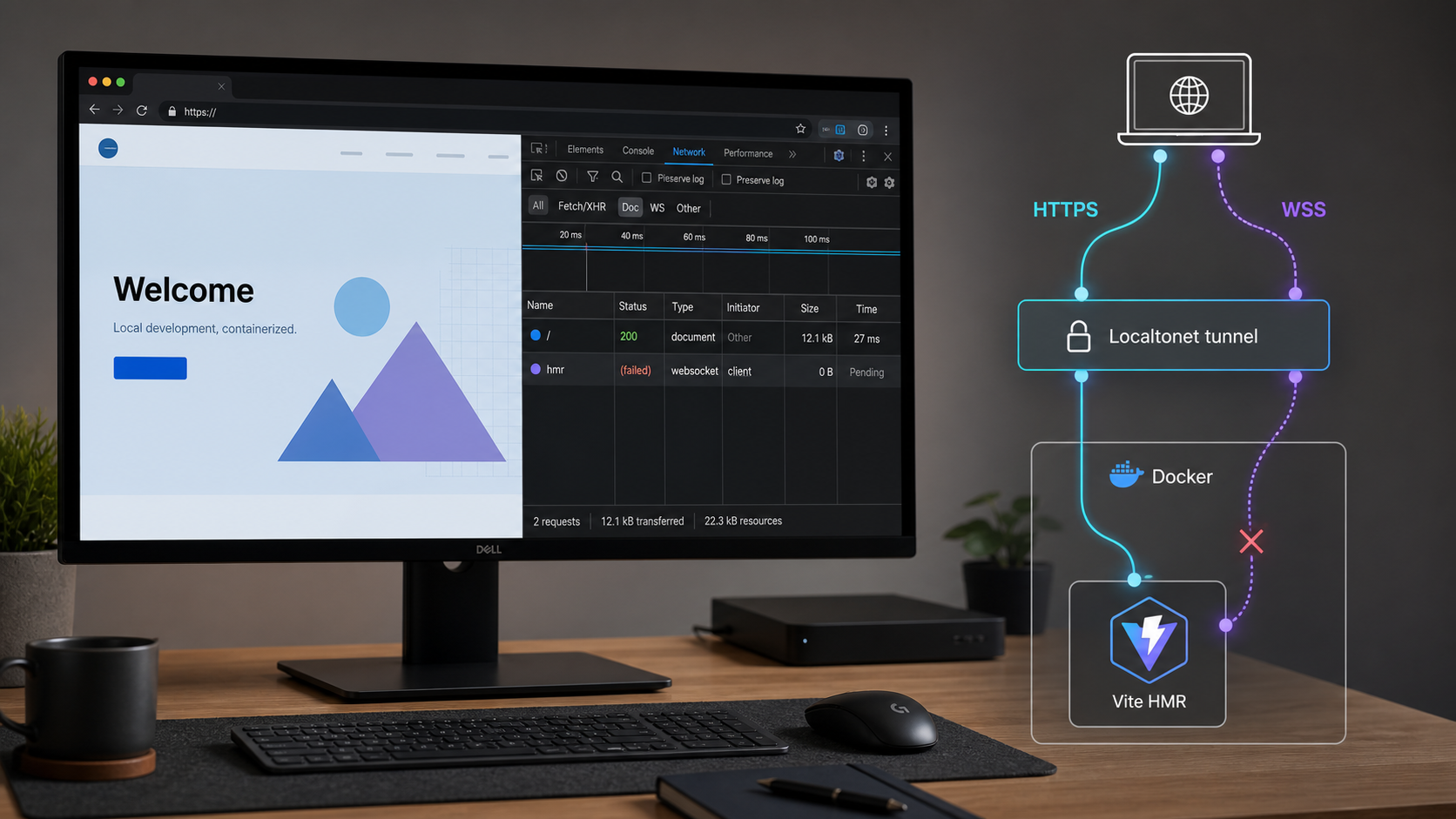
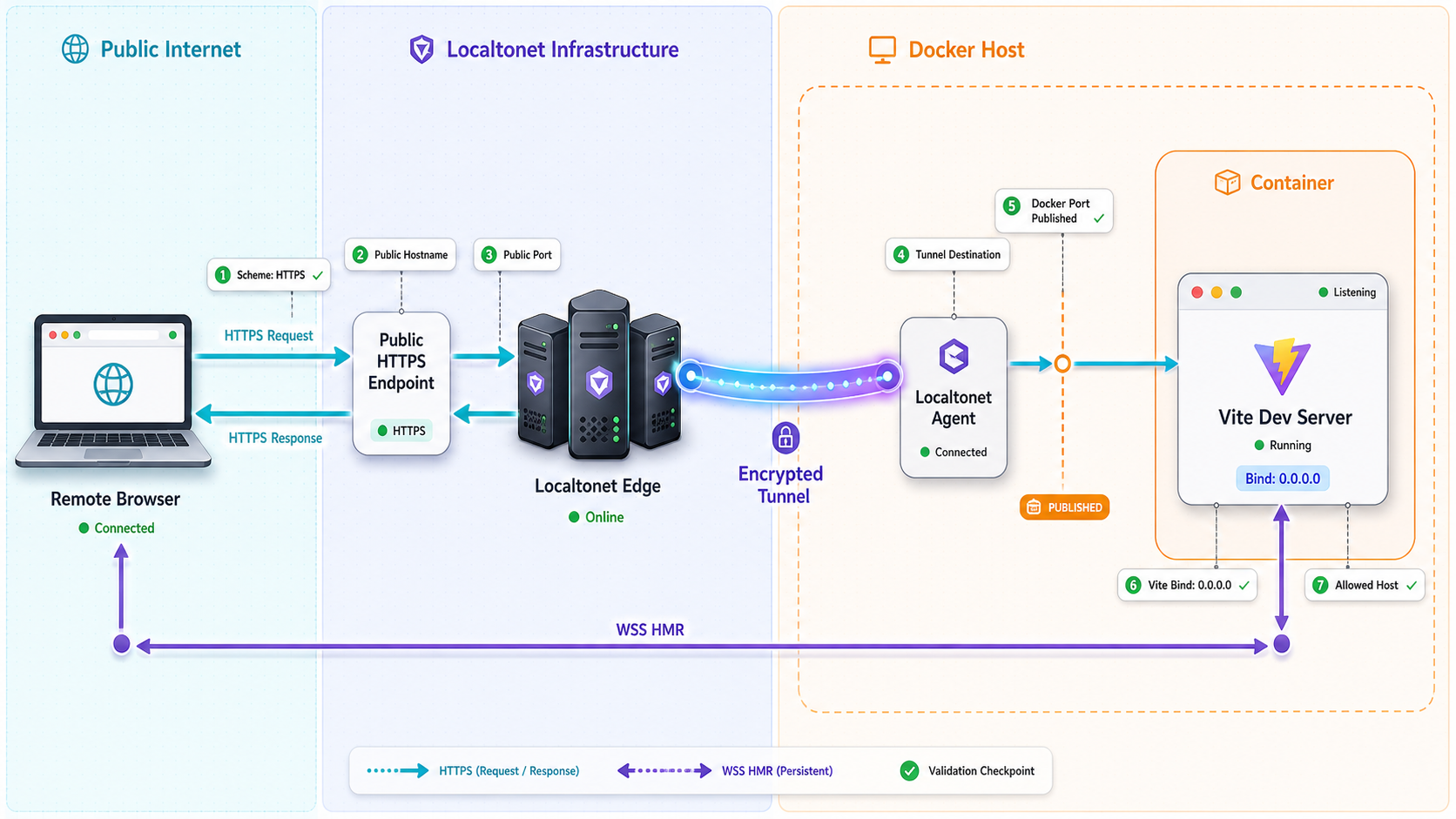
The expected request path is the remote browser to the public HTTPS endpoint, the Localtonet relay to the connected client, and the client to the local Vite target. If Vite runs in Docker, that final part also crosses from the host into the container. Every layer must agree about where traffic should go, but the address used at each layer is not necessarily the same.
Do not infer successful HMR forwarding from a working page alone. Open the browser’s Network tools, locate the Vite WebSocket, confirm a successful upgrade, and edit a source file while watching HMR frames. This procedure verifies the behavior of the exact browser, Vite release, tunnel, and network topology in use.
The connection layers that must agree
Understand what localhost means at each boundary
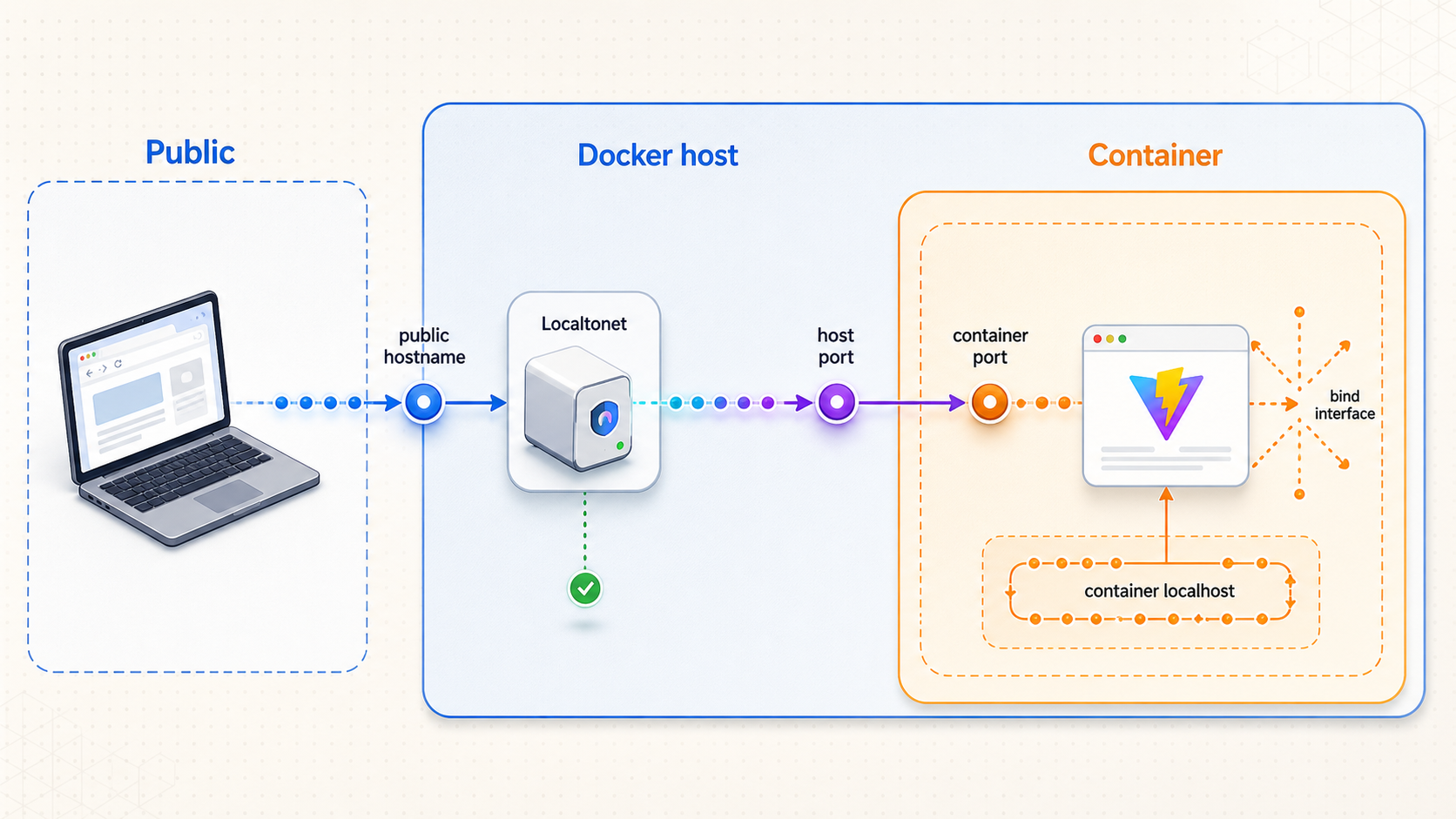
In a colleague’s browser, localhost means the colleague’s computer. Inside a Docker container, it means that container. On the development host, it means the host operating system. A Vite process listening at 127.0.0.1 inside a container is therefore not listening on the host’s loopback interface, even if both environments use the same port number.
| Perspective | Meaning of localhost | Common failure | Verification question |
|---|---|---|---|
| Remote browser | The viewer’s device | HMR connects to a service that does not exist on the viewer’s computer | Does the WebSocket URL contain the public hostname? |
| Vite container | The running container | Vite listens only inside the container loopback namespace | Is Vite bound to 0.0.0.0 or another suitable interface? |
| Development host | The host operating system | The container port is not published to the host | Can the host request the published Vite port? |
| Public endpoint | Not applicable | The HMR client uses the internal Vite port instead of the public origin | Does the socket use the public scheme, host, effective port, and expected path? |
Prerequisites and version scope
The examples in this guide target the Vite 7 server configuration schema. Vite 7 requires Node.js 20.19 or later, or Node.js 22.12 or later. If your project uses another Vite major version, inspect the version installed by the project lockfile and confirm the corresponding server option documentation before copying the configuration. Do not use the behavior of an old Vite 2 discussion as evidence for a current project.
Before configuring the public endpoint, make sure you have all of the following:
- A Vite project that starts successfully with its normal development command.
- A Node.js release supported by the Vite major version installed in the project.
- Docker Engine with Docker Compose available if you are following the container workflow.
- A local Vite service reachable from the device where the Localtonet client will run.
- The Localtonet application installed and running on that device.
- A device-specific Localtonet authentication token entered through the supported client workflow.
- Access to the OAuth provider’s application settings if you plan to test an OAuth callback.
- A public hostname selected by the Localtonet HTTP tunnel workflow.
Check the installed runtime and Vite version from the project directory:
node --version
npm --version
npm ls vite
For Docker, verify that both the engine and Compose are available:
docker version
docker compose version
The exact output depends on your environment. The important result is that Node satisfies the installed Vite release, npm ls vite identifies the project’s actual Vite version, and Docker commands can communicate with the Docker engine.
Variables prefixed for exposure to browser code are not a safe place for OAuth client secrets, access tokens, refresh tokens, Localtonet device tokens, or private API keys. A public development preview makes client-delivered code and requests visible to anyone who can access the endpoint.
Configure Vite for a reachable and predictable server
Begin with the smallest configuration needed to make Vite reachable from Docker or another host namespace. Keep HMR on the same public origin initially. Only add explicit browser-facing HMR overrides if DevTools proves that Vite constructed the wrong WebSocket destination.
Minimal configuration for the base server
Set PUBLIC_PREVIEW_HOST to the hostname assigned to the active tunnel, without https://, a path, or a port. The variable is read by the Node-side Vite configuration and is not a credential.
import { defineConfig } from 'vite'

const publicPreviewHost = process.env.PUBLIC_PREVIEW_HOST

export default defineConfig({
  server: {
    host: '0.0.0.0',
    port: 5173,
    strictPort: true,
    allowedHosts: publicPreviewHost ? [publicPreviewHost] : []
  }
})
This baseline deliberately omits server.hmr. In a same-origin topology, the preferred first test is for the browser to use the public page origin for HMR while the tunnel forwards the WebSocket request to the same local Vite service. Because WebSocket behavior must be confirmed for the exact route, inspect the resulting connection rather than assuming that page delivery guarantees an upgrade.
What each Vite server option controls
| Option | Role | When to set it |
|---|---|---|
server.host |
Controls the network interfaces on which Vite listens. | Use 0.0.0.0 in this Docker workflow so Vite is reachable outside the container loopback namespace. |
server.port |
Sets the Vite development server’s local listening port. | Set it to the container port and local target used by the Compose and tunnel configurations. |
server.strictPort |
Controls whether Vite exits when the requested port is occupied instead of silently selecting another port. | Use true when Docker and the tunnel expect a fixed target such as 5173. |
server.allowedHosts |
Restricts which hostnames Vite accepts in incoming requests. | Add the exact public preview hostname. Do not use true as a public-preview shortcut. |
server.hmr.protocol |
Controls the browser-facing WebSocket protocol selected by the HMR client. | Set it to wss only when the inferred protocol is wrong for the public HTTPS endpoint. |
server.hmr.host |
Controls the hostname placed in the browser’s HMR WebSocket URL. | Set it to the public hostname when the browser otherwise tries localhost, a private address, or an internal container name. |
server.hmr.port |
Sets the HMR WebSocket server port. | Normally omit it when HMR shares Vite’s HTTP server. Use it only for a deliberately separate HMR listener and route. |
server.hmr.clientPort |
Overrides the port used by the HMR client in the browser. | Use 443 when the public browser endpoint is standard HTTPS but the local Vite service listens on another port. |
server.hmr.path |
Changes the WebSocket path used by the HMR client and server. | Normally omit it. Set it only when every forwarding layer is intentionally configured for the same custom path. |
strictPort: true is especially important in a fixed tunnel or container setup. Without strict mode, Vite can move from 5173 to another free port when 5173 is occupied. Docker may continue publishing 5173 and the Localtonet tunnel may continue targeting 5173, leaving both pointed at the wrong process or an inactive port.
Add browser-facing HMR overrides only when required
If DevTools shows that the HMR client is attempting ws://, localhost, a private address, or Vite’s internal port, add an explicit HMR block:
import { defineConfig } from 'vite'

const publicPreviewHost = process.env.PUBLIC_PREVIEW_HOST

export default defineConfig({
  server: {
    host: '0.0.0.0',
    port: 5173,
    strictPort: true,
    allowedHosts: publicPreviewHost ? [publicPreviewHost] : [],
    hmr: publicPreviewHost
      ? {
          protocol: 'wss',
          host: publicPreviewHost,
          clientPort: 443
        }
      : undefined
  }
})
Replace the environment value with the hostname from the active tunnel. Do not include a URL scheme. This configuration says that Vite still listens locally on port 5173, while browser HMR connects to the public hostname over WSS using the standard HTTPS port. It does not create a second HMR server.
Leave server.hmr.port and server.hmr.path unset for this same-service example. A separate HMR port requires a second deliberately reachable route, and a custom path requires every forwarding layer to agree on that path. Adding either setting speculatively creates more opportunities for mismatch.
Accepting arbitrary hosts weakens Vite’s protection against hostile Host headers and DNS rebinding scenarios. Add the exact temporary development hostname instead. If the generated public hostname changes, update the allowlist and restart Vite so the new configuration is loaded.
Understand Vite’s direct-connection fallback
Current Vite documentation describes a direct WebSocket fallback when the HMR client cannot connect through a reverse proxy. That fallback can cause the browser to attempt a direct connection to the Vite server. A direct attempt may work on the developer’s own machine but fail for a remote viewer because the internal address or port is not publicly reachable.
Treat a fallback attempt as evidence that the intended WebSocket path did not work. Do not publish Vite’s container or host port broadly merely to satisfy the fallback. Instead, inspect the first failed WebSocket request, verify the public destination, and correct the upgrade path or browser-facing HMR values.
Run Vite in Docker and publish the correct port
The following example keeps the development service reproducible while limiting the published port to host loopback. That is appropriate when the Localtonet client runs on the Docker host and targets 127.0.0.1:5173. If our client runs on another device, the service must be reachable from that device through an address permitted by your network policy.
Dockerfile
FROM node:22-alpine

WORKDIR /app

COPY package.json package-lock.json ./
RUN npm ci

COPY . .

EXPOSE 5173

CMD ["npm", "run", "dev"]
The Node 22 image must resolve to a release new enough for the installed Vite major version. For Vite 7, verify that the runtime is Node 22.12 or later. Production projects may pin an exact image version or digest through their normal dependency update process.
Docker Compose configuration
services:
  vite:
    build:
      context: .
    init: true
    ports:
      - "127.0.0.1:5173:5173"
    environment:
      PUBLIC_PREVIEW_HOST: "${PUBLIC_PREVIEW_HOST:-}"
    volumes:
      - .:/app
      - /app/node_modules
    command: npm run dev
    restart: unless-stopped
The first volume mounts the source tree so edits made on the host appear in the container. The anonymous /app/node_modules volume prevents the bind mount from replacing dependencies installed in the image. The port publication maps host loopback port 5173 to container port 5173. Vite’s host: '0.0.0.0' setting is what makes the process accept traffic arriving through the container interface.
Export the active public hostname before starting the service:
export PUBLIC_PREVIEW_HOST=preview.example.com
docker compose up --build
preview.example.com is a reserved example value. Replace it with the actual hostname assigned to your tunnel, without a scheme, port, or path.
If you use the first baseline configuration without explicit HMR overrides, the environment value controls only allowedHosts. If testing proves that explicit HMR values are required, switch to the second configuration and restart the Vite service.
EXPOSE 5173 documents the image’s intended port but does not publish it to the host. The Compose ports entry performs the host publication. Vite must also listen on a non-loopback container interface for that publication to work.
Start and inspect the container
docker compose up --build -d
docker compose ps
docker compose logs -f vite
The service should remain running, the port mapping should show host port 5173 mapped to container port 5173, and the Vite log should show the server listening on port 5173. If Vite exits because the port is occupied, strictPort: true is working as intended. Free the port or deliberately update the Vite, Compose, and tunnel configurations together.
Confirm the Node and Vite versions inside the running container:
docker compose exec vite node --version
docker compose exec vite npm ls vite
Create the Localtonet HTTP tunnel in the documented order
Complete the local Docker and Vite checks before creating the public endpoint. The Localtonet client must run on the device that can reach the host-published service. The following sequence preserves the current HTTP tunnel documentation workflow.
Install and run the Localtonet application
Complete the installation steps appropriate for the operating system on the device that can reach Vite. Enter the device-specific authentication token through the supported application workflow and keep it out of source control, screenshots, browser code, and shared logs.
Go to the HTTP Tunnel page
Open the HTTP Tunnel page in the Localtonet dashboard. This is the configuration area for exposing the local Vite web service at a public HTTPS address.
Select the Process Type
Choose Random Sub Domain, Custom Sub Domain, or Custom Domain according to your needs and current account availability. All three process types serve the configured content at a public HTTPS address. Check current documentation before applying custom-domain DNS settings.
Select the AuthToken
Select the AuthToken entered in the Localtonet application for the device that can reach Vite. Tokens are device-specific and must not be guessed, copied into the Vite configuration, or exposed publicly.
Select the relay server
Choose an available server in the current dashboard. Server availability can vary, so select a current value instead of copying a server code from an older tutorial.
Enter the local IP address and port
For the loopback-bound Compose example, enter IP 127.0.0.1 and port 5173 when the Localtonet client runs on the Docker host. If the client runs elsewhere, use an address and port that are actually reachable from that device.
Create and start the tunnel
Press the Start button from the list to create and start the tunnel. Creating a configuration does not by itself mean the endpoint is running. Wait for the selected client and tunnel to show a connected state before opening the assigned public URL.
See the Localtonet HTTP/s tunnel documentation while configuring the endpoint. Current dashboard options, server availability, domain requirements, and plan availability can change.
Keep a public development preview temporary. Do not expose client secrets, unrestricted administrative routes, development databases, debug output, or device tokens. Use application authentication, least privilege, IP restrictions, and other appropriate access controls where available. Stop the tunnel when the remote test is complete.
Verify every layer from container to HMR update
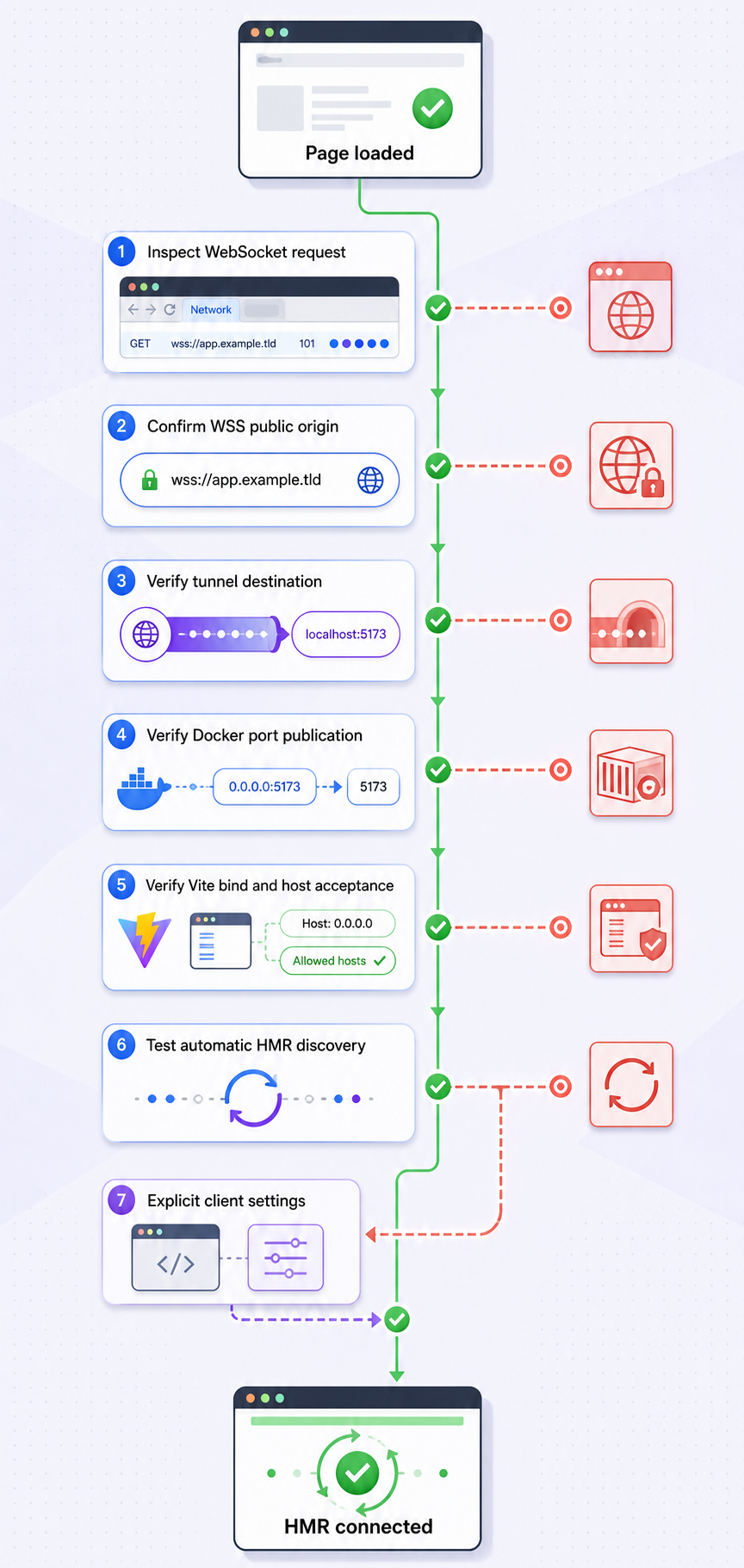
Run the checks in order. Moving outward from the Vite process prevents a public tunnel problem from being confused with a container binding, port publication, or local application failure.
1. Verify Vite inside the container
docker compose exec vite node -e "fetch('http://127.0.0.1:5173').then(r => { console.log(r.status, r.headers.get('content-type')); process.exit(r.ok ? 0 : 1) }).catch(e => { console.error(e); process.exit(1) })"Expect an HTTP success status and an HTML content type for a normal Vite application entry point. A refused connection means Vite is not running on port 5173. An unexpected response means another process or route may be handling the request.
2. Verify the host-published port
Run this on the Docker host, which is also the Localtonet client device in the example:
curl -I http://127.0.0.1:5173/Expect a successful or otherwise application-appropriate HTTP response from Vite. If the container check succeeds but this host check fails, inspect the Compose port publication and Vite bind address. Do not proceed to the tunnel until the host can reach the target.
3. Verify the public tunnel page
curl -I https://preview.example.com/Replace the example hostname with the assigned public hostname. Expect an HTTPS response corresponding to the same Vite application. A tunnel error, unrelated page, or connection failure indicates a target, tunnel state, device connection, hostname, or server-selection problem.
4. Verify the WebSocket in browser DevTools
Open the public URL in a new browser session, then open Developer Tools and select the Network panel. Filter for WebSocket requests, often shown as WS. Reload the page and select the Vite HMR connection.
| DevTools field | Expected result | Failure meaning |
|---|---|---|
| Request URL | wss:// with the active public hostname |
Localhost, a private address, or ws:// indicates a browser-facing HMR destination problem. |
| Effective port | 443 when the public URL uses standard HTTPS without an explicit port | 5173 or another internal port indicates an incorrect client port for this topology. |
| Upgrade result | A successful WebSocket upgrade, commonly represented by HTTP status 101 | HTTP 400, 403, 404, or a gateway error points to host, path, policy, or forwarding failure. |
| Connection state | The socket remains open | Immediate closure or repeated reconnects indicate an unstable or rejected path. |
| Messages or frames | Vite protocol traffic appears, with update activity after an edit | An open but inactive connection requires a real file-change test and watcher inspection. |
For a shareable diagnostic image, capture this DevTools view only from a real test. Annotate the public hostname, effective port, successful upgrade status, and HMR frames generated after an edit. Redact query parameters, cookies, authorization headers, tokens, project identifiers, and any private endpoint data before sharing the screenshot.
5. Perform a real file-change HMR test
Keep DevTools open and edit a component or stylesheet that is visible on the current page. Make a reversible change, such as changing a heading or background color, save the file, and observe all three locations:
- The Vite container log should report file or module update activity.
- The browser WebSocket view should show new HMR frames or messages.
- The visible page should update without requiring a manual refresh when the edited module supports HMR.
If the application performs a full reload instead of a module replacement, the transport may still be working. Vite or the framework plugin can choose a full reload for changes that cannot be safely replaced in place. The decisive transport evidence is an open socket plus update traffic after the edit.
6. Inspect logs while reproducing a failure
docker compose logs --tail=200 -f viteReload the public page and save a source file while the log stream is visible. Compare the first browser error with the corresponding server output. A host rejection, startup port conflict, watcher silence, or process restart usually becomes clearer when the browser and server timelines are observed together.
Construct and verify an OAuth callback URL
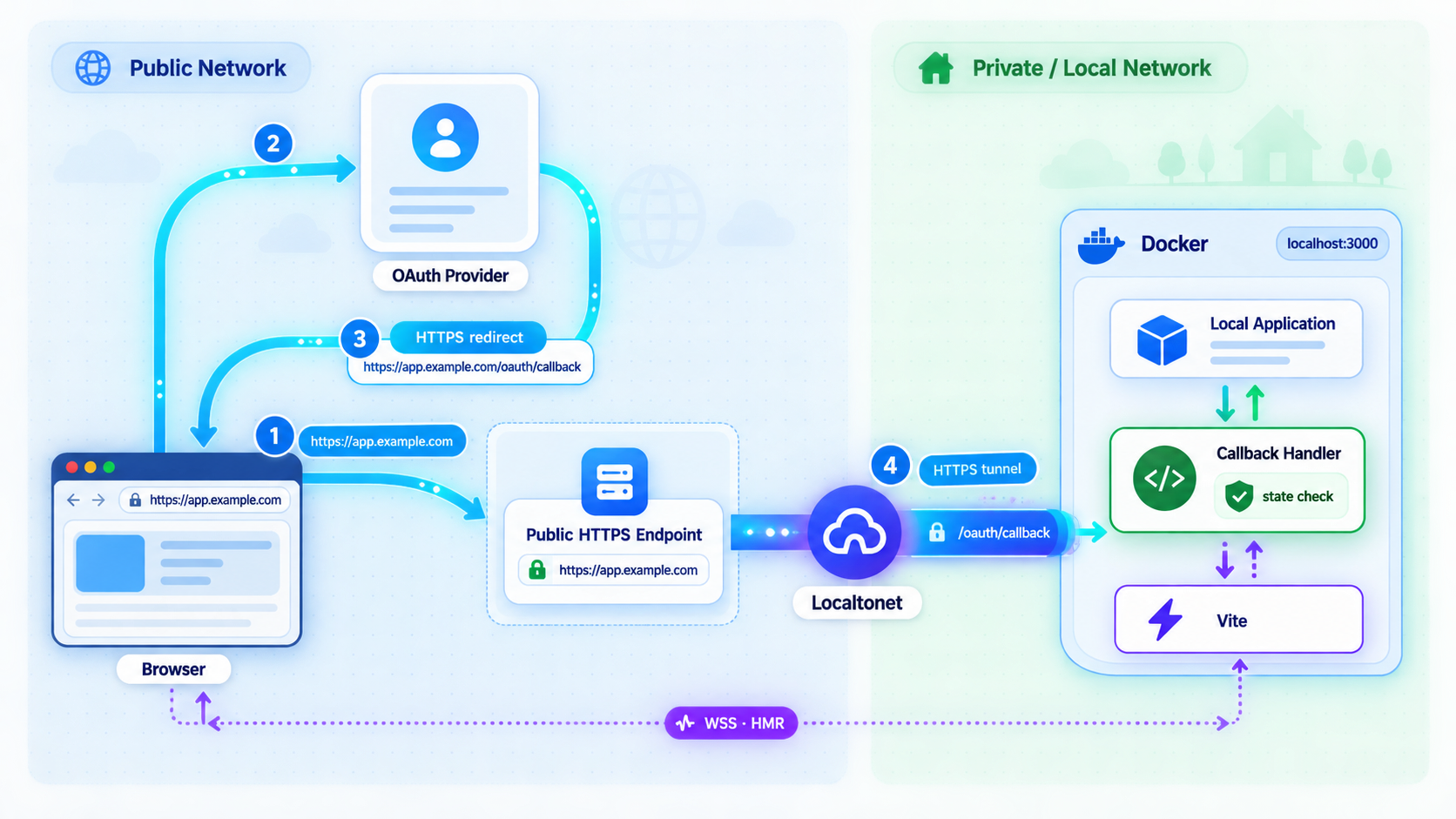
OAuth introduces a separate redirect check. Suppose the active public origin is the reserved example URL https://preview.example.com and the application handles its callback at /auth/callback. The complete redirect URI is:
https://preview.example.com/auth/callbackReplace the example hostname and callback path with the values used by your application. Register that complete URI in the OAuth provider’s application settings and configure the application to send the same redirect URI in its authorization request.
Redirect matching rules vary by provider and by the protocol or profile being implemented. Many providers require an exact registered URI, but do not assume that every provider compares each textual form identically. In a URL, HTTPS without an explicit port normally has an effective port of 443, while a provider may normalize or validate omitted and explicit default ports according to its own rules. Follow the provider’s current documentation and register the form your application actually sends.
Verify the callback in four places:
- Inspect the redirect URI registered in the provider’s application settings.
- Inspect the authorization request generated by the application, without publishing its sensitive parameters.
- Confirm that the browser returns to the active public hostname and intended callback path.
- Confirm that the local application receives and processes the callback according to its normal server-side flow.
A changing generated hostname also changes the callback URI. If the tunnel receives a different hostname, update PUBLIC_PREVIEW_HOST, restart Vite, update the provider registration, and ensure the application constructs the callback from the new public origin.
Never publish client secrets, authorization codes, access tokens, refresh tokens, session cookies, state values, PKCE verifiers, Localtonet device tokens, or private callback data. Redact query strings and request headers from screenshots and logs.
HMR and OAuth must be verified independently. A successful OAuth redirect proves that the browser reached an HTTP callback route. It does not prove that the HMR WebSocket upgraded. Likewise, a working HMR socket does not prove that the provider accepted the registered redirect URI.
Troubleshoot common HTTPS, WebSocket, Docker, and OAuth failures
Vite rejects the public hostname
A host rejection means the request reached Vite but the Host value was not accepted. Confirm that PUBLIC_PREVIEW_HOST contains only the current hostname, without https://, a port, slash, or callback path. Restart Vite after changing the environment because the configuration is evaluated at startup. Keep allowedHosts narrow and never replace it with true as a shortcut.
The browser reports mixed content
Inspect the failed WebSocket URL. A page loaded over HTTPS should not be directed to an insecure ws:// HMR socket. First test same-origin inference. If the installed Vite version constructs the wrong protocol, set server.hmr.protocol to wss and verify the result in DevTools.
The HMR client uses the wrong port
If the public page uses standard HTTPS but the browser tries :5173, it is attempting to reach the local development port directly. For the topology in this guide, set server.hmr.clientPort to 443 while leaving server.port at 5173. The first is browser-facing; the second is where Vite listens locally.
The WebSocket upgrade fails
Record the request URL and response status. A 404 can indicate a wrong custom path or a request reaching the wrong service. A 403 can indicate host or application policy rejection. A gateway response suggests that the upstream service was unavailable or that the connection did not reach Vite. Confirm local HTTP reachability, then test the exact public route again.
Do not add server.hmr.path merely because the upgrade failed. The default same-service path should remain unchanged unless a deliberate path-based forwarding design requires a custom value. If a custom path is used, the browser, Vite, and every intermediate forwarding layer must use the same path.
The browser enters a reconnect loop
Repeated retries are a symptom of a failed or unstable socket. Focus on the first failed request after a clean reload. Check whether the browser is using a direct-connection fallback, whether the socket reaches the public hostname, and whether Vite logs a corresponding request or rejection. Correct the underlying destination or upgrade issue instead of relying on the fallback.
Vite works in the container but not on the host
Confirm that Vite uses host: '0.0.0.0', that Compose publishes 127.0.0.1:5173:5173, and that the container remains healthy. Inspect the effective mapping:
docker compose ps
docker compose port vite 5173
curl -I http://127.0.0.1:5173/
If the Localtonet client runs on a different machine, a loopback-only publication will not be reachable from that machine. Deliberately publish to a suitable host interface and apply firewall and access policy rather than exposing the port unintentionally.
Vite silently starts on another port
This should not happen with strictPort: true. Vite should exit when 5173 is unavailable. Find the process or container already using the port, stop it if appropriate, and restart Vite. If you intentionally select another port, update server.port, the Compose publication, the Localtonet target, and any local verification commands together.
Source edits do not trigger updates
First determine whether the file changed inside the container:
docker compose exec vite sh -lc "ls -l /app && date"Inspect the edited path directly if needed. If the mounted file changes but Vite logs no event, the host and container filesystem combination may not deliver watcher events reliably. Vite supports watcher configuration through its server watch options, but polling increases resource use and should be enabled only when the environment requires it. Consult the documentation for the installed Vite release before choosing polling options and intervals.
If Vite logs an update but the browser receives no frame, return to the WebSocket path. If the browser receives an update frame but the UI remains unchanged, inspect framework plugin behavior, module boundaries, and browser console errors.
The public hostname changed
A changed hostname affects multiple independent controls. Update the Vite allowed host, any explicit HMR host, the OAuth redirect registration, the application’s public base or callback configuration, and bookmarks shared with testers. Restart Vite after changing its environment. Avoid keeping an old public URL in screenshots or automated test configuration.
The OAuth provider reports a redirect mismatch
Compare the registered URI with the URI sent in the authorization request. Check the scheme, hostname, explicit or omitted port, callback path, trailing slash, character case where relevant, and query component rules. Provider behavior varies, so use that provider’s current redirect URI requirements rather than assuming universal normalization.
| Symptom | Likely layer | First check |
|---|---|---|
| Public page does not load | Base HTTP route | Container state, host reachability, tunnel state, and local target |
| Page loads but HMR disconnects | WebSocket route | Socket protocol, hostname, port, path, and upgrade status |
| Browser tries localhost | HMR client destination | server.hmr.host and actual Vite version behavior |
| Browser tries port 5173 publicly | HMR client port | server.hmr.clientPort for the public HTTPS topology |
| Host rejected | Vite validation | Exact server.allowedHosts entry |
| Host curl fails but container request works | Docker boundary | Vite bind address and Compose port publication |
| Socket works but edits do nothing | File watcher or module update | Container file change, Vite log, frames, and framework plugin behavior |
| OAuth redirect rejected | Provider validation | Registered URI versus the URI actually sent |
Restart behavior, routine operation, and cleanup
Vite reads the configuration and PUBLIC_PREVIEW_HOST when the development server starts. If the hostname or HMR settings change, restart the Vite service:
docker compose restart vite
docker compose logs --tail=100 vite
The Compose example uses restart: unless-stopped, so Docker can restart the development container after a process or daemon restart. This does not start a Localtonet tunnel automatically or guarantee that an OAuth provider still contains the correct callback. After any restart, verify the container, local port, tunnel state, browser WebSocket, and callback configuration again.
When testing is complete, stop the public tunnel from the Localtonet dashboard. Delete it if it is no longer required. The endpoint is available only while the selected client remains connected and the tunnel is running, but intentionally stopping it is still the correct end-of-session operation.
Stop the Compose service when the local development environment is no longer needed:
docker compose downReview OAuth provider settings and remove temporary callback URIs that should not remain registered. Also remove temporary hostname values from shared environment files, test scripts, screenshots, and team documentation. Never commit a Localtonet authentication token or OAuth secret during cleanup.
Frequently asked questions
Why does my Vite page load through HTTPS while HMR fails?
Documents and modules use ordinary HTTP requests, while HMR uses a separately negotiated WebSocket. The page route can succeed even when the socket uses the wrong protocol, hostname, port, or path, or when its upgrade is rejected.
Which Vite settings are required for this Docker example?
The base example uses server.host set to 0.0.0.0, a fixed server.port, server.strictPort set to true, and a narrow server.allowedHosts entry. Explicit HMR protocol, host, and client port values are topology-dependent overrides added only when browser evidence shows that same-origin inference is wrong.
Should a remote browser connect to localhost for HMR?
No. Localhost in the remote browser refers to the viewer’s device. For this topology, the browser-facing HMR destination should use the active public hostname, while Localtonet separately forwards traffic to the private local Vite target.
Does Vite need to serve HTTPS inside Docker?
Not necessarily. The browser can use a public HTTPS and WSS endpoint while the tunnel targets a locally reachable HTTP Vite service. Verify the actual WebSocket upgrade end to end because this article does not assume compatibility from page delivery alone.
Why is strictPort useful for a tunnel?
It prevents Vite from silently selecting another port when the configured port is occupied. Docker and the Localtonet tunnel can then rely on one predictable target, and a conflict fails visibly instead of producing a misleading route.
Should I set server.hmr.port for HTTPS tunneling?
Usually not for the same-service topology in this guide. Leave it unset so HMR shares the Vite server. Use a separate HMR port only when you intentionally operate and forward a distinct listener, then verify that complete route.
Can I use allowedHosts: true to fix a host rejection?
That is not the safe fix. Add the exact public development hostname and restart Vite. Broad host acceptance weakens protection against hostile Host headers and DNS rebinding scenarios.
Which URL should I register as an OAuth callback?
Register the active public HTTPS origin plus the application’s callback path, using the form accepted by the provider and sent by the application. Redirect validation rules vary, including treatment of omitted default ports, trailing slashes, and other URI details.
Does creating a Localtonet tunnel make it immediately available?
No. Complete the HTTP tunnel configuration and press the Start button. The endpoint remains available only while the selected client is connected and the tunnel is running. Stop or delete it when the development session is finished.
Test your Vite preview with Localtonet
Make Vite reachable locally, publish the Docker port deliberately, create the HTTP tunnel in the documented order, and verify the public WebSocket with a real file edit. Keep the preview protected and temporary, then stop the tunnel when testing is complete.
Get Started Free →

